fork and rework plugin i18nPlugin https://github.com/nyavro/i18nPlugin
See the codePlugin ID: com.ibrahimdans.i18n
IntelliJ IDEA plugin providing i18n support for JavaScript, TypeScript, JSX, TSX, and PHP projects.
Supports i18next, vue-i18n, lingui, react-intl, ngx-translate, svelte-i18n, and i18n-js frameworks with JSON, YAML, and PO/POT translation files.
Highlights unresolved i18n keys, offers navigation from keys to their translation files, provides autocomplete for key names, displays translation values as inline hints, and supports key extraction from plain text strings.
On a real i18next/vue-i18n project, your keys and translations live in files your editor treats as dead text — so you keep opening JSON files just to check whether a key exists, in which namespace, and whether it's translated everywhere.
I18n Support Plus turns i18n keys into first-class code symbols.
Alt+Enter), rename across all
locales and code (Shift+F6), move a key to another namespace (Ctrl+Alt+Shift+M),
sort keys alphabetically.Works with i18next, vue-i18n, lingui, react-intl, ngx-translate, svelte-i18n & i18n-js across JS/TS/JSX/TSX, Vue SFC and PHP, with JSON, YAML and PO/POT files. A setup wizard auto-configures it on first launch.
| Framework | Recognised syntaxes | Config-based |
|---|---|---|
| i18next / react-i18next | t('ns:key'), t(`key.${suffix}`), t('key', { ns: 'other' }), useTranslation('ns'), <Trans i18nKey="key"> | Yes |
| vue-i18n | $t('key'), $tc('key'), $te('key') | No |
lingui (@lingui/core, @lingui/react, @lingui/macro) | msg('key'), i18n._('key'), source-based <Trans>Hello world!</Trans> | No |
| react-intl (FormatJS) | formatMessage({ id: 'key' }), <FormattedMessage id="key" /> | No |
| ngx-translate (Angular) | translate.instant('key'), .get('key'), .stream('key'), {{ 'key' | translate }} 1 | No |
| svelte-i18n | $_('key'), _('key') 2 | No |
| i18n-js (React Native / Expo) | t('key'), i18n.t('key'), plain locale-keyed TS/JS catalogues, nested plurals 3 | No |
useTranslation supports both string form (useTranslation('ns')) and array form (useTranslation(['ns1', 'ns2'])). The namespace can also come from an options object (t('key', { ns: 'auth' })) or from the key itself (t('auth:key')).
1 The | translate pipe is recognised in JSX/TSX and in standalone Angular templates (.html). A template is parsed as Angular only inside an Angular project — a component referencing it through templateUrl, with @angular/core resolvable; outside one the file stays plain HTML and the pipe is inert text.
2 .svelte single-file components are analysed as well, provided the Svelte plugin is installed — it is not bundled with IntelliJ Ultimate, and without it a .svelte file is plain text to the IDE. With it, both the <script> block and {…} expressions in the markup are ordinary JavaScript, so keys inside them resolve like any other.
3 i18n-js pluralizes into a nested object ({ one: …, other: … }) rather than through i18next's flat key_one suffixes; such a key is treated as resolved. Its %{count} placeholders are displayed verbatim, as the plugin interprets no interpolation syntax.
| Language | Extensions | Annotations | Completion | Folding | Hints | References |
|---|---|---|---|---|---|---|
| JavaScript | .js | ✓ | ✓ | ✓ | ✓ | ✓ |
| TypeScript | .ts | ✓ | ✓ | ✓ | ✓ | ✓ |
| JSX | .jsx | ✓ | ✓ | ✓ | ✓ | ✓ |
| TSX | .tsx | ✓ | ✓ | ✓ | ✓ | ✓ |
| Vue SFC | .vue | ✓ | ✓ | ✓ | ✓ | ✓ |
| PHP | .php | ✓ | ✓ | ✓ | ✓ | ✓ |
Vue support requires the Vue.js plugin (optional dependency). PHP support requires the PHP plugin (optional dependency).
| Format | Extensions | References | Content generation |
|---|---|---|---|
| JSON | .json, .json5 | ✓ | ✓ |
| YAML | .yaml, .yml | ✓ | ✓ |
| PO/POT (gettext) | .po, .pot | ✓ | ✓ |
| TypeScript (i18next config) | .ts | ✓ | — |
Keys are resolved as nested properties by default (app.header.title walks three levels).
Projects storing flat ids — one property per key, as react-intl / FormatJS usually do —
should enable Treat keys as flat in Settings → Tools → i18n Support Plus Configuration.
The setting turns off key-separator splitting and namespace parsing altogether, so the whole
id is looked up as a single property and translation files are located through the default
namespace.
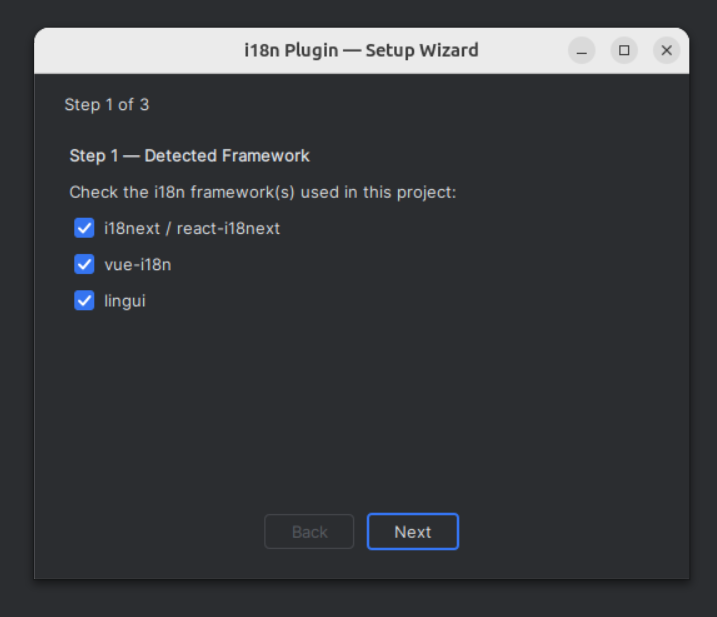
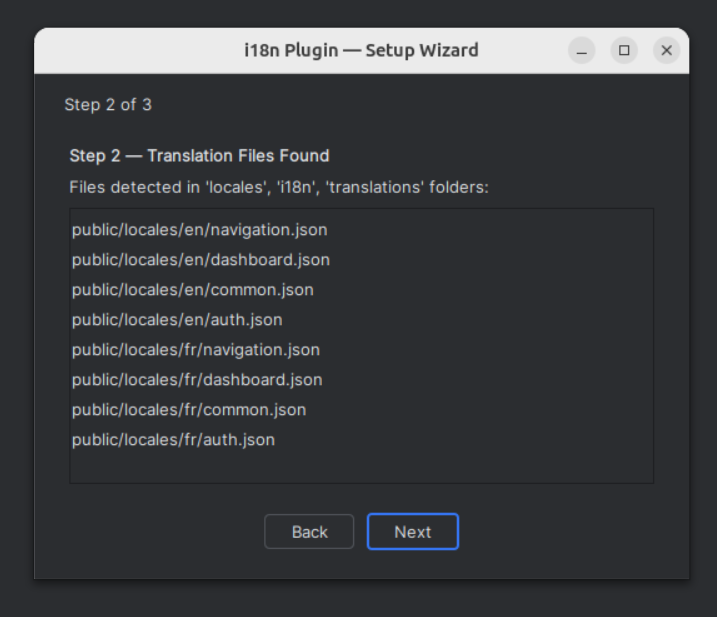
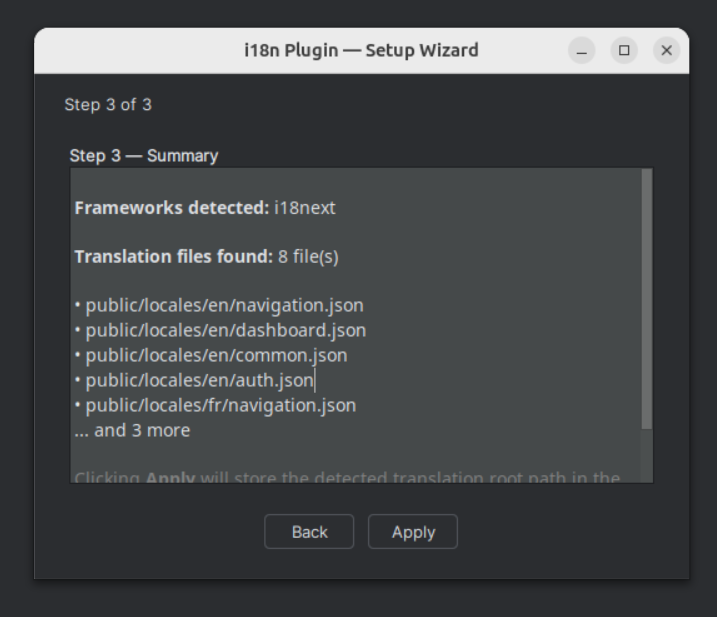
On first launch, a wizard guides you through configuration in 3 steps:
package.json.json, .yaml, .po, and .pot files in locales/, i18n/, translations/ folders (PO/POT support requires the optional GNU GetText plugin — see Plugin Dependencies)You can reopen it at any time from Tools > i18n Support Plus > Run Setup Wizard.
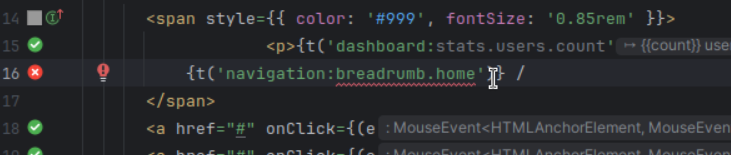
Highlights i18n keys with visual feedback on resolution status:
| Status | Description |
|---|---|
| Resolved key | Key found in all translation files |
| Unresolved segment | Part of the key path doesn't exist |
| Missing file | Referenced namespace file not found |
| Object reference | Key points to a JSON object instead of a value |
| Plural reference | Key resolves to plural variants (_one, _other, etc.) |
| Partial translation | Key exists in some locales but not all (opt-in) |
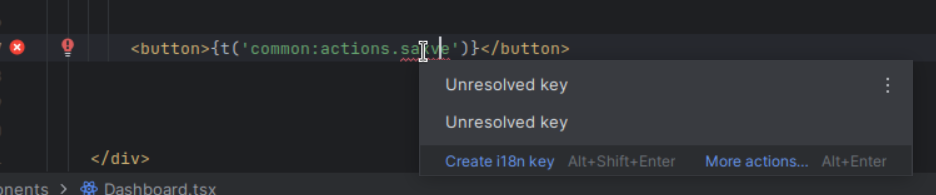
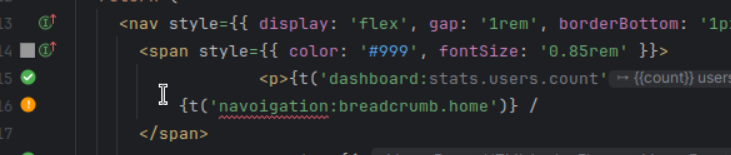
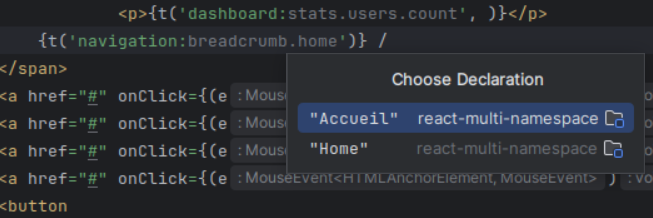
Ctrl+Click on any i18n key navigates directly to the translation value in the JSON/YAML file.
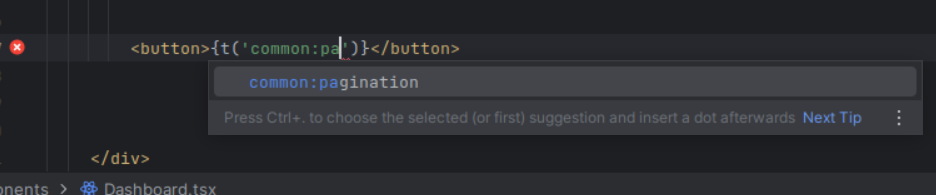
Autocomplete i18n keys as you type, with full namespace support. Suggestions are drawn from all translation files in the project.
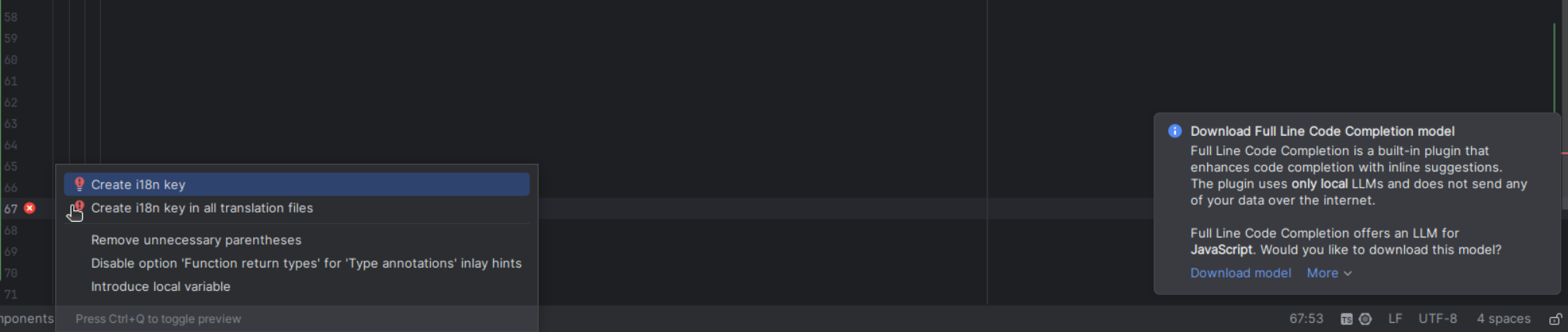
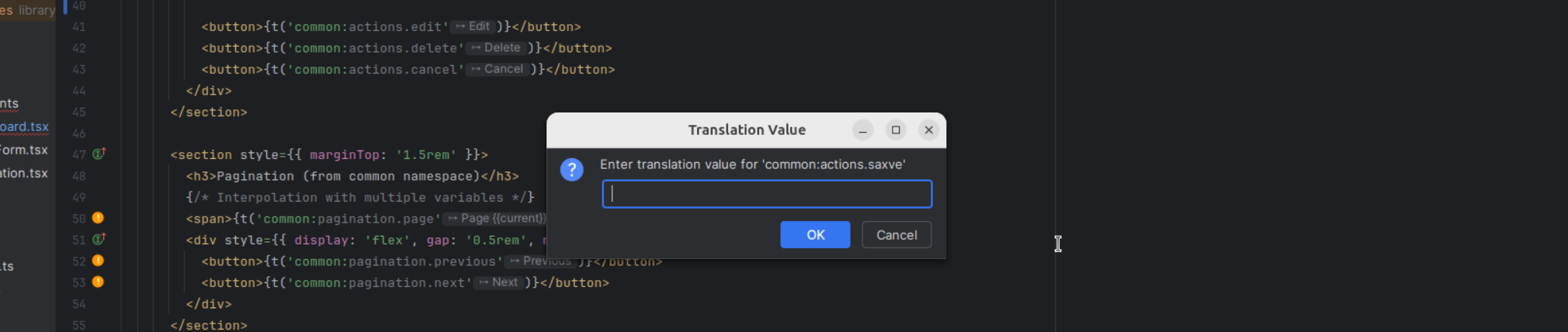
Extract hardcoded strings into translation files via Alt+Enter intention action. Supports sorted insertion (Extract sorted setting).
Line markers in the editor gutter indicate key resolution status at a glance:
| Icon | Meaning |
|---|---|
| ✅ Green | Key resolved in all locales |
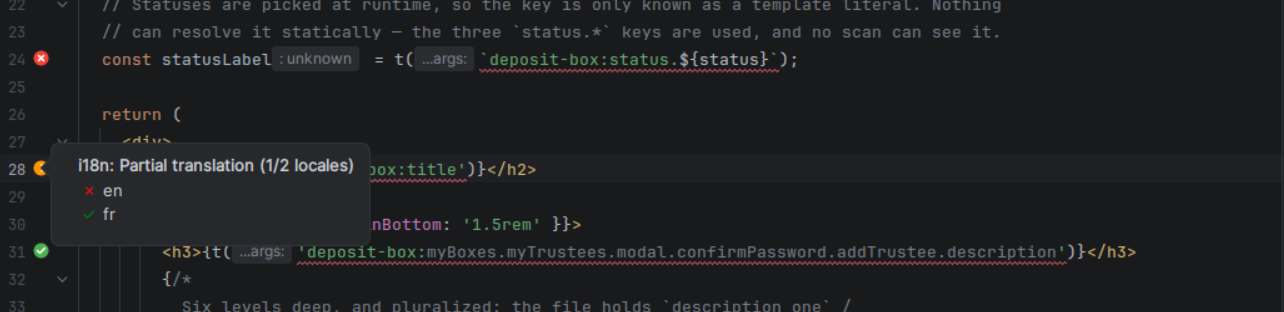
| ⚠️ Yellow | Key resolved in some locales (partial) |
| ❌ Red | Key not found in any locale |
Hovering a badge lists the locales; clicking a partial/missing badge triggers the quick fix to create the missing key.
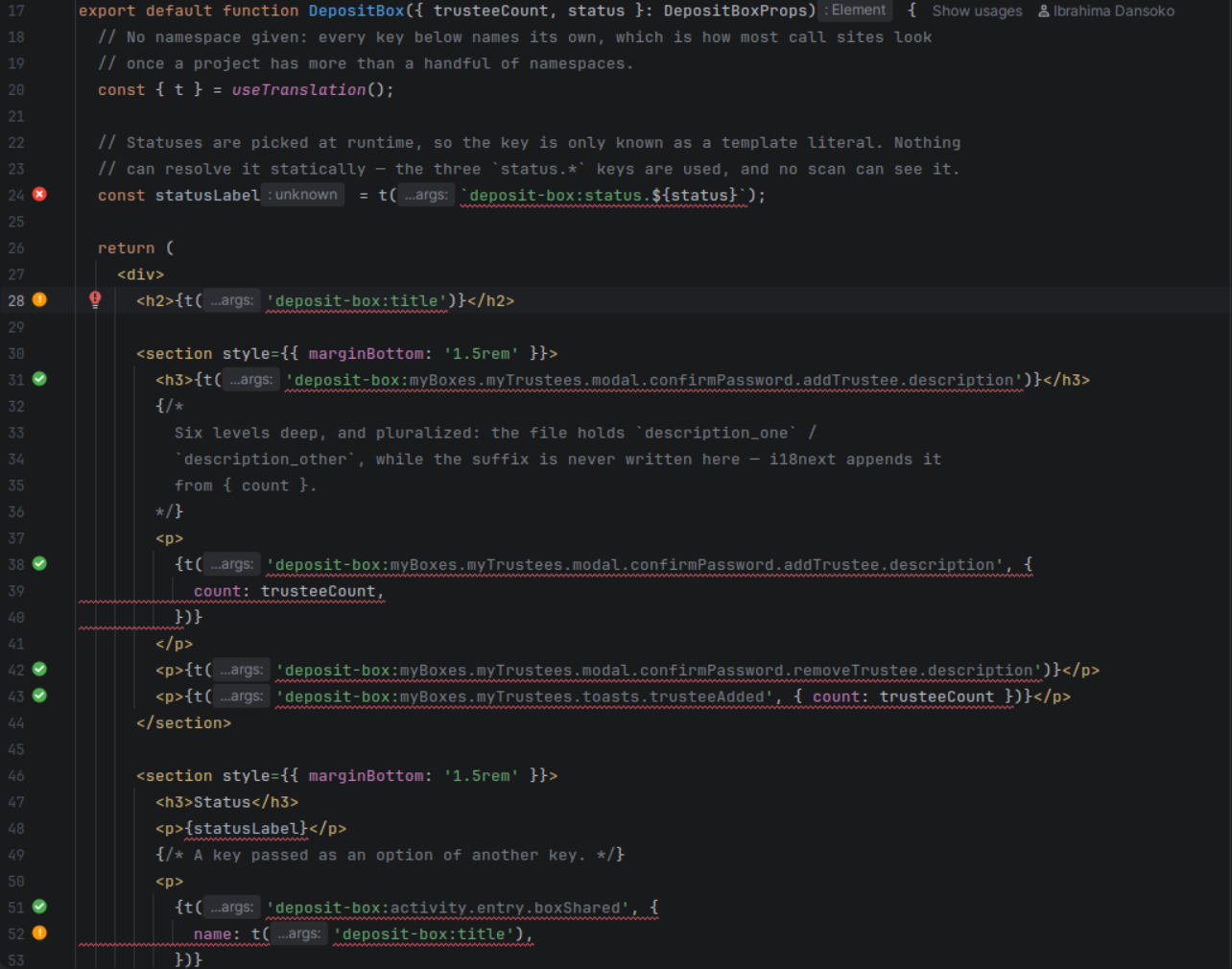
Displays the resolved translation value inline after each i18n key expression, directly in the editor. Toggle via Editor > Inlay Hints > i18n translations.

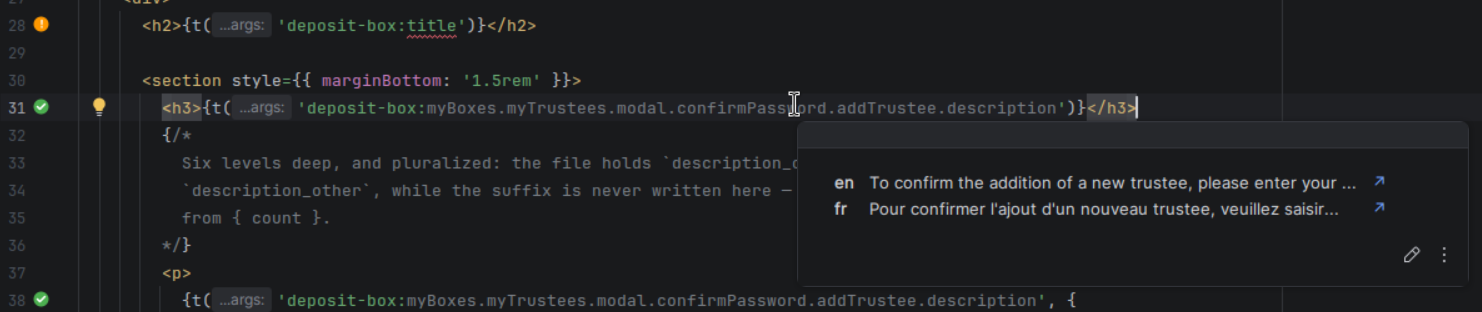
Ctrl+hover on an i18n key shows a tooltip with all translations grouped by locale, with missing translations shown as "—" and a navigation link (↗) to the translation file.
i18n: en in the status bar says which locale inlay hints, hover, Ctrl+click and folding read in. Click it to pick another of the project's locales; Switch Preview Locale in the editor's context menu cycles through them, ready for a shortcut. The Preview locale and Preferred folding language settings stay for anyone who wants the two apart.
Replaces i18n keys with their translation values inline for better readability. Toggle with Ctrl+Alt+Shift+T or via the editor context menu.


Rename i18n keys across all translation files and source code references with Shift+F6 — every call site, whether written with its namespace, under a hook namespace or under a key prefix; plural suffixes (_one, _other) are kept.
| Action | Where | What it does |
|---|---|---|
| Batch Extract i18n Keys | Code menu, Ctrl+Alt+Shift+B | Extract several hardcoded strings of a file as keys in one pass |
| Move i18n Key to Namespace… | editor context menu, Ctrl+Alt+Shift+M | Move a key to another namespace, updating every locale file and code reference |
| Sort i18n Keys Alphabetically | editor context menu, in a translation file | Reorder the file's keys, recursively |
| Sync Keys | Tools > i18n Support Plus, tool window toolbar | Create in every locale the keys it lacks, with a batch dialog to fill the values |
| Export Translations to CSV… | Tools > i18n Support Plus | One row per key, one column per locale |
| Import Translations from CSV… | Tools > i18n Support Plus | Write values back from a CSV, with a preview of what changes before anything is written |
| Cleanup Unused Keys… | Tools > i18n Support Plus | Scan the code for keys never used and delete the selected ones from every locale |
Enabled under Settings > Editor > Inspections > i18n Support Plus:
| Inspection | Reports |
|---|---|
| Empty translation value | A key whose value is blank in a translation file |
| Duplicate translation value | Two keys of a file holding the same value |
| Placeholder consistency across locales | A {name} or %s placeholder present in one locale and not in another, or an unbalanced brace |
| ICU message format validation | Unbalanced braces, a plural block without one/other, … |
| Unused translation key | A key of a translation file no code refers to |
Intermediate * wildcards in composite key resolution allow matching any segment at a given position. For example, a.*.b matches a.foo.b, a.bar.b, etc. Useful with dynamic keys where the middle segment varies.
| Quick Fix | Trigger |
|---|---|
| Create missing key | Unresolved key annotation |
| Create translation file | Missing namespace file annotation |
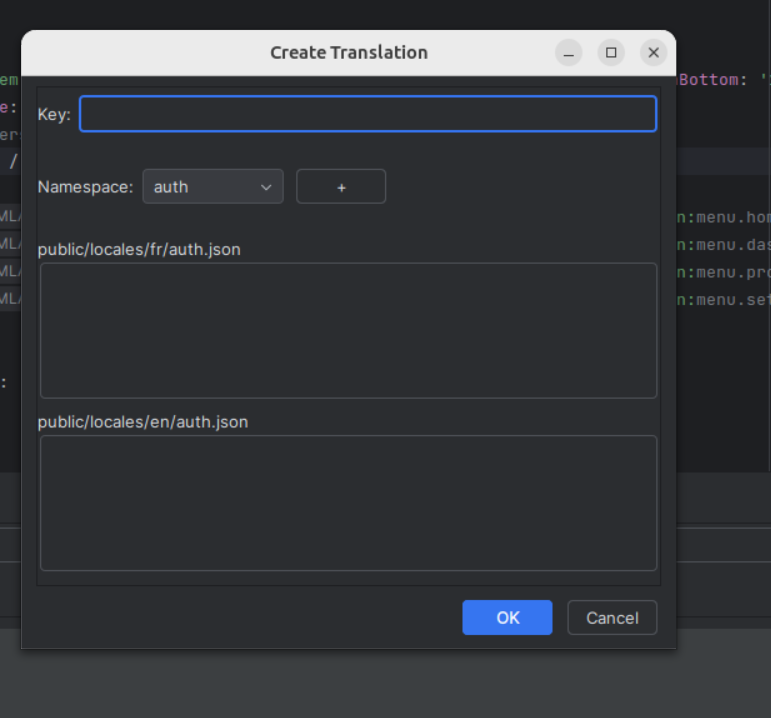
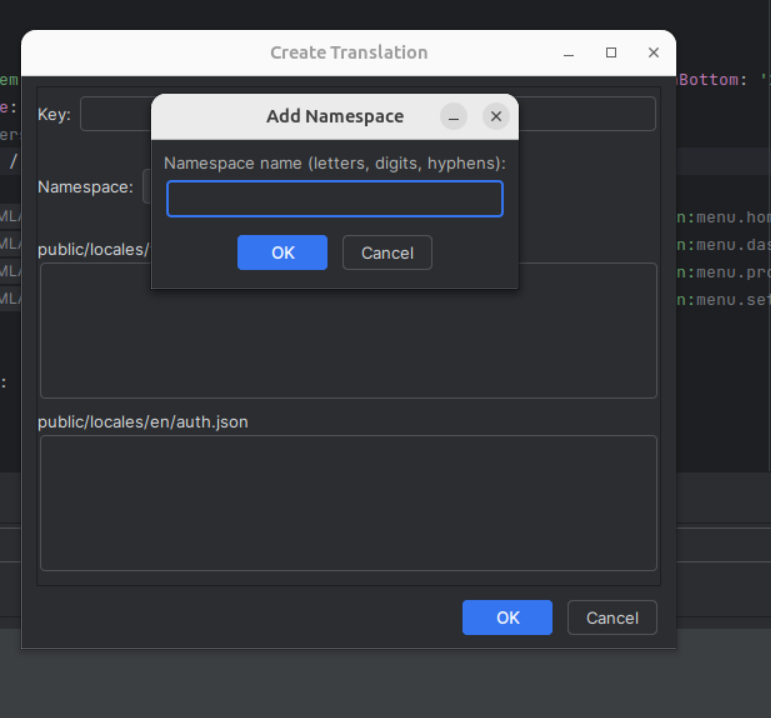
| Create namespace on the fly | + button in Create Translation dialog |
The I18n tool window (bottom panel) provides a centralized view of all translations in the project.
The toolbar holds the actions — add a translation, add a namespace, refresh, Sync Keys, Scan Orphans, settings —, a search field filtering the tree and the table by key or value (with a result count), and, when several modules are configured, a module selector. A project in which nothing can be read shows where the plugin looked and links to the setup wizard and the settings. The window reloads itself when a translation file changes.
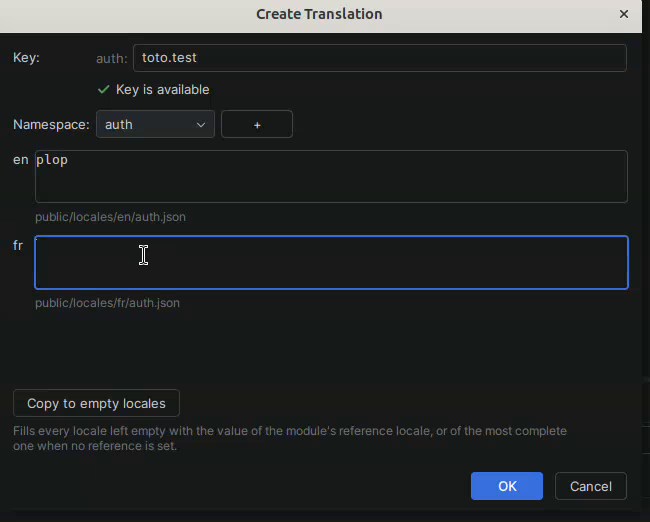
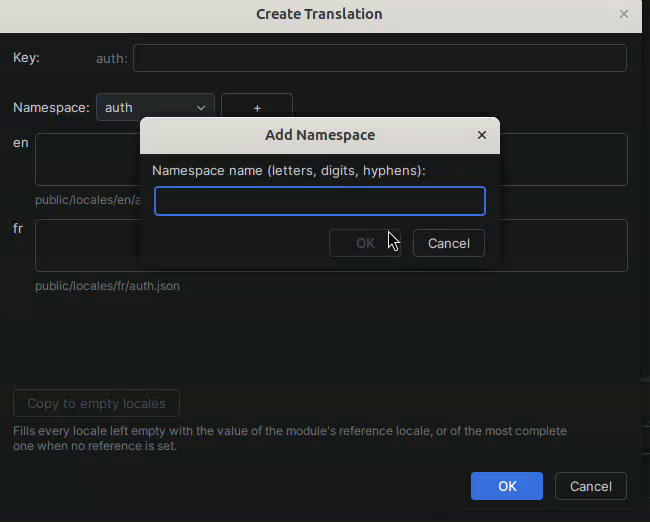
Add translation opens the same dialog as the quick fix: the key is checked as you type, one field per locale says which file it writes to, Copy to empty locales fills the blanks from the reference locale, and the + next to the namespace creates a new one on the spot.
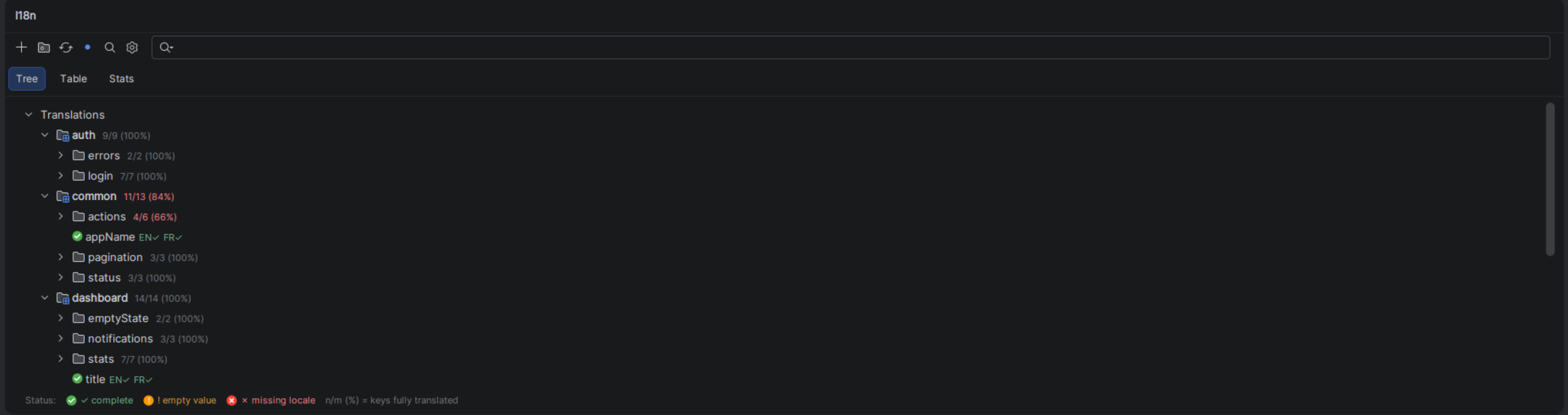
Keys grouped by namespace, then by segment. Every key carries its status three times over — an icon, per-locale badges (EN✓ FR✗) and a colour — so it survives a colour-blind reader or a custom theme; a branch shows how many of its keys are fully translated (12/14 (86%)), and a namespace row how complete the namespace is.
common (default) — when the configuration names a single one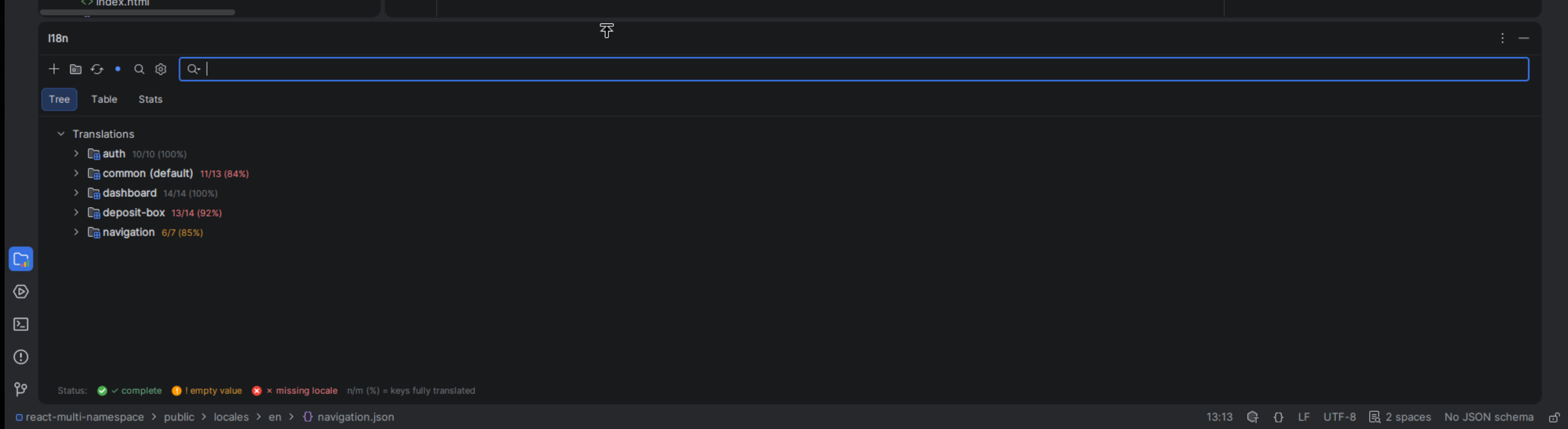
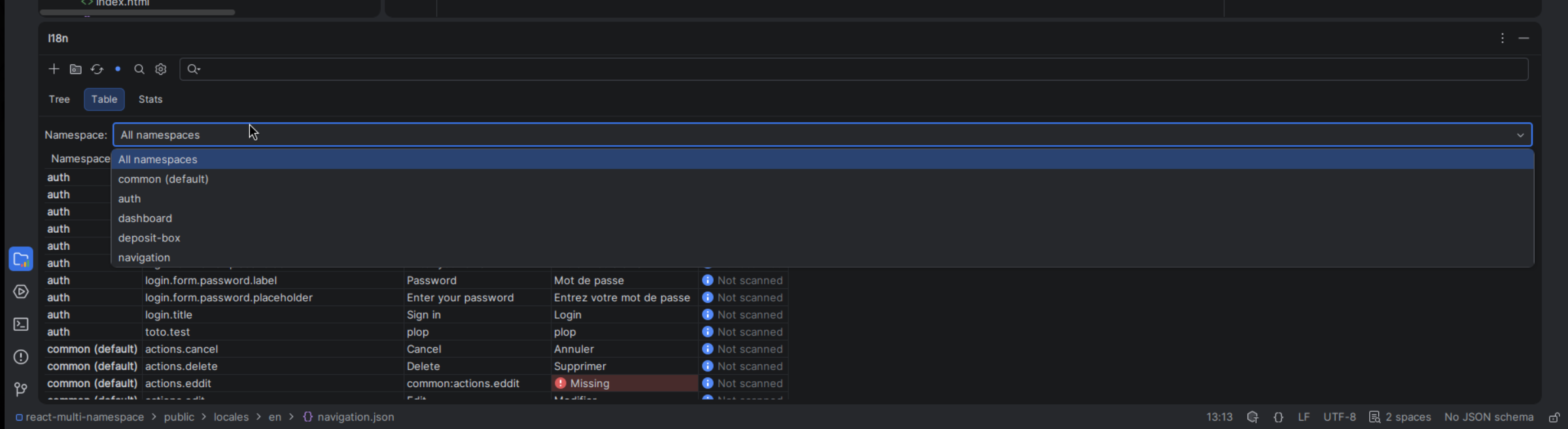
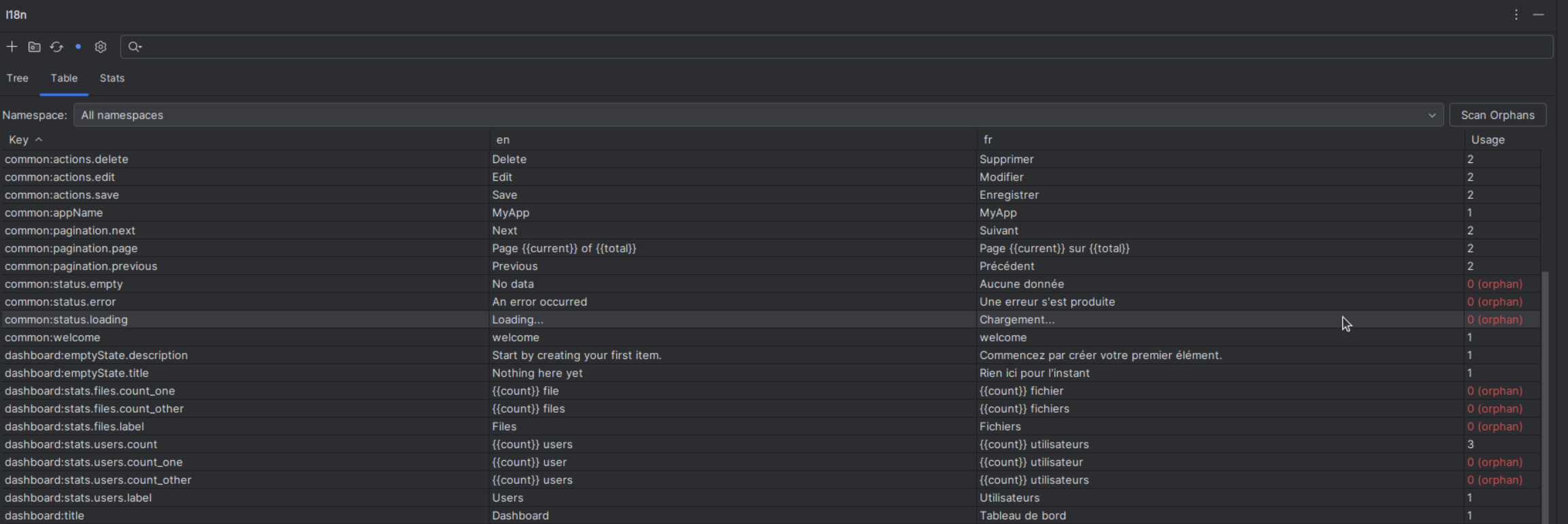
Flat table: a Namespace column while the rows span several namespaces, the Key, one column per locale, and Usage. Every cell says what it is — a Missing or Empty word with an icon, the value otherwise — before being tinted.
t(`status.${kind}`)) are told from unused ones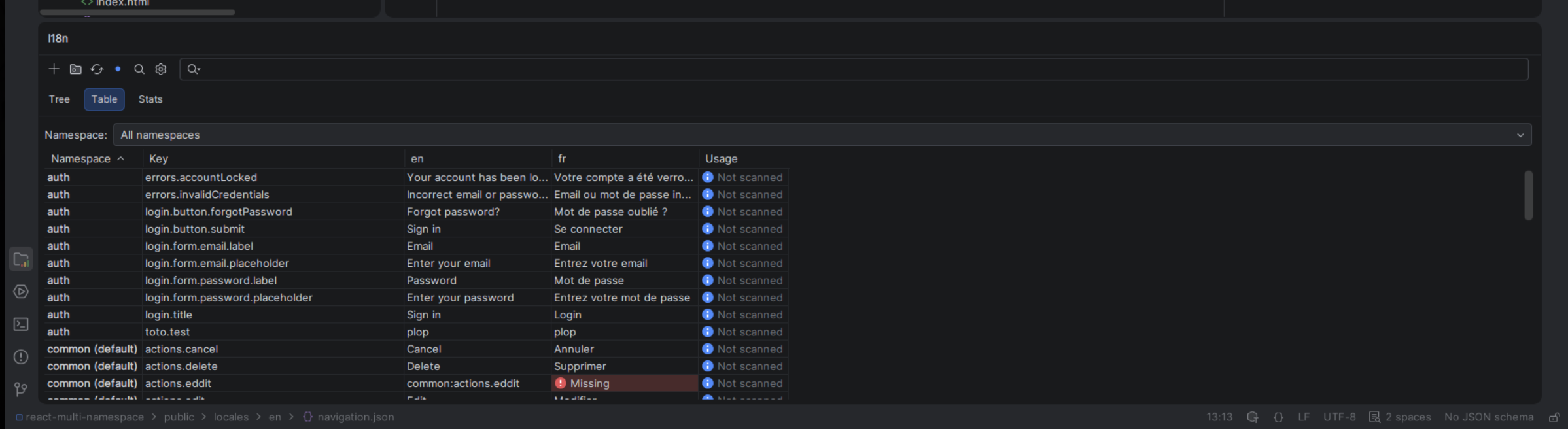
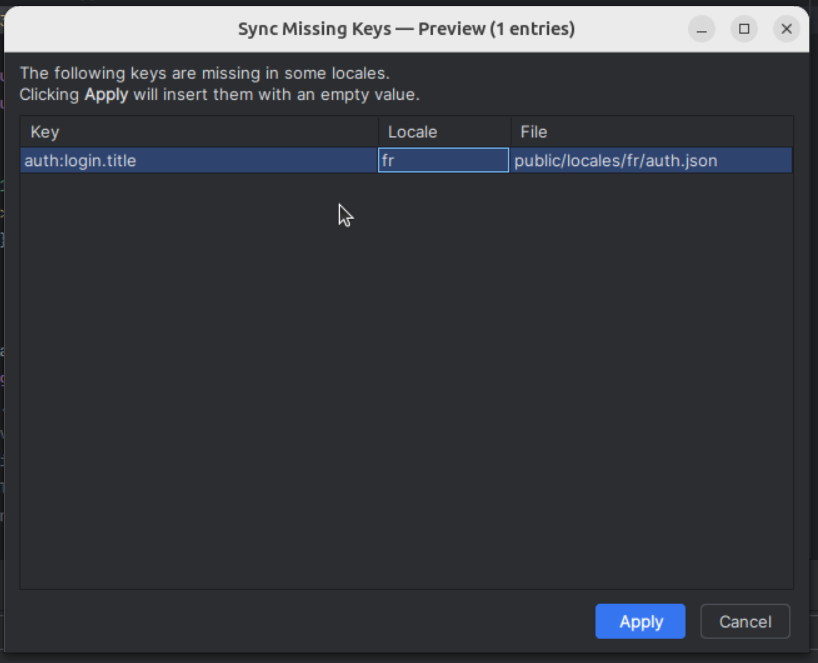
Propagates missing keys across all locales in one click. When a key exists in en.json but not fr.json, the synchronizer creates the missing entry. A batch placeholder dialog lets you fill in values for all missing keys at once.
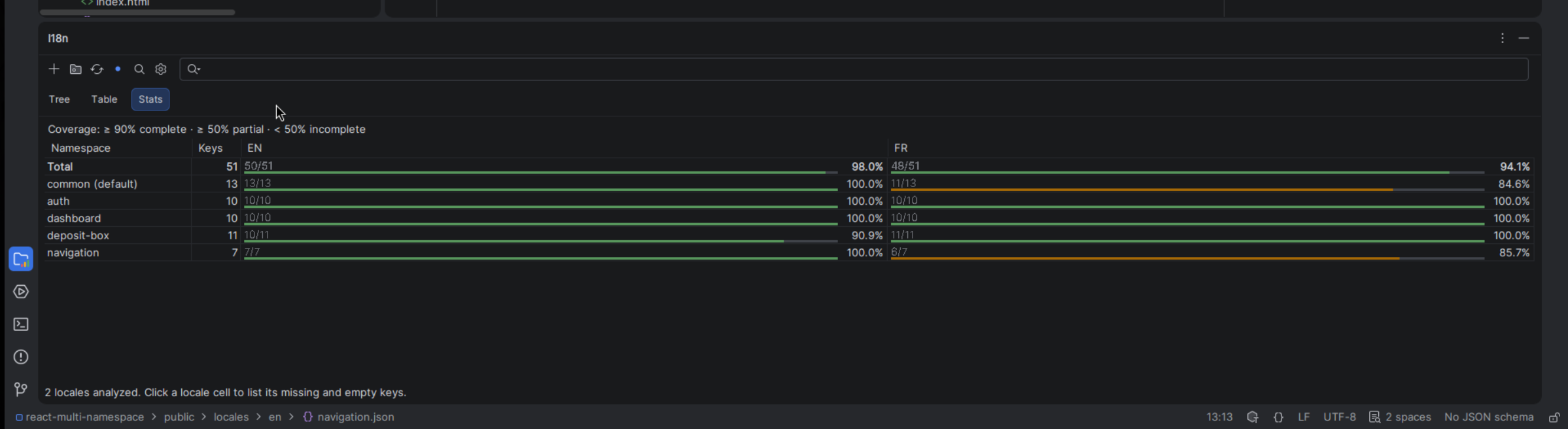
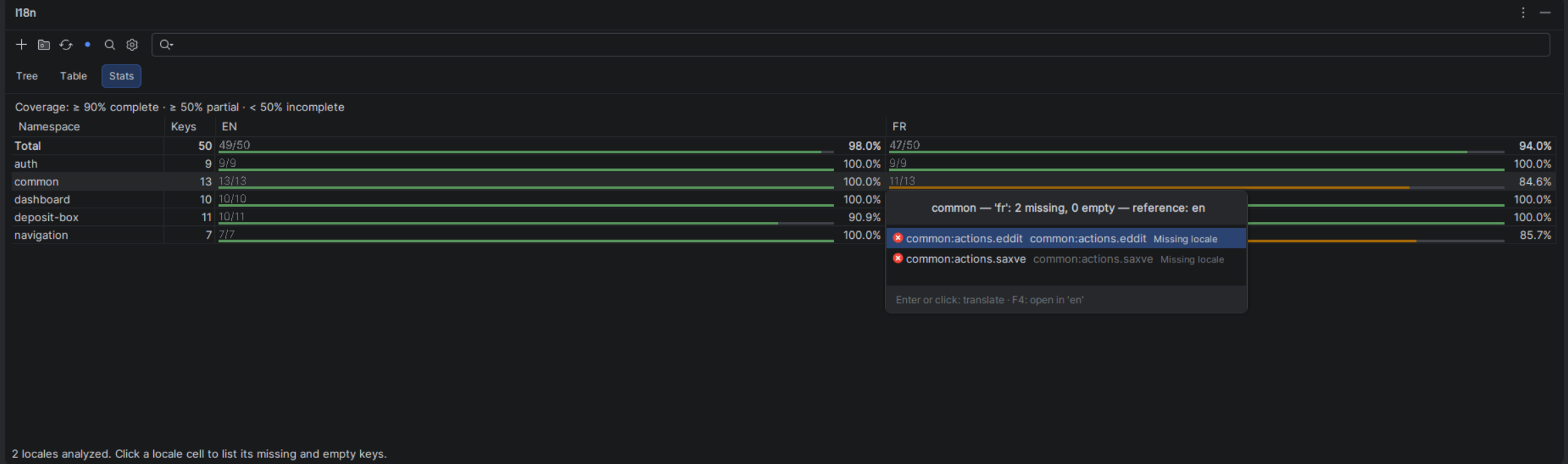
Coverage as a matrix: one row per namespace under a Total row, one column per locale. A cell reads 11/13 [===== ] 84.6% — translated keys over the namespace's keys, a bar tinted by tier (≥ 90% complete, ≥ 50% partial, below incomplete), the percentage.
Clicking a cell lists that namespace's untranslated keys in that locale — missing and empty told apart, each next to what it says in the reference locale. Enter or a click opens the translation dialog on the key; F4 opens the reference file.
A monorepo is described as modules in the settings (root directory, path template, key template, framework preset). With two or more, the toolbar's module selector switches the three views from one module to the next; a code file inside a module's root directory resolves its keys against that module's translation files only.
Settings > Tools > i18n Support Plus Configuration
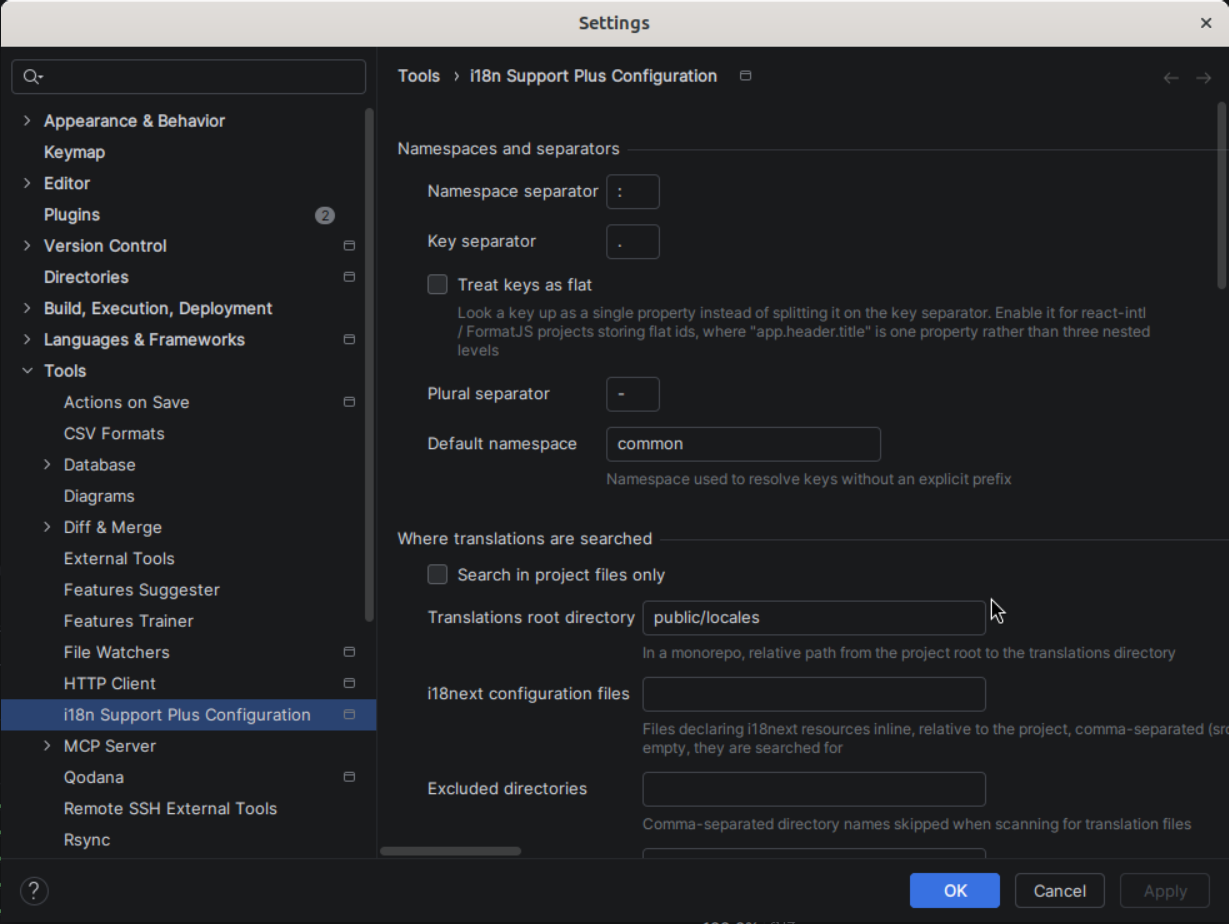
| Setting | Default | Description |
|---|---|---|
| Namespace separator | : | Separates namespace from key (e.g. common:key) |
| Key separator | . | Separates nested keys (e.g. parent.child) |
| Plural separator | - | Separates plural forms |
| Default namespace | translation | Namespace(s) used for keys without a prefix, separated by ;, , or whitespace |
| First component as namespace | false | Treat the first key component as the namespace (vue-i18n) |
| Treat keys as flat | false | Look a key up as a single property, without splitting (react-intl / FormatJS) |
| Setting | Default | Description |
|---|---|---|
| Search in project files only | true | Skip libraries and external roots |
| Translations root directory | (empty) | In a monorepo, path from the project root to the translations directory |
| i18next configuration files | (empty) | Files declaring i18next resources inline, comma-separated (src/i18n.ts) |
| Excluded directories | (empty) | Directory names skipped when scanning for translation files |
| Excluded file extensions | (empty) | Extensions on which annotations are suppressed (php,vue) |
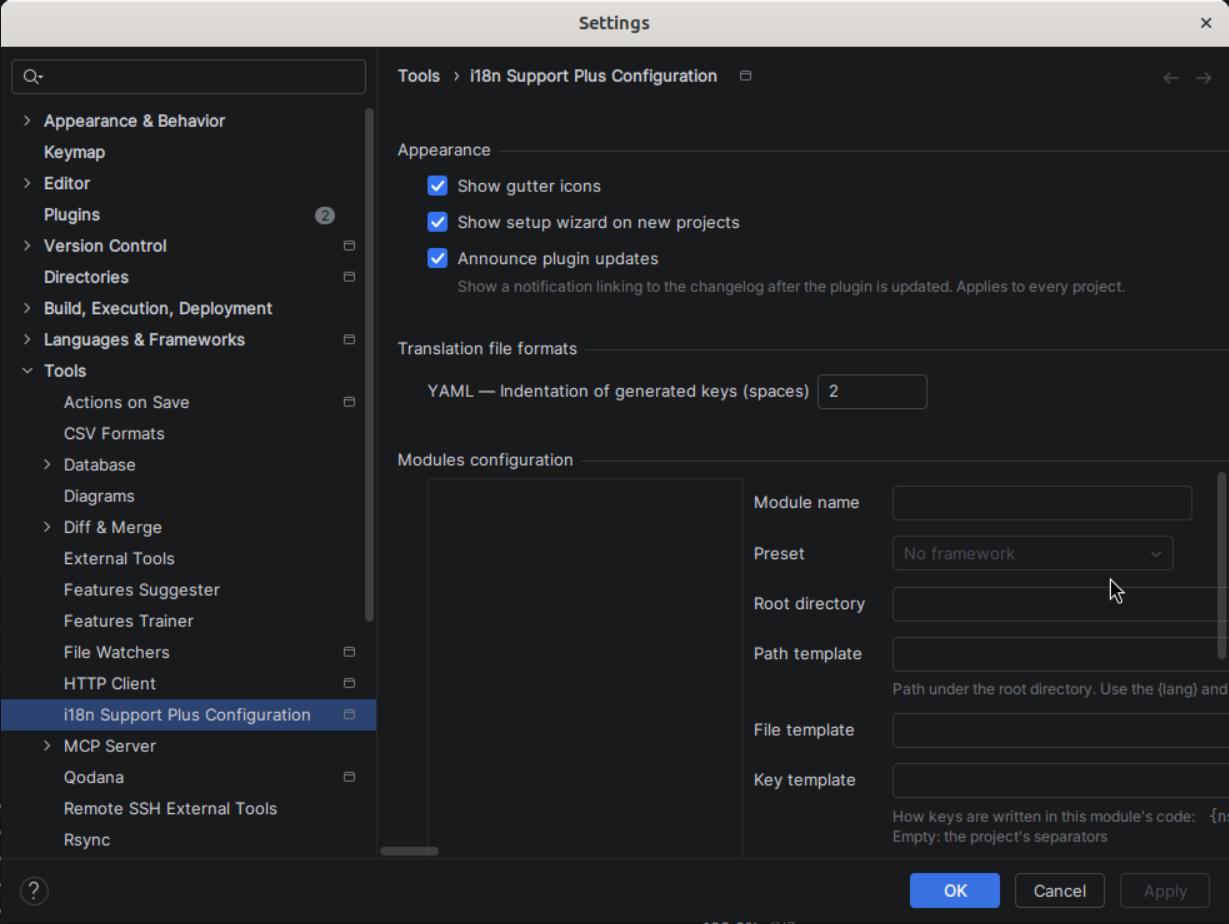
One entry per application of a monorepo: a name, a root directory, a path template designating its translation files (locales/{lang}/{ns}.json, messages/{lang}.yml), an optional file template, a key template saying how its code writes keys ({ns}:{key}, {ns}.{key}, {key}) and a framework preset. A diagnostics panel underneath says what each template resolves to.
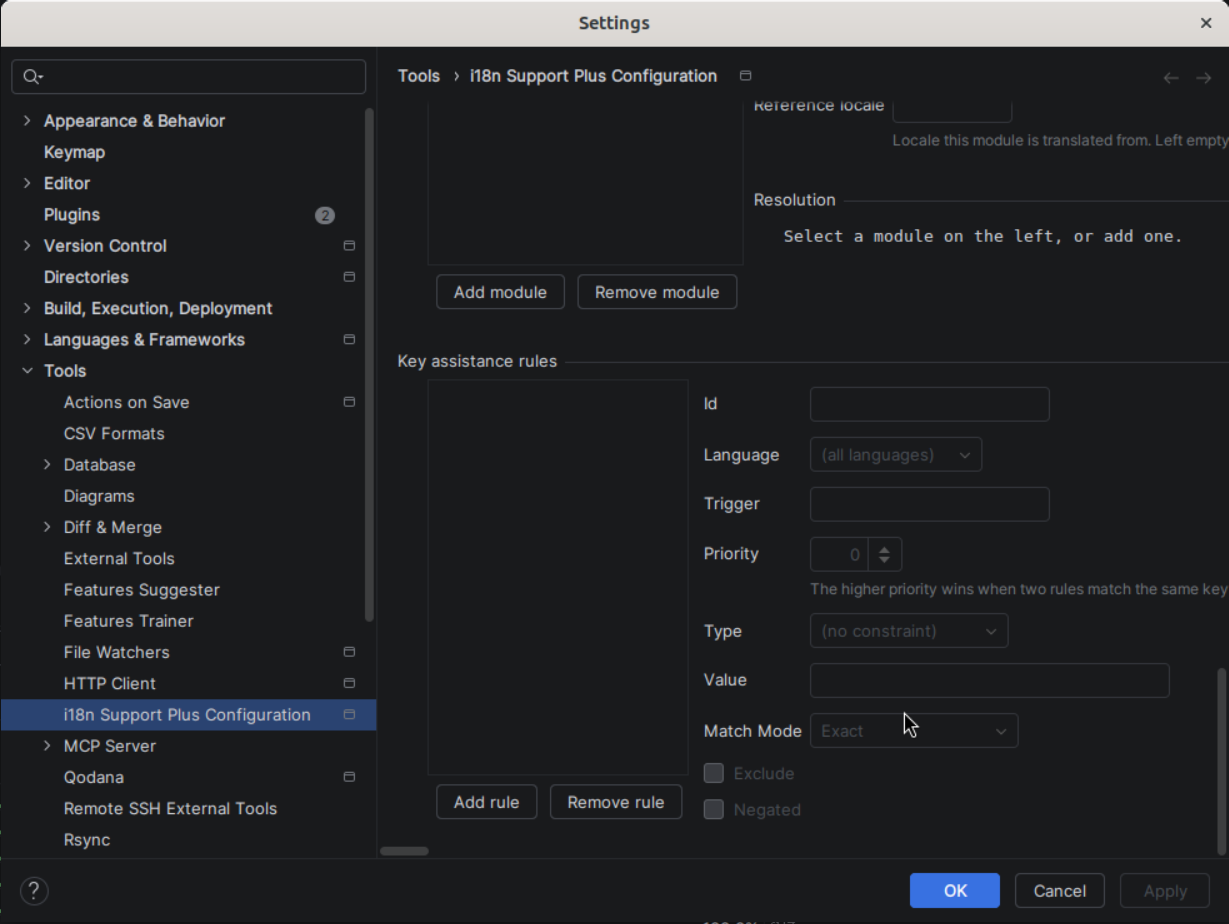
Rules make other calls behave like t: a trigger (translate, i18n.translate, __) turns a function into a translation call, an exclude rule takes one out. Each rule can be limited to a language (js, php) and constrained on the file path, the file's imports or the key — exact, prefix or regular expression, optionally negated.
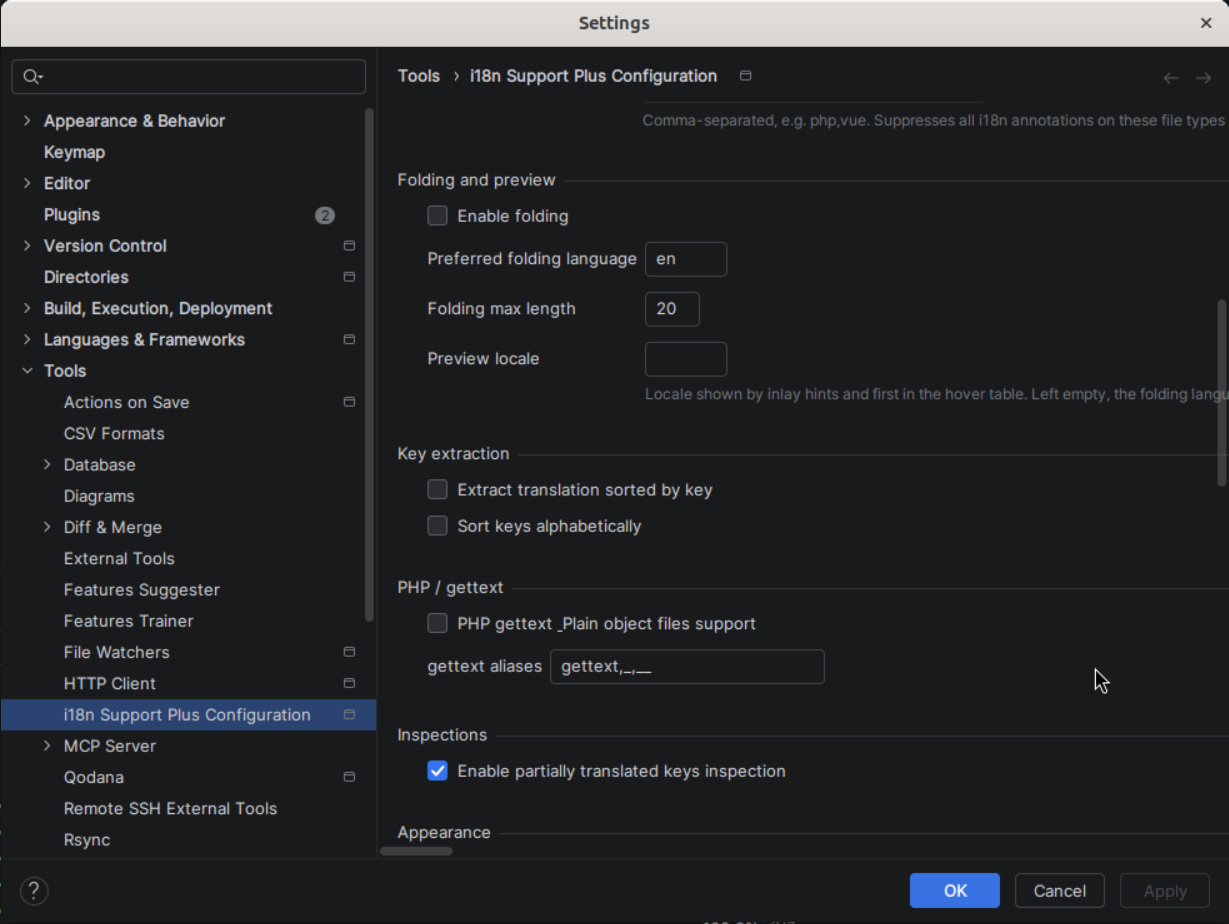
| Setting | Default | Description |
|---|---|---|
| Enable folding | false | Show translation values inline in place of the keys |
| Preferred folding language | en | Locale used by folding |
| Folding max length | 20 | Max characters shown in a folded translation |
| Preview locale | (empty) | Locale shown by inlay hints, first in the hover table and opened by Ctrl+click; the folding language when empty |
| Setting | Default | Description |
|---|---|---|
| Extract translation sorted by key | false | Insert extracted keys in alphabetical order |
| Sort keys alphabetically | false | Keep JSON translation files sorted after every key creation |
| Setting | Default | Description |
|---|---|---|
| Partially translated keys inspection | false | Warn when a key exists in some locales but not others |
| Setting | Default | Description |
|---|---|---|
| PHP gettext & plain object files support | false | Enable gettext/PO file support |
| gettext aliases | gettext,_,__ | Function names recognized as gettext calls |
Per-format settings; the first one is the indentation of the keys generated in YAML files (2 spaces). JSON follows the IDE's code style.
| Setting | Default | Description |
|---|---|---|
| Show gutter icons | true | Display resolution badges in the editor gutter |
| Show setup wizard on new projects | true | Run the wizard the first time an unconfigured project opens |
| Announce plugin updates | true | After an update, a notification linking to the changelog (applies to every project) |
| Plugin | Required | Enables |
|---|---|---|
| JavaScript | Yes | Core JS/TS support |
| Vue.js | No | vue-i18n support ($t, $tc, $te) |
| YAML | No | .yaml/.yml translation files |
| PHP | No | PHP language support |
| Localization | No | PO/POT gettext files |
Search for "I18n Support Plus" in Settings > Plugins > Marketplace.
git clone https://github.com/IBRAHIMDANS/i18nSupportPlus.git
cd i18nSupportPlus
./gradlew buildPlugin
# Output: "build/distributions/i18n Support Plus-<version>.zip"
Then install via Settings > Plugins > ⚙️ > Install Plugin from Disk.
# Build
./gradlew build

# Run tests
./gradlew test

# Launch IDE with plugin loaded
./gradlew runIde

# Code coverage
./gradlew jacocoTestReport
Requires Java 21 (JAVA_HOME=/usr/lib/jvm/java-21-openjdk-amd64).
Originally created by Evgeniy Nyavro.
Maintained by Ibrahim Dansoko. Licensed under MIT.
fork and rework plugin i18nPlugin https://github.com/nyavro/i18nPlugin
See the codePlugin ID: com.ibrahimdans.i18n
IntelliJ IDEA plugin providing i18n support for JavaScript, TypeScript, JSX, TSX, and PHP projects.
Supports i18next, vue-i18n, lingui, react-intl, ngx-translate, svelte-i18n, and i18n-js frameworks with JSON, YAML, and PO/POT translation files.
Highlights unresolved i18n keys, offers navigation from keys to their translation files, provides autocomplete for key names, displays translation values as inline hints, and supports key extraction from plain text strings.
On a real i18next/vue-i18n project, your keys and translations live in files your editor treats as dead text — so you keep opening JSON files just to check whether a key exists, in which namespace, and whether it's translated everywhere.
I18n Support Plus turns i18n keys into first-class code symbols.
Alt+Enter), rename across all
locales and code (Shift+F6), move a key to another namespace (Ctrl+Alt+Shift+M),
sort keys alphabetically.Works with i18next, vue-i18n, lingui, react-intl, ngx-translate, svelte-i18n & i18n-js across JS/TS/JSX/TSX, Vue SFC and PHP, with JSON, YAML and PO/POT files. A setup wizard auto-configures it on first launch.
| Framework | Recognised syntaxes | Config-based |
|---|---|---|
| i18next / react-i18next | t('ns:key'), t(`key.${suffix}`), t('key', { ns: 'other' }), useTranslation('ns'), <Trans i18nKey="key"> | Yes |
| vue-i18n | $t('key'), $tc('key'), $te('key') | No |
lingui (@lingui/core, @lingui/react, @lingui/macro) | msg('key'), i18n._('key'), source-based <Trans>Hello world!</Trans> | No |
| react-intl (FormatJS) | formatMessage({ id: 'key' }), <FormattedMessage id="key" /> | No |
| ngx-translate (Angular) | translate.instant('key'), .get('key'), .stream('key'), {{ 'key' | translate }} 1 | No |
| svelte-i18n | $_('key'), _('key') 2 | No |
| i18n-js (React Native / Expo) | t('key'), i18n.t('key'), plain locale-keyed TS/JS catalogues, nested plurals 3 | No |
useTranslation supports both string form (useTranslation('ns')) and array form (useTranslation(['ns1', 'ns2'])). The namespace can also come from an options object (t('key', { ns: 'auth' })) or from the key itself (t('auth:key')).
1 The | translate pipe is recognised in JSX/TSX and in standalone Angular templates (.html). A template is parsed as Angular only inside an Angular project — a component referencing it through templateUrl, with @angular/core resolvable; outside one the file stays plain HTML and the pipe is inert text.
2 .svelte single-file components are analysed as well, provided the Svelte plugin is installed — it is not bundled with IntelliJ Ultimate, and without it a .svelte file is plain text to the IDE. With it, both the <script> block and {…} expressions in the markup are ordinary JavaScript, so keys inside them resolve like any other.
3 i18n-js pluralizes into a nested object ({ one: …, other: … }) rather than through i18next's flat key_one suffixes; such a key is treated as resolved. Its %{count} placeholders are displayed verbatim, as the plugin interprets no interpolation syntax.
| Language | Extensions | Annotations | Completion | Folding | Hints | References |
|---|---|---|---|---|---|---|
| JavaScript | .js | ✓ | ✓ | ✓ | ✓ | ✓ |
| TypeScript | .ts | ✓ | ✓ | ✓ | ✓ | ✓ |
| JSX | .jsx | ✓ | ✓ | ✓ | ✓ | ✓ |
| TSX | .tsx | ✓ | ✓ | ✓ | ✓ | ✓ |
| Vue SFC | .vue | ✓ | ✓ | ✓ | ✓ | ✓ |
| PHP | .php | ✓ | ✓ | ✓ | ✓ | ✓ |
Vue support requires the Vue.js plugin (optional dependency). PHP support requires the PHP plugin (optional dependency).
| Format | Extensions | References | Content generation |
|---|---|---|---|
| JSON | .json, .json5 | ✓ | ✓ |
| YAML | .yaml, .yml | ✓ | ✓ |
| PO/POT (gettext) | .po, .pot | ✓ | ✓ |
| TypeScript (i18next config) | .ts | ✓ | — |
Keys are resolved as nested properties by default (app.header.title walks three levels).
Projects storing flat ids — one property per key, as react-intl / FormatJS usually do —
should enable Treat keys as flat in Settings → Tools → i18n Support Plus Configuration.
The setting turns off key-separator splitting and namespace parsing altogether, so the whole
id is looked up as a single property and translation files are located through the default
namespace.
On first launch, a wizard guides you through configuration in 3 steps:
package.json.json, .yaml, .po, and .pot files in locales/, i18n/, translations/ folders (PO/POT support requires the optional GNU GetText plugin — see Plugin Dependencies)You can reopen it at any time from Tools > i18n Support Plus > Run Setup Wizard.
Highlights i18n keys with visual feedback on resolution status:
| Status | Description |
|---|---|
| Resolved key | Key found in all translation files |
| Unresolved segment | Part of the key path doesn't exist |
| Missing file | Referenced namespace file not found |
| Object reference | Key points to a JSON object instead of a value |
| Plural reference | Key resolves to plural variants (_one, _other, etc.) |
| Partial translation | Key exists in some locales but not all (opt-in) |
Ctrl+Click on any i18n key navigates directly to the translation value in the JSON/YAML file.
Autocomplete i18n keys as you type, with full namespace support. Suggestions are drawn from all translation files in the project.
Extract hardcoded strings into translation files via Alt+Enter intention action. Supports sorted insertion (Extract sorted setting).
Line markers in the editor gutter indicate key resolution status at a glance:
| Icon | Meaning |
|---|---|
| ✅ Green | Key resolved in all locales |
| ⚠️ Yellow | Key resolved in some locales (partial) |
| ❌ Red | Key not found in any locale |
Hovering a badge lists the locales; clicking a partial/missing badge triggers the quick fix to create the missing key.
Displays the resolved translation value inline after each i18n key expression, directly in the editor. Toggle via Editor > Inlay Hints > i18n translations.
Ctrl+hover on an i18n key shows a tooltip with all translations grouped by locale, with missing translations shown as "—" and a navigation link (↗) to the translation file.
i18n: en in the status bar says which locale inlay hints, hover, Ctrl+click and folding read in. Click it to pick another of the project's locales; Switch Preview Locale in the editor's context menu cycles through them, ready for a shortcut. The Preview locale and Preferred folding language settings stay for anyone who wants the two apart.
Replaces i18n keys with their translation values inline for better readability. Toggle with Ctrl+Alt+Shift+T or via the editor context menu.
Rename i18n keys across all translation files and source code references with Shift+F6 — every call site, whether written with its namespace, under a hook namespace or under a key prefix; plural suffixes (_one, _other) are kept.
| Action | Where | What it does |
|---|---|---|
| Batch Extract i18n Keys | Code menu, Ctrl+Alt+Shift+B | Extract several hardcoded strings of a file as keys in one pass |
| Move i18n Key to Namespace… | editor context menu, Ctrl+Alt+Shift+M | Move a key to another namespace, updating every locale file and code reference |
| Sort i18n Keys Alphabetically | editor context menu, in a translation file | Reorder the file's keys, recursively |
| Sync Keys | Tools > i18n Support Plus, tool window toolbar | Create in every locale the keys it lacks, with a batch dialog to fill the values |
| Export Translations to CSV… | Tools > i18n Support Plus | One row per key, one column per locale |
| Import Translations from CSV… | Tools > i18n Support Plus | Write values back from a CSV, with a preview of what changes before anything is written |
| Cleanup Unused Keys… | Tools > i18n Support Plus | Scan the code for keys never used and delete the selected ones from every locale |
Enabled under Settings > Editor > Inspections > i18n Support Plus:
| Inspection | Reports |
|---|---|
| Empty translation value | A key whose value is blank in a translation file |
| Duplicate translation value | Two keys of a file holding the same value |
| Placeholder consistency across locales | A {name} or %s placeholder present in one locale and not in another, or an unbalanced brace |
| ICU message format validation | Unbalanced braces, a plural block without one/other, … |
| Unused translation key | A key of a translation file no code refers to |
Intermediate * wildcards in composite key resolution allow matching any segment at a given position. For example, a.*.b matches a.foo.b, a.bar.b, etc. Useful with dynamic keys where the middle segment varies.
| Quick Fix | Trigger |
|---|---|
| Create missing key | Unresolved key annotation |
| Create translation file | Missing namespace file annotation |
| Create namespace on the fly | + button in Create Translation dialog |
The I18n tool window (bottom panel) provides a centralized view of all translations in the project.
The toolbar holds the actions — add a translation, add a namespace, refresh, Sync Keys, Scan Orphans, settings —, a search field filtering the tree and the table by key or value (with a result count), and, when several modules are configured, a module selector. A project in which nothing can be read shows where the plugin looked and links to the setup wizard and the settings. The window reloads itself when a translation file changes.
Add translation opens the same dialog as the quick fix: the key is checked as you type, one field per locale says which file it writes to, Copy to empty locales fills the blanks from the reference locale, and the + next to the namespace creates a new one on the spot.
Keys grouped by namespace, then by segment. Every key carries its status three times over — an icon, per-locale badges (EN✓ FR✗) and a colour — so it survives a colour-blind reader or a custom theme; a branch shows how many of its keys are fully translated (12/14 (86%)), and a namespace row how complete the namespace is.
common (default) — when the configuration names a single one
Flat table: a Namespace column while the rows span several namespaces, the Key, one column per locale, and Usage. Every cell says what it is — a Missing or Empty word with an icon, the value otherwise — before being tinted.
t(`status.${kind}`)) are told from unused ones
Propagates missing keys across all locales in one click. When a key exists in en.json but not fr.json, the synchronizer creates the missing entry. A batch placeholder dialog lets you fill in values for all missing keys at once.
Coverage as a matrix: one row per namespace under a Total row, one column per locale. A cell reads 11/13 [===== ] 84.6% — translated keys over the namespace's keys, a bar tinted by tier (≥ 90% complete, ≥ 50% partial, below incomplete), the percentage.
Clicking a cell lists that namespace's untranslated keys in that locale — missing and empty told apart, each next to what it says in the reference locale. Enter or a click opens the translation dialog on the key; F4 opens the reference file.
A monorepo is described as modules in the settings (root directory, path template, key template, framework preset). With two or more, the toolbar's module selector switches the three views from one module to the next; a code file inside a module's root directory resolves its keys against that module's translation files only.
Settings > Tools > i18n Support Plus Configuration
| Setting | Default | Description |
|---|---|---|
| Namespace separator | : | Separates namespace from key (e.g. common:key) |
| Key separator | . | Separates nested keys (e.g. parent.child) |
| Plural separator | - | Separates plural forms |
| Default namespace | translation | Namespace(s) used for keys without a prefix, separated by ;, , or whitespace |
| First component as namespace | false | Treat the first key component as the namespace (vue-i18n) |
| Treat keys as flat | false | Look a key up as a single property, without splitting (react-intl / FormatJS) |
| Setting | Default | Description |
|---|---|---|
| Search in project files only | true | Skip libraries and external roots |
| Translations root directory | (empty) | In a monorepo, path from the project root to the translations directory |
| i18next configuration files | (empty) | Files declaring i18next resources inline, comma-separated (src/i18n.ts) |
| Excluded directories | (empty) | Directory names skipped when scanning for translation files |
| Excluded file extensions | (empty) | Extensions on which annotations are suppressed (php,vue) |
One entry per application of a monorepo: a name, a root directory, a path template designating its translation files (locales/{lang}/{ns}.json, messages/{lang}.yml), an optional file template, a key template saying how its code writes keys ({ns}:{key}, {ns}.{key}, {key}) and a framework preset. A diagnostics panel underneath says what each template resolves to.
Rules make other calls behave like t: a trigger (translate, i18n.translate, __) turns a function into a translation call, an exclude rule takes one out. Each rule can be limited to a language (js, php) and constrained on the file path, the file's imports or the key — exact, prefix or regular expression, optionally negated.
| Setting | Default | Description |
|---|---|---|
| Enable folding | false | Show translation values inline in place of the keys |
| Preferred folding language | en | Locale used by folding |
| Folding max length | 20 | Max characters shown in a folded translation |
| Preview locale | (empty) | Locale shown by inlay hints, first in the hover table and opened by Ctrl+click; the folding language when empty |
| Setting | Default | Description |
|---|---|---|
| Extract translation sorted by key | false | Insert extracted keys in alphabetical order |
| Sort keys alphabetically | false | Keep JSON translation files sorted after every key creation |
| Setting | Default | Description |
|---|---|---|
| Partially translated keys inspection | false | Warn when a key exists in some locales but not others |
| Setting | Default | Description |
|---|---|---|
| PHP gettext & plain object files support | false | Enable gettext/PO file support |
| gettext aliases | gettext,_,__ | Function names recognized as gettext calls |
Per-format settings; the first one is the indentation of the keys generated in YAML files (2 spaces). JSON follows the IDE's code style.
| Setting | Default | Description |
|---|---|---|
| Show gutter icons | true | Display resolution badges in the editor gutter |
| Show setup wizard on new projects | true | Run the wizard the first time an unconfigured project opens |
| Announce plugin updates | true | After an update, a notification linking to the changelog (applies to every project) |
| Plugin | Required | Enables |
|---|---|---|
| JavaScript | Yes | Core JS/TS support |
| Vue.js | No | vue-i18n support ($t, $tc, $te) |
| YAML | No | .yaml/.yml translation files |
| PHP | No | PHP language support |
| Localization | No | PO/POT gettext files |
Search for "I18n Support Plus" in Settings > Plugins > Marketplace.
git clone https://github.com/IBRAHIMDANS/i18nSupportPlus.git
cd i18nSupportPlus
./gradlew buildPlugin
# Output: "build/distributions/i18n Support Plus-<version>.zip"
Then install via Settings > Plugins > ⚙️ > Install Plugin from Disk.
# Build
./gradlew build

# Run tests
./gradlew test

# Launch IDE with plugin loaded
./gradlew runIde

# Code coverage
./gradlew jacocoTestReport
Requires Java 21 (JAVA_HOME=/usr/lib/jvm/java-21-openjdk-amd64).
Originally created by Evgeniy Nyavro.
Maintained by Ibrahim Dansoko. Licensed under MIT.



