
See what people are saying
README
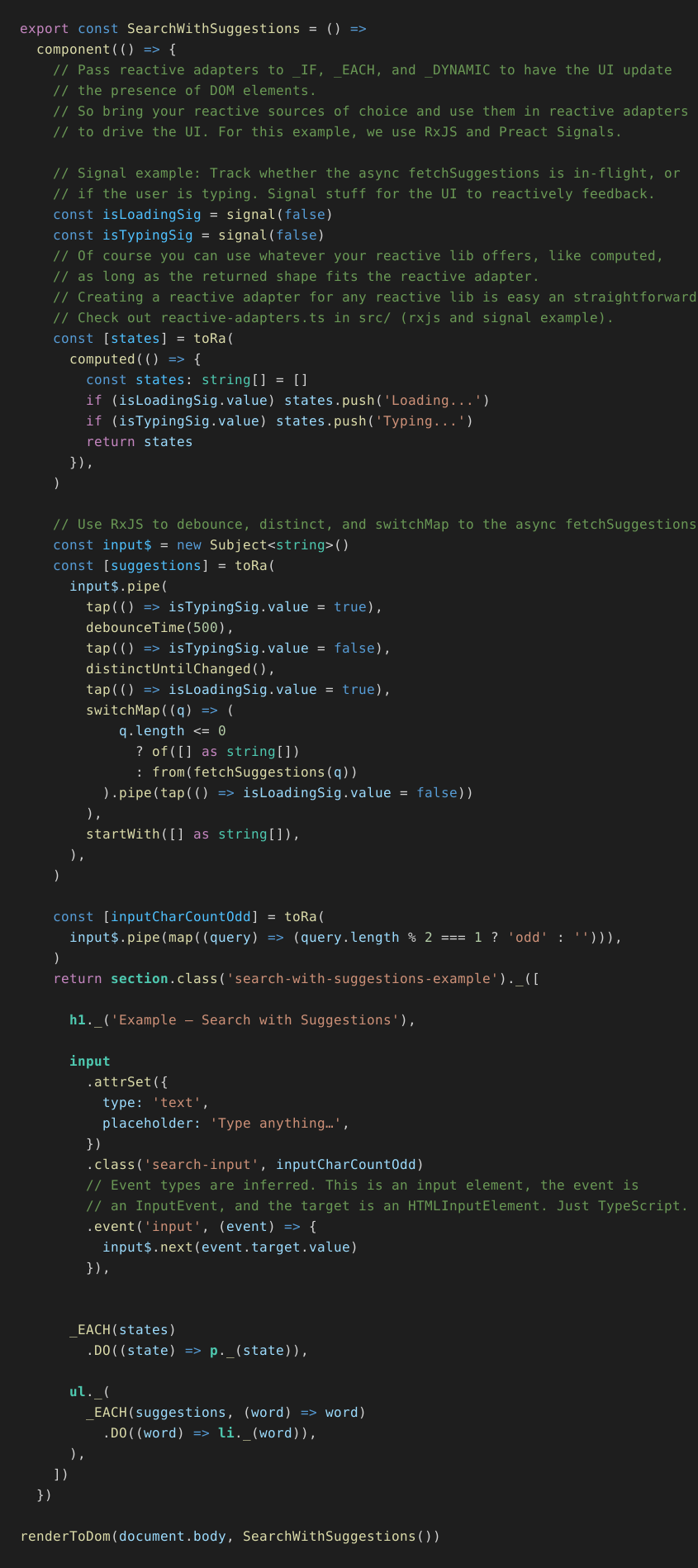
⚠️ One main goal of elemen-ts is to make HTML elements visually distinct in TypeScript code. This is achieved with semantic TypeScript highlighting in your IDE. Unfortunately, this cannot be rendered in standard Markdown code blocks. Therefore the examples in this README are generated as SVGs. interactive, text based examples can be found here.

Plain TypeScript - Reactive - UI Components
elemen-ts is a library which allows you to build UI for the browser, with a dev experience somewhat similar to React, but without having to leave or enhance TypeScript-Land.
How to install
Add elemen-ts to a Deno project from JSR:
deno add jsr:@huberst/elemen-ts
Or install it from npm:
npm install @huberst/elemen-ts
The Mission: HTML-level scannability, pure TS
The biggest hurdle was to achieve a visual distinction of HTML elements from the rest of the syntax. Because that is what XML and thus HTML and JSX are so strong at: You can quickly grasp the structure of the document.
First I tried to make the HTML elements visually striking, by using underscores or special characters, like in these examples:
_div___div__$_div$_DIV
But none of these really helped scanning a component as quickly with your eyes, as you can with HTML / JSX.
Then I found a little trick to make it work: Using static members on classes, with one class for each HTML element!
Most themes for syntax highlighting will highlight classes noticeably different, so they are easy to spot for your eyes. In VS Code Dark Modern, for example, they are colored in a green or almost turquoise color, which is also used for type information.
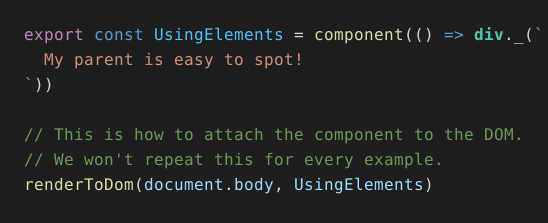
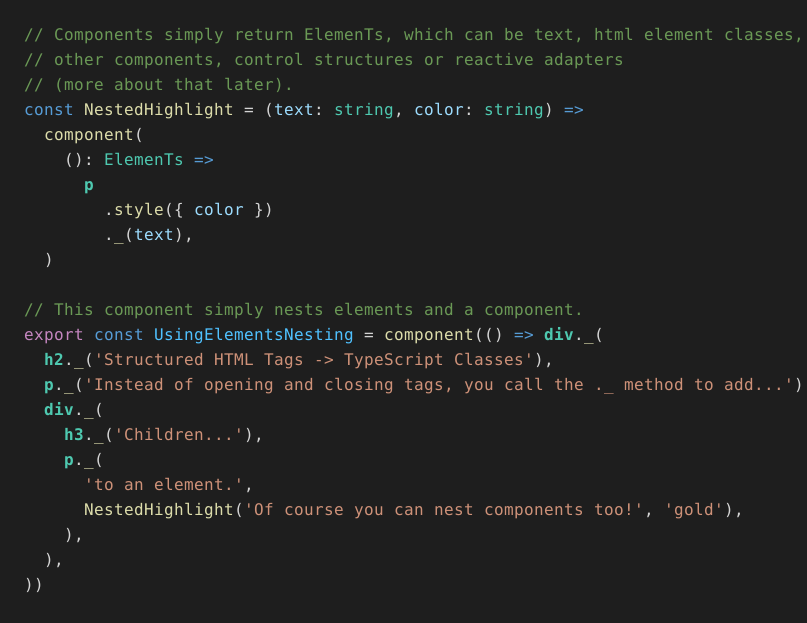
What are the benefits of this approach?
- No need for a template language syntax like JSX, lit-html, or similar and their overhead.
- Therefore no editor / IDE extension for that syntax.
- No extra type-checking logic for that syntax.
- No build step required to transform that syntax into JS/TS.
- No virtual DOM.
- No magic.
Element API
- Content:
._(...)adds text, elements, and components as children. - Properties:
.prop('value', value)and.propSet({ checked: true })assign DOM properties, including reactive values. Names and values are checked against the element's DOM type. - Attributes:
.attr('aria-label', 'Close')and.attrSet({ viewBox: '0 0 100 100' })set HTML or SVG attributes, including reactive values. Attribute names are strings because TypeScript's DOM types do not list attributes by tag. On an element description,.dataAttr('state', 'open')is shorthand fordata-state. - Appearance:
.class('active', activeClass)adds static or reactive classes..style({ color: 'red' })sets inline styles; a reactive style object also removes declarations that disappear on subsequent updates. - Interaction and lifecycle:
.event('click', handler)registers a handler;.setRef(callback)provides a typed DOM element reference..afterMount(callback)and.onRemove(callback)run on mounting and removal.
But what about reactivity?
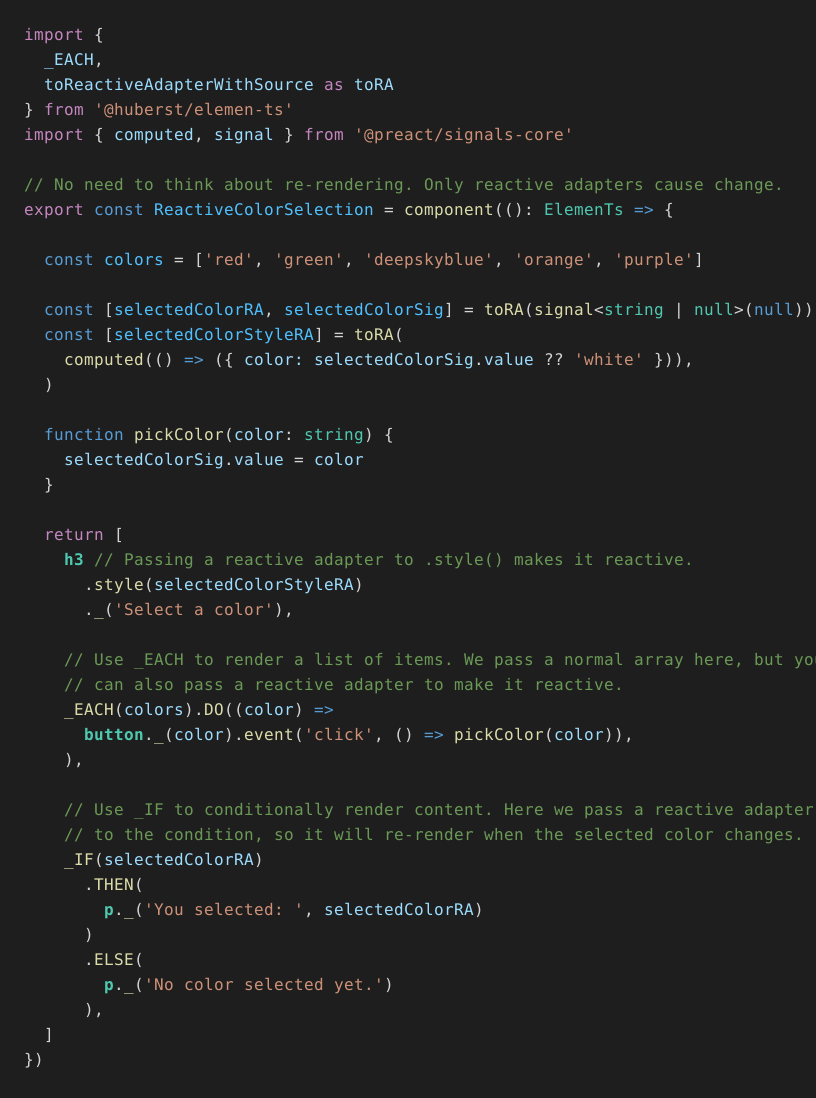
elemen-ts components never 're-render' in the sense of React or Vue. All updates are driven by reactive adapters, which can be built on top of any reactive source you like. Reactive adapters for preact signals and RxJS are already included. They are easy to integrate.
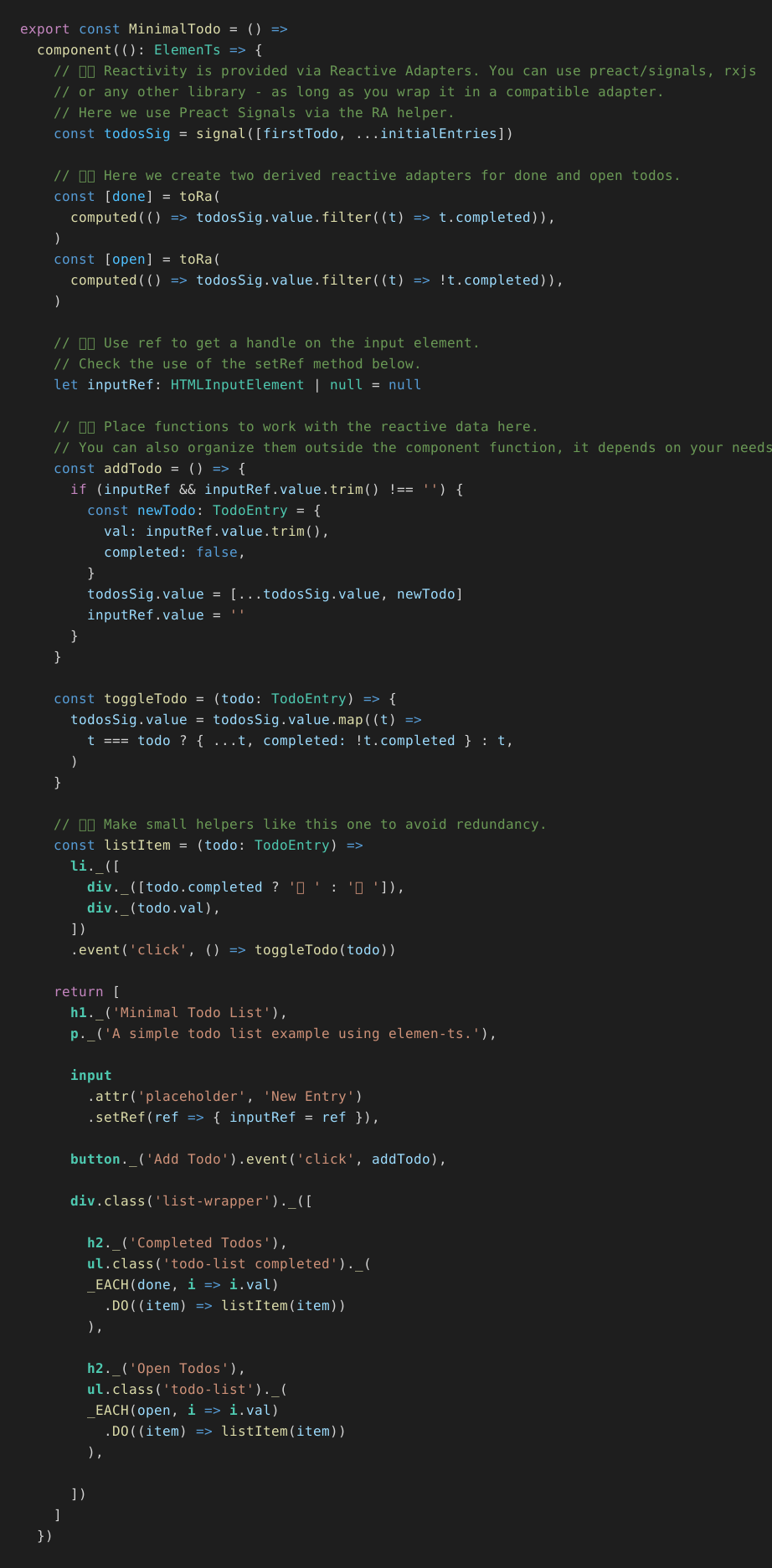
Of course there is a todo app example 🙄
Mixing multiple reactive sources
License
MIT © 2026 Stefan Huber
Similar repos


See what people are saying
README
⚠️ One main goal of elemen-ts is to make HTML elements visually distinct in TypeScript code. This is achieved with semantic TypeScript highlighting in your IDE. Unfortunately, this cannot be rendered in standard Markdown code blocks. Therefore the examples in this README are generated as SVGs. interactive, text based examples can be found here.
Plain TypeScript - Reactive - UI Components
elemen-ts is a library which allows you to build UI for the browser, with a dev experience somewhat similar to React, but without having to leave or enhance TypeScript-Land.
How to install
Add elemen-ts to a Deno project from JSR:
deno add jsr:@huberst/elemen-ts
Or install it from npm:
npm install @huberst/elemen-ts
The Mission: HTML-level scannability, pure TS
The biggest hurdle was to achieve a visual distinction of HTML elements from the rest of the syntax. Because that is what XML and thus HTML and JSX are so strong at: You can quickly grasp the structure of the document.
First I tried to make the HTML elements visually striking, by using underscores or special characters, like in these examples:
_div___div__$_div$_DIV
But none of these really helped scanning a component as quickly with your eyes, as you can with HTML / JSX.
Then I found a little trick to make it work: Using static members on classes, with one class for each HTML element!
Most themes for syntax highlighting will highlight classes noticeably different, so they are easy to spot for your eyes. In VS Code Dark Modern, for example, they are colored in a green or almost turquoise color, which is also used for type information.
What are the benefits of this approach?
- No need for a template language syntax like JSX, lit-html, or similar and their overhead.
- Therefore no editor / IDE extension for that syntax.
- No extra type-checking logic for that syntax.
- No build step required to transform that syntax into JS/TS.
- No virtual DOM.
- No magic.
Element API
- Content:
._(...)adds text, elements, and components as children. - Properties:
.prop('value', value)and.propSet({ checked: true })assign DOM properties, including reactive values. Names and values are checked against the element's DOM type. - Attributes:
.attr('aria-label', 'Close')and.attrSet({ viewBox: '0 0 100 100' })set HTML or SVG attributes, including reactive values. Attribute names are strings because TypeScript's DOM types do not list attributes by tag. On an element description,.dataAttr('state', 'open')is shorthand fordata-state. - Appearance:
.class('active', activeClass)adds static or reactive classes..style({ color: 'red' })sets inline styles; a reactive style object also removes declarations that disappear on subsequent updates. - Interaction and lifecycle:
.event('click', handler)registers a handler;.setRef(callback)provides a typed DOM element reference..afterMount(callback)and.onRemove(callback)run on mounting and removal.
But what about reactivity?
elemen-ts components never 're-render' in the sense of React or Vue. All updates are driven by reactive adapters, which can be built on top of any reactive source you like. Reactive adapters for preact signals and RxJS are already included. They are easy to integrate.
Of course there is a todo app example 🙄
Mixing multiple reactive sources
License
MIT © 2026 Stefan Huber