Declare packages and dotfiles your system should have. Repeatability on any system
Rust
2
1 commits
updated Oct 10, 2026
Declare the packages and dotfiles your machines should have. Repeatability on any system


Why • Features • Install • Quick start • Guide
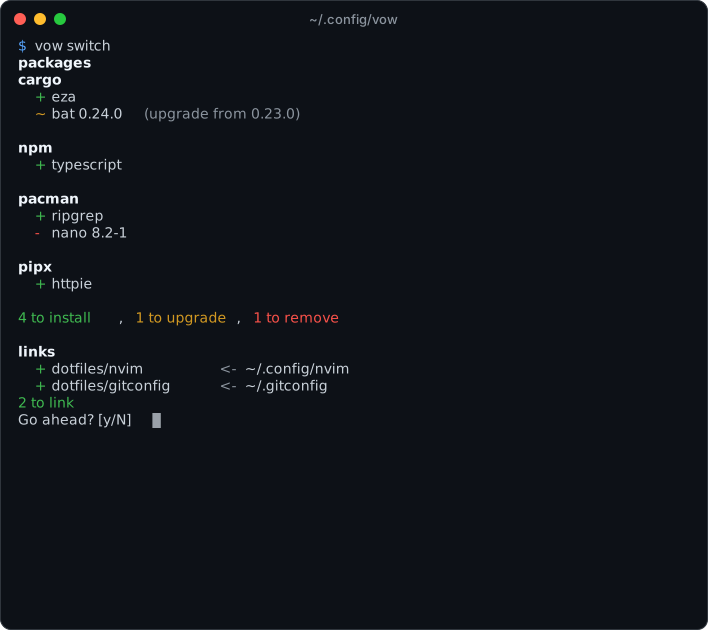
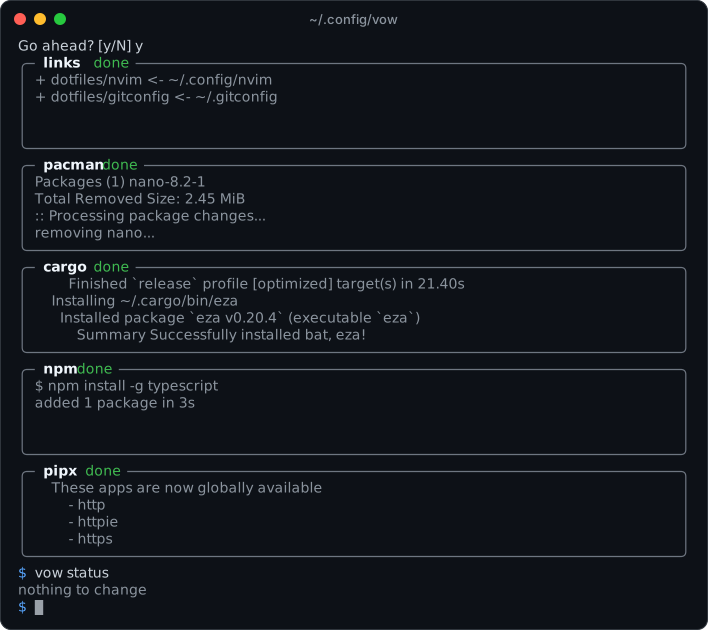
Every machine drifts. A tool goes in with cargo, another with pacman, an
editor plugin with npm, and a dotfile gets tweaked in ~/.config. Six months
later nobody can say what the setup actually is, let alone rebuild it on a new
laptop.
The usual fixes each cover part of the problem:
vow sits in between. You keep using the package managers you already have, whether that's 1 or 20 of them. vow keeps a list for each one, plus your dotfiles, in a folder you track in git. It makes the machine match in both directions: what's declared gets installed, and what's no longer declared gets removed.
name, or name version to hold it at an exact version.apt, pacman, brew, dnf),
language (cargo, npm, pip, go), version managers (rustup, mise,
pyenv), editor extensions and more, each driven through its own CLI.npm = [] keeps npm at
nothing installed.~/.config/nvim/init.lua edits the copy in git. vow only ever replaces
symlinks it placed itself.hosts/<hostname>.toml, or config.toml if it has none, plus whatever that
file includes. Files merge, and a disagreement between two files is an
error, never a silent override.apt can install cargo and the
cargo list is applied in the same switch. Within a stage, managers run
side by side, each in a live box.Build from this repository with Cargo (Rust 1.88 or newer):
cargo install --locked --git https://github.com/Houdiee/vow
Or from a clone:
git clone https://github.com/Houdiee/vow && cd vow
cargo build --release
install -Dm755 target/release/vow ~/.local/bin/vow
With Nix, nix develop in the clone gives you a shell with the Rust
toolchain, and cargo build --release works from there.
vow is developed and tested on Linux. It works with whichever of its
supported managers are on your PATH.
1. Declare this machine as it is. generate-config writes
~/.config/vow/config.toml, listing what every installed manager has
installed:
vow generate-config
vow status                     # nothing to change
2. Bring in a dotfile. Move it into the graph:
mv ~/.config/nvim ~/.config/vow/nvim
Then declare where it goes, in the [links] table at the end of
config.toml, and switch:
[links]
nvim = { source = "nvim", target = "~/.config/nvim" }
vow switch # shows "+ nvim <- ~/.config/nvim", asks, links
3. Track it in git.
cd ~/.config/vow && git init && git add -A && git commit -m "my machine"
On another machine, clone the graph and converge:
git clone <your-repo> ~/.config/vow
vow status                     # what this machine is missing, or has extra
vow switch                     # install, remove and link to match
When machines start to differ, give each its own host file, found by hostname. It includes what the machines share:
~/.config/vow/
├── config.toml           # applied by a machine with no host file
├── hosts/
│   ├── laptop.toml       # applied by the machine named "laptop"
│   └── desktop.toml
├── common.toml           # anything a host file includes, named as you like
└── dotfiles/             # your files, laid out however you like
# common.toml
[packages]
pacman = ["git", "neovim", "ripgrep"]
cargo = ["bat", "eza 0.20.0"]   # a version holds it there

[links]
nvim = { source = "dotfiles/nvim", target = "~/.config/nvim" }
git = { source = "dotfiles/gitconfig", target = "~/.gitconfig" }
# hosts/laptop.toml
includes = ["../common.toml"]

[packages]
pacman = ["tlp", "brightnessctl"]   # merged with common.toml's list
The same package declared alike in two files merges. Declared differently,
it's an error, reported where it happens. Add cargo = ["bat 0.24.0"] to the
laptop's file and:
$ vow status
error: `bat` is already declared as `bat 0.24.0` in `hosts/laptop.toml`
 --> ~/.config/vow/common.toml:3:10
  |
3 | cargo = ["bat", "eza 0.20.0"]   # a version holds it there
  |          ^^^^^ declared differently here
  |
  = note: first declared at ~/.config/vow/hosts/laptop.toml:5; files merge only what they declare alike, and none overrides another: make them agree, or declare the package in one file
There's no overriding and no templating, by design. If something should apply
everywhere except one machine, put it in a file that machine doesn't include.
If a dotfile needs per-machine differences, use the tool's own include or
conditional (git's includeIf, ssh's Match, source in a shell). The
guide has the full rules.
| Command | What it does |
|---|---|
vow status | Show how this machine differs from what it declares |
vow switch | Converge: show the plan, confirm, then link, install and remove |
vow switch --dry-run | Show the plan and stop |
vow switch --upgrade | Also bring unpinned packages up to date |
vow generate-config [--pin] | Write a file declaring everything installed now |
vow outdated | Declared packages with a newer version available |
vow search <query> | Search each manager's own index |
vow links | Every link this machine applies, which file declares it, and whether it's in place |
vow managed | Every supported manager, and which ones this machine manages |
Name managers first to act on just those: vow cargo,npm status.
--packages and --links restrict a command to one half. --host=NAME or
--file=PATH applies another machine's file, and --path points at a graph
somewhere else.
vow supports 43 package managers, applied in three stages:
| Stage | Managers |
|---|---|
| System | apk apt brew dnf pacman xbps zypper |
| Toolchains | asdf bob elan ghcup mise pyenv rustup volta zvm |
| Everything else | bun cargo code code-server codium composer coursier dotnet fisher flatpak gem go krew luarocks npm ollama opam pip pipx pixi pnpm pub raco soar uv yarn yazi |
Every manager except flatpak, code and codium is tested weekly against
the real tool in its own container: vow installs a package, reads it back,
searches, and removes it.
A manager is only added when its explicitly installed packages can be told apart from their dependencies. Otherwise vow would offer to remove dependencies. The guide explains why some obvious candidates are missing.
| vow | Nix + home-manager | chezmoi | GNU stow | Ansible | |
|---|---|---|---|---|---|
| Packages | ✅ | ✅ | via scripts | ❌ | ✅ |
| Dotfiles | ✅ symlinks | ✅ | ✅ copies | ✅ symlinks | ✅ |
| Removes what you undeclare | ✅ | ✅ | ❌ | ❌ | only if written as a task |
| Drives the package managers you already use | ✅ | ❌ | – | – | ✅ |
| Format | TOML | Nix language | files + Go templates | directory layout | YAML playbooks |
| Templating | ❌ by design | ✅ | ✅ | ❌ | ✅ |
If you want every machine to be bit-for-bit reproducible, use Nix. If you want the tools you already have, with a machine you can describe in a few lists and rebuild with one command, use vow.
vow --help and vow <command> --help cover every command and flag.Bug reports and ideas are welcome in the issues. If vow misreads a manager's output, please paste what the tool printed. New managers are only added from real captured output.
Before opening a pull request, read AGENTS.md. It covers the
code layout, the design decisions already made, and how to run the tests:
cargo fmt --check && cargo clippy --all-targets && cargo test
VOW_CONTAINERS=1 cargo test container::apt     # one manager, against the real tool (needs docker)
MIT © Houdiee
Declare packages and dotfiles your system should have. Repeatability on any system
Rust
2
1 commits
updated Oct 10, 2026
Declare the packages and dotfiles your machines should have. Repeatability on any system
Why • Features • Install • Quick start • Guide
Every machine drifts. A tool goes in with cargo, another with pacman, an
editor plugin with npm, and a dotfile gets tweaked in ~/.config. Six months
later nobody can say what the setup actually is, let alone rebuild it on a new
laptop.
The usual fixes each cover part of the problem:
vow sits in between. You keep using the package managers you already have, whether that's 1 or 20 of them. vow keeps a list for each one, plus your dotfiles, in a folder you track in git. It makes the machine match in both directions: what's declared gets installed, and what's no longer declared gets removed.
name, or name version to hold it at an exact version.apt, pacman, brew, dnf),
language (cargo, npm, pip, go), version managers (rustup, mise,
pyenv), editor extensions and more, each driven through its own CLI.npm = [] keeps npm at
nothing installed.~/.config/nvim/init.lua edits the copy in git. vow only ever replaces
symlinks it placed itself.hosts/<hostname>.toml, or config.toml if it has none, plus whatever that
file includes. Files merge, and a disagreement between two files is an
error, never a silent override.apt can install cargo and the
cargo list is applied in the same switch. Within a stage, managers run
side by side, each in a live box.Build from this repository with Cargo (Rust 1.88 or newer):
cargo install --locked --git https://github.com/Houdiee/vow
Or from a clone:
git clone https://github.com/Houdiee/vow && cd vow
cargo build --release
install -Dm755 target/release/vow ~/.local/bin/vow
With Nix, nix develop in the clone gives you a shell with the Rust
toolchain, and cargo build --release works from there.
vow is developed and tested on Linux. It works with whichever of its
supported managers are on your PATH.
1. Declare this machine as it is. generate-config writes
~/.config/vow/config.toml, listing what every installed manager has
installed:
vow generate-config
vow status                     # nothing to change
2. Bring in a dotfile. Move it into the graph:
mv ~/.config/nvim ~/.config/vow/nvim
Then declare where it goes, in the [links] table at the end of
config.toml, and switch:
[links]
nvim = { source = "nvim", target = "~/.config/nvim" }
vow switch # shows "+ nvim <- ~/.config/nvim", asks, links
3. Track it in git.
cd ~/.config/vow && git init && git add -A && git commit -m "my machine"
On another machine, clone the graph and converge:
git clone <your-repo> ~/.config/vow
vow status                     # what this machine is missing, or has extra
vow switch                     # install, remove and link to match
When machines start to differ, give each its own host file, found by hostname. It includes what the machines share:
~/.config/vow/
├── config.toml           # applied by a machine with no host file
├── hosts/
│   ├── laptop.toml       # applied by the machine named "laptop"
│   └── desktop.toml
├── common.toml           # anything a host file includes, named as you like
└── dotfiles/             # your files, laid out however you like
# common.toml
[packages]
pacman = ["git", "neovim", "ripgrep"]
cargo = ["bat", "eza 0.20.0"]   # a version holds it there

[links]
nvim = { source = "dotfiles/nvim", target = "~/.config/nvim" }
git = { source = "dotfiles/gitconfig", target = "~/.gitconfig" }
# hosts/laptop.toml
includes = ["../common.toml"]

[packages]
pacman = ["tlp", "brightnessctl"]   # merged with common.toml's list
The same package declared alike in two files merges. Declared differently,
it's an error, reported where it happens. Add cargo = ["bat 0.24.0"] to the
laptop's file and:
$ vow status
error: `bat` is already declared as `bat 0.24.0` in `hosts/laptop.toml`
 --> ~/.config/vow/common.toml:3:10
  |
3 | cargo = ["bat", "eza 0.20.0"]   # a version holds it there
  |          ^^^^^ declared differently here
  |
  = note: first declared at ~/.config/vow/hosts/laptop.toml:5; files merge only what they declare alike, and none overrides another: make them agree, or declare the package in one file
There's no overriding and no templating, by design. If something should apply
everywhere except one machine, put it in a file that machine doesn't include.
If a dotfile needs per-machine differences, use the tool's own include or
conditional (git's includeIf, ssh's Match, source in a shell). The
guide has the full rules.
| Command | What it does |
|---|---|
vow status | Show how this machine differs from what it declares |
vow switch | Converge: show the plan, confirm, then link, install and remove |
vow switch --dry-run | Show the plan and stop |
vow switch --upgrade | Also bring unpinned packages up to date |
vow generate-config [--pin] | Write a file declaring everything installed now |
vow outdated | Declared packages with a newer version available |
vow search <query> | Search each manager's own index |
vow links | Every link this machine applies, which file declares it, and whether it's in place |
vow managed | Every supported manager, and which ones this machine manages |
Name managers first to act on just those: vow cargo,npm status.
--packages and --links restrict a command to one half. --host=NAME or
--file=PATH applies another machine's file, and --path points at a graph
somewhere else.
vow supports 43 package managers, applied in three stages:
| Stage | Managers |
|---|---|
| System | apk apt brew dnf pacman xbps zypper |
| Toolchains | asdf bob elan ghcup mise pyenv rustup volta zvm |
| Everything else | bun cargo code code-server codium composer coursier dotnet fisher flatpak gem go krew luarocks npm ollama opam pip pipx pixi pnpm pub raco soar uv yarn yazi |
Every manager except flatpak, code and codium is tested weekly against
the real tool in its own container: vow installs a package, reads it back,
searches, and removes it.
A manager is only added when its explicitly installed packages can be told apart from their dependencies. Otherwise vow would offer to remove dependencies. The guide explains why some obvious candidates are missing.
| vow | Nix + home-manager | chezmoi | GNU stow | Ansible | |
|---|---|---|---|---|---|
| Packages | ✅ | ✅ | via scripts | ❌ | ✅ |
| Dotfiles | ✅ symlinks | ✅ | ✅ copies | ✅ symlinks | ✅ |
| Removes what you undeclare | ✅ | ✅ | ❌ | ❌ | only if written as a task |
| Drives the package managers you already use | ✅ | ❌ | – | – | ✅ |
| Format | TOML | Nix language | files + Go templates | directory layout | YAML playbooks |
| Templating | ❌ by design | ✅ | ✅ | ❌ | ✅ |
If you want every machine to be bit-for-bit reproducible, use Nix. If you want the tools you already have, with a machine you can describe in a few lists and rebuild with one command, use vow.
vow --help and vow <command> --help cover every command and flag.Bug reports and ideas are welcome in the issues. If vow misreads a manager's output, please paste what the tool printed. New managers are only added from real captured output.
Before opening a pull request, read AGENTS.md. It covers the
code layout, the design decisions already made, and how to run the tests:
cargo fmt --check && cargo clippy --all-targets && cargo test
VOW_CONTAINERS=1 cargo test container::apt     # one manager, against the real tool (needs docker)
MIT © Houdiee



