
[CVPR 2026] 3D-Fixer: Coarse-to-Fine In-place Completion for 3D Scenes from a Single Image
See the codeREADME
[CVPR 2026] 3D-Fixer: Coarse-to-Fine In-place Completion for 3D Scenes from a Single Image
Project Page | Paper | Model | Dataset | Online Demo
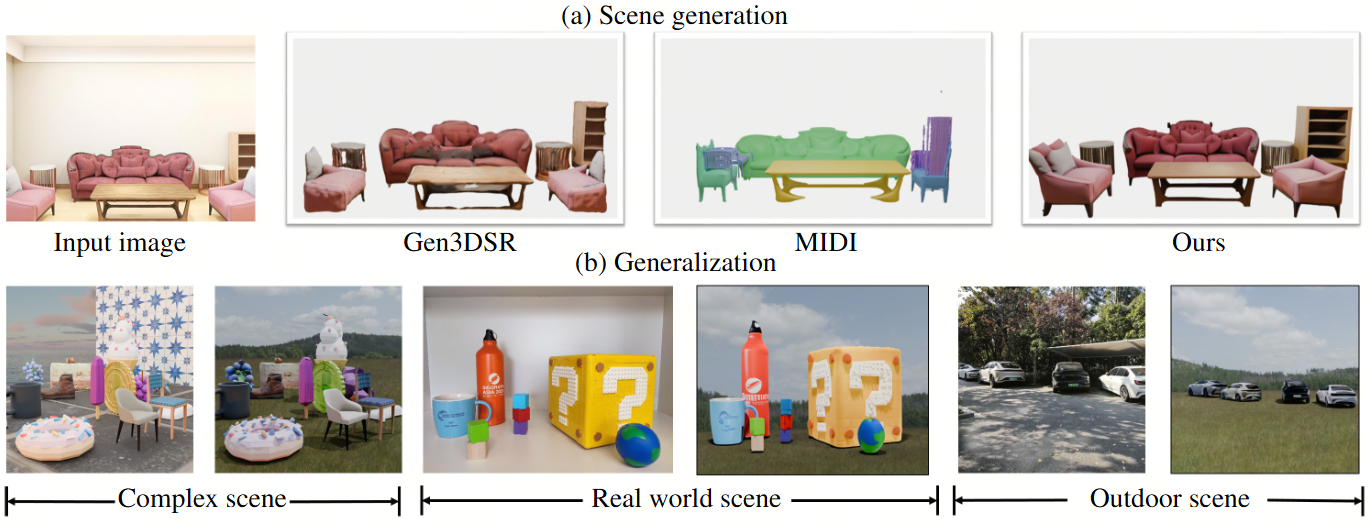
3D-Fixer proposes a novel In-Place Completion paradigm to create high-fidelity 3D scene from a single image. Specifically, 3D-Fixer extends 3D object generative priors to generate complete 3D assets conditioning on the partially visible point cloud at the same location, which is cropped from the fragented geometry obtained from the geometry estimation methods. Unlike prior works that require explicit pose alignment, 3D-Fixer explicitly utilizes the fragmented geometry as the spatial anchor to preserve layout fidelity.
Features
- High Quality: It generates high quality 3D assets for diverse scenes.
- High Generalizability: It generalizes to real world scenes and complex scenes.
- Novel Paradigm: It shifts scene generation scheme to In-Place Completion paradigm, without time-consuming per-scene optimization.
Updates
- [2025-03] Release model weights, training and evaluation dataset, training and evaluation scripts, and the data curation scripts of 3D-Fixer.
Installation
Prerequisites
- System: The code is currently tested only on Linux.
- Hardware: An NVIDIA GPU with at least 24GB of memory is necessary. The code has been verified on NVIDIA RTX 4090, and NVIDIA RTX L20 GPUs.
- Software:
- The CUDA Toolkit is needed to compile certain submodules. The code has been tested with CUDA versions 11.8 and 12.8.
- Conda is recommended for managing dependencies.
- Python version 3.8 or higher is required.
Installation Steps
-
Clone the repo:
git clone --recurse-submodules https://github.com/HorizonRobotics/3D-Fixer cd 3D-Fixer -
Install the dependencies (Following TRELLIS):
Create a new conda environment named
threeDFixerand install the dependencies:. ./setup.sh --new-env --basic --xformers --flash-attn --diffoctreerast --spconv --mipgaussian --kaolin --nvdiffrastThe detailed usage of
setup.shcan be found by running. ./setup.sh --help.Usage: setup.sh [OPTIONS] Options: -h, --help Display this help message --new-env Create a new conda environment --basic Install basic dependencies --train Install training dependencies --xformers Install xformers --flash-attn Install flash-attn --diffoctreerast Install diffoctreerast --spconv Install spconv --mipgaussian Install mip-splatting --kaolin Install kaolin --nvdiffrast Install nvdiffrast --demo Install all dependencies for demo
Pretrained Models
We host the pretrained model at huggingface.
The models are hosted on Hugging Face. You can directly load the models with their repository names in the code:
ThreeDFixerPipeline.from_pretrained("HorizonRobotics/3D-Fixer")
If you prefer loading the model from local, you can download the model files from the links above and load the model with the folder path (folder structure should be maintained), download the MoGe v2 ckpts, and modify the scene_cond_model in /path/to/3D-Fixer/pipeline.json to /path/to/MoGe v2 ckpts. Then use 3D-Fixer as follows:
ThreeDFixerPipeline.from_pretrained("/path/to/3D-Fixer")
Usage
Launch Demo
We provide interactive demo using gradio. Download the pretrained model for SAM2-Hiera-Large from SAM2, then place them in the checkpoints directory, and follow the instruction to install SAM2.
python app.py
Dataset
We provide ARSG-110K, a large-scale scene-level dataset containing diversity of scenes with accurate 3D object-level ground-truth, layout, and annotation based on TRELLIS-500K. Please refer to the dataset README for more details.
Evaluation
We provide the inference and evaluation code on our test set, Gen3DSR test set, and MIDI test set.
ARSG-110K test set
Please download the ARSG-110K-testset.zip and object_assets.zip from here, and unzip the files. ARSG-110K-testset.zip contains the scene data of our test set, and object_assets.zip contains our pre-processed object assets from Toys4K. Then you can run the following commands to perform inference:
python inference_ours_testset.py \
    --output_dir {PATH_TO_SAVE_RESULTS} \
    --testset_dir {PATH_TO_ARSG-110K-testset} \
    --model_dir {PATH_TO_LOAD_PRETRAINED_MODELS} \
    --rank 0 \
    --world_size 1
After running inference, you can use the following commands to get the evaluation metrics:
python eval_metrics_ours_testset.py \
    --output_dir {PATH_TO_SAVE_RESULTS} \
    --testset_dir {PATH_TO_ARSG-110K-testset} \
    --assets_dir {PATH_TO_object_assets}
Gen3DSR test set
Please follow the instruction from Gen3DSR to download the Gen3DSR test set. And download the pre-segmented masks from here, which we generate using the code from Gen3DSR. Put the pre-segmented masks in the Gen3DSR test set, and run the following code to perform inference:
python inference_gen3dsr_testset.py \
    --output_dir {PATH_TO_SAVE_RESULTS} \
    --testset_dir {PATH_TO_Gen3DSR_TESTSET} \
    --model_dir {PATH_TO_LOAD_PRETRAINED_MODELS} \
    --rank 0 \
    --world_size 1
After running inference, you can use the following commands to get the evaluation metrics:
python eval_metrics_gen3dsr_testset.py \
    --rec_path {PATH_TO_SAVE_RESULTS} \
    --data_root {PATH_TO_Gen3DSR_TESTSET}
MIDI test set
Please follow the instruction from MIDI to download the MIDI test set. Then run the following code to perform inference:
python inference_midi_testset_parallel.py \
    --output_dir {PATH_TO_SAVE_RESULTS} \
    --testset_dir {PATH_TO_MIDI_TESTSET} \
    --model_dir {PATH_TO_LOAD_PRETRAINED_MODELS} \
    --rank 0 \
    --world_size 1
After running inference, you can use the following commands to get the evaluation metrics:
python eval_metrics_midi_testset.py \
    --output_dir {PATH_TO_SAVE_RESULTS} \
    --testset_dir {PATH_TO_OURS_TESTSET}
Training
3D-Fixer is constructed based on the amazing framework provided TRELLIS. For details of the command please refer to here. Below we provide details about the training of 3D-Fixer only.
Fine-tune SparseStructureFlowModel
We fine-tune SparseStructureFlowModel, the stage-one model of TRELLIS, to generate sparse voxels conditioned on an input image. Since the original model is trained to generate 3D assets in canonical poses, we further fine-tune it on randomly rotated 3D assets to better adapt its priors to our task, where objects in real-world scenes are not always canonically aligned.
To finetune with a single machine.
python train.py --config configs/finetune/rand_rot_ss_flow_img_dit_L_16l8_fp16.json \
    --output_dir outputs/rand_rot_ss_flow_img_dit_L_16l8_fp16 \
    --data_dir /path/to/your/dataset1,/path/to/your/dataset2 \
    --auto_retry 3
Multi-nodes finetuning is the same as TRELLIS.
Note that this can be trained when the data is processed with Step 1, 2, 3, 4, and 9 as in dataset README.
Fine-tune SLatGaussianDecoder and SLatMeshDecoder
For the same reason as above, we finetune the 3DGS decoder and Mesh decoder.
To finetune SLatGaussianDecoder with a single machine.
python train.py --config configs/finetune/rand_rot_slat_vae_dec_gs_swin8_B_64l8_fp16.json \
    --output_dir outputs/rand_rot_slat_vae_dec_gs_swin8_B_64l8_fp16 \
    --data_dir /path/to/your/dataset1,/path/to/your/dataset2 \
    --auto_retry 3
To finetune SLatMeshDecoder with a single machine.
python train.py --config configs/finetune/rand_rot_slat_vae_dec_mesh_swin8_B_64l8_fp16.json \
    --output_dir outputs/rand_rot_slat_vae_dec_mesh_swin8_B_64l8_fp16 \
    --data_dir /path/to/your/dataset1,/path/to/your/dataset2 \
    --auto_retry 3
Note that this can be trained when the data is processed with Step 1-11 as in dataset README.
Fine-tune SLatFlowModel
For the same reason as above, we finetune the second stage flow matching model.
To finetune SLatFlowModel with a single machine.
python train.py --config configs/finetune/rand_rot_slat_flow_img_dit_L_64l8p2_fp16.json \
    --output_dir outputs/rand_rot_slat_flow_img_dit_L_64l8p2_fp16 \
    --data_dir /path/to/your/dataset1,/path/to/your/dataset2 \
    --auto_retry 3
Note that this can be trained when the data is processed with Step 1-11 as in dataset README.
Pre-train the first model of 3D-Fixer
Before training the Coarse Structure Completer and the Fine Shape Refiner,
we first pre-train the model using object-level data.
To finetune SLatFlowModel with a single machine.
python train.py --config configs/3d_fixer/scene_obj_pre_train_ss_flow_img_dit_L_16l8_fp16.json \
    --output_dir outputs/scene_obj_pre_train_ss_flow_img_dit_L_16l8_fp16 \
    --data_dir /path/to/your/dataset1,/path/to/your/dataset2 \
    --auto_retry 3
Note that this can be trained when the data is processed with Step 1-11 as in dataset README.
Train 3D-Fixer
Finally, we start train the 3D-Fixer model on scene-level dataset. You need first follow the Step 12-13 to render the scene dataset as in in dataset README. If you wish to create more scenes, please check Step 14.
Make sure your data is organized as follows:
/path/to/scene_data/
├── scene1/
├── scene2/
...

/path/to/object_data/
├── ABO/
├── 3D-FUTURE/
...
To train the Coarse Structure Completer on a single machine.
python train.py --config configs/3d_fixer/scene_obj_pre_train_ss_flow_img_dit_L_16l8_fp16.json \
    --output_dir outputs/scene_obj_pre_train_ss_flow_img_dit_L_16l8_fp16 \
    --data_dir /path/to/scene_data,/path/to/object_data \
    --auto_retry 3
To train the Fine Shape Refiner on a single machine.
python train.py --config configs/3d_fixer/scene_fine_ss_flow_img_dit_after_obj_pretrain_L_16l8_fp16.json \
    --output_dir outputs/scene_obj_pre_train_ss_flow_img_dit_L_16l8_fp16 \
    --data_dir /path/to/scene_data,/path/to/object_data \
    --auto_retry 3
Please update the resume_ckpts in the config to load the pre-trained checkpoint with object pre-training.
To train the Occlusion-Aware 3D Texturer on a single machine.
python train.py --config configs/3d_fixer/scene_fine_ss_flow_img_dit_after_obj_pretrain_L_16l8_fp16.json \
    --output_dir outputs/scene_obj_pre_train_ss_flow_img_dit_L_16l8_fp16 \
    --data_dir /path/to/your/dataset1,/path/to/your/dataset2 \
    --auto_retry 3
License
The original code in this repository is licensed under the Apache License 2.0. This repository also includes third-party code and modified derivatives from other projects, which remain subject to their respective original licenses. See THIRD_PARTY_NOTICES.md and per-file headers for details.
Acknowledgment
3D-Fixer builds upon the following amazing projects and models: TRELLIS, MIDI, Gen3DSR, MoGe v2, DINO v2, VGGT, Depth-Anything-v2, Depth pro, Grounding DINO, SAM, SAM 2.
Citation
@inproceedings{yin20263d,
  title={3D-Fixer: Coarse-to-Fine In-place Completion for 3D Scenes from a Single Image},
  author={Yin, Ze-Xin and Liu, Liu and Wang, Xinjie and Sui, Wei and Su, Zhizhong and Yang, Jian and Xie, Jin},
  booktitle={Proceedings of the IEEE/CVF Conference on Computer Vision and Pattern Recognition},
  pages={12753--12763},
  year={2026}
}
Similar repos




Languages
Python
99.2%
[CVPR 2026] 3D-Fixer: Coarse-to-Fine In-place Completion for 3D Scenes from a Single Image
See the codeREADME
[CVPR 2026] 3D-Fixer: Coarse-to-Fine In-place Completion for 3D Scenes from a Single Image
Project Page | Paper | Model | Dataset | Online Demo
3D-Fixer proposes a novel In-Place Completion paradigm to create high-fidelity 3D scene from a single image. Specifically, 3D-Fixer extends 3D object generative priors to generate complete 3D assets conditioning on the partially visible point cloud at the same location, which is cropped from the fragented geometry obtained from the geometry estimation methods. Unlike prior works that require explicit pose alignment, 3D-Fixer explicitly utilizes the fragmented geometry as the spatial anchor to preserve layout fidelity.
Features
- High Quality: It generates high quality 3D assets for diverse scenes.
- High Generalizability: It generalizes to real world scenes and complex scenes.
- Novel Paradigm: It shifts scene generation scheme to In-Place Completion paradigm, without time-consuming per-scene optimization.
Updates
- [2025-03] Release model weights, training and evaluation dataset, training and evaluation scripts, and the data curation scripts of 3D-Fixer.
Installation
Prerequisites
- System: The code is currently tested only on Linux.
- Hardware: An NVIDIA GPU with at least 24GB of memory is necessary. The code has been verified on NVIDIA RTX 4090, and NVIDIA RTX L20 GPUs.
- Software:
- The CUDA Toolkit is needed to compile certain submodules. The code has been tested with CUDA versions 11.8 and 12.8.
- Conda is recommended for managing dependencies.
- Python version 3.8 or higher is required.
Installation Steps
-
Clone the repo:
git clone --recurse-submodules https://github.com/HorizonRobotics/3D-Fixer cd 3D-Fixer -
Install the dependencies (Following TRELLIS):
Create a new conda environment named
threeDFixerand install the dependencies:. ./setup.sh --new-env --basic --xformers --flash-attn --diffoctreerast --spconv --mipgaussian --kaolin --nvdiffrastThe detailed usage of
setup.shcan be found by running. ./setup.sh --help.Usage: setup.sh [OPTIONS] Options: -h, --help Display this help message --new-env Create a new conda environment --basic Install basic dependencies --train Install training dependencies --xformers Install xformers --flash-attn Install flash-attn --diffoctreerast Install diffoctreerast --spconv Install spconv --mipgaussian Install mip-splatting --kaolin Install kaolin --nvdiffrast Install nvdiffrast --demo Install all dependencies for demo
Pretrained Models
We host the pretrained model at huggingface.
The models are hosted on Hugging Face. You can directly load the models with their repository names in the code:
ThreeDFixerPipeline.from_pretrained("HorizonRobotics/3D-Fixer")
If you prefer loading the model from local, you can download the model files from the links above and load the model with the folder path (folder structure should be maintained), download the MoGe v2 ckpts, and modify the scene_cond_model in /path/to/3D-Fixer/pipeline.json to /path/to/MoGe v2 ckpts. Then use 3D-Fixer as follows:
ThreeDFixerPipeline.from_pretrained("/path/to/3D-Fixer")
Usage
Launch Demo
We provide interactive demo using gradio. Download the pretrained model for SAM2-Hiera-Large from SAM2, then place them in the checkpoints directory, and follow the instruction to install SAM2.
python app.py
Dataset
We provide ARSG-110K, a large-scale scene-level dataset containing diversity of scenes with accurate 3D object-level ground-truth, layout, and annotation based on TRELLIS-500K. Please refer to the dataset README for more details.
Evaluation
We provide the inference and evaluation code on our test set, Gen3DSR test set, and MIDI test set.
ARSG-110K test set
Please download the ARSG-110K-testset.zip and object_assets.zip from here, and unzip the files. ARSG-110K-testset.zip contains the scene data of our test set, and object_assets.zip contains our pre-processed object assets from Toys4K. Then you can run the following commands to perform inference:
python inference_ours_testset.py \
    --output_dir {PATH_TO_SAVE_RESULTS} \
    --testset_dir {PATH_TO_ARSG-110K-testset} \
    --model_dir {PATH_TO_LOAD_PRETRAINED_MODELS} \
    --rank 0 \
    --world_size 1
After running inference, you can use the following commands to get the evaluation metrics:
python eval_metrics_ours_testset.py \
    --output_dir {PATH_TO_SAVE_RESULTS} \
    --testset_dir {PATH_TO_ARSG-110K-testset} \
    --assets_dir {PATH_TO_object_assets}
Gen3DSR test set
Please follow the instruction from Gen3DSR to download the Gen3DSR test set. And download the pre-segmented masks from here, which we generate using the code from Gen3DSR. Put the pre-segmented masks in the Gen3DSR test set, and run the following code to perform inference:
python inference_gen3dsr_testset.py \
    --output_dir {PATH_TO_SAVE_RESULTS} \
    --testset_dir {PATH_TO_Gen3DSR_TESTSET} \
    --model_dir {PATH_TO_LOAD_PRETRAINED_MODELS} \
    --rank 0 \
    --world_size 1
After running inference, you can use the following commands to get the evaluation metrics:
python eval_metrics_gen3dsr_testset.py \
    --rec_path {PATH_TO_SAVE_RESULTS} \
    --data_root {PATH_TO_Gen3DSR_TESTSET}
MIDI test set
Please follow the instruction from MIDI to download the MIDI test set. Then run the following code to perform inference:
python inference_midi_testset_parallel.py \
    --output_dir {PATH_TO_SAVE_RESULTS} \
    --testset_dir {PATH_TO_MIDI_TESTSET} \
    --model_dir {PATH_TO_LOAD_PRETRAINED_MODELS} \
    --rank 0 \
    --world_size 1
After running inference, you can use the following commands to get the evaluation metrics:
python eval_metrics_midi_testset.py \
    --output_dir {PATH_TO_SAVE_RESULTS} \
    --testset_dir {PATH_TO_OURS_TESTSET}
Training
3D-Fixer is constructed based on the amazing framework provided TRELLIS. For details of the command please refer to here. Below we provide details about the training of 3D-Fixer only.
Fine-tune SparseStructureFlowModel
We fine-tune SparseStructureFlowModel, the stage-one model of TRELLIS, to generate sparse voxels conditioned on an input image. Since the original model is trained to generate 3D assets in canonical poses, we further fine-tune it on randomly rotated 3D assets to better adapt its priors to our task, where objects in real-world scenes are not always canonically aligned.
To finetune with a single machine.
python train.py --config configs/finetune/rand_rot_ss_flow_img_dit_L_16l8_fp16.json \
    --output_dir outputs/rand_rot_ss_flow_img_dit_L_16l8_fp16 \
    --data_dir /path/to/your/dataset1,/path/to/your/dataset2 \
    --auto_retry 3
Multi-nodes finetuning is the same as TRELLIS.
Note that this can be trained when the data is processed with Step 1, 2, 3, 4, and 9 as in dataset README.
Fine-tune SLatGaussianDecoder and SLatMeshDecoder
For the same reason as above, we finetune the 3DGS decoder and Mesh decoder.
To finetune SLatGaussianDecoder with a single machine.
python train.py --config configs/finetune/rand_rot_slat_vae_dec_gs_swin8_B_64l8_fp16.json \
    --output_dir outputs/rand_rot_slat_vae_dec_gs_swin8_B_64l8_fp16 \
    --data_dir /path/to/your/dataset1,/path/to/your/dataset2 \
    --auto_retry 3
To finetune SLatMeshDecoder with a single machine.
python train.py --config configs/finetune/rand_rot_slat_vae_dec_mesh_swin8_B_64l8_fp16.json \
    --output_dir outputs/rand_rot_slat_vae_dec_mesh_swin8_B_64l8_fp16 \
    --data_dir /path/to/your/dataset1,/path/to/your/dataset2 \
    --auto_retry 3
Note that this can be trained when the data is processed with Step 1-11 as in dataset README.
Fine-tune SLatFlowModel
For the same reason as above, we finetune the second stage flow matching model.
To finetune SLatFlowModel with a single machine.
python train.py --config configs/finetune/rand_rot_slat_flow_img_dit_L_64l8p2_fp16.json \
    --output_dir outputs/rand_rot_slat_flow_img_dit_L_64l8p2_fp16 \
    --data_dir /path/to/your/dataset1,/path/to/your/dataset2 \
    --auto_retry 3
Note that this can be trained when the data is processed with Step 1-11 as in dataset README.
Pre-train the first model of 3D-Fixer
Before training the Coarse Structure Completer and the Fine Shape Refiner,
we first pre-train the model using object-level data.
To finetune SLatFlowModel with a single machine.
python train.py --config configs/3d_fixer/scene_obj_pre_train_ss_flow_img_dit_L_16l8_fp16.json \
    --output_dir outputs/scene_obj_pre_train_ss_flow_img_dit_L_16l8_fp16 \
    --data_dir /path/to/your/dataset1,/path/to/your/dataset2 \
    --auto_retry 3
Note that this can be trained when the data is processed with Step 1-11 as in dataset README.
Train 3D-Fixer
Finally, we start train the 3D-Fixer model on scene-level dataset. You need first follow the Step 12-13 to render the scene dataset as in in dataset README. If you wish to create more scenes, please check Step 14.
Make sure your data is organized as follows:
/path/to/scene_data/
├── scene1/
├── scene2/
...

/path/to/object_data/
├── ABO/
├── 3D-FUTURE/
...
To train the Coarse Structure Completer on a single machine.
python train.py --config configs/3d_fixer/scene_obj_pre_train_ss_flow_img_dit_L_16l8_fp16.json \
    --output_dir outputs/scene_obj_pre_train_ss_flow_img_dit_L_16l8_fp16 \
    --data_dir /path/to/scene_data,/path/to/object_data \
    --auto_retry 3
To train the Fine Shape Refiner on a single machine.
python train.py --config configs/3d_fixer/scene_fine_ss_flow_img_dit_after_obj_pretrain_L_16l8_fp16.json \
    --output_dir outputs/scene_obj_pre_train_ss_flow_img_dit_L_16l8_fp16 \
    --data_dir /path/to/scene_data,/path/to/object_data \
    --auto_retry 3
Please update the resume_ckpts in the config to load the pre-trained checkpoint with object pre-training.
To train the Occlusion-Aware 3D Texturer on a single machine.
python train.py --config configs/3d_fixer/scene_fine_ss_flow_img_dit_after_obj_pretrain_L_16l8_fp16.json \
    --output_dir outputs/scene_obj_pre_train_ss_flow_img_dit_L_16l8_fp16 \
    --data_dir /path/to/your/dataset1,/path/to/your/dataset2 \
    --auto_retry 3
License
The original code in this repository is licensed under the Apache License 2.0. This repository also includes third-party code and modified derivatives from other projects, which remain subject to their respective original licenses. See THIRD_PARTY_NOTICES.md and per-file headers for details.
Acknowledgment
3D-Fixer builds upon the following amazing projects and models: TRELLIS, MIDI, Gen3DSR, MoGe v2, DINO v2, VGGT, Depth-Anything-v2, Depth pro, Grounding DINO, SAM, SAM 2.
Citation
@inproceedings{yin20263d,
  title={3D-Fixer: Coarse-to-Fine In-place Completion for 3D Scenes from a Single Image},
  author={Yin, Ze-Xin and Liu, Liu and Wang, Xinjie and Sui, Wei and Su, Zhizhong and Yang, Jian and Xie, Jin},
  booktitle={Proceedings of the IEEE/CVF Conference on Computer Vision and Pattern Recognition},
  pages={12753--12763},
  year={2026}
}
Similar repos
Languages
Python
99.2%