
Code repo for "Most Language Models can be Poets too: An AI Writing Assistant and Constrained Text Generation Studio" at the (CAI2) workshop, jointly held at (COLING 2022)
Python
217
32 commits
updated Apr 11, 2026
README
Constrained Text Generation Studio (CTGS)

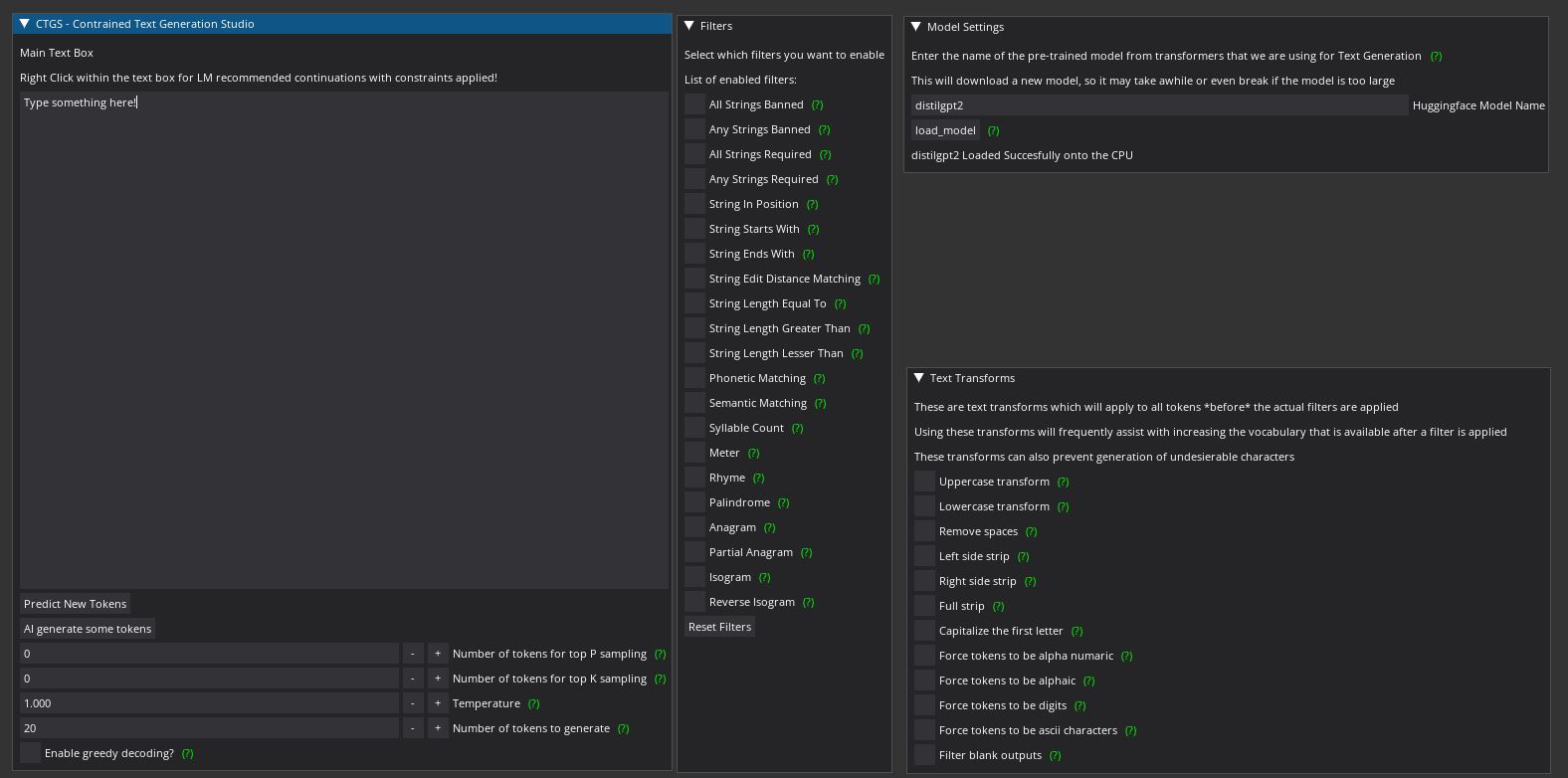
Table of Contents
Introduction
Constrained Text Generation Studio (CTGS) is an AI writing assistant for recreational linguists, poets, creative writers, and researchers to use and study the ability of large language models to generate constrained text.
CTGS allows users to generate or choose from text with any combination of a wide variety of constraints, such as banning a particular letter, forcing generated words to have a certain number of syllables, and/or forcing words to be partial anagrams of another word. A partial list of these sorts of constraints can be found here.
How It Works
At each generation step, a language model samples from a probability distribution over its entire vocabulary. CTGS filters or penalizes tokens that violate the chosen constraints before the sampling step. This has two advantages over fine-tuning:
- The model will never violate the imposed constraint (when using hard filtering), which is impossible to guarantee with fine-tuning alone.
- On constrained writing datasets, this technique results in strictly superior perplexity over fine-tuning alone.
Progressive Relaxation & Backtracking
Previous versions of CTGS suffered from a fundamental problem: when constraints were too strict, they would filter out all tokens from the top-k/top-p candidate pool, leaving the model with nothing to say. This vocabulary crippling problem has been solved with three mechanisms:
- Progressive Relaxation: When constraints filter out all candidates at the current top-k/top-p level, CTGS automatically expands the candidate pool (doubling k, loosening p) up to the full vocabulary. This ensures tokens are always available if any exist.
- Soft Constraints: Instead of hard pass/fail filtering, the Constraint Strength slider allows penalty-based constraints. At strength < 1.0, tokens that violate constraints receive reduced probability rather than being banned entirely. This preserves model coherence while nudging toward constraint satisfaction.
- Backtracking: During multi-token generation, if the model hits a dead end (no valid tokens), it backtracks to a previous decision point and tries an alternative token. This prevents generation from stalling.
Paper
CTGS, along with its datasets and a HuggingFace Space called Gadsby, are presented in the paper "Most Language Models can be Poets too: An AI Writing Assistant and Constrained Text Generation Studio", appearing at The Second Workshop on When Creative AI Meets Conversational AI (CAI2), jointly held at COLING 2022.
Features
CTGS consists of 4 main components: the model, the constraint engine, the filters, and the text transforms.
HuggingFace Integration
CTGS supports any causal language model available on HuggingFace, with support for 32-bit, 16-bit, and 8-bit precision loading.
Constraint Engine
The constraint engine provides three settings that control how constraints interact with the language model:
- Constraint Strength (0.0 - 1.0): At 1.0, constraints are hard filters (tokens pass or fail). Below 1.0, tokens that fail constraints receive a probability penalty instead of being removed. This prevents vocabulary crippling while still guiding generation toward constraint satisfaction.
- Progressive Relaxation: When enabled, automatically expands the top-k/top-p candidate pool if too few tokens survive constraint filtering. Tries progressively larger pools before falling back to the full vocabulary.
- Max Backtracks: During multi-token generation, the number of times the system will backtrack to try alternative tokens when hitting dead ends.
Filters
CTGS has 21 constraint filters organized into 4 categories. Any combination can be applied simultaneously:
Lexical Constraints
- All Strings Banned (Lipogram) - Avoid particular letters or strings
- Any Strings Banned (Weak Lipogram) - Avoid at least one of the specified letters/strings
- All Strings Required (Reverse Lipogram) - Force particular letters or strings to appear
- Any Strings Required (Weak Reverse Lipogram) - Force at least one of the specified strings
- String In Position - Force particular characters at specific positions
- String Starts With - Guarantee tokens start with a particular prefix
- String Ends With - Guarantee tokens end with a particular suffix
- String Length Equal To - Exact length constraint
- String Length Greater Than - Minimum length constraint
- String Length Less Than - Maximum length constraint
Phonetic Constraints
- Phonetic Matching - Match tokens phonetically using the Metaphone algorithm
- Syllable Count - Require a specific number of syllables
- Meter - Match the stress pattern (meter) of a given word
- Rhyme - Return tokens that rhyme with a given word
Semantic Constraints
- Semantic Matching - Find tokens semantically similar using FastText word vectors
- String Edit Distance - Find tokens within a Levenshtein distance threshold
Structural Constraints
- Palindrome - Tokens must read the same forwards and backwards
- Anagram - Tokens must be exact anagrams of a given string
- Partial Anagram - Tokens must be constructible from letters of a given string
- Isogram - No character may appear more than N times
- Reverse Isogram - Every character must appear at least N times
Text Transforms
Text transforms are applied to tokens before constraint filtering. They increase the vocabulary that survives filtering:
- Uppercase / Lowercase / Capitalize first letter
- Remove spaces / Left strip / Right strip / Full strip
- Alphanumeric only / Alphabetic only / Digits only / ASCII only
- Filter blank outputs
Install Instructions
Requirements
- Python 3.10+
- CUDA-capable GPU recommended (CPU works but is slower)
Setup (uv - recommended)
git clone https://github.com/Hellisotherpeople/Constrained-Text-Generation-Studio.git
cd Constrained-Text-Generation-Studio
uv sync
uv run python Constrained-Text-Generation-Studio.py
Setup (pip)
git clone https://github.com/Hellisotherpeople/Constrained-Text-Generation-Studio.git
cd Constrained-Text-Generation-Studio
pip install -r requirements.txt
python Constrained-Text-Generation-Studio.py
The first run will download the default model (EleutherAI/pythia-1b) and FastText embeddings from HuggingFace. This may take several minutes depending on your internet connection.
Usage Instructions
Getting Started
-
Wait for model loading - Check the Model Settings window for loading status. The status text will confirm when the model is ready.
-
Type or paste text into the main text box.
-
Press F1 (or click "Predict New Tokens") to generate constraint-aware suggestions. Right-click in the text box to see them.
-
Press F2 (or click "Generate Tokens") to auto-insert tokens directly.
Keyboard Shortcuts
| Key | Action |
|---|---|
| F1 | Predict new token candidates (populates right-click menu) |
| F2 | Insert a single token directly into the text |
Working with Constraints
- Open the Filters window and select a tab (Lexical, Phonetic, Semantic, or Structural).
- Check the checkbox for a constraint to expand its options.
- Configure the constraint parameters and click Apply.
- Multiple constraints can be combined simultaneously.
- Use Reset All Filters to clear all active constraints.
Tips for Best Results
- Start with Text Transforms: Enable "Full strip" and "Filter blanks" to normalize tokens before filtering. This dramatically increases the vocabulary that survives constraints.
- Use Soft Constraints first: Set Constraint Strength to 0.5-0.8 initially. This guides the model toward constraints without eliminating too many tokens. Increase to 1.0 once you're happy with the constraint setup.
- Progressive Relaxation: Keep this enabled (default) to prevent dead ends when constraints are strict.
- Small models respond faster: Try
distilgpt2orEleutherAI/pythia-160mfor rapid iteration, then switch to larger models for quality.
Loading Different Models
Enter any HuggingFace causal language model name in the Model Settings window and click "Load Model". Popular options:
distilgpt2- Fast, small (good for testing)EleutherAI/pythia-160m- Small but capableEleutherAI/pythia-1b- Default, good balanceEleutherAI/pythia-2.8b- Higher quality (needs more RAM/VRAM)meta-llama/Llama-2-7b-hf- High quality (needs GPU + HF access token)
Use 16-bit or 8-bit precision for larger models to reduce memory usage.
Architecture
CTGS is built with:
- DearPyGUI - Desktop GUI framework with docking support
- HuggingFace Transformers - Language model loading and inference
- FastText - Word vectors for semantic matching
- pronouncing - CMU Pronouncing Dictionary for rhyme, meter, and syllable constraints
- pyphonetics - Metaphone algorithm for phonetic matching
- python-Levenshtein - Edit distance computation
The application uses a tiling window layout with docking enabled - windows can be rearranged and docked to your preference. Hover over green (?) icons throughout the interface for contextual help.
Contributors

32 commits
Similar repos



Languages
Python
100.0%
Code repo for "Most Language Models can be Poets too: An AI Writing Assistant and Constrained Text Generation Studio" at the (CAI2) workshop, jointly held at (COLING 2022)
Python
217
32 commits
updated Apr 11, 2026
README
Constrained Text Generation Studio (CTGS)
Table of Contents
Introduction
Constrained Text Generation Studio (CTGS) is an AI writing assistant for recreational linguists, poets, creative writers, and researchers to use and study the ability of large language models to generate constrained text.
CTGS allows users to generate or choose from text with any combination of a wide variety of constraints, such as banning a particular letter, forcing generated words to have a certain number of syllables, and/or forcing words to be partial anagrams of another word. A partial list of these sorts of constraints can be found here.
How It Works
At each generation step, a language model samples from a probability distribution over its entire vocabulary. CTGS filters or penalizes tokens that violate the chosen constraints before the sampling step. This has two advantages over fine-tuning:
- The model will never violate the imposed constraint (when using hard filtering), which is impossible to guarantee with fine-tuning alone.
- On constrained writing datasets, this technique results in strictly superior perplexity over fine-tuning alone.
Progressive Relaxation & Backtracking
Previous versions of CTGS suffered from a fundamental problem: when constraints were too strict, they would filter out all tokens from the top-k/top-p candidate pool, leaving the model with nothing to say. This vocabulary crippling problem has been solved with three mechanisms:
- Progressive Relaxation: When constraints filter out all candidates at the current top-k/top-p level, CTGS automatically expands the candidate pool (doubling k, loosening p) up to the full vocabulary. This ensures tokens are always available if any exist.
- Soft Constraints: Instead of hard pass/fail filtering, the Constraint Strength slider allows penalty-based constraints. At strength < 1.0, tokens that violate constraints receive reduced probability rather than being banned entirely. This preserves model coherence while nudging toward constraint satisfaction.
- Backtracking: During multi-token generation, if the model hits a dead end (no valid tokens), it backtracks to a previous decision point and tries an alternative token. This prevents generation from stalling.
Paper
CTGS, along with its datasets and a HuggingFace Space called Gadsby, are presented in the paper "Most Language Models can be Poets too: An AI Writing Assistant and Constrained Text Generation Studio", appearing at The Second Workshop on When Creative AI Meets Conversational AI (CAI2), jointly held at COLING 2022.
Features
CTGS consists of 4 main components: the model, the constraint engine, the filters, and the text transforms.
HuggingFace Integration
CTGS supports any causal language model available on HuggingFace, with support for 32-bit, 16-bit, and 8-bit precision loading.
Constraint Engine
The constraint engine provides three settings that control how constraints interact with the language model:
- Constraint Strength (0.0 - 1.0): At 1.0, constraints are hard filters (tokens pass or fail). Below 1.0, tokens that fail constraints receive a probability penalty instead of being removed. This prevents vocabulary crippling while still guiding generation toward constraint satisfaction.
- Progressive Relaxation: When enabled, automatically expands the top-k/top-p candidate pool if too few tokens survive constraint filtering. Tries progressively larger pools before falling back to the full vocabulary.
- Max Backtracks: During multi-token generation, the number of times the system will backtrack to try alternative tokens when hitting dead ends.
Filters
CTGS has 21 constraint filters organized into 4 categories. Any combination can be applied simultaneously:
Lexical Constraints
- All Strings Banned (Lipogram) - Avoid particular letters or strings
- Any Strings Banned (Weak Lipogram) - Avoid at least one of the specified letters/strings
- All Strings Required (Reverse Lipogram) - Force particular letters or strings to appear
- Any Strings Required (Weak Reverse Lipogram) - Force at least one of the specified strings
- String In Position - Force particular characters at specific positions
- String Starts With - Guarantee tokens start with a particular prefix
- String Ends With - Guarantee tokens end with a particular suffix
- String Length Equal To - Exact length constraint
- String Length Greater Than - Minimum length constraint
- String Length Less Than - Maximum length constraint
Phonetic Constraints
- Phonetic Matching - Match tokens phonetically using the Metaphone algorithm
- Syllable Count - Require a specific number of syllables
- Meter - Match the stress pattern (meter) of a given word
- Rhyme - Return tokens that rhyme with a given word
Semantic Constraints
- Semantic Matching - Find tokens semantically similar using FastText word vectors
- String Edit Distance - Find tokens within a Levenshtein distance threshold
Structural Constraints
- Palindrome - Tokens must read the same forwards and backwards
- Anagram - Tokens must be exact anagrams of a given string
- Partial Anagram - Tokens must be constructible from letters of a given string
- Isogram - No character may appear more than N times
- Reverse Isogram - Every character must appear at least N times
Text Transforms
Text transforms are applied to tokens before constraint filtering. They increase the vocabulary that survives filtering:
- Uppercase / Lowercase / Capitalize first letter
- Remove spaces / Left strip / Right strip / Full strip
- Alphanumeric only / Alphabetic only / Digits only / ASCII only
- Filter blank outputs
Install Instructions
Requirements
- Python 3.10+
- CUDA-capable GPU recommended (CPU works but is slower)
Setup (uv - recommended)
git clone https://github.com/Hellisotherpeople/Constrained-Text-Generation-Studio.git
cd Constrained-Text-Generation-Studio
uv sync
uv run python Constrained-Text-Generation-Studio.py
Setup (pip)
git clone https://github.com/Hellisotherpeople/Constrained-Text-Generation-Studio.git
cd Constrained-Text-Generation-Studio
pip install -r requirements.txt
python Constrained-Text-Generation-Studio.py
The first run will download the default model (EleutherAI/pythia-1b) and FastText embeddings from HuggingFace. This may take several minutes depending on your internet connection.
Usage Instructions
Getting Started
-
Wait for model loading - Check the Model Settings window for loading status. The status text will confirm when the model is ready.
-
Type or paste text into the main text box.
-
Press F1 (or click "Predict New Tokens") to generate constraint-aware suggestions. Right-click in the text box to see them.
-
Press F2 (or click "Generate Tokens") to auto-insert tokens directly.
Keyboard Shortcuts
| Key | Action |
|---|---|
| F1 | Predict new token candidates (populates right-click menu) |
| F2 | Insert a single token directly into the text |
Working with Constraints
- Open the Filters window and select a tab (Lexical, Phonetic, Semantic, or Structural).
- Check the checkbox for a constraint to expand its options.
- Configure the constraint parameters and click Apply.
- Multiple constraints can be combined simultaneously.
- Use Reset All Filters to clear all active constraints.
Tips for Best Results
- Start with Text Transforms: Enable "Full strip" and "Filter blanks" to normalize tokens before filtering. This dramatically increases the vocabulary that survives constraints.
- Use Soft Constraints first: Set Constraint Strength to 0.5-0.8 initially. This guides the model toward constraints without eliminating too many tokens. Increase to 1.0 once you're happy with the constraint setup.
- Progressive Relaxation: Keep this enabled (default) to prevent dead ends when constraints are strict.
- Small models respond faster: Try
distilgpt2orEleutherAI/pythia-160mfor rapid iteration, then switch to larger models for quality.
Loading Different Models
Enter any HuggingFace causal language model name in the Model Settings window and click "Load Model". Popular options:
distilgpt2- Fast, small (good for testing)EleutherAI/pythia-160m- Small but capableEleutherAI/pythia-1b- Default, good balanceEleutherAI/pythia-2.8b- Higher quality (needs more RAM/VRAM)meta-llama/Llama-2-7b-hf- High quality (needs GPU + HF access token)
Use 16-bit or 8-bit precision for larger models to reduce memory usage.
Architecture
CTGS is built with:
- DearPyGUI - Desktop GUI framework with docking support
- HuggingFace Transformers - Language model loading and inference
- FastText - Word vectors for semantic matching
- pronouncing - CMU Pronouncing Dictionary for rhyme, meter, and syllable constraints
- pyphonetics - Metaphone algorithm for phonetic matching
- python-Levenshtein - Edit distance computation
The application uses a tiling window layout with docking enabled - windows can be rearranged and docked to your preference. Hover over green (?) icons throughout the interface for contextual help.
Similar repos
Contributors
32 commits
Languages
Python
100.0%