
Privacy-first, agentic coding CLI for local LLMs. No telemetry, no outbound network by default, encrypted sessions.
Python
2
334 commits
updated Sep 30, 2026
See what people are saying
README
CoBirb 🦜





A privacy-first, agentic coding CLI for local LLMs and your eyes only.
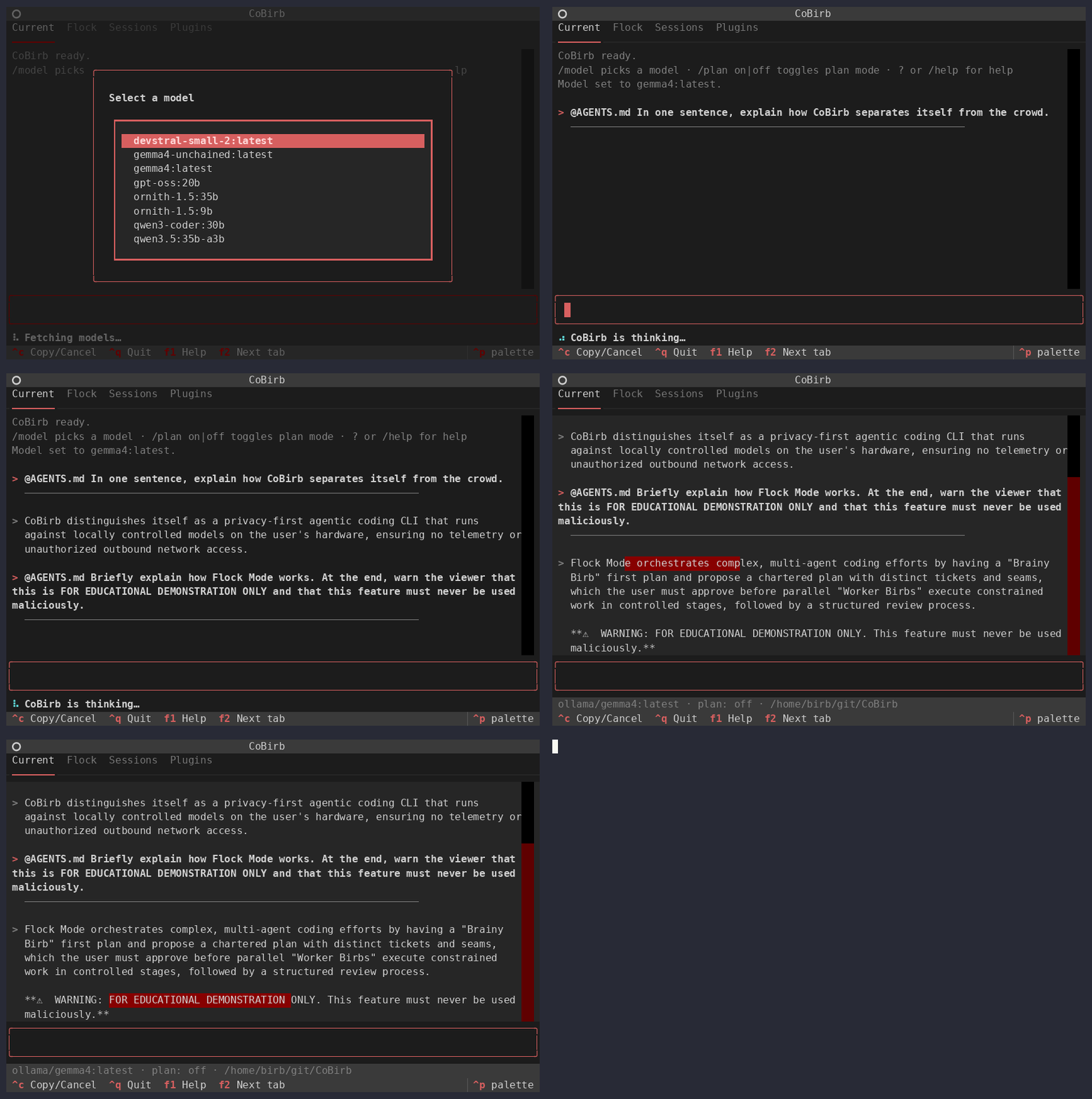
Flock demo Coming Soon. ™
Privacy-first by design.
- 🔒 No telemetry. No analytics. No pings. No little birbs singing (except for you).
- 🔒 No outbound network by default. Models are yours to configure.
- 🔒 Sessions are encrypted at rest (AES-256-GCM, keyed via scrypt).
- 🔒 Credentials are stripped from tool output before the model, the session or the
audit log ever see them - private keys,
AKIA…,ghp_…,sk-…and friends. - 🔒 Shell commands run in a sandbox (bubblewrap): no network, nothing writable outside your
project, and credential directories like
~/.sshhidden. Contained commands run without asking; anything the sandbox cannot contain is put to you first. - 🔒 Nothing else is pre-approved by default - but can be, for convenience and control.
- ↩️ Every turn is checkpointed whole:
/undotakes back what the agent changed, shell commands included, and/diffshows it - without touching your git history. - 🧭 Auto-pilot (
/autopilot) for long jobs: works unattended inside the project and the sandbox, refuses anything else instead of waiting on a dialog. - 🔌 Works with Ollama, llama.cpp, LM Studio and vLLM -
cobirb setuppoints it at yours. - 🔒 Your model's own
SYSTEMprompt is left alone, broken or not. - 🔒 Encrypted coding sessions on demand (sessions disabled by default).
- 🦜 "Flock" mode lets you use one model to distribute isolated workloads to worker agents; "broken" Brainy Birbs tell expert Worker Birbs what to do on need-to-know basis.
Quick start
Starting from nothing, on a machine with Ollama installed:
ollama pull qwen2.5-coder:14b     # or any other model you want to use, CoBirb doesn't judge

curl -fsSL https://github.com/HeckerBirb/CoBirb/releases/latest/download/install.sh | bash

# Point it at your model server and pick a model (Ollama, llama.cpp, LM Studio, vLLM).
cobirb setup

# Interactive: the full-screen app.
cobirb
That builds a virtualenv in ~/.local/share/cobirb, installs a checksum-verified release into
it, and puts cobirb on your PATH at ~/.local/bin/cobirb. No sudo, no pipx, nothing
outside your home directory, and nothing to activate before you can use it. Python 3.11+ is the
only prerequisite.
Piping a script into a shell is a reasonable thing to be suspicious of — it is
install.sh in this repository, and reading it first is the better
habit:
curl -fsSL https://github.com/HeckerBirb/CoBirb/releases/latest/download/install.sh -o install.sh
less install.sh
sh install.sh
Everything else:
# One-shot with specific model
COBIRB_MODEL_NAME="ornith-1.5:9b" cobirb -p "list the files in this directory" --allow-tool=list_dir

# One-shot with default model(s)
cobirb -p "check if the pytests pass" --headless --output json \
  --allow-tool='shell(python -m pytest)'

# Encrypted session enabled and password protected
cobirb -w hunter2
cobirb -w
cobirb --session ~/.cobirb/sessions/session-20260912-185817.json -w

# Upgrade CoBirb to the latest version
cobirb --upgrade

# Read more in the help text
cobirb --help
Looking for a config to start from instead of an empty one? See examples/.
Updating, pinning, and removing
cobirb --upgrade                    # move to the latest release
cobirb --upgrade v0.13.0            # move to a particular one
cobirb --upgrade v0.13.0 --force    # ...including backwards
--upgrade re-runs the installer that put CoBirb there, with a different version. Upgrading and
downgrading are therefore the same operation, and the only difference is that going backwards
refuses to happen unless --force says out loud that it should.
Install a specific release in the first place by passing the same flag through the pipe:
curl -fsSL https://github.com/HeckerBirb/CoBirb/releases/latest/download/install.sh \
  | bash -s -- --version v0.13.0
Removing it again:
curl -fsSL https://github.com/HeckerBirb/CoBirb/releases/latest/download/install.sh \
  | bash -s -- --uninstall
That takes out the virtualenv and the cobirb symlink. It does not touch ~/.cobirb/ —
your config, your sessions and your memory catalogues are yours, and they outlive any install.
--upgrade is the one CoBirb command that talks to a network by default — allowed because you
just typed it, the same reasoning cobirb plugin install already relies on to run a plugin's own
code.
Installing from source
For working on CoBirb itself, clone it and install it editable, so a source change needs nothing further to take effect:
git clone https://github.com/HeckerBirb/CoBirb && cd CoBirb

pipx install --editable .           # a `cobirb` on PATH, deps isolated, no venv to activate
# ...or, if you want the test suite in the same environment:
python3 -m venv .venv && source .venv/bin/activate
pip install -e ".[dev]"
Only a source change is picked up automatically. A pyproject.toml change (a new dependency,
a changed entry point, a version bump) needs the install command run again: that is metadata pip
snapshots once at install time, not something it reads fresh off the source on every run. It's
cheap and idempotent, so re-running it after a git pull when you're unsure never hurts.
cobirb --upgrade works here too, and does the equivalent thing for a clone — fetches, moves the
checkout onto the tag, reinstalls. It fast-forwards the branch you are on rather than detaching
HEAD, and refuses outright if you have uncommitted changes rather than guessing what to do with
them.
See CONTRIBUTING.md before sending a patch.
Configuration
Copy config.json.example to ~/.cobirb/config.json and edit it. See
cobirb help config for what each key does.
This is enough to get started with Ollama (localhost:11434), default SYSTEM prompts
and separate Flock-mode models:
{
  "models": {
    "default": {
      "name": "gemma4:latest",
      "base_url": "http://localhost:11434"
    },
    "orchestrator": {
      "name": "gemma4-free-as-in-liberty:latest"
    },
    "worker": {
      "name": "ornith-1.5:9b"
    }
  },

  "system_prompt": "off",
  "plugins": {
    "model": "core-model",
    "io": "core-io",
    "crypto": "core-crypto"
  }
}
More examples can be found in the examples/ dir.
Disclaimer: what CoBirb does not protect you from
Being straight about the edges, since the rest of this page makes strong claims:
- Your model server is a separate program you didn't write. CoBirb's guarantees end at
the socket. Ollama binds an unauthenticated local port — any process running as you can
read what you send it or issue its own requests — fetches weights from a registry, and
makes outbound requests on its own schedule. None of that is malicious; all of it is trust
rather than enforcement.
llama-server, LM Studio and vLLM have the same shape. CoBirb will not close this itself — it is a client of your model server's HTTP API and deliberately does not run models (an embedded GGUF runtime was considered and dropped). Where inference happens is yours to choose, including an endpoint you wrote. If the endpoint's trustworthiness matters to you, that is a property to fix in the endpoint, and it is fixable —llama-serverwill bind a Unix socket instead of a port (--host /path/to.sock), which removes the port any local process can reach. - Without bubblewrap, an approved shell command runs with your full user privileges.
With it (
bwrapinstalled), every command runs in a sandbox: no network, the filesystem read-only except your project and a private/tmp, and credential directories such as~/.sshand~/.awshidden. A command the model explicitly asks to run outside the sandbox is always put to you first.cobirb doctorsays which applies on your machine. - Without git installed,
/undodoes not cover what a shell command did. With git (the common case), every turn is snapshotted whole — in a private store CoBirb deletes when the session ends, never in your repository — and/undoputs back anything the last turn changed, shell included. Without git, only files changed throughwrite_file,edit_fileorapply_patchcan be put back. Either way, undo is for the last few turns, not a backup: keep your work in version control as well. - Context is finite. Long sessions are compacted to fit the model's window (see
/context); old tool results are summarised away first, and a large file is read a range at a time rather than whole. Nothing is lost from your session file, only from what the model is shown at once. - Installing a plugin runs that plugin's code.
cobirb plugin installhands the directory topip, and pip executes the package's own build backend — so the install is arbitrary code execution at your privileges, before CoBirb has looked at a single class and before any permission prompt exists to ask you about it. No prompt can cover this; it is what installing any Python package means. A plugin is code you chose to run, and choosing it is the security decision. Afterwards its tools are gated like any others; the install itself is not. - An MCP server you configure is a program you chose to run. CoBirb's "no telemetry, no
outbound network" promises are about CoBirb. A configured server can open its own network
connections and send the arguments of every call it receives — file paths, code, queries —
anywhere it likes, and nothing in CoBirb detects or prevents that. Two defaults reduce the
blast radius: a server does not inherit your environment (no cloud credentials, no API
tokens for unrelated services), and its tools are pre-approved by nothing. Read
cobirb help mcpbefore adding one; it also has a worked example of writing your own offline server, which is the case worth building for.
Documentation
- docs/ — the user manual, short how-to pages from installing to the Flock
and Remote Worker Birbs. Every page is also
cobirb help <page>in the terminal. - docs/architecture/ — how each part works, from the agent loop and the security design to the plugin SPI and the Flock.
- examples/ — configurations to start from, each focused on one combination of settings.
- CHANGELOG.md — release history.
License
MIT — see LICENSE.
Similar repos


Privacy-first, agentic coding CLI for local LLMs. No telemetry, no outbound network by default, encrypted sessions.
Python
2
334 commits
updated Sep 30, 2026
See what people are saying
README
CoBirb 🦜
A privacy-first, agentic coding CLI for local LLMs and your eyes only.
Flock demo Coming Soon. ™
Privacy-first by design.
- 🔒 No telemetry. No analytics. No pings. No little birbs singing (except for you).
- 🔒 No outbound network by default. Models are yours to configure.
- 🔒 Sessions are encrypted at rest (AES-256-GCM, keyed via scrypt).
- 🔒 Credentials are stripped from tool output before the model, the session or the
audit log ever see them - private keys,
AKIA…,ghp_…,sk-…and friends. - 🔒 Shell commands run in a sandbox (bubblewrap): no network, nothing writable outside your
project, and credential directories like
~/.sshhidden. Contained commands run without asking; anything the sandbox cannot contain is put to you first. - 🔒 Nothing else is pre-approved by default - but can be, for convenience and control.
- ↩️ Every turn is checkpointed whole:
/undotakes back what the agent changed, shell commands included, and/diffshows it - without touching your git history. - 🧭 Auto-pilot (
/autopilot) for long jobs: works unattended inside the project and the sandbox, refuses anything else instead of waiting on a dialog. - 🔌 Works with Ollama, llama.cpp, LM Studio and vLLM -
cobirb setuppoints it at yours. - 🔒 Your model's own
SYSTEMprompt is left alone, broken or not. - 🔒 Encrypted coding sessions on demand (sessions disabled by default).
- 🦜 "Flock" mode lets you use one model to distribute isolated workloads to worker agents; "broken" Brainy Birbs tell expert Worker Birbs what to do on need-to-know basis.
Quick start
Starting from nothing, on a machine with Ollama installed:
ollama pull qwen2.5-coder:14b     # or any other model you want to use, CoBirb doesn't judge

curl -fsSL https://github.com/HeckerBirb/CoBirb/releases/latest/download/install.sh | bash

# Point it at your model server and pick a model (Ollama, llama.cpp, LM Studio, vLLM).
cobirb setup

# Interactive: the full-screen app.
cobirb
That builds a virtualenv in ~/.local/share/cobirb, installs a checksum-verified release into
it, and puts cobirb on your PATH at ~/.local/bin/cobirb. No sudo, no pipx, nothing
outside your home directory, and nothing to activate before you can use it. Python 3.11+ is the
only prerequisite.
Piping a script into a shell is a reasonable thing to be suspicious of — it is
install.sh in this repository, and reading it first is the better
habit:
curl -fsSL https://github.com/HeckerBirb/CoBirb/releases/latest/download/install.sh -o install.sh
less install.sh
sh install.sh
Everything else:
# One-shot with specific model
COBIRB_MODEL_NAME="ornith-1.5:9b" cobirb -p "list the files in this directory" --allow-tool=list_dir

# One-shot with default model(s)
cobirb -p "check if the pytests pass" --headless --output json \
  --allow-tool='shell(python -m pytest)'

# Encrypted session enabled and password protected
cobirb -w hunter2
cobirb -w
cobirb --session ~/.cobirb/sessions/session-20260912-185817.json -w

# Upgrade CoBirb to the latest version
cobirb --upgrade

# Read more in the help text
cobirb --help
Looking for a config to start from instead of an empty one? See examples/.
Updating, pinning, and removing
cobirb --upgrade                    # move to the latest release
cobirb --upgrade v0.13.0            # move to a particular one
cobirb --upgrade v0.13.0 --force    # ...including backwards
--upgrade re-runs the installer that put CoBirb there, with a different version. Upgrading and
downgrading are therefore the same operation, and the only difference is that going backwards
refuses to happen unless --force says out loud that it should.
Install a specific release in the first place by passing the same flag through the pipe:
curl -fsSL https://github.com/HeckerBirb/CoBirb/releases/latest/download/install.sh \
  | bash -s -- --version v0.13.0
Removing it again:
curl -fsSL https://github.com/HeckerBirb/CoBirb/releases/latest/download/install.sh \
  | bash -s -- --uninstall
That takes out the virtualenv and the cobirb symlink. It does not touch ~/.cobirb/ —
your config, your sessions and your memory catalogues are yours, and they outlive any install.
--upgrade is the one CoBirb command that talks to a network by default — allowed because you
just typed it, the same reasoning cobirb plugin install already relies on to run a plugin's own
code.
Installing from source
For working on CoBirb itself, clone it and install it editable, so a source change needs nothing further to take effect:
git clone https://github.com/HeckerBirb/CoBirb && cd CoBirb

pipx install --editable .           # a `cobirb` on PATH, deps isolated, no venv to activate
# ...or, if you want the test suite in the same environment:
python3 -m venv .venv && source .venv/bin/activate
pip install -e ".[dev]"
Only a source change is picked up automatically. A pyproject.toml change (a new dependency,
a changed entry point, a version bump) needs the install command run again: that is metadata pip
snapshots once at install time, not something it reads fresh off the source on every run. It's
cheap and idempotent, so re-running it after a git pull when you're unsure never hurts.
cobirb --upgrade works here too, and does the equivalent thing for a clone — fetches, moves the
checkout onto the tag, reinstalls. It fast-forwards the branch you are on rather than detaching
HEAD, and refuses outright if you have uncommitted changes rather than guessing what to do with
them.
See CONTRIBUTING.md before sending a patch.
Configuration
Copy config.json.example to ~/.cobirb/config.json and edit it. See
cobirb help config for what each key does.
This is enough to get started with Ollama (localhost:11434), default SYSTEM prompts
and separate Flock-mode models:
{
  "models": {
    "default": {
      "name": "gemma4:latest",
      "base_url": "http://localhost:11434"
    },
    "orchestrator": {
      "name": "gemma4-free-as-in-liberty:latest"
    },
    "worker": {
      "name": "ornith-1.5:9b"
    }
  },

  "system_prompt": "off",
  "plugins": {
    "model": "core-model",
    "io": "core-io",
    "crypto": "core-crypto"
  }
}
More examples can be found in the examples/ dir.
Disclaimer: what CoBirb does not protect you from
Being straight about the edges, since the rest of this page makes strong claims:
- Your model server is a separate program you didn't write. CoBirb's guarantees end at
the socket. Ollama binds an unauthenticated local port — any process running as you can
read what you send it or issue its own requests — fetches weights from a registry, and
makes outbound requests on its own schedule. None of that is malicious; all of it is trust
rather than enforcement.
llama-server, LM Studio and vLLM have the same shape. CoBirb will not close this itself — it is a client of your model server's HTTP API and deliberately does not run models (an embedded GGUF runtime was considered and dropped). Where inference happens is yours to choose, including an endpoint you wrote. If the endpoint's trustworthiness matters to you, that is a property to fix in the endpoint, and it is fixable —llama-serverwill bind a Unix socket instead of a port (--host /path/to.sock), which removes the port any local process can reach. - Without bubblewrap, an approved shell command runs with your full user privileges.
With it (
bwrapinstalled), every command runs in a sandbox: no network, the filesystem read-only except your project and a private/tmp, and credential directories such as~/.sshand~/.awshidden. A command the model explicitly asks to run outside the sandbox is always put to you first.cobirb doctorsays which applies on your machine. - Without git installed,
/undodoes not cover what a shell command did. With git (the common case), every turn is snapshotted whole — in a private store CoBirb deletes when the session ends, never in your repository — and/undoputs back anything the last turn changed, shell included. Without git, only files changed throughwrite_file,edit_fileorapply_patchcan be put back. Either way, undo is for the last few turns, not a backup: keep your work in version control as well. - Context is finite. Long sessions are compacted to fit the model's window (see
/context); old tool results are summarised away first, and a large file is read a range at a time rather than whole. Nothing is lost from your session file, only from what the model is shown at once. - Installing a plugin runs that plugin's code.
cobirb plugin installhands the directory topip, and pip executes the package's own build backend — so the install is arbitrary code execution at your privileges, before CoBirb has looked at a single class and before any permission prompt exists to ask you about it. No prompt can cover this; it is what installing any Python package means. A plugin is code you chose to run, and choosing it is the security decision. Afterwards its tools are gated like any others; the install itself is not. - An MCP server you configure is a program you chose to run. CoBirb's "no telemetry, no
outbound network" promises are about CoBirb. A configured server can open its own network
connections and send the arguments of every call it receives — file paths, code, queries —
anywhere it likes, and nothing in CoBirb detects or prevents that. Two defaults reduce the
blast radius: a server does not inherit your environment (no cloud credentials, no API
tokens for unrelated services), and its tools are pre-approved by nothing. Read
cobirb help mcpbefore adding one; it also has a worked example of writing your own offline server, which is the case worth building for.
Documentation
- docs/ — the user manual, short how-to pages from installing to the Flock
and Remote Worker Birbs. Every page is also
cobirb help <page>in the terminal. - docs/architecture/ — how each part works, from the agent loop and the security design to the plugin SPI and the Flock.
- examples/ — configurations to start from, each focused on one combination of settings.
- CHANGELOG.md — release history.
License
MIT — see LICENSE.