📱 Open-source multi-device responsive review and QA workspace for Chrome & Chromium browsers. Persistent previews, zero-reload geometry, and optional local MCP bridge.
See the code

Open-source multi-device responsive review and QA workspace for Chrome & Chromium browsers.
Keep real websites alive inside multiple viewports with zero-reload geometry changes, deterministic QA audits, and an optional local MCP bridge for AI agents.






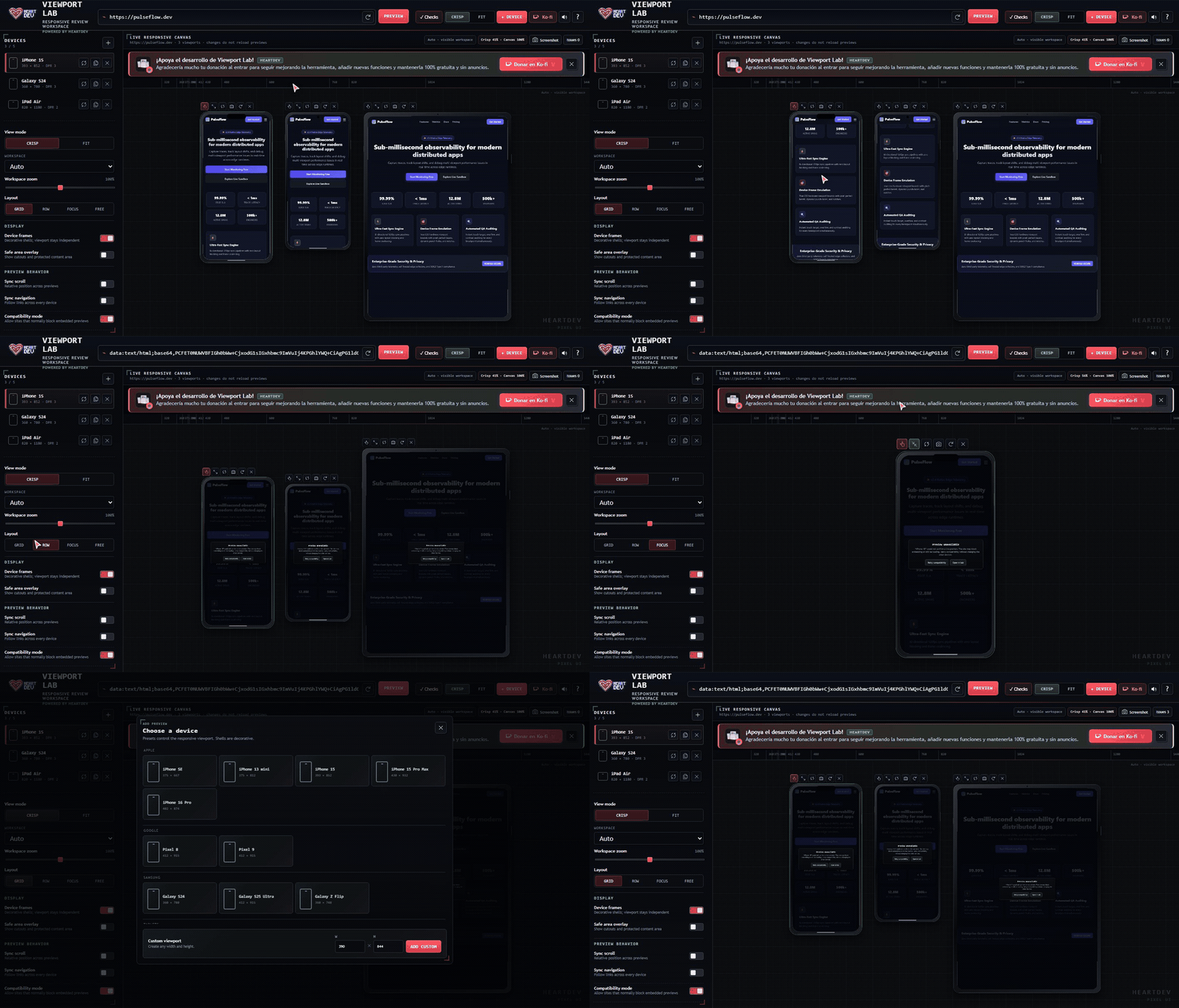
Interactive demonstration: Multi-device sync scroll, Row & Focus layouts, hot zero-reload rotation, device presets, and deterministic QA checks. (Download MP4 Video)
localhost, LAN IPs (192.168.x.x, 10.x.x.x), and dev domains (.local, .test) without forcing HTTPS, plus auto-saved recent URL history.alt attributes, and unlabelled form controls — no AI hallucinations, purely deterministic.@media (min-width / max-width) breakpoint.X-Frame-Options and frame-ancestors CSP headers on preview subframes using Manifest V3 declarativeNetRequest session rules — without compromising top-level browser security.requestAnimationFrame throttled scroll synchronization, echo suppression, and trailing alignment.chrome.storage.local.127.0.0.1.Explore Viewport Lab's workflow, layout modes, inspection tools, and developer utilities in action:
| Multi-Device Responsive Workspace | Focus Mode (1:1 Sharp Single View) |
|---|---|
 Real-time multi-viewport canvas with Apple, Android & Laptop frames |  Pixel-perfect 1:1 view with quick rotation, shell switching, and inspect tools |
| Row Layout Comparison | Device Presets Dialog |
|---|---|
 Synchronized horizontal stack with unified scroll & navigation lockstep |  Curated Apple, Google, Samsung, Tablets, Desktops, and custom viewports |
| Automated Responsive QA Checks | Onboarding & Guided Tour |
|---|---|
 Deterministic detection of touch target flaws, layout overflows & missing alts |  Interactive step-by-step introduction for first-time developers |
| MCP AI Agent Bridge | Responsive Sweep & Precision Sidebar |
|---|---|
 Model Context Protocol integration for Claude, Antigravity, and Cursor agents |  Scrub breakpoints from 240px to 1440px with live CSS media query pins |
Viewport Lab has no build step; it runs on standard browser web technologies.
git clone https://github.com/HeartDev0/viewport-lab.git
chrome://extensionsedge://extensionsviewport-lab-extension folder.http://localhost:5173) and click the Viewport Lab icon in your browser toolbar.Device shells (pill, notch, punch-hole, clean bezel, tablet) are purely decorative. The underlying iframe receives authentic CSS viewport dimensions. When you rotate or resize a device, CSS media queries trigger naturally without destroying JavaScript state or reloading the page.
Viewport Lab fits your screen without overflowing or introducing confusing double scrollbars. You can preview in:
Many production websites set X-Frame-Options: DENY or Content-Security-Policy: frame-ancestors 'self'.
Viewport Lab uses Manifest V3 declarativeNetRequest session rules:
tabId).| Shortcut | Action |
|---|---|
| + or = | Open Add Device dialog |
| R | Rotate selected device (portrait ↔ landscape) |
| Ctrl / Cmd + D | Duplicate selected device |
| Delete | Remove selected device |
| C | Switch to Crisp view (1:1 clarity) |
| F | Switch to Fit view (all devices visible) |
| 1 | Grid layout |
| 2 | Row layout |
| 3 | Focus layout (magnifies selected device) |
| 4 | Free layout (draggable viewports) |
| Alt + C | Run deterministic responsive checks |
| Ctrl / Cmd + R | Reload all active previews |
| Ctrl / Cmd + Wheel | Zoom workspace in / out |
Viewport Lab includes an optional Model Context Protocol (MCP) server under mcp/. This allows AI coding assistants (like Claude Desktop, Antigravity, or Cursor) to programmatically inspect responsive layouts, detect bugs, and run QA sweeps.
Open a terminal in the mcp/ directory and install dependencies:
cd mcp
npm install
Add the MCP server to your agent's configuration:
Claude Desktop (claude_desktop_config.json) / Antigravity (mcp.json):
{
  "mcpServers": {
    "viewport-lab": {
      "command": "node",
      "args": [
        "/absolute/path/to/viewport-lab-extension/mcp/server.mjs"
      ]
    }
  }
}
In Viewport Lab, expand the Integrations section in the left sidebar and enable Allow agent control.
viewport_status: Inspect current URL, devices, layout, and agent control state.viewport_open_url: Direct previews to an HTTP/HTTPS or localhost URL.viewport_select_device / viewport_add_device / viewport_remove_device: Manage viewports.viewport_set_device: Resize, rotate, or restyle devices on the fly without reloads.viewport_run_checks: Run deterministic responsive QA checks (overflow, touch targets, alt tags).viewport_inspect_page / viewport_inspect_element: Extract DOM bounds, landmarks, and computed styles.viewport_sweep: Run automated width sweeps across 320–1440px.viewport_screenshot: Capture full workspace or device PNGs for multimodal vision models.Security Note: The MCP bridge binds strictly to loopback (127.0.0.1:43117). Password fields are permanently blocked from agent input tools.
Run all regression checks and privacy audits with:
# Run all audits
npm test

# Run individual checks
npm run check          # Validates manifest, required files, and icon dimensions
npm run privacy-check  # Ensures zero telemetry, remote scripts, or non-loopback endpoints
npm run check:phase0   # Confirms zero-reload invariants and canvas containment
npm run check:phase1   # Verifies UI markers and design tokens
npm run check:focus    # Tests Focus mode scaling mathematics
Viewport Lab is completely free, open-source, and contains zero ads or telemetry. If this extension saves you time in your responsive design and testing workflow, consider supporting its development:
📱 Open-source multi-device responsive review and QA workspace for Chrome & Chromium browsers. Persistent previews, zero-reload geometry, and optional local MCP bridge.
See the code
Open-source multi-device responsive review and QA workspace for Chrome & Chromium browsers.
Keep real websites alive inside multiple viewports with zero-reload geometry changes, deterministic QA audits, and an optional local MCP bridge for AI agents.
Interactive demonstration: Multi-device sync scroll, Row & Focus layouts, hot zero-reload rotation, device presets, and deterministic QA checks. (Download MP4 Video)
localhost, LAN IPs (192.168.x.x, 10.x.x.x), and dev domains (.local, .test) without forcing HTTPS, plus auto-saved recent URL history.alt attributes, and unlabelled form controls — no AI hallucinations, purely deterministic.@media (min-width / max-width) breakpoint.X-Frame-Options and frame-ancestors CSP headers on preview subframes using Manifest V3 declarativeNetRequest session rules — without compromising top-level browser security.requestAnimationFrame throttled scroll synchronization, echo suppression, and trailing alignment.chrome.storage.local.127.0.0.1.Explore Viewport Lab's workflow, layout modes, inspection tools, and developer utilities in action:
| Multi-Device Responsive Workspace | Focus Mode (1:1 Sharp Single View) |
|---|---|
Real-time multi-viewport canvas with Apple, Android & Laptop frames | Pixel-perfect 1:1 view with quick rotation, shell switching, and inspect tools |
| Row Layout Comparison | Device Presets Dialog |
|---|---|
Synchronized horizontal stack with unified scroll & navigation lockstep | Curated Apple, Google, Samsung, Tablets, Desktops, and custom viewports |
| Automated Responsive QA Checks | Onboarding & Guided Tour |
|---|---|
Deterministic detection of touch target flaws, layout overflows & missing alts | Interactive step-by-step introduction for first-time developers |
| MCP AI Agent Bridge | Responsive Sweep & Precision Sidebar |
|---|---|
Model Context Protocol integration for Claude, Antigravity, and Cursor agents | Scrub breakpoints from 240px to 1440px with live CSS media query pins |
Viewport Lab has no build step; it runs on standard browser web technologies.
git clone https://github.com/HeartDev0/viewport-lab.git
chrome://extensionsedge://extensionsviewport-lab-extension folder.http://localhost:5173) and click the Viewport Lab icon in your browser toolbar.Device shells (pill, notch, punch-hole, clean bezel, tablet) are purely decorative. The underlying iframe receives authentic CSS viewport dimensions. When you rotate or resize a device, CSS media queries trigger naturally without destroying JavaScript state or reloading the page.
Viewport Lab fits your screen without overflowing or introducing confusing double scrollbars. You can preview in:
Many production websites set X-Frame-Options: DENY or Content-Security-Policy: frame-ancestors 'self'.
Viewport Lab uses Manifest V3 declarativeNetRequest session rules:
tabId).| Shortcut | Action |
|---|---|
| + or = | Open Add Device dialog |
| R | Rotate selected device (portrait ↔ landscape) |
| Ctrl / Cmd + D | Duplicate selected device |
| Delete | Remove selected device |
| C | Switch to Crisp view (1:1 clarity) |
| F | Switch to Fit view (all devices visible) |
| 1 | Grid layout |
| 2 | Row layout |
| 3 | Focus layout (magnifies selected device) |
| 4 | Free layout (draggable viewports) |
| Alt + C | Run deterministic responsive checks |
| Ctrl / Cmd + R | Reload all active previews |
| Ctrl / Cmd + Wheel | Zoom workspace in / out |
Viewport Lab includes an optional Model Context Protocol (MCP) server under mcp/. This allows AI coding assistants (like Claude Desktop, Antigravity, or Cursor) to programmatically inspect responsive layouts, detect bugs, and run QA sweeps.
Open a terminal in the mcp/ directory and install dependencies:
cd mcp
npm install
Add the MCP server to your agent's configuration:
Claude Desktop (claude_desktop_config.json) / Antigravity (mcp.json):
{
  "mcpServers": {
    "viewport-lab": {
      "command": "node",
      "args": [
        "/absolute/path/to/viewport-lab-extension/mcp/server.mjs"
      ]
    }
  }
}
In Viewport Lab, expand the Integrations section in the left sidebar and enable Allow agent control.
viewport_status: Inspect current URL, devices, layout, and agent control state.viewport_open_url: Direct previews to an HTTP/HTTPS or localhost URL.viewport_select_device / viewport_add_device / viewport_remove_device: Manage viewports.viewport_set_device: Resize, rotate, or restyle devices on the fly without reloads.viewport_run_checks: Run deterministic responsive QA checks (overflow, touch targets, alt tags).viewport_inspect_page / viewport_inspect_element: Extract DOM bounds, landmarks, and computed styles.viewport_sweep: Run automated width sweeps across 320–1440px.viewport_screenshot: Capture full workspace or device PNGs for multimodal vision models.Security Note: The MCP bridge binds strictly to loopback (127.0.0.1:43117). Password fields are permanently blocked from agent input tools.
Run all regression checks and privacy audits with:
# Run all audits
npm test

# Run individual checks
npm run check          # Validates manifest, required files, and icon dimensions
npm run privacy-check  # Ensures zero telemetry, remote scripts, or non-loopback endpoints
npm run check:phase0   # Confirms zero-reload invariants and canvas containment
npm run check:phase1   # Verifies UI markers and design tokens
npm run check:focus    # Tests Focus mode scaling mathematics
Viewport Lab is completely free, open-source, and contains zero ads or telemetry. If this extension saves you time in your responsive design and testing workflow, consider supporting its development:





