
Reads manga/comic panels aloud as you scroll, using on-page OCR and local neural text-to-speech. Never repeats a panel unless you ask it to.
0
stars
12
commits
JavaScript
primary language
Aug 22, 2026
updated
README
Haruki's Manga Voice Reader

A Chrome extension that reads manga and comic panels aloud as you browse — no pre-processed audiobooks, no site cooperation required. It watches what's on screen, recognizes the text in each panel with on-page OCR, and speaks it with a realistic local text-to-speech voice.
Capabilities
- On-page OCR — recognizes dialogue directly from screenshots of what's visible, using PaddleOCR with a comic-text-detector rescue pass for panels with unusual bubble layouts or dense art.
- Local neural TTS — reads lines aloud entirely on-device, with a choice of engine: Piper (fast, lightweight) or Kokoro (more realistic, larger); multiple voices for each, selectable in the popup.
- Consistent volume — every line is automatically loudness-normalized before playback, so switching voices (which can otherwise come out at very different volumes) doesn't mean re-adjusting your system volume.
- Reads only the manga — automatically ignores site chrome, ads, and synopsis/info-page text; only recognizes text that actually overlaps a manga image on the page.
- Read selected text — highlight any text (e.g. a synopsis) and press Read to have it spoken directly, no OCR involved.
- Autoscroll — glides down the page for you, pausing while each panel is read, so you can go hands-free.
- Never repeats — tracks what's already been read; scrolling back over a panel won't re-trigger it unless you ask it to.
- Reading order — right-to-left (manga) or left-to-right (comics/webtoons).
- Always-visible overlay — quick Read / Autoscroll / Pause controls on the page itself, no need to open the popup.
Settings
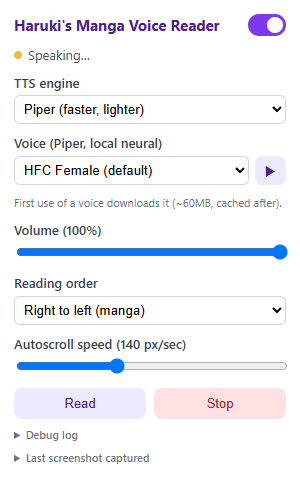
- Toggle (top-right) — turns the extension on/off for the current site.
- TTS engine — Piper (faster, lighter — a separate ~60MB model per voice, ~0.3-0.4s per line) or Kokoro (more realistic, one shared ~85MB model, but ~15-20x slower — benchmarked at ~6s per line).
- Voice — picks the specific voice used for reading, within whichever engine is selected above. The ▶ button next to it plays a short sample so you can hear a voice before committing to it.
- Volume — scales playback loudness (0-100%, default 100 — the level everything is already normalized to, see below).
- Reading order — right-to-left for manga, left-to-right for comics/webtoons; controls which panel/bubble gets read first.
- Autoscroll speed — how fast the page glides during Autoscroll.
- Read — starts (or restarts, if you've hit Stop) reading the currently visible panels.
- Stop — stops reading entirely for this tab.
- Debug log / Last screenshot captured — expandable panels for troubleshooting what the OCR pipeline actually saw.
Overlay controls

A small always-visible bar appears on the page itself so you don't need to open the popup:
- Status dot + text — shows idle / reading / speaking / error at a glance.
- Read — OCRs and reads the panels currently visible right now (or, if you've highlighted text on the page, reads that selection directly instead of OCR'ing anything).
- Autoscroll — glides the page down for you, pausing while each panel is read; click again (Stop Scroll) to stop.
- Pause — pauses reading in place; refresh the page to resume normally.
Installing (unpacked, for development/testing)
- Open
chrome://extensions - Enable Developer mode
- Click Load unpacked and select this repo's root folder
License
GPL-3.0 — see LICENSE.
Contributors

12 commits
Similar repos


Languages
JavaScript
99.6%
Reads manga/comic panels aloud as you scroll, using on-page OCR and local neural text-to-speech. Never repeats a panel unless you ask it to.
0
stars
12
commits
JavaScript
primary language
Aug 22, 2026
updated
README
Haruki's Manga Voice Reader
A Chrome extension that reads manga and comic panels aloud as you browse — no pre-processed audiobooks, no site cooperation required. It watches what's on screen, recognizes the text in each panel with on-page OCR, and speaks it with a realistic local text-to-speech voice.
Capabilities
- On-page OCR — recognizes dialogue directly from screenshots of what's visible, using PaddleOCR with a comic-text-detector rescue pass for panels with unusual bubble layouts or dense art.
- Local neural TTS — reads lines aloud entirely on-device, with a choice of engine: Piper (fast, lightweight) or Kokoro (more realistic, larger); multiple voices for each, selectable in the popup.
- Consistent volume — every line is automatically loudness-normalized before playback, so switching voices (which can otherwise come out at very different volumes) doesn't mean re-adjusting your system volume.
- Reads only the manga — automatically ignores site chrome, ads, and synopsis/info-page text; only recognizes text that actually overlaps a manga image on the page.
- Read selected text — highlight any text (e.g. a synopsis) and press Read to have it spoken directly, no OCR involved.
- Autoscroll — glides down the page for you, pausing while each panel is read, so you can go hands-free.
- Never repeats — tracks what's already been read; scrolling back over a panel won't re-trigger it unless you ask it to.
- Reading order — right-to-left (manga) or left-to-right (comics/webtoons).
- Always-visible overlay — quick Read / Autoscroll / Pause controls on the page itself, no need to open the popup.
Settings
- Toggle (top-right) — turns the extension on/off for the current site.
- TTS engine — Piper (faster, lighter — a separate ~60MB model per voice, ~0.3-0.4s per line) or Kokoro (more realistic, one shared ~85MB model, but ~15-20x slower — benchmarked at ~6s per line).
- Voice — picks the specific voice used for reading, within whichever engine is selected above. The ▶ button next to it plays a short sample so you can hear a voice before committing to it.
- Volume — scales playback loudness (0-100%, default 100 — the level everything is already normalized to, see below).
- Reading order — right-to-left for manga, left-to-right for comics/webtoons; controls which panel/bubble gets read first.
- Autoscroll speed — how fast the page glides during Autoscroll.
- Read — starts (or restarts, if you've hit Stop) reading the currently visible panels.
- Stop — stops reading entirely for this tab.
- Debug log / Last screenshot captured — expandable panels for troubleshooting what the OCR pipeline actually saw.
Overlay controls
A small always-visible bar appears on the page itself so you don't need to open the popup:
- Status dot + text — shows idle / reading / speaking / error at a glance.
- Read — OCRs and reads the panels currently visible right now (or, if you've highlighted text on the page, reads that selection directly instead of OCR'ing anything).
- Autoscroll — glides the page down for you, pausing while each panel is read; click again (Stop Scroll) to stop.
- Pause — pauses reading in place; refresh the page to resume normally.
Installing (unpacked, for development/testing)
- Open
chrome://extensions - Enable Developer mode
- Click Load unpacked and select this repo's root folder
License
GPL-3.0 — see LICENSE.
Similar repos
Contributors
12 commits
Languages
JavaScript
99.6%