
Adds a new backend for SwarmUI using stable-diffusion.cpp
C#
3
82 commits
updated Aug 22, 2026
README
SwarmUI StableDiffusion.cpp Backend
===========================================================================
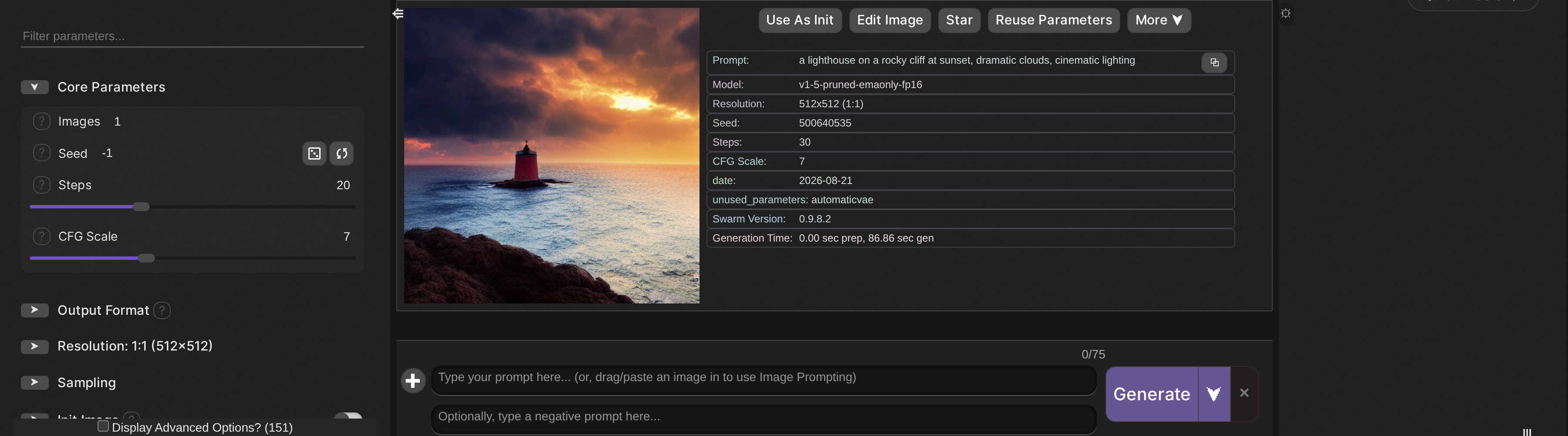
Table of Contents
- Introduction
- Features
- Quick Start
- Configuration
- Usage Tips
- Performance and Caching
- Troubleshooting
- Architecture Support
- Advanced Features
- Technical Architecture
- Performance Benchmarks
- Contributing
- License
- Credits
Introduction
This extension adds a SwarmUI backend powered by stable-diffusion.cpp. It runs image generation through an external SD.cpp executable (CPU/CUDA/Vulkan) and integrates the results into SwarmUI.
Features
Core capabilities
- Z-Image Models - Supports Z-Image Turbo with the required Qwen LLM text encoder.
- Flux Models - Full support for FLUX.1-dev, FLUX.1-schnell, and FLUX.2-dev with automatic component management.
- SD3/SD3.5 - Multi-component architecture support (CLIP-G, CLIP-L, T5-XXL) for SD3 family models.
- SDXL/SD1.5/SD2 - Compatible with the mainstream Stable Diffusion architectures.
- Newer image models - Ideogram4, Krea2, Lens, ERNIE-Image, SeFi-Image, Mage-Flow, Boogu, LongCat-Image, PiD, MiniT2I and HiDream-O1, with the encoders and VAEs each one needs.
- Video Generation - Wan 2.1/2.2, LTX-2.3, MiniMax-H3, HunyuanVideo 1.5 and LingBot-Video, covering text-to-video, image-to-video and first/last-frame modes. LTX-2.3 and MiniMax-H3 also decode the audio track they generate.
- Image editing - Kontext, Qwen-Image-Edit (including 2509/2511), Boogu Edit, Mage-Flow-Edit, LongCat Edit and PiD, using reference-image conditioning with the preset each model expects, and accepting several reference images at once.
- IP-Adapter and ADetailer - IP-Adapter reference conditioning for SD 1.5 and SDXL, plus an optional YOLOv8-driven detail repair pass.
- GGUF Format - Load quantized GGUF models in common precisions (Q2_K, Q4_K, Q8_0).
- LoRA Support - Automatic LoRA discovery from the Models/Lora directory.
- ControlNet (experimental) - Single ControlNet per job with detection of unsupported setups.
- Live Previews - TAESD previews update frequently during generation. TODO: This needs to be tested.
- Auto-Update - Automatically downloads SD.cpp binaries from GitHub releases when enabled.
Performance optimizations
TODO: This needs work. Currently generations are slow even on repeat runs.
- Inference Caching - cache-dit/ucache/easycache integration exists but is currently not delivering the expected speedups.
- Memory Mapping - The
--mmapoption speeds up model loading and reduces RAM usage. - VAE Convolution - Direct convolution (
--vae-conv-direct) accelerates decoding. - VAE Tiling - Breaks down VAE work into tiles to lower VRAM requirements.
- CPU Offloading - Move the VAE and CLIP encoders to CPU when GPU memory is constrained.
- Flash Attention - Optional attention path that saves memory at slight quality cost.
Platform support
- CUDA - NVIDIA GPUs using the installed CUDA toolkits (11.x, 12.x, or compatible 13.x drivers).
- CPU - AVX/AVX2-compatible fallback.
- Vulkan - Experimental GPU acceleration path that can work on non-NVIDIA hardware (limited Flux support).
Quick Start
Installation
This extension is installed like any other SwarmUI extension.
Preferred Method (Via SwarmUI)
- Open your SwarmUI instance.
- Navigate to
Server → Extensions. - Find "SD.cpp Backend".
- Click Install.
- Restart SwarmUI when prompted (extensions require a rebuild/restart to load).
Once installed it shows up in the installed-extensions table, where you can update, disable, or uninstall it:

Manual Installation
- Close SwarmUI.
- Clone this repository into
SwarmUI/src/Extensions/SwarmUI-SD.cpp-Backend/. - Restart SwarmUI.
- Go to
Server → Extensionsand enable "SD.cpp Backend".
First Run
- Open
Server → Backends → SD.cpp Backend. - Choose your device (CPU, CUDA, or Vulkan).
- (CUDA only) Leave CUDA version on Auto unless you know you need 11.x vs 12.x.
- The installer downloads the SD.cpp release into
dlbackend/sdcpp/{device}and then creates arun-sd-server.shwrapper on Linux that always setsLD_LIBRARY_PATHto the binary directory before launching, so the bundled shared libraries (e.g.libstable-diffusion.so) are resolvable even on clean systems.
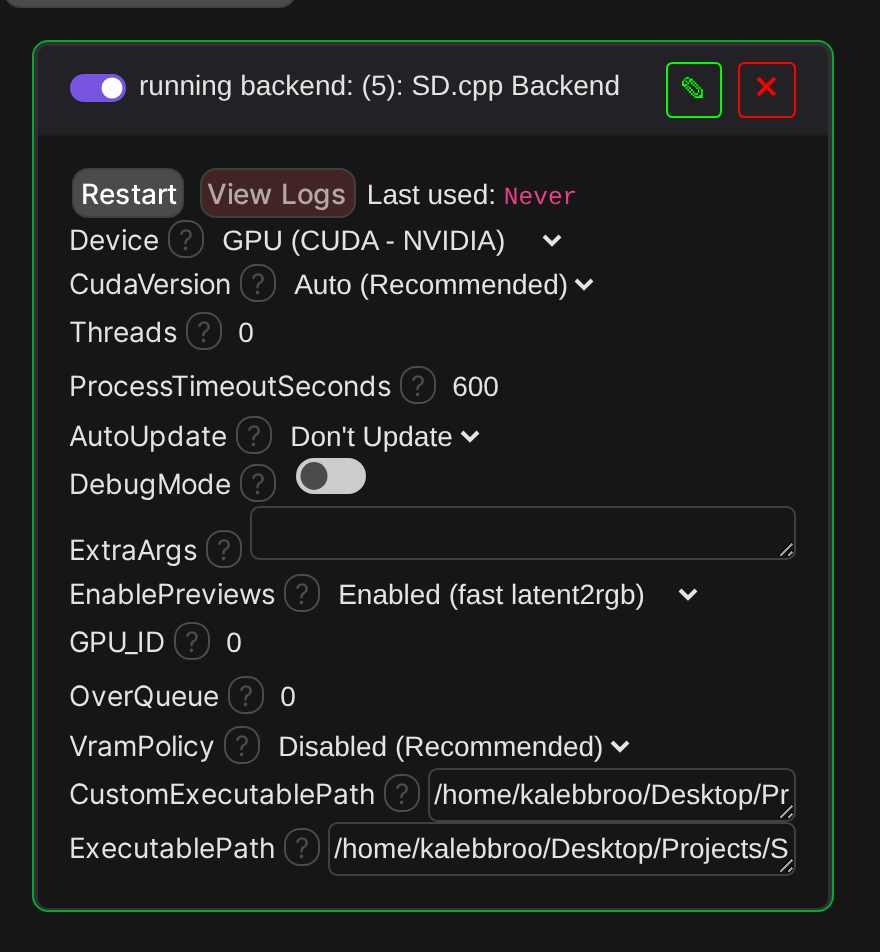
A green border and a running label mean the executable passed its startup probe. If it comes up errored,
View Logs names the reason, and Custom Executable Path lets you point at your own sd-cli build when no
prebuilt fits your system:
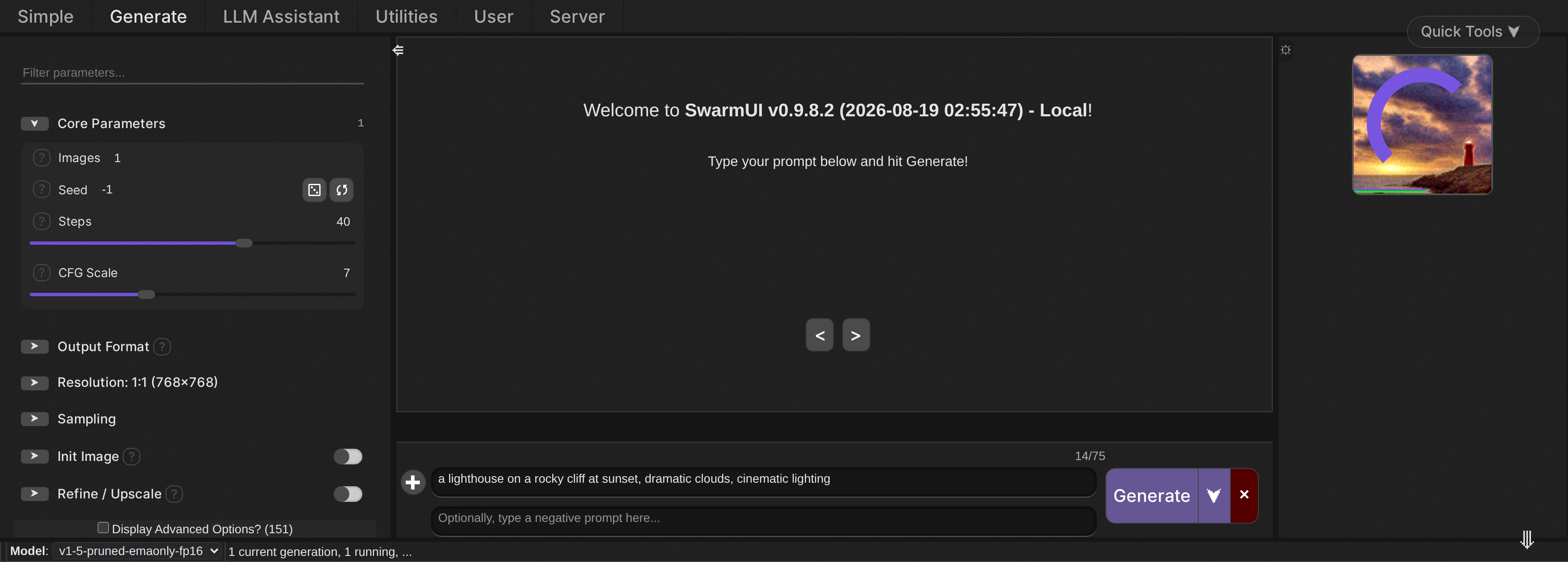
With a model selected, generation runs like any other backend, and previews stream into the batch strip on the right as SD.cpp works through the step count:
Add Models
Place your models in Models/Stable-Diffusion/. GGUF models go into the /diffusion_models/ folder.
Supported formats include:
- GGUF models
- SafeTensors
- CKPT/BIN
Follow the SwarmUI Supported Models documentation for more details on properly installing models into Swarm.
Configuration
Backend Settings
Access settings via Server → Backends → SD.cpp Backend
Device Selection:
CPU- Universal, works on any system (slower)CUDA- NVIDIA GPUs (best performance)Vulkan- Any modern GPU (experimental for Flux)
CUDA Version (Auto-detects):
Auto- Automatically detects your CUDA installation (recommended)CUDA 11.x- For older NVIDIA drivers (450+)CUDA 12.x- For newer NVIDIA drivers (525+)CUDA 13.x- Uses CUDA 12 binaries (forward compatible)
Auto-Update:
- Enabled by default
- Checks GitHub for SD.cpp updates on startup
- Downloads latest version automatically
Machine-Level Settings
Anything that describes the machine rather than an individual image lives in Server -> Backends next to the
device picker, not in the parameter sidebar:
| Setting | SD.cpp CLI Arg | Notes |
|---|---|---|
| Backend Assignment | --backend | Which device each module runs on, eg te=cpu,vae=cuda0. Overrides all automatic offload placement. |
| Params Backend | --params-backend | Where parameters are stored, eg disk or diffusion=disk,clip=cpu. |
| Eager Load | --eager-load | Load parameters at model-load time instead of lazily. |
| Split Mode | --split-mode | Weight distribution when a module spans several devices. |
| RPC Servers | --rpc-servers | Remote hosts to offload to, in host:port form. |
| Stream Layers | --stream-layers | Residency and prefetch streaming. Requires the Max VRAM parameter. |
| Hires Upscalers Dir | --hires-upscalers-dir | Directory of upscaler models for the highres fix pass. |
| Disable Image Metadata | --disable-image-metadata | Skip SD.cpp's own metadata block. SwarmUI records its own regardless. |
VRAM Policy: Auto (SD.cpp --auto-fit) | --auto-fit | Hands placement to SD.cpp instead of the Swarm-side ladder. The two are mutually exclusive, since they decide the same things. |
Performance Parameters
SwarmUI parameters are organized into standard Swarm groups (Sampling / Advanced Sampling / Advanced Video / Advanced Model Addons / Refine-Upscale / ControlNet), plus SD.cpp-specific groups (VRAM/Memory and Performance/Caching).
Below is the definitive list of SD.cpp-related parameters and what SD.cpp CLI arguments they emit.
The "Shown for" column matters. Parameters are gated by feature flag, so you only see what the model you have loaded can actually use. PhotoMaker does not appear for Flux, Wan options do not appear for SD 1.5, and the high-noise group only appears for Wan 2.2. Model-specific parameters appear once the model is loaded onto the backend, so switching models changes the visible set. A model whose filename defeats architecture detection falls back to showing everything rather than nothing.
These flags are namespaced (sdcpp_video, sdcpp_flux, and so on) on purpose: SwarmUI unions feature flags across
every enabled backend, so an un-namespaced name could be satisfied by a different backend entirely.
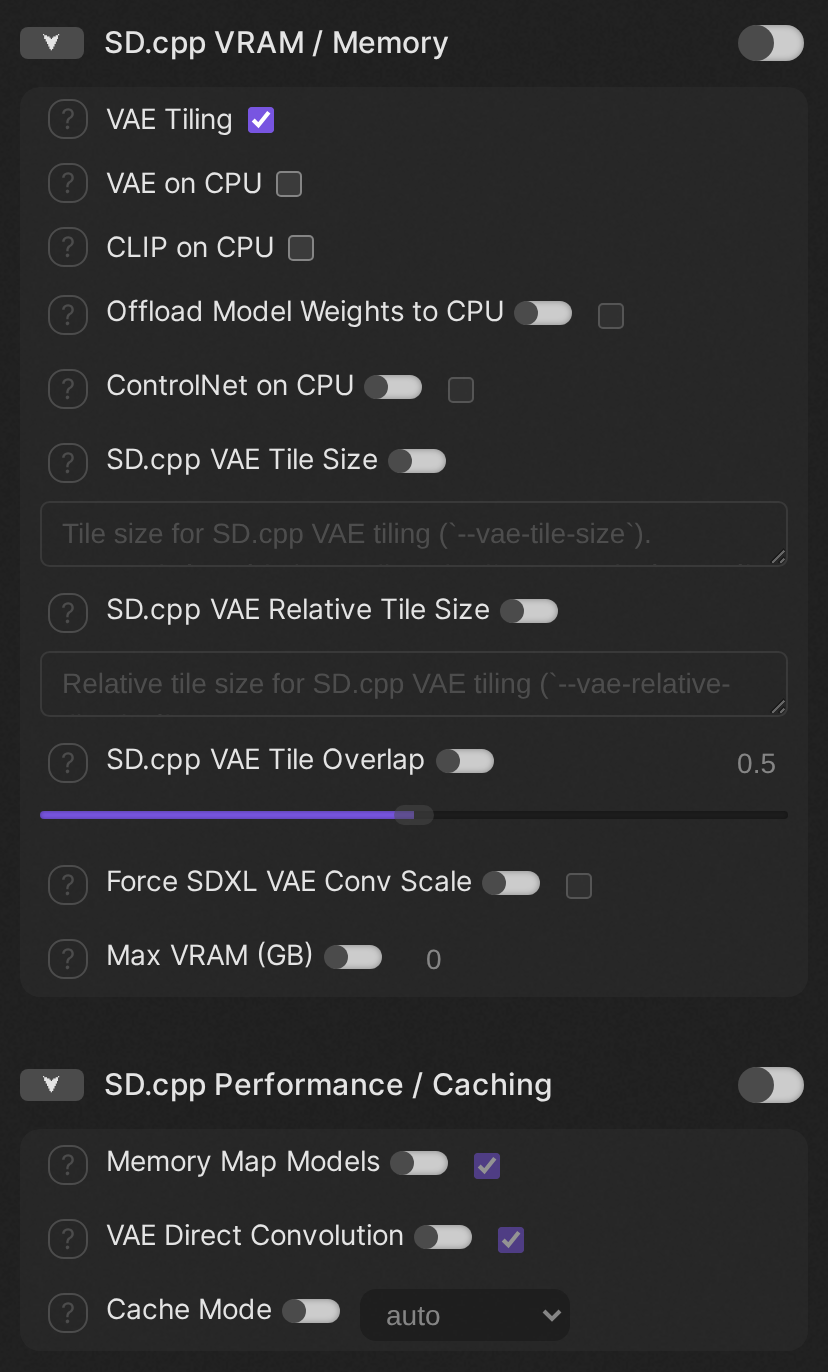
Every SD.cpp parameter is marked advanced, so tick Display Advanced Options at the bottom of the parameter sidebar before you go looking for these groups:
Sampling
Swarm core group.
| Swarm Parameter | SD.cpp CLI Arg | Shown for | Notes |
|---|---|---|---|
| SD.cpp Sampler | (no direct flag) | any model | Sampling method for SD.cpp backend. |
| SD.cpp Scheduler | (no direct flag) | any model | Scheduler type for SD.cpp backend. |
Advanced Sampling
Swarm core group.
| Swarm Parameter | SD.cpp CLI Arg | Shown for | Notes |
|---|---|---|---|
| Custom Sigmas | --sigmas | any model | Custom sigma schedule (--sigmas). |
| Diffusion Direct Convolution | --diffusion-conv-direct | any model | Enables SD.cpp's direct convolution path in the diffusion model (--diffusion-conv-direct). |
| Eta | --eta | any model | Eta value for DDIM/TCD sampling (--eta). |
| Extra Sample Args | --extra-sample-args | any model | Extra sampler/scheduler/guidance options passed straight to SD.cpp (--extra-sample-args). |
| Extra Tiling Args | --extra-tiling-args | any model | Extra VAE tiling options passed straight to SD.cpp (--extra-tiling-args). |
| Flash Attention | --diffusion-fa | any model | How widely to apply flash attention. |
| Prediction Override | --prediction | any model | Overrides SD.cpp prediction type (--prediction). |
| Preview Interval | --preview-interval | any model | Interval in denoising steps between preview updates (--preview-interval). |
| Preview Method Override | --preview | any model | Overrides SD.cpp preview method (--preview). |
| Preview Noisy | --preview-noisy | any model | Previews noisy model inputs rather than denoised outputs (--preview-noisy). |
| RNG | --rng | any model | Selects the random number generator backend (--rng). |
| SD.cpp Image Guidance Scale | --img-cfg-scale | any model | How strongly the reference or init image guides an edit or inpaint model (--img-cfg-scale). |
| SLG End | --skip-layer-end | any model_dit | When to stop applying SLG (--skip-layer-end). |
| SLG Scale | --slg-scale | any model_dit | Skip Layer Guidance scale (--slg-scale). |
| SLG Skip Layers | --skip-layers | any model_dit | Which layers to skip for SLG steps (--skip-layers). |
| SLG Start | --skip-layer-start | any model_dit | When to start applying SLG (--skip-layer-start). |
| Sampler RNG | --sampler-rng | any model | Selects the sampler RNG backend (--sampler-rng). |
| TAESD Preview Only | --taesd-preview-only | any model | Prevents using TAESD for the final image decode (--taesd-preview-only). |
| Timestep Shift | --timestep-shift | any model | Shifts timesteps for NitroFusion models (--timestep-shift). |
SD.cpp VRAM / Memory
SD.cpp-specific group. Memory placement and VAE tiling.
| Swarm Parameter | SD.cpp CLI Arg | Shown for | Notes |
|---|---|---|---|
| CLIP on CPU | (no direct flag) | any model | Runs text encoder(s) on CPU (emitted as --backend te=cpu). |
| ControlNet on CPU | (no direct flag) | any model | Keeps the ControlNet model on CPU (emitted as --backend controlnet=cpu). |
| Force SDXL VAE Conv Scale | --force-sdxl-vae-conv-scale | any model | Forces use of conv scale in SDXL VAE (--force-sdxl-vae-conv-scale). |
| Max VRAM (GB) | --max-vram | any model | Hard cap on VRAM SD.cpp may use (--max-vram). |
| Offload Model Weights to CPU | --offload-to-cpu | any model | Enables SD.cpp weight offloading (--offload-to-cpu). |
| SD.cpp VAE Relative Tile Size | --vae-relative-tile-size | any model | Relative tile size for SD.cpp VAE tiling (--vae-relative-tile-size). |
| SD.cpp VAE Tile Overlap | --vae-tile-overlap | any model | Tile overlap fraction for SD.cpp VAE tiling (--vae-tile-overlap). |
| SD.cpp VAE Tile Size | --vae-tile-size | any model | Tile size for SD.cpp VAE tiling (--vae-tile-size). |
| VAE Tiling | --vae-tiling | any model | Enables SD.cpp's VAE tiling mode (--vae-tiling). |
| VAE on CPU | (no direct flag) | any model | Runs the VAE decoder on CPU (emitted as --backend vae=cpu). |
SD.cpp Performance / Caching
SD.cpp-specific group. Caching strategy and load-time options.
| Swarm Parameter | SD.cpp CLI Arg | Shown for | Notes |
|---|---|---|---|
| Cache Mode | --cache-mode | any model | Selects SD.cpp's caching strategy (--cache-mode). |
| Cache Option | --cache-option | any model | Raw cache options string passed to SD.cpp (--cache-option). |
| Memory Map Models | --mmap | any model | Enables memory-mapping (--mmap). |
| SCM Mask | --scm-mask | any model | SCM steps mask for cache-dit (--scm-mask). |
| SCM Policy | --scm-policy | any model | SCM policy for cache-dit (--scm-policy). |
| VAE Direct Convolution | --vae-conv-direct | any model | Enables SD.cpp's direct VAE convolution path (--vae-conv-direct). |
Refine / Upscale
Swarm core group. SD.cpp's highres fix is driven from the core refiner controls here. Refiner Upscale is the switch: leave it at 1 and no highres pass runs, so you can use the ESRGAN post-upscale parameters in this group on their own. Refiner Control Percentage and Refiner Steps modify the pass but do not turn it on.
SD.cpp runs the second pass with the same model and VAE as the first, so Refiner Model, Refiner VAE, and
any Refiner Method other than PostApply are rejected with an explanatory error rather than silently ignored.
Refiner CFG Scale and Refiner Do Tiling have no SD.cpp equivalent and are not applied.
| Swarm Parameter | SD.cpp CLI Arg | Shown for | Notes |
|---|---|---|---|
| ESRGAN Upscale Model | (no direct flag) | any model | ESRGAN model for upscaling generated images. |
| SD.cpp Hires Height | --hires-height | any model_hires | Explicit target height for the highres fix pass (--hires-height). |
| SD.cpp Hires Sigmas | --hires-sigmas | any model_hires | Custom sigma schedule for the highres fix second pass (--hires-sigmas). |
| SD.cpp Hires Upscale Tile Size | --hires-upscale-tile-size | any model_hires | Tile size for the highres fix upscaler (--hires-upscale-tile-size). |
| SD.cpp Hires Upscaler | --hires-upscaler | any model_hires | Upscaler the highres fix pass uses between the two stages (--hires-upscaler). |
| SD.cpp Hires Width | --hires-width | any model_hires | Explicit target width for the highres fix pass (--hires-width). |
| SD.cpp Upscale Tile Size | --upscale-tile-size | any model | Tile size used by the ESRGAN upscaler (--upscale-tile-size). |
| Upscale Repeats | (no direct flag) | any model | Number of times to run the ESRGAN upscaler. |
ControlNet
Swarm core group.
| Swarm Parameter | SD.cpp CLI Arg | Shown for | Notes |
|---|---|---|---|
| ControlNet Canny Preprocessor | --canny | any model_controlnet | Applies SD.cpp's built-in Canny edge preprocessor (--canny). |
Init Image
Swarm core group.
| Swarm Parameter | SD.cpp CLI Arg | Shown for | Notes |
|---|---|---|---|
| Disable Reference Image Auto-Resize | --disable-auto-resize-ref-image | any model_edit | Stops SD.cpp resizing reference images to the model's expected size (--disable-auto-resize-ref-image). |
Advanced Video
Swarm core group.
| Swarm Parameter | SD.cpp CLI Arg | Shown for | Notes |
|---|---|---|---|
| AnimateDiff Motion Module | --motion-module | any model_animatediff | AnimateDiff motion module for SD 1.5 (--motion-module). |
| Control Video Frames Directory | --control-video | any model_video | Directory path containing control video frames for SD.cpp (--control-video). |
| Flow Shift | --flow-shift | any model_video | Flow shift value for Flow-based models like SD3.x or Wan (--flow-shift). |
| MoE Boundary | --moe-boundary | any model_wan22 | Timestep boundary for Wan2.2 MoE models (--moe-boundary). |
| H3 Reference Audio | --ref-audio | any model_h3 | Standalone WAV reference for MiniMax-H3 Ref2VA (--ref-audio). |
| H3 Reference Video Audio | --ref-video-audio | any model_h3 | WAV soundtrack paired by position with each Reference Video Directory (--ref-video-audio). |
| H3 Reference Video Directory | --ref-video | any model_h3 | Directory of 24fps reference video frames for MiniMax-H3 Ref2VA (--ref-video). |
| VACE Strength | --vace-strength | any model_wan | Wan VACE strength (--vace-strength). |
SD.cpp High-Noise Overrides
SD.cpp-specific group. Only appears for Wan 2.2. Anything left unset inherits the low-noise value.
| Swarm Parameter | SD.cpp CLI Arg | Shown for | Notes |
|---|---|---|---|
| High-Noise CFG Scale | --high-noise-cfg-scale | any model_wan22 | CFG scale for the high-noise stage (--high-noise-cfg-scale). |
| High-Noise Eta | --high-noise-eta | any model_wan22 | Noise multiplier for the high-noise stage (--high-noise-eta). |
| High-Noise Guidance | --high-noise-guidance | any model_wan22 | Distilled guidance scale for the high-noise stage (--high-noise-guidance). |
| High-Noise Image Guidance Scale | --high-noise-img-cfg-scale | any model_wan22 | Image guidance scale for the high-noise stage (--high-noise-img-cfg-scale). |
| High-Noise SLG End | --high-noise-skip-layer-end | any model_wan22 | When high-noise SLG switches off (--high-noise-skip-layer-end). |
| High-Noise SLG Scale | --high-noise-slg-scale | any model_wan22 | Skip Layer Guidance scale for the high-noise stage (--high-noise-slg-scale). |
| High-Noise SLG Skip Layers | --high-noise-skip-layers | any model_wan22 | Layers to skip during high-noise SLG steps (--high-noise-skip-layers). |
| High-Noise SLG Start | --high-noise-skip-layer-start | any model_wan22 | When high-noise SLG switches on (--high-noise-skip-layer-start). |
| High-Noise Sampler | --high-noise-sampling-method | any model_wan22 | Sampling method for the high-noise stage (--high-noise-sampling-method). |
Advanced Model Addons
Swarm core group.
| Swarm Parameter | SD.cpp CLI Arg | Shown for | Notes |
|---|---|---|---|
| ADetailer Extra Args | --extra-ad-args | any model | Extra ADetailer options (--extra-ad-args), eg 'confidence=0.3,mask_blur=4,denoising_strength=0.4'. |
| ADetailer Model | --ad-model | any model | YOLOv8 detection model for the ADetailer repair pass (--ad-model). |
| ADetailer Negative Prompt | --ad-negative-prompt | any model | Negative prompt for the ADetailer repair pass (--ad-negative-prompt). |
| ADetailer Prompt | --ad-prompt | any model | Prompt for the ADetailer repair pass (--ad-prompt). |
| Embeddings Directory | --embd-dir | any model | Embeddings directory path (--embd-dir). |
| IP-Adapter Model | --ip-adapter | any model_ipadapter | IP-Adapter model to apply (--ip-adapter). |
| IP-Adapter Strength | --ip-adapter-strength | any model_ipadapter | How strongly to apply the IP-Adapter (--ip-adapter-strength). |
| LLM Vision Model | --llm_vision | any model_multimodal | Optional vision encoder for LLM-based image models (--llm_vision). |
| LoRA Apply Mode | --lora-apply-mode | any model | Controls how SD.cpp applies LoRAs (--lora-apply-mode). |
| PhotoMaker ID Embed Path | --pm-id-embed-path | any model_photomaker | Path to PhotoMaker v2 ID embed file (--pm-id-embed-path). |
| PhotoMaker ID Images Directory | --pm-id-images-dir | any model_photomaker | Directory containing PhotoMaker ID images (--pm-id-images-dir). |
| PhotoMaker Model | --photo-maker | any model_photomaker | Path to a PhotoMaker model (--photo-maker). |
| PhotoMaker Style Strength | --pm-style-strength | any model_photomaker | PhotoMaker style strength (--pm-style-strength). |
| PuLID ID Embedding Path | --pulid-id-embedding | any model_flux | Path to a precomputed PuLID identity embedding (--pulid-id-embedding). |
| PuLID Identity Strength | --pulid-id-weight | any model_flux | How strongly to inject the PuLID identity (--pulid-id-weight). |
| PuLID Weights | --pulid-weights | any model_flux | PuLID Flux weights for identity-preserving generation (--pulid-weights). |
| Qwen Image Layer Count | --qwen-image-layers | any model_qwenimage | Number of Qwen-Image layered layers (--qwen-image-layers). |
| SD.cpp VAE Latent Format | --vae-format | any model | Overrides how SD.cpp interprets the VAE latent space (--vae-format). |
| TAESD Preview Decoder | (no direct flag) | any model | Tiny AutoEncoder for fast preview decoding. |
| Tensor Type Rules | --tensor-type-rules | any model | Weight type per tensor pattern (--tensor-type-rules). |
| Unconditional Diffusion Model | --uncond-diffusion-model | any model_ideogram4 | Standalone unconditional diffusion model, used by Ideogram4 for CFG (--uncond-diffusion-model). |
| Weight Type | --type | any model | Overrides SD.cpp weight type selection (--type). |
CLI Coverage
Every stable-diffusion.cpp master-827 option is either emitted by a parameter above, derived from a Swarm core
parameter, or exposed as a machine-level setting. The only options deliberately left out are the ones that make no
sense inside SwarmUI:
--version, --list-devices, --help (used internally by the startup capability probe), --convert-name,
--imat-in, --imat-out (offline quantization tooling), --metadata-all, --metadata-brief, --metadata-raw,
--metadata-format, --image (CLI metadata-inspection mode), --mode (set by the backend from the model architecture),
--prompt-file, --negative-prompt-file (SwarmUI passes prompts inline), --color (log colouring),
--output-begin-idx (SwarmUI owns output naming), --tae (alias of --taesd, which is emitted), and
--qwen2vl / --qwen2vl_vision (deprecated aliases of --llm / --llm_vision, which are emitted).
Usage Tips
Known Issues
- SD.cpp master-827 is the minimum – Device placement now goes through
--backend, which upstream added in May 2026. A downloaded binary older than that is replaced automatically on startup, bypassing the once-a-day update check, because that check is per-device and a device you rarely select can otherwise sit on a months-old binary. A binary supplied through Custom Executable Path is never overwritten; that case is reported so you can rebuild it yourself. - Linux prebuilts need glibc 2.38 – SD.cpp's official Linux binaries are built on Ubuntu 24.04, so they will not start on older distributions (Ubuntu 22.04 and similar). There is also no prebuilt CUDA binary for Linux at all. On those systems, build stable-diffusion.cpp from source and point the backend's Custom Executable Path setting at the resulting
sd-cli. - Components without an automatic download – Several newer architectures need text encoders whose upstream repositories are gated or laid out differently from their documentation. Those are not auto-downloaded; install them yourself or select them with the VAE / Text Encoder parameters. The error message names the exact file when one is missing.
- Slow generations – Initial caching is slow and repeated runs do not yet reach expected speedups across architectures. Measured on an RTX 3060 12GB with a CUDA build of
master-827-97d2990: SD 1.5 at 768x768 for 40 steps took 254 seconds end to end, roughly 6.3 seconds per step. That is far off what this hardware should manage, and the cause has not been isolated yet. The default-on--diffusion-conv-directand the per-step--preview-interval 1are the first things worth ruling out. - Z-Image text encoder – SD.cpp fails to load the shipped Qwen text encoder (
text_encoders.llm.model.*tensors are missing), so Z-Image inference currently errors unless you manually provide a compatible encoder (GGUF version is confirmed to work). - Previews – TAESD preview images may fail to render if the binary's capability probe does not detect
--preview; expect missing preview frames when that happens. - Img2Img/Upscaling – The backend has not been fully exercised with img2img or upscaling workflows, so their behavior remains unverified and may have undiscovered issues.
Performance and Caching
- TODO: The current caching/performance behavior is not acceptable. Identify why repeat generations are not speeding up as expected.
- TODO: Verify and document when
cache-dit,ucache, andeasycacheactually apply, and what models/architectures benefit. - TODO: Add profiling notes (CPU vs CUDA vs Vulkan), common bottlenecks, and recommended defaults.
- TODO: Add a small troubleshooting matrix for "first run slow" vs "every run slow".
Performance Optimization
For Best Speed:
- Enable "Cache Mode" set to
autoorcache-dit - Set "Cache Preset" to
ultraorfast - Enable "Memory Map Models"
- Enable "VAE Direct Convolution"
- Use quantized GGUF models (Q4_K or Q8_0)
- First generation builds cache (slow), subsequent generations are 5-10x faster
For Limited VRAM:
- Enable "VAE Tiling"
- Enable "VAE on CPU" and "CLIP on CPU"
- Use lower quantization (Q2_K, Q4_0)
- Reduce image dimensions
- Close other GPU applications
Dynamic VRAM Policy (Auto Offload)
SwarmUI automatically applies SD.cpp offload flags when VRAM is tight. This system is always on and uses real model file sizes, GPU free VRAM, and generation parameters (resolution + batch count) to decide which flags are needed. It does not clear VRAM between generations, so models stay resident and repeat runs stay fast.
How it works:
- Computes an estimated VRAM footprint from model sizes + runtime overhead + resolution
- Compares that to free VRAM with a safety margin
- Gradually escalates offload flags only if required
Escalation order (more aggressive as needed):
--vae-tiling- text encoders to CPU
- VAE to CPU
--offload-to-cpu
Steps 2 and 3 are emitted as a single --backend te=cpu,vae=cpu assignment. SD.cpp master-827 deprecated the
old per-module --clip-on-cpu / --vae-on-cpu / --control-net-cpu flags, and this backend no longer emits them
at all, which is why master-827 is the minimum version. The backend probes --help on startup and refuses to
start with a clear message if the binary predates --backend, rather than starting and silently skipping offload.
Notes:
- User-set flags are respected if they are more aggressive than the auto-policy.
- Very low VRAM GPUs (<6 GB) will automatically enable all offload flags.
- Setting Backend Assignment by hand overrides this entire ladder.
- Choosing the
Auto (SD.cpp --auto-fit)VRAM policy skips this ladder and lets SD.cpp place modules itself. The two cannot both run, because they make the same decisions from the same inputs.
LoRA Usage
- TODO: Test and verify LoRA functionality with various models.
Important:
- Place LoRA files in
Models/Lora/ - Backend automatically detects LoRA directory
Video Generation (Wan Models)
Video-specific parameters:
- Video Frames: Number of frames to generate
- Video FPS: Frames per second
- Flow Shift: Flow control (default 3.0 for Wan)
- Wan 2.2: Supports dual-model system with high-noise diffusion model
Troubleshooting
No Preview Images
Problem: Live previews not showing during generation
- TODO: This is still a work in progress and needs testing.
Solution:
- Backend automatically enables TAESD previews
- Previews require an SD.cpp build with
--preview; the backend probes--helpon startup and logs the result - MiniMax-H3 needs SD.cpp
master-827or newer; older builds refuse--taesdon H3 and log a warning instead - Check logs to verify
--preview taeis being used - Previews update every step or every 500ms
Out of Memory
Problem: CUDA out of memory or allocation failed
Solution:
- Enable "VAE Tiling"
- Enable "VAE on CPU"
- Use lower quantization (Q2_K instead of Q8_0)
- Reduce image dimensions
- Close other GPU applications
Architecture Support
Generated from the architecture table in Models/SDcppArchitectures.cs, so it stays in step with the code.
Status legend: Arg-verified means the command line this extension builds for that architecture was
checked against stable-diffusion.cpp master-827-97d2990 - every flag exists, components resolve, and the
routing matches that model's upstream docs. It does not mean a generation was run on that architecture.
| Architecture | Kind | Loads as | Extra components | Steps / CFG | Status |
|---|---|---|---|---|---|
| ltx-2.3 | Video | --diffusion-model | --llm, --vae, --audio-vae, --embeddings-connectors | 20 / 6 | Arg-verified |
| minimax-h3 | Video | --diffusion-model | --llm, --vae, --audio-vae | 20 / 1 | Arg-verified |
| hunyuan-video-1.5 | Video | --diffusion-model | --llm, --t5xxl, --vae | 20 / 6 | Arg-verified |
| lingbot-video | Video | --diffusion-model | --llm, --vae | 20 / 3 | Arg-verified |
| ideogram4 | Image | --diffusion-model | --llm, --vae | 20 / 5 | Arg-verified |
| krea2 | Image | --diffusion-model | --llm, --vae | 20 / 5 | Arg-verified |
| lens | Image | --diffusion-model | --llm, --vae | 20 / 5 | Arg-verified |
| ernie-image | Image | --diffusion-model | --llm, --vae | 20 / 5 | Arg-verified |
| sefi-image | Image | --diffusion-model | --llm, --vae | 50 / 4 | Arg-verified |
| mage-flow-edit | Image edit | --diffusion-model | --llm, --llm-vision, --vae | 30 / 4 | Arg-verified |
| mage-flow | Image | --diffusion-model | --llm, --vae | 30 / 4 | Arg-verified |
| boogu-edit | Image edit | --diffusion-model | --llm, --llm-vision, --vae | 20 / 7 | Arg-verified |
| boogu | Image | --diffusion-model | --llm, --vae | 20 / 7 | Arg-verified |
| longcat-image-edit | Image edit | --diffusion-model | --llm, --llm-vision, --vae | 20 / 5 | Arg-verified |
| longcat-image | Image | --diffusion-model | --llm, --vae | 20 / 5 | Arg-verified |
| pid | Image edit | --diffusion-model | --llm, --vae | 4 / 1 | Arg-verified |
| minit2i | Image | --diffusion-model | --t5xxl | 100 / 6 | Arg-verified |
| hidream-o1 | Image | --model | none | 20 / 1 | Arg-verified |
| chroma-radiance | Image | --diffusion-model | none | 4 / 1 | Arg-verified |
| chroma | Image | --diffusion-model | none | 4 / 1 | Arg-verified |
| ovis | Image | --diffusion-model | none | 20 / 1 | Arg-verified |
| qwen-image-edit | Image edit | --diffusion-model | none | 20 / 5 | Arg-verified |
| qwen-image | Image | --diffusion-model | none | 20 / 5 | Arg-verified |
| anima | Image | --diffusion-model | none | 20 / 1 | Arg-verified |
| z-image | Image | --diffusion-model | none | 20 / 5 | Arg-verified |
| flux-kontext | Image edit | --diffusion-model | none | 20 / 1 | Arg-verified |
| flux2-klein-9b | Image | --diffusion-model | none | 20 / 1 | Arg-verified |
| flux2-klein-4b | Image | --diffusion-model | none | 20 / 1 | Arg-verified |
| flux2-dev | Image | --diffusion-model | none | 20 / 1 | Arg-verified |
| flux-schnell | Image | --diffusion-model | none | 4 / 1 | Arg-verified |
| flux-dev | Image | --diffusion-model | none | 20 / 1 | Arg-verified |
| sd3.5 | Image | --diffusion-model | none | 20 / 4.5 | Arg-verified |
| sd3 | Image | --diffusion-model | none | 20 / 4.5 | Arg-verified |
| wan-2.2 | Video | --diffusion-model | none | 20 / 7 | Arg-verified |
| wan-2.1 | Video | --diffusion-model | none | 20 / 7 | Arg-verified |
| video | Video | --model | none | 20 / 7 | Arg-verified |
| sdxl-turbo | Image | --model | none | 4 / 1 | Arg-verified |
| sdxl-lightning | Image | --model | none | 4 / 1 | Arg-verified |
| sdxl | Image | --model | none | 20 / 7 | Arg-verified |
| sd2 | Image | --model | none | 20 / 7 | Arg-verified |
| sd15-turbo | Image | --model | none | 4 / 1 | Arg-verified |
| sd15 | Image | --model | none | 20 / 7 | Arg-verified |
| lcm | Image | --model | none | 4 / 1 | Arg-verified |
Architectures whose extra components have no verified download are resolved from what you already have installed (matched by filename) or picked explicitly with the VAE / Text Encoder parameters. If one is missing, generation stops with an error naming the exact file and the folder to put it in, rather than failing partway through. The Flux, Flux.2, Wan and CLIP-Vision components do download automatically.
Advanced Features
Img2Img and Inpainting
-
TODO: Test and verify img2img and inpainting functionality.
-
Init Image: Automatic img2img support
-
Init Image Creativity: Strength parameter (0.0-1.0)
-
Mask Image: Inpainting with mask support
ControlNet (Experimental)
- SD.cpp supports single ControlNet
- Backend will warn if multiple ControlNets used
- ControlNet model + control image required
- Control strength parameter (0.0-2.0)
Batch Generation
-
TODO: Test and verify batch generation functionality.
-
Batch count parameter (generates multiple images)
-
SD.cpp
--batch-countflag -
All images saved and returned
ESRGAN Upscaling
-
TODO: Test and verify ESRGAN upscaling functionality.
-
Post-processing upscaler
-
Supports RealESRGAN models
-
Multiple upscale passes supported
-
Place upscale models in
Models/upscale_model/
Technical Architecture
Extension Structure
SwarmUI-SD.cpp-Backend/
├── SDcppExtension.cs              # Main extension entry point
├── SwarmBackends/
│   └── SDcppBackend.cs            # Backend implementation (~400 lines, refactored)
├── Models/
│   ├── SDcppModelManager.cs       # Model detection, validation, downloads
│   └── SDcppParameterBuilder.cs   # Parameter conversion to SD.cpp CLI format
├── Utils/
│   ├── GGUFConverter.cs           # GGUF conversion helpers
│   ├── SDcppDownloadManager.cs    # Auto-download SD.cpp binaries
│   ├── SDcppProcessManager.cs     # Process execution and output capture
│   └── SDcppVramPolicy.cs         # Dynamic VRAM offload policy
└── WebAPI/
    └── SDcppAPI.cs                # Additional API endpoints
File Format Support
Model Formats:
.gguf- Native SD.cpp format (Q2_K, Q4_K, Q8_0 quantization).safetensors- Standard format (recommended).ckpt,.pth- PyTorch checkpoint formats
Image Formats: Input (SD.cpp CLI):
.png,.jpg/.jpeg,.bmp
Output (SD.cpp CLI):
.pngby default.jpg/.jpeg/.jpewhen the output path uses a JPEG extension
SwarmUI backend:
- SD.cpp output is requested as PNG; SwarmUI can convert images to other formats if needed.
Performance Benchmarks
One measured data point so far. Treat it as a baseline to beat, not as a target.
| Hardware | Build | Model | Settings | Result |
|---|---|---|---|---|
| RTX 3060 12GB, i7-9700K | master-827-97d2990, CUDA 13.2, source build | SD 1.5 fp16 | 768x768, 40 steps, euler_a, CFG 7, previews on | 254 s total (~6.3 s/step) |
Flags in play for that run: --diffusion-fa --diffusion-conv-direct --mmap --vae-conv-direct --cache-mode ucache --cache-option reset=1 --preview proj --preview-interval 1.
- TODO: Add CPU and Vulkan numbers for the same settings.
- TODO: Measure with
--diffusion-conv-directand per-step previews disabled, to find where the time actually goes. - TODO: Include "first run" vs "repeat run" measurements and note when (if ever) caching improves throughput.
Contributing
Contributions welcome! Focus areas:
- Performance profiling and optimization Image gen is very slow currently.
- Better error messages and user guidance
- UI/UX improvements
- Swarm parameter fixes
License
MIT License
Credits
- stable-diffusion.cpp by leejet
- SwarmUI by mcmonkey
Last Updated: August 2026 Extension Version: 0.1.6 Pinned SD.cpp Version: master-827-97d2990
Similar repos



Languages
C#
100.0%
Adds a new backend for SwarmUI using stable-diffusion.cpp
C#
3
82 commits
updated Aug 22, 2026
README
SwarmUI StableDiffusion.cpp Backend
===========================================================================
Table of Contents
- Introduction
- Features
- Quick Start
- Configuration
- Usage Tips
- Performance and Caching
- Troubleshooting
- Architecture Support
- Advanced Features
- Technical Architecture
- Performance Benchmarks
- Contributing
- License
- Credits
Introduction
This extension adds a SwarmUI backend powered by stable-diffusion.cpp. It runs image generation through an external SD.cpp executable (CPU/CUDA/Vulkan) and integrates the results into SwarmUI.
Features
Core capabilities
- Z-Image Models - Supports Z-Image Turbo with the required Qwen LLM text encoder.
- Flux Models - Full support for FLUX.1-dev, FLUX.1-schnell, and FLUX.2-dev with automatic component management.
- SD3/SD3.5 - Multi-component architecture support (CLIP-G, CLIP-L, T5-XXL) for SD3 family models.
- SDXL/SD1.5/SD2 - Compatible with the mainstream Stable Diffusion architectures.
- Newer image models - Ideogram4, Krea2, Lens, ERNIE-Image, SeFi-Image, Mage-Flow, Boogu, LongCat-Image, PiD, MiniT2I and HiDream-O1, with the encoders and VAEs each one needs.
- Video Generation - Wan 2.1/2.2, LTX-2.3, MiniMax-H3, HunyuanVideo 1.5 and LingBot-Video, covering text-to-video, image-to-video and first/last-frame modes. LTX-2.3 and MiniMax-H3 also decode the audio track they generate.
- Image editing - Kontext, Qwen-Image-Edit (including 2509/2511), Boogu Edit, Mage-Flow-Edit, LongCat Edit and PiD, using reference-image conditioning with the preset each model expects, and accepting several reference images at once.
- IP-Adapter and ADetailer - IP-Adapter reference conditioning for SD 1.5 and SDXL, plus an optional YOLOv8-driven detail repair pass.
- GGUF Format - Load quantized GGUF models in common precisions (Q2_K, Q4_K, Q8_0).
- LoRA Support - Automatic LoRA discovery from the Models/Lora directory.
- ControlNet (experimental) - Single ControlNet per job with detection of unsupported setups.
- Live Previews - TAESD previews update frequently during generation. TODO: This needs to be tested.
- Auto-Update - Automatically downloads SD.cpp binaries from GitHub releases when enabled.
Performance optimizations
TODO: This needs work. Currently generations are slow even on repeat runs.
- Inference Caching - cache-dit/ucache/easycache integration exists but is currently not delivering the expected speedups.
- Memory Mapping - The
--mmapoption speeds up model loading and reduces RAM usage. - VAE Convolution - Direct convolution (
--vae-conv-direct) accelerates decoding. - VAE Tiling - Breaks down VAE work into tiles to lower VRAM requirements.
- CPU Offloading - Move the VAE and CLIP encoders to CPU when GPU memory is constrained.
- Flash Attention - Optional attention path that saves memory at slight quality cost.
Platform support
- CUDA - NVIDIA GPUs using the installed CUDA toolkits (11.x, 12.x, or compatible 13.x drivers).
- CPU - AVX/AVX2-compatible fallback.
- Vulkan - Experimental GPU acceleration path that can work on non-NVIDIA hardware (limited Flux support).
Quick Start
Installation
This extension is installed like any other SwarmUI extension.
Preferred Method (Via SwarmUI)
- Open your SwarmUI instance.
- Navigate to
Server → Extensions. - Find "SD.cpp Backend".
- Click Install.
- Restart SwarmUI when prompted (extensions require a rebuild/restart to load).
Once installed it shows up in the installed-extensions table, where you can update, disable, or uninstall it:
Manual Installation
- Close SwarmUI.
- Clone this repository into
SwarmUI/src/Extensions/SwarmUI-SD.cpp-Backend/. - Restart SwarmUI.
- Go to
Server → Extensionsand enable "SD.cpp Backend".
First Run
- Open
Server → Backends → SD.cpp Backend. - Choose your device (CPU, CUDA, or Vulkan).
- (CUDA only) Leave CUDA version on Auto unless you know you need 11.x vs 12.x.
- The installer downloads the SD.cpp release into
dlbackend/sdcpp/{device}and then creates arun-sd-server.shwrapper on Linux that always setsLD_LIBRARY_PATHto the binary directory before launching, so the bundled shared libraries (e.g.libstable-diffusion.so) are resolvable even on clean systems.
A green border and a running label mean the executable passed its startup probe. If it comes up errored,
View Logs names the reason, and Custom Executable Path lets you point at your own sd-cli build when no
prebuilt fits your system:
With a model selected, generation runs like any other backend, and previews stream into the batch strip on the right as SD.cpp works through the step count:
Add Models
Place your models in Models/Stable-Diffusion/. GGUF models go into the /diffusion_models/ folder.
Supported formats include:
- GGUF models
- SafeTensors
- CKPT/BIN
Follow the SwarmUI Supported Models documentation for more details on properly installing models into Swarm.
Configuration
Backend Settings
Access settings via Server → Backends → SD.cpp Backend
Device Selection:
CPU- Universal, works on any system (slower)CUDA- NVIDIA GPUs (best performance)Vulkan- Any modern GPU (experimental for Flux)
CUDA Version (Auto-detects):
Auto- Automatically detects your CUDA installation (recommended)CUDA 11.x- For older NVIDIA drivers (450+)CUDA 12.x- For newer NVIDIA drivers (525+)CUDA 13.x- Uses CUDA 12 binaries (forward compatible)
Auto-Update:
- Enabled by default
- Checks GitHub for SD.cpp updates on startup
- Downloads latest version automatically
Machine-Level Settings
Anything that describes the machine rather than an individual image lives in Server -> Backends next to the
device picker, not in the parameter sidebar:
| Setting | SD.cpp CLI Arg | Notes |
|---|---|---|
| Backend Assignment | --backend | Which device each module runs on, eg te=cpu,vae=cuda0. Overrides all automatic offload placement. |
| Params Backend | --params-backend | Where parameters are stored, eg disk or diffusion=disk,clip=cpu. |
| Eager Load | --eager-load | Load parameters at model-load time instead of lazily. |
| Split Mode | --split-mode | Weight distribution when a module spans several devices. |
| RPC Servers | --rpc-servers | Remote hosts to offload to, in host:port form. |
| Stream Layers | --stream-layers | Residency and prefetch streaming. Requires the Max VRAM parameter. |
| Hires Upscalers Dir | --hires-upscalers-dir | Directory of upscaler models for the highres fix pass. |
| Disable Image Metadata | --disable-image-metadata | Skip SD.cpp's own metadata block. SwarmUI records its own regardless. |
VRAM Policy: Auto (SD.cpp --auto-fit) | --auto-fit | Hands placement to SD.cpp instead of the Swarm-side ladder. The two are mutually exclusive, since they decide the same things. |
Performance Parameters
SwarmUI parameters are organized into standard Swarm groups (Sampling / Advanced Sampling / Advanced Video / Advanced Model Addons / Refine-Upscale / ControlNet), plus SD.cpp-specific groups (VRAM/Memory and Performance/Caching).
Below is the definitive list of SD.cpp-related parameters and what SD.cpp CLI arguments they emit.
The "Shown for" column matters. Parameters are gated by feature flag, so you only see what the model you have loaded can actually use. PhotoMaker does not appear for Flux, Wan options do not appear for SD 1.5, and the high-noise group only appears for Wan 2.2. Model-specific parameters appear once the model is loaded onto the backend, so switching models changes the visible set. A model whose filename defeats architecture detection falls back to showing everything rather than nothing.
These flags are namespaced (sdcpp_video, sdcpp_flux, and so on) on purpose: SwarmUI unions feature flags across
every enabled backend, so an un-namespaced name could be satisfied by a different backend entirely.
Every SD.cpp parameter is marked advanced, so tick Display Advanced Options at the bottom of the parameter sidebar before you go looking for these groups:
Sampling
Swarm core group.
| Swarm Parameter | SD.cpp CLI Arg | Shown for | Notes |
|---|---|---|---|
| SD.cpp Sampler | (no direct flag) | any model | Sampling method for SD.cpp backend. |
| SD.cpp Scheduler | (no direct flag) | any model | Scheduler type for SD.cpp backend. |
Advanced Sampling
Swarm core group.
| Swarm Parameter | SD.cpp CLI Arg | Shown for | Notes |
|---|---|---|---|
| Custom Sigmas | --sigmas | any model | Custom sigma schedule (--sigmas). |
| Diffusion Direct Convolution | --diffusion-conv-direct | any model | Enables SD.cpp's direct convolution path in the diffusion model (--diffusion-conv-direct). |
| Eta | --eta | any model | Eta value for DDIM/TCD sampling (--eta). |
| Extra Sample Args | --extra-sample-args | any model | Extra sampler/scheduler/guidance options passed straight to SD.cpp (--extra-sample-args). |
| Extra Tiling Args | --extra-tiling-args | any model | Extra VAE tiling options passed straight to SD.cpp (--extra-tiling-args). |
| Flash Attention | --diffusion-fa | any model | How widely to apply flash attention. |
| Prediction Override | --prediction | any model | Overrides SD.cpp prediction type (--prediction). |
| Preview Interval | --preview-interval | any model | Interval in denoising steps between preview updates (--preview-interval). |
| Preview Method Override | --preview | any model | Overrides SD.cpp preview method (--preview). |
| Preview Noisy | --preview-noisy | any model | Previews noisy model inputs rather than denoised outputs (--preview-noisy). |
| RNG | --rng | any model | Selects the random number generator backend (--rng). |
| SD.cpp Image Guidance Scale | --img-cfg-scale | any model | How strongly the reference or init image guides an edit or inpaint model (--img-cfg-scale). |
| SLG End | --skip-layer-end | any model_dit | When to stop applying SLG (--skip-layer-end). |
| SLG Scale | --slg-scale | any model_dit | Skip Layer Guidance scale (--slg-scale). |
| SLG Skip Layers | --skip-layers | any model_dit | Which layers to skip for SLG steps (--skip-layers). |
| SLG Start | --skip-layer-start | any model_dit | When to start applying SLG (--skip-layer-start). |
| Sampler RNG | --sampler-rng | any model | Selects the sampler RNG backend (--sampler-rng). |
| TAESD Preview Only | --taesd-preview-only | any model | Prevents using TAESD for the final image decode (--taesd-preview-only). |
| Timestep Shift | --timestep-shift | any model | Shifts timesteps for NitroFusion models (--timestep-shift). |
SD.cpp VRAM / Memory
SD.cpp-specific group. Memory placement and VAE tiling.
| Swarm Parameter | SD.cpp CLI Arg | Shown for | Notes |
|---|---|---|---|
| CLIP on CPU | (no direct flag) | any model | Runs text encoder(s) on CPU (emitted as --backend te=cpu). |
| ControlNet on CPU | (no direct flag) | any model | Keeps the ControlNet model on CPU (emitted as --backend controlnet=cpu). |
| Force SDXL VAE Conv Scale | --force-sdxl-vae-conv-scale | any model | Forces use of conv scale in SDXL VAE (--force-sdxl-vae-conv-scale). |
| Max VRAM (GB) | --max-vram | any model | Hard cap on VRAM SD.cpp may use (--max-vram). |
| Offload Model Weights to CPU | --offload-to-cpu | any model | Enables SD.cpp weight offloading (--offload-to-cpu). |
| SD.cpp VAE Relative Tile Size | --vae-relative-tile-size | any model | Relative tile size for SD.cpp VAE tiling (--vae-relative-tile-size). |
| SD.cpp VAE Tile Overlap | --vae-tile-overlap | any model | Tile overlap fraction for SD.cpp VAE tiling (--vae-tile-overlap). |
| SD.cpp VAE Tile Size | --vae-tile-size | any model | Tile size for SD.cpp VAE tiling (--vae-tile-size). |
| VAE Tiling | --vae-tiling | any model | Enables SD.cpp's VAE tiling mode (--vae-tiling). |
| VAE on CPU | (no direct flag) | any model | Runs the VAE decoder on CPU (emitted as --backend vae=cpu). |
SD.cpp Performance / Caching
SD.cpp-specific group. Caching strategy and load-time options.
| Swarm Parameter | SD.cpp CLI Arg | Shown for | Notes |
|---|---|---|---|
| Cache Mode | --cache-mode | any model | Selects SD.cpp's caching strategy (--cache-mode). |
| Cache Option | --cache-option | any model | Raw cache options string passed to SD.cpp (--cache-option). |
| Memory Map Models | --mmap | any model | Enables memory-mapping (--mmap). |
| SCM Mask | --scm-mask | any model | SCM steps mask for cache-dit (--scm-mask). |
| SCM Policy | --scm-policy | any model | SCM policy for cache-dit (--scm-policy). |
| VAE Direct Convolution | --vae-conv-direct | any model | Enables SD.cpp's direct VAE convolution path (--vae-conv-direct). |
Refine / Upscale
Swarm core group. SD.cpp's highres fix is driven from the core refiner controls here. Refiner Upscale is the switch: leave it at 1 and no highres pass runs, so you can use the ESRGAN post-upscale parameters in this group on their own. Refiner Control Percentage and Refiner Steps modify the pass but do not turn it on.
SD.cpp runs the second pass with the same model and VAE as the first, so Refiner Model, Refiner VAE, and
any Refiner Method other than PostApply are rejected with an explanatory error rather than silently ignored.
Refiner CFG Scale and Refiner Do Tiling have no SD.cpp equivalent and are not applied.
| Swarm Parameter | SD.cpp CLI Arg | Shown for | Notes |
|---|---|---|---|
| ESRGAN Upscale Model | (no direct flag) | any model | ESRGAN model for upscaling generated images. |
| SD.cpp Hires Height | --hires-height | any model_hires | Explicit target height for the highres fix pass (--hires-height). |
| SD.cpp Hires Sigmas | --hires-sigmas | any model_hires | Custom sigma schedule for the highres fix second pass (--hires-sigmas). |
| SD.cpp Hires Upscale Tile Size | --hires-upscale-tile-size | any model_hires | Tile size for the highres fix upscaler (--hires-upscale-tile-size). |
| SD.cpp Hires Upscaler | --hires-upscaler | any model_hires | Upscaler the highres fix pass uses between the two stages (--hires-upscaler). |
| SD.cpp Hires Width | --hires-width | any model_hires | Explicit target width for the highres fix pass (--hires-width). |
| SD.cpp Upscale Tile Size | --upscale-tile-size | any model | Tile size used by the ESRGAN upscaler (--upscale-tile-size). |
| Upscale Repeats | (no direct flag) | any model | Number of times to run the ESRGAN upscaler. |
ControlNet
Swarm core group.
| Swarm Parameter | SD.cpp CLI Arg | Shown for | Notes |
|---|---|---|---|
| ControlNet Canny Preprocessor | --canny | any model_controlnet | Applies SD.cpp's built-in Canny edge preprocessor (--canny). |
Init Image
Swarm core group.
| Swarm Parameter | SD.cpp CLI Arg | Shown for | Notes |
|---|---|---|---|
| Disable Reference Image Auto-Resize | --disable-auto-resize-ref-image | any model_edit | Stops SD.cpp resizing reference images to the model's expected size (--disable-auto-resize-ref-image). |
Advanced Video
Swarm core group.
| Swarm Parameter | SD.cpp CLI Arg | Shown for | Notes |
|---|---|---|---|
| AnimateDiff Motion Module | --motion-module | any model_animatediff | AnimateDiff motion module for SD 1.5 (--motion-module). |
| Control Video Frames Directory | --control-video | any model_video | Directory path containing control video frames for SD.cpp (--control-video). |
| Flow Shift | --flow-shift | any model_video | Flow shift value for Flow-based models like SD3.x or Wan (--flow-shift). |
| MoE Boundary | --moe-boundary | any model_wan22 | Timestep boundary for Wan2.2 MoE models (--moe-boundary). |
| H3 Reference Audio | --ref-audio | any model_h3 | Standalone WAV reference for MiniMax-H3 Ref2VA (--ref-audio). |
| H3 Reference Video Audio | --ref-video-audio | any model_h3 | WAV soundtrack paired by position with each Reference Video Directory (--ref-video-audio). |
| H3 Reference Video Directory | --ref-video | any model_h3 | Directory of 24fps reference video frames for MiniMax-H3 Ref2VA (--ref-video). |
| VACE Strength | --vace-strength | any model_wan | Wan VACE strength (--vace-strength). |
SD.cpp High-Noise Overrides
SD.cpp-specific group. Only appears for Wan 2.2. Anything left unset inherits the low-noise value.
| Swarm Parameter | SD.cpp CLI Arg | Shown for | Notes |
|---|---|---|---|
| High-Noise CFG Scale | --high-noise-cfg-scale | any model_wan22 | CFG scale for the high-noise stage (--high-noise-cfg-scale). |
| High-Noise Eta | --high-noise-eta | any model_wan22 | Noise multiplier for the high-noise stage (--high-noise-eta). |
| High-Noise Guidance | --high-noise-guidance | any model_wan22 | Distilled guidance scale for the high-noise stage (--high-noise-guidance). |
| High-Noise Image Guidance Scale | --high-noise-img-cfg-scale | any model_wan22 | Image guidance scale for the high-noise stage (--high-noise-img-cfg-scale). |
| High-Noise SLG End | --high-noise-skip-layer-end | any model_wan22 | When high-noise SLG switches off (--high-noise-skip-layer-end). |
| High-Noise SLG Scale | --high-noise-slg-scale | any model_wan22 | Skip Layer Guidance scale for the high-noise stage (--high-noise-slg-scale). |
| High-Noise SLG Skip Layers | --high-noise-skip-layers | any model_wan22 | Layers to skip during high-noise SLG steps (--high-noise-skip-layers). |
| High-Noise SLG Start | --high-noise-skip-layer-start | any model_wan22 | When high-noise SLG switches on (--high-noise-skip-layer-start). |
| High-Noise Sampler | --high-noise-sampling-method | any model_wan22 | Sampling method for the high-noise stage (--high-noise-sampling-method). |
Advanced Model Addons
Swarm core group.
| Swarm Parameter | SD.cpp CLI Arg | Shown for | Notes |
|---|---|---|---|
| ADetailer Extra Args | --extra-ad-args | any model | Extra ADetailer options (--extra-ad-args), eg 'confidence=0.3,mask_blur=4,denoising_strength=0.4'. |
| ADetailer Model | --ad-model | any model | YOLOv8 detection model for the ADetailer repair pass (--ad-model). |
| ADetailer Negative Prompt | --ad-negative-prompt | any model | Negative prompt for the ADetailer repair pass (--ad-negative-prompt). |
| ADetailer Prompt | --ad-prompt | any model | Prompt for the ADetailer repair pass (--ad-prompt). |
| Embeddings Directory | --embd-dir | any model | Embeddings directory path (--embd-dir). |
| IP-Adapter Model | --ip-adapter | any model_ipadapter | IP-Adapter model to apply (--ip-adapter). |
| IP-Adapter Strength | --ip-adapter-strength | any model_ipadapter | How strongly to apply the IP-Adapter (--ip-adapter-strength). |
| LLM Vision Model | --llm_vision | any model_multimodal | Optional vision encoder for LLM-based image models (--llm_vision). |
| LoRA Apply Mode | --lora-apply-mode | any model | Controls how SD.cpp applies LoRAs (--lora-apply-mode). |
| PhotoMaker ID Embed Path | --pm-id-embed-path | any model_photomaker | Path to PhotoMaker v2 ID embed file (--pm-id-embed-path). |
| PhotoMaker ID Images Directory | --pm-id-images-dir | any model_photomaker | Directory containing PhotoMaker ID images (--pm-id-images-dir). |
| PhotoMaker Model | --photo-maker | any model_photomaker | Path to a PhotoMaker model (--photo-maker). |
| PhotoMaker Style Strength | --pm-style-strength | any model_photomaker | PhotoMaker style strength (--pm-style-strength). |
| PuLID ID Embedding Path | --pulid-id-embedding | any model_flux | Path to a precomputed PuLID identity embedding (--pulid-id-embedding). |
| PuLID Identity Strength | --pulid-id-weight | any model_flux | How strongly to inject the PuLID identity (--pulid-id-weight). |
| PuLID Weights | --pulid-weights | any model_flux | PuLID Flux weights for identity-preserving generation (--pulid-weights). |
| Qwen Image Layer Count | --qwen-image-layers | any model_qwenimage | Number of Qwen-Image layered layers (--qwen-image-layers). |
| SD.cpp VAE Latent Format | --vae-format | any model | Overrides how SD.cpp interprets the VAE latent space (--vae-format). |
| TAESD Preview Decoder | (no direct flag) | any model | Tiny AutoEncoder for fast preview decoding. |
| Tensor Type Rules | --tensor-type-rules | any model | Weight type per tensor pattern (--tensor-type-rules). |
| Unconditional Diffusion Model | --uncond-diffusion-model | any model_ideogram4 | Standalone unconditional diffusion model, used by Ideogram4 for CFG (--uncond-diffusion-model). |
| Weight Type | --type | any model | Overrides SD.cpp weight type selection (--type). |
CLI Coverage
Every stable-diffusion.cpp master-827 option is either emitted by a parameter above, derived from a Swarm core
parameter, or exposed as a machine-level setting. The only options deliberately left out are the ones that make no
sense inside SwarmUI:
--version, --list-devices, --help (used internally by the startup capability probe), --convert-name,
--imat-in, --imat-out (offline quantization tooling), --metadata-all, --metadata-brief, --metadata-raw,
--metadata-format, --image (CLI metadata-inspection mode), --mode (set by the backend from the model architecture),
--prompt-file, --negative-prompt-file (SwarmUI passes prompts inline), --color (log colouring),
--output-begin-idx (SwarmUI owns output naming), --tae (alias of --taesd, which is emitted), and
--qwen2vl / --qwen2vl_vision (deprecated aliases of --llm / --llm_vision, which are emitted).
Usage Tips
Known Issues
- SD.cpp master-827 is the minimum – Device placement now goes through
--backend, which upstream added in May 2026. A downloaded binary older than that is replaced automatically on startup, bypassing the once-a-day update check, because that check is per-device and a device you rarely select can otherwise sit on a months-old binary. A binary supplied through Custom Executable Path is never overwritten; that case is reported so you can rebuild it yourself. - Linux prebuilts need glibc 2.38 – SD.cpp's official Linux binaries are built on Ubuntu 24.04, so they will not start on older distributions (Ubuntu 22.04 and similar). There is also no prebuilt CUDA binary for Linux at all. On those systems, build stable-diffusion.cpp from source and point the backend's Custom Executable Path setting at the resulting
sd-cli. - Components without an automatic download – Several newer architectures need text encoders whose upstream repositories are gated or laid out differently from their documentation. Those are not auto-downloaded; install them yourself or select them with the VAE / Text Encoder parameters. The error message names the exact file when one is missing.
- Slow generations – Initial caching is slow and repeated runs do not yet reach expected speedups across architectures. Measured on an RTX 3060 12GB with a CUDA build of
master-827-97d2990: SD 1.5 at 768x768 for 40 steps took 254 seconds end to end, roughly 6.3 seconds per step. That is far off what this hardware should manage, and the cause has not been isolated yet. The default-on--diffusion-conv-directand the per-step--preview-interval 1are the first things worth ruling out. - Z-Image text encoder – SD.cpp fails to load the shipped Qwen text encoder (
text_encoders.llm.model.*tensors are missing), so Z-Image inference currently errors unless you manually provide a compatible encoder (GGUF version is confirmed to work). - Previews – TAESD preview images may fail to render if the binary's capability probe does not detect
--preview; expect missing preview frames when that happens. - Img2Img/Upscaling – The backend has not been fully exercised with img2img or upscaling workflows, so their behavior remains unverified and may have undiscovered issues.
Performance and Caching
- TODO: The current caching/performance behavior is not acceptable. Identify why repeat generations are not speeding up as expected.
- TODO: Verify and document when
cache-dit,ucache, andeasycacheactually apply, and what models/architectures benefit. - TODO: Add profiling notes (CPU vs CUDA vs Vulkan), common bottlenecks, and recommended defaults.
- TODO: Add a small troubleshooting matrix for "first run slow" vs "every run slow".
Performance Optimization
For Best Speed:
- Enable "Cache Mode" set to
autoorcache-dit - Set "Cache Preset" to
ultraorfast - Enable "Memory Map Models"
- Enable "VAE Direct Convolution"
- Use quantized GGUF models (Q4_K or Q8_0)
- First generation builds cache (slow), subsequent generations are 5-10x faster
For Limited VRAM:
- Enable "VAE Tiling"
- Enable "VAE on CPU" and "CLIP on CPU"
- Use lower quantization (Q2_K, Q4_0)
- Reduce image dimensions
- Close other GPU applications
Dynamic VRAM Policy (Auto Offload)
SwarmUI automatically applies SD.cpp offload flags when VRAM is tight. This system is always on and uses real model file sizes, GPU free VRAM, and generation parameters (resolution + batch count) to decide which flags are needed. It does not clear VRAM between generations, so models stay resident and repeat runs stay fast.
How it works:
- Computes an estimated VRAM footprint from model sizes + runtime overhead + resolution
- Compares that to free VRAM with a safety margin
- Gradually escalates offload flags only if required
Escalation order (more aggressive as needed):
--vae-tiling- text encoders to CPU
- VAE to CPU
--offload-to-cpu
Steps 2 and 3 are emitted as a single --backend te=cpu,vae=cpu assignment. SD.cpp master-827 deprecated the
old per-module --clip-on-cpu / --vae-on-cpu / --control-net-cpu flags, and this backend no longer emits them
at all, which is why master-827 is the minimum version. The backend probes --help on startup and refuses to
start with a clear message if the binary predates --backend, rather than starting and silently skipping offload.
Notes:
- User-set flags are respected if they are more aggressive than the auto-policy.
- Very low VRAM GPUs (<6 GB) will automatically enable all offload flags.
- Setting Backend Assignment by hand overrides this entire ladder.
- Choosing the
Auto (SD.cpp --auto-fit)VRAM policy skips this ladder and lets SD.cpp place modules itself. The two cannot both run, because they make the same decisions from the same inputs.
LoRA Usage
- TODO: Test and verify LoRA functionality with various models.
Important:
- Place LoRA files in
Models/Lora/ - Backend automatically detects LoRA directory
Video Generation (Wan Models)
Video-specific parameters:
- Video Frames: Number of frames to generate
- Video FPS: Frames per second
- Flow Shift: Flow control (default 3.0 for Wan)
- Wan 2.2: Supports dual-model system with high-noise diffusion model
Troubleshooting
No Preview Images
Problem: Live previews not showing during generation
- TODO: This is still a work in progress and needs testing.
Solution:
- Backend automatically enables TAESD previews
- Previews require an SD.cpp build with
--preview; the backend probes--helpon startup and logs the result - MiniMax-H3 needs SD.cpp
master-827or newer; older builds refuse--taesdon H3 and log a warning instead - Check logs to verify
--preview taeis being used - Previews update every step or every 500ms
Out of Memory
Problem: CUDA out of memory or allocation failed
Solution:
- Enable "VAE Tiling"
- Enable "VAE on CPU"
- Use lower quantization (Q2_K instead of Q8_0)
- Reduce image dimensions
- Close other GPU applications
Architecture Support
Generated from the architecture table in Models/SDcppArchitectures.cs, so it stays in step with the code.
Status legend: Arg-verified means the command line this extension builds for that architecture was
checked against stable-diffusion.cpp master-827-97d2990 - every flag exists, components resolve, and the
routing matches that model's upstream docs. It does not mean a generation was run on that architecture.
| Architecture | Kind | Loads as | Extra components | Steps / CFG | Status |
|---|---|---|---|---|---|
| ltx-2.3 | Video | --diffusion-model | --llm, --vae, --audio-vae, --embeddings-connectors | 20 / 6 | Arg-verified |
| minimax-h3 | Video | --diffusion-model | --llm, --vae, --audio-vae | 20 / 1 | Arg-verified |
| hunyuan-video-1.5 | Video | --diffusion-model | --llm, --t5xxl, --vae | 20 / 6 | Arg-verified |
| lingbot-video | Video | --diffusion-model | --llm, --vae | 20 / 3 | Arg-verified |
| ideogram4 | Image | --diffusion-model | --llm, --vae | 20 / 5 | Arg-verified |
| krea2 | Image | --diffusion-model | --llm, --vae | 20 / 5 | Arg-verified |
| lens | Image | --diffusion-model | --llm, --vae | 20 / 5 | Arg-verified |
| ernie-image | Image | --diffusion-model | --llm, --vae | 20 / 5 | Arg-verified |
| sefi-image | Image | --diffusion-model | --llm, --vae | 50 / 4 | Arg-verified |
| mage-flow-edit | Image edit | --diffusion-model | --llm, --llm-vision, --vae | 30 / 4 | Arg-verified |
| mage-flow | Image | --diffusion-model | --llm, --vae | 30 / 4 | Arg-verified |
| boogu-edit | Image edit | --diffusion-model | --llm, --llm-vision, --vae | 20 / 7 | Arg-verified |
| boogu | Image | --diffusion-model | --llm, --vae | 20 / 7 | Arg-verified |
| longcat-image-edit | Image edit | --diffusion-model | --llm, --llm-vision, --vae | 20 / 5 | Arg-verified |
| longcat-image | Image | --diffusion-model | --llm, --vae | 20 / 5 | Arg-verified |
| pid | Image edit | --diffusion-model | --llm, --vae | 4 / 1 | Arg-verified |
| minit2i | Image | --diffusion-model | --t5xxl | 100 / 6 | Arg-verified |
| hidream-o1 | Image | --model | none | 20 / 1 | Arg-verified |
| chroma-radiance | Image | --diffusion-model | none | 4 / 1 | Arg-verified |
| chroma | Image | --diffusion-model | none | 4 / 1 | Arg-verified |
| ovis | Image | --diffusion-model | none | 20 / 1 | Arg-verified |
| qwen-image-edit | Image edit | --diffusion-model | none | 20 / 5 | Arg-verified |
| qwen-image | Image | --diffusion-model | none | 20 / 5 | Arg-verified |
| anima | Image | --diffusion-model | none | 20 / 1 | Arg-verified |
| z-image | Image | --diffusion-model | none | 20 / 5 | Arg-verified |
| flux-kontext | Image edit | --diffusion-model | none | 20 / 1 | Arg-verified |
| flux2-klein-9b | Image | --diffusion-model | none | 20 / 1 | Arg-verified |
| flux2-klein-4b | Image | --diffusion-model | none | 20 / 1 | Arg-verified |
| flux2-dev | Image | --diffusion-model | none | 20 / 1 | Arg-verified |
| flux-schnell | Image | --diffusion-model | none | 4 / 1 | Arg-verified |
| flux-dev | Image | --diffusion-model | none | 20 / 1 | Arg-verified |
| sd3.5 | Image | --diffusion-model | none | 20 / 4.5 | Arg-verified |
| sd3 | Image | --diffusion-model | none | 20 / 4.5 | Arg-verified |
| wan-2.2 | Video | --diffusion-model | none | 20 / 7 | Arg-verified |
| wan-2.1 | Video | --diffusion-model | none | 20 / 7 | Arg-verified |
| video | Video | --model | none | 20 / 7 | Arg-verified |
| sdxl-turbo | Image | --model | none | 4 / 1 | Arg-verified |
| sdxl-lightning | Image | --model | none | 4 / 1 | Arg-verified |
| sdxl | Image | --model | none | 20 / 7 | Arg-verified |
| sd2 | Image | --model | none | 20 / 7 | Arg-verified |
| sd15-turbo | Image | --model | none | 4 / 1 | Arg-verified |
| sd15 | Image | --model | none | 20 / 7 | Arg-verified |
| lcm | Image | --model | none | 4 / 1 | Arg-verified |
Architectures whose extra components have no verified download are resolved from what you already have installed (matched by filename) or picked explicitly with the VAE / Text Encoder parameters. If one is missing, generation stops with an error naming the exact file and the folder to put it in, rather than failing partway through. The Flux, Flux.2, Wan and CLIP-Vision components do download automatically.
Advanced Features
Img2Img and Inpainting
-
TODO: Test and verify img2img and inpainting functionality.
-
Init Image: Automatic img2img support
-
Init Image Creativity: Strength parameter (0.0-1.0)
-
Mask Image: Inpainting with mask support
ControlNet (Experimental)
- SD.cpp supports single ControlNet
- Backend will warn if multiple ControlNets used
- ControlNet model + control image required
- Control strength parameter (0.0-2.0)
Batch Generation
-
TODO: Test and verify batch generation functionality.
-
Batch count parameter (generates multiple images)
-
SD.cpp
--batch-countflag -
All images saved and returned
ESRGAN Upscaling
-
TODO: Test and verify ESRGAN upscaling functionality.
-
Post-processing upscaler
-
Supports RealESRGAN models
-
Multiple upscale passes supported
-
Place upscale models in
Models/upscale_model/
Technical Architecture
Extension Structure
SwarmUI-SD.cpp-Backend/
├── SDcppExtension.cs              # Main extension entry point
├── SwarmBackends/
│   └── SDcppBackend.cs            # Backend implementation (~400 lines, refactored)
├── Models/
│   ├── SDcppModelManager.cs       # Model detection, validation, downloads
│   └── SDcppParameterBuilder.cs   # Parameter conversion to SD.cpp CLI format
├── Utils/
│   ├── GGUFConverter.cs           # GGUF conversion helpers
│   ├── SDcppDownloadManager.cs    # Auto-download SD.cpp binaries
│   ├── SDcppProcessManager.cs     # Process execution and output capture
│   └── SDcppVramPolicy.cs         # Dynamic VRAM offload policy
└── WebAPI/
    └── SDcppAPI.cs                # Additional API endpoints
File Format Support
Model Formats:
.gguf- Native SD.cpp format (Q2_K, Q4_K, Q8_0 quantization).safetensors- Standard format (recommended).ckpt,.pth- PyTorch checkpoint formats
Image Formats: Input (SD.cpp CLI):
.png,.jpg/.jpeg,.bmp
Output (SD.cpp CLI):
.pngby default.jpg/.jpeg/.jpewhen the output path uses a JPEG extension
SwarmUI backend:
- SD.cpp output is requested as PNG; SwarmUI can convert images to other formats if needed.
Performance Benchmarks
One measured data point so far. Treat it as a baseline to beat, not as a target.
| Hardware | Build | Model | Settings | Result |
|---|---|---|---|---|
| RTX 3060 12GB, i7-9700K | master-827-97d2990, CUDA 13.2, source build | SD 1.5 fp16 | 768x768, 40 steps, euler_a, CFG 7, previews on | 254 s total (~6.3 s/step) |
Flags in play for that run: --diffusion-fa --diffusion-conv-direct --mmap --vae-conv-direct --cache-mode ucache --cache-option reset=1 --preview proj --preview-interval 1.
- TODO: Add CPU and Vulkan numbers for the same settings.
- TODO: Measure with
--diffusion-conv-directand per-step previews disabled, to find where the time actually goes. - TODO: Include "first run" vs "repeat run" measurements and note when (if ever) caching improves throughput.
Contributing
Contributions welcome! Focus areas:
- Performance profiling and optimization Image gen is very slow currently.
- Better error messages and user guidance
- UI/UX improvements
- Swarm parameter fixes
License
MIT License
Credits
- stable-diffusion.cpp by leejet
- SwarmUI by mcmonkey
Last Updated: August 2026 Extension Version: 0.1.6 Pinned SD.cpp Version: master-827-97d2990
Similar repos
Languages
C#
100.0%