The good ol' Forge WebUI, now updated with new features~
Python
1,824
9,308 commits
updated Oct 17, 2026
[ Neo | Classic ]
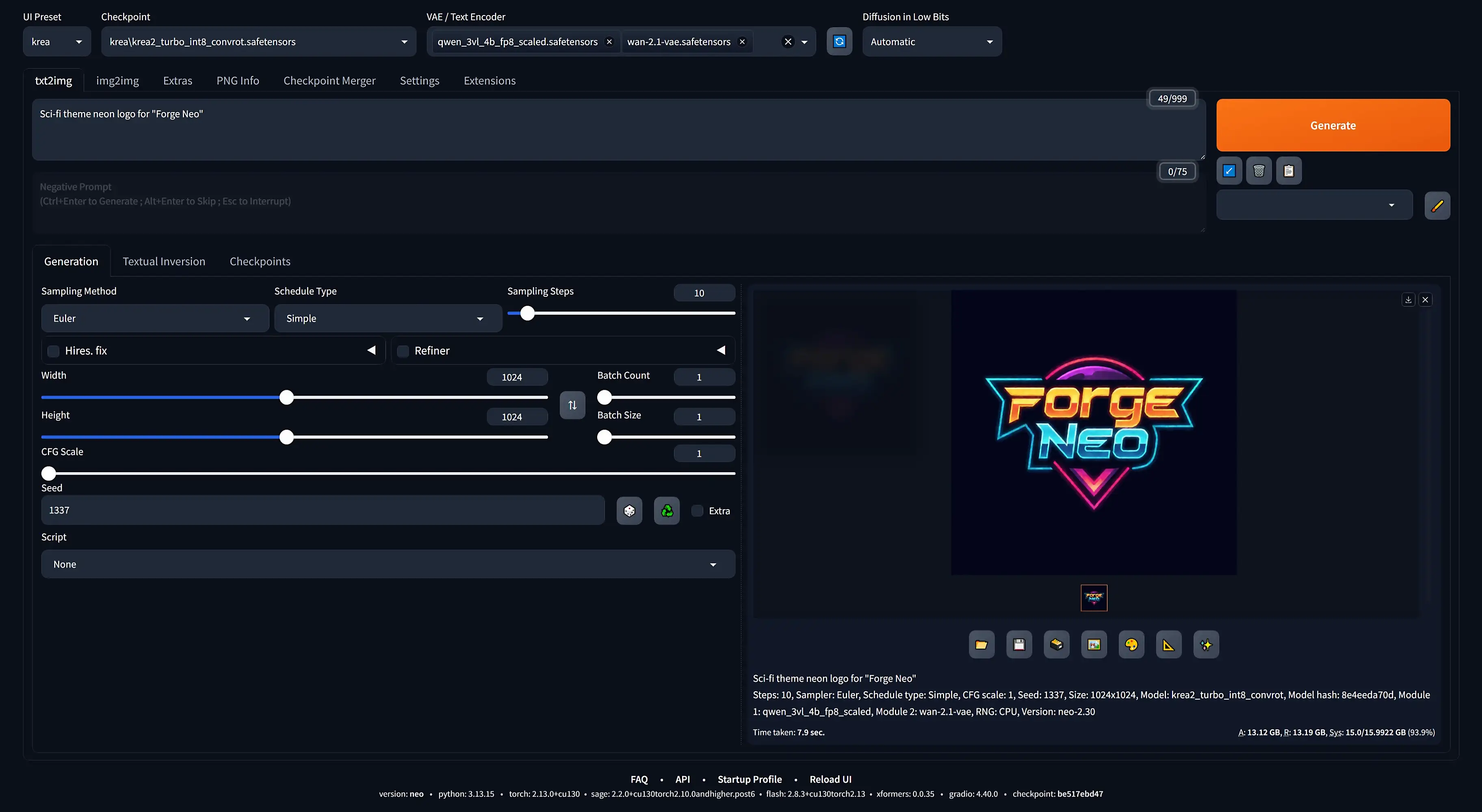
Stable Diffusion WebUI Forge is a platform on top of the original Stable Diffusion WebUI by AUTOMATIC1111, to make development easier, optimize resource management, speed up inference, and study experimental features.
The name "Forge" is inspired by "Minecraft Forge". This project aims to become the Forge of Stable Diffusion WebUI.
- lllyasviel
(paraphrased)
"Neo" mainly serves as an continuation for the "latest" version of Forge, which was built on Gradio 4.40.0 before lllyasviel became too busy... Additionally, this fork is focused on optimization and usability, with the main goal of being able to run the latest popular models via an easy-to-use GUI.
[!Tip] How to Install
Most base features of the original Automatic1111 Webui should still function
qwen35_4b adapter requires Extension4B / 9B (not FLUX.2-Dev)[!Note] To toggle between
img2imgandreference(edit) forQwen-Image-2.1/Krea 2/Anima/Flux.2-Klein, refer to Settings/Stable Diffusion
sdxl / qwen / flux1 / flux2 (not PixelDiT)PiD Integrated to automatically upscale after generation14B (not 5B)Refiner to achieve High Noise / Low Noise switching[!Important] To export a video, you need to have FFmpeg installed
Shift slider for xl preset in Settings/Presets/XL[!Note]
- v-prediction:
state_dictmust include "v_pred"- Zero Terminal SNR:
state_dictmust include "ztsnr"- Rectified Flow: the model must include "
rectified" in its path (e.g. file name or folder name)
[!Note] To be detected as an Edit model, the model must include both "
qwen" and "edit" in its path (e.g. file name or folder name)
[!Note] To be detected as a Kontext model, the model must include "
kontext" in its path (e.g. file name or folder name)
ImageStitch Integrated
Wan 2.2SVDQ) Models (Deprecated)
flux-dev, flux-krea, flux-kontext, qwen-image, qwen-image-edit, z-image-turboFlux and Qwen support LoRA currentlyfp4mixed / fp8mixed / mxfp8 / nvfp4 / fp8_scaled / int8_convrot / convrot_w4a4 / asym_w4a8_int8 / w6a8_int8[!Tip] Check out Download Models for where to get each model and the accompanying modules
[!Tip] Check out Inference References for how to use each model and the recommended parameters
[!Note] This overrides the
UI Defaultsfor the controlled parameters
64 by defaultfp16_accumulation
Wan 2.2state_dict switching for Refiner
v-pred checkpointstorch.compile
tritonConv2d for VAE
Mask blur blending
half precision
.avif, .heif, and .jxl image formatsX/Y/Z Plot<lora:name:[w1@t1, w2@t2, ...]>bitsandbytes SupportNunchaku Supportmemory_management.py, ModelPatcher, attention.py, etc.)git clone any repository on fresh installopen-clipgr.Image that already contains imagecmd_argsargs_parsershared_optionsTiled VAE fallbackTiling for SD1 and SDXL[!Note] Put every upscaler (
.pth/.safetensors) inside theESRGANfolder
[!Tip] Check out OpenModelDB for where to get upscalers
ForgeCanvas
SpandrelVAEOutOfMemoryX/Y/Z PlotSoft InpaintingMultiDiffusionuni_pc and LCM samplersembeddings folder into models folderemphasis properlygr.Tabmasks & buttonsRefiner CFG ScalePillow
protobuf
insightface loadingtorch==2.13.0+cu130[!Note] If your GPU does not support the latest PyTorch, manually install older version of PyTorch
3.13.12These flags can be added after the
set COMMANDLINE_ARGS=line in thewebui-user.bat(in the same line ; separate each flag with space)
[!Tip] Use
python launch.py --helpto see all available flags
--xformers: Install the xformers package to speed up generation[!Warning]
xformersdoes not supportRTX 50s
--port: Specify a server port to use
7860--api: Enable API access--cuda-malloc: Improve memory allocation--cuda-stream: Enable async weight offloading--pin-shared-memory: Improve RAM utilization--expandable-segments: Enable experimental PyTorch allocator (may prevent OutOfMemory errors on certain platforms)--uv: Replace the python -m pip calls with uv pip to massively speed up package installation
--uv-symlink: Same as above; but additionally pass --link-mode symlink to the commands
~7 GB to ~100 MB)--uv-local-cache: Same as above; but additionally set UV_CACHE_DIR to a .uv-cache folder within WebUI directory
C: on Windows)[!Important]
symlinkmeans it will directly access the packages from the cache folder instead of copying the packages over ; refrain from clearing the cache when using this option
--model-ref: Points to a central models folder that contains all your models
Stable-diffusion, Lora, VAE, ESRGAN, etc.[!Important] This simply replaces the
modelsfolder rather than adding on top of it
--forge-ref-a1111-home: Point to an Automatic1111 installation to load its models folders
Stable-diffusion, text_encoder, etc.--forge-ref-comfy-home: Point to a ComfyUI installation to load its models folders
diffusion_models, clip, etc.--forge-ref-comfy-yaml: Point to the ComfyUI extra_model_paths.yaml to load its configurations
base_path, checkpoints, etc.--sage: Install the sageattention package to speed up generation
triton automatically--flash: Install the flash_attn package to speed up generation--nunchaku: Install the nunchaku package to inference SVDQ models[!Warning] Using
nunchakuwill fall back to older version of PyTorch
--onnxruntime-gpu: Install the onnxruntime with the latest GPU support--fast-fp8: Use the torch._scaled_mm function when the model type is float8_e4m3fn--fast-fp16: Enable the allow_fp16_accumulation option--autotune: Enable the torch.backends.cudnn.benchmark option
--tiled-conv2d: Replace Conv2d ops with tiled variants
64 / 128 / 256 / 512--use-ck-attention: Use the Comfy-Kitchen attention to speed up generation
--enable-triton-backend: Enable the use of Triton backend in comfy-kitchen
--pynvml: Use the NVIDIA Management Library to determine the actual amount of free VRAM
Install git
Clone the Repo
git clone https://github.com/Haoming02/sd-webui-forge-classic sd-webui-forge-neo --branch neo
Setup Python
cd sd-webui-forge-neo
uv venv venv --python 3.13 --seed
--uv flag to webui-user.batAdd Python to PATHwebui-user.bat[!Tip]
- For AMD, refer to CS1o 's Guide
- For Linux and macOS, refer to Wiki
- For Docker (
Nvidia), refer to Docker
[!Tip] Check out Extra Installations for how to install
git,uv, andFFmpeg
[!Note] The
--xformers,--flash, and--sageargs are only responsible for installing the packages, not whether its respective attention is used (this also means you can remove them once the packages are successfully installed)
[!Caution] Do not just blindly install all of them
Nowadays the native PyTorchscaled_dot_product_attentionis usually as fast, and also more stable
Forge Neo tries to import the packages and automatically choose the first available attention function in the following order:
SageAttentionFlashAttentionxformersPyTorchBasic[!Tip] To skip a specific attention, add the respective disable arg such as
--disable-sage
[!Caution]
- If you post NSFW images/videos, you will immediately be banned
- the sole discretion is on me ; if you are unsure, just generate
catsanddogs...
Special thanks to AUTOMATIC1111, lllyasviel, and comfyanonymous, kijai, city96,
along with the rest of the contributors,
for their invaluable efforts in the open-source image generation community
581 followers · starred Jul 2026
96 followers · starred Jul 2026
376 followers · starred Feb 2026
412 followers · starred Dec 2025
The good ol' Forge WebUI, now updated with new features~
Python
1,824
9,308 commits
updated Oct 17, 2026
[ Neo | Classic ]
Stable Diffusion WebUI Forge is a platform on top of the original Stable Diffusion WebUI by AUTOMATIC1111, to make development easier, optimize resource management, speed up inference, and study experimental features.
The name "Forge" is inspired by "Minecraft Forge". This project aims to become the Forge of Stable Diffusion WebUI.
- lllyasviel
(paraphrased)
"Neo" mainly serves as an continuation for the "latest" version of Forge, which was built on Gradio 4.40.0 before lllyasviel became too busy... Additionally, this fork is focused on optimization and usability, with the main goal of being able to run the latest popular models via an easy-to-use GUI.
[!Tip] How to Install
Most base features of the original Automatic1111 Webui should still function
qwen35_4b adapter requires Extension4B / 9B (not FLUX.2-Dev)[!Note] To toggle between
img2imgandreference(edit) forQwen-Image-2.1/Krea 2/Anima/Flux.2-Klein, refer to Settings/Stable Diffusion
sdxl / qwen / flux1 / flux2 (not PixelDiT)PiD Integrated to automatically upscale after generation14B (not 5B)Refiner to achieve High Noise / Low Noise switching[!Important] To export a video, you need to have FFmpeg installed
Shift slider for xl preset in Settings/Presets/XL[!Note]
- v-prediction:
state_dictmust include "v_pred"- Zero Terminal SNR:
state_dictmust include "ztsnr"- Rectified Flow: the model must include "
rectified" in its path (e.g. file name or folder name)
[!Note] To be detected as an Edit model, the model must include both "
qwen" and "edit" in its path (e.g. file name or folder name)
[!Note] To be detected as a Kontext model, the model must include "
kontext" in its path (e.g. file name or folder name)
ImageStitch Integrated
Wan 2.2SVDQ) Models (Deprecated)
flux-dev, flux-krea, flux-kontext, qwen-image, qwen-image-edit, z-image-turboFlux and Qwen support LoRA currentlyfp4mixed / fp8mixed / mxfp8 / nvfp4 / fp8_scaled / int8_convrot / convrot_w4a4 / asym_w4a8_int8 / w6a8_int8[!Tip] Check out Download Models for where to get each model and the accompanying modules
[!Tip] Check out Inference References for how to use each model and the recommended parameters
[!Note] This overrides the
UI Defaultsfor the controlled parameters
64 by defaultfp16_accumulation
Wan 2.2state_dict switching for Refiner
v-pred checkpointstorch.compile
tritonConv2d for VAE
Mask blur blending
half precision
.avif, .heif, and .jxl image formatsX/Y/Z Plot<lora:name:[w1@t1, w2@t2, ...]>bitsandbytes SupportNunchaku Supportmemory_management.py, ModelPatcher, attention.py, etc.)git clone any repository on fresh installopen-clipgr.Image that already contains imagecmd_argsargs_parsershared_optionsTiled VAE fallbackTiling for SD1 and SDXL[!Note] Put every upscaler (
.pth/.safetensors) inside theESRGANfolder
[!Tip] Check out OpenModelDB for where to get upscalers
ForgeCanvas
SpandrelVAEOutOfMemoryX/Y/Z PlotSoft InpaintingMultiDiffusionuni_pc and LCM samplersembeddings folder into models folderemphasis properlygr.Tabmasks & buttonsRefiner CFG ScalePillow
protobuf
insightface loadingtorch==2.13.0+cu130[!Note] If your GPU does not support the latest PyTorch, manually install older version of PyTorch
3.13.12These flags can be added after the
set COMMANDLINE_ARGS=line in thewebui-user.bat(in the same line ; separate each flag with space)
[!Tip] Use
python launch.py --helpto see all available flags
--xformers: Install the xformers package to speed up generation[!Warning]
xformersdoes not supportRTX 50s
--port: Specify a server port to use
7860--api: Enable API access--cuda-malloc: Improve memory allocation--cuda-stream: Enable async weight offloading--pin-shared-memory: Improve RAM utilization--expandable-segments: Enable experimental PyTorch allocator (may prevent OutOfMemory errors on certain platforms)--uv: Replace the python -m pip calls with uv pip to massively speed up package installation
--uv-symlink: Same as above; but additionally pass --link-mode symlink to the commands
~7 GB to ~100 MB)--uv-local-cache: Same as above; but additionally set UV_CACHE_DIR to a .uv-cache folder within WebUI directory
C: on Windows)[!Important]
symlinkmeans it will directly access the packages from the cache folder instead of copying the packages over ; refrain from clearing the cache when using this option
--model-ref: Points to a central models folder that contains all your models
Stable-diffusion, Lora, VAE, ESRGAN, etc.[!Important] This simply replaces the
modelsfolder rather than adding on top of it
--forge-ref-a1111-home: Point to an Automatic1111 installation to load its models folders
Stable-diffusion, text_encoder, etc.--forge-ref-comfy-home: Point to a ComfyUI installation to load its models folders
diffusion_models, clip, etc.--forge-ref-comfy-yaml: Point to the ComfyUI extra_model_paths.yaml to load its configurations
base_path, checkpoints, etc.--sage: Install the sageattention package to speed up generation
triton automatically--flash: Install the flash_attn package to speed up generation--nunchaku: Install the nunchaku package to inference SVDQ models[!Warning] Using
nunchakuwill fall back to older version of PyTorch
--onnxruntime-gpu: Install the onnxruntime with the latest GPU support--fast-fp8: Use the torch._scaled_mm function when the model type is float8_e4m3fn--fast-fp16: Enable the allow_fp16_accumulation option--autotune: Enable the torch.backends.cudnn.benchmark option
--tiled-conv2d: Replace Conv2d ops with tiled variants
64 / 128 / 256 / 512--use-ck-attention: Use the Comfy-Kitchen attention to speed up generation
--enable-triton-backend: Enable the use of Triton backend in comfy-kitchen
--pynvml: Use the NVIDIA Management Library to determine the actual amount of free VRAM
Install git
Clone the Repo
git clone https://github.com/Haoming02/sd-webui-forge-classic sd-webui-forge-neo --branch neo
Setup Python
cd sd-webui-forge-neo
uv venv venv --python 3.13 --seed
--uv flag to webui-user.batAdd Python to PATHwebui-user.bat[!Tip]
- For AMD, refer to CS1o 's Guide
- For Linux and macOS, refer to Wiki
- For Docker (
Nvidia), refer to Docker
[!Tip] Check out Extra Installations for how to install
git,uv, andFFmpeg
[!Note] The
--xformers,--flash, and--sageargs are only responsible for installing the packages, not whether its respective attention is used (this also means you can remove them once the packages are successfully installed)
[!Caution] Do not just blindly install all of them
Nowadays the native PyTorchscaled_dot_product_attentionis usually as fast, and also more stable
Forge Neo tries to import the packages and automatically choose the first available attention function in the following order:
SageAttentionFlashAttentionxformersPyTorchBasic[!Tip] To skip a specific attention, add the respective disable arg such as
--disable-sage
[!Caution]
- If you post NSFW images/videos, you will immediately be banned
- the sole discretion is on me ; if you are unsure, just generate
catsanddogs...
Special thanks to AUTOMATIC1111, lllyasviel, and comfyanonymous, kijai, city96,
along with the rest of the contributors,
for their invaluable efforts in the open-source image generation community
581 followers · starred Jul 2026
96 followers · starred Jul 2026
376 followers · starred Feb 2026
412 followers · starred Dec 2025