
⚡ Laya engine on AWS Lambda, backed by Lambda SnapStart.
Python
2
6 commits
updated Sep 21, 2026
See what people are saying (1)
README
Laymbda
⚡ The Laya engine running on AWS Lambda.
What's this ❓
Laymbda is an example of how to run the Laya System-1 decision model on AWS Lambda using a CPU-only, serverless architecture. It is backed by Lambda SnapStart for container functions, which caches and restores initialized Lambda states quickly.
This project uses the AWS Cloud Development Kit (CDK) as the Infrastructure-as-Code layer, and requires Node.js, Docker, npm, and AWS credentials configured for the target account and region.
All credit goes to the Laya project.
Architecture
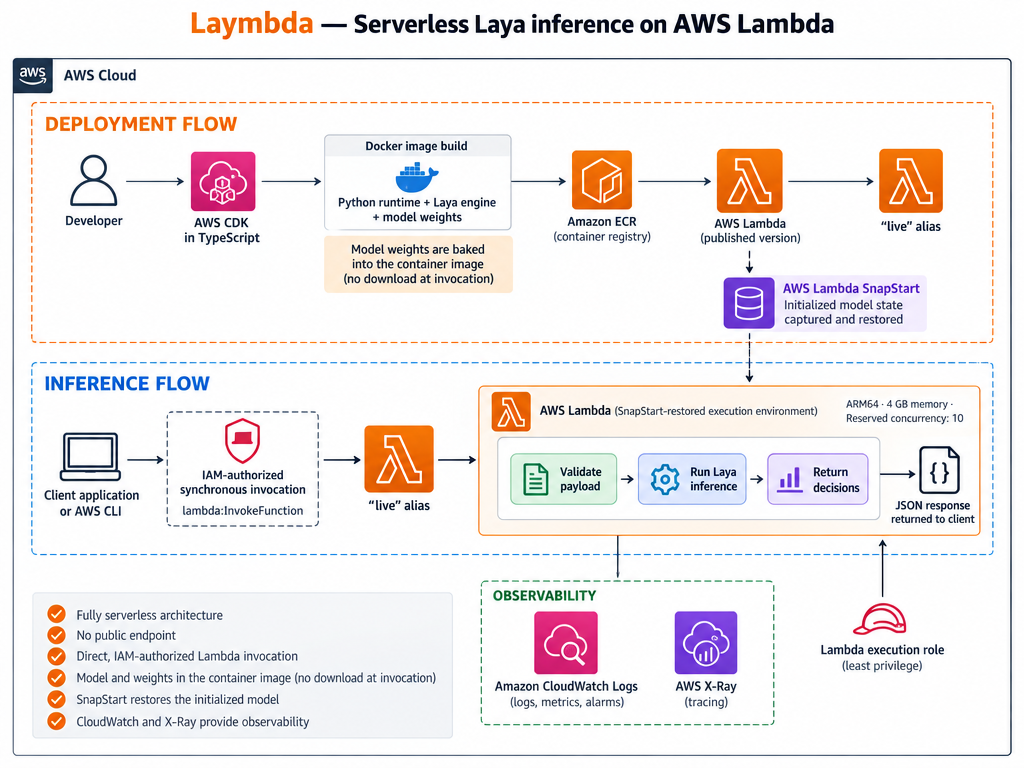
Laymbda has no long-running servers. CDK packages the runtime as an x86-64 container image, Lambda loads Laya during initialization, and SnapStart captures the initialized process when CDK publishes a version.
Architectural Trade-offs
Using AWS Lambda is not the most conventional choice for running ML workloads due to its resource limits and lack of GPU acceleration.
However, Laya’s encoder-only ModernBERT architecture makes CPU inference practical within Lambda’s execution environment. A serverless, event-driven approach can be effective for bursty, stateless inference workloads where Lambda scales execution environments within the configured concurrency limit, while Snapstart restores the model fast instead of loading it from scratch for every new environment.
It is less suitable though for sustained high-throughput inference requiring a GPU, or applications that require consistently low tail latency.
🚀 Quick Start
Run every command in this guide from the project root.
Install
Install the project dependencies:
npm ci
Bootstrap
Bootstrap AWS CDK in the target account and Region:
Bootstrap is required per account and region only once.
npm run bootstrap
Deploy
AWS CDK builds the image during deployment using Docker, downloads the pinned Laya checkpoint, pushes the image to ECR, and publishes a SnapStart-enabled Lambda version behind the live alias.
npm run deploy
Invoke the model
Invoke the live alias with the included support-ticket example.
aws lambda invoke \
  --function-name "$(aws cloudformation describe-stacks \
    --stack-name LaymbdaStack \
    --query "Stacks[0].Outputs[?OutputKey=='LiveAliasArn'].OutputValue" \
    --output text)" \
  --cli-binary-format raw-in-base64-out \
  --payload fileb://examples/support-ticket.json \
  response.json
Response
The invocation response will be saved in response.json.
cat response.json
See Model invocation for the request format, question types, responses, and validation rules.
🧪 Benchmarks
The benchmark used a 4 GB Lambda memory configuration with the Laya model, example payload, and x86-64 runtime with FP16 weights. Sequential requests were sent to a single Lambda container with a maximum concurrency of one.
AWS Lambda scales the number of vCPUs with the allocated memory.
SDK retries were disabled for the benchmark.
| Metric | 4 GB x86-64 |
|---|---|
| Warm average latency | 2.022 s |
| Warm p95 latency | 2.051 s |
| Warm p99 latency | 2.087 s |
| Client-observed average | 2.115 s |
| Per-container throughput | 0.470 req/s |
| Peak memory | 3,122 MB |
| SnapStart restore time | 2.445 s |
💰 Cost
The estimates use the measured warm duration of the 4 GB x86-64 function in eu-west-1. They exclude ECR, observability, data transfer, taxes, and Free Tier discounts. See the AWS Lambda pricing page for regional rates.
Laymbda sets a reserved concurrency to 10 by default, limiting simultaneous invocations and burst scale-out.
| Cost component | Price |
|---|---|
| Lambda execution | $0.135 per 1,000 requests |
| SnapStart cache | $15.60 per active version per month |
| SnapStart restoration | $0.000559 per restored environment |
🧹 Cleanup
npm run destroy
Destroying the stack removes the function, published version, alias, log group, and runtime role. CDK bootstrap assets follow the lifecycle of the bootstrap environment and may remain cached for later deployments.
Contributors

6 commits
Similar repos


Languages
Python
78.9%
TypeScript
18.4%
Dockerfile
2.7%
⚡ Laya engine on AWS Lambda, backed by Lambda SnapStart.
Python
2
6 commits
updated Sep 21, 2026
See what people are saying (1)
README
Laymbda
⚡ The Laya engine running on AWS Lambda.
What's this ❓
Laymbda is an example of how to run the Laya System-1 decision model on AWS Lambda using a CPU-only, serverless architecture. It is backed by Lambda SnapStart for container functions, which caches and restores initialized Lambda states quickly.
This project uses the AWS Cloud Development Kit (CDK) as the Infrastructure-as-Code layer, and requires Node.js, Docker, npm, and AWS credentials configured for the target account and region.
All credit goes to the Laya project.
Architecture
Laymbda has no long-running servers. CDK packages the runtime as an x86-64 container image, Lambda loads Laya during initialization, and SnapStart captures the initialized process when CDK publishes a version.
Architectural Trade-offs
Using AWS Lambda is not the most conventional choice for running ML workloads due to its resource limits and lack of GPU acceleration.
However, Laya’s encoder-only ModernBERT architecture makes CPU inference practical within Lambda’s execution environment. A serverless, event-driven approach can be effective for bursty, stateless inference workloads where Lambda scales execution environments within the configured concurrency limit, while Snapstart restores the model fast instead of loading it from scratch for every new environment.
It is less suitable though for sustained high-throughput inference requiring a GPU, or applications that require consistently low tail latency.
🚀 Quick Start
Run every command in this guide from the project root.
Install
Install the project dependencies:
npm ci
Bootstrap
Bootstrap AWS CDK in the target account and Region:
Bootstrap is required per account and region only once.
npm run bootstrap
Deploy
AWS CDK builds the image during deployment using Docker, downloads the pinned Laya checkpoint, pushes the image to ECR, and publishes a SnapStart-enabled Lambda version behind the live alias.
npm run deploy
Invoke the model
Invoke the live alias with the included support-ticket example.
aws lambda invoke \
  --function-name "$(aws cloudformation describe-stacks \
    --stack-name LaymbdaStack \
    --query "Stacks[0].Outputs[?OutputKey=='LiveAliasArn'].OutputValue" \
    --output text)" \
  --cli-binary-format raw-in-base64-out \
  --payload fileb://examples/support-ticket.json \
  response.json
Response
The invocation response will be saved in response.json.
cat response.json
See Model invocation for the request format, question types, responses, and validation rules.
🧪 Benchmarks
The benchmark used a 4 GB Lambda memory configuration with the Laya model, example payload, and x86-64 runtime with FP16 weights. Sequential requests were sent to a single Lambda container with a maximum concurrency of one.
AWS Lambda scales the number of vCPUs with the allocated memory.
SDK retries were disabled for the benchmark.
| Metric | 4 GB x86-64 |
|---|---|
| Warm average latency | 2.022 s |
| Warm p95 latency | 2.051 s |
| Warm p99 latency | 2.087 s |
| Client-observed average | 2.115 s |
| Per-container throughput | 0.470 req/s |
| Peak memory | 3,122 MB |
| SnapStart restore time | 2.445 s |
💰 Cost
The estimates use the measured warm duration of the 4 GB x86-64 function in eu-west-1. They exclude ECR, observability, data transfer, taxes, and Free Tier discounts. See the AWS Lambda pricing page for regional rates.
Laymbda sets a reserved concurrency to 10 by default, limiting simultaneous invocations and burst scale-out.
| Cost component | Price |
|---|---|
| Lambda execution | $0.135 per 1,000 requests |
| SnapStart cache | $15.60 per active version per month |
| SnapStart restoration | $0.000559 per restored environment |
🧹 Cleanup
npm run destroy
Destroying the stack removes the function, published version, alias, log group, and runtime role. CDK bootstrap assets follow the lifecycle of the bootstrap environment and may remain cached for later deployments.
Similar repos
Contributors
6 commits
Languages
Python
78.9%
TypeScript
18.4%
Dockerfile
2.7%