Job application tracker and AI-powered job search assistant. Helps job seekers manage their search journey with AI resume review, job matching, task logging, and application analytics, all while keeping your data private.
See the codeThe self-hosted job search assistant with AI-powered resume review, job matching, and automated discovery
Live Demo · Quick Start · AI Assistant · MCP Setup · Help




Track every application, get AI resume reviews and job matches, and discover new openings automatically — free, open source, and your data never leaves your server.
🔒 Self-hosted · 🤖 Local AI via Ollama or any cloud provider · 🔌 MCP server for Claude Desktop, Hermes, etc
⭐ If JobSync helps your search, a star helps other job seekers find it.
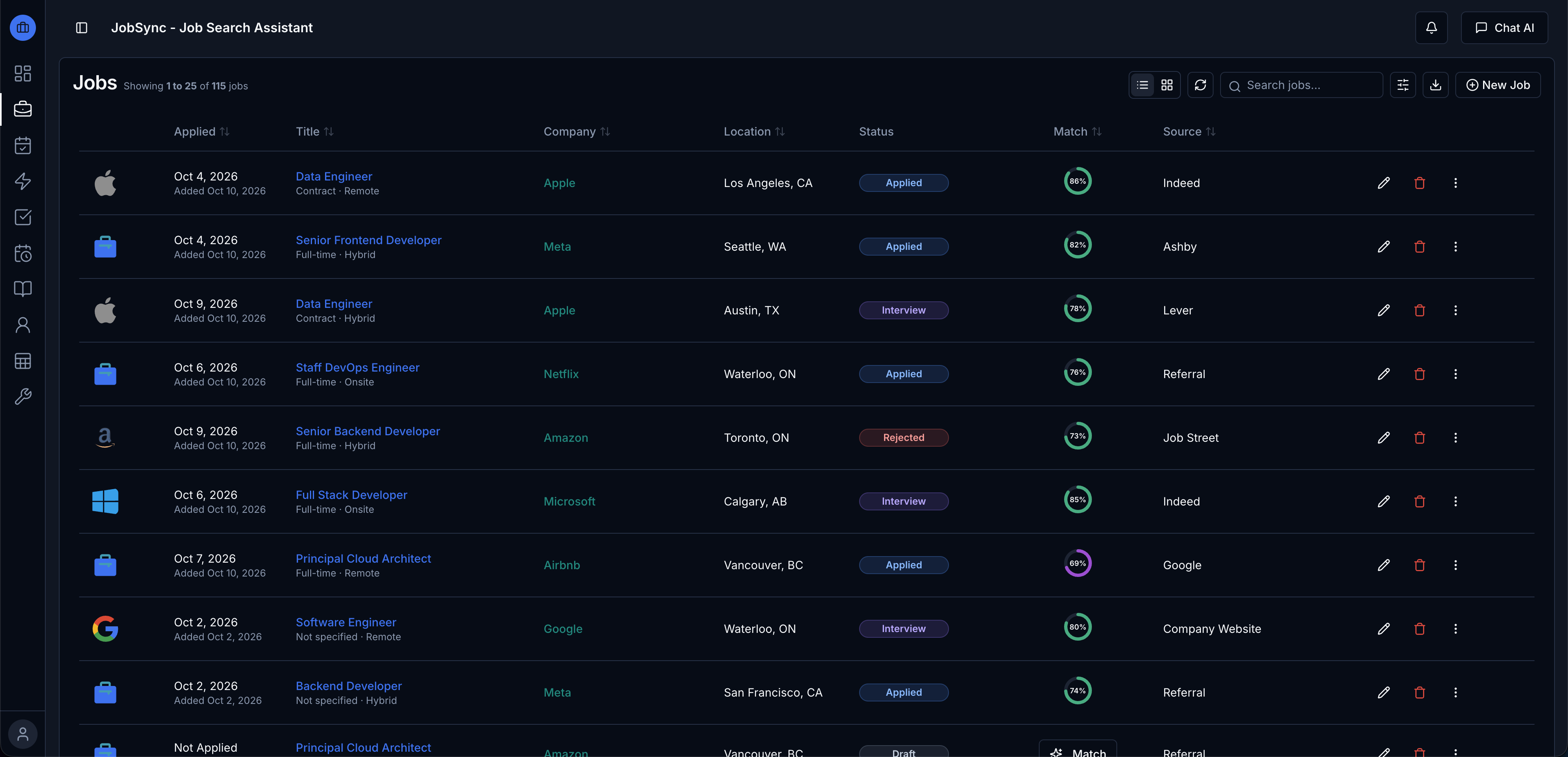
Application Tracker: Record every application with its company, title, dates and current status.
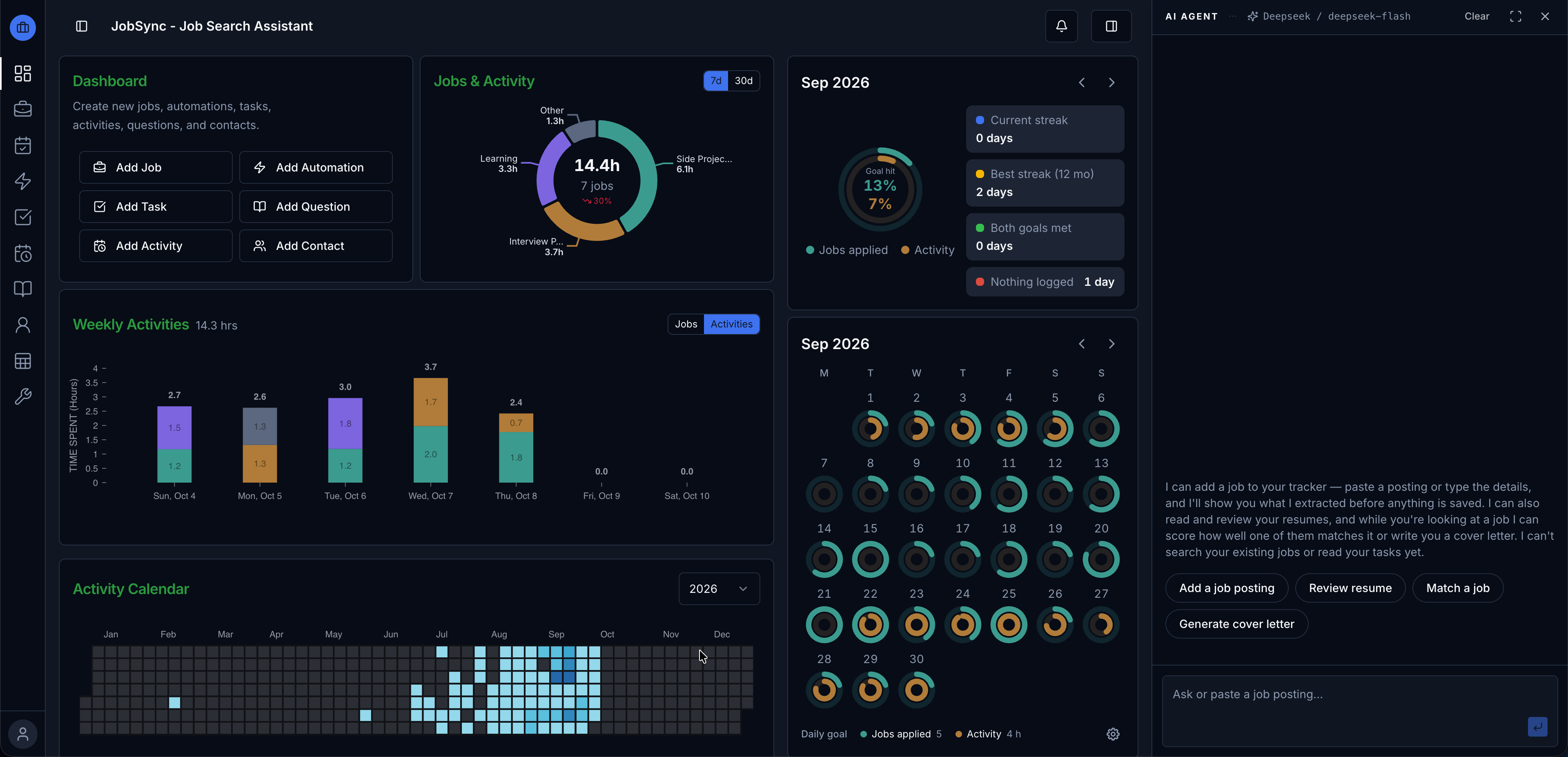
Monitoring Dashboard: See your search progress, activity and daily goals at a glance.
Resume Management: Store resumes, export them as PDFs, and import existing PDF or Word files with AI.
Automated Job Discovery: Schedule searches over company job boards and AI-match each listing to your resume. Details
Task & Activity Management: Track tasks and time your activities. Tasks · Activities
Contacts: Keep recruiters, interviewers and references, linked to the jobs they touched. Details
Company Pages: One page per company with its jobs, people and links, plus a watchlist. Details
Question Bank: Build a library of interview questions and answers, tagged by skill.
Data Backup & Restore: Export everything as one zip, import it anywhere, and undo an import. Details
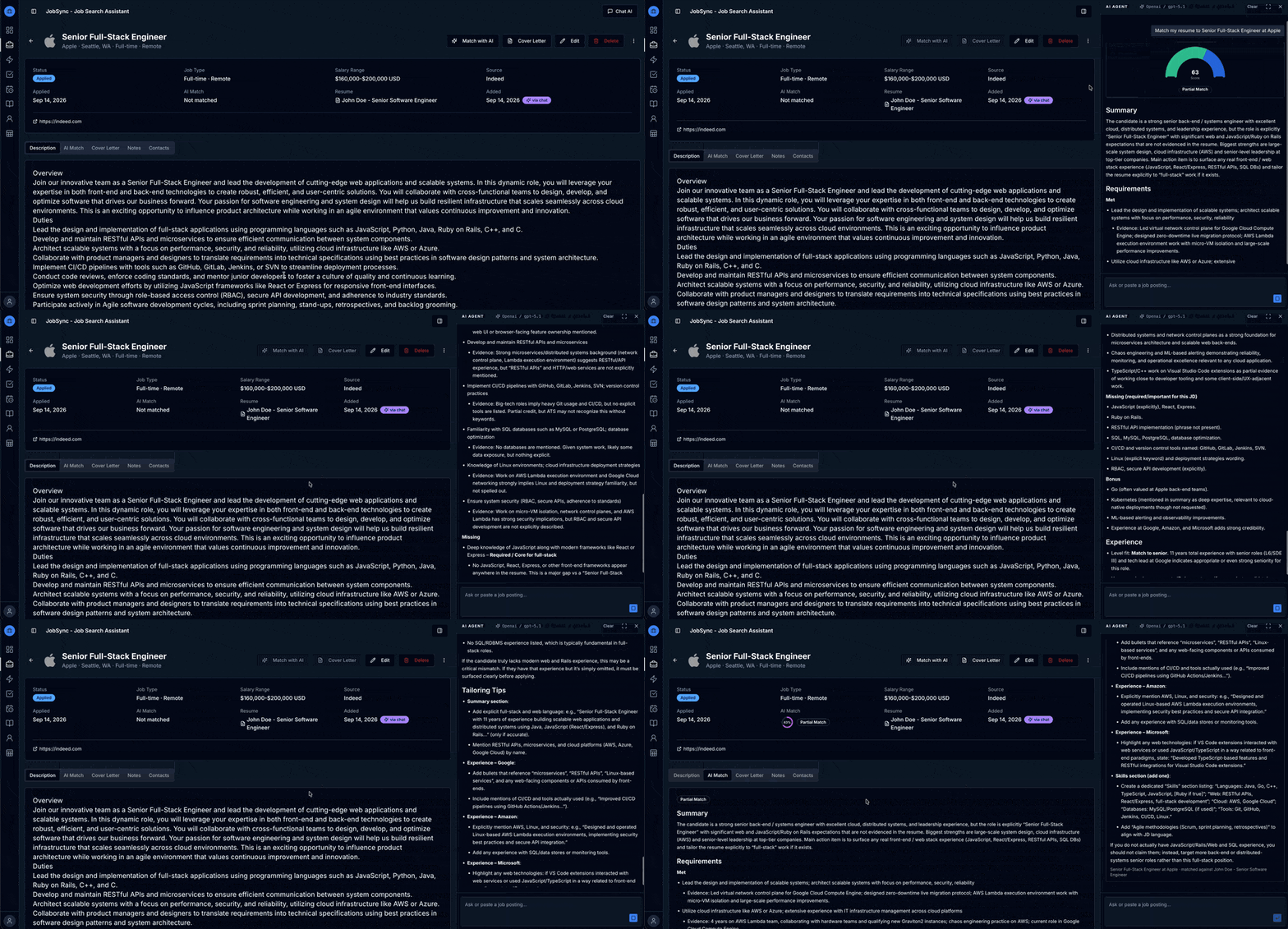
AI Assistant: A docked chat that reviews resumes, scores job matches, writes cover letters and adds jobs you paste in. Details
AI Agent Integration (MCP): Add jobs and questions from Claude Desktop and other agents. Details
Make sure Docker is installed and running, then:
git clone https://github.com/Gsync/jobsync.git
cd jobsync
docker compose up
Note: The first startup downloads the prebuilt app image, so give it a moment before opening the browser.
Open http://localhost:3737 and create your account. That's it!
API keys for AI providers can be configured in Settings after signing in.
Environment variables can be set in docker-compose.yml:
| Variable | Description |
|---|---|
TZ | Your timezone (e.g. America/Edmonton). Set this on remote servers to avoid activity time shifts. |
AUTH_SECRET | Auto-generated if not set. To set manually: openssl rand -base64 32 |
ENCRYPTION_KEY | Encrypts the API keys you save in Settings. Set your own (openssl rand -base64 32) before adding any keys, and never change it afterwards — a new value makes every stored API key unrecoverable. |
NEXTAUTH_URL | The address you open JobSync at. Defaults to http://localhost:3737; on a homelab server, use the server's IP or hostname. |
MCP_ENABLED | Set to false to turn off the MCP server. Enabled by default in docker-compose.yml. |
From the project directory, run the deploy script to pull the latest image and restart:
curl -fsSL https://raw.githubusercontent.com/Gsync/jobsync/main/deploy.sh | sudo bash -s
On Windows, run the PowerShell equivalent from the project directory instead (deploy.sh needs WSL or Git Bash; deploy.ps1 runs natively):
.\deploy.ps1
Note: If you are updating in a homelab environment, edit
NEXTAUTH_URLin your.envfile to use your server IP address instead oflocalhost. See.env.examplefor the expected format.
All of JobSync's AI features live in one place: a chat panel that docks to the side of the app instead of taking it over, so the page you were on stays visible and usable while the assistant works.
Open it from the AI Assistant button in the header, or let the app open it for you — the Review button on a resume and the Match with AI and Cover Letter buttons on a job all start the matching request in the panel.
What you can ask for:
The reviews, matches and letters are the same analyses the dedicated panels used to produce — the chat is a new way in, not a lighter-weight version.
The assistant is deliberately narrow about what it can see: it reads your resumes and the single job you're looking at, and nothing else. It can't list or search your jobs, and it can't see tasks or activities. Pasted postings are also treated as untrusted text, so instructions hidden inside a posting can't make the assistant act on your data.
Pick a model under Settings > AI Settings before using the panel — it needs one that supports tool calling, and it will tell you rather than guessing if none is set. See known-good models for the ones that have been tested, including a fully local option.
Export any resume as a professionally formatted PDF directly from the resume page. Choose between two layouts — a clean Simple template and a more polished Professional template. If a PDF attachment already exists, you'll be prompted to replace it or keep the download only.
Import an existing resume from a PDF or Word (.docx) file. AI extracts structured data — contact info, summary, skills, work experience, education, and certifications — and presents each section as a review card. You can accept or skip individual sections before saving them to your resume.
Set up automations that search for new jobs on a schedule and AI-match them against your resume, so relevant openings come to you.
Greenhouse — track specific companies by name from a built-in directory (or by pasting a board URL). Each run pulls every published role from those companies' Greenhouse boards, ranks them against your target titles, skills, and resume with a fast local relevance score, and runs the AI match on only the top candidates to keep costs bounded. No API key required.
Lever — same company-tracking workflow as Greenhouse, backed by a built-in directory of 1,160+ companies (or paste a board URL). Automatically resolves the right regional API (lever.co or eu.lever.co) per company and carries full remote/hybrid/onsite signal from the listing. No API key required.
Ashby — same company-tracking workflow, backed by a built-in directory of 1,860+ companies (or paste a board URL). No API key required.
More job board sources are on the way. Discovered jobs are surfaced for review — accept the ones you like to promote them into your job tracker, or dismiss the rest.
JobSync exposes an MCP server so AI agents (Claude Desktop, Hermes, OpenClaw, etc.) can add job applications and Question Bank entries directly, with your approval.
Browsing a job posting or reading an interview question elsewhere and don't want to break your flow to log it manually? Just ask your connected AI agent, for example:
The agent resolves or creates the company, title, location, and tags by name, and reports back what it matched versus created — so your data stays de-duplicated without you having to switch to the app.
When you add a job with a substantial description and you've set a default resume (Profile), the agent also analyzes the fit against that resume and saves a job match score — no round trip to the app needed. The result shows up on the job just like an in-app AI match, scores, recommendation, and write-up included.
claude_desktop_config.json in your default editor.mcpServers, e.g.:{
"mcpServers": {
"jobsync": {
"command": "npx",
"args": [
"mcp-remote",
"http://<your-jobsync-url>/api/mcp",
"--header",
"Authorization: Bearer <your-token>"
]
}
}
}
Note: Claude Desktop only supports local (stdio) MCP servers directly, so
mcp-remoteis required as a bridge to JobSync's remote endpoint.
Clients that support streamable-http natively can connect directly without mcp-remote:
{
  "mcpServers": {
    "jobsync": {
      "type": "streamable-http",
      "url": "http://<your-jobsync-url>/api/mcp",
      "headers": { "Authorization": "Bearer <your-token>" }
    }
  }
}
Self-hosting on a home network? If your JobSync URL is a plain
http://LAN address (notlocalhostor HTTPS), add--allow-httpto themcp-remoteargs — it refuses non-HTTPS URLs by default. The Settings page adds this flag automatically when it detects a non-localhost HTTP URL.
In-app usage guides — getting started, jobs, automations, and MCP access — live in the GitHub Wiki.
We welcome contributions! Please read our Contributing Guidelines to get started. This project follows a Code of Conduct — by participating, you agree to uphold its standards.
API keys for all cloud providers can be configured in Settings > AI Settings after signing in. Ollama is selected as the default provider.
Note: Selected models must support structured output and tool calling for AI features to work correctly — the AI Assistant panel works by calling tools, so a model without tool support will reply with text instead of doing anything.
Known-good models. The AI Assistant has been tested end to end with qwen3.5:9b on Ollama (fully local), deepseek-v4-flash, and OpenAI gpt-4.1. Other tool-calling models should work, but these are the ones exercised against the full set of assistant features.
Works with Ollama to run AI models locally on your machine.
Access a wide range of AI models from multiple providers through a single API.
If JobSync has been helpful in your job search, consider giving it a star on GitHub! It helps others discover the project and motivates continued development.
Every star means a lot — thank you for your support!
144 followers · starred Jun 2026
38 followers · starred Jul 2024
156 followers · starred Aug 2026
52 followers · starred Jun 2026
Job application tracker and AI-powered job search assistant. Helps job seekers manage their search journey with AI resume review, job matching, task logging, and application analytics, all while keeping your data private.
See the codeThe self-hosted job search assistant with AI-powered resume review, job matching, and automated discovery
Live Demo · Quick Start · AI Assistant · MCP Setup · Help
Track every application, get AI resume reviews and job matches, and discover new openings automatically — free, open source, and your data never leaves your server.
🔒 Self-hosted · 🤖 Local AI via Ollama or any cloud provider · 🔌 MCP server for Claude Desktop, Hermes, etc
⭐ If JobSync helps your search, a star helps other job seekers find it.
Application Tracker: Record every application with its company, title, dates and current status.
Monitoring Dashboard: See your search progress, activity and daily goals at a glance.
Resume Management: Store resumes, export them as PDFs, and import existing PDF or Word files with AI.
Automated Job Discovery: Schedule searches over company job boards and AI-match each listing to your resume. Details
Task & Activity Management: Track tasks and time your activities. Tasks · Activities
Contacts: Keep recruiters, interviewers and references, linked to the jobs they touched. Details
Company Pages: One page per company with its jobs, people and links, plus a watchlist. Details
Question Bank: Build a library of interview questions and answers, tagged by skill.
Data Backup & Restore: Export everything as one zip, import it anywhere, and undo an import. Details
AI Assistant: A docked chat that reviews resumes, scores job matches, writes cover letters and adds jobs you paste in. Details
AI Agent Integration (MCP): Add jobs and questions from Claude Desktop and other agents. Details
Make sure Docker is installed and running, then:
git clone https://github.com/Gsync/jobsync.git
cd jobsync
docker compose up
Note: The first startup downloads the prebuilt app image, so give it a moment before opening the browser.
Open http://localhost:3737 and create your account. That's it!
API keys for AI providers can be configured in Settings after signing in.
Environment variables can be set in docker-compose.yml:
| Variable | Description |
|---|---|
TZ | Your timezone (e.g. America/Edmonton). Set this on remote servers to avoid activity time shifts. |
AUTH_SECRET | Auto-generated if not set. To set manually: openssl rand -base64 32 |
ENCRYPTION_KEY | Encrypts the API keys you save in Settings. Set your own (openssl rand -base64 32) before adding any keys, and never change it afterwards — a new value makes every stored API key unrecoverable. |
NEXTAUTH_URL | The address you open JobSync at. Defaults to http://localhost:3737; on a homelab server, use the server's IP or hostname. |
MCP_ENABLED | Set to false to turn off the MCP server. Enabled by default in docker-compose.yml. |
From the project directory, run the deploy script to pull the latest image and restart:
curl -fsSL https://raw.githubusercontent.com/Gsync/jobsync/main/deploy.sh | sudo bash -s
On Windows, run the PowerShell equivalent from the project directory instead (deploy.sh needs WSL or Git Bash; deploy.ps1 runs natively):
.\deploy.ps1
Note: If you are updating in a homelab environment, edit
NEXTAUTH_URLin your.envfile to use your server IP address instead oflocalhost. See.env.examplefor the expected format.
All of JobSync's AI features live in one place: a chat panel that docks to the side of the app instead of taking it over, so the page you were on stays visible and usable while the assistant works.
Open it from the AI Assistant button in the header, or let the app open it for you — the Review button on a resume and the Match with AI and Cover Letter buttons on a job all start the matching request in the panel.
What you can ask for:
The reviews, matches and letters are the same analyses the dedicated panels used to produce — the chat is a new way in, not a lighter-weight version.
The assistant is deliberately narrow about what it can see: it reads your resumes and the single job you're looking at, and nothing else. It can't list or search your jobs, and it can't see tasks or activities. Pasted postings are also treated as untrusted text, so instructions hidden inside a posting can't make the assistant act on your data.
Pick a model under Settings > AI Settings before using the panel — it needs one that supports tool calling, and it will tell you rather than guessing if none is set. See known-good models for the ones that have been tested, including a fully local option.
Export any resume as a professionally formatted PDF directly from the resume page. Choose between two layouts — a clean Simple template and a more polished Professional template. If a PDF attachment already exists, you'll be prompted to replace it or keep the download only.
Import an existing resume from a PDF or Word (.docx) file. AI extracts structured data — contact info, summary, skills, work experience, education, and certifications — and presents each section as a review card. You can accept or skip individual sections before saving them to your resume.
Set up automations that search for new jobs on a schedule and AI-match them against your resume, so relevant openings come to you.
Greenhouse — track specific companies by name from a built-in directory (or by pasting a board URL). Each run pulls every published role from those companies' Greenhouse boards, ranks them against your target titles, skills, and resume with a fast local relevance score, and runs the AI match on only the top candidates to keep costs bounded. No API key required.
Lever — same company-tracking workflow as Greenhouse, backed by a built-in directory of 1,160+ companies (or paste a board URL). Automatically resolves the right regional API (lever.co or eu.lever.co) per company and carries full remote/hybrid/onsite signal from the listing. No API key required.
Ashby — same company-tracking workflow, backed by a built-in directory of 1,860+ companies (or paste a board URL). No API key required.
More job board sources are on the way. Discovered jobs are surfaced for review — accept the ones you like to promote them into your job tracker, or dismiss the rest.
JobSync exposes an MCP server so AI agents (Claude Desktop, Hermes, OpenClaw, etc.) can add job applications and Question Bank entries directly, with your approval.
Browsing a job posting or reading an interview question elsewhere and don't want to break your flow to log it manually? Just ask your connected AI agent, for example:
The agent resolves or creates the company, title, location, and tags by name, and reports back what it matched versus created — so your data stays de-duplicated without you having to switch to the app.
When you add a job with a substantial description and you've set a default resume (Profile), the agent also analyzes the fit against that resume and saves a job match score — no round trip to the app needed. The result shows up on the job just like an in-app AI match, scores, recommendation, and write-up included.
claude_desktop_config.json in your default editor.mcpServers, e.g.:{
"mcpServers": {
"jobsync": {
"command": "npx",
"args": [
"mcp-remote",
"http://<your-jobsync-url>/api/mcp",
"--header",
"Authorization: Bearer <your-token>"
]
}
}
}
Note: Claude Desktop only supports local (stdio) MCP servers directly, so
mcp-remoteis required as a bridge to JobSync's remote endpoint.
Clients that support streamable-http natively can connect directly without mcp-remote:
{
  "mcpServers": {
    "jobsync": {
      "type": "streamable-http",
      "url": "http://<your-jobsync-url>/api/mcp",
      "headers": { "Authorization": "Bearer <your-token>" }
    }
  }
}
Self-hosting on a home network? If your JobSync URL is a plain
http://LAN address (notlocalhostor HTTPS), add--allow-httpto themcp-remoteargs — it refuses non-HTTPS URLs by default. The Settings page adds this flag automatically when it detects a non-localhost HTTP URL.
In-app usage guides — getting started, jobs, automations, and MCP access — live in the GitHub Wiki.
We welcome contributions! Please read our Contributing Guidelines to get started. This project follows a Code of Conduct — by participating, you agree to uphold its standards.
API keys for all cloud providers can be configured in Settings > AI Settings after signing in. Ollama is selected as the default provider.
Note: Selected models must support structured output and tool calling for AI features to work correctly — the AI Assistant panel works by calling tools, so a model without tool support will reply with text instead of doing anything.
Known-good models. The AI Assistant has been tested end to end with qwen3.5:9b on Ollama (fully local), deepseek-v4-flash, and OpenAI gpt-4.1. Other tool-calling models should work, but these are the ones exercised against the full set of assistant features.
Works with Ollama to run AI models locally on your machine.
Access a wide range of AI models from multiple providers through a single API.
If JobSync has been helpful in your job search, consider giving it a star on GitHub! It helps others discover the project and motivates continued development.
Every star means a lot — thank you for your support!
144 followers · starred Jun 2026
38 followers · starred Jul 2024
156 followers · starred Aug 2026
52 followers · starred Jun 2026



