
`require`s taking too much time? Profile 'em.
TypeScript
374
81 commits
updated Jun 17, 2024
README
require-so-slow
This repository is no longer maintained.
- Wondering why your applications is slow to start?
requireseems to take an eternity?- Wonder no more!
This module produces a timeline of your requires and produces an output
that you can load in the Chrome Timeline Viewer.
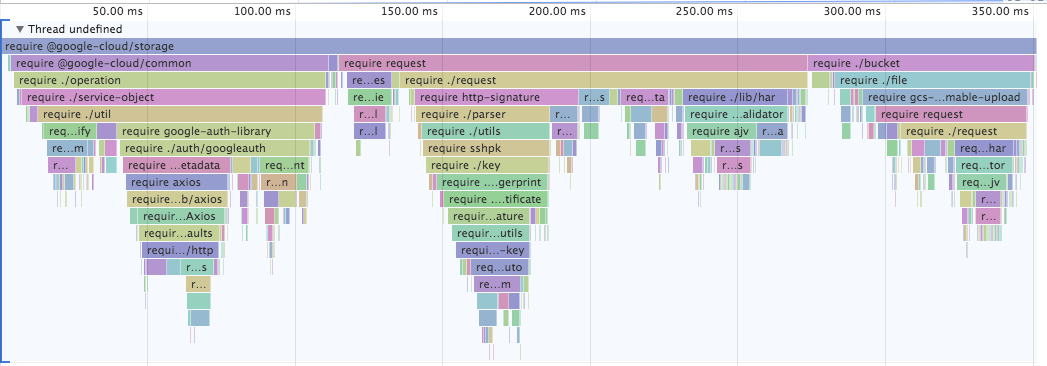
Click on the image above to go see an interactive version.
Command Line Usage
# Profiles the timeline of requiring `request@latest` and generates a trace
# output file you can load in Chrome Timeline viewer [1]
$ npx require-so-slow request

# You can specify specific versions or dist-tags.
$ npx require-so-slow got@9.0.0
$ npx require-so-slow got@rc

# You can specify what output filename to use:
$ npm require-so-slow -o lodash.trace.json lodash
You can also preload require-so-slow from node:
npm i -D require-so-slow

# Traces the entire execution of entrypoint and writes to
# ./require-so-slow.trace by default
$ node -r require-so-slow [entrypoint]

# The output path can be changed with the TRACE_OUTFILE environent variable
API
const requireSoSlow = require('require-so-slow');

// load stuff, run stuff.
require('request');

// Write a trace file at some point.
requireSoSlow.write('require-trace.trace');
Contributors


Similar repos





Languages
TypeScript
65.8%
JavaScript
34.2%
`require`s taking too much time? Profile 'em.
TypeScript
374
81 commits
updated Jun 17, 2024
README
require-so-slow
This repository is no longer maintained.
- Wondering why your applications is slow to start?
requireseems to take an eternity?- Wonder no more!
This module produces a timeline of your requires and produces an output
that you can load in the Chrome Timeline Viewer.
Click on the image above to go see an interactive version.
Command Line Usage
# Profiles the timeline of requiring `request@latest` and generates a trace
# output file you can load in Chrome Timeline viewer [1]
$ npx require-so-slow request

# You can specify specific versions or dist-tags.
$ npx require-so-slow got@9.0.0
$ npx require-so-slow got@rc

# You can specify what output filename to use:
$ npm require-so-slow -o lodash.trace.json lodash
You can also preload require-so-slow from node:
npm i -D require-so-slow

# Traces the entire execution of entrypoint and writes to
# ./require-so-slow.trace by default
$ node -r require-so-slow [entrypoint]

# The output path can be changed with the TRACE_OUTFILE environent variable
API
const requireSoSlow = require('require-so-slow');

// load stuff, run stuff.
require('request');

// Write a trace file at some point.
requireSoSlow.write('require-trace.trace');
Similar repos
Contributors
Languages
TypeScript
65.8%
JavaScript
34.2%