
README
Lighthouse CI
Overview
Lighthouse CI is a suite of tools that make continuously running, saving, retrieving, and asserting against Lighthouse results as easy as possible.
Quick Start
To get started with GitHub actions for common project configurations, add the following file to your GitHub repository. Follow the Getting Started guide for a more complete walkthrough and instructions on other providers and setups.
.github/workflows/ci.yml
name: CI
on: [push]
jobs:
  lighthouseci:
    runs-on: ubuntu-latest
    steps:
      - uses: actions/checkout@v4
      - uses: actions/setup-node@v4
        with:
          node-version: 18
      - run: npm install && npm install -g @lhci/cli@0.15.x
      - run: npm run build
      - run: lhci autorun
Features
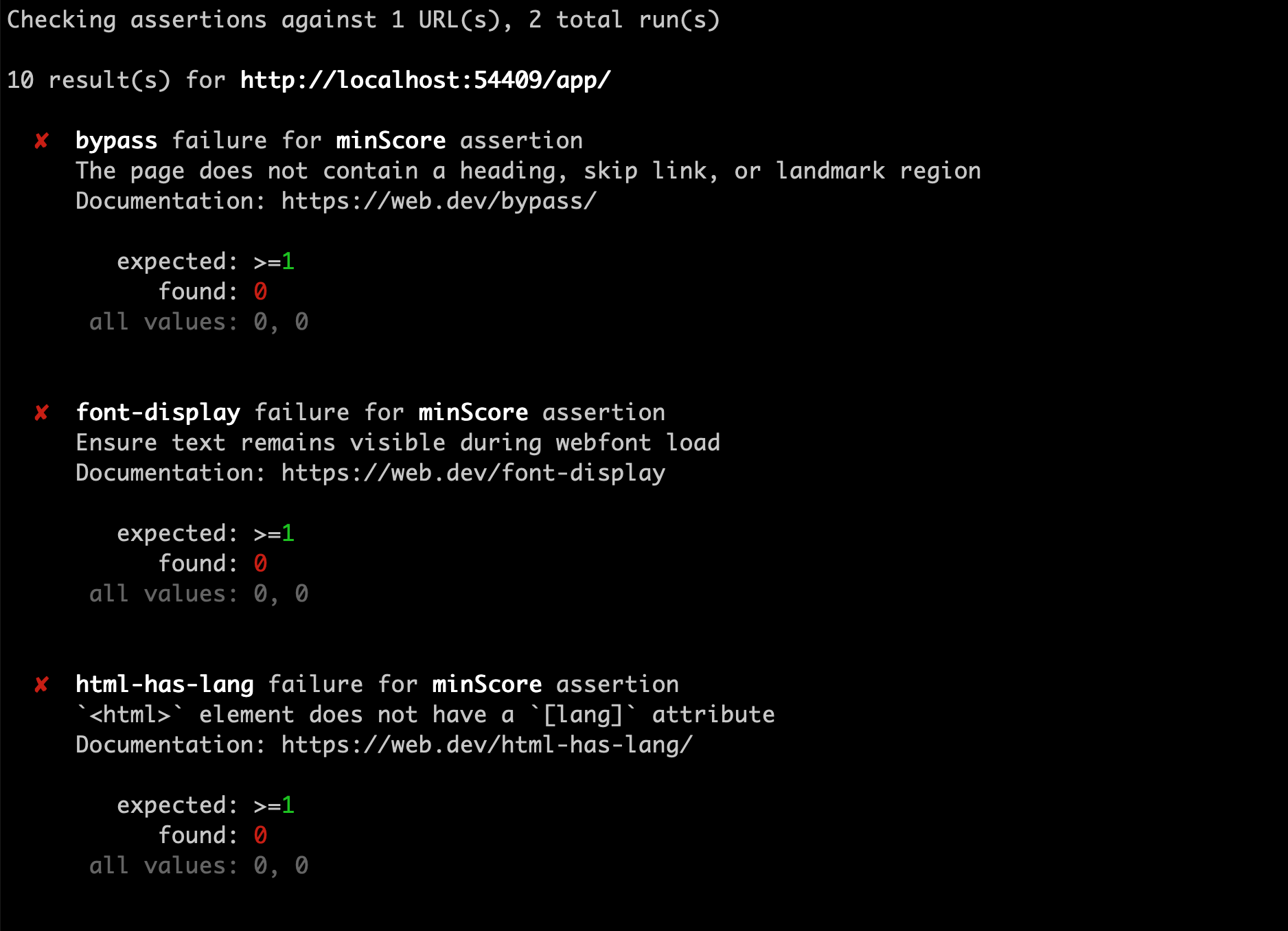
- Get a Lighthouse report alongside every PR.
- Prevent regressions in accessibility, SEO, offline support, and performance best practices.
- Track performance metrics and Lighthouse scores over time.
- Set and keep performance budgets on scripts and images.
- Run Lighthouse many times to reduce variance.
- Compare two versions of your site to find improvements and regressions of individual resources.



Documentation
If you're already familiar with continuous integration and have an existing process, start with Getting Started.
If you're not familiar with continuous integration, start with Introduction to CI.
- Introduction to CI
- Getting Started
- Architecture
- Troubleshooting / FAQs
- Configuration
- Server
- Versioning Policy
Related Community Projects
A collection of projects using Lighthouse CI written by the community. If you're using Lighthouse CI in your open source project, open a PR to add it here!
-
Lighthouse CI GitHub Action - Automatically run Lighthouse CI on every PR with GitHub Actions, no infrastructure required.
-
Lighthouse CI Starter Example - A minimal example repo that you can use as a template when starting from scratch, offers a beginner-friendly quickstart guide using create-react-app.
-
Lighthouse CI Compare Action - A Lighthouse CI Github Action that compares the current commit run against the ancestor commit and creates an object with the differences and a Markdown table that you can use for different purposes.
Community Guides
A collection of unofficial blog posts, tutorials, and guides written by the community on using Lighthouse CI. If you've written up a guide to using Lighthouse CI in your project, open a PR to add it here!
NOTE: This is not official documentation. You're encouraged to familiarize yourself with Lighthouse CI and read through Getting Started before continuing.
- Integrate Lighthouse CI for static website generator - An article on integrating Lighthouse CI with static website generators like Gatsby, Jekyll, etc.
- Automating Google Lighthouse audits and uploading results to Azure - This article covers configuring Lighthouse CI to run against a website and uploading the results to a Lighthouse CI server Docker container running both locally and in Azure.
Contributing
We welcome contributions to lighthouse-ci! Read our contributing guide to get started.
Contributors
(top 30 of 119)



Similar repos


Languages
JavaScript
91.5%
CSS
7.9%
README
Lighthouse CI
Overview
Lighthouse CI is a suite of tools that make continuously running, saving, retrieving, and asserting against Lighthouse results as easy as possible.
Quick Start
To get started with GitHub actions for common project configurations, add the following file to your GitHub repository. Follow the Getting Started guide for a more complete walkthrough and instructions on other providers and setups.
.github/workflows/ci.yml
name: CI
on: [push]
jobs:
  lighthouseci:
    runs-on: ubuntu-latest
    steps:
      - uses: actions/checkout@v4
      - uses: actions/setup-node@v4
        with:
          node-version: 18
      - run: npm install && npm install -g @lhci/cli@0.15.x
      - run: npm run build
      - run: lhci autorun
Features
- Get a Lighthouse report alongside every PR.
- Prevent regressions in accessibility, SEO, offline support, and performance best practices.
- Track performance metrics and Lighthouse scores over time.
- Set and keep performance budgets on scripts and images.
- Run Lighthouse many times to reduce variance.
- Compare two versions of your site to find improvements and regressions of individual resources.
Documentation
If you're already familiar with continuous integration and have an existing process, start with Getting Started.
If you're not familiar with continuous integration, start with Introduction to CI.
- Introduction to CI
- Getting Started
- Architecture
- Troubleshooting / FAQs
- Configuration
- Server
- Versioning Policy
Related Community Projects
A collection of projects using Lighthouse CI written by the community. If you're using Lighthouse CI in your open source project, open a PR to add it here!
-
Lighthouse CI GitHub Action - Automatically run Lighthouse CI on every PR with GitHub Actions, no infrastructure required.
-
Lighthouse CI Starter Example - A minimal example repo that you can use as a template when starting from scratch, offers a beginner-friendly quickstart guide using create-react-app.
-
Lighthouse CI Compare Action - A Lighthouse CI Github Action that compares the current commit run against the ancestor commit and creates an object with the differences and a Markdown table that you can use for different purposes.
Community Guides
A collection of unofficial blog posts, tutorials, and guides written by the community on using Lighthouse CI. If you've written up a guide to using Lighthouse CI in your project, open a PR to add it here!
NOTE: This is not official documentation. You're encouraged to familiarize yourself with Lighthouse CI and read through Getting Started before continuing.
- Integrate Lighthouse CI for static website generator - An article on integrating Lighthouse CI with static website generators like Gatsby, Jekyll, etc.
- Automating Google Lighthouse audits and uploading results to Azure - This article covers configuring Lighthouse CI to run against a website and uploading the results to a Lighthouse CI server Docker container running both locally and in Azure.
Contributing
We welcome contributions to lighthouse-ci! Read our contributing guide to get started.
Similar repos
Contributors
(top 30 of 119)
Languages
JavaScript
91.5%
CSS
7.9%