Glosano — read foreign texts, save words, track your vocabulary. A LingQ-inspired language learning app for personal use.
TypeScript
0
12 commits
updated Oct 19, 2026

Learn languages from texts and videos you actually want to read — on your own server.
Self-hosting guide · Development · Decisions · MIT license
Glosano is a self-hosted, LingQ-style platform for content-driven language learning. Import an article, a book chapter or a YouTube video, read it in an interactive reader, save the words and phrases you don't know, and review them with spaced repetition. Everything — your library, vocabulary and progress — stays on a server you own.
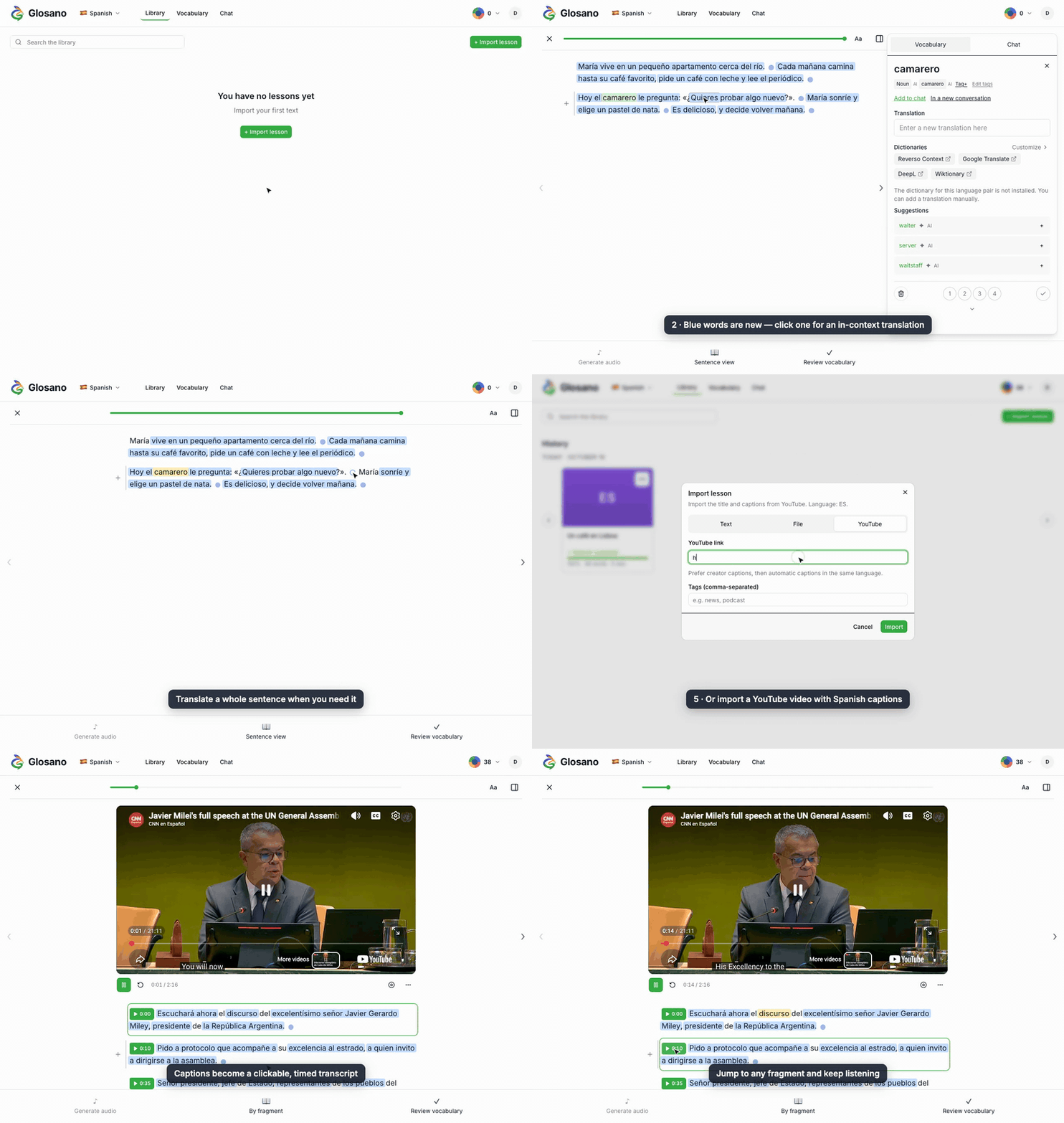
.txt and .md files, YouTube videos with captions in the language you learn, and whole web pages through the Chrome/Firefox importer extension. Keep lessons private or share them with everyone on your instance.Status: MVP in active development. Still ahead: the admin panel and full touch support on phones and tablets.
Glosano ships as a Docker Compose stack: the app, a background worker, Postgres and Redis. The short version:
git clone https://github.com/Glosano/glosano.git && cd glosano
cp .env.example .env        # set GLOSANO_ENV=prod, GLOSANO_SECRET_KEY, database password
docker compose build
docker compose run --rm app-api alembic upgrade head
docker compose up -d
The self-hosting guide covers the rest: HTTPS behind Caddy or nginx, the first admin account, loading dictionaries, AI providers, updates, backups and troubleshooting.
Requirements: Docker, uv for the backend, Node.js with corepack enabled for pnpm.
cp .env.example .env
cd backend && uv sync && cd ..
cd frontend && corepack pnpm install && cd ..
docker compose -f docker-compose.yml -f docker-compose.dev.yml up --build
| Frontend (Vite) | http://localhost:5173 |
| Backend API | http://localhost:8000 |
| Health check | http://localhost:8000/health |
cd backend
uv sync                          # install deps
uv run glosano serve             # run API locally (http://localhost:8000)
uv run glosano worker            # run Taskiq worker
uv run pytest                    # run tests
uv run ruff check .              # lint
uv run ruff format .             # format
uv run pyright                   # type check
uv run alembic upgrade head      # apply migrations
uv run alembic revision --autogenerate -m "message"  # create a migration
cd frontend
corepack pnpm install            # install deps
corepack pnpm dev                # start Vite dev server
corepack pnpm build              # production build
corepack pnpm test               # run Vitest
corepack pnpm lint               # ESLint
corepack pnpm format             # Prettier
See extension/README.md.
glosano/
├── backend/          # Python 3.13 + FastAPI + SQLAlchemy + Taskiq
├── frontend/         # React 19 + TypeScript + Vite + Tailwind v4
├── extension/        # Browser importer (WXT, Chrome + Firefox MV3)
├── docs/             # Self-hosting guide, product and architecture docs
├── docker-compose.yml
└── docker-compose.dev.yml
See ADR-0006 for the full tech stack.
docs/self-hosting.md — running your own instance.docs/lingq-like-self-hosted-spec-2026.md — source product specification.docs/specs/2026-04-11-mvp-product-alignment-design.md — MVP decision log.docs/architecture/2026-04-11-mvp-architecture-overview.md — high-level architecture.docs/adr/ — architecture decision records.Agent guidance: AGENTS.md (English) / AGENTS_RU.md (Russian).
MIT — see LICENSE.
Glosano uses Wiktionary-derived dictionary data from Kaikki.org under CC-BY-SA 4.0. Attribution is shown in the UI wherever dictionary data is displayed — see ADR-0004.
Glosano — read foreign texts, save words, track your vocabulary. A LingQ-inspired language learning app for personal use.
TypeScript
0
12 commits
updated Oct 19, 2026
Learn languages from texts and videos you actually want to read — on your own server.
Self-hosting guide · Development · Decisions · MIT license
Glosano is a self-hosted, LingQ-style platform for content-driven language learning. Import an article, a book chapter or a YouTube video, read it in an interactive reader, save the words and phrases you don't know, and review them with spaced repetition. Everything — your library, vocabulary and progress — stays on a server you own.
.txt and .md files, YouTube videos with captions in the language you learn, and whole web pages through the Chrome/Firefox importer extension. Keep lessons private or share them with everyone on your instance.Status: MVP in active development. Still ahead: the admin panel and full touch support on phones and tablets.
Glosano ships as a Docker Compose stack: the app, a background worker, Postgres and Redis. The short version:
git clone https://github.com/Glosano/glosano.git && cd glosano
cp .env.example .env        # set GLOSANO_ENV=prod, GLOSANO_SECRET_KEY, database password
docker compose build
docker compose run --rm app-api alembic upgrade head
docker compose up -d
The self-hosting guide covers the rest: HTTPS behind Caddy or nginx, the first admin account, loading dictionaries, AI providers, updates, backups and troubleshooting.
Requirements: Docker, uv for the backend, Node.js with corepack enabled for pnpm.
cp .env.example .env
cd backend && uv sync && cd ..
cd frontend && corepack pnpm install && cd ..
docker compose -f docker-compose.yml -f docker-compose.dev.yml up --build
| Frontend (Vite) | http://localhost:5173 |
| Backend API | http://localhost:8000 |
| Health check | http://localhost:8000/health |
cd backend
uv sync                          # install deps
uv run glosano serve             # run API locally (http://localhost:8000)
uv run glosano worker            # run Taskiq worker
uv run pytest                    # run tests
uv run ruff check .              # lint
uv run ruff format .             # format
uv run pyright                   # type check
uv run alembic upgrade head      # apply migrations
uv run alembic revision --autogenerate -m "message"  # create a migration
cd frontend
corepack pnpm install            # install deps
corepack pnpm dev                # start Vite dev server
corepack pnpm build              # production build
corepack pnpm test               # run Vitest
corepack pnpm lint               # ESLint
corepack pnpm format             # Prettier
See extension/README.md.
glosano/
├── backend/          # Python 3.13 + FastAPI + SQLAlchemy + Taskiq
├── frontend/         # React 19 + TypeScript + Vite + Tailwind v4
├── extension/        # Browser importer (WXT, Chrome + Firefox MV3)
├── docs/             # Self-hosting guide, product and architecture docs
├── docker-compose.yml
└── docker-compose.dev.yml
See ADR-0006 for the full tech stack.
docs/self-hosting.md — running your own instance.docs/lingq-like-self-hosted-spec-2026.md — source product specification.docs/specs/2026-04-11-mvp-product-alignment-design.md — MVP decision log.docs/architecture/2026-04-11-mvp-architecture-overview.md — high-level architecture.docs/adr/ — architecture decision records.Agent guidance: AGENTS.md (English) / AGENTS_RU.md (Russian).
MIT — see LICENSE.
Glosano uses Wiktionary-derived dictionary data from Kaikki.org under CC-BY-SA 4.0. Attribution is shown in the UI wherever dictionary data is displayed — see ADR-0004.



