Magisk and KernelSU modules for Clash/mihomo services.
See the code


This project is a Magisk, Kernelsu, APatch module for Clash/mihomo, sing-box, v2ray, xray, hysteria. It supports REDIRECT (TCP only), TPROXY (TCP + UDP) transparent proxy, TUN (TCP + UDP), and hybrid mode REDIRECT (TCP) + TUN (UDP) proxy.
Based on upstream integration for one-stop service, ready to use. Suitable for:
The project's theme and configuration focus on Clash/mihomo.Meta.
This module needs to be used in a Magisk/Kernelsu environment. If you don't know how to configure the required environment, you might need applications like ClashForAndroid, v2rayNG, surfboard, SagerNet, AnXray.
Welcome to use Surfing. Before using this project, please carefully read and understand the following statements and disclaimers. By using this project, you agree to accept the following terms and conditions. Hereinafter referred to as Surfing.
This project is an open-source project for learning and research purposes only and does not provide any form of guarantee. Users must bear full responsibility for the risks and consequences of using this project.
This project is only for the convenience of simplifying the installation and configuration of Surfing for Clash services in the Android Magisk environment. It does not make any guarantees about the functionality and performance of Surfing. The developer of this project is not responsible for any problems or losses.
The use of this projects Surfing module may violate the laws and regulations of your region or the terms of service of service providers. You need to bear the risks of using this project on your own. The developer of this project is not responsible for your actions or the consequences of use.
The developer of this project is not responsible for any direct or indirect losses or damages resulting from the use of this project, including but not limited to data loss, device damage, service interruption, personal privacy leaks, etc.
Before using the Surfing module, please make sure you have carefully read and understood the usage instructions and related documents of Clash and Magisk and comply with their rules and terms.
Before using this project, back up your device data and related settings to prevent unexpected situations. The developer of this project is not responsible for your data loss or damage.
Please comply with local laws and regulations and respect the legitimate rights and interests of other users when using this project. It is forbidden to use this project for illegal, abusive, or infringing activities.
If you encounter any problems or have any suggestions when using this project, you are welcome to provide feedback to the developer of this project, but the developer is not obligated to resolve issues or respond to feedback.
Please decide whether to use the Surfing module only after clearly understanding and accepting the above statements and disclaimers. If you do not agree or cannot accept the above terms, please stop using this project immediately.
During the use of this project, you must comply with the laws and regulations of your region. In case of any disputes, interpretation and resolution should be carried out in accordance with local laws and regulations.
Uninstalling this module via the manager will remove all related service data, including Web and SurfingTile tile app data.

After the module is installed for the first time, please first add your subscription URL to
/data/adb/box_bll/clash/config.yaml, or add it through the desktop App
(Note: SurfingTile requires Root permission to operate), then manually reboot your device once.
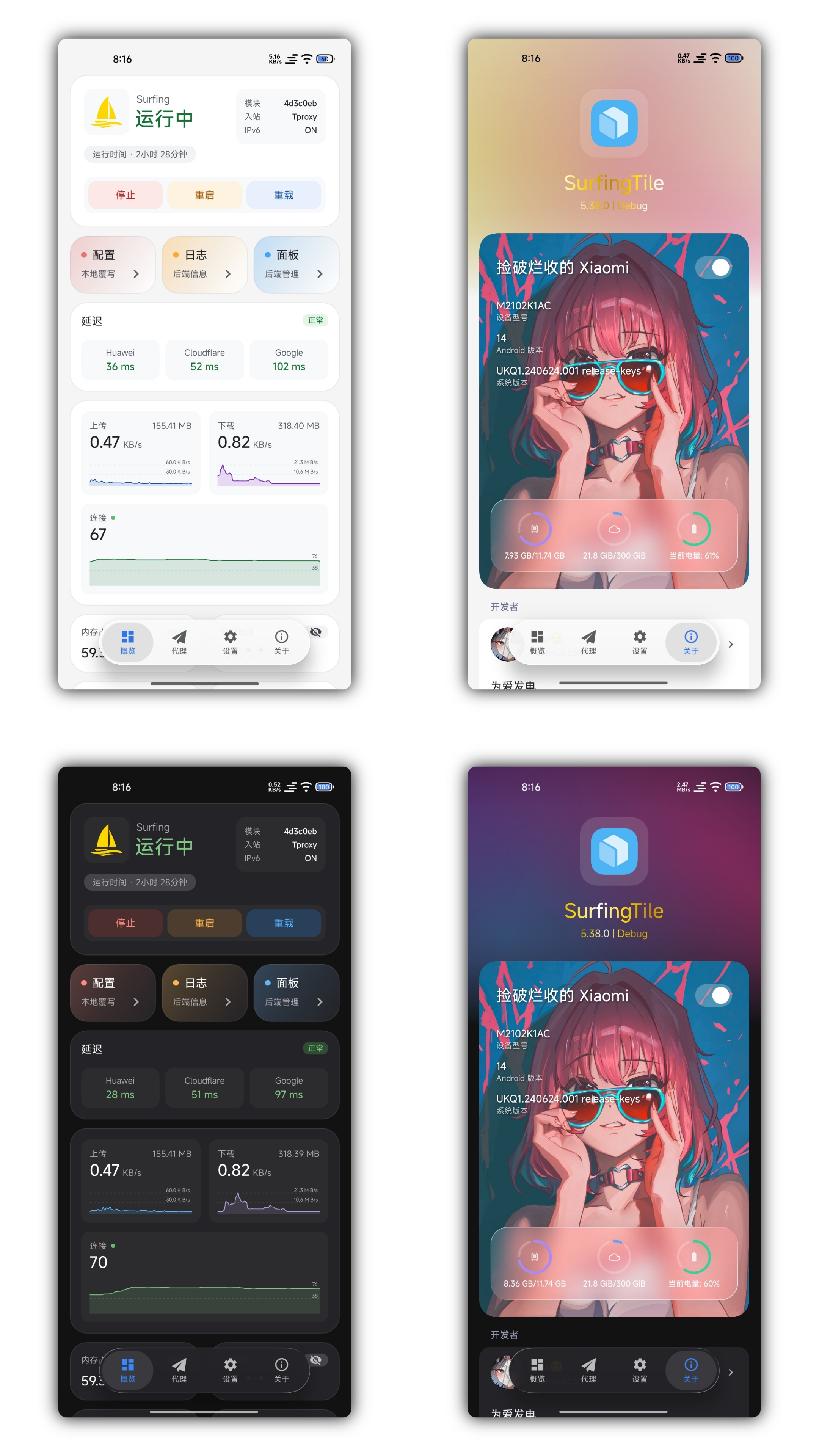
After rebooting, open the SurfingTile App from the desktop to start using it.
Due to network issues, rules/subscriptions may not be fully downloaded automatically; please manually refresh them from the panel.
If the subscription fails to load, try switching the Ua in the configuration.
If the issue persists, make sure your network environment is working properly.
SurfingTile App:
If the panel content is displayed incorrectly or cannot be displayed,
please update thecom.google.android.webviewcomponent through the Google Play Store.
Changes take effect in real time, no reboot requiredIf SurfingTile is already installedAutomatically updates every 24 hours
config.yaml.bakbox.config.bakproxies/subscribe_urls_backup.txtPs: Mainly follows upstream updates and pushes some configuration adjustments.
To proxy all apps except certain ones, open /data/adb/box_bll/scripts/box.config,
set proxy_mode to blacklist (default), and add elements to the user_packages_list array.
The element format is id:package_name, separated by spaces.
These apps will not be proxied.
Example: user_packages_list=("id:package_name" "id:package_name")
To proxy only specific apps, open /data/adb/box_bll/scripts/box.config,
set proxy_mode to whitelist, and add elements to the user_packages_list array.
The element format is id:package_name, separated by spaces.
Only these apps will be proxied.
Example: user_packages_list=("id:package_name" "id:package_name")
Android user group IDs:
| User Type | ID |
|---|---|
| Owner | 0 |
| Phone Clone | 10 |
| Multiple Apps | 999 |
You can usually find all user group IDs and app package names under
/data/user/.
Can be enabled or disabled manually via configuration if required.
With increasingly robust routing rules, blacklist/whitelist is becoming less necessary.
May affect proper display of panel fonts.
198.18.0.0To access the backend console from other devices:
http://<CurrentWiFi>/<TunGateway>:9090/ui
Local IP redirection for domains, forced binding
Supports Android 10+
com.github.surfing v6.0.0 is now standaloneLong press the home icon to toggle Gold Privilege

> Thanks for providing valuable foundation for the implementation of this project. <
214 followers · starred Feb 2026
83 followers · starred Nov 2024
57 followers · starred Nov 2024
1 followers · starred Mar 2025
Magisk and KernelSU modules for Clash/mihomo services.
See the code
This project is a Magisk, Kernelsu, APatch module for Clash/mihomo, sing-box, v2ray, xray, hysteria. It supports REDIRECT (TCP only), TPROXY (TCP + UDP) transparent proxy, TUN (TCP + UDP), and hybrid mode REDIRECT (TCP) + TUN (UDP) proxy.
Based on upstream integration for one-stop service, ready to use. Suitable for:
The project's theme and configuration focus on Clash/mihomo.Meta.
This module needs to be used in a Magisk/Kernelsu environment. If you don't know how to configure the required environment, you might need applications like ClashForAndroid, v2rayNG, surfboard, SagerNet, AnXray.
Welcome to use Surfing. Before using this project, please carefully read and understand the following statements and disclaimers. By using this project, you agree to accept the following terms and conditions. Hereinafter referred to as Surfing.
This project is an open-source project for learning and research purposes only and does not provide any form of guarantee. Users must bear full responsibility for the risks and consequences of using this project.
This project is only for the convenience of simplifying the installation and configuration of Surfing for Clash services in the Android Magisk environment. It does not make any guarantees about the functionality and performance of Surfing. The developer of this project is not responsible for any problems or losses.
The use of this projects Surfing module may violate the laws and regulations of your region or the terms of service of service providers. You need to bear the risks of using this project on your own. The developer of this project is not responsible for your actions or the consequences of use.
The developer of this project is not responsible for any direct or indirect losses or damages resulting from the use of this project, including but not limited to data loss, device damage, service interruption, personal privacy leaks, etc.
Before using the Surfing module, please make sure you have carefully read and understood the usage instructions and related documents of Clash and Magisk and comply with their rules and terms.
Before using this project, back up your device data and related settings to prevent unexpected situations. The developer of this project is not responsible for your data loss or damage.
Please comply with local laws and regulations and respect the legitimate rights and interests of other users when using this project. It is forbidden to use this project for illegal, abusive, or infringing activities.
If you encounter any problems or have any suggestions when using this project, you are welcome to provide feedback to the developer of this project, but the developer is not obligated to resolve issues or respond to feedback.
Please decide whether to use the Surfing module only after clearly understanding and accepting the above statements and disclaimers. If you do not agree or cannot accept the above terms, please stop using this project immediately.
During the use of this project, you must comply with the laws and regulations of your region. In case of any disputes, interpretation and resolution should be carried out in accordance with local laws and regulations.
Uninstalling this module via the manager will remove all related service data, including Web and SurfingTile tile app data.
After the module is installed for the first time, please first add your subscription URL to
/data/adb/box_bll/clash/config.yaml, or add it through the desktop App
(Note: SurfingTile requires Root permission to operate), then manually reboot your device once.
After rebooting, open the SurfingTile App from the desktop to start using it.
Due to network issues, rules/subscriptions may not be fully downloaded automatically; please manually refresh them from the panel.
If the subscription fails to load, try switching the Ua in the configuration.
If the issue persists, make sure your network environment is working properly.
SurfingTile App:
If the panel content is displayed incorrectly or cannot be displayed,
please update thecom.google.android.webviewcomponent through the Google Play Store.
Changes take effect in real time, no reboot requiredIf SurfingTile is already installedAutomatically updates every 24 hours
config.yaml.bakbox.config.bakproxies/subscribe_urls_backup.txtPs: Mainly follows upstream updates and pushes some configuration adjustments.
To proxy all apps except certain ones, open /data/adb/box_bll/scripts/box.config,
set proxy_mode to blacklist (default), and add elements to the user_packages_list array.
The element format is id:package_name, separated by spaces.
These apps will not be proxied.
Example: user_packages_list=("id:package_name" "id:package_name")
To proxy only specific apps, open /data/adb/box_bll/scripts/box.config,
set proxy_mode to whitelist, and add elements to the user_packages_list array.
The element format is id:package_name, separated by spaces.
Only these apps will be proxied.
Example: user_packages_list=("id:package_name" "id:package_name")
Android user group IDs:
| User Type | ID |
|---|---|
| Owner | 0 |
| Phone Clone | 10 |
| Multiple Apps | 999 |
You can usually find all user group IDs and app package names under
/data/user/.
Can be enabled or disabled manually via configuration if required.
With increasingly robust routing rules, blacklist/whitelist is becoming less necessary.
May affect proper display of panel fonts.
198.18.0.0To access the backend console from other devices:
http://<CurrentWiFi>/<TunGateway>:9090/ui
Local IP redirection for domains, forced binding
Supports Android 10+
com.github.surfing v6.0.0 is now standaloneLong press the home icon to toggle Gold Privilege
> Thanks for providing valuable foundation for the implementation of this project. <
214 followers · starred Feb 2026
83 followers · starred Nov 2024
57 followers · starred Nov 2024
1 followers · starred Mar 2025