







Author: Katharina J. Hoff
Katharina J. Hoff, University of Greifswald, Germany, [email protected], +49 3834 420 4624
Migrating from GALBA (
galba.pl)? The fastest path to your first GALBA2 run is the dedicated step-by-step tutorial: MIGRATING_FROM_GALBA.md. It maps everygalba.plflag you already use to the equivalentsamples.csvcolumn orconfig.iniparameter, and walks through the translation with concrete examples.
GALBA2 is a Snakemake pipeline for genome annotation by protein homology, built on the BRAKER4 framework. It is designed for cases where no RNA-Seq data is available, but a database of protein sequences from related species exists. GALBA has only one prediction mode: miniprot aligns proteins to the genome, miniprothint extracts training genes and hints, AUGUSTUS is trained on those genes and then predicts with the protein-derived hints. There is no separate "EP" or "ETP" mode as in BRAKER.
GALBA2 is particularly useful for:
GALBA2 is a rewrite of the original GALBA Perl pipeline (galba.pl, ~275 KB) as a Snakemake workflow. All bioinformatics tools run inside Singularity containers, so you do not install miniprot, AUGUSTUS, DIAMOND, or their dependencies on your system. Compared to galba.pl, GALBA2 adds:
samples.csv..smk files for easier debugging and extension.[paths] tmp_dir) and copy only the kept files back, so slow network file systems do not dominate the runtime.masking_tool in config.ini. Skipped automatically when you provide a pre-masked genome via genome_masked in samples.csv.use_minisplice = 1).galba_with_ncRNA.gff3 when run_ncrna = 1.run_fantasia = 1, GPU-only).run_omark = 1).
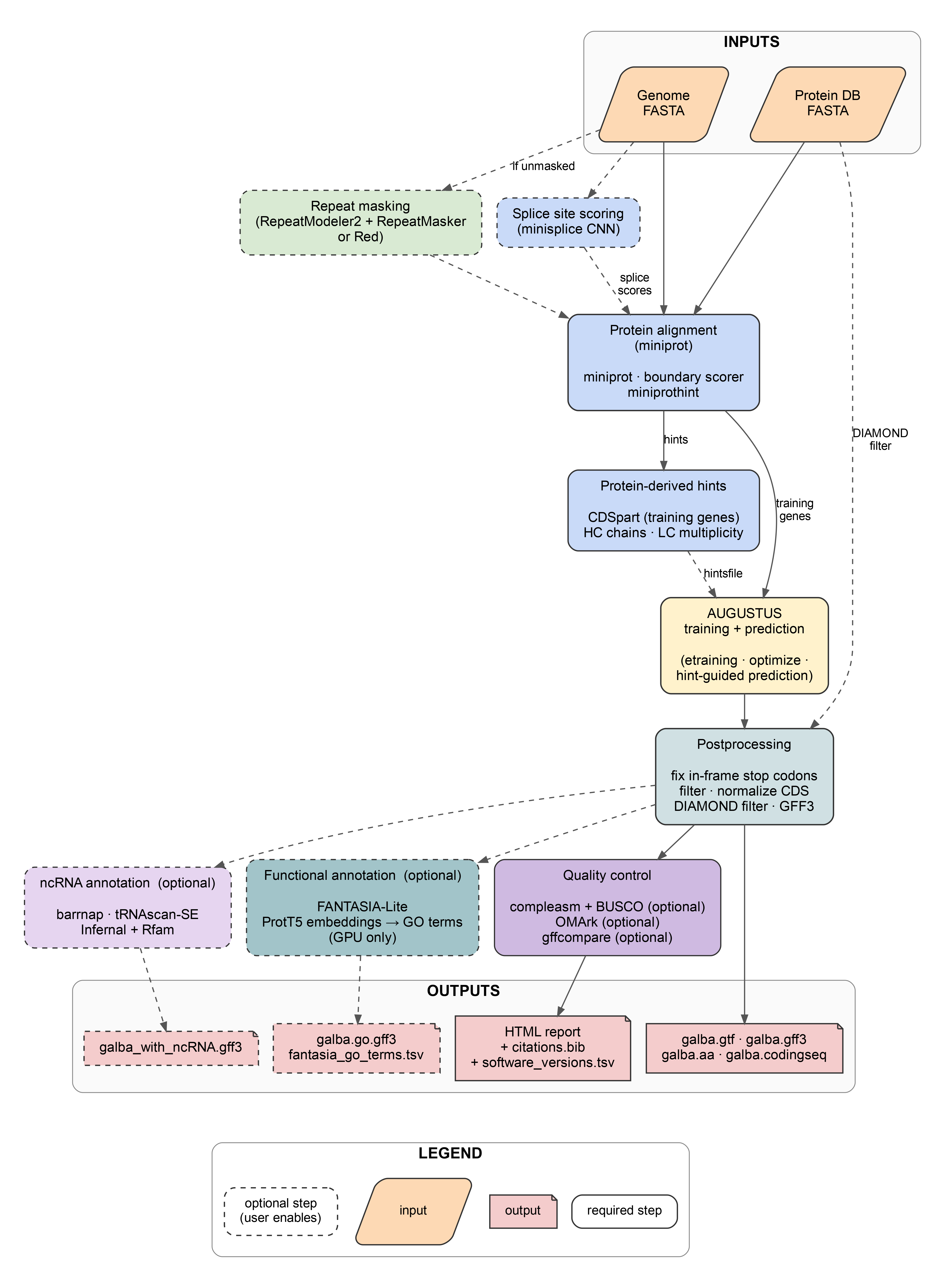
Figure 1. Overview of the GALBA2 pipeline. Solid borders mark required steps; dashed borders mark optional steps.
To verify that GALBA2 reproduces the gene-prediction accuracy of the original galba.pl Perl pipeline, we run the same Arabidopsis thaliana genome (TAIR10 assembly, ~121 Mb) through both pipelines with matched configurations and score the resulting gene sets against the Phytozome Araport11 reference annotation using gffcompare v0.12.6 at the CDS level (--strict-match -e 3 -T).
Inputs (identical for all pipelines): TAIR10 genome FASTA (pre-softmasked), Viridiplantae proteins from OrthoDB v12 (~467 MB). All pipelines run with optimize_augustus.pl enabled. BRAKER4 EP (which uses ProtHint + GeneMark-EP+ instead of miniprot) is included as an additional reference point.
| Pipeline | Genes / loci | Locus | Exon | Base | ||||||
|---|---|---|---|---|---|---|---|---|---|---|
| Sn | Pr | F1 | Sn | Pr | F1 | Sn | Pr | F1 | ||
galba.pl (native Perl) | 31,979 / 30,626 | 70.0 | 63.4 | 66.5 | 80.1 | 85.3 | 82.6 | 94.1 | 84.6 | 89.1 |
| GALBA2 (default) | 32,333 / 30,747 | 70.4 | 63.4 | 66.7 | 80.8 | 84.3 | 82.5 | 94.7 | 84.1 | 89.1 |
| GALBA2 + minisplice | 32,172 / 30,642 | 70.2 | 63.5 | 66.7 | 80.5 | 84.1 | 82.3 | 94.5 | 83.9 | 88.9 |
| BRAKER4 EP (reference) | 34,834 / — | 77.0 | 61.8 | 68.6 | 83.2 | 80.4 | 81.8 | 96.1 | 80.4 | 87.6 |
Sn = Sensitivity (% of reference features recovered). Pr = Precision (% of predicted features matching reference). F1 = harmonic mean of Sn and Pr (2·Sn·Pr / (Sn+Pr)). Higher is better. Bold marks the best value per metric column across all four pipelines.
Reading the table.
galba.pl — GALBA2 matches the original Perl pipeline within measurement noise at every level: locus Sn/Pr 70.4/63.4 vs 70.0/63.4, exon Sn/Pr 80.8/84.3 vs 80.1/85.3, base Sn/Pr 94.7/84.1 vs 94.1/84.6. GALBA2 is marginally more sensitive (+0.4 locus Sn, +0.7 exon Sn, +0.6 base Sn); galba.pl is marginally more precise at the exon and base levels (+1.0 exon Pr, +0.5 base Pr). The two pipelines are interchangeable from an accuracy standpoint — GALBA2's reason for existing is the Snakemake-based execution model (multi-sample input, automatic resume, SLURM-native scheduling, containerised tools), not a change in prediction behaviour.+ minisplice — enabling CNN splice-site scoring (use_minisplice = 1, Yang et al., 2025) on this A. thaliana benchmark left locus-level accuracy essentially unchanged (Sn 70.2 / Pr 63.5 vs 70.4 / 63.4). For closely related protein evidence, minisplice is therefore off by default; it may still help on distant homologs or more repetitive genomes where miniprot's splice-site signal is weaker.Where GALBA shines. The A. thaliana genome (~121 Mb) is small. On larger genomes — which are common for many animal, plant, and fungal species — GALBA's miniprot-based approach scales much better than BRAKER2's ProtHint + GeneMark-EP+ pipeline. On genomes of 1 Gb and above, GALBA consistently outperforms BRAKER2 EP mode in both accuracy and runtime, because miniprot handles large, repeat-rich genomes more robustly than the Spaln/DIAMOND-based ProtHint alignment. If you are annotating a large genome with protein evidence only, GALBA2 is the recommended tool.
Use a high quality genome assembly. If you have a huge number of very short scaffolds, those will increase runtime but not prediction accuracy.
Use simple scaffold names in the genome file (e.g. >contig1). Complex headers can cause parsing issues.
The genome should be soft-masked for repeats. Soft-masking (lowercase letters for repeats) leads to better results than hard-masking (replacing with N). If you leave the genome_masked column in samples.csv empty, GALBA2 will mask the genome itself — by default using RepeatModeler2 + RepeatMasker, or using Red (REpeat Detector; Girgis, 2015) when you set masking_tool = red in config.ini. Red is ~10x faster and ~50x smaller as a container (~13 MB vs ~727 MB) at the cost of no repeat-family classification; it is a good default when you do not need the classified repeat library.
Always check gene prediction results before further usage. You can use a genome browser for visual inspection of gene models in context with protein alignments.
GALBA2 requires protein sequences from closely related species — this is different from BRAKER, which uses large OrthoDB partitions with distant homologs. GALBA relies on miniprot to produce high-quality spliced alignments, which works best with closely related proteins that share high sequence identity with the target genome.
Recommended protein sources:
Example: To annotate a new grass species, combine the proteomes of Oryza sativa, Zea mays, Sorghum bicolor, and Brachypodium distachyon into a single FASTA file:
cat rice_proteins.fa maize_proteins.fa sorghum_proteins.fa brachy_proteins.fa > close_relatives.fa
Then specify it in samples.csv:
sample_name,genome,genome_masked,protein_fasta,busco_lineage,reference_gtf
my_grass,genome.fa,,close_relatives.fa,poales_odb12,
You can also provide multiple files colon-separated:
protein_fasta
rice_proteins.fa:maize_proteins.fa:sorghum_proteins.fa
Platform requirement: GALBA2 requires Linux. It relies on GNU coreutils (readlink -f), GNU grep (grep -P), and Singularity/Apptainer. If you are on macOS or Windows, run GALBA2 inside a Linux virtual machine or WSL2.
GALBA2 requires two things on your system: Snakemake and Singularity. All bioinformatics tools (miniprot, miniprothint, AUGUSTUS, DIAMOND, etc.) run inside the container. You do not need to install them.
We recommend pixi. The repository ships a pixi.toml and a pixi.lock, so everyone gets the same versions of Snakemake, the SLURM executor plugin, and pandas. pixi is a single binary and needs no root access, so it also works on HPC login nodes.
curl -fsSL https://pixi.sh/install.sh | bash   # once; or: conda install -c conda-forge pixi
cd /path/to/GALBA2
pixi install
pixi shell                                     # activates the environment
pixi shell puts snakemake on your PATH. Alternatively, prefix single commands with pixi run --manifest-path /path/to/GALBA2/pixi.toml.
If you prefer pip, requirements.txt carries the same pins:
python3 -m venv snakemake_env
source snakemake_env/bin/activate
pip install -r requirements.txt
GALBA2 supports SLURM as its HPC executor. The Snakemake SLURM executor plugin (snakemake-executor-plugin-slurm==2.6.0) is part of both the pixi environment and requirements.txt. Other schedulers (SGE, PBS, LSF) are not supported — if your cluster uses a different scheduler, run without --executor slurm and submit the Snakemake process itself as a single job, letting it execute rules locally within that allocation.
The unit tests in tests/ need pytest, biopython, and matplotlib on the host. The pixi test environment has them:
pixi run test
Singularity (or Apptainer, its open-source successor) must be installed on your system. On most HPC clusters, it is already available as a module:
module load singularity
GALBA2 will automatically pull the container image and convert it to a Singularity image on the first run.
Container image:
| Container | Image | Size | Used for |
|---|---|---|---|
| GALBA2 tools | katharinahoff/galba2-tools:latest | 112 MB | miniprot, miniprot_boundary_scorer, miniprothint, compleasm, matplotlib, BioPython — protein alignment, hint generation, completeness assessment, report plots |
| AUGUSTUS | quay.io/biocontainers/augustus:3.5.0--pl5321h9716f88_9 | 249 MB | AUGUSTUS, etraining, DIAMOND, all Perl training/prediction scripts — training, prediction, postprocessing |
| AGAT | quay.io/biocontainers/agat:1.4.1--pl5321hdfd78af_0 | 370 MB | GTF-to-GFF3 conversion |
| TE Tools | dfam/tetools:latest | 727 MB | RepeatModeler2 + RepeatMasker (only when masking_tool = repeatmasker) |
| Red | quay.io/biocontainers/red:2018.09.10 | 13 MB | Fast repeat detection (only when masking_tool = red) |
| BUSCO | ezlabgva/busco:v6.0.0_cv1 | 801 MB | BUSCO completeness assessment (optional) |
| barrnap | quay.io/biocontainers/barrnap:0.9--hdfd78af_4 | 68 MB | rRNA prediction (only when run_ncrna = 1) |
| tRNAscan-SE | quay.io/biocontainers/trnascan-se:2.0.12--pl5321h031d066_0 | 32 MB | tRNA prediction (only when run_ncrna = 1) |
| Infernal | quay.io/biocontainers/infernal:1.1.5--pl5321h031d066_2 | 28 MB | Rfam scan for snoRNA/snRNA/miRNA (only when run_ncrna = 1) |
| OMArk | quay.io/biocontainers/omark:0.4.1--pyh7e72e81_0 | 455 MB | OMArk proteome quality assessment (optional, only when run_omark = 1) |
| gffcompare | quay.io/biocontainers/gffcompare:0.12.10--h9948957_0 | 11 MB | Evaluation against a reference annotation (optional) |
| FANTASIA-Lite | katharinahoff/fantasia_for_brain:lite.v1.0.0 | ~6 GB | Functional GO annotation via ProtT5 embeddings (optional, GPU-only) |
A standard GALBA2 run (no masking, no BUSCO) pulls only the GALBA2 tools + AUGUSTUS + AGAT containers: ~730 MB total.
Singularity bind paths: Singularity containers can only see directories tha
t are explicitly bound. GALBA2 passes --singularity-args "-B /home" by default. If your data resides outside /home (e.g. in /scratch, /data, or /gpfs), you must add those paths:
--singularity-args "-B /home -B /scratch -B /data"
Node-local scratch ([paths] tmp_dir): Several rules write thousands of small files (AUGUSTUS prediction and optimization, BUSCO, compleasm) or many intermediates (FANTASIA-Lite chunks). On network file systems with slow small-file writes this can dominate the runtime. These rules therefore work in a private directory on the node-local disk, copy only the files GALBA2 keeps to output/<sample>/, and remove the scratch directory when the job ends, also on failure.
[paths] tmp_dir in config.ini (or the environment variable GALBA2_TMP_DIR). Empty (the default) means each job's $TMPDIR, else /tmp.output/<sample>/ as GALBA2 did before and writes a line starting with WARNING: working in to its log. A job that got scratch logs scratch directory: <path>./tmp and $HOME by default. Any other tmp_dir is added to SINGULARITY_BIND/APPTAINER_BIND automatically. The path must exist on every compute node.srun -p <partition> -N1 -n1 df -h /tmp. Several jobs can share a node, and the free-space check runs when each job starts.G = genome FASTA, H = hints file. NEED is the free space a job requires, in GB, rounded up, including 5 GB headroom.
| Rule | On scratch | Copied back | NEED |
|---|---|---|---|
run_augustus_hints | genome split, per-chunk hints, job scripts and GFFs | job list, joined predictions | 3 x (G + H) + 5 |
optimize_augustus | optimize_augustus.pl buckets | nothing (parameters live in the AUGUSTUS config) | 20 |
busco_genome, busco_proteins | BUSCO run dir | short_summary*.txt | 20 / 10 |
run_compleasm | compleasm work dir | summary.txt | 5 x G + 5 |
fantasia_annotate | FANTASIA-Lite chunk dirs | nothing | 10 |
TMPDIR: With [paths] tmp_dir empty, each job uses its $TMPDIR as the scratch root; Snakemake sets it from the tmpdir resource. Many SLURM clusters set TMPDIR=/local/scratch/$USER (or similar) per allocation. If that path is not writable inside the Singularity container, the jobs still run but work in output/<sample>/ (look for the WARNING: working in line). Either set [paths] tmp_dir to a node-local path that exists on every node (GALBA2 binds it into the containers), or set the default tmpdir resource in your SLURM profile and add the same path to --singularity-args:
# profiles/slurm/config.yaml
default-resources:
  tmpdir: "/path/you/can/write"   # e.g. /scratch/$USER/tmp
--singularity-args "-B /home -B /scratch -B /path/you/can/write"
The commented default-resources block in profiles/slurm/config.yaml shows the exact shape.
GALBA2 requires two configuration files in your working directory: samples.csv and config.ini.
This CSV file defines your input samples. Each row is one genome to annotate.
sample_name,genome,genome_masked,protein_fasta,busco_lineage,reference_gtf
Columns:
| Column | Required | Description |
|---|---|---|
sample_name | yes | Unique identifier. Output goes to output/{sample_name}/. |
genome | yes | Path to genome FASTA file. |
genome_masked | no | Path to soft-masked genome. If empty, the unmasked genome is used directly. |
protein_fasta | yes | Protein sequences in FASTA format. Multiple files can be colon-separated. We recommend OrthoDB. |
busco_lineage | yes | BUSCO lineage for QC (e.g. eukaryota_odb12, arthropoda_odb12). |
reference_gtf | no | Reference annotation for gffcompare evaluation. Optional. |
Example: annotating two genomes in one run
sample_name,genome,genome_masked,protein_fasta,busco_lineage,reference_gtf
fly,fly_genome.fa,,orthodb_arthropoda.fa,arthropoda_odb12,
plant,plant_genome.fa,plant_masked.fa,orthodb_viridiplantae.fa,viridiplantae_odb12,reference.gtf
You can also combine multiple protein sources by colon-separating them:
sample_name,genome,genome_masked,protein_fasta,busco_lineage,reference_gtf
my_species,genome.fa,,orthodb.fa:close_relative.fa,eukaryota_odb12,
This file contains pipeline parameters. Place it in the same directory as your samples.csv.
[paths]
samples_file = samples.csv
augustus_config_path = augustus_config
; tmp_dir = /path/on/every/node                        # optional node-local scratch root, see "Node-local scratch" above
; busco_download_path = shared_data/busco_downloads      # optional, see "Pre-downloading BUSCO data" below
; compleasm_download_path = shared_data/busco_downloads/lineages  # optional, defaults to {busco_download_path}/lineages

[containers]
galba_tools_image = docker://katharinahoff/galba2-tools:latest    # miniprot, miniprothint, compleasm
augustus_image = docker://quay.io/biocontainers/augustus:3.5.0--pl5321h9716f88_9  # AUGUSTUS, DIAMOND

[PARAMS]
skip_optimize_augustus = 0          # set to 1 to skip AUGUSTUS optimization (saves time)
disable_diamond_filter = 0         # set to 1 to skip DIAMOND filtering of predictions
skip_busco = 0                     # set to 1 to skip the BUSCO pipeline
run_omark = 0                      # set to 1 to run OMArk (requires LUCA.h5 database)
run_ncrna = 0                      # set to 1 to annotate ncRNAs (rRNA, tRNA, snoRNA, miRNA)
translation_table = 1              # only table 1 (standard code) is currently supported
allow_hinted_splicesites = gcag,atac # non-canonical splice sites for AUGUSTUS
augustus_chunksize = 3000000        # genome chunk size (bp) for parallel AUGUSTUS prediction
augustus_overlap = 500000           # overlap (bp) between adjacent AUGUSTUS chunks
no_cleanup = 0                     # set to 1 to keep all intermediate files (debugging only)
use_dev_shm = 0                    # set to 1 to use /dev/shm as scratch for masking and AUGUSTUS

[OMARK]
# omamer_db = /path/to/LUCA.h5      # OMAmer database for OMArk (used only when run_omark = 1)

[SLURM_ARGS]
cpus_per_task = 48
mem_of_node = 120000                # memory in MB
max_runtime = 4320                  # runtime in minutes (72 hours)
A ready-to-use template with all keys and per-option comments is shipped as config.ini.example. Copy it to your working directory and rename it:
cp /path/to/GALBA2/config.ini.example config.ini
Then edit the values as needed. The template keeps all comments on separate lines for compatibility with strict INI parsers; GALBA2 itself also accepts inline comments (key = value # comment).
Every value in [PARAMS] and [SLURM_ARGS] can also be overridden via an environment variable named GALBA2_<KEY_UPPER>, e.g. GALBA2_MAX_RUNTIME=240 or GALBA2_SKIP_OPTIMIZE_AUGUSTUS=1. Environment variables win over the file. The path of the file itself can be overridden with GALBA2_CONFIG=/path/to/another.ini.
For running GALBA2 on a local workstation or a single compute node:
snakemake --cores 8 --use-singularity \
    --singularity-prefix .singularity_cache \
    --singularity-args "-B /home"
Adjust --cores to the number of CPU cores available.
For running on a SLURM-managed cluster:
snakemake \
    --executor slurm \
    --default-resources slurm_partition=batch mem_mb=120000 \
    --cores 48 \
    --jobs 48 \
    --use-singularity \
    --singularity-prefix .singularity_cache \
    --singularity-args "-B /home -B /scratch"
We recommend running the Snakemake master process in a screen or tmux session, or submitting it as a long-running SLURM job.
| Option | Default | Description |
|---|---|---|
skip_optimize_augustus | 0 | Skip optimize_augustus.pl. Saves hours on large genomes. Do not enable for production runs — optimization improves accuracy. |
disable_diamond_filter | 0 | Skip DIAMOND filtering of AUGUSTUS predictions against input proteins. The filter removes gene predictions that have no sequence similarity match in the protein database. Disabling produces more genes but also more false positives. |
skip_busco | 0 | Skip the BUSCO completeness assessment (slow). compleasm still runs. |
run_omark | 0 | Run OMArk proteome quality assessment. Requires the LUCA.h5 OMAmer database (~8.8 GB). Download with bash scripts/download_data.sh --omark. Set the database path via [OMARK] omamer_db = /path/to/LUCA.h5 in config.ini (or the GALBA2_OMAMER_DB environment variable). If unset, GALBA2 auto-discovers LUCA.h5 in shared_data/ or sibling BRAKER4/BRAKER-as-snakemake repos. |
masking_tool | repeatmasker | Repeat masking tool: repeatmasker (RepeatModeler2 + RepeatMasker, thorough but slow) or red (Red repeat detector, much faster). Only used when genome_masked column is empty. |
use_minisplice | 0 | Use minisplice CNN splice site scores to improve miniprot alignment. Requires miniprot >= 0.14 and a pre-trained minisplice model (see minisplice). Experimental. |
run_ncrna | 0 | Annotate non-coding RNAs: rRNA (barrnap), tRNA (tRNAscan-SE), snoRNA/snRNA/miRNA (Infernal + Rfam). Requires Rfam database (~315 MB, downloaded by scripts/download_data.sh). |
run_fantasia | 0 | Run FANTASIA-Lite functional GO annotation. GPU-only (requires NVIDIA GPU + pre-staged container, ProtT5 cache, and V1 lookup bundle). Set sif, hf_cache_dir, and lookup_dir in the [fantasia] section of config.ini. Download the lookup bundle from Zenodo record 17720428. |
translation_table | 1 | NCBI genetic code table. Currently only table 1 (standard code) is supported because miniprot does not support alternative genetic codes. Support for additional tables is planned for a future release. |
no_cleanup | 0 | Keep all intermediate files. Useful for debugging. |
use_dev_shm | 0 | Use /dev/shm (shared memory) instead of the node-local disk as the scratch root of run_masking, optimize_augustus and run_augustus_hints. All other rules use [paths] tmp_dir (see "Node-local scratch" above). If /dev/shm has too little free space, optimize_augustus and run_augustus_hints work in output/<sample>/ instead. |
GALBA2 ships a helper script to download shared databases:
# Download compleasm/BUSCO lineage cache directories
bash scripts/download_data.sh

# Also download the OMAmer database for OMArk
bash scripts/download_data.sh --omark

# Use a custom location (shared with BRAKER4 or other pipelines)
bash scripts/download_data.sh --shared-data /data/shared_databases
The script auto-discovers existing shared_data directories in sibling BRAKER4 or BRAKER-as-snakemake repositories to avoid redundant downloads.
By default, both BUSCO and compleasm download their lineage datasets and a file_versions.tsv manifest from https://busco-data*.ezlab.org/ on the fly. On clusters without outbound internet access — or when the ezlab mirror is temporarily unreachable — this causes the pipeline to fail with messages like:
ERROR: Cannot reach https://busco-data2.ezlab.org/v5/data/file_versions.tsv
ERROR: BUSCO analysis failed!
GALBA2 uses lineage data from the ezlab mirror in two places — busco (at busco_download_path) and compleasm (at compleasm_download_path). Both must see the lineage on disk for a fully offline run. To avoid downloading the same data twice, GALBA2 defaults compleasm_download_path to {busco_download_path}/lineages/ so that a single extracted tarball serves both tools.
GALBA2 detects pre-downloaded data automatically:
{busco_download_path}/lineages/{busco_lineage}/dataset.cfg exists, the BUSCO rules add --offline and skip the file_versions.tsv check. The dataset.cfg test matters — it tells a full BUSCO lineage apart from a compleasm-only download, which stores fewer files in the same location.{compleasm_download_path}/{busco_lineage}/ exists, compleasm reuses it via -L without contacting the mirror.Each rule logs which path it took at the top of its log file.
How to pre-download the data:
Pick one shared directory for BUSCO and point config.ini at it in the [paths] section:
busco_download_path = /data/shared/busco_downloads
# compleasm_download_path  defaults to /data/shared/busco_downloads/lineages
If unset, GALBA2 uses <repo>/shared_data/busco_downloads/ and <repo>/shared_data/busco_downloads/lineages/.
On a machine with internet access, populate the cache once per lineage. Either let busco do it for you (recommended — it lays out the directory exactly the way both tools expect):
busco --download fungi_odb12      --download_path /data/shared/busco_downloads
busco --download eukaryota_odb12  --download_path /data/shared/busco_downloads
# …repeat for every lineage in your samples.csv
Or fetch the tarball with wget/curl and unpack it into the lineages/ subdirectory:
mkdir -p /data/shared/busco_downloads/lineages
cd /data/shared/busco_downloads/lineages
wget https://busco-data.ezlab.org/v5/data/lineages/fungi_odb12.2024-11-14.tar.gz
tar -xzf fungi_odb12.2024-11-14.tar.gz
# The extracted directory must be named exactly "fungi_odb12" (no date suffix).
The resulting layout serves both tools from the same files:
/data/shared/busco_downloads/
└── lineages/                    <-- compleasm reads from here (-L)
    ├── fungi_odb12/             <-- BUSCO reads from here (--offline)
    │   ├── dataset.cfg
    │   ├── hmms/
    │   └── …
    └── eukaryota_odb12/
        └── …
Run GALBA2 as usual. If a lineage is missing, GALBA2 falls back to the normal online download — so this is safe to enable on internet-connected machines too, and new lineages added later will just be fetched on first use.
If you prefer to keep the two caches separate (e.g. an existing compleasm cache you do not want to move), set compleasm_download_path explicitly in [paths] and populate it independently — compleasm uses a flat layout ({compleasm_download_path}/{lineage}/, no lineages/ subdirectory).
GALBA2 collects all important output files in output/{sample}/results/:
| File | Description |
|---|---|
galba.gtf.gz | Gene predictions in GTF format |
galba.gff3.gz | Gene predictions in GFF3 format |
galba.aa.gz | Predicted protein sequences |
galba.codingseq.gz | Predicted coding sequences |
galba_with_ncRNA.gff3.gz | Gene predictions + ncRNA annotations (only when run_ncrna = 1) |
galba.go.gff3.gz | GO-term decorated GFF3 (only when run_fantasia = 1) |
hintsfile.gff.gz | Protein-derived hints used for prediction |
galba_report.html | Pipeline report with statistics |
galba_citations.bib | BibTeX citations for tools used |
software_versions.tsv | Versions of all tools used |
quality_control/ | BUSCO/compleasm completeness, gene set statistics, training summary |
GALBA2 ships with a small toy dataset in test_data/ (a ~1 MB genome and ~119 KB protein set from the original GALBA test suite). To run the toy test locally:
cd test_scenarios_local/scenario_01_toy
bash run_test.sh
Additional local scenarios under test_scenarios_local/:
scenario_02_red/ — toy dataset with Red repeat masking.scenario_03_busco_online/ — BUSCO with online lineage download.scenario_04_busco_offline/ — BUSCO with a pre-downloaded lineage (--offline).For HPC benchmarks, see test_scenarios/scenario_benchmark_athaliana*/, which annotate the full A. thaliana genome with Viridiplantae proteins from OrthoDB.
Please report bugs and feature requests at https://github.com/Gaius-Augustus/GALBA2/issues
Before reporting a bug, please check:
.snakemake/log/ for error details.--unlock to clear the lock. If that does not help, delete the .snakemake/ directory in your working directory and re-run — it holds only Snakemake metadata (locks, job tracking), not your output files.Since GALBA2 is a pipeline that calls many bioinformatics tools, publication of results requires citing the tools that were actually used. The HTML report (galba_report.html) automatically generates a complete, run-specific citation list and BibTeX file. Use these for your publication — they include only the tools that were relevant to your particular run configuration.
The report and BibTeX file are located in:
output/{sample_name}/results/galba_report.html
output/{sample_name}/results/galba_citations.bib
The development of GALBA2 was assisted by AI tools:
All AI-generated code was reviewed and tested by the authors. The pipeline was validated end-to-end on test data and the A. thaliana benchmark genome.
See LICENSE for details.
Author: Katharina J. Hoff
Katharina J. Hoff, University of Greifswald, Germany, [email protected], +49 3834 420 4624
Migrating from GALBA (
galba.pl)? The fastest path to your first GALBA2 run is the dedicated step-by-step tutorial: MIGRATING_FROM_GALBA.md. It maps everygalba.plflag you already use to the equivalentsamples.csvcolumn orconfig.iniparameter, and walks through the translation with concrete examples.
GALBA2 is a Snakemake pipeline for genome annotation by protein homology, built on the BRAKER4 framework. It is designed for cases where no RNA-Seq data is available, but a database of protein sequences from related species exists. GALBA has only one prediction mode: miniprot aligns proteins to the genome, miniprothint extracts training genes and hints, AUGUSTUS is trained on those genes and then predicts with the protein-derived hints. There is no separate "EP" or "ETP" mode as in BRAKER.
GALBA2 is particularly useful for:
GALBA2 is a rewrite of the original GALBA Perl pipeline (galba.pl, ~275 KB) as a Snakemake workflow. All bioinformatics tools run inside Singularity containers, so you do not install miniprot, AUGUSTUS, DIAMOND, or their dependencies on your system. Compared to galba.pl, GALBA2 adds:
samples.csv..smk files for easier debugging and extension.[paths] tmp_dir) and copy only the kept files back, so slow network file systems do not dominate the runtime.masking_tool in config.ini. Skipped automatically when you provide a pre-masked genome via genome_masked in samples.csv.use_minisplice = 1).galba_with_ncRNA.gff3 when run_ncrna = 1.run_fantasia = 1, GPU-only).run_omark = 1).
Figure 1. Overview of the GALBA2 pipeline. Solid borders mark required steps; dashed borders mark optional steps.
To verify that GALBA2 reproduces the gene-prediction accuracy of the original galba.pl Perl pipeline, we run the same Arabidopsis thaliana genome (TAIR10 assembly, ~121 Mb) through both pipelines with matched configurations and score the resulting gene sets against the Phytozome Araport11 reference annotation using gffcompare v0.12.6 at the CDS level (--strict-match -e 3 -T).
Inputs (identical for all pipelines): TAIR10 genome FASTA (pre-softmasked), Viridiplantae proteins from OrthoDB v12 (~467 MB). All pipelines run with optimize_augustus.pl enabled. BRAKER4 EP (which uses ProtHint + GeneMark-EP+ instead of miniprot) is included as an additional reference point.
| Pipeline | Genes / loci | Locus | Exon | Base | ||||||
|---|---|---|---|---|---|---|---|---|---|---|
| Sn | Pr | F1 | Sn | Pr | F1 | Sn | Pr | F1 | ||
galba.pl (native Perl) | 31,979 / 30,626 | 70.0 | 63.4 | 66.5 | 80.1 | 85.3 | 82.6 | 94.1 | 84.6 | 89.1 |
| GALBA2 (default) | 32,333 / 30,747 | 70.4 | 63.4 | 66.7 | 80.8 | 84.3 | 82.5 | 94.7 | 84.1 | 89.1 |
| GALBA2 + minisplice | 32,172 / 30,642 | 70.2 | 63.5 | 66.7 | 80.5 | 84.1 | 82.3 | 94.5 | 83.9 | 88.9 |
| BRAKER4 EP (reference) | 34,834 / — | 77.0 | 61.8 | 68.6 | 83.2 | 80.4 | 81.8 | 96.1 | 80.4 | 87.6 |
Sn = Sensitivity (% of reference features recovered). Pr = Precision (% of predicted features matching reference). F1 = harmonic mean of Sn and Pr (2·Sn·Pr / (Sn+Pr)). Higher is better. Bold marks the best value per metric column across all four pipelines.
Reading the table.
galba.pl — GALBA2 matches the original Perl pipeline within measurement noise at every level: locus Sn/Pr 70.4/63.4 vs 70.0/63.4, exon Sn/Pr 80.8/84.3 vs 80.1/85.3, base Sn/Pr 94.7/84.1 vs 94.1/84.6. GALBA2 is marginally more sensitive (+0.4 locus Sn, +0.7 exon Sn, +0.6 base Sn); galba.pl is marginally more precise at the exon and base levels (+1.0 exon Pr, +0.5 base Pr). The two pipelines are interchangeable from an accuracy standpoint — GALBA2's reason for existing is the Snakemake-based execution model (multi-sample input, automatic resume, SLURM-native scheduling, containerised tools), not a change in prediction behaviour.+ minisplice — enabling CNN splice-site scoring (use_minisplice = 1, Yang et al., 2025) on this A. thaliana benchmark left locus-level accuracy essentially unchanged (Sn 70.2 / Pr 63.5 vs 70.4 / 63.4). For closely related protein evidence, minisplice is therefore off by default; it may still help on distant homologs or more repetitive genomes where miniprot's splice-site signal is weaker.Where GALBA shines. The A. thaliana genome (~121 Mb) is small. On larger genomes — which are common for many animal, plant, and fungal species — GALBA's miniprot-based approach scales much better than BRAKER2's ProtHint + GeneMark-EP+ pipeline. On genomes of 1 Gb and above, GALBA consistently outperforms BRAKER2 EP mode in both accuracy and runtime, because miniprot handles large, repeat-rich genomes more robustly than the Spaln/DIAMOND-based ProtHint alignment. If you are annotating a large genome with protein evidence only, GALBA2 is the recommended tool.
Use a high quality genome assembly. If you have a huge number of very short scaffolds, those will increase runtime but not prediction accuracy.
Use simple scaffold names in the genome file (e.g. >contig1). Complex headers can cause parsing issues.
The genome should be soft-masked for repeats. Soft-masking (lowercase letters for repeats) leads to better results than hard-masking (replacing with N). If you leave the genome_masked column in samples.csv empty, GALBA2 will mask the genome itself — by default using RepeatModeler2 + RepeatMasker, or using Red (REpeat Detector; Girgis, 2015) when you set masking_tool = red in config.ini. Red is ~10x faster and ~50x smaller as a container (~13 MB vs ~727 MB) at the cost of no repeat-family classification; it is a good default when you do not need the classified repeat library.
Always check gene prediction results before further usage. You can use a genome browser for visual inspection of gene models in context with protein alignments.
GALBA2 requires protein sequences from closely related species — this is different from BRAKER, which uses large OrthoDB partitions with distant homologs. GALBA relies on miniprot to produce high-quality spliced alignments, which works best with closely related proteins that share high sequence identity with the target genome.
Recommended protein sources:
Example: To annotate a new grass species, combine the proteomes of Oryza sativa, Zea mays, Sorghum bicolor, and Brachypodium distachyon into a single FASTA file:
cat rice_proteins.fa maize_proteins.fa sorghum_proteins.fa brachy_proteins.fa > close_relatives.fa
Then specify it in samples.csv:
sample_name,genome,genome_masked,protein_fasta,busco_lineage,reference_gtf
my_grass,genome.fa,,close_relatives.fa,poales_odb12,
You can also provide multiple files colon-separated:
protein_fasta
rice_proteins.fa:maize_proteins.fa:sorghum_proteins.fa
Platform requirement: GALBA2 requires Linux. It relies on GNU coreutils (readlink -f), GNU grep (grep -P), and Singularity/Apptainer. If you are on macOS or Windows, run GALBA2 inside a Linux virtual machine or WSL2.
GALBA2 requires two things on your system: Snakemake and Singularity. All bioinformatics tools (miniprot, miniprothint, AUGUSTUS, DIAMOND, etc.) run inside the container. You do not need to install them.
We recommend pixi. The repository ships a pixi.toml and a pixi.lock, so everyone gets the same versions of Snakemake, the SLURM executor plugin, and pandas. pixi is a single binary and needs no root access, so it also works on HPC login nodes.
curl -fsSL https://pixi.sh/install.sh | bash   # once; or: conda install -c conda-forge pixi
cd /path/to/GALBA2
pixi install
pixi shell                                     # activates the environment
pixi shell puts snakemake on your PATH. Alternatively, prefix single commands with pixi run --manifest-path /path/to/GALBA2/pixi.toml.
If you prefer pip, requirements.txt carries the same pins:
python3 -m venv snakemake_env
source snakemake_env/bin/activate
pip install -r requirements.txt
GALBA2 supports SLURM as its HPC executor. The Snakemake SLURM executor plugin (snakemake-executor-plugin-slurm==2.6.0) is part of both the pixi environment and requirements.txt. Other schedulers (SGE, PBS, LSF) are not supported — if your cluster uses a different scheduler, run without --executor slurm and submit the Snakemake process itself as a single job, letting it execute rules locally within that allocation.
The unit tests in tests/ need pytest, biopython, and matplotlib on the host. The pixi test environment has them:
pixi run test
Singularity (or Apptainer, its open-source successor) must be installed on your system. On most HPC clusters, it is already available as a module:
module load singularity
GALBA2 will automatically pull the container image and convert it to a Singularity image on the first run.
Container image:
| Container | Image | Size | Used for |
|---|---|---|---|
| GALBA2 tools | katharinahoff/galba2-tools:latest | 112 MB | miniprot, miniprot_boundary_scorer, miniprothint, compleasm, matplotlib, BioPython — protein alignment, hint generation, completeness assessment, report plots |
| AUGUSTUS | quay.io/biocontainers/augustus:3.5.0--pl5321h9716f88_9 | 249 MB | AUGUSTUS, etraining, DIAMOND, all Perl training/prediction scripts — training, prediction, postprocessing |
| AGAT | quay.io/biocontainers/agat:1.4.1--pl5321hdfd78af_0 | 370 MB | GTF-to-GFF3 conversion |
| TE Tools | dfam/tetools:latest | 727 MB | RepeatModeler2 + RepeatMasker (only when masking_tool = repeatmasker) |
| Red | quay.io/biocontainers/red:2018.09.10 | 13 MB | Fast repeat detection (only when masking_tool = red) |
| BUSCO | ezlabgva/busco:v6.0.0_cv1 | 801 MB | BUSCO completeness assessment (optional) |
| barrnap | quay.io/biocontainers/barrnap:0.9--hdfd78af_4 | 68 MB | rRNA prediction (only when run_ncrna = 1) |
| tRNAscan-SE | quay.io/biocontainers/trnascan-se:2.0.12--pl5321h031d066_0 | 32 MB | tRNA prediction (only when run_ncrna = 1) |
| Infernal | quay.io/biocontainers/infernal:1.1.5--pl5321h031d066_2 | 28 MB | Rfam scan for snoRNA/snRNA/miRNA (only when run_ncrna = 1) |
| OMArk | quay.io/biocontainers/omark:0.4.1--pyh7e72e81_0 | 455 MB | OMArk proteome quality assessment (optional, only when run_omark = 1) |
| gffcompare | quay.io/biocontainers/gffcompare:0.12.10--h9948957_0 | 11 MB | Evaluation against a reference annotation (optional) |
| FANTASIA-Lite | katharinahoff/fantasia_for_brain:lite.v1.0.0 | ~6 GB | Functional GO annotation via ProtT5 embeddings (optional, GPU-only) |
A standard GALBA2 run (no masking, no BUSCO) pulls only the GALBA2 tools + AUGUSTUS + AGAT containers: ~730 MB total.
Singularity bind paths: Singularity containers can only see directories tha
t are explicitly bound. GALBA2 passes --singularity-args "-B /home" by default. If your data resides outside /home (e.g. in /scratch, /data, or /gpfs), you must add those paths:
--singularity-args "-B /home -B /scratch -B /data"
Node-local scratch ([paths] tmp_dir): Several rules write thousands of small files (AUGUSTUS prediction and optimization, BUSCO, compleasm) or many intermediates (FANTASIA-Lite chunks). On network file systems with slow small-file writes this can dominate the runtime. These rules therefore work in a private directory on the node-local disk, copy only the files GALBA2 keeps to output/<sample>/, and remove the scratch directory when the job ends, also on failure.
[paths] tmp_dir in config.ini (or the environment variable GALBA2_TMP_DIR). Empty (the default) means each job's $TMPDIR, else /tmp.output/<sample>/ as GALBA2 did before and writes a line starting with WARNING: working in to its log. A job that got scratch logs scratch directory: <path>./tmp and $HOME by default. Any other tmp_dir is added to SINGULARITY_BIND/APPTAINER_BIND automatically. The path must exist on every compute node.srun -p <partition> -N1 -n1 df -h /tmp. Several jobs can share a node, and the free-space check runs when each job starts.G = genome FASTA, H = hints file. NEED is the free space a job requires, in GB, rounded up, including 5 GB headroom.
| Rule | On scratch | Copied back | NEED |
|---|---|---|---|
run_augustus_hints | genome split, per-chunk hints, job scripts and GFFs | job list, joined predictions | 3 x (G + H) + 5 |
optimize_augustus | optimize_augustus.pl buckets | nothing (parameters live in the AUGUSTUS config) | 20 |
busco_genome, busco_proteins | BUSCO run dir | short_summary*.txt | 20 / 10 |
run_compleasm | compleasm work dir | summary.txt | 5 x G + 5 |
fantasia_annotate | FANTASIA-Lite chunk dirs | nothing | 10 |
TMPDIR: With [paths] tmp_dir empty, each job uses its $TMPDIR as the scratch root; Snakemake sets it from the tmpdir resource. Many SLURM clusters set TMPDIR=/local/scratch/$USER (or similar) per allocation. If that path is not writable inside the Singularity container, the jobs still run but work in output/<sample>/ (look for the WARNING: working in line). Either set [paths] tmp_dir to a node-local path that exists on every node (GALBA2 binds it into the containers), or set the default tmpdir resource in your SLURM profile and add the same path to --singularity-args:
# profiles/slurm/config.yaml
default-resources:
  tmpdir: "/path/you/can/write"   # e.g. /scratch/$USER/tmp
--singularity-args "-B /home -B /scratch -B /path/you/can/write"
The commented default-resources block in profiles/slurm/config.yaml shows the exact shape.
GALBA2 requires two configuration files in your working directory: samples.csv and config.ini.
This CSV file defines your input samples. Each row is one genome to annotate.
sample_name,genome,genome_masked,protein_fasta,busco_lineage,reference_gtf
Columns:
| Column | Required | Description |
|---|---|---|
sample_name | yes | Unique identifier. Output goes to output/{sample_name}/. |
genome | yes | Path to genome FASTA file. |
genome_masked | no | Path to soft-masked genome. If empty, the unmasked genome is used directly. |
protein_fasta | yes | Protein sequences in FASTA format. Multiple files can be colon-separated. We recommend OrthoDB. |
busco_lineage | yes | BUSCO lineage for QC (e.g. eukaryota_odb12, arthropoda_odb12). |
reference_gtf | no | Reference annotation for gffcompare evaluation. Optional. |
Example: annotating two genomes in one run
sample_name,genome,genome_masked,protein_fasta,busco_lineage,reference_gtf
fly,fly_genome.fa,,orthodb_arthropoda.fa,arthropoda_odb12,
plant,plant_genome.fa,plant_masked.fa,orthodb_viridiplantae.fa,viridiplantae_odb12,reference.gtf
You can also combine multiple protein sources by colon-separating them:
sample_name,genome,genome_masked,protein_fasta,busco_lineage,reference_gtf
my_species,genome.fa,,orthodb.fa:close_relative.fa,eukaryota_odb12,
This file contains pipeline parameters. Place it in the same directory as your samples.csv.
[paths]
samples_file = samples.csv
augustus_config_path = augustus_config
; tmp_dir = /path/on/every/node                        # optional node-local scratch root, see "Node-local scratch" above
; busco_download_path = shared_data/busco_downloads      # optional, see "Pre-downloading BUSCO data" below
; compleasm_download_path = shared_data/busco_downloads/lineages  # optional, defaults to {busco_download_path}/lineages

[containers]
galba_tools_image = docker://katharinahoff/galba2-tools:latest    # miniprot, miniprothint, compleasm
augustus_image = docker://quay.io/biocontainers/augustus:3.5.0--pl5321h9716f88_9  # AUGUSTUS, DIAMOND

[PARAMS]
skip_optimize_augustus = 0          # set to 1 to skip AUGUSTUS optimization (saves time)
disable_diamond_filter = 0         # set to 1 to skip DIAMOND filtering of predictions
skip_busco = 0                     # set to 1 to skip the BUSCO pipeline
run_omark = 0                      # set to 1 to run OMArk (requires LUCA.h5 database)
run_ncrna = 0                      # set to 1 to annotate ncRNAs (rRNA, tRNA, snoRNA, miRNA)
translation_table = 1              # only table 1 (standard code) is currently supported
allow_hinted_splicesites = gcag,atac # non-canonical splice sites for AUGUSTUS
augustus_chunksize = 3000000        # genome chunk size (bp) for parallel AUGUSTUS prediction
augustus_overlap = 500000           # overlap (bp) between adjacent AUGUSTUS chunks
no_cleanup = 0                     # set to 1 to keep all intermediate files (debugging only)
use_dev_shm = 0                    # set to 1 to use /dev/shm as scratch for masking and AUGUSTUS

[OMARK]
# omamer_db = /path/to/LUCA.h5      # OMAmer database for OMArk (used only when run_omark = 1)

[SLURM_ARGS]
cpus_per_task = 48
mem_of_node = 120000                # memory in MB
max_runtime = 4320                  # runtime in minutes (72 hours)
A ready-to-use template with all keys and per-option comments is shipped as config.ini.example. Copy it to your working directory and rename it:
cp /path/to/GALBA2/config.ini.example config.ini
Then edit the values as needed. The template keeps all comments on separate lines for compatibility with strict INI parsers; GALBA2 itself also accepts inline comments (key = value # comment).
Every value in [PARAMS] and [SLURM_ARGS] can also be overridden via an environment variable named GALBA2_<KEY_UPPER>, e.g. GALBA2_MAX_RUNTIME=240 or GALBA2_SKIP_OPTIMIZE_AUGUSTUS=1. Environment variables win over the file. The path of the file itself can be overridden with GALBA2_CONFIG=/path/to/another.ini.
For running GALBA2 on a local workstation or a single compute node:
snakemake --cores 8 --use-singularity \
    --singularity-prefix .singularity_cache \
    --singularity-args "-B /home"
Adjust --cores to the number of CPU cores available.
For running on a SLURM-managed cluster:
snakemake \
    --executor slurm \
    --default-resources slurm_partition=batch mem_mb=120000 \
    --cores 48 \
    --jobs 48 \
    --use-singularity \
    --singularity-prefix .singularity_cache \
    --singularity-args "-B /home -B /scratch"
We recommend running the Snakemake master process in a screen or tmux session, or submitting it as a long-running SLURM job.
| Option | Default | Description |
|---|---|---|
skip_optimize_augustus | 0 | Skip optimize_augustus.pl. Saves hours on large genomes. Do not enable for production runs — optimization improves accuracy. |
disable_diamond_filter | 0 | Skip DIAMOND filtering of AUGUSTUS predictions against input proteins. The filter removes gene predictions that have no sequence similarity match in the protein database. Disabling produces more genes but also more false positives. |
skip_busco | 0 | Skip the BUSCO completeness assessment (slow). compleasm still runs. |
run_omark | 0 | Run OMArk proteome quality assessment. Requires the LUCA.h5 OMAmer database (~8.8 GB). Download with bash scripts/download_data.sh --omark. Set the database path via [OMARK] omamer_db = /path/to/LUCA.h5 in config.ini (or the GALBA2_OMAMER_DB environment variable). If unset, GALBA2 auto-discovers LUCA.h5 in shared_data/ or sibling BRAKER4/BRAKER-as-snakemake repos. |
masking_tool | repeatmasker | Repeat masking tool: repeatmasker (RepeatModeler2 + RepeatMasker, thorough but slow) or red (Red repeat detector, much faster). Only used when genome_masked column is empty. |
use_minisplice | 0 | Use minisplice CNN splice site scores to improve miniprot alignment. Requires miniprot >= 0.14 and a pre-trained minisplice model (see minisplice). Experimental. |
run_ncrna | 0 | Annotate non-coding RNAs: rRNA (barrnap), tRNA (tRNAscan-SE), snoRNA/snRNA/miRNA (Infernal + Rfam). Requires Rfam database (~315 MB, downloaded by scripts/download_data.sh). |
run_fantasia | 0 | Run FANTASIA-Lite functional GO annotation. GPU-only (requires NVIDIA GPU + pre-staged container, ProtT5 cache, and V1 lookup bundle). Set sif, hf_cache_dir, and lookup_dir in the [fantasia] section of config.ini. Download the lookup bundle from Zenodo record 17720428. |
translation_table | 1 | NCBI genetic code table. Currently only table 1 (standard code) is supported because miniprot does not support alternative genetic codes. Support for additional tables is planned for a future release. |
no_cleanup | 0 | Keep all intermediate files. Useful for debugging. |
use_dev_shm | 0 | Use /dev/shm (shared memory) instead of the node-local disk as the scratch root of run_masking, optimize_augustus and run_augustus_hints. All other rules use [paths] tmp_dir (see "Node-local scratch" above). If /dev/shm has too little free space, optimize_augustus and run_augustus_hints work in output/<sample>/ instead. |
GALBA2 ships a helper script to download shared databases:
# Download compleasm/BUSCO lineage cache directories
bash scripts/download_data.sh

# Also download the OMAmer database for OMArk
bash scripts/download_data.sh --omark

# Use a custom location (shared with BRAKER4 or other pipelines)
bash scripts/download_data.sh --shared-data /data/shared_databases
The script auto-discovers existing shared_data directories in sibling BRAKER4 or BRAKER-as-snakemake repositories to avoid redundant downloads.
By default, both BUSCO and compleasm download their lineage datasets and a file_versions.tsv manifest from https://busco-data*.ezlab.org/ on the fly. On clusters without outbound internet access — or when the ezlab mirror is temporarily unreachable — this causes the pipeline to fail with messages like:
ERROR: Cannot reach https://busco-data2.ezlab.org/v5/data/file_versions.tsv
ERROR: BUSCO analysis failed!
GALBA2 uses lineage data from the ezlab mirror in two places — busco (at busco_download_path) and compleasm (at compleasm_download_path). Both must see the lineage on disk for a fully offline run. To avoid downloading the same data twice, GALBA2 defaults compleasm_download_path to {busco_download_path}/lineages/ so that a single extracted tarball serves both tools.
GALBA2 detects pre-downloaded data automatically:
{busco_download_path}/lineages/{busco_lineage}/dataset.cfg exists, the BUSCO rules add --offline and skip the file_versions.tsv check. The dataset.cfg test matters — it tells a full BUSCO lineage apart from a compleasm-only download, which stores fewer files in the same location.{compleasm_download_path}/{busco_lineage}/ exists, compleasm reuses it via -L without contacting the mirror.Each rule logs which path it took at the top of its log file.
How to pre-download the data:
Pick one shared directory for BUSCO and point config.ini at it in the [paths] section:
busco_download_path = /data/shared/busco_downloads
# compleasm_download_path  defaults to /data/shared/busco_downloads/lineages
If unset, GALBA2 uses <repo>/shared_data/busco_downloads/ and <repo>/shared_data/busco_downloads/lineages/.
On a machine with internet access, populate the cache once per lineage. Either let busco do it for you (recommended — it lays out the directory exactly the way both tools expect):
busco --download fungi_odb12      --download_path /data/shared/busco_downloads
busco --download eukaryota_odb12  --download_path /data/shared/busco_downloads
# …repeat for every lineage in your samples.csv
Or fetch the tarball with wget/curl and unpack it into the lineages/ subdirectory:
mkdir -p /data/shared/busco_downloads/lineages
cd /data/shared/busco_downloads/lineages
wget https://busco-data.ezlab.org/v5/data/lineages/fungi_odb12.2024-11-14.tar.gz
tar -xzf fungi_odb12.2024-11-14.tar.gz
# The extracted directory must be named exactly "fungi_odb12" (no date suffix).
The resulting layout serves both tools from the same files:
/data/shared/busco_downloads/
└── lineages/                    <-- compleasm reads from here (-L)
    ├── fungi_odb12/             <-- BUSCO reads from here (--offline)
    │   ├── dataset.cfg
    │   ├── hmms/
    │   └── …
    └── eukaryota_odb12/
        └── …
Run GALBA2 as usual. If a lineage is missing, GALBA2 falls back to the normal online download — so this is safe to enable on internet-connected machines too, and new lineages added later will just be fetched on first use.
If you prefer to keep the two caches separate (e.g. an existing compleasm cache you do not want to move), set compleasm_download_path explicitly in [paths] and populate it independently — compleasm uses a flat layout ({compleasm_download_path}/{lineage}/, no lineages/ subdirectory).
GALBA2 collects all important output files in output/{sample}/results/:
| File | Description |
|---|---|
galba.gtf.gz | Gene predictions in GTF format |
galba.gff3.gz | Gene predictions in GFF3 format |
galba.aa.gz | Predicted protein sequences |
galba.codingseq.gz | Predicted coding sequences |
galba_with_ncRNA.gff3.gz | Gene predictions + ncRNA annotations (only when run_ncrna = 1) |
galba.go.gff3.gz | GO-term decorated GFF3 (only when run_fantasia = 1) |
hintsfile.gff.gz | Protein-derived hints used for prediction |
galba_report.html | Pipeline report with statistics |
galba_citations.bib | BibTeX citations for tools used |
software_versions.tsv | Versions of all tools used |
quality_control/ | BUSCO/compleasm completeness, gene set statistics, training summary |
GALBA2 ships with a small toy dataset in test_data/ (a ~1 MB genome and ~119 KB protein set from the original GALBA test suite). To run the toy test locally:
cd test_scenarios_local/scenario_01_toy
bash run_test.sh
Additional local scenarios under test_scenarios_local/:
scenario_02_red/ — toy dataset with Red repeat masking.scenario_03_busco_online/ — BUSCO with online lineage download.scenario_04_busco_offline/ — BUSCO with a pre-downloaded lineage (--offline).For HPC benchmarks, see test_scenarios/scenario_benchmark_athaliana*/, which annotate the full A. thaliana genome with Viridiplantae proteins from OrthoDB.
Please report bugs and feature requests at https://github.com/Gaius-Augustus/GALBA2/issues
Before reporting a bug, please check:
.snakemake/log/ for error details.--unlock to clear the lock. If that does not help, delete the .snakemake/ directory in your working directory and re-run — it holds only Snakemake metadata (locks, job tracking), not your output files.Since GALBA2 is a pipeline that calls many bioinformatics tools, publication of results requires citing the tools that were actually used. The HTML report (galba_report.html) automatically generates a complete, run-specific citation list and BibTeX file. Use these for your publication — they include only the tools that were relevant to your particular run configuration.
The report and BibTeX file are located in:
output/{sample_name}/results/galba_report.html
output/{sample_name}/results/galba_citations.bib
The development of GALBA2 was assisted by AI tools:
All AI-generated code was reviewed and tested by the authors. The pipeline was validated end-to-end on test data and the A. thaliana benchmark genome.
See LICENSE for details.



