
README
Semantic project navigator
Introductory blog post about this tool: Browse code by meaning.
This project provides a tool that lets you browse a repository's files by their meaning:
https://github.com/user-attachments/assets/95f04087-453d-413e-8661-5bcd7dce4062
Setup
Currently I've only built and run this script using uv and Nix. However, you can feel free to submit pull requests for other installation instructions if you've vetted them.
No matter what you do you will need to provide an OPENAI_API_KEY environment variable in
order to use this script:
$ export OPENAI_API_KEY="$(< ./path/to/openai.key)"
uv
You can run the script in a single command, like this:
$ uvx git+https://github.com/Gabriella439/semantic-navigator ./path/to/repository
… or you can install the script:
$ uv tool install git+https://github.com/Gabriella439/semantic-navigator

$ semantic-navigator ./path/to/repository
Nix
You can run the script in a single command, like this:
$ nix run github:Gabriella439/semantic-navigator -- ./path/to/repository
… or you can build the script and run it separately:
$ nix build github:Gabriella439/semantic-navigator

$ ./result/bin/semantic-navigator ./path/to/repository
… or you can install the script:
$ nix profile install github:Gabriella439/semantic-navigator

$ semantic-navigator ./path/to/repository
Usage
Depending on the size of the project it will probably take between a few
seconds to a minute to produce a tree viewer. Most of this delay is due to
using gpt-5-mini by default to label clusters because gpt-5-mini has worse
latency1, but is cheaper and still generally gives good results. If you're
willing to pay 7× as much to use a snappier and better model you can do this:
$ semantic-navigator --completion-model gpt-5.2 ./path/to/repository
For small repositories (up to 20 files) you won't see any clusters and the tool will just summarize the individual files:
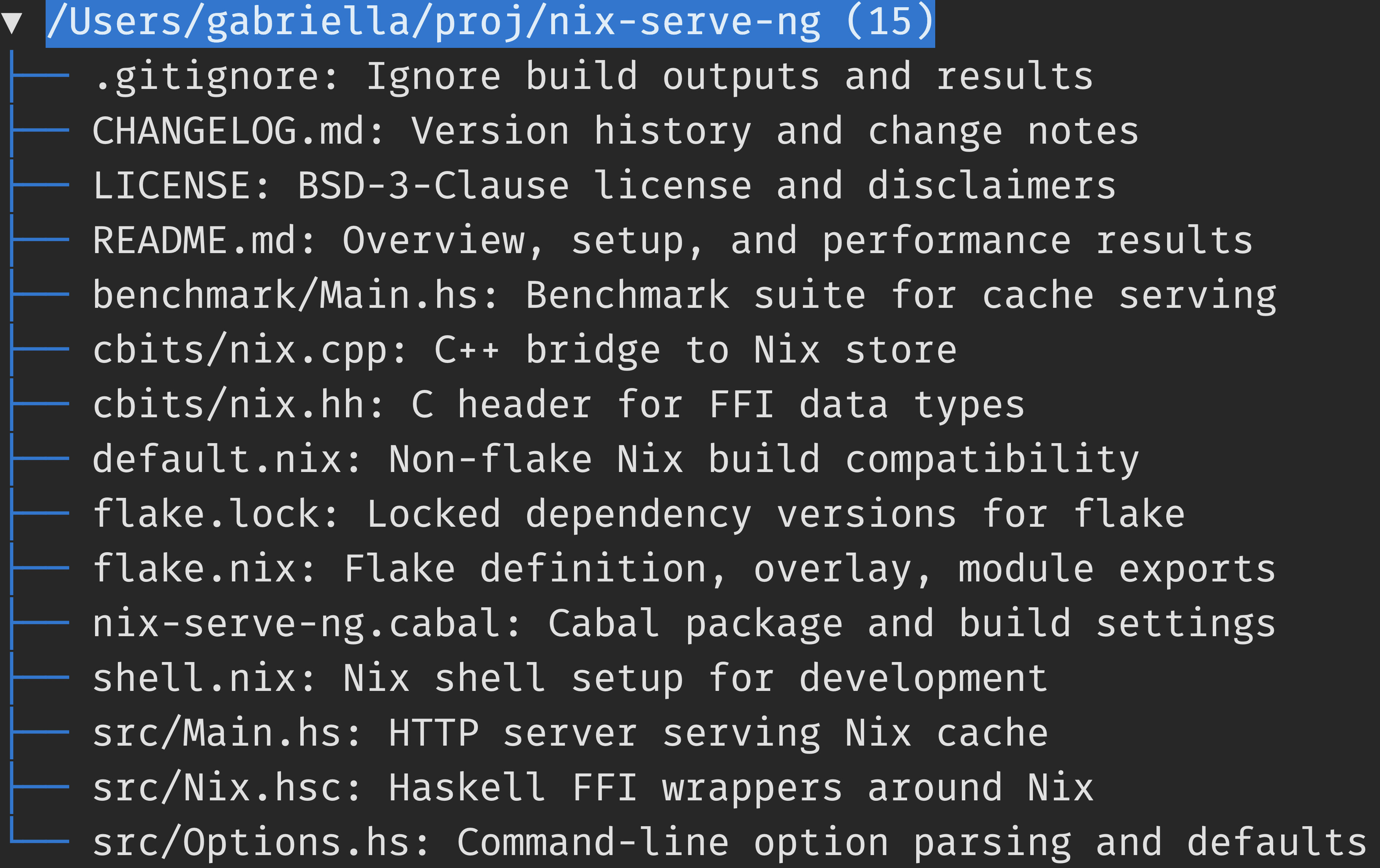
This is a tradeoff the tool makes for ergonomic reasons: the tool avoids subdividing clusters with 20 files or fewer.
For a a medium-sized repository you'll begin to see top-level clusters:
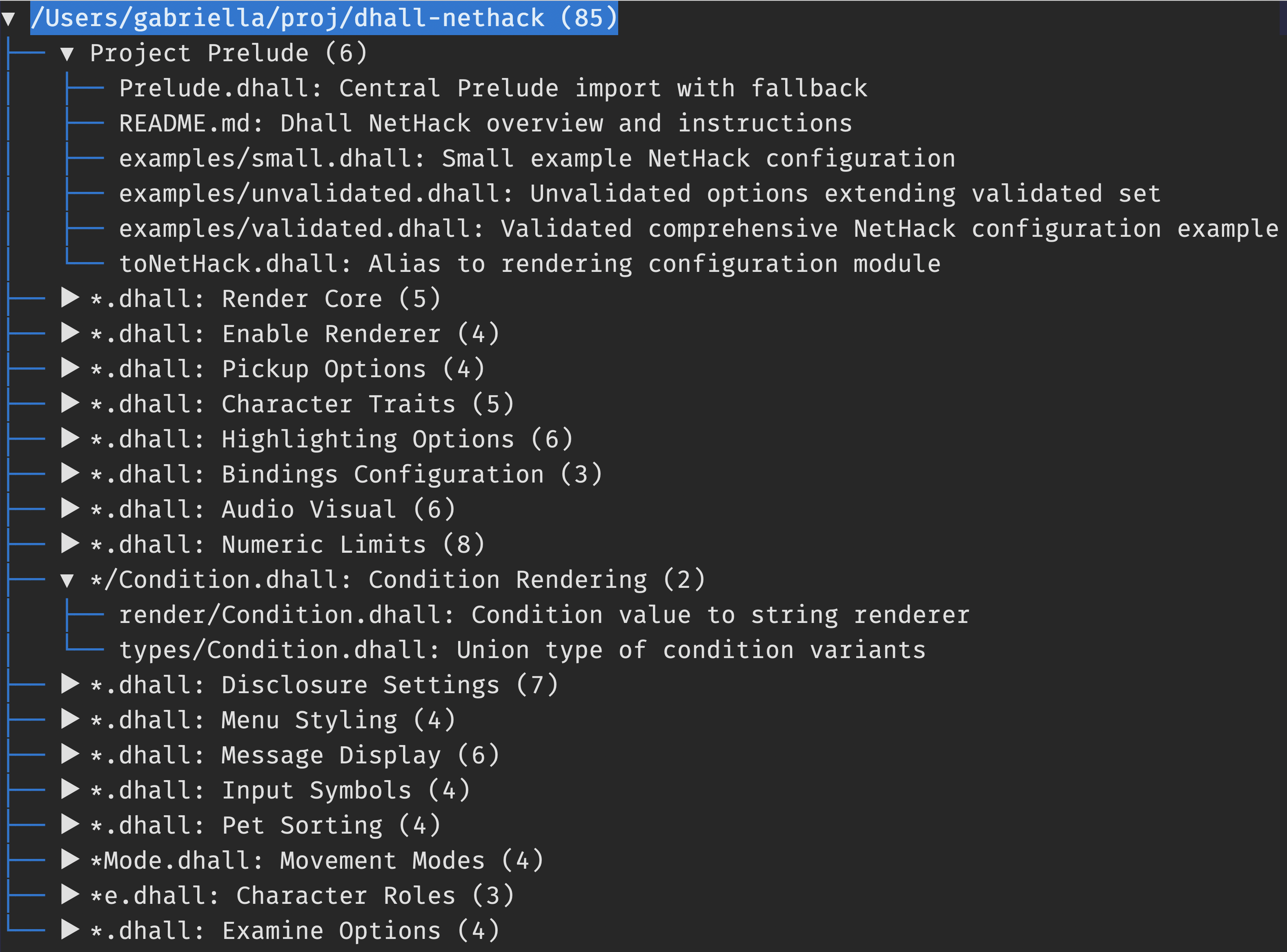
The label for each cluster describes the files within that cluster and will
also display a file pattern if all files within the cluster begin with the same
prefix or suffix. In the above example the "Project Prelude" doesn't display a
file pattern because there is no common prefix or suffix within the cluster,
whereas the "Condition Rendering" cluster displays a file pattern of
*/Condition.dhall because both files within the cluster share the same
suffix.
For an even larger repository you'll begin to see nested clusters:
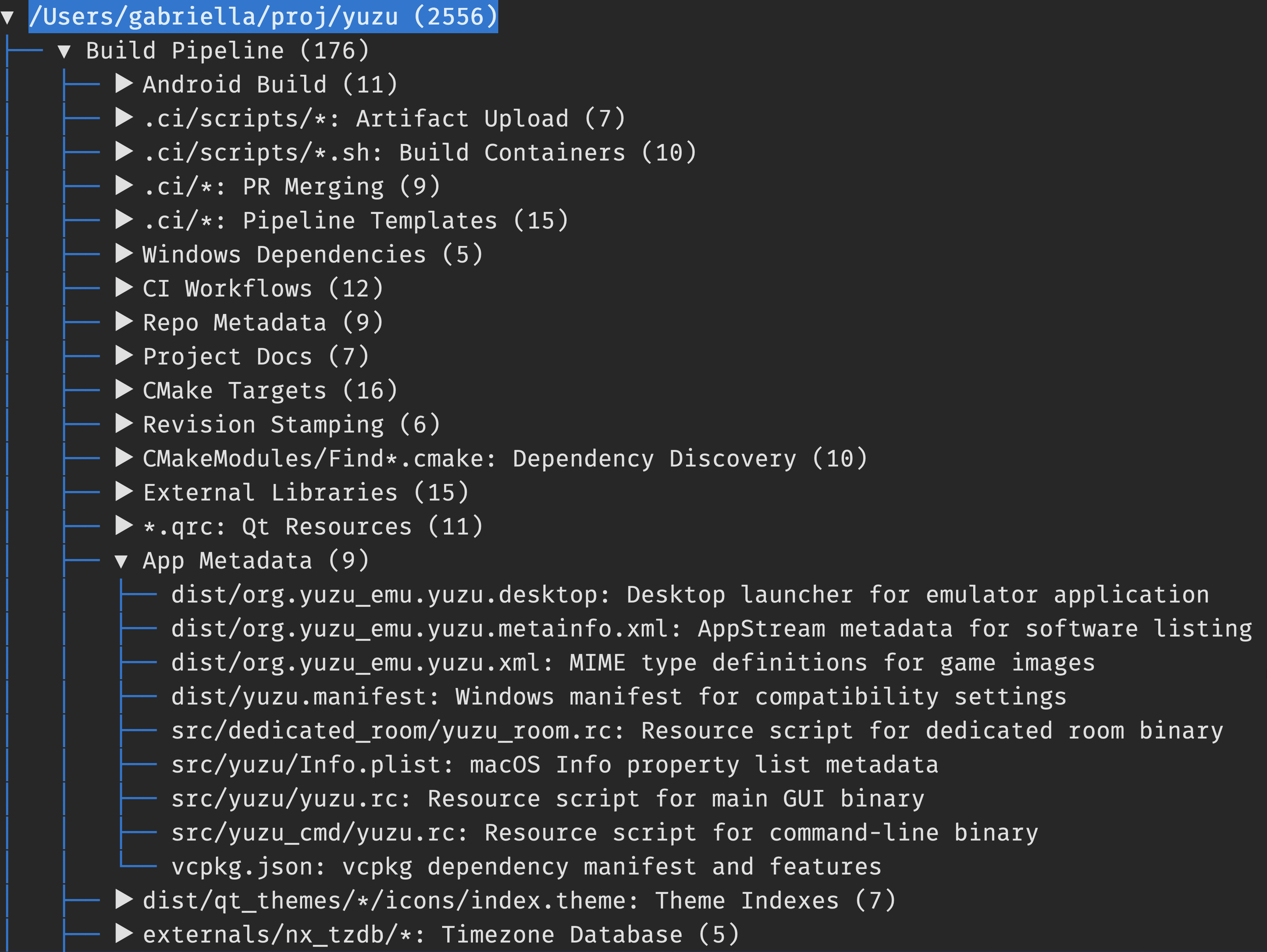
On a somewhat modern MacBook this tool can handle up to ≈10,000 files within a few minutes.
You can use this tool on any text documents; not just code! For example, here's the result when running the tool on the repository for my self-hosted blog:
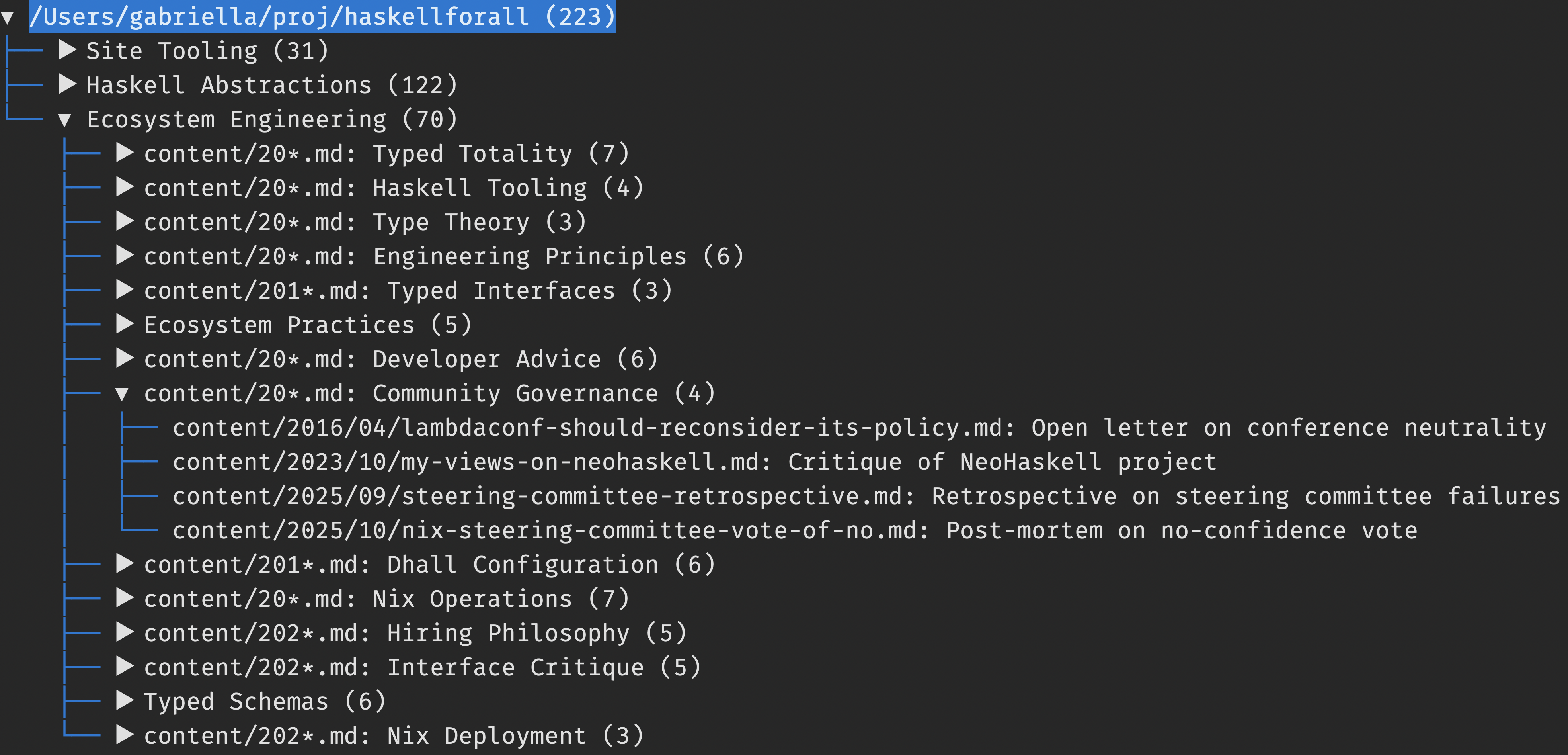
In other words, this tool isn't just a code indexer or project indexer; it's a general file indexer.
Development
If you use Nix and direnv this project provides a .envrc which
automatically provides a virtual environment with all the necessary
dependencies (both Python and non-Python dependencies).
Otherwise if you don't use direnv you can enter the virtual environment using:
$ nix develop
… and you can test any of the setup commands with a local checkout by replacing
github:Gabriella439/semantic-navigator with ., like this:
$ nix run . -- ./path/to/repository
Footnotes
-
OpenAI advertises
gpt-5-minias faster thangpt-5*models, but I see significantly worse latency for completions requests usinggpt-5-miniwhich matters more for this project's purposes. The completions model is only being used to generate short labels where inference throughput does not matter that much. ↩
Contributors

58 commits
Similar repos


Languages
Python
95.3%
Nix
4.7%
README
Semantic project navigator
Introductory blog post about this tool: Browse code by meaning.
This project provides a tool that lets you browse a repository's files by their meaning:
https://github.com/user-attachments/assets/95f04087-453d-413e-8661-5bcd7dce4062
Setup
Currently I've only built and run this script using uv and Nix. However, you can feel free to submit pull requests for other installation instructions if you've vetted them.
No matter what you do you will need to provide an OPENAI_API_KEY environment variable in
order to use this script:
$ export OPENAI_API_KEY="$(< ./path/to/openai.key)"
uv
You can run the script in a single command, like this:
$ uvx git+https://github.com/Gabriella439/semantic-navigator ./path/to/repository
… or you can install the script:
$ uv tool install git+https://github.com/Gabriella439/semantic-navigator

$ semantic-navigator ./path/to/repository
Nix
You can run the script in a single command, like this:
$ nix run github:Gabriella439/semantic-navigator -- ./path/to/repository
… or you can build the script and run it separately:
$ nix build github:Gabriella439/semantic-navigator

$ ./result/bin/semantic-navigator ./path/to/repository
… or you can install the script:
$ nix profile install github:Gabriella439/semantic-navigator

$ semantic-navigator ./path/to/repository
Usage
Depending on the size of the project it will probably take between a few
seconds to a minute to produce a tree viewer. Most of this delay is due to
using gpt-5-mini by default to label clusters because gpt-5-mini has worse
latency1, but is cheaper and still generally gives good results. If you're
willing to pay 7× as much to use a snappier and better model you can do this:
$ semantic-navigator --completion-model gpt-5.2 ./path/to/repository
For small repositories (up to 20 files) you won't see any clusters and the tool will just summarize the individual files:
This is a tradeoff the tool makes for ergonomic reasons: the tool avoids subdividing clusters with 20 files or fewer.
For a a medium-sized repository you'll begin to see top-level clusters:
The label for each cluster describes the files within that cluster and will
also display a file pattern if all files within the cluster begin with the same
prefix or suffix. In the above example the "Project Prelude" doesn't display a
file pattern because there is no common prefix or suffix within the cluster,
whereas the "Condition Rendering" cluster displays a file pattern of
*/Condition.dhall because both files within the cluster share the same
suffix.
For an even larger repository you'll begin to see nested clusters:
On a somewhat modern MacBook this tool can handle up to ≈10,000 files within a few minutes.
You can use this tool on any text documents; not just code! For example, here's the result when running the tool on the repository for my self-hosted blog:
In other words, this tool isn't just a code indexer or project indexer; it's a general file indexer.
Development
If you use Nix and direnv this project provides a .envrc which
automatically provides a virtual environment with all the necessary
dependencies (both Python and non-Python dependencies).
Otherwise if you don't use direnv you can enter the virtual environment using:
$ nix develop
… and you can test any of the setup commands with a local checkout by replacing
github:Gabriella439/semantic-navigator with ., like this:
$ nix run . -- ./path/to/repository
Footnotes
-
OpenAI advertises
gpt-5-minias faster thangpt-5*models, but I see significantly worse latency for completions requests usinggpt-5-miniwhich matters more for this project's purposes. The completions model is only being used to generate short labels where inference throughput does not matter that much. ↩
Similar repos
Contributors
58 commits
Languages
Python
95.3%
Nix
4.7%