G4SBO/PatchLight

Traffic light for Windows 11 updates: checks every pending update against Microsoft's known issues and pauses only the bad ones.

C#

3

60 commits

updated Oct 15, 2026

See the code

See what people are saying

SourceMessageScoreDate

Tired of Windows updates breaking your PC? I built a traffic light for them (r/github)

windows updates break stuff way too often (black screens, audio, remote desktop) and the dumb part is microsoft usually lists the problem publicly. nobody checks that before updating so i made patchlight. it checks every pending update against microsoft's known issues and gives it a green / yellow…

1

Oct 15, 2026

Tired of Windows updates breaking your PC? I built a traffic light for them (r/coolgithubprojects)

windows updates break stuff way too often (black screens, audio, remote desktop) and the dumb part is microsoft usually lists the problem publicly. nobody checks that before updating so i made patchlight. it checks every pending update against microsoft's known issues and gives it a green / yellow…

2

Oct 15, 2026

Tired of Windows updates breaking your PC? I built a traffic light for them (Fully Open Source) (r/SideProject)

Windows updates break stuff way too often (black screens, audio, remote desktop) and the dumb part is Microsoft does not care. So I made **PatchLight**. it checks every pending update against Microsoft's known issues and gives it a green / yellow / red light. red ones get paused automatically and…

3

Oct 15, 2026

README

PatchLight 🟢🟡🔴

Know if a Windows update is safe before you install it.

⬇ Download PatchLight for Windows 11 (installer, 46 MB) · All downloads · Is it safe?

Use the download link above. The green Code → Download ZIP button gives you the source code, not the app.

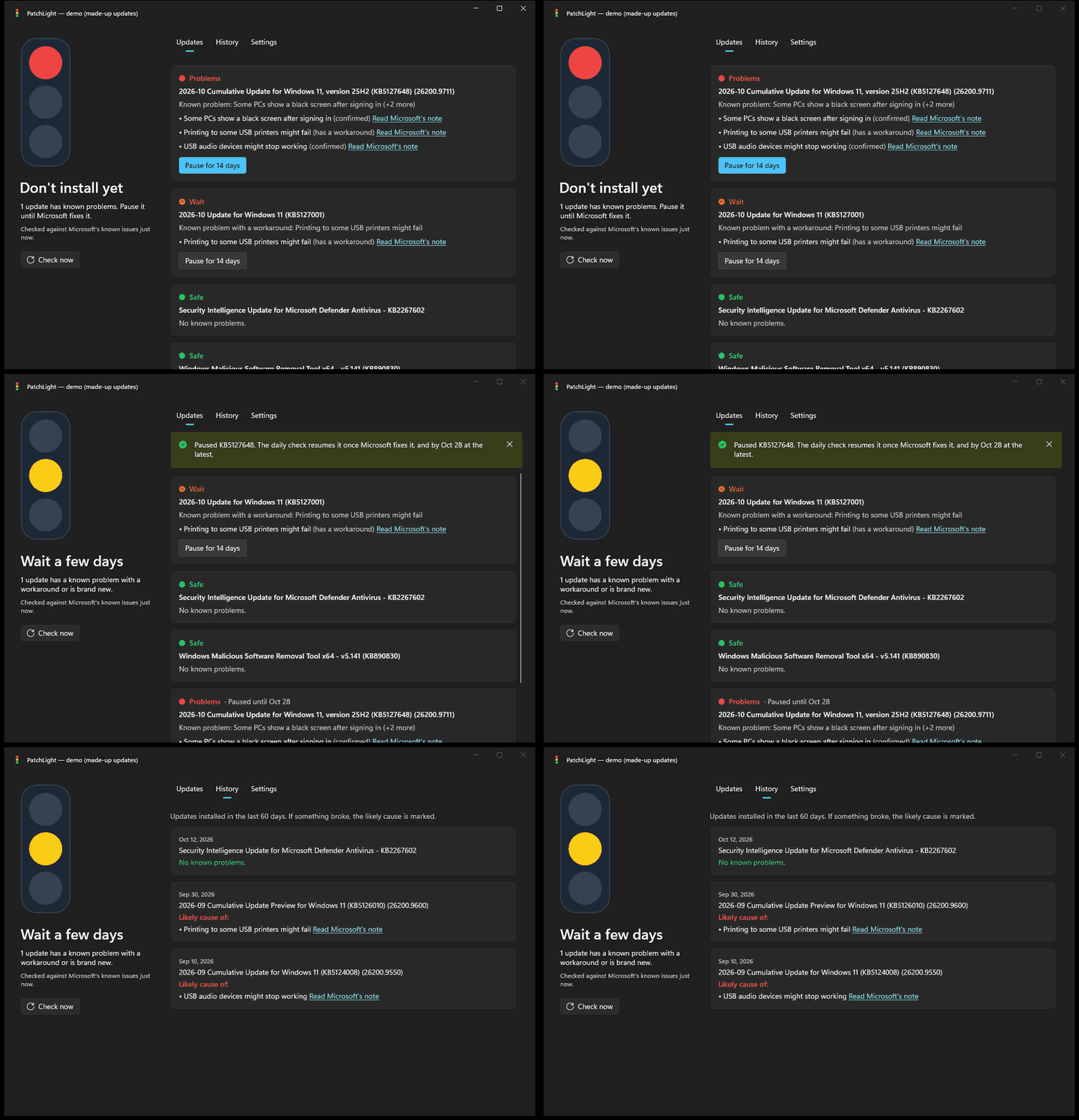
Windows updates break PCs more often than they should: black screens, Remote Desktop failures, broken audio. PatchLight checks every update waiting on your PC against Microsoft's own list of known problems and gives it a light:

LightMeaning
🟢 SafeNo known problems.
🟡 WaitA problem with a workaround, or it came out less than 3 days ago.
🔴 ProblemsMicrosoft confirmed it breaks something. Pause it.

PatchLight: a red light for an update with known problems, one click on Pause, the light turns yellow, then History shows which update likely broke something

(GIF of demo mode with made-up updates. Run PatchLight.exe --demo to try it without touching anything.)

What it does

  • Traffic light: The icon next to the clock is green, yellow or red, so you know right away.
  • Tells you when something is wrong: A notification appears when an update waiting on your PC has known problems.
  • Pauses only the bad ones: One click on Pause (Windows asks for permission) hides that update from Windows Update. Everything else keeps installing.
  • Never blocks forever: An hourly automatic check resumes a paused update as soon as Microsoft fixes it, and every pause ends after 14 days (you can choose up to 35), because security updates matter.
  • What broke my PC? The History tab shows recent updates and marks the one most likely behind an open problem. One click on Uninstall this update removes it, and PatchLight keeps it paused until Microsoft fixes the problem.
  • New Windows versions too: When Windows offers an upgrade like "Windows 11, version 26H2", PatchLight checks it against Microsoft's known issues for that version, so you know whether to wait.
  • Early warnings from tech news: Problems often show up on Neowin and Windows Latest days before Microsoft lists them. A report turns a safe update into 🟡 Wait (never 🔴), with a link to the article. You can turn this off in Settings.
  • Only problems that matter to you: Some known problems only hit company PCs (domains, virtual desktops, servers). On a home PC they're still listed but don't turn the light red. Company and school PCs count everything.
  • Acts before Windows does: Once Windows has an update ready for your next restart, it installs it no matter how you shut down. So PatchLight acts earlier (change it in Settings → Protection):
    • Pause red updates automatically: (on by default): the hourly check pauses updates with confirmed problems on its own. Yellow updates and news reports never trigger it, and an update you resume stays resumed unless a new problem shows up.
    • Wait before installing new updates: (off by default; 3, 7 or 14 days): new monthly updates rarely have known problems on day one, so waiting gives problems time to show up. On Pro, Enterprise and Education this uses Windows' own deferral setting; on Home, PatchLight pauses new updates until they're old enough.

Windows 11 only. Free and open source. No account, no server, no tracking: your PC reads Microsoft's public Windows release health pages directly.

Get it

  1. Download PatchLight-Setup.exe and open it.
  2. Windows asks for permission, then PatchLight installs and opens. After that you can find it later in the Start menu.
  3. The installer asks whether PatchLight should start with Windows (it then waits in the tray). You can change that any time in Settings.

The files aren't code-signed yet, so Windows SmartScreen may warn you the first time. Choose More info, then Run anyway. (Why?)

Prefer no installer? PatchLight-win-x64.zip on the downloads page is the same app. Unzip it to C:\Program Files\PatchLight: the automatic check only runs PatchLight from a folder that only administrators can change, so other programs can't swap it for something else.

Is it safe?

PatchLight needs administrator rights to pause updates, so it's fair to ask. Here is what you can check:

  • Why Windows warns you: the downloads aren't code-signed yet. A signing certificate costs money, and SmartScreen also warns about any new app that few people have downloaded. It doesn't mean something bad was found.
  • Read the code: everything PatchLight does is in this repository, under the MIT license.
  • Check the file: the downloads page shows the SHA-256 of every file, and the release notes link a VirusTotal scan.
  • Build it yourself: see Build. No Visual Studio needed.
  • Know what it touches: What PatchLight changes on your PC lists everything, and uninstalling removes all of it and resumes every update it paused.
  • No data leaves your PC: see Privacy.

Command line

There is also a single-file patchlight.exe in case you would like to use it from the terminal:

patchlight                       Check the updates waiting on this PC
patchlight hold KB5127648        Pause an update (needs administrator)
patchlight release KB5127648     Resume it
patchlight history               Which recent update likely broke something
patchlight uninstall KB5124008   Remove an installed update and keep it paused until it's fixed (needs administrator)

How it works

  • Lights: each pending update is matched with the known issues on Microsoft's release health page for your Windows version. Cumulative updates inherit open problems from the builds they build on.
  • Pausing: uses Windows Update's own "hide this update" switch, so nothing is uninstalled or blocked outside Windows Update. Afterwards PatchLight asks Windows to search for updates again (like pressing "Check for updates"), so Settings shows the change right away. Depending on your Windows Update settings, that search may also start installing the other updates.
  • Uninstalling: only when you ask. Windows cumulative updates are removed with DISM, other updates with wusa. Windows can only remove its newest cumulative update; for older ones PatchLight points you to Settings > System > Recovery. After a restart Windows offers the update again, and PatchLight's check (it also runs 5 minutes after start-up) pauses it.
  • Business-only problems: recognized only by clear wording in Microsoft's description (domain-joined devices, Azure Virtual Desktop, Remote Desktop Services, Windows Server, IT-managed devices and similar). When in doubt, a problem counts.
  • Automatic check: a scheduled task (\PatchLight\Daily check in Task Scheduler, named before it ran hourly) runs PatchLight.exe --background-check as SYSTEM every hour and 5 minutes after start-up. It also applies the Protection settings, kept in C:\ProgramData\PatchLight\settings.json. Its data folder, C:\ProgramData\PatchLight, can only be changed by administrators.
  • Your settings: %LOCALAPPDATA%\PatchLight (also the saved news reports, kept 30 days).

Uninstall

Open Settings → Apps → Installed apps, find PatchLight and choose Uninstall. It resumes every update PatchLight paused, removes the automatic check, the "wait" policy it set and "Start with Windows", and deletes its data in C:\ProgramData\PatchLight.

Privacy

PatchLight doesn't collect, send or share anything about you or your PC. Over the network it only:

  • downloads Microsoft's public Windows release health pages (for your Windows version, and for any new version Windows offers you),
  • downloads the public news feeds of Neowin and Windows Latest to spot reported problems (turn this off in Settings, or run patchlight --no-news),
  • asks Windows Update on your own PC which updates are waiting.

No account, no analytics, no server of ours. Like any app that reads a web page, these downloads show the sites your IP address and that the request comes from PatchLight. Nothing about you, your PC or your updates is sent. This program will not transfer any information to others.

What PatchLight changes on your PC

All of these are removed when you uninstall:

  • Start with Windows (if you choose it): one entry in your account's startup programs.
  • Automatic check: a task in Task Scheduler, \PatchLight\Daily check, turned on by the installer (and when you pause an update or change Protection); you can turn it off in Settings.
  • Wait before installing new updates (Pro and up, if you choose it): Windows Update's DeferQualityUpdates and DeferQualityUpdatesPeriodInDays policy values. PatchLight never changes them if something else already set them.
  • Paused updates: hidden with Windows Update's own "hide this update" switch, never uninstalled or blocked.
  • Data: C:\ProgramData\PatchLight (pauses, a saved copy of Microsoft's page) and %LOCALAPPDATA%\PatchLight (your settings).

Code signing policy

The downloads aren't code-signed yet. Free code signing from SignPath Foundation is planned.

Every download is built by GitHub Actions from the code in this repository, and each release is approved by hand before it is published.

Team roles:

  • Committers and reviewers: G4SBO
  • Approvers: G4SBO

See Privacy for what the program does over the network.

Build

Requires the .NET 10 SDK on Windows 11. No Visual Studio needed.

dotnet test
dotnet run --project src/PatchLight.App -- --demo
dotnet run --project src/PatchLight.Cli
.\scripts\publish.ps1            # builds the app, the installer (needs Inno Setup 6), the zip and patchlight.exe

License

MIT. Made by G4SBO.

cli
csharp
dotnet
known-issues
open-source
patch-tuesday
system-tray
tray-app
windows
windows-11
windows11
windows-update
windows-updates
winui3

G4SBO/PatchLight

Traffic light for Windows 11 updates: checks every pending update against Microsoft's known issues and pauses only the bad ones.

C#

3

60 commits

updated Oct 15, 2026

See the code

See what people are saying

SourceMessageScoreDate

Tired of Windows updates breaking your PC? I built a traffic light for them (r/github)

windows updates break stuff way too often (black screens, audio, remote desktop) and the dumb part is microsoft usually lists the problem publicly. nobody checks that before updating so i made patchlight. it checks every pending update against microsoft's known issues and gives it a green / yellow…

1

Oct 15, 2026

Tired of Windows updates breaking your PC? I built a traffic light for them (r/coolgithubprojects)

windows updates break stuff way too often (black screens, audio, remote desktop) and the dumb part is microsoft usually lists the problem publicly. nobody checks that before updating so i made patchlight. it checks every pending update against microsoft's known issues and gives it a green / yellow…

2

Oct 15, 2026

Tired of Windows updates breaking your PC? I built a traffic light for them (Fully Open Source) (r/SideProject)

Windows updates break stuff way too often (black screens, audio, remote desktop) and the dumb part is Microsoft does not care. So I made **PatchLight**. it checks every pending update against Microsoft's known issues and gives it a green / yellow / red light. red ones get paused automatically and…

3

Oct 15, 2026

README

PatchLight 🟢🟡🔴

Know if a Windows update is safe before you install it.

⬇ Download PatchLight for Windows 11 (installer, 46 MB) · All downloads · Is it safe?

Use the download link above. The green Code → Download ZIP button gives you the source code, not the app.

Windows updates break PCs more often than they should: black screens, Remote Desktop failures, broken audio. PatchLight checks every update waiting on your PC against Microsoft's own list of known problems and gives it a light:

LightMeaning
🟢 SafeNo known problems.
🟡 WaitA problem with a workaround, or it came out less than 3 days ago.
🔴 ProblemsMicrosoft confirmed it breaks something. Pause it.

PatchLight: a red light for an update with known problems, one click on Pause, the light turns yellow, then History shows which update likely broke something

(GIF of demo mode with made-up updates. Run PatchLight.exe --demo to try it without touching anything.)

What it does

  • Traffic light: The icon next to the clock is green, yellow or red, so you know right away.
  • Tells you when something is wrong: A notification appears when an update waiting on your PC has known problems.
  • Pauses only the bad ones: One click on Pause (Windows asks for permission) hides that update from Windows Update. Everything else keeps installing.
  • Never blocks forever: An hourly automatic check resumes a paused update as soon as Microsoft fixes it, and every pause ends after 14 days (you can choose up to 35), because security updates matter.
  • What broke my PC? The History tab shows recent updates and marks the one most likely behind an open problem. One click on Uninstall this update removes it, and PatchLight keeps it paused until Microsoft fixes the problem.
  • New Windows versions too: When Windows offers an upgrade like "Windows 11, version 26H2", PatchLight checks it against Microsoft's known issues for that version, so you know whether to wait.
  • Early warnings from tech news: Problems often show up on Neowin and Windows Latest days before Microsoft lists them. A report turns a safe update into 🟡 Wait (never 🔴), with a link to the article. You can turn this off in Settings.
  • Only problems that matter to you: Some known problems only hit company PCs (domains, virtual desktops, servers). On a home PC they're still listed but don't turn the light red. Company and school PCs count everything.
  • Acts before Windows does: Once Windows has an update ready for your next restart, it installs it no matter how you shut down. So PatchLight acts earlier (change it in Settings → Protection):
    • Pause red updates automatically: (on by default): the hourly check pauses updates with confirmed problems on its own. Yellow updates and news reports never trigger it, and an update you resume stays resumed unless a new problem shows up.
    • Wait before installing new updates: (off by default; 3, 7 or 14 days): new monthly updates rarely have known problems on day one, so waiting gives problems time to show up. On Pro, Enterprise and Education this uses Windows' own deferral setting; on Home, PatchLight pauses new updates until they're old enough.

Windows 11 only. Free and open source. No account, no server, no tracking: your PC reads Microsoft's public Windows release health pages directly.

Get it

  1. Download PatchLight-Setup.exe and open it.
  2. Windows asks for permission, then PatchLight installs and opens. After that you can find it later in the Start menu.
  3. The installer asks whether PatchLight should start with Windows (it then waits in the tray). You can change that any time in Settings.

The files aren't code-signed yet, so Windows SmartScreen may warn you the first time. Choose More info, then Run anyway. (Why?)

Prefer no installer? PatchLight-win-x64.zip on the downloads page is the same app. Unzip it to C:\Program Files\PatchLight: the automatic check only runs PatchLight from a folder that only administrators can change, so other programs can't swap it for something else.

Is it safe?

PatchLight needs administrator rights to pause updates, so it's fair to ask. Here is what you can check:

  • Why Windows warns you: the downloads aren't code-signed yet. A signing certificate costs money, and SmartScreen also warns about any new app that few people have downloaded. It doesn't mean something bad was found.
  • Read the code: everything PatchLight does is in this repository, under the MIT license.
  • Check the file: the downloads page shows the SHA-256 of every file, and the release notes link a VirusTotal scan.
  • Build it yourself: see Build. No Visual Studio needed.
  • Know what it touches: What PatchLight changes on your PC lists everything, and uninstalling removes all of it and resumes every update it paused.
  • No data leaves your PC: see Privacy.

Command line

There is also a single-file patchlight.exe in case you would like to use it from the terminal:

patchlight                       Check the updates waiting on this PC
patchlight hold KB5127648        Pause an update (needs administrator)
patchlight release KB5127648     Resume it
patchlight history               Which recent update likely broke something
patchlight uninstall KB5124008   Remove an installed update and keep it paused until it's fixed (needs administrator)

How it works

  • Lights: each pending update is matched with the known issues on Microsoft's release health page for your Windows version. Cumulative updates inherit open problems from the builds they build on.
  • Pausing: uses Windows Update's own "hide this update" switch, so nothing is uninstalled or blocked outside Windows Update. Afterwards PatchLight asks Windows to search for updates again (like pressing "Check for updates"), so Settings shows the change right away. Depending on your Windows Update settings, that search may also start installing the other updates.
  • Uninstalling: only when you ask. Windows cumulative updates are removed with DISM, other updates with wusa. Windows can only remove its newest cumulative update; for older ones PatchLight points you to Settings > System > Recovery. After a restart Windows offers the update again, and PatchLight's check (it also runs 5 minutes after start-up) pauses it.
  • Business-only problems: recognized only by clear wording in Microsoft's description (domain-joined devices, Azure Virtual Desktop, Remote Desktop Services, Windows Server, IT-managed devices and similar). When in doubt, a problem counts.
  • Automatic check: a scheduled task (\PatchLight\Daily check in Task Scheduler, named before it ran hourly) runs PatchLight.exe --background-check as SYSTEM every hour and 5 minutes after start-up. It also applies the Protection settings, kept in C:\ProgramData\PatchLight\settings.json. Its data folder, C:\ProgramData\PatchLight, can only be changed by administrators.
  • Your settings: %LOCALAPPDATA%\PatchLight (also the saved news reports, kept 30 days).

Uninstall

Open Settings → Apps → Installed apps, find PatchLight and choose Uninstall. It resumes every update PatchLight paused, removes the automatic check, the "wait" policy it set and "Start with Windows", and deletes its data in C:\ProgramData\PatchLight.

Privacy

PatchLight doesn't collect, send or share anything about you or your PC. Over the network it only:

  • downloads Microsoft's public Windows release health pages (for your Windows version, and for any new version Windows offers you),
  • downloads the public news feeds of Neowin and Windows Latest to spot reported problems (turn this off in Settings, or run patchlight --no-news),
  • asks Windows Update on your own PC which updates are waiting.

No account, no analytics, no server of ours. Like any app that reads a web page, these downloads show the sites your IP address and that the request comes from PatchLight. Nothing about you, your PC or your updates is sent. This program will not transfer any information to others.

What PatchLight changes on your PC

All of these are removed when you uninstall:

  • Start with Windows (if you choose it): one entry in your account's startup programs.
  • Automatic check: a task in Task Scheduler, \PatchLight\Daily check, turned on by the installer (and when you pause an update or change Protection); you can turn it off in Settings.
  • Wait before installing new updates (Pro and up, if you choose it): Windows Update's DeferQualityUpdates and DeferQualityUpdatesPeriodInDays policy values. PatchLight never changes them if something else already set them.
  • Paused updates: hidden with Windows Update's own "hide this update" switch, never uninstalled or blocked.
  • Data: C:\ProgramData\PatchLight (pauses, a saved copy of Microsoft's page) and %LOCALAPPDATA%\PatchLight (your settings).

Code signing policy

The downloads aren't code-signed yet. Free code signing from SignPath Foundation is planned.

Every download is built by GitHub Actions from the code in this repository, and each release is approved by hand before it is published.

Team roles:

  • Committers and reviewers: G4SBO
  • Approvers: G4SBO

See Privacy for what the program does over the network.

Build

Requires the .NET 10 SDK on Windows 11. No Visual Studio needed.

dotnet test
dotnet run --project src/PatchLight.App -- --demo
dotnet run --project src/PatchLight.Cli
.\scripts\publish.ps1            # builds the app, the installer (needs Inno Setup 6), the zip and patchlight.exe

License

MIT. Made by G4SBO.

cli
csharp
dotnet
known-issues
open-source
patch-tuesday
system-tray
tray-app
windows
windows-11
windows11
windows-update
windows-updates
winui3