
README

Music Decoy
Stop launching the Music app
whenever you press ▶ Play

Installation
- Download, unzip, move to
/Applications - or..
brew install --cask music-decoy
What does this do?
Nothing. The app does absolutely nothing while running. 0% CPU all day long.
But by simply having it running, the macOS system won't launch the Music app whenever you accidentally press Play.
It won't launch Music even if you try to launch it manually! that might not actually be a good thing, but.. oh well
How does it achieve that?
By having the same bundle identifier as the system Music app: com.apple.Music
In more technical terms, this is what I found out about how the ▷ Play mechanism works:
- The
Playevent is caught by thercddaemon (living at/System/Library/CoreServices/rcd.app/Contents/MacOS/rcd) - The daemon checks if there is any app playing something and forwards the event to that app
- If there is no such app,
rcdchecks if any running app hascom.apple.Musicas its bundle identifier- Without a running
com.apple.Musicapp,rcdlaunches the system Music app - But if there is such an app, the event is forwarded to it instead
- Without a running
Uh.. how do I quit this app?
The app has no Dock icon and no menubar icon so to quit it you'd need to do one of the following:
- Launch Activity Monitor, find Music Decoy and press the ❌ button at the top
- Run the following command in the Terminal:
killall 'Music Decoy'
Configuration
Since v1.1 you can configure Music Decoy to launch another app when the ▷ Play button is pressed.
To do that, run the following command in the Terminal (example for Spotify):
defaults write com.lowtechguys.MusicDecoy mediaAppPath /Applications/Spotify.app
To reset the configuration, run:
defaults delete com.lowtechguys.MusicDecoy mediaAppPath
Alternatives
Based on this StackExchange answer, there are a few different ways to achieve the same effect:
launchctl unload -w /System/Library/LaunchAgents/com.apple.rcd.plist- Problem: disables the Play button completely
- noTunes which listens for launched apps and kills Music as soon as it is launched
- Problem: it does use a tiny bit of CPU in the background although checking for launched apps is very little work
Frequently asked questions?
I think they were only asked once, and they might not even be questions but I might as well record the info for posterity.
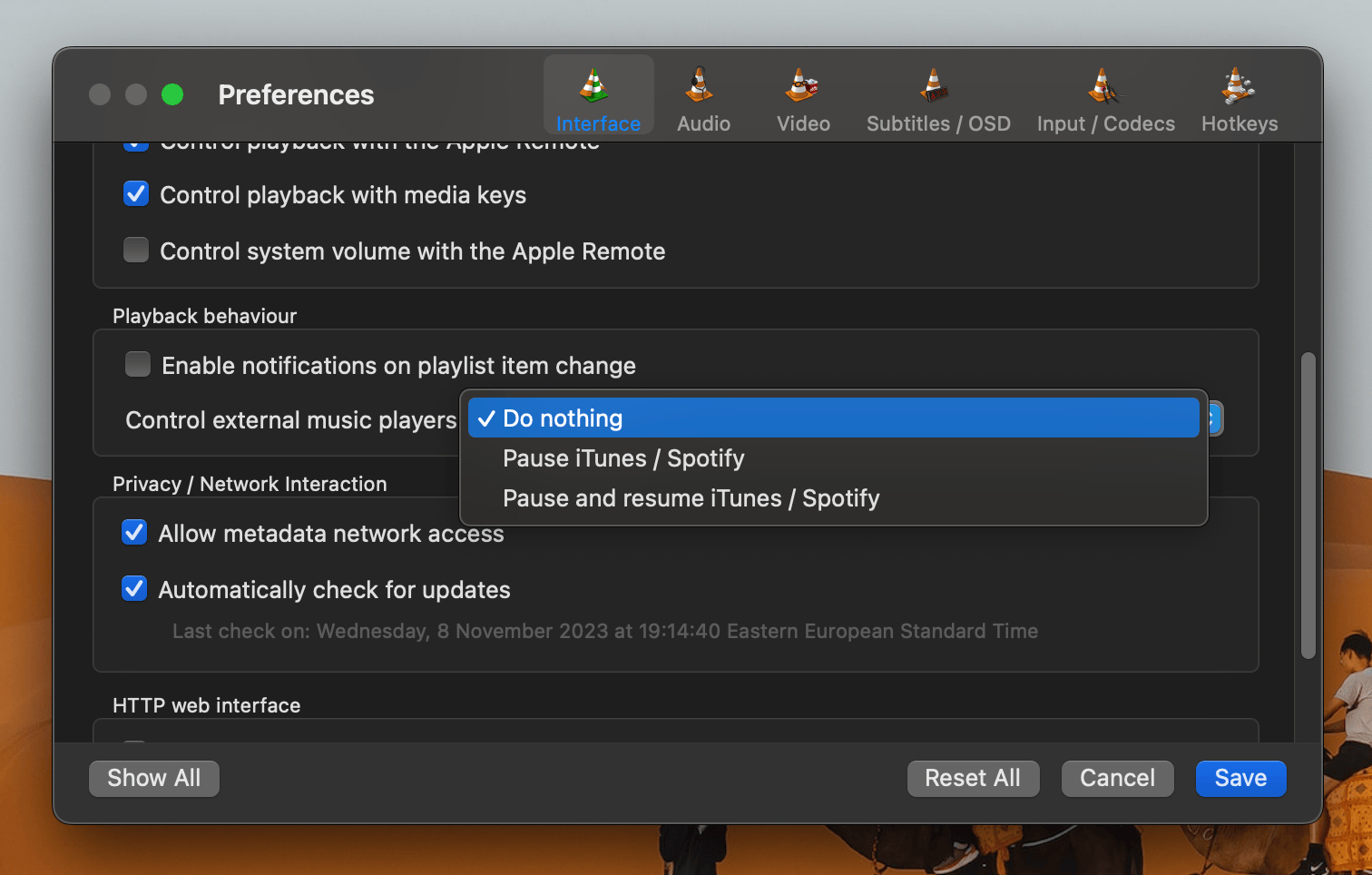
VLC crashes
Looks like VLC tries to use ScriptingBridge to send commands to the Music app.
warning: failed to get scripting definition from /Applications/Music Decoy.app; it may not be scriptable.
-[SBApplication playerState]: unrecognized selector sent to instance 0x600003399050
You can fix this by configuring the following setting:
How do I launch Music?
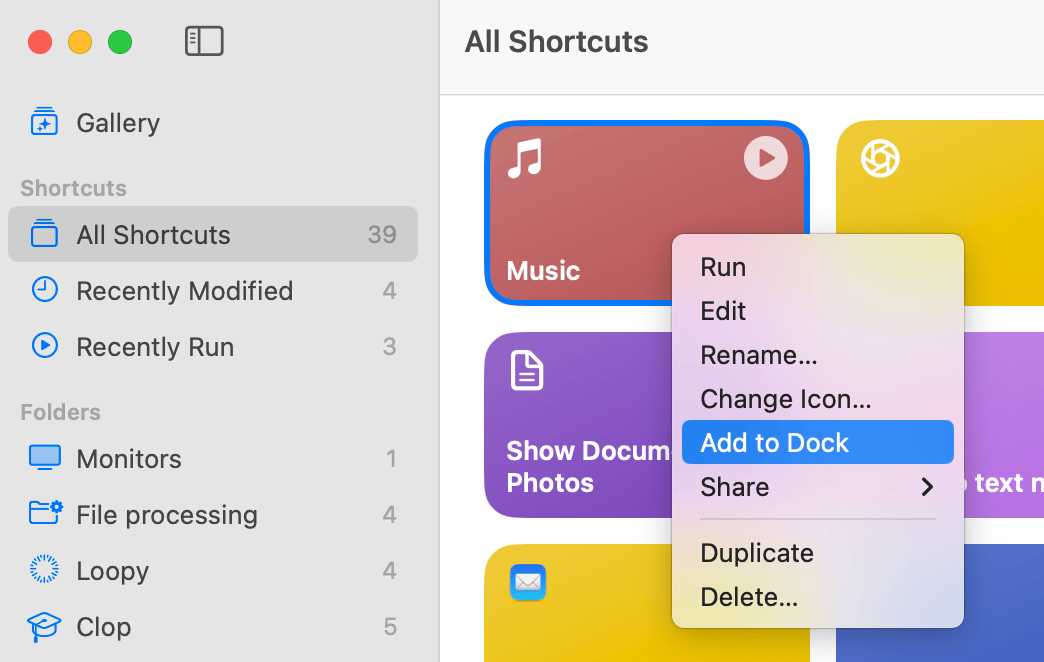
You can use this macOS Shortcut: Music.shortcut
It will quit Music Decoy and launch the Music app, with a small delay between the two actions.
You can add it to your Dock for easy access:
Contributors


Similar repos


Languages
Objective-C
100.0%
README
Music Decoy
Stop launching the Music app
whenever you press ▶ Play
Installation
- Download, unzip, move to
/Applications - or..
brew install --cask music-decoy
What does this do?
Nothing. The app does absolutely nothing while running. 0% CPU all day long.
But by simply having it running, the macOS system won't launch the Music app whenever you accidentally press Play.
It won't launch Music even if you try to launch it manually! that might not actually be a good thing, but.. oh well
How does it achieve that?
By having the same bundle identifier as the system Music app: com.apple.Music
In more technical terms, this is what I found out about how the ▷ Play mechanism works:
- The
Playevent is caught by thercddaemon (living at/System/Library/CoreServices/rcd.app/Contents/MacOS/rcd) - The daemon checks if there is any app playing something and forwards the event to that app
- If there is no such app,
rcdchecks if any running app hascom.apple.Musicas its bundle identifier- Without a running
com.apple.Musicapp,rcdlaunches the system Music app - But if there is such an app, the event is forwarded to it instead
- Without a running
Uh.. how do I quit this app?
The app has no Dock icon and no menubar icon so to quit it you'd need to do one of the following:
- Launch Activity Monitor, find Music Decoy and press the ❌ button at the top
- Run the following command in the Terminal:
killall 'Music Decoy'
Configuration
Since v1.1 you can configure Music Decoy to launch another app when the ▷ Play button is pressed.
To do that, run the following command in the Terminal (example for Spotify):
defaults write com.lowtechguys.MusicDecoy mediaAppPath /Applications/Spotify.app
To reset the configuration, run:
defaults delete com.lowtechguys.MusicDecoy mediaAppPath
Alternatives
Based on this StackExchange answer, there are a few different ways to achieve the same effect:
launchctl unload -w /System/Library/LaunchAgents/com.apple.rcd.plist- Problem: disables the Play button completely
- noTunes which listens for launched apps and kills Music as soon as it is launched
- Problem: it does use a tiny bit of CPU in the background although checking for launched apps is very little work
Frequently asked questions?
I think they were only asked once, and they might not even be questions but I might as well record the info for posterity.
VLC crashes
Looks like VLC tries to use ScriptingBridge to send commands to the Music app.
warning: failed to get scripting definition from /Applications/Music Decoy.app; it may not be scriptable.
-[SBApplication playerState]: unrecognized selector sent to instance 0x600003399050
You can fix this by configuring the following setting:
How do I launch Music?
You can use this macOS Shortcut: Music.shortcut
It will quit Music Decoy and launch the Music app, with a small delay between the two actions.
You can add it to your Dock for easy access:
Similar repos
Contributors
Languages
Objective-C
100.0%