
Fun-Audio-Chat is a Large Audio Language Model built for natural, low-latency voice interactions.
Python
1,008
23 commits
updated Sep 21, 2026
README
Fun-Audio-Chat
Fun-Audio-Chat is a Large Audio Language Model built for natural, low-latency voice interactions.




📋 Table of Contents
- Overview
- News
- Installation
- Quick Start
- Evaluation
- Training
- Acknowledgments
- License
- Research Intern Position
- Contact
📖 Overview
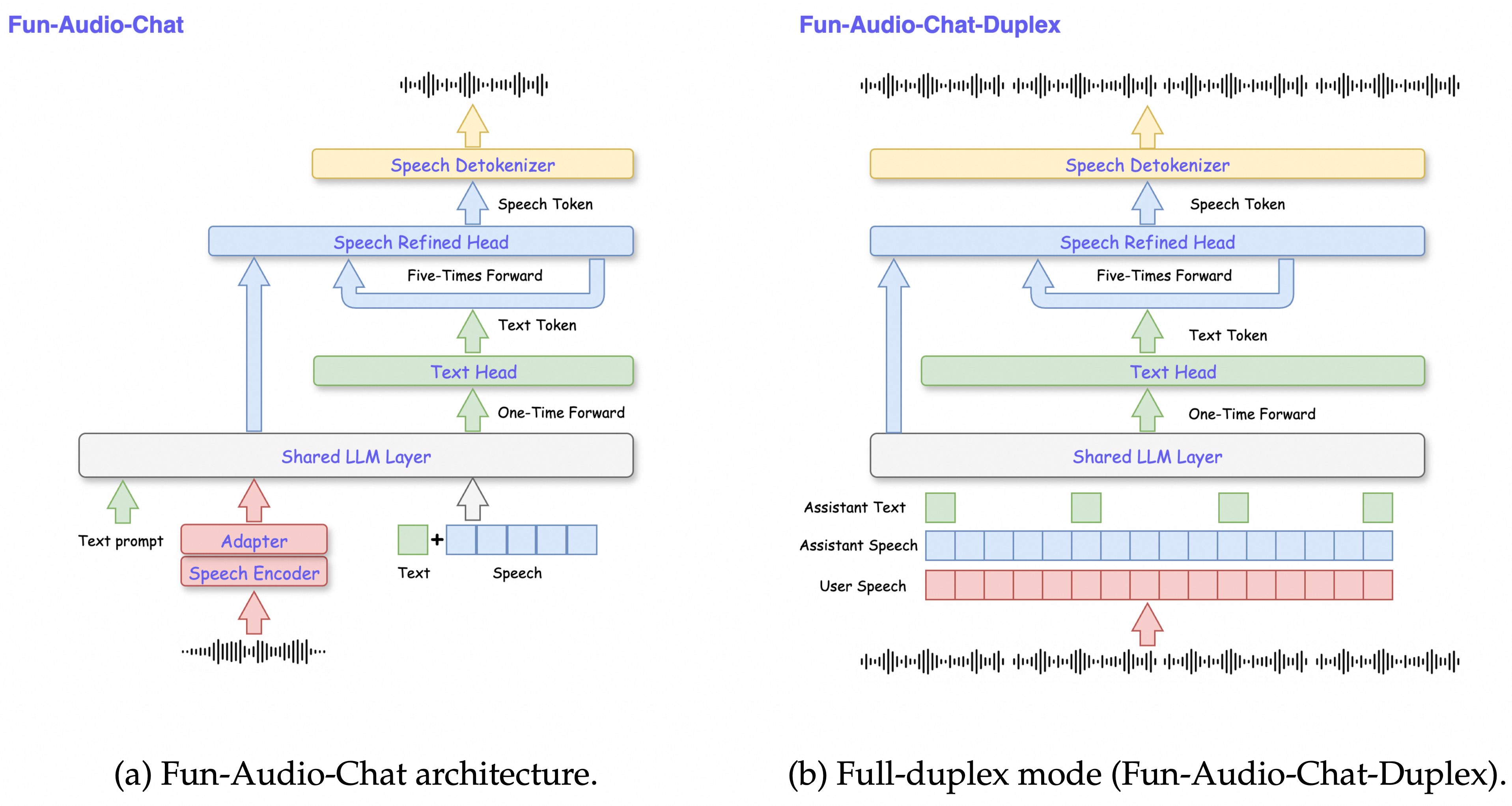
Fun-Audio-Chat is a Large Audio Language Model built for natural, low-latency voice interactions. It introduces Dual-Resolution Speech Representations (an efficient 5Hz shared backbone + a 25Hz refined head) to cut compute while keeping high speech quality, and Core-Cocktail training to preserve strong text LLM capabilities. It delivers top-tier results on spoken QA, audio understanding, speech function calling, and speech instruction-following and voice empathy benchmarks.
Key Features
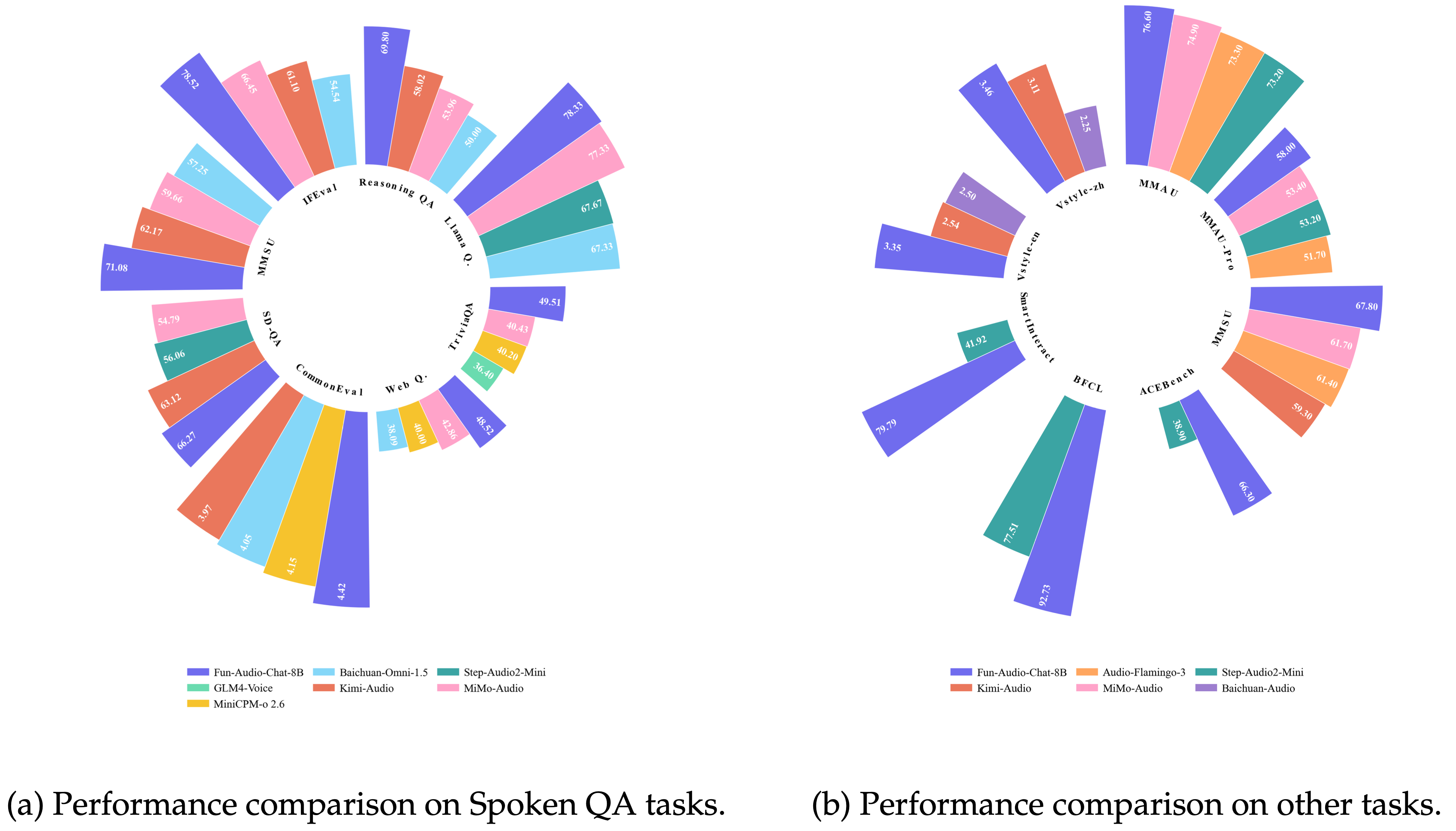
- Dual-Resolution Speech Representations: Efficient 5Hz frame rate (vs. 12.5Hz or 25Hz for other models), reducing GPU hours by nearly 50% while maintaining high speech quality
- State-of-the-Art Performance: Ranks Top among models of the same size (around-8B parameters) on OpenAudioBench, VoiceBench and UltraEval-Audio, MMAU, MMAU-Pro, MMSU, Speech-ACEBench, Speech-BFCL, Speech-SmartInteract, VStyle
- Comprehensive Capabilities: Supports spoken QA, audio understanding, speech function calling, speech instruction-following, voice empathy
📰 News
- [2026.01.29] Thanks to @nemoramo for contributing S2T inference support to the official vLLM repository, achieving ~20x speedup for short audios and ~50x for long audios!
- [2026.01.26] Our previous work DrVoice: Parallel Speech-Text Voice Conversation Model via Dual-Resolution Speech Representations has been accepted by ICLR 2026!
- [2025.12.23] Fun-Audio-Chat-8B (model, training and inference code) released with state-of-the-art performance on multiple spoken question answering, audio understanding, speech function calling, speech instruction-following and voice empathy benchmarks
🔧 Installation
1. Requirements
- Python == 3.12
- PyTorch == 2.8.0
- ffmpeg
- GPU Memory: ~24GB for inference, 4×80GB for training
2. Clone Repository
git clone --recurse-submodules https://github.com/FunAudioLLM/Fun-Audio-Chat
cd Fun-Audio-Chat
3. Install Dependencies
apt install ffmpeg
# It is recommended to create a new environment
conda create -n FunAudioChat python=3.12 -y
conda activate FunAudioChat
pip install torch==2.8.0 torchaudio==2.8.0 --index-url https://download.pytorch.org/whl/cu128
pip install -r requirements.txt
4. Download Pretrained Models
Pretrained models should be placed in the pretrained_models/ directory:
Using HuggingFace:
pip install huggingface-hub
hf download FunAudioLLM/Fun-Audio-Chat-8B --local-dir ./pretrained_models/Fun-Audio-Chat-8B
hf download FunAudioLLM/Fun-CosyVoice3-0.5B-2512 --local-dir ./pretrained_models/Fun-CosyVoice3-0.5B-2512
Or using ModelScope:
modelscope download --model FunAudioLLM/Fun-Audio-Chat-8B --local_dir pretrained_models/Fun-Audio-Chat-8B
modelscope download --model FunAudioLLM/Fun-CosyVoice3-0.5B-2512 --local_dir pretrained_models/Fun-CosyVoice3-0.5B-2512
Directory structure:
pretrained_models/
├── Fun-Audio-Chat-8B/     # 8B parameter main model
└── Fun-CosyVoice3-0.5B-2512/  # Speech synthesis model
🚀 Quick Start
Run Example Scripts
export PYTHONPATH=`pwd`
python examples/infer_s2t.py
python examples/infer_s2s.py
Web Demo
Server:
# Start server
pip install sphn aiohttp

# Use another GPU for better perfermance
python -m web_demo.server.server --model-path pretrained_models/Fun-Audio-Chat-8B --port 11236 --tts-gpu 1
Client:
cd web_demo/client
# 1. Use NVM to manage Node version (install NVM if not already installed)
# Install NVM (if needed):
curl -o- https://raw.githubusercontent.com/nvm-sh/nvm/v0.39.0/install.sh | bash

# Use the project's recommended Node version
nvm use

# 2. Generate SSL certificates (cert.pem and key.pem)
openssl req -x509 -newkey rsa:4096 -keyout key.pem -out cert.pem -days 365 -nodes

# 3. Create .env.local file and add configuration
cat > .env.local << 'EOF'
VITE_QUEUE_API_PATH=/api
EOF

# 4. Install dependencies
npm install

# 5. Run development server
npm run dev
For more details, please refer to web_demo/server/README.md and web_demo/client/README.md.
📊 Evaluation
1. S2T (Speech-to-Text)
Use DEFAULT_S2T_PROMPT from utils/constant.py for inference. Refer to examples/infer_s2t.py for the inference script.
- VoiceBench: Data and evaluation scripts can be found at Kimi-Audio-Evalkit
- OpenAudioBench: Data and evaluation scripts can be found at OpenAudioBench
2. S2S (Speech-to-Speech)
Use DEFAULT_S2M_PROMPT from utils/constant.py for inference. Refer to examples/infer_s2s.py for the inference script.
- UltraEval-Audio: Data and evaluation scripts can be found at UltraEval-Audio
3. Audio Understanding & ASR
Audio Understanding
Use DEFAULT_S2T_PROMPT from utils/constant.py for inference. Refer to examples/infer_s2t.py for the inference script.
- MMAU: Data and evaluation scripts can be found at Kimi-Audio-Evalkit (MMAU evaluation section)
- MMSU: Data and evaluation scripts can be found at MMSU_Bench
- MMAU-Prompt: Data and evaluation scripts can be found at MMAUPro
Instruction format for Audio Understanding tasks:
- For multiple-choice questions:
f"{question} Choose the correct option from the following options:\n(A){choice_a}\n(B){choice_b}\n(C){choice_c}\n(D){choice_d}"(extend for more options if needed) - For non-multiple-choice questions:
f"{question}"
Please refer to the corresponding text in each dataset for question and choices.
ASR
Evaluation tools: Use whisper_normalizer and compute-wer to calculate WER/CER.
Instruction for ASR: Please help me transcribe the audio.
4. Speech Function Calling
Use FUNCTION_CALLING_PROMPT from utils/constant.py for inference. Note: replace the {tools_definition} placeholder with appropriate tool definitions. Refer to examples/infer_s2t.py for the inference script and tool definition format.
- SpeechFCEval: Data and evaluation scripts can be found at SpeechFCEval
- Some data and evaluation scripts are from BFCL and ACEBench. We thank them for their contributions.
5. Speech Instruction-Following
Use SPOKEN_S2M_PROMPT from utils/constant.py for inference. Refer to examples/infer_s2s.py for the inference script.
- VStyle: Data and evaluation scripts can be found at VStyle
🎓 Training
0. Environment
Install third-party libraries:
pip install flash-attn --no-build-isolation
cd third_party/LLaMA-Factory
pip install -e ".[metrics]" --no-build-isolation
1. Prepare Data
Reference data:
Download GSQA/spoken-alpaca-gpt4 data to the training/datasets/spoken-alpaca-gpt4 directory.
Execute format conversion:
cd ../../training
python process/data_process.py --debug
Configure your dataset in training/data/dataset_info.json.
2. Configure Training Parameters
Edit training/configs/sft.yaml:
model_name_or_path: ../pretrained_models/Fun-Audio-Chat-8B
dataset: your_dataset
template: funaudiochat
output_dir: saves/your_experiment
3. Start Training
bash run_shell/run.sh
4. Monitor Training
Training logs are saved in the training/logs/ directory, and model checkpoints are saved in the configured output_dir.
🙏 Acknowledgments
This project is based on the following excellent open-source projects:
Citation
If you find this model useful, please cite our paper:
@article{funaudiochat2025,
  title={Fun-Audio-Chat Technical Report},
  author={Qian Chen and Luyao Cheng and Chong Deng and Xiangang Li and Jiaqing Liu and Chao-Hong Tan and Wen Wang and Junhao Xu and Jieping Ye and Qinglin Zhang and Qiquan Zhang and Jingren Zhou},
  year={2025},
  eprint={2512.20156},
  archivePrefix={arXiv},
  primaryClass={cs.CL},
  url={https://arxiv.org/abs/2512.20156},
}

@misc{tan2025drvoiceparallelspeechtextvoice,
  title={DrVoice: Parallel Speech-Text Voice Conversation Model via Dual-Resolution Speech Representations},
  author={Chao-Hong Tan and Qian Chen and Wen Wang and Chong Deng and Qinglin Zhang and Luyao Cheng and Hai Yu and Xin Zhang and Xiang Lv and Tianyu Zhao and Chong Zhang and Yukun Ma and Yafeng Chen and Hui Wang and Jiaqing Liu and Xiangang Li and Jieping Ye},
  year={2025},
  eprint={2506.09349},
  archivePrefix={arXiv},
  primaryClass={cs.CL},
  url={https://arxiv.org/abs/2506.09349},
}
📄 License
Fun-Audio-Chat is a Large Audio Language Model for natural voice interactions developed by Alibaba Cloud and licensed under the Apache License (Version 2.0). This product contains various third-party components under other open source licenses. See the NOTICE file for more information.
For license details, see the LICENSE file.
💼 Research Intern Position
Research intern positions are open (base in Hangzhou, Beijing, Shanghai).
Research Area: Multimodal Interaction, Multimodal Understanding and Generation, etc.
Contact: dengchong.d@alibaba-inc.com and tanqing.cq@alibaba-inc.com
📮 Contact
If you have any questions or suggestions, please contact us through:
- 🐛 Submit an Issue
- 💡 Submit a Pull Request
- 📧 Send an Email
- 💬 Join official Dingding chat group
If this project is helpful to you, please give us a ⭐ Star!
Made with ❤️ by Tongyi Fun Team
Contributors


Similar repos





Languages
Python
74.7%
TypeScript
23.1%
Shell
1.4%
Fun-Audio-Chat is a Large Audio Language Model built for natural, low-latency voice interactions.
Python
1,008
23 commits
updated Sep 21, 2026
README
Fun-Audio-Chat
Fun-Audio-Chat is a Large Audio Language Model built for natural, low-latency voice interactions.
📋 Table of Contents
- Overview
- News
- Installation
- Quick Start
- Evaluation
- Training
- Acknowledgments
- License
- Research Intern Position
- Contact
📖 Overview
Fun-Audio-Chat is a Large Audio Language Model built for natural, low-latency voice interactions. It introduces Dual-Resolution Speech Representations (an efficient 5Hz shared backbone + a 25Hz refined head) to cut compute while keeping high speech quality, and Core-Cocktail training to preserve strong text LLM capabilities. It delivers top-tier results on spoken QA, audio understanding, speech function calling, and speech instruction-following and voice empathy benchmarks.
Key Features
- Dual-Resolution Speech Representations: Efficient 5Hz frame rate (vs. 12.5Hz or 25Hz for other models), reducing GPU hours by nearly 50% while maintaining high speech quality
- State-of-the-Art Performance: Ranks Top among models of the same size (around-8B parameters) on OpenAudioBench, VoiceBench and UltraEval-Audio, MMAU, MMAU-Pro, MMSU, Speech-ACEBench, Speech-BFCL, Speech-SmartInteract, VStyle
- Comprehensive Capabilities: Supports spoken QA, audio understanding, speech function calling, speech instruction-following, voice empathy
📰 News
- [2026.01.29] Thanks to @nemoramo for contributing S2T inference support to the official vLLM repository, achieving ~20x speedup for short audios and ~50x for long audios!
- [2026.01.26] Our previous work DrVoice: Parallel Speech-Text Voice Conversation Model via Dual-Resolution Speech Representations has been accepted by ICLR 2026!
- [2025.12.23] Fun-Audio-Chat-8B (model, training and inference code) released with state-of-the-art performance on multiple spoken question answering, audio understanding, speech function calling, speech instruction-following and voice empathy benchmarks
🔧 Installation
1. Requirements
- Python == 3.12
- PyTorch == 2.8.0
- ffmpeg
- GPU Memory: ~24GB for inference, 4×80GB for training
2. Clone Repository
git clone --recurse-submodules https://github.com/FunAudioLLM/Fun-Audio-Chat
cd Fun-Audio-Chat
3. Install Dependencies
apt install ffmpeg
# It is recommended to create a new environment
conda create -n FunAudioChat python=3.12 -y
conda activate FunAudioChat
pip install torch==2.8.0 torchaudio==2.8.0 --index-url https://download.pytorch.org/whl/cu128
pip install -r requirements.txt
4. Download Pretrained Models
Pretrained models should be placed in the pretrained_models/ directory:
Using HuggingFace:
pip install huggingface-hub
hf download FunAudioLLM/Fun-Audio-Chat-8B --local-dir ./pretrained_models/Fun-Audio-Chat-8B
hf download FunAudioLLM/Fun-CosyVoice3-0.5B-2512 --local-dir ./pretrained_models/Fun-CosyVoice3-0.5B-2512
Or using ModelScope:
modelscope download --model FunAudioLLM/Fun-Audio-Chat-8B --local_dir pretrained_models/Fun-Audio-Chat-8B
modelscope download --model FunAudioLLM/Fun-CosyVoice3-0.5B-2512 --local_dir pretrained_models/Fun-CosyVoice3-0.5B-2512
Directory structure:
pretrained_models/
├── Fun-Audio-Chat-8B/     # 8B parameter main model
└── Fun-CosyVoice3-0.5B-2512/  # Speech synthesis model
🚀 Quick Start
Run Example Scripts
export PYTHONPATH=`pwd`
python examples/infer_s2t.py
python examples/infer_s2s.py
Web Demo
Server:
# Start server
pip install sphn aiohttp

# Use another GPU for better perfermance
python -m web_demo.server.server --model-path pretrained_models/Fun-Audio-Chat-8B --port 11236 --tts-gpu 1
Client:
cd web_demo/client
# 1. Use NVM to manage Node version (install NVM if not already installed)
# Install NVM (if needed):
curl -o- https://raw.githubusercontent.com/nvm-sh/nvm/v0.39.0/install.sh | bash

# Use the project's recommended Node version
nvm use

# 2. Generate SSL certificates (cert.pem and key.pem)
openssl req -x509 -newkey rsa:4096 -keyout key.pem -out cert.pem -days 365 -nodes

# 3. Create .env.local file and add configuration
cat > .env.local << 'EOF'
VITE_QUEUE_API_PATH=/api
EOF

# 4. Install dependencies
npm install

# 5. Run development server
npm run dev
For more details, please refer to web_demo/server/README.md and web_demo/client/README.md.
📊 Evaluation
1. S2T (Speech-to-Text)
Use DEFAULT_S2T_PROMPT from utils/constant.py for inference. Refer to examples/infer_s2t.py for the inference script.
- VoiceBench: Data and evaluation scripts can be found at Kimi-Audio-Evalkit
- OpenAudioBench: Data and evaluation scripts can be found at OpenAudioBench
2. S2S (Speech-to-Speech)
Use DEFAULT_S2M_PROMPT from utils/constant.py for inference. Refer to examples/infer_s2s.py for the inference script.
- UltraEval-Audio: Data and evaluation scripts can be found at UltraEval-Audio
3. Audio Understanding & ASR
Audio Understanding
Use DEFAULT_S2T_PROMPT from utils/constant.py for inference. Refer to examples/infer_s2t.py for the inference script.
- MMAU: Data and evaluation scripts can be found at Kimi-Audio-Evalkit (MMAU evaluation section)
- MMSU: Data and evaluation scripts can be found at MMSU_Bench
- MMAU-Prompt: Data and evaluation scripts can be found at MMAUPro
Instruction format for Audio Understanding tasks:
- For multiple-choice questions:
f"{question} Choose the correct option from the following options:\n(A){choice_a}\n(B){choice_b}\n(C){choice_c}\n(D){choice_d}"(extend for more options if needed) - For non-multiple-choice questions:
f"{question}"
Please refer to the corresponding text in each dataset for question and choices.
ASR
Evaluation tools: Use whisper_normalizer and compute-wer to calculate WER/CER.
Instruction for ASR: Please help me transcribe the audio.
4. Speech Function Calling
Use FUNCTION_CALLING_PROMPT from utils/constant.py for inference. Note: replace the {tools_definition} placeholder with appropriate tool definitions. Refer to examples/infer_s2t.py for the inference script and tool definition format.
- SpeechFCEval: Data and evaluation scripts can be found at SpeechFCEval
- Some data and evaluation scripts are from BFCL and ACEBench. We thank them for their contributions.
5. Speech Instruction-Following
Use SPOKEN_S2M_PROMPT from utils/constant.py for inference. Refer to examples/infer_s2s.py for the inference script.
- VStyle: Data and evaluation scripts can be found at VStyle
🎓 Training
0. Environment
Install third-party libraries:
pip install flash-attn --no-build-isolation
cd third_party/LLaMA-Factory
pip install -e ".[metrics]" --no-build-isolation
1. Prepare Data
Reference data:
Download GSQA/spoken-alpaca-gpt4 data to the training/datasets/spoken-alpaca-gpt4 directory.
Execute format conversion:
cd ../../training
python process/data_process.py --debug
Configure your dataset in training/data/dataset_info.json.
2. Configure Training Parameters
Edit training/configs/sft.yaml:
model_name_or_path: ../pretrained_models/Fun-Audio-Chat-8B
dataset: your_dataset
template: funaudiochat
output_dir: saves/your_experiment
3. Start Training
bash run_shell/run.sh
4. Monitor Training
Training logs are saved in the training/logs/ directory, and model checkpoints are saved in the configured output_dir.
🙏 Acknowledgments
This project is based on the following excellent open-source projects:
Citation
If you find this model useful, please cite our paper:
@article{funaudiochat2025,
  title={Fun-Audio-Chat Technical Report},
  author={Qian Chen and Luyao Cheng and Chong Deng and Xiangang Li and Jiaqing Liu and Chao-Hong Tan and Wen Wang and Junhao Xu and Jieping Ye and Qinglin Zhang and Qiquan Zhang and Jingren Zhou},
  year={2025},
  eprint={2512.20156},
  archivePrefix={arXiv},
  primaryClass={cs.CL},
  url={https://arxiv.org/abs/2512.20156},
}

@misc{tan2025drvoiceparallelspeechtextvoice,
  title={DrVoice: Parallel Speech-Text Voice Conversation Model via Dual-Resolution Speech Representations},
  author={Chao-Hong Tan and Qian Chen and Wen Wang and Chong Deng and Qinglin Zhang and Luyao Cheng and Hai Yu and Xin Zhang and Xiang Lv and Tianyu Zhao and Chong Zhang and Yukun Ma and Yafeng Chen and Hui Wang and Jiaqing Liu and Xiangang Li and Jieping Ye},
  year={2025},
  eprint={2506.09349},
  archivePrefix={arXiv},
  primaryClass={cs.CL},
  url={https://arxiv.org/abs/2506.09349},
}
📄 License
Fun-Audio-Chat is a Large Audio Language Model for natural voice interactions developed by Alibaba Cloud and licensed under the Apache License (Version 2.0). This product contains various third-party components under other open source licenses. See the NOTICE file for more information.
For license details, see the LICENSE file.
💼 Research Intern Position
Research intern positions are open (base in Hangzhou, Beijing, Shanghai).
Research Area: Multimodal Interaction, Multimodal Understanding and Generation, etc.
Contact: dengchong.d@alibaba-inc.com and tanqing.cq@alibaba-inc.com
📮 Contact
If you have any questions or suggestions, please contact us through:
- 🐛 Submit an Issue
- 💡 Submit a Pull Request
- 📧 Send an Email
- 💬 Join official Dingding chat group
If this project is helpful to you, please give us a ⭐ Star!
Made with ❤️ by Tongyi Fun Team
Similar repos
Contributors
Languages
Python
74.7%
TypeScript
23.1%
Shell
1.4%