
About • Supported Domains • Quickstart • Documentation • Citation
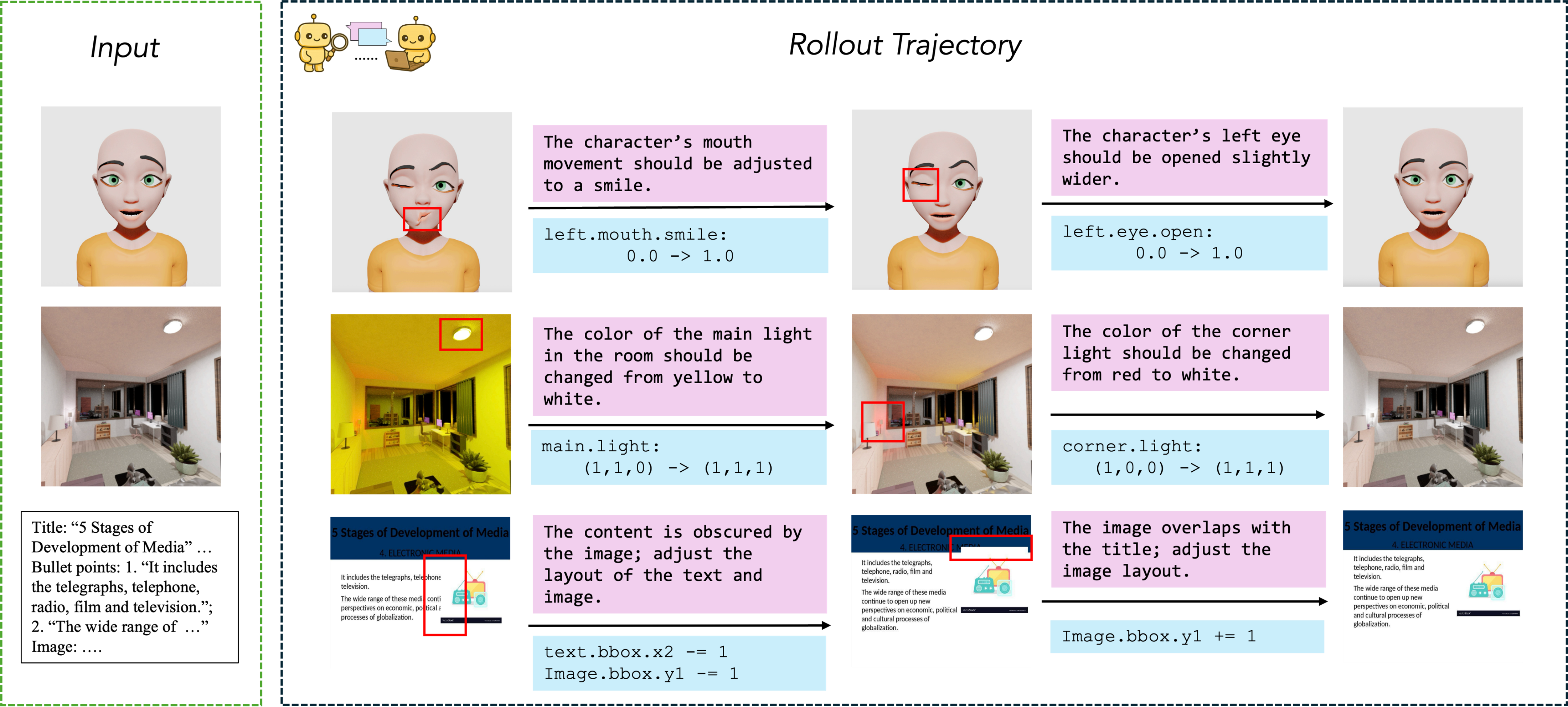
VIGA is an analysis-by-synthesis code agent for programmatic visual reconstruction. It approaches vision-as-inverse-graphics through an iterative loop of generating, rendering, and verifying scenes against target images.
A single self-reflective agent alternates between two roles:
Generator — Writes and executes scene programs using tools for planning, code execution, asset retrieval, and scene queries.
Verifier — Examines rendered output from multiple viewpoints, identifies visual discrepancies, and provides feedback for the next iteration.
The agent maintains an evolving contextual memory with plans, code diffs, and render history. This write-run-compare-revise loop is self-correcting and requires no finetuning.
| Mode | Description | Output |
|---|---|---|
| BlenderBench | Multi-step 3D graphics editing (Level 1-3) | Blender Python |
| BlenderGym | Single-step 3D graphics editing | Blender Python |
| SlideBench | 2D slide/document layout synthesis | PowerPoint |
| Custom Static Scene | Single-view 3D reconstruction | Blender scene |
| Custom Dynamic Scene | 4D dynamic scene with physics | Blender animation |
You need Conda installed. For 3D modes, an NVIDIA GPU with CUDA support is recommended.
git clone https://github.com/Fugtemypt123/VIGA-release.git && cd VIGA-release
git submodule update --init --recursive
# download sam module
wget -P utils/third_party/sam https://dl.fbaipublicfiles.com/segment_anything/sam_vit_h_4b8939.pth
VIGA requires separate environments for the agent and tools.
conda create -n agent python=3.10 -y && conda activate agent
pip install -r requirements/requirement_agent.txt

conda create -n blender python=3.11 -y && conda activate blender
pip install -r requirements/requirement_blender.txt
cd utils/third_party/infinigen
INFINIGEN_MINIMAL_INSTALL=True bash scripts/install/interactive_blender.sh # You can ignore the errors as long as you can see `utils/third_party/infinigen/blender`

conda create -n sam python=3.10 -y && conda activate sam
pip install -r requirements/requirement_sam.txt

conda create -n sam3d python=3.11 -y && conda activate sam3d
./requirements/install_sam3d.sh
See Requirements for additional options.
cp utils/_api_keys.py.example utils/_api_keys.py
Edit utils/_api_keys.py and add your OPENAI_API_KEY and MESHY_API_KEY.
cp utils/_path.py.example utils/_path.py
Edit utils/_path.py to set your conda installation path. By default, it points to ~/anaconda3/envs. Update the CONDA_BASE variable or set the VIGA_CONDA_BASE environment variable to match your conda environments location.
conda activate agent
python runners/dynamic_scene.py --task=artist --model=gpt-5 --generator-tools=tools/blender/exec.py,tools/generator_base.py,tools/initialize_plan.py,tools/sam3d/init.py --prompt-setting=init
Custom data: place in data/dynamic_scene/<your-data-name> following the format in data/dynamic_scene/artist.
| Doc | Description |
|---|---|
| Architecture | System design and agent tools |
| Requirements | Conda environment setup |
| Runners | Batch execution options |
You can find a paper writeup of the framework on arXiv.
If you find this project useful for your research, please consider citing:
@misc{yin2026visionasinversegraphicsagentinterleavedmultimodal,
      title={Vision-as-Inverse-Graphics Agent via Interleaved Multimodal Reasoning},
      author={Shaofeng Yin and Jiaxin Ge and Zora Zhiruo Wang and Xiuyu Li and Michael J. Black and Trevor Darrell and Angjoo Kanazawa and Haiwen Feng},
      year={2026},
      eprint={2601.11109},
      archivePrefix={arXiv},
      primaryClass={cs.CV},
      url={https://arxiv.org/abs/2601.11109},
}
3,378 followers · starred Jan 2026
1,949 followers · starred Jan 2026
381 followers · starred Jan 2026
467 followers · starred Jan 2026
About • Supported Domains • Quickstart • Documentation • Citation
VIGA is an analysis-by-synthesis code agent for programmatic visual reconstruction. It approaches vision-as-inverse-graphics through an iterative loop of generating, rendering, and verifying scenes against target images.
A single self-reflective agent alternates between two roles:
Generator — Writes and executes scene programs using tools for planning, code execution, asset retrieval, and scene queries.
Verifier — Examines rendered output from multiple viewpoints, identifies visual discrepancies, and provides feedback for the next iteration.
The agent maintains an evolving contextual memory with plans, code diffs, and render history. This write-run-compare-revise loop is self-correcting and requires no finetuning.
| Mode | Description | Output |
|---|---|---|
| BlenderBench | Multi-step 3D graphics editing (Level 1-3) | Blender Python |
| BlenderGym | Single-step 3D graphics editing | Blender Python |
| SlideBench | 2D slide/document layout synthesis | PowerPoint |
| Custom Static Scene | Single-view 3D reconstruction | Blender scene |
| Custom Dynamic Scene | 4D dynamic scene with physics | Blender animation |
You need Conda installed. For 3D modes, an NVIDIA GPU with CUDA support is recommended.
git clone https://github.com/Fugtemypt123/VIGA-release.git && cd VIGA-release
git submodule update --init --recursive
# download sam module
wget -P utils/third_party/sam https://dl.fbaipublicfiles.com/segment_anything/sam_vit_h_4b8939.pth
VIGA requires separate environments for the agent and tools.
conda create -n agent python=3.10 -y && conda activate agent
pip install -r requirements/requirement_agent.txt

conda create -n blender python=3.11 -y && conda activate blender
pip install -r requirements/requirement_blender.txt
cd utils/third_party/infinigen
INFINIGEN_MINIMAL_INSTALL=True bash scripts/install/interactive_blender.sh # You can ignore the errors as long as you can see `utils/third_party/infinigen/blender`

conda create -n sam python=3.10 -y && conda activate sam
pip install -r requirements/requirement_sam.txt

conda create -n sam3d python=3.11 -y && conda activate sam3d
./requirements/install_sam3d.sh
See Requirements for additional options.
cp utils/_api_keys.py.example utils/_api_keys.py
Edit utils/_api_keys.py and add your OPENAI_API_KEY and MESHY_API_KEY.
cp utils/_path.py.example utils/_path.py
Edit utils/_path.py to set your conda installation path. By default, it points to ~/anaconda3/envs. Update the CONDA_BASE variable or set the VIGA_CONDA_BASE environment variable to match your conda environments location.
conda activate agent
python runners/dynamic_scene.py --task=artist --model=gpt-5 --generator-tools=tools/blender/exec.py,tools/generator_base.py,tools/initialize_plan.py,tools/sam3d/init.py --prompt-setting=init
Custom data: place in data/dynamic_scene/<your-data-name> following the format in data/dynamic_scene/artist.
| Doc | Description |
|---|---|
| Architecture | System design and agent tools |
| Requirements | Conda environment setup |
| Runners | Batch execution options |
You can find a paper writeup of the framework on arXiv.
If you find this project useful for your research, please consider citing:
@misc{yin2026visionasinversegraphicsagentinterleavedmultimodal,
      title={Vision-as-Inverse-Graphics Agent via Interleaved Multimodal Reasoning},
      author={Shaofeng Yin and Jiaxin Ge and Zora Zhiruo Wang and Xiuyu Li and Michael J. Black and Trevor Darrell and Angjoo Kanazawa and Haiwen Feng},
      year={2026},
      eprint={2601.11109},
      archivePrefix={arXiv},
      primaryClass={cs.CV},
      url={https://arxiv.org/abs/2601.11109},
}
3,378 followers · starred Jan 2026
1,949 followers · starred Jan 2026
381 followers · starred Jan 2026
467 followers · starred Jan 2026