
Forget paying to learn. The best place to learn Science, Tech, Engineering and Math in depth, for free. First release.
See the codeREADME
 | 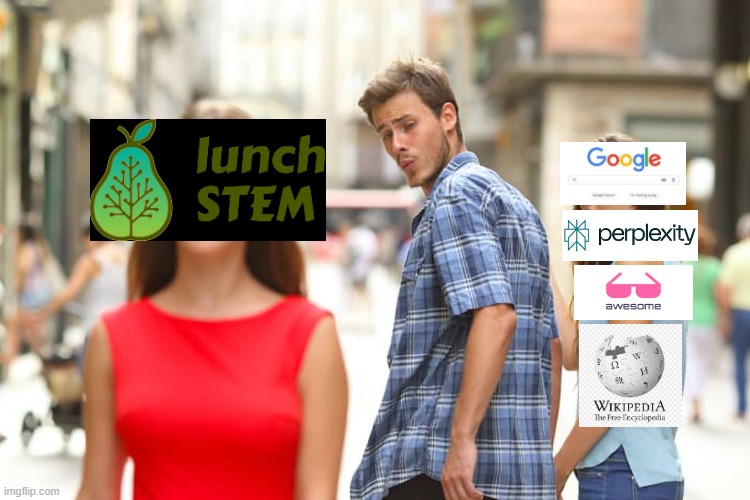 |
Forget paying to learn: just use lunchSTEM for free
🌟 Non-profit, open source project (v0.1.0) 🌟
Think of a better Wikipedia for STEM.
It's like FreeCodeCamp, but for documents (and not just for Software Engineering).







⭐ Star the Project
If you find lunchSTEM useful, please consider giving us a star on GitHub! It helps us reach more people and keeps us motivated.
Example Image
📚 Table of Contents
- 🔍 Overview
- 🎯 Who is this for?
- 📊 Project Statistics
- ⚙️ Requirements for Usage
- 🚀 How to Use
- 📁 Directory Structure and Naming Conventions
- 🔬 Coverage of STEM Fields
- 🤝 Contributions
- 🗺️ Roadmap Attempt
- 🗑️ Content Removal and Credit Attribution Requests
- 📝 Credit Attribution
- ⚖️ Disclaimer & Terms
- 💎 Sponsors
- 🙏 Acknowledgements
🔍 Overview
This is an evolving STEM (Science, Technology, Engineering and Mathematics) knowledge base, meant to be reviewed and improved with the effort of the community. It can be used and improved by humans and AI agents.
Its ideal use-case is to be used to go deep into a STEM topic (and related topics) after you have an initial understanding of it (which you can easily get via Google Search or AI Assistants).
It should be more organized and higher-quality (signal-to-noise ratio) than default Google search/AI deep research for this use-case.
The goal is to, later on, enable AI agents to easily use it as a tool by making a lunchSTEM MCP Server.
🎯 Who is this for?
- Students looking for supplementary learning materials
- Professionals wanting to deepen their STEM knowledge
- Researchers needing organized reference materials
- Educators searching for teaching resources
- Self-learners pursuing independent study
📊 Project Statistics
- Size: 60+ GB (including a lot of links)
- Number of pdf files 10k+
- Number of sub-topics 6k+
- Language of materials: English
⚙️ Requirements for Usage
Make sure you have these tools installed:
gitrclone
These can be installed by following their respective installation guide on their websites.
[!NOTE] When installing rclone, Windows users might see a security warning, it's normal.
🚀 How to Use
- Open a terminal: To open the terminal, use your operating system's search box.
- For Linux: search "terminal"
- For Windows: search "powershell" and click on "Windows Powershell"
-
Clone the repo with git (this command will create a
lunch-stemfolder in your current directory)git clone https://github.com/Freelunch-AI/lunch-stem.git
[!NOTE] If you are using Windows, it's important to clone inside a top-level directory, to avoid potential errors related to the creating file paths that are too long. Windows typically has a maximum file path of 260 characters.
[!NOTE] The
git clonecommand will copy the project in your machine with the entire folder structure already in place.
-
Enter the
lunch-stemfoldercd lunch-stem -
Setup the project
For Linux
Enable bash script execution
chmod +x scripts/setupRun setup script
source scripts/setupYou should see
Setup complete!message printed in the terminal, along with other details.For Windows:
Enable execution of scripts within the powershell session
Set-ExecutionPolicy -ExecutionPolicy Bypass -Scope ProcessRun setup script
scripts/setup.ps1You should see
Setup complete!message printed in the terminal, along with other details. -
Browse inside the
ai2ffolderai2ffolder structure:├── __Loopback ├── Computer Science and Engineering ├── Hardcore Engineering ├── Hardcore Science └── Mathematics -
Download pdf files:
-
For
.pdf.dvcfilesDownload specific pdf files with:
lunch files "<first/dvc/file/path/placeholder.pdf.dvc>" "[second/dvc/file/path/placeholder.pdf.dvc]"where you can put multiple file paths, only the first is required.
This command will get the
.pdffiles and put it in your current directory.
-
[!WARNING]
/or\as separators inside the paths?
Linuxonly accepts/
Windowsaccepts both.
[!WARNING] Is it necessary to put paths inside
""quotes?Yes, it is. Because a lot of paths have directories and/or files with blank spaces. If don't put the path inside
""quotes, the command will not work.
[!TIP] Example Usage with absolute paths: Suppose
current_path=="D:\coding-workspace\lunch-stem"lunch files "D:\coding-workspace\lunch-stem\ai2f\__Loopback\1 - OS Fundamentals_56b97b\3 - OS, Virtual Memory, OS Abstractions.pdf.dvc" "D:\coding-workspace\lunch-stem\ai2f\__Loopback\1 - OS Fundamentals_56b97b\4 - Bounded Buffers, Concurrency, Locks.pdf.dvc" "D:\coding-workspace\lunch-stem\ai2f\__Loopback\1 - OS Fundamentals_56b97b\5 - Threads, Condition Variables, Preemption.pdf.dvc"This command downloads
3 - OS, Virtual Memory, OS Abstractions.pdf,4 - Bounded Buffers, Concurrency, Locks.pdfand5 - Threads, Condition Variables, Preemption.pdfincurrent_path.
[!TIP] Example Usage with relative paths (relative to the current path in which you are running the command): Suppose
current_path=="D:\coding-workspace\lunch-stem\ai2f\__Loopback\1 - OS Fundamentals_56b97b"lunch files "3 - OS, Virtual Memory, OS Abstractions.pdf.dvc" "4 - Bounded Buffers, Concurrency, Locks.pdf.dvc" "5 - Threads, Condition Variables, Preemption.pdf.dvc"This command downloads
3 - OS, Virtual Memory, OS Abstractions.pdf,4 - Bounded Buffers, Concurrency, Locks.pdfand5 - Threads, Condition Variables, Preemption.pdfincurrent_path.
-
(continuation)
If you want to put files in the same place as their respectivepdf.dvcfile then use:lunch files "<first/dvc/file/path/placeholder.pdf.dvc>" "[second/dvc/file/path/placeholder.pdf.dvc]" --in-place- Note 1: first file path argument is required, the rest are optional.
- Note 2: the file path used in this command shouldn't have
.source.jsonat the end of it. it should end with.pdf.dvc. - Note 3: other types of files (e.g.
.txt) should be opened directly, without using the lunch CLI. - Note 4: if
.web.txtis present, then you shouldn't try this command, just copy and paste the link inside.web.txtin your browser. We will implement alunch getlater on to get files from the web. - Note 5: the
.pdffile shouldn't be visible before you run this command. - Note 6: you can get the file paths via the graphical user interface of your Operating System, each operating system has an easy way.
Download all the files from a specific folder via:
lunch folder "<folder/path/placeholder>"If you want to put the new pdf files in the same place as ther corresponding
pdf.dvcfiles then use:lunch folder "<folder/path/placeholder>" --in-placeIf you want to download all the files from all subdirectories (recursively) then use:
lunch folder "<folder/path/placeholder>" --recursiveIf you want to put files in the same place as the
pdf.dvcfile and for all subdirectories then use:lunch folder "<folder/path/placeholder>" --in-place --recursiveFor debugging, use the
--verboseflag. -
For
pdf.web.txtfiles:Simply open the file and follow the web link inside it.
-
For
.sym.txtfiles:Simply open the file and navigate to the file or folder path written inside it. This file or folder will be inside the
__Loopback.
[!WARNING] ⚠️ Important
Documents in lunchSTEM are created by external authors, not by us. We don't support inclusion of non-distributable documents without author permission (for non-distributable documents: check
author_permissions.jsonl).Each document credits its author(s) in a corresponding
<file_name>.<file_extension>.source.jsonfile.Authors may request content removal at any time. After following our streamlined protocol for Content Removal Requests, we remove content within 24 hours. This option is faster and more friendly than a Digital Millennium Copyright Act (DMCA) notification (which can shutdown the project).
[!NOTE] 🟩 Coming Soon
• Browser App with author homepages, keyword/semantic search, discussion forums on top of documents, content previews, interactive content visualizations, content starring/tagging/favouriting, making notes on top of documents, trending/popular documents, statistics for documents and authors, and more.
• MCP Server: useful for AI Agents doing complex engineering work or scientific research.
• Proper CLI where users can do keyword and semantic search.
📁 Directory Structure and Naming Conventions
-
__Loopbackdirectory contains files that had a path that was too long. A pointer.sym.txtfile was created in place of these files pointing to the actual file located inside the__Loopbackdirectory. These pointer txt files follow this naming convention:file_name.file_extension.sym.txtand are located in the same directory where the actual file should be. -
to_add.txtfile at root contains links to materials to be included later in lunchSTEM. -
Files or folders starting with MEGA indicate aggregator materials (materials that aggregate a bunch of links regarding a specific topic).
-
Files or folders starting with Awesome indicate super high quality content.
🔬 Coverage of STEM Fields
Strongest Fields
lunchSTEM is at the moment more complete in the fields of Computer Science & Engineering and AI specifically.
Weakest Fields
The fields of Hardcore Science (Physics, Chemistry, Biology, Economics) are notably more superficial in terms of the depth of their tree of topics.
🤝 Contributions
If you want to contribute to the project, check out our CONTRIBUTING.md.
[!WARNING] The GCP service account file is purposely public in this repo, it only has read rights to the Google Drive folder containing the pdfs.
We know it's not good practice to make them publicly available, but it was the way to be able to leverage our existing Google Drive subscription (without having to make globally scalable backend).
We will soon move to a public S3 bucket, and then, this little "hack" will be removed.
🗺️ Roadmap Attempt
Note: Steps with the same [letter] can be done in parallel.
Phase A: Fundamental Problems
-
[b][a] Create branch naminging convention and branch rules.
-
[a] Solve urgent copyright and credit attribution issues related to actual files being stored
- Make CI script that builds a list of
.source.jsonpaths that don't have author info - these should be priority.
- Make CI script that builds a list of
-
[a] Replace actual files (and homepage/entrypoint links) with links to get the files directly from their original host (use a browser-using AI agent to help with this). The goal is for most files to be
file_name.file_extension.web.txtwith the link inside of it (i.e., file hosted externally). Users can still contribute with actual files if they are the authors of these files (like arXiv does) because under the hood we will still be using DVC for actual files. -
[a] Implement proper symlinks that work across Operating Systems. No more manually looking the path inside the
.sym.txtfile and manually going to that directory. Also implementing easy weblinks, to avoid manual copy/paste of paths inside.web.txtto the browser.
Phase B: Important Additions
-
[b][a] Create a proper (not in bash, with docstrings, modular, with tests, compiled) lunchSTEM CLI package/installable where you can also:
- Get files or directories from the web.
- Hide/Show certain file types (e.g., hide: .dvc, .source.json, .prerequisites.json, symlinks for other operating systems, etc)
- Do search: keyword search and semantic search
-
[b] Make a lunchSTEM MCP Server: first, need to create a
.mdversion of each.pdf -
[b][a] Make a browser app to ease lunchSTEM consumption by humans, where users can:
- Visualize and navigate the repo as a graph
- Use keyword, filter-based and semantic search
- See preview of documents without having to open them
- Open documents directly in the browser
- Star a document
- Make their own tagging/favouriting on top of the materials, that will only be visible to them.
- Make highlights and notes on materials that will only be visible to them
- See author homepages that link to all materials of a specific author.
- Engage in discussions forums on top of specific documents
- See trending/popular documents and authors
- See statistics for documents and authors
-
[b] Get sponsors and grants to: (1) support our app hosting; (2) build a dedicated team of lunchSTEM maintainers; (3) pay experts for peer-review processes; and (4) to route a percentage of the money to contributing authors. All sponsorship money would be reinvested in the project, it's a non-profit project.
-
Make CI Workflows
-
[b][a] Replace actual
.pdffiles with.pdf.dvcfiles, avoiding actual knowledge files in the repo. -
[b][a] Add malicious file removal, large file removal, git repo removal, removal of files with not-accepted extensions, copyrighted material removal, etc to automatically avoid bad PRs.
-
[b][a] Add standard conventions enforcement in CI to keep the knowledge base consistent, avoiding inconsistent PRs.
-
-
Make a lunchSTEM dataset and put it on HuggingFace.
Phase C: More Core Features
- [b][c][d] Add features to lunchSTEM, potentially using AgentPool to help (in parallel: keep adding more materials from
to_add.txt, but add asfile_name.file_extension.web.txtwith the HTTPS link inside the file):- Prerequisites: Add
<file_name>.<file_extension>.prerequisites.jsoncontaining hierarchical list of prerequisites for each file - Exercises: Put exercises with solutions in every topic directory inside
__Exercises - Tools: put software tools in very topic inside
__Tools. Can be tools for doing or understanding something related to the topic. - Learning & Certification tracks: guided sequential tracks (e.g., ML Engineer track) with estimated completion time of 3 or 6 months, and with an internal or external exam/certification in the end.
- Sample Projects: Put sample projects in every topic directory inside
__Sample Projects - AI Assistant inside lunchSTEM CLI for making your doc easier to understand: can add diagrams, notebook, we write in easier to understand words, make examples, etc. A training/prompting dataset can be generated by synthetically worsening good learning materials on purpose.
- AI Tutor that uses lunchSTEM as it's knowledge base: tutor that can make custom study guides, explain blobs of text giving teaching all its requires prerequisites, make custom interactive materials, etc
- AI Peer-Reviewer that uses lunchSTEM as it's knowledge base: build an AI Agent capable of reviewing new STEM documents included in PRs (and that aren't in the list of respected sources), to avoid having to rely on human peer reviews which are slow and constly. Human Peer Reviews should then be done annually to catch AI Peer Reviewer mistakes and generate data to improve the AI Peer Reviewer on it's weak points.
- lunchSTEM University: free, online university for people that prefer strict deadlines, responsabilities and learning with others. No exams. Each year, students will build existing technologies or methods from scratch, inspired by build-your-own-x together with a monography with all the important details and share it with the community via a blog post. Students finish the university with a stellar portfolio to show. Top-down teaching approach where we help students learn topics on-demand when they need it to build something.
- Prerequisites: Add
Phase D: Nice to Have Improvements
-
[d] Migrate from Google Drive (I was already paying for 2TB, so that's why I used it) to a better storage option (e.g., S3).
-
[d] Make AgentPool: team of diverse agents that make PRs to the lunchSTEM repo after internal discussions, asking humans questions and evaluating proposed changes via STEM benchamarks. Agents are continually finetuned to ensure diversity between them (tema intelligence > individual) and to improve their intelligence based on approved new knowledge added to lunchSTEM.
🗑️ Content Removal and Credit Attribution Requests
A big effort was made to detect and remove copyrighted (non-distributable) content, and to recognize the authors/publishers/universities of the remaining materials. Manual review of each file couldn't be done because of the sheer amount of files (but we welcome the community to help us with this by, opening issues and PRs).
- We ran scripts to delete any file containing any other extension outside of:
.pdf,.txt,.md,.ipynb,.json - We ran scripts for automated detection of copyright-related keywords in documents and deletion of such documents
- We ran scripts for automated removal of academic papers.
- We manually replaced each book pdf for a link to it.
- We ran scripts for automated creation of a credit attribution file (
.source.json) for each remaining pdf, with info such as: authors, link to source, modified or not, etc. Default value of fields arenull, with the exception of the default value of thechanges_were_madefield which isFalse. Default values are used when the info can't be found in the pdf itself.
However, we cannot guarantee perfection in this process, therefore, if you find any copyrighted content or content without proper credit attribution data, please open an issue and/or make a PR and/or send an email to bruno.c.scaglione@gmail.com. We aim to resolve the problem in 24h. Refer to the CONTRIBUTING.md file for the guidelines for this.
Streamlined Protocol for Content Removal Requests (Recommended over DMCA)
- Read CONTRIBUTING.md to see issue guidelines
- Open a content removal request issue
- Send an email to bruno.c.scaglione@gmail.com with the subject "[lunchSTEM] Content Removal Request: #GITHUB_ISSUE_NUMBER_PLACEHOLDER" explaining: who you are, the path of the content(s) you need to be removed and link to the specific issue you opened.
This option is faster and more friendly than a DMCA notification. If we receive multiple DMCA notifications, the project risks being removed from Github (even after taking down the contents) and a lot of people that could benefit from it will be affected.
Digital Millennium Copyright Act (DMCA) Compliance: we comply with the Digital Millennium Copyright Act (DMCA). For formal takedown requests, please follow the DMCA process.
📝 Credit Attribution
Credit attribution data of a pdf file is stored in <file_name>.pdf.source.json which should be opened directly (without dvc pull). This file can contain authors, university, publisher, link do the source, and other metadata about the specific file it references. Default value of fields are null, with the exception of the default value of the changes_were_made field which is False.
⚖️ Disclaimer & Terms
AS-IS BASIS: This project is provided "as-is" without warranties of any kind. We make no representations about the accuracy, completeness, or legality of the content.
LIMITATION OF LIABILITY: To the maximum extent permitted by law, the project maintainers shall not be liable for any damages arising from the use of this repository.
TERMS OF SERVICE: By using this repository, you agree to respect copyright laws, use content for educational purposes only, and comply with all applicable laws in your jurisdiction.
NO LEGAL ADVICE: Nothing in this repository constitutes legal, financial, or professional advice.
Educational Purpose: This project aims to provide organized access to educational materials for non-commercial, educational purposes. We believe many uses of the content may qualify for fair use protections, but fair use determinations are made on a case-by-case basis by courts.
💎 Sponsors
Want to be a sponsor? Send an email to bruno.c.scaglione@gmail.com with the subject "[lunchSTEM] Sponsorship"
Freelunch

🙏 Acknowledgements
To all the authors that made their content publicly available.
To our early testers.
To our contributors, maintainers and sponsors that keep the project alive and evolving.
Contributors

62 commits
Similar repos


Languages
Jupyter Notebook
100.0%
Forget paying to learn. The best place to learn Science, Tech, Engineering and Math in depth, for free. First release.
See the codeREADME
| |
Forget paying to learn: just use lunchSTEM for free
🌟 Non-profit, open source project (v0.1.0) 🌟
Think of a better Wikipedia for STEM.
It's like FreeCodeCamp, but for documents (and not just for Software Engineering).
⭐ Star the Project
If you find lunchSTEM useful, please consider giving us a star on GitHub! It helps us reach more people and keeps us motivated.
Example Image
📚 Table of Contents
- 🔍 Overview
- 🎯 Who is this for?
- 📊 Project Statistics
- ⚙️ Requirements for Usage
- 🚀 How to Use
- 📁 Directory Structure and Naming Conventions
- 🔬 Coverage of STEM Fields
- 🤝 Contributions
- 🗺️ Roadmap Attempt
- 🗑️ Content Removal and Credit Attribution Requests
- 📝 Credit Attribution
- ⚖️ Disclaimer & Terms
- 💎 Sponsors
- 🙏 Acknowledgements
🔍 Overview
This is an evolving STEM (Science, Technology, Engineering and Mathematics) knowledge base, meant to be reviewed and improved with the effort of the community. It can be used and improved by humans and AI agents.
Its ideal use-case is to be used to go deep into a STEM topic (and related topics) after you have an initial understanding of it (which you can easily get via Google Search or AI Assistants).
It should be more organized and higher-quality (signal-to-noise ratio) than default Google search/AI deep research for this use-case.
The goal is to, later on, enable AI agents to easily use it as a tool by making a lunchSTEM MCP Server.
🎯 Who is this for?
- Students looking for supplementary learning materials
- Professionals wanting to deepen their STEM knowledge
- Researchers needing organized reference materials
- Educators searching for teaching resources
- Self-learners pursuing independent study
📊 Project Statistics
- Size: 60+ GB (including a lot of links)
- Number of pdf files 10k+
- Number of sub-topics 6k+
- Language of materials: English
⚙️ Requirements for Usage
Make sure you have these tools installed:
gitrclone
These can be installed by following their respective installation guide on their websites.
[!NOTE] When installing rclone, Windows users might see a security warning, it's normal.
🚀 How to Use
- Open a terminal: To open the terminal, use your operating system's search box.
- For Linux: search "terminal"
- For Windows: search "powershell" and click on "Windows Powershell"
-
Clone the repo with git (this command will create a
lunch-stemfolder in your current directory)git clone https://github.com/Freelunch-AI/lunch-stem.git
[!NOTE] If you are using Windows, it's important to clone inside a top-level directory, to avoid potential errors related to the creating file paths that are too long. Windows typically has a maximum file path of 260 characters.
[!NOTE] The
git clonecommand will copy the project in your machine with the entire folder structure already in place.
-
Enter the
lunch-stemfoldercd lunch-stem -
Setup the project
For Linux
Enable bash script execution
chmod +x scripts/setupRun setup script
source scripts/setupYou should see
Setup complete!message printed in the terminal, along with other details.For Windows:
Enable execution of scripts within the powershell session
Set-ExecutionPolicy -ExecutionPolicy Bypass -Scope ProcessRun setup script
scripts/setup.ps1You should see
Setup complete!message printed in the terminal, along with other details. -
Browse inside the
ai2ffolderai2ffolder structure:├── __Loopback ├── Computer Science and Engineering ├── Hardcore Engineering ├── Hardcore Science └── Mathematics -
Download pdf files:
-
For
.pdf.dvcfilesDownload specific pdf files with:
lunch files "<first/dvc/file/path/placeholder.pdf.dvc>" "[second/dvc/file/path/placeholder.pdf.dvc]"where you can put multiple file paths, only the first is required.
This command will get the
.pdffiles and put it in your current directory.
-
[!WARNING]
/or\as separators inside the paths?
Linuxonly accepts/
Windowsaccepts both.
[!WARNING] Is it necessary to put paths inside
""quotes?Yes, it is. Because a lot of paths have directories and/or files with blank spaces. If don't put the path inside
""quotes, the command will not work.
[!TIP] Example Usage with absolute paths: Suppose
current_path=="D:\coding-workspace\lunch-stem"lunch files "D:\coding-workspace\lunch-stem\ai2f\__Loopback\1 - OS Fundamentals_56b97b\3 - OS, Virtual Memory, OS Abstractions.pdf.dvc" "D:\coding-workspace\lunch-stem\ai2f\__Loopback\1 - OS Fundamentals_56b97b\4 - Bounded Buffers, Concurrency, Locks.pdf.dvc" "D:\coding-workspace\lunch-stem\ai2f\__Loopback\1 - OS Fundamentals_56b97b\5 - Threads, Condition Variables, Preemption.pdf.dvc"This command downloads
3 - OS, Virtual Memory, OS Abstractions.pdf,4 - Bounded Buffers, Concurrency, Locks.pdfand5 - Threads, Condition Variables, Preemption.pdfincurrent_path.
[!TIP] Example Usage with relative paths (relative to the current path in which you are running the command): Suppose
current_path=="D:\coding-workspace\lunch-stem\ai2f\__Loopback\1 - OS Fundamentals_56b97b"lunch files "3 - OS, Virtual Memory, OS Abstractions.pdf.dvc" "4 - Bounded Buffers, Concurrency, Locks.pdf.dvc" "5 - Threads, Condition Variables, Preemption.pdf.dvc"This command downloads
3 - OS, Virtual Memory, OS Abstractions.pdf,4 - Bounded Buffers, Concurrency, Locks.pdfand5 - Threads, Condition Variables, Preemption.pdfincurrent_path.
-
(continuation)
If you want to put files in the same place as their respectivepdf.dvcfile then use:lunch files "<first/dvc/file/path/placeholder.pdf.dvc>" "[second/dvc/file/path/placeholder.pdf.dvc]" --in-place- Note 1: first file path argument is required, the rest are optional.
- Note 2: the file path used in this command shouldn't have
.source.jsonat the end of it. it should end with.pdf.dvc. - Note 3: other types of files (e.g.
.txt) should be opened directly, without using the lunch CLI. - Note 4: if
.web.txtis present, then you shouldn't try this command, just copy and paste the link inside.web.txtin your browser. We will implement alunch getlater on to get files from the web. - Note 5: the
.pdffile shouldn't be visible before you run this command. - Note 6: you can get the file paths via the graphical user interface of your Operating System, each operating system has an easy way.
Download all the files from a specific folder via:
lunch folder "<folder/path/placeholder>"If you want to put the new pdf files in the same place as ther corresponding
pdf.dvcfiles then use:lunch folder "<folder/path/placeholder>" --in-placeIf you want to download all the files from all subdirectories (recursively) then use:
lunch folder "<folder/path/placeholder>" --recursiveIf you want to put files in the same place as the
pdf.dvcfile and for all subdirectories then use:lunch folder "<folder/path/placeholder>" --in-place --recursiveFor debugging, use the
--verboseflag. -
For
pdf.web.txtfiles:Simply open the file and follow the web link inside it.
-
For
.sym.txtfiles:Simply open the file and navigate to the file or folder path written inside it. This file or folder will be inside the
__Loopback.
[!WARNING] ⚠️ Important
Documents in lunchSTEM are created by external authors, not by us. We don't support inclusion of non-distributable documents without author permission (for non-distributable documents: check
author_permissions.jsonl).Each document credits its author(s) in a corresponding
<file_name>.<file_extension>.source.jsonfile.Authors may request content removal at any time. After following our streamlined protocol for Content Removal Requests, we remove content within 24 hours. This option is faster and more friendly than a Digital Millennium Copyright Act (DMCA) notification (which can shutdown the project).
[!NOTE] 🟩 Coming Soon
• Browser App with author homepages, keyword/semantic search, discussion forums on top of documents, content previews, interactive content visualizations, content starring/tagging/favouriting, making notes on top of documents, trending/popular documents, statistics for documents and authors, and more.
• MCP Server: useful for AI Agents doing complex engineering work or scientific research.
• Proper CLI where users can do keyword and semantic search.
📁 Directory Structure and Naming Conventions
-
__Loopbackdirectory contains files that had a path that was too long. A pointer.sym.txtfile was created in place of these files pointing to the actual file located inside the__Loopbackdirectory. These pointer txt files follow this naming convention:file_name.file_extension.sym.txtand are located in the same directory where the actual file should be. -
to_add.txtfile at root contains links to materials to be included later in lunchSTEM. -
Files or folders starting with MEGA indicate aggregator materials (materials that aggregate a bunch of links regarding a specific topic).
-
Files or folders starting with Awesome indicate super high quality content.
🔬 Coverage of STEM Fields
Strongest Fields
lunchSTEM is at the moment more complete in the fields of Computer Science & Engineering and AI specifically.
Weakest Fields
The fields of Hardcore Science (Physics, Chemistry, Biology, Economics) are notably more superficial in terms of the depth of their tree of topics.
🤝 Contributions
If you want to contribute to the project, check out our CONTRIBUTING.md.
[!WARNING] The GCP service account file is purposely public in this repo, it only has read rights to the Google Drive folder containing the pdfs.
We know it's not good practice to make them publicly available, but it was the way to be able to leverage our existing Google Drive subscription (without having to make globally scalable backend).
We will soon move to a public S3 bucket, and then, this little "hack" will be removed.
🗺️ Roadmap Attempt
Note: Steps with the same [letter] can be done in parallel.
Phase A: Fundamental Problems
-
[b][a] Create branch naminging convention and branch rules.
-
[a] Solve urgent copyright and credit attribution issues related to actual files being stored
- Make CI script that builds a list of
.source.jsonpaths that don't have author info - these should be priority.
- Make CI script that builds a list of
-
[a] Replace actual files (and homepage/entrypoint links) with links to get the files directly from their original host (use a browser-using AI agent to help with this). The goal is for most files to be
file_name.file_extension.web.txtwith the link inside of it (i.e., file hosted externally). Users can still contribute with actual files if they are the authors of these files (like arXiv does) because under the hood we will still be using DVC for actual files. -
[a] Implement proper symlinks that work across Operating Systems. No more manually looking the path inside the
.sym.txtfile and manually going to that directory. Also implementing easy weblinks, to avoid manual copy/paste of paths inside.web.txtto the browser.
Phase B: Important Additions
-
[b][a] Create a proper (not in bash, with docstrings, modular, with tests, compiled) lunchSTEM CLI package/installable where you can also:
- Get files or directories from the web.
- Hide/Show certain file types (e.g., hide: .dvc, .source.json, .prerequisites.json, symlinks for other operating systems, etc)
- Do search: keyword search and semantic search
-
[b] Make a lunchSTEM MCP Server: first, need to create a
.mdversion of each.pdf -
[b][a] Make a browser app to ease lunchSTEM consumption by humans, where users can:
- Visualize and navigate the repo as a graph
- Use keyword, filter-based and semantic search
- See preview of documents without having to open them
- Open documents directly in the browser
- Star a document
- Make their own tagging/favouriting on top of the materials, that will only be visible to them.
- Make highlights and notes on materials that will only be visible to them
- See author homepages that link to all materials of a specific author.
- Engage in discussions forums on top of specific documents
- See trending/popular documents and authors
- See statistics for documents and authors
-
[b] Get sponsors and grants to: (1) support our app hosting; (2) build a dedicated team of lunchSTEM maintainers; (3) pay experts for peer-review processes; and (4) to route a percentage of the money to contributing authors. All sponsorship money would be reinvested in the project, it's a non-profit project.
-
Make CI Workflows
-
[b][a] Replace actual
.pdffiles with.pdf.dvcfiles, avoiding actual knowledge files in the repo. -
[b][a] Add malicious file removal, large file removal, git repo removal, removal of files with not-accepted extensions, copyrighted material removal, etc to automatically avoid bad PRs.
-
[b][a] Add standard conventions enforcement in CI to keep the knowledge base consistent, avoiding inconsistent PRs.
-
-
Make a lunchSTEM dataset and put it on HuggingFace.
Phase C: More Core Features
- [b][c][d] Add features to lunchSTEM, potentially using AgentPool to help (in parallel: keep adding more materials from
to_add.txt, but add asfile_name.file_extension.web.txtwith the HTTPS link inside the file):- Prerequisites: Add
<file_name>.<file_extension>.prerequisites.jsoncontaining hierarchical list of prerequisites for each file - Exercises: Put exercises with solutions in every topic directory inside
__Exercises - Tools: put software tools in very topic inside
__Tools. Can be tools for doing or understanding something related to the topic. - Learning & Certification tracks: guided sequential tracks (e.g., ML Engineer track) with estimated completion time of 3 or 6 months, and with an internal or external exam/certification in the end.
- Sample Projects: Put sample projects in every topic directory inside
__Sample Projects - AI Assistant inside lunchSTEM CLI for making your doc easier to understand: can add diagrams, notebook, we write in easier to understand words, make examples, etc. A training/prompting dataset can be generated by synthetically worsening good learning materials on purpose.
- AI Tutor that uses lunchSTEM as it's knowledge base: tutor that can make custom study guides, explain blobs of text giving teaching all its requires prerequisites, make custom interactive materials, etc
- AI Peer-Reviewer that uses lunchSTEM as it's knowledge base: build an AI Agent capable of reviewing new STEM documents included in PRs (and that aren't in the list of respected sources), to avoid having to rely on human peer reviews which are slow and constly. Human Peer Reviews should then be done annually to catch AI Peer Reviewer mistakes and generate data to improve the AI Peer Reviewer on it's weak points.
- lunchSTEM University: free, online university for people that prefer strict deadlines, responsabilities and learning with others. No exams. Each year, students will build existing technologies or methods from scratch, inspired by build-your-own-x together with a monography with all the important details and share it with the community via a blog post. Students finish the university with a stellar portfolio to show. Top-down teaching approach where we help students learn topics on-demand when they need it to build something.
- Prerequisites: Add
Phase D: Nice to Have Improvements
-
[d] Migrate from Google Drive (I was already paying for 2TB, so that's why I used it) to a better storage option (e.g., S3).
-
[d] Make AgentPool: team of diverse agents that make PRs to the lunchSTEM repo after internal discussions, asking humans questions and evaluating proposed changes via STEM benchamarks. Agents are continually finetuned to ensure diversity between them (tema intelligence > individual) and to improve their intelligence based on approved new knowledge added to lunchSTEM.
🗑️ Content Removal and Credit Attribution Requests
A big effort was made to detect and remove copyrighted (non-distributable) content, and to recognize the authors/publishers/universities of the remaining materials. Manual review of each file couldn't be done because of the sheer amount of files (but we welcome the community to help us with this by, opening issues and PRs).
- We ran scripts to delete any file containing any other extension outside of:
.pdf,.txt,.md,.ipynb,.json - We ran scripts for automated detection of copyright-related keywords in documents and deletion of such documents
- We ran scripts for automated removal of academic papers.
- We manually replaced each book pdf for a link to it.
- We ran scripts for automated creation of a credit attribution file (
.source.json) for each remaining pdf, with info such as: authors, link to source, modified or not, etc. Default value of fields arenull, with the exception of the default value of thechanges_were_madefield which isFalse. Default values are used when the info can't be found in the pdf itself.
However, we cannot guarantee perfection in this process, therefore, if you find any copyrighted content or content without proper credit attribution data, please open an issue and/or make a PR and/or send an email to bruno.c.scaglione@gmail.com. We aim to resolve the problem in 24h. Refer to the CONTRIBUTING.md file for the guidelines for this.
Streamlined Protocol for Content Removal Requests (Recommended over DMCA)
- Read CONTRIBUTING.md to see issue guidelines
- Open a content removal request issue
- Send an email to bruno.c.scaglione@gmail.com with the subject "[lunchSTEM] Content Removal Request: #GITHUB_ISSUE_NUMBER_PLACEHOLDER" explaining: who you are, the path of the content(s) you need to be removed and link to the specific issue you opened.
This option is faster and more friendly than a DMCA notification. If we receive multiple DMCA notifications, the project risks being removed from Github (even after taking down the contents) and a lot of people that could benefit from it will be affected.
Digital Millennium Copyright Act (DMCA) Compliance: we comply with the Digital Millennium Copyright Act (DMCA). For formal takedown requests, please follow the DMCA process.
📝 Credit Attribution
Credit attribution data of a pdf file is stored in <file_name>.pdf.source.json which should be opened directly (without dvc pull). This file can contain authors, university, publisher, link do the source, and other metadata about the specific file it references. Default value of fields are null, with the exception of the default value of the changes_were_made field which is False.
⚖️ Disclaimer & Terms
AS-IS BASIS: This project is provided "as-is" without warranties of any kind. We make no representations about the accuracy, completeness, or legality of the content.
LIMITATION OF LIABILITY: To the maximum extent permitted by law, the project maintainers shall not be liable for any damages arising from the use of this repository.
TERMS OF SERVICE: By using this repository, you agree to respect copyright laws, use content for educational purposes only, and comply with all applicable laws in your jurisdiction.
NO LEGAL ADVICE: Nothing in this repository constitutes legal, financial, or professional advice.
Educational Purpose: This project aims to provide organized access to educational materials for non-commercial, educational purposes. We believe many uses of the content may qualify for fair use protections, but fair use determinations are made on a case-by-case basis by courts.
💎 Sponsors
Want to be a sponsor? Send an email to bruno.c.scaglione@gmail.com with the subject "[lunchSTEM] Sponsorship"
Freelunch
🙏 Acknowledgements
To all the authors that made their content publicly available.
To our early testers.
To our contributors, maintainers and sponsors that keep the project alive and evolving.
Similar repos
Contributors
62 commits
Languages
Jupyter Notebook
100.0%