

This kernel module permit to recognize the chipset Nuvoton NCT6687-R in lm-sensors package. This sensor is present on some B550 motherboard such as MSI or ASUS.
The implementation is minimalist and was done by reverse coding of Windows 10 source code from LibreHardwareMonitor
~$ git clone https://github.com/Fred78290/nct6687d
~$ cd nct6687d
~$ make deb
~$ dpkg -i ../nct6687d-dkms_*.deb
~$ git clone https://github.com/Fred78290/nct6687d
~$ cd nct6687d
~$ make akmod
apt-get install build-essential linux-headers-$(uname -r) dkms dh-dkmsyum install make automake gcc gcc-c++ kernel-devel kernel-headers dkmspacman -S make automake linux-firmware linux-headers dkms base-develzypper in git make gcc dkms
~$ git clone https://github.com/Fred78290/nct6687d
~$ cd nct6687d
~$ make dkms/install
~$ git clone (this-repo)
~$ cd nct6687d
~$ sudo make install
To remove a manual installation:
~$ sudo make uninstall
By running the command sensors, you got this output
nct6687-isa-0a20
Adapter: ISA adapter
+12V:           12.17 V
+5V:             5.14 V
+3.3V:           3.38 V
CPU Soc:         1.11 V
CPU Vcore:       1.05 V
CPU 1P8:         1.84 V
CPU VDDP:        0.00 V
DRAM:            1.34 V
Chipset:       890.00 mV
CPU Fan:       1192 RPM
Pump Fan:      1538 RPM
System Fan #1:  922 RPM
System Fan #2:  953 RPM
System Fan #3: 1393 RPM
System Fan #4:    0 RPM
System Fan #5: 1007 RPM
System Fan #6:    0 RPM
CPU:            +59.0°C
System:         +34.0°C
VRM MOS:        +31.0°C
PCH:            +40.0°C
CPU Socket:     +33.0°C
PCIe x1:        +32.0°C
M2_1:            +0.0°C
To make it loaded after system boots
Just add nct6687 into /etc/modules
sudo sh -c 'echo "nct6687" >> /etc/modules'
sudo sh -c 'echo "nct6687" >> /etc/modules-load.d/nct6687.conf'
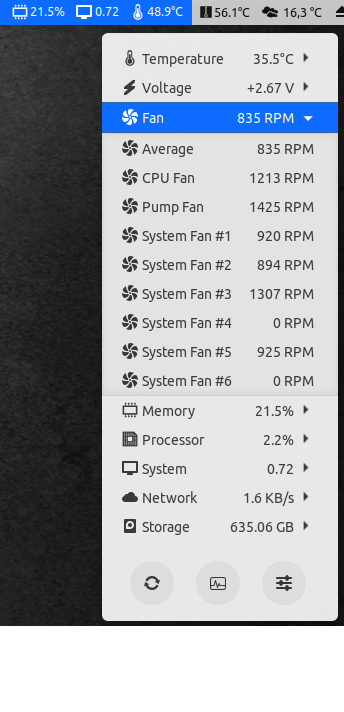
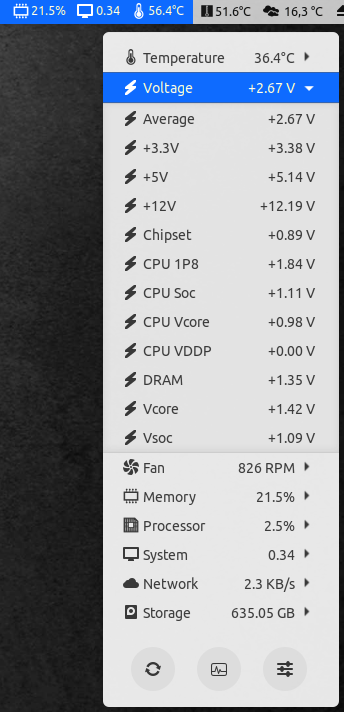
This module was tested on Ubuntu 20.04 with all kernel available on motherboard MAG-B550-TOMAHAWK running an AMD 3900X/AMD 5900X, and on RL8(RHEL8) MAG-B550M-MORTAR running an AMD 5700G
Some people report that voltage are wrong. The reason is with some motherboard, voltage sensors are not connected on the same nct6687 register.
As example the VCore sensor is connected on the 5th register for AMD but is connected on the 3rd register for INTEL.
Also the DIMM sensor is connected on the 4th register for AMD but connected to 5th register for INTEL.
To allow customize voltage configuration you must add manual=1 parameter passed to the module at load
sudo sh -c 'echo "nct6687 manual=1" >> /etc/modules'
And use a sensors conf like this /etc/sensors.d/B460M-7C83.conf
# Micro-Star International Co., Ltd.
# MAG B460M BAZOOKA (MS-7C83)

chip "nct6687-*"
    label in0         "+12V"
    label in1         "+5V"
    label in2         "VCore"
    label in3         "Voltage #1"
    label in4         "DIMM"
    label in5         "CPU I/O"
    label in6         "CPU SA"
    label in7         "Voltage #2"
    label in8         "+3.3V"
    label in9         "VTT"
    label in10        "VRef"
    label in11        "VSB"
    label in12        "AVSB"
    label in13        "VBat"

    ignore in3
    ignore in7
    ignore in9
    ignore in10
    ignore in13

    ignore temp6
    ignore temp7

    compute in0       (@ * 12), (@ / 12)
    compute in1       (@ * 5), (@ / 5)
    compute in4       (@ * 2), (@ / 2)
force (bool) (default: false) Set to enable support for unknown vendors.
manual (bool) (default: false)
Set voltage input and voltage label configured with external sensors file.
You can use custom labels and ignore inputs without setting this option if
you can figure out their names (see which *_label contains builtin label).
fan_config (default, msi_alt1) (default: default) Changes fan configuration
for RPM & PWM registers for motherboards with alternative chip configurations.
Motherboards which need this will show CPU/Pump RPMs but no data on System fans.
msi_alt1 is automatically enabled for supported MSI motherboards. Manual configuration is only needed for unsupported boards.
msi_fan_brute_force (bool) (default: false) [BETA]
For MSI motherboards with msi_alt1 configuration: When enabled, writes PWM values to all 7 fan
curve control points. This may help with fan control on some MSI boards where standard PWM writes
don't take effect immediately. Only affects system fans controlled by the BIOS. Not the CPU fan or pump fan.
Before entering manual control, the driver saves all 7 original curve points. The saved curve is
restored when userspace writes automatic mode to pwmN_enable, when the driver is unloaded, or
when the optional fan-control watchdog expires.
This implementation is based on register mappings from LibreHardwareMonitor.
Usage: modprobe nct6687 msi_fan_brute_force=1
With this option enabled, the hwmon device exposes fan_control_watchdog. Writing a timeout from
1 to 300 seconds arms or refreshes a manual-control lease. If the lease expires, every channel
changed since the last automatic-mode request is restored to its original curve and control mode.
Writing 0 disarms the watchdog. A controlling daemon should refresh the lease independently of
PWM value changes and disarm it only after returning all channels to automatic control. The lease
is paused while the system is suspended and resumes with its remaining time after the device is
active again.
Note: This option requires blacklisting the nct6683 module to prevent it from loading instead of nct6687. See the Issues section for detailed instructions.
fan_mask (uint) (default: all channels, 0xff)
Bitmask of the fan/pwm channels to expose. Bit 0 controls fan1/pwm1, bit 1
controls fan2/pwm2, and so on up to bit 7 for fan8/pwm8. Both the
tachometer and PWM attributes of a channel are covered by the same bit, since
fanN_input and pwmN are the same physical header.
Useful on boards with fewer than 8 headers, where the unused channels report a constant 0 RPM.
temp_mask (uint) (default: all channels, 0x7f)
Bitmask of the temperature channels to expose. Bit 0 controls temp1, up to
bit 6 for temp7. Useful for hiding channels the board does not populate.
Both masks accept decimal or 0x hex. Masked channels are not read from the EC
at all, and channel numbering is never renumbered to fill gaps: masking off
bit 1 leaves fan1 and fan3–fan8 with no fan2, so existing sensors.d
and fancontrol configuration keeps referring to the same hardware.
Examples:
# fan1-fan6 and pwm1-pwm6 only, fan7/fan8/pwm7/pwm8 hidden
# temp1-temp4 only, temp5/temp6/temp7 hidden
    options nct6687 fan_mask=0x3f temp_mask=0x0f
| Board | DMI |
|---|---|
| PRO B840-P WIFI | MS-7E57 |
| B840M GAMING PLUS WIFI6E | MS-7E77 |
| B850 GAMING PLUS WIFI | MS-7E56 |
| B850 GAMING PLUS WIFI6E | MS-7E80 |
| B850M GAMING PLUS WIFI6E | MS-7E81 |
| PRO B850-P WIFI | MS-7E56 |
| PRO B850M-A WIFI | MS-7E66 |
| PRO B850M-P WIFI | MS-7E71 |
| MAG B850M MORTAR WIFI | MS-7E61 |
| MAG B850 TOMAHAWK MAX WIFI | MS-7E62 |
| MPG B850 EDGE TI WIFI | MS-7E62 |
| MPG B850I EDGE TI WIFI | MS-7E79 |
| B850MPOWER | MS-7E83 |
| PRO B850-S WIFI6E | MS-7E80 |
| X870 GAMING PLUS WIFI | MS-7E47 |
| X870E GAMING PLUS WIFI | MS-7E70 |
| MAG X870 TOMAHAWK WIFI | MS-7E51 |
| PRO X870-P WIFI | MS-7E47 |
| PRO X870E-P WIFI | MS-7E70 |
| MAG X870E TOMAHAWK WIFI | MS-7E59 |
| MAG X870E TOMAHAWK MAX WIFI PZ | MS-7E84 |
| MPG X870E CARBON WIFI | MS-7E49 |
| MPG X870E EDGE TI WIFI | MS-7E59 |
| MEG X870E GODLIKE | MS-7E48 |
| MEG Z890 ACE | MS-7E22 |
| MEG Z890M ACE | MS-7E23 |
| MPG Z890 CARBON WIFI | MS-7E17 |
| MPG Z890M CARBON WIFI | MS-7E18 |
| MPG Z890 EDGE TI WIFI | MS-7E19 |
| MPG Z890I EDGE TI WIFI | MS-7E33 |
| Z890 GAMING PLUS WIFI | MS-7E34 |
| MAG Z890 TOMAHAWK WIFI | MS-7E32 |
| PRO Z890-A WIFI | MS-7E32 |
| PRO Z890-P WIFI | MS-7E34 |
| PRO Z890-S WIFI | MS-7E54 |
In order to be able to use this interface you need to know the path as which
it's published. The path isn't fixed and depends on the order in which chips are
registered by the kernel. One way to find it is by device class (hwmon) via a
simple command like this:
for d in /sys/class/hwmon/*; do echo "$d: $(cat "$d/name")"; done | grep nct6687
Possible output:
/sys/class/hwmon/hwmon5: nct6687
This means that your base path for examples below is /sys/class/hwmon/hwmon5
(note that adding/removing hardware can change the path, drop grep from the
command above to see all sensors and their relative ordering).
Another way to look it up is by a device (class path actually just points to device path) like in:
cd /sys/devices/platform/nct6687.*/hwmon/hwmon*
The first asterisk will be expanded to an address (2592 which is 0xa20 that
you can see in sensors output) and the second one to a number like 5 from
above.
pwm[1-8]Gets/sets PWM duty cycle or DC value that defines fan speed. Which unit is used depends on what was configured by firmware.
Accepted values: 0-255 (slowest to full speed).
Writing to this file changes fan control to manual mode.
Example:
# slow down a fan as much as possible (will stop it if the fan supports zero RPM mode)
echo 0 > pwm6
# fix a fan at around half its speed (actual behaviour depends on the fan)
echo 128 > pwm6
# full speed
echo 255 > pwm6
pwm[1-8]_enableGets/sets the fan control mode.
Accepted values:
1 - manual speed management through pwm[1-8]2 - automatic control using the profile configured by firmwareThe legacy value 99 is still accepted when written for compatibility, but
reading pwm[1-8]_enable always reports the standard hwmon value 1 or 2.
Example:
# fix a fan at current speed (`echo pwm6` will be constant from now on)
echo 1 > pwm6_enable
# switch back to automatic control set up by firmware (`echo pwm6` is again dynamic after this)
echo 2 > pwm6_enable
# switch to ~25% of max speed
echo 64 > pwm6
# automatic
echo 2 > pwm6_enable
# back to ~25% (it seems to be remembered)
echo 1 > pwm6_enable
1. Fan speed control
dmesg / journalctl shows
kernel: nct6687: EC base I/O port unconfigured
systemd-modules-load[339]: Failed to insert module 'nct6687': No such device
softdep nct6687 pre: i2c_i801 to e.g. /etc/modprobe.d/sensors.conf.msi_fan_brute_force parameter failsSymptom: No RPM value is displayed for some fans in the sensor data; or the following behavior is observed: the fan stops at 60%
Solution steps:
echo "blacklist nct6683" | sudo tee /etc/modprobe.d/nct6683_blacklist.conf
echo "options nct6687 msi_fan_brute_force=1" | sudo tee /etc/modprobe.d/nct6687_msi.conf
nct6687 module is loaded at boot:
echo "nct6687" | sudo tee /etc/modules-load.d/nct6687.conf
After installation:
Check /etc/conf.d/lm-sensors.conf (or your distro's equivalent) that HWMON_MODULES not includes nct6683 (e.g., HWMON_MODULES="coretemp nct6683 ...") to ensure the correct driver is loaded at boot.
On MSI motherboards, msi_alt1 configuration is automatically detected and enabled.
You can verify this in dmesg after loading the module:
nct6687 nct6687.2592: Detected MSI board; using alternative fan configuration (msi_alt1)
nct6687 nct6687.2592: active fan config=msi_alt1, SYS_FAN reg_rpm=0x015E/0x015C/0x015A
The second line is always printed and shows the EC offsets the driver reads for SYS_FAN #1/#2/#3. Use it to confirm the right mapping is active.
If you have a non-MSI motherboard with this issue, try using module parameter fan_config=msi_alt1 manually.
Warning — do NOT force
fan_config=msi_alt1on non-listed MSI boards. Only the NCT6687DR-equipped MSI families (B840/B850/X870/X870E/Z890) are compatible withmsi_alt1. Earlier MSI series with the plain NCT6687D chip — including B650/B660/X670/Z690/Z790 — use the default register mapping and are auto-detected correctly without any module parameter.If you previously set
options nct6687 fan_config=msi_alt1in/etc/modprobe.d/on one of those boards as a troubleshooting attempt, remove it: forcingmsi_alt1makes the driver read EC offsets0x154-0x15Ewhich are zero on non-DR variants, causing all SYS_FAN to report0 RPMwhile CPU_FAN keeps working. Theactive fan config=...dmesg line above will reveal a stale forced setting at a glance.Reference: issue #167 (MSI MPG B650 CARBON WIFI, MS-7D74).
249 followers · starred Jul 2026
779 followers · starred May 2025
147 followers · starred Apr 2025
13 followers · starred Aug 2025
This kernel module permit to recognize the chipset Nuvoton NCT6687-R in lm-sensors package. This sensor is present on some B550 motherboard such as MSI or ASUS.
The implementation is minimalist and was done by reverse coding of Windows 10 source code from LibreHardwareMonitor
~$ git clone https://github.com/Fred78290/nct6687d
~$ cd nct6687d
~$ make deb
~$ dpkg -i ../nct6687d-dkms_*.deb
~$ git clone https://github.com/Fred78290/nct6687d
~$ cd nct6687d
~$ make akmod
apt-get install build-essential linux-headers-$(uname -r) dkms dh-dkmsyum install make automake gcc gcc-c++ kernel-devel kernel-headers dkmspacman -S make automake linux-firmware linux-headers dkms base-develzypper in git make gcc dkms
~$ git clone https://github.com/Fred78290/nct6687d
~$ cd nct6687d
~$ make dkms/install
~$ git clone (this-repo)
~$ cd nct6687d
~$ sudo make install
To remove a manual installation:
~$ sudo make uninstall
By running the command sensors, you got this output
nct6687-isa-0a20
Adapter: ISA adapter
+12V:           12.17 V
+5V:             5.14 V
+3.3V:           3.38 V
CPU Soc:         1.11 V
CPU Vcore:       1.05 V
CPU 1P8:         1.84 V
CPU VDDP:        0.00 V
DRAM:            1.34 V
Chipset:       890.00 mV
CPU Fan:       1192 RPM
Pump Fan:      1538 RPM
System Fan #1:  922 RPM
System Fan #2:  953 RPM
System Fan #3: 1393 RPM
System Fan #4:    0 RPM
System Fan #5: 1007 RPM
System Fan #6:    0 RPM
CPU:            +59.0°C
System:         +34.0°C
VRM MOS:        +31.0°C
PCH:            +40.0°C
CPU Socket:     +33.0°C
PCIe x1:        +32.0°C
M2_1:            +0.0°C
To make it loaded after system boots
Just add nct6687 into /etc/modules
sudo sh -c 'echo "nct6687" >> /etc/modules'
sudo sh -c 'echo "nct6687" >> /etc/modules-load.d/nct6687.conf'
This module was tested on Ubuntu 20.04 with all kernel available on motherboard MAG-B550-TOMAHAWK running an AMD 3900X/AMD 5900X, and on RL8(RHEL8) MAG-B550M-MORTAR running an AMD 5700G
Some people report that voltage are wrong. The reason is with some motherboard, voltage sensors are not connected on the same nct6687 register.
As example the VCore sensor is connected on the 5th register for AMD but is connected on the 3rd register for INTEL.
Also the DIMM sensor is connected on the 4th register for AMD but connected to 5th register for INTEL.
To allow customize voltage configuration you must add manual=1 parameter passed to the module at load
sudo sh -c 'echo "nct6687 manual=1" >> /etc/modules'
And use a sensors conf like this /etc/sensors.d/B460M-7C83.conf
# Micro-Star International Co., Ltd.
# MAG B460M BAZOOKA (MS-7C83)

chip "nct6687-*"
    label in0         "+12V"
    label in1         "+5V"
    label in2         "VCore"
    label in3         "Voltage #1"
    label in4         "DIMM"
    label in5         "CPU I/O"
    label in6         "CPU SA"
    label in7         "Voltage #2"
    label in8         "+3.3V"
    label in9         "VTT"
    label in10        "VRef"
    label in11        "VSB"
    label in12        "AVSB"
    label in13        "VBat"

    ignore in3
    ignore in7
    ignore in9
    ignore in10
    ignore in13

    ignore temp6
    ignore temp7

    compute in0       (@ * 12), (@ / 12)
    compute in1       (@ * 5), (@ / 5)
    compute in4       (@ * 2), (@ / 2)
force (bool) (default: false) Set to enable support for unknown vendors.
manual (bool) (default: false)
Set voltage input and voltage label configured with external sensors file.
You can use custom labels and ignore inputs without setting this option if
you can figure out their names (see which *_label contains builtin label).
fan_config (default, msi_alt1) (default: default) Changes fan configuration
for RPM & PWM registers for motherboards with alternative chip configurations.
Motherboards which need this will show CPU/Pump RPMs but no data on System fans.
msi_alt1 is automatically enabled for supported MSI motherboards. Manual configuration is only needed for unsupported boards.
msi_fan_brute_force (bool) (default: false) [BETA]
For MSI motherboards with msi_alt1 configuration: When enabled, writes PWM values to all 7 fan
curve control points. This may help with fan control on some MSI boards where standard PWM writes
don't take effect immediately. Only affects system fans controlled by the BIOS. Not the CPU fan or pump fan.
Before entering manual control, the driver saves all 7 original curve points. The saved curve is
restored when userspace writes automatic mode to pwmN_enable, when the driver is unloaded, or
when the optional fan-control watchdog expires.
This implementation is based on register mappings from LibreHardwareMonitor.
Usage: modprobe nct6687 msi_fan_brute_force=1
With this option enabled, the hwmon device exposes fan_control_watchdog. Writing a timeout from
1 to 300 seconds arms or refreshes a manual-control lease. If the lease expires, every channel
changed since the last automatic-mode request is restored to its original curve and control mode.
Writing 0 disarms the watchdog. A controlling daemon should refresh the lease independently of
PWM value changes and disarm it only after returning all channels to automatic control. The lease
is paused while the system is suspended and resumes with its remaining time after the device is
active again.
Note: This option requires blacklisting the nct6683 module to prevent it from loading instead of nct6687. See the Issues section for detailed instructions.
fan_mask (uint) (default: all channels, 0xff)
Bitmask of the fan/pwm channels to expose. Bit 0 controls fan1/pwm1, bit 1
controls fan2/pwm2, and so on up to bit 7 for fan8/pwm8. Both the
tachometer and PWM attributes of a channel are covered by the same bit, since
fanN_input and pwmN are the same physical header.
Useful on boards with fewer than 8 headers, where the unused channels report a constant 0 RPM.
temp_mask (uint) (default: all channels, 0x7f)
Bitmask of the temperature channels to expose. Bit 0 controls temp1, up to
bit 6 for temp7. Useful for hiding channels the board does not populate.
Both masks accept decimal or 0x hex. Masked channels are not read from the EC
at all, and channel numbering is never renumbered to fill gaps: masking off
bit 1 leaves fan1 and fan3–fan8 with no fan2, so existing sensors.d
and fancontrol configuration keeps referring to the same hardware.
Examples:
# fan1-fan6 and pwm1-pwm6 only, fan7/fan8/pwm7/pwm8 hidden
# temp1-temp4 only, temp5/temp6/temp7 hidden
    options nct6687 fan_mask=0x3f temp_mask=0x0f
| Board | DMI |
|---|---|
| PRO B840-P WIFI | MS-7E57 |
| B840M GAMING PLUS WIFI6E | MS-7E77 |
| B850 GAMING PLUS WIFI | MS-7E56 |
| B850 GAMING PLUS WIFI6E | MS-7E80 |
| B850M GAMING PLUS WIFI6E | MS-7E81 |
| PRO B850-P WIFI | MS-7E56 |
| PRO B850M-A WIFI | MS-7E66 |
| PRO B850M-P WIFI | MS-7E71 |
| MAG B850M MORTAR WIFI | MS-7E61 |
| MAG B850 TOMAHAWK MAX WIFI | MS-7E62 |
| MPG B850 EDGE TI WIFI | MS-7E62 |
| MPG B850I EDGE TI WIFI | MS-7E79 |
| B850MPOWER | MS-7E83 |
| PRO B850-S WIFI6E | MS-7E80 |
| X870 GAMING PLUS WIFI | MS-7E47 |
| X870E GAMING PLUS WIFI | MS-7E70 |
| MAG X870 TOMAHAWK WIFI | MS-7E51 |
| PRO X870-P WIFI | MS-7E47 |
| PRO X870E-P WIFI | MS-7E70 |
| MAG X870E TOMAHAWK WIFI | MS-7E59 |
| MAG X870E TOMAHAWK MAX WIFI PZ | MS-7E84 |
| MPG X870E CARBON WIFI | MS-7E49 |
| MPG X870E EDGE TI WIFI | MS-7E59 |
| MEG X870E GODLIKE | MS-7E48 |
| MEG Z890 ACE | MS-7E22 |
| MEG Z890M ACE | MS-7E23 |
| MPG Z890 CARBON WIFI | MS-7E17 |
| MPG Z890M CARBON WIFI | MS-7E18 |
| MPG Z890 EDGE TI WIFI | MS-7E19 |
| MPG Z890I EDGE TI WIFI | MS-7E33 |
| Z890 GAMING PLUS WIFI | MS-7E34 |
| MAG Z890 TOMAHAWK WIFI | MS-7E32 |
| PRO Z890-A WIFI | MS-7E32 |
| PRO Z890-P WIFI | MS-7E34 |
| PRO Z890-S WIFI | MS-7E54 |
In order to be able to use this interface you need to know the path as which
it's published. The path isn't fixed and depends on the order in which chips are
registered by the kernel. One way to find it is by device class (hwmon) via a
simple command like this:
for d in /sys/class/hwmon/*; do echo "$d: $(cat "$d/name")"; done | grep nct6687
Possible output:
/sys/class/hwmon/hwmon5: nct6687
This means that your base path for examples below is /sys/class/hwmon/hwmon5
(note that adding/removing hardware can change the path, drop grep from the
command above to see all sensors and their relative ordering).
Another way to look it up is by a device (class path actually just points to device path) like in:
cd /sys/devices/platform/nct6687.*/hwmon/hwmon*
The first asterisk will be expanded to an address (2592 which is 0xa20 that
you can see in sensors output) and the second one to a number like 5 from
above.
pwm[1-8]Gets/sets PWM duty cycle or DC value that defines fan speed. Which unit is used depends on what was configured by firmware.
Accepted values: 0-255 (slowest to full speed).
Writing to this file changes fan control to manual mode.
Example:
# slow down a fan as much as possible (will stop it if the fan supports zero RPM mode)
echo 0 > pwm6
# fix a fan at around half its speed (actual behaviour depends on the fan)
echo 128 > pwm6
# full speed
echo 255 > pwm6
pwm[1-8]_enableGets/sets the fan control mode.
Accepted values:
1 - manual speed management through pwm[1-8]2 - automatic control using the profile configured by firmwareThe legacy value 99 is still accepted when written for compatibility, but
reading pwm[1-8]_enable always reports the standard hwmon value 1 or 2.
Example:
# fix a fan at current speed (`echo pwm6` will be constant from now on)
echo 1 > pwm6_enable
# switch back to automatic control set up by firmware (`echo pwm6` is again dynamic after this)
echo 2 > pwm6_enable
# switch to ~25% of max speed
echo 64 > pwm6
# automatic
echo 2 > pwm6_enable
# back to ~25% (it seems to be remembered)
echo 1 > pwm6_enable
1. Fan speed control
dmesg / journalctl shows
kernel: nct6687: EC base I/O port unconfigured
systemd-modules-load[339]: Failed to insert module 'nct6687': No such device
softdep nct6687 pre: i2c_i801 to e.g. /etc/modprobe.d/sensors.conf.msi_fan_brute_force parameter failsSymptom: No RPM value is displayed for some fans in the sensor data; or the following behavior is observed: the fan stops at 60%
Solution steps:
echo "blacklist nct6683" | sudo tee /etc/modprobe.d/nct6683_blacklist.conf
echo "options nct6687 msi_fan_brute_force=1" | sudo tee /etc/modprobe.d/nct6687_msi.conf
nct6687 module is loaded at boot:
echo "nct6687" | sudo tee /etc/modules-load.d/nct6687.conf
After installation:
Check /etc/conf.d/lm-sensors.conf (or your distro's equivalent) that HWMON_MODULES not includes nct6683 (e.g., HWMON_MODULES="coretemp nct6683 ...") to ensure the correct driver is loaded at boot.
On MSI motherboards, msi_alt1 configuration is automatically detected and enabled.
You can verify this in dmesg after loading the module:
nct6687 nct6687.2592: Detected MSI board; using alternative fan configuration (msi_alt1)
nct6687 nct6687.2592: active fan config=msi_alt1, SYS_FAN reg_rpm=0x015E/0x015C/0x015A
The second line is always printed and shows the EC offsets the driver reads for SYS_FAN #1/#2/#3. Use it to confirm the right mapping is active.
If you have a non-MSI motherboard with this issue, try using module parameter fan_config=msi_alt1 manually.
Warning — do NOT force
fan_config=msi_alt1on non-listed MSI boards. Only the NCT6687DR-equipped MSI families (B840/B850/X870/X870E/Z890) are compatible withmsi_alt1. Earlier MSI series with the plain NCT6687D chip — including B650/B660/X670/Z690/Z790 — use the default register mapping and are auto-detected correctly without any module parameter.If you previously set
options nct6687 fan_config=msi_alt1in/etc/modprobe.d/on one of those boards as a troubleshooting attempt, remove it: forcingmsi_alt1makes the driver read EC offsets0x154-0x15Ewhich are zero on non-DR variants, causing all SYS_FAN to report0 RPMwhile CPU_FAN keeps working. Theactive fan config=...dmesg line above will reveal a stale forced setting at a glance.Reference: issue #167 (MSI MPG B650 CARBON WIFI, MS-7D74).
249 followers · starred Jul 2026
779 followers · starred May 2025
147 followers · starred Apr 2025
13 followers · starred Aug 2025



