This repository contains the code to run the LASER data selection pipeline and scripts to replicate the experiment of our EMNLP 2025 Findings paper [link].
The LASER pipeline enables you to select the best composition of instruction tuning datapoints from a large pool of source data. LASER has 3 steps: Use a light-weight classifer (Step 1) to route data to specialized scorers (Step 2) and subsequently sample in a diversity aware fashion (Step 3; see illustration below).
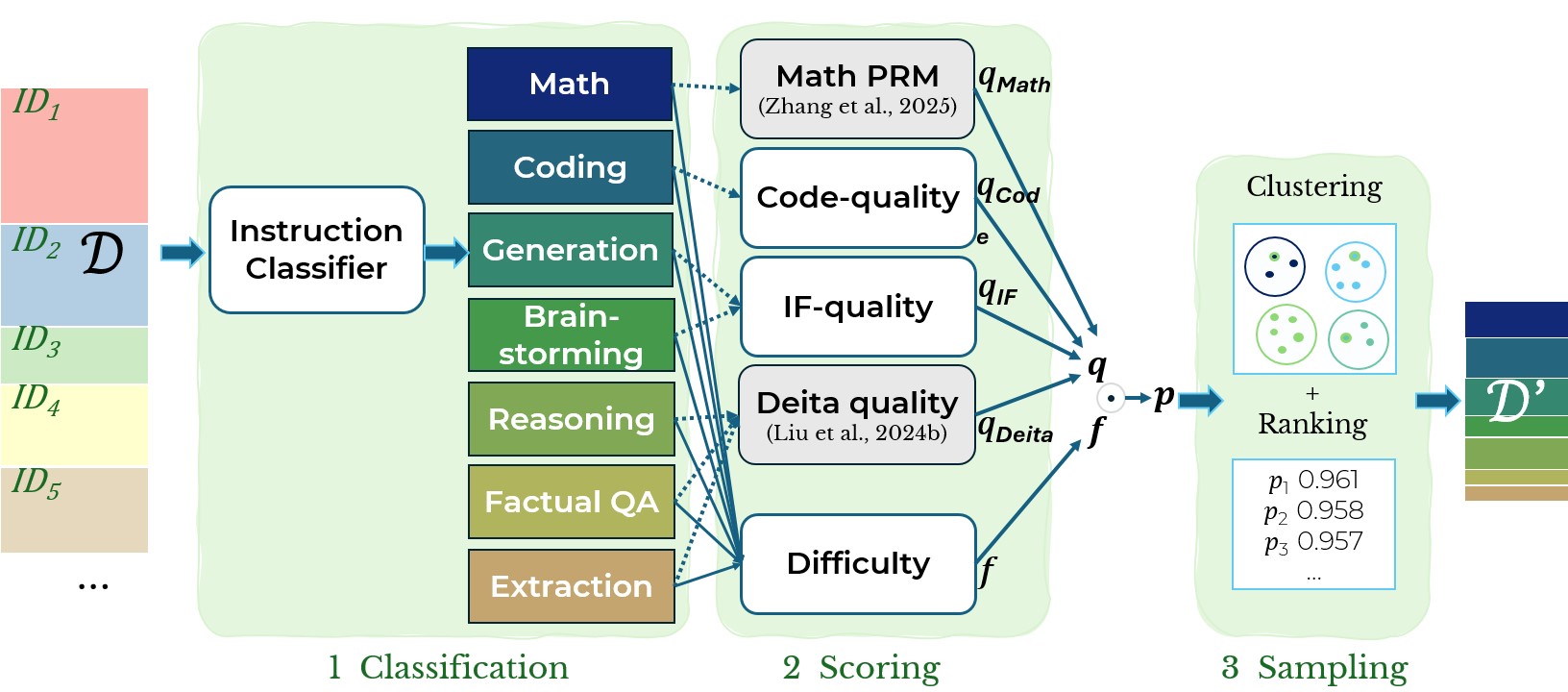
Studies show post-training (instruction tuning) datasets for LLMs can be substantially down-sampled without deteriorating performance.
However, Instruction Data (ID) selection often incurs high computational costs or is limited to narrow domains.
In this work, we demonstrate that data selection can be both—efficient and universal—by using a multi-step pipeline, LASER.
To run the LASER pipeline, you will have to install its dependencies. We recommend creating a virtual environment via
python -m venv laser-env
source laser-env/bin/activate
pip install -r requirements.txt
The data from our experiments can be downloaded to data/ and preprocessed by running the following script:
python data/download_data.py
LASER can also be used with any custom instruction tuning data. Note that data should be stored in data/ and follow either conversational json...
{
  "messages": [
    {"role": "user", "content": "<instruction>"},
    {"role": "assistant", "content": "<response>"}
  ],
  "data_id": "<unique_string>"
}
...or instruction - output format.
{
  "instruction":  "<instruction>",
  "output":       "<response>",
  "data_id":      "<unique_string>"
}
Data must be saved as a .jsonl file.
In Step 1 and 2 of the LASER pipeline, we analyse every sample for its domain as well as its quality and difficulty. You can run the analysis pipeline as shown below.
cd analysis
python -m run_analysis --analysis <type_analysis> --dataset <name_dataset>
Please check the documentation in the README.md in the analysis subdirectory for additional details.
In Step 3, we integrate the results from Step 1 and 2 to then sample in a diversity-aware way. To run the sampling pipeline, you have to specify a dataset_config and then run the sampling with it.
Store the configs .yaml-file for your sampling in dataset_mixer/dataset_configs/. To sample at random from alpaca_gpt4, flan_v2_90k and sharegpt_en, you can define:
test_random:
  scoring_strategy: random
  sample_size: 10000
  data:
    - name: alpaca_gpt4
      data_path: DATA_PATH/alpaca_gpt4.jsonl
      type: self_instruct
      multi_turn: True
      language: en

    - name: flan_v2_90k
      data_path: DATA_PATH/flan_v2_90k.jsonl
      type: self_instruct
      multi_turn: True
      language: en

    - name: sharegpt_en
      data_path: DATA_PATH/sharegpt_en.jsonl
      type: chat
      multi_turn: True
      language: en
Find more examples in the dataset_mixer/dataset_configs/ subdirectory.
Execute the following to run a single sampling run...
cd dataset_mixer/
python finetuning_data_mixer.py --config test_random.yaml
...or add multiple configs to the DATASET_CONFIGS= in scripts/sample_data.sh and run:
bash scripts/sample_data.sh
To replicate all of the experiments that we ran in the context of our EMNLP paper, please check scripts/list_of_emnlp25_experiments.sh
If you find this project is useful in your own work, please consider citing as follows:
@article{mirza2025stratified,
  title={LASER: Stratified Selective Sampling for Instruction Tuning with Dedicated Scoring Strategy},
  author={Mirza, Paramita and Weber, Lucas and K{\"u}ch, Fabian},
  journal={arXiv preprint arXiv:2505.22157},
  year={2025}
}
This repository contains the code to run the LASER data selection pipeline and scripts to replicate the experiment of our EMNLP 2025 Findings paper [link].
The LASER pipeline enables you to select the best composition of instruction tuning datapoints from a large pool of source data. LASER has 3 steps: Use a light-weight classifer (Step 1) to route data to specialized scorers (Step 2) and subsequently sample in a diversity aware fashion (Step 3; see illustration below).
Studies show post-training (instruction tuning) datasets for LLMs can be substantially down-sampled without deteriorating performance.
However, Instruction Data (ID) selection often incurs high computational costs or is limited to narrow domains.
In this work, we demonstrate that data selection can be both—efficient and universal—by using a multi-step pipeline, LASER.
To run the LASER pipeline, you will have to install its dependencies. We recommend creating a virtual environment via
python -m venv laser-env
source laser-env/bin/activate
pip install -r requirements.txt
The data from our experiments can be downloaded to data/ and preprocessed by running the following script:
python data/download_data.py
LASER can also be used with any custom instruction tuning data. Note that data should be stored in data/ and follow either conversational json...
{
  "messages": [
    {"role": "user", "content": "<instruction>"},
    {"role": "assistant", "content": "<response>"}
  ],
  "data_id": "<unique_string>"
}
...or instruction - output format.
{
  "instruction":  "<instruction>",
  "output":       "<response>",
  "data_id":      "<unique_string>"
}
Data must be saved as a .jsonl file.
In Step 1 and 2 of the LASER pipeline, we analyse every sample for its domain as well as its quality and difficulty. You can run the analysis pipeline as shown below.
cd analysis
python -m run_analysis --analysis <type_analysis> --dataset <name_dataset>
Please check the documentation in the README.md in the analysis subdirectory for additional details.
In Step 3, we integrate the results from Step 1 and 2 to then sample in a diversity-aware way. To run the sampling pipeline, you have to specify a dataset_config and then run the sampling with it.
Store the configs .yaml-file for your sampling in dataset_mixer/dataset_configs/. To sample at random from alpaca_gpt4, flan_v2_90k and sharegpt_en, you can define:
test_random:
  scoring_strategy: random
  sample_size: 10000
  data:
    - name: alpaca_gpt4
      data_path: DATA_PATH/alpaca_gpt4.jsonl
      type: self_instruct
      multi_turn: True
      language: en

    - name: flan_v2_90k
      data_path: DATA_PATH/flan_v2_90k.jsonl
      type: self_instruct
      multi_turn: True
      language: en

    - name: sharegpt_en
      data_path: DATA_PATH/sharegpt_en.jsonl
      type: chat
      multi_turn: True
      language: en
Find more examples in the dataset_mixer/dataset_configs/ subdirectory.
Execute the following to run a single sampling run...
cd dataset_mixer/
python finetuning_data_mixer.py --config test_random.yaml
...or add multiple configs to the DATASET_CONFIGS= in scripts/sample_data.sh and run:
bash scripts/sample_data.sh
To replicate all of the experiments that we ran in the context of our EMNLP paper, please check scripts/list_of_emnlp25_experiments.sh
If you find this project is useful in your own work, please consider citing as follows:
@article{mirza2025stratified,
  title={LASER: Stratified Selective Sampling for Instruction Tuning with Dedicated Scoring Strategy},
  author={Mirza, Paramita and Weber, Lucas and K{\"u}ch, Fabian},
  journal={arXiv preprint arXiv:2505.22157},
  year={2025}
}



