
A CLI tool that transforms PDFs to look like scanned documents.
Swift
102
19 commits
updated Feb 3, 2026
README
Scanify
A CLI tool that transforms PDFs to look like scanned documents.
Ever been asked to "print, sign, and scan" a document? Sometimes you just need a PDF that looks like it passed through a physical scanner — with all the subtle imperfections that implies.
Demo
https://github.com/user-attachments/assets/ef722540-1156-4bc7-a9dd-b7c5dea7c8d3
Examples
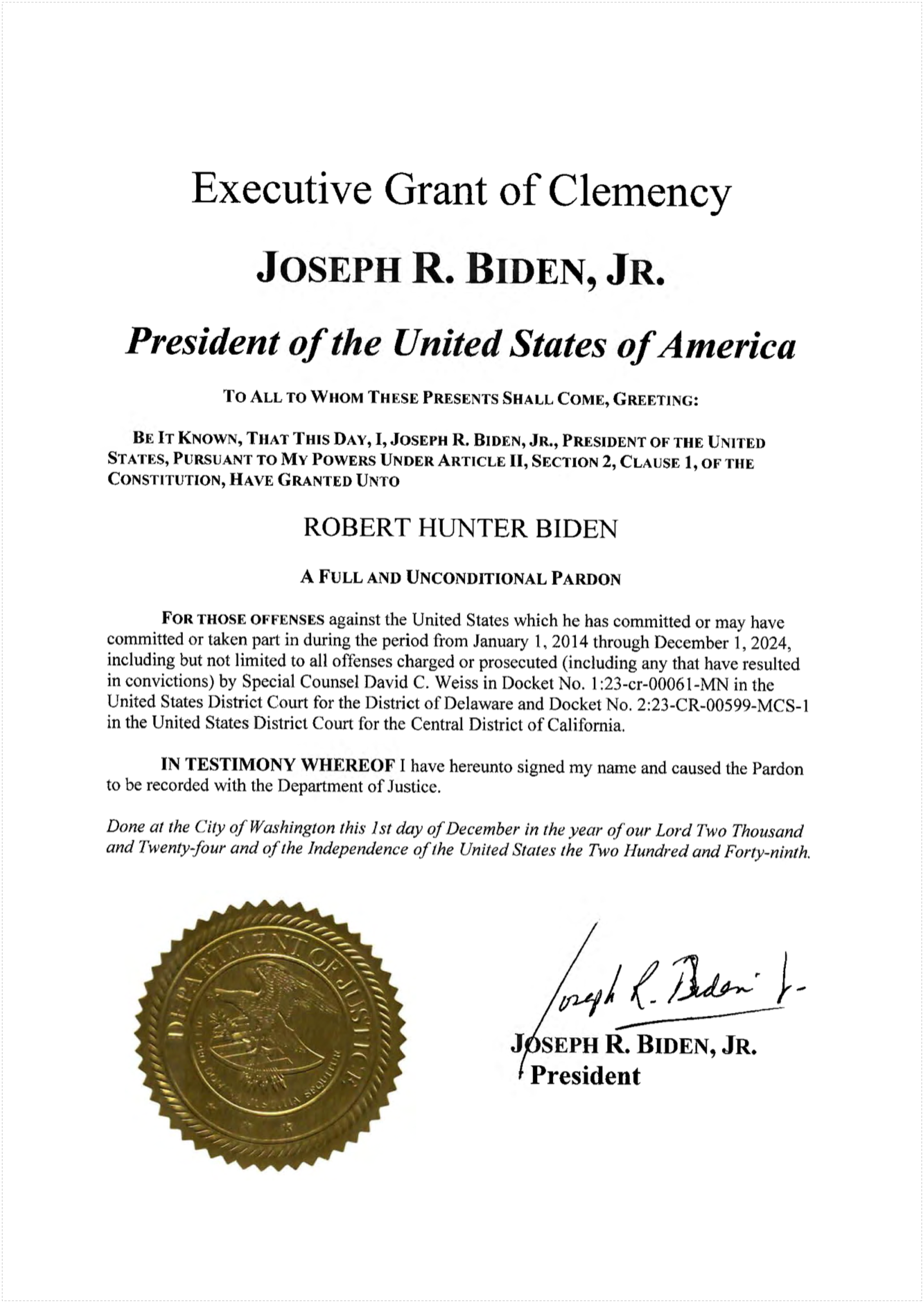
Original
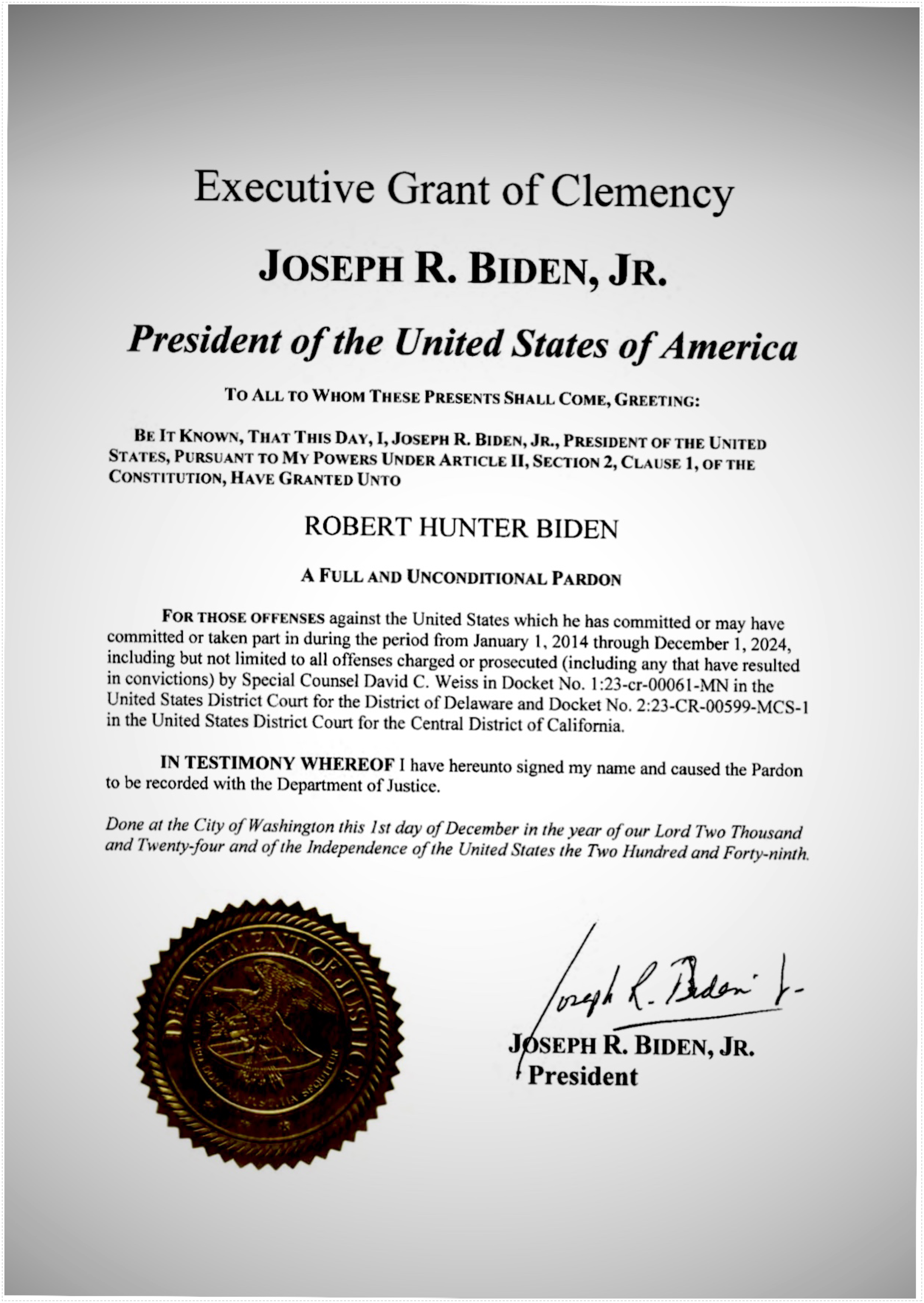
Default Scan
scanify input.pdf
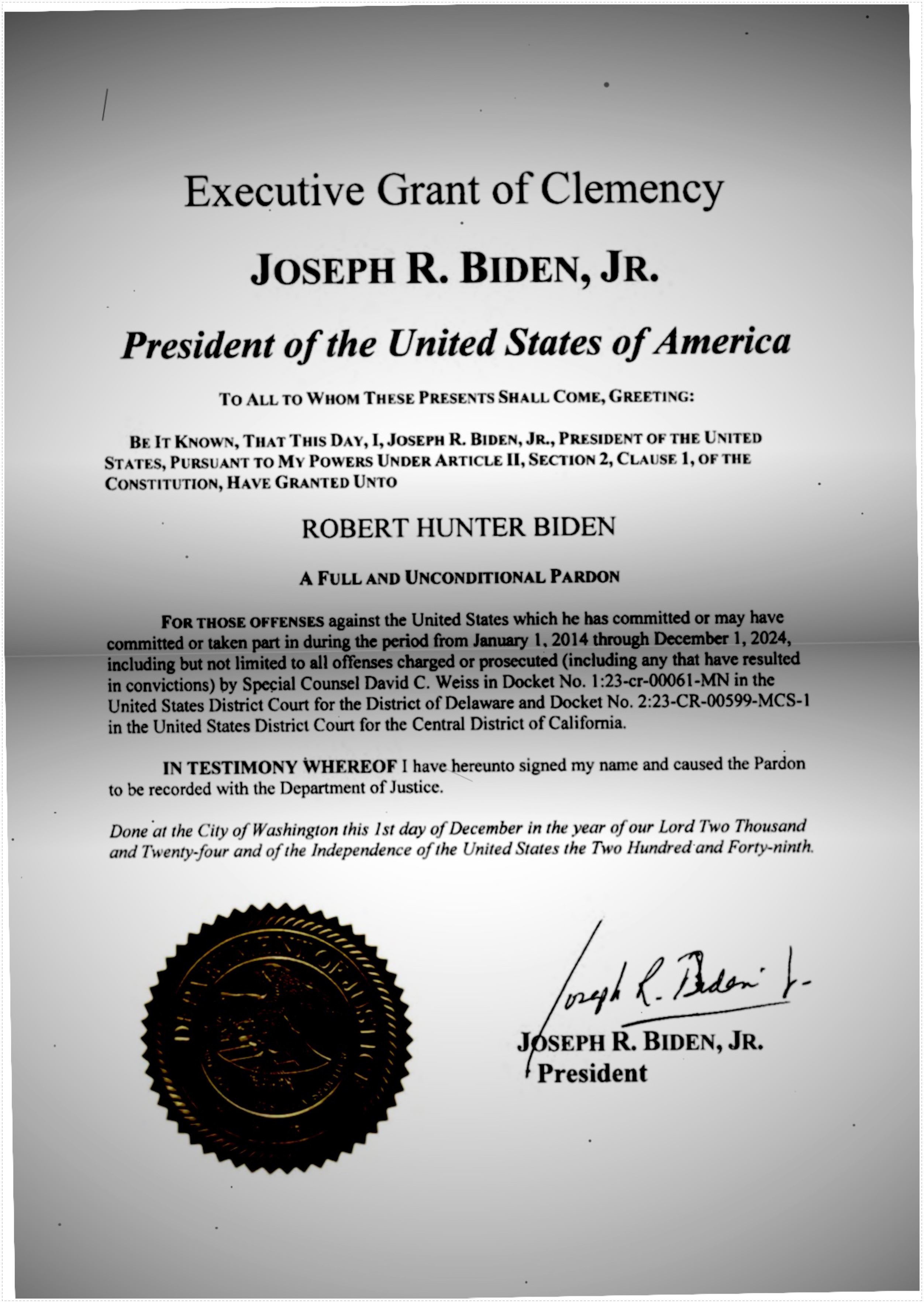
All Effects
scanify --aggressive --bent --dusty input.pdf
Installation
macOS (Homebrew)
brew tap Francium-Tech/tap
brew install scanify
macOS (From Source)
git clone https://github.com/Francium-Tech/scanify.git
cd scanify
swift build -c release
cp .build/release/scanify /usr/local/bin/
Linux (From Source)
Ubuntu/Debian:
# Install Swift (if not already installed)
# See https://swift.org/download for the latest version
wget https://download.swift.org/swift-5.9-release/ubuntu2204/swift-5.9-RELEASE/swift-5.9-RELEASE-ubuntu22.04.tar.gz
tar xzf swift-5.9-RELEASE-ubuntu22.04.tar.gz
sudo mv swift-5.9-RELEASE-ubuntu22.04 /opt/swift
echo 'export PATH=/opt/swift/usr/bin:$PATH' >> ~/.bashrc
source ~/.bashrc

# Install dependencies
sudo apt-get update
sudo apt-get install -y poppler-utils imagemagick

# Fix ImageMagick PDF policy (required)
sudo sed -i 's/rights="none" pattern="PDF"/rights="read|write" pattern="PDF"/' /etc/ImageMagick-6/policy.xml

# Build and install
git clone https://github.com/Francium-Tech/scanify.git
cd scanify
swift build -c release
sudo cp .build/release/scanify /usr/local/bin/
Fedora/RHEL:
# Install dependencies
sudo dnf install poppler-utils ImageMagick

# Fix ImageMagick PDF policy
sudo sed -i 's/rights="none" pattern="PDF"/rights="read|write" pattern="PDF"/' /etc/ImageMagick-6/policy.xml

# Then follow the build steps above
Arch Linux:
# Install dependencies
sudo pacman -S poppler imagemagick

# Then follow the build steps above
Docker
# Build the image
docker build -t scanify .

# Run
docker run --rm -v $(pwd):/data scanify /data/input.pdf /data/output.pdf
Usage
# Basic usage - creates input_scanned.pdf
scanify document.pdf

# Specify output path
scanify document.pdf scanned_output.pdf

# Aggressive mode - more noise, rotation, artifacts
scanify --aggressive document.pdf

# Bent paper effect - shadow band like curved paper
scanify --bent document.pdf

# Dusty scanner - random dust specks and particles
scanify --dusty document.pdf

# Combine options
scanify --aggressive --bent --dusty document.pdf
Options
| Option | Description |
|---|---|
--aggressive | Apply stronger scan effects (more noise, rotation, artifacts) |
--bent | Add paper bend shadow effect (like curved paper under a scanner) |
--dusty | Add random dust specks and hair particles (like a dirty scanner glass) |
--version | Show version |
--help | Show help |
Effects Applied
Base Effects (always applied)
| Effect | Description |
|---|---|
| Paper darkening | Whites become slightly gray (scanned paper is never pure white) |
| Edge shadows | Vignette effect from scanner lid |
| Top shadow | Gradient shadow at top edge |
| Uneven lighting | Slightly off-center lighting variation |
| Noise/grain | Paper texture simulation |
| Slight blur | Optical imperfection |
| Random rotation | Paper feed misalignment |
| Saturation reduction | Scanner color limitations |
Optional Effects
--aggressive
Amplifies all base effects for a more dramatic scan appearance:
- Stronger rotation (up to 1.5°)
- More noise and grain
- Heavier paper darkening
- More pronounced edge shadows
--bent
Adds a horizontal shadow band across the page to simulate paper that isn't perfectly flat on the scanner glass.
--dusty
Adds random artifacts to simulate a dirty scanner:
- 15-40 dust specks of varying sizes
- 0-3 thin hair/fiber lines
- Randomly scattered (not uniform)
Requirements
macOS
- macOS 12.0 (Monterey) or later
- No additional dependencies (uses native PDFKit and CoreImage)
Linux
- Swift 5.9+
- poppler-utils (provides
pdftoppmandpdfinfo) - ImageMagick 6 or 7 (provides
convertandidentify) - ImageMagick PDF policy must allow read/write (see installation instructions)
License
MIT License - see LICENSE


Similar repos


Languages
Swift
98.8%
Dockerfile
1.2%
A CLI tool that transforms PDFs to look like scanned documents.
Swift
102
19 commits
updated Feb 3, 2026
README
Scanify
A CLI tool that transforms PDFs to look like scanned documents.
Ever been asked to "print, sign, and scan" a document? Sometimes you just need a PDF that looks like it passed through a physical scanner — with all the subtle imperfections that implies.
Demo
https://github.com/user-attachments/assets/ef722540-1156-4bc7-a9dd-b7c5dea7c8d3
Examples
Original
Default Scan
scanify input.pdf
All Effects
scanify --aggressive --bent --dusty input.pdf
Installation
macOS (Homebrew)
brew tap Francium-Tech/tap
brew install scanify
macOS (From Source)
git clone https://github.com/Francium-Tech/scanify.git
cd scanify
swift build -c release
cp .build/release/scanify /usr/local/bin/
Linux (From Source)
Ubuntu/Debian:
# Install Swift (if not already installed)
# See https://swift.org/download for the latest version
wget https://download.swift.org/swift-5.9-release/ubuntu2204/swift-5.9-RELEASE/swift-5.9-RELEASE-ubuntu22.04.tar.gz
tar xzf swift-5.9-RELEASE-ubuntu22.04.tar.gz
sudo mv swift-5.9-RELEASE-ubuntu22.04 /opt/swift
echo 'export PATH=/opt/swift/usr/bin:$PATH' >> ~/.bashrc
source ~/.bashrc

# Install dependencies
sudo apt-get update
sudo apt-get install -y poppler-utils imagemagick

# Fix ImageMagick PDF policy (required)
sudo sed -i 's/rights="none" pattern="PDF"/rights="read|write" pattern="PDF"/' /etc/ImageMagick-6/policy.xml

# Build and install
git clone https://github.com/Francium-Tech/scanify.git
cd scanify
swift build -c release
sudo cp .build/release/scanify /usr/local/bin/
Fedora/RHEL:
# Install dependencies
sudo dnf install poppler-utils ImageMagick

# Fix ImageMagick PDF policy
sudo sed -i 's/rights="none" pattern="PDF"/rights="read|write" pattern="PDF"/' /etc/ImageMagick-6/policy.xml

# Then follow the build steps above
Arch Linux:
# Install dependencies
sudo pacman -S poppler imagemagick

# Then follow the build steps above
Docker
# Build the image
docker build -t scanify .

# Run
docker run --rm -v $(pwd):/data scanify /data/input.pdf /data/output.pdf
Usage
# Basic usage - creates input_scanned.pdf
scanify document.pdf

# Specify output path
scanify document.pdf scanned_output.pdf

# Aggressive mode - more noise, rotation, artifacts
scanify --aggressive document.pdf

# Bent paper effect - shadow band like curved paper
scanify --bent document.pdf

# Dusty scanner - random dust specks and particles
scanify --dusty document.pdf

# Combine options
scanify --aggressive --bent --dusty document.pdf
Options
| Option | Description |
|---|---|
--aggressive | Apply stronger scan effects (more noise, rotation, artifacts) |
--bent | Add paper bend shadow effect (like curved paper under a scanner) |
--dusty | Add random dust specks and hair particles (like a dirty scanner glass) |
--version | Show version |
--help | Show help |
Effects Applied
Base Effects (always applied)
| Effect | Description |
|---|---|
| Paper darkening | Whites become slightly gray (scanned paper is never pure white) |
| Edge shadows | Vignette effect from scanner lid |
| Top shadow | Gradient shadow at top edge |
| Uneven lighting | Slightly off-center lighting variation |
| Noise/grain | Paper texture simulation |
| Slight blur | Optical imperfection |
| Random rotation | Paper feed misalignment |
| Saturation reduction | Scanner color limitations |
Optional Effects
--aggressive
Amplifies all base effects for a more dramatic scan appearance:
- Stronger rotation (up to 1.5°)
- More noise and grain
- Heavier paper darkening
- More pronounced edge shadows
--bent
Adds a horizontal shadow band across the page to simulate paper that isn't perfectly flat on the scanner glass.
--dusty
Adds random artifacts to simulate a dirty scanner:
- 15-40 dust specks of varying sizes
- 0-3 thin hair/fiber lines
- Randomly scattered (not uniform)
Requirements
macOS
- macOS 12.0 (Monterey) or later
- No additional dependencies (uses native PDFKit and CoreImage)
Linux
- Swift 5.9+
- poppler-utils (provides
pdftoppmandpdfinfo) - ImageMagick 6 or 7 (provides
convertandidentify) - ImageMagick PDF policy must allow read/write (see installation instructions)
License
MIT License - see LICENSE
Similar repos
Languages
Swift
98.8%
Dockerfile
1.2%