
See what people are saying
README
FlowCompute: An Open-Source GUI for OpenFOAM
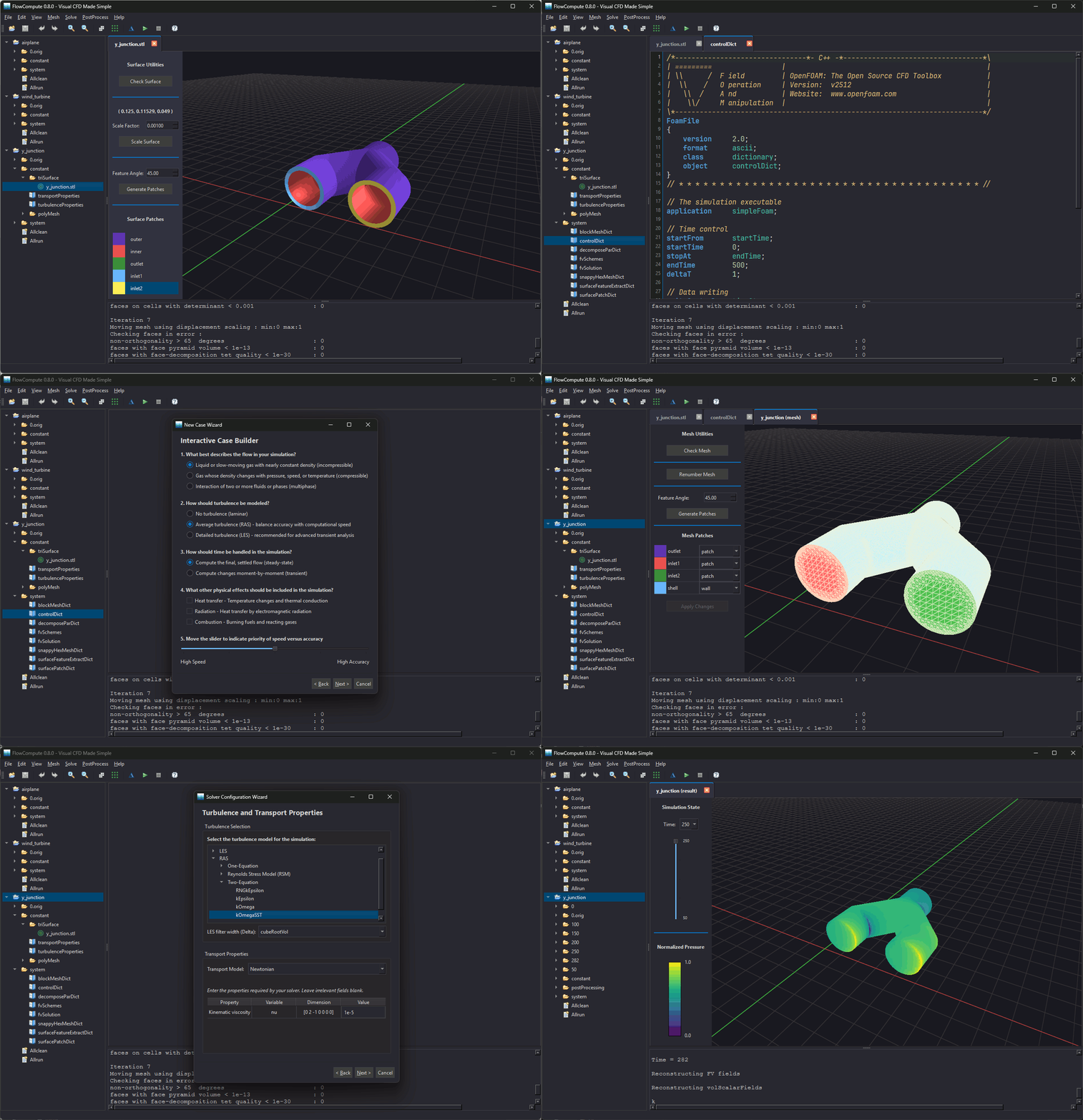
FlowCompute is an open-source, Vulkan-based graphical client for OpenFOAM fluid analysis. Available for Windows and Linux, it lets you create cases, generate meshes, configure simulations, and launch tools without the command line. FlowCompute can access OpenFOAM running natively on Linux, inside the Windows Subsystem for Linux (WSL), or on a remote SSH server. Download the latest installers here.
The following YouTube videos demonstrate FlowCompute in action:
- Linux demonstration - Runs a transient simulation with compressible flow
- Windows demonstration - Runs a steady-state simulation with incompressible flow
Released under the GNU Lesser General Public License (LGPL), FlowCompute is free to use, modify, and distribute.
The client streamlines case management by generating dictionary files based on user input. Wizards guide users through creating case folders, customizing the meshing process, and configuring the simulation. When all the dictionary files have been created, OpenFOAM utilities can be launched using buttons.
Important features:
- Multi-language support - The FlowCompute interface can display text in English, German, French, Italian, Japanese, Korean, Portuguese (Brazilian), Swedish, and Chinese (Simplified)
- High-performance rendering - display STL surfaces, OpenFOAM meshes, and computed results (scalar only)
- Utility access - launch OpenFOAM utilities using traditional dialogs and buttons
- Data validation - ensure that dictionary files are formatted correctly
Building FlowCompute:
Before you can build FlowCompute, the target system requires the following packages:
- CMake - version 3.19 or higher
- Compiler - must support C++20 and C11 standards
- Qt - version 6.5 or higher. Required components: Core, Widgets, Network, Concurrent, and LinguistTools
- Vulkan SDK - the glslangValidator tool must be found by CMake or be available in your system's PATH to compile shaders
- libssh and zlib - must be discoverable by pkg-config
- OpenFOAM - OpenFOAM must be installed locally (Linux) or in WSL (Windows). It must be present in /usr/local/openfoam (OpenCFD) or /opt/openfoamXX (Foundation).
Build steps on Linux:
- Clone the repository:
git clone https://github.com/FlowComputeClient/flowcompute.git
- Create the build directory in the top-level folder:
cd FlowCompute
mkdir build
- Configure the project:
cd build
cmake ..
- Compile the executable:
cmake --build .
- Run the application: Once compilation is finished, you can run the executable directly from the build directory.
./FlowCompute
Build steps on Windows:
- Clone the repository:
git clone https://github.com/FlowComputeClient/flowcompute.git
- Install system dependencies with vcpkg:
vcpkg install libssh:x64-windows zlib:x64-windows
- Configure the project:
cmake -B build -S . -DCMAKE_TOOLCHAIN_FILE="C:\path\to\vcpkg\scripts\buildsystems\vcpkg.cmake" -DCMAKE_PREFIX_PATH="C:\path\to\Qt\6.x.x\msvc2019_64"
- Compile the executable:
cmake --build build --config Release
- Run the application:
.\build\Release\FlowCompute.exe
To access OpenFOAM in WSL, FlowCompute requires that the wsl_server executable be present and running. If this can't be found, FlowCompute will attempt to install it whenever a user creates or accesses a case in WSL. The source code for wsl_server is in the top-level server folder, and it can be built in WSL using the Makefile.
© 2026 FlowCompute LLC ‐ All rights reserved
Similar repos


See what people are saying
README
FlowCompute: An Open-Source GUI for OpenFOAM
FlowCompute is an open-source, Vulkan-based graphical client for OpenFOAM fluid analysis. Available for Windows and Linux, it lets you create cases, generate meshes, configure simulations, and launch tools without the command line. FlowCompute can access OpenFOAM running natively on Linux, inside the Windows Subsystem for Linux (WSL), or on a remote SSH server. Download the latest installers here.
The following YouTube videos demonstrate FlowCompute in action:
- Linux demonstration - Runs a transient simulation with compressible flow
- Windows demonstration - Runs a steady-state simulation with incompressible flow
Released under the GNU Lesser General Public License (LGPL), FlowCompute is free to use, modify, and distribute.
The client streamlines case management by generating dictionary files based on user input. Wizards guide users through creating case folders, customizing the meshing process, and configuring the simulation. When all the dictionary files have been created, OpenFOAM utilities can be launched using buttons.
Important features:
- Multi-language support - The FlowCompute interface can display text in English, German, French, Italian, Japanese, Korean, Portuguese (Brazilian), Swedish, and Chinese (Simplified)
- High-performance rendering - display STL surfaces, OpenFOAM meshes, and computed results (scalar only)
- Utility access - launch OpenFOAM utilities using traditional dialogs and buttons
- Data validation - ensure that dictionary files are formatted correctly
Building FlowCompute:
Before you can build FlowCompute, the target system requires the following packages:
- CMake - version 3.19 or higher
- Compiler - must support C++20 and C11 standards
- Qt - version 6.5 or higher. Required components: Core, Widgets, Network, Concurrent, and LinguistTools
- Vulkan SDK - the glslangValidator tool must be found by CMake or be available in your system's PATH to compile shaders
- libssh and zlib - must be discoverable by pkg-config
- OpenFOAM - OpenFOAM must be installed locally (Linux) or in WSL (Windows). It must be present in /usr/local/openfoam (OpenCFD) or /opt/openfoamXX (Foundation).
Build steps on Linux:
- Clone the repository:
git clone https://github.com/FlowComputeClient/flowcompute.git
- Create the build directory in the top-level folder:
cd FlowCompute
mkdir build
- Configure the project:
cd build
cmake ..
- Compile the executable:
cmake --build .
- Run the application: Once compilation is finished, you can run the executable directly from the build directory.
./FlowCompute
Build steps on Windows:
- Clone the repository:
git clone https://github.com/FlowComputeClient/flowcompute.git
- Install system dependencies with vcpkg:
vcpkg install libssh:x64-windows zlib:x64-windows
- Configure the project:
cmake -B build -S . -DCMAKE_TOOLCHAIN_FILE="C:\path\to\vcpkg\scripts\buildsystems\vcpkg.cmake" -DCMAKE_PREFIX_PATH="C:\path\to\Qt\6.x.x\msvc2019_64"
- Compile the executable:
cmake --build build --config Release
- Run the application:
.\build\Release\FlowCompute.exe
To access OpenFOAM in WSL, FlowCompute requires that the wsl_server executable be present and running. If this can't be found, FlowCompute will attempt to install it whenever a user creates or accesses a case in WSL. The source code for wsl_server is in the top-level server folder, and it can be built in WSL using the Makefile.
© 2026 FlowCompute LLC ‐ All rights reserved