100% browser-native anime VTuber — local LLM (WebLLM Qwen3) + EMAGE full-body motion + Edge-TTS. Real-time chat with VRM characters, no backend.
See the code

A 100% browser-native anime companion — local LLM + on-device STT + EMAGE motion + Edge-TTS, zero backend
English • 简体中文



[!IMPORTANT] Notice: This repository is a browser-native AI companion research prototype. It explores 100% client-side AI stacks (WebLLM / WebGPU / ONNX Runtime Web) and Cloudflare Workers edge TTS. It is not recommended for direct commercial production deployment.
Project XiaoChun (小蠢) is a fully browser-native anime companion. The character renders through @pixiv/three-vrm with MToon NPR shading inside an immersive linework outdoor scene; all AI inference runs in your browser tab — no Python backend, no server GPUs.
Entry is a 2D MAD preload into 3D — the camera pushes in from a distant 3.3× view while the overlay dissolves. You talk to her (ChatBar mic dictation via on-device SenseVoice, or type). She thinks (WebLLM MiniCPM5 2B q4f16_1 on WebGPU, falls back to Qwen2.5 0.5B; thinking optional), speaks (Edge-TTS over a Cloudflare Workers WebSocket), and moves with her (EMAGE ONNX in a Dedicated Web Worker). If the model is not ready yet, typed messages queue instead of getting dropped. The chat-bar menu can switch models from WebLLM's prebuilt list, or connect any custom OpenAI-compatible provider (Ollama / LM Studio / vLLM / LocalAI / cloud) via the in-app config dialog — credentials stay AES-GCM encrypted in IndexedDB.
The UI is fully SSR-hydrated multi-language (zh-CN / en / ja) via TanStack Start + i18next, and is mobile-first responsive (iOS HIG 44 pt / Material 48 dp touch targets).

Entry: idol-debut style loading screen, then a dimension-break into the 3D stage
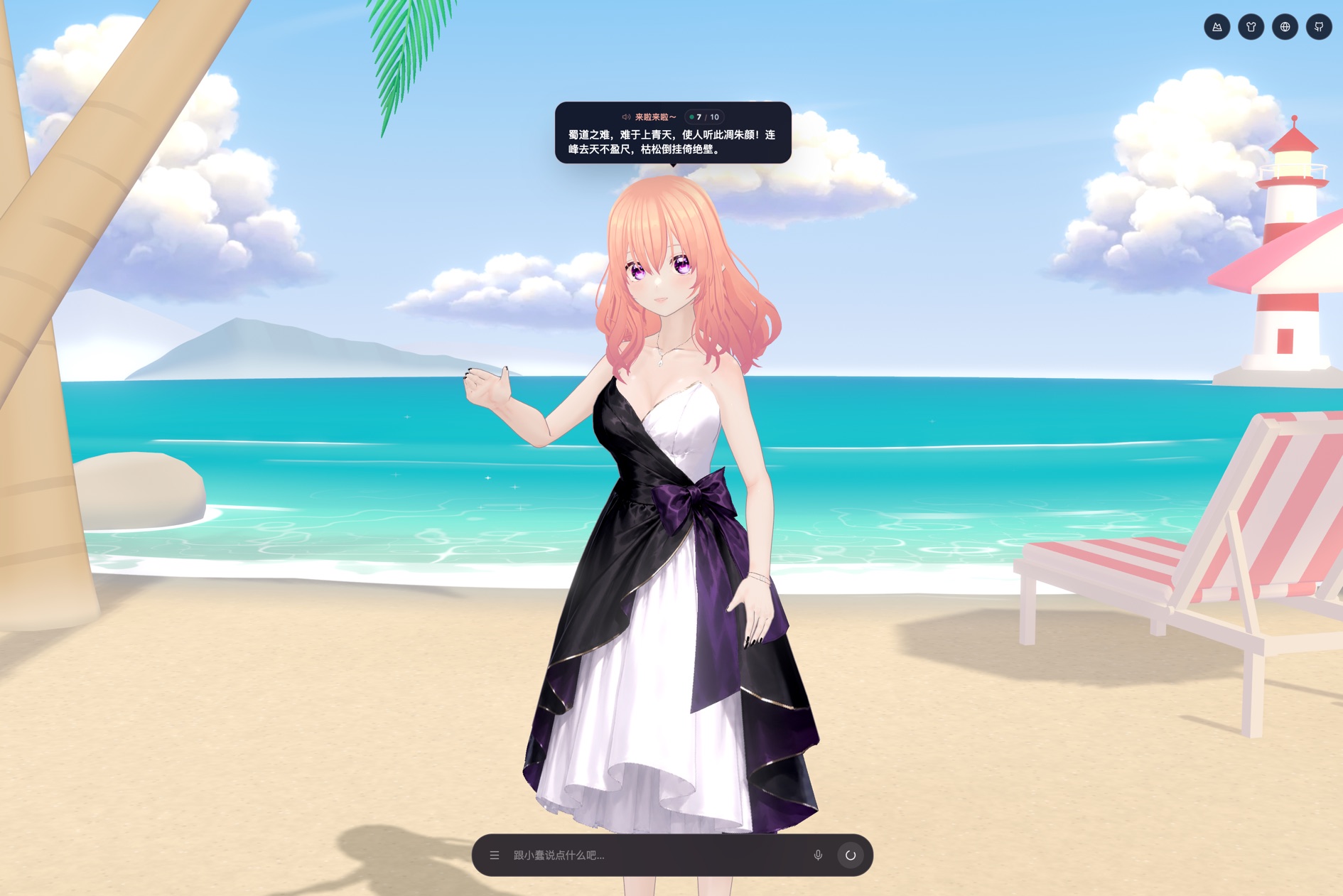
3D stage: MToon NPR character, sunny beach scene, head bubble, and chat bar
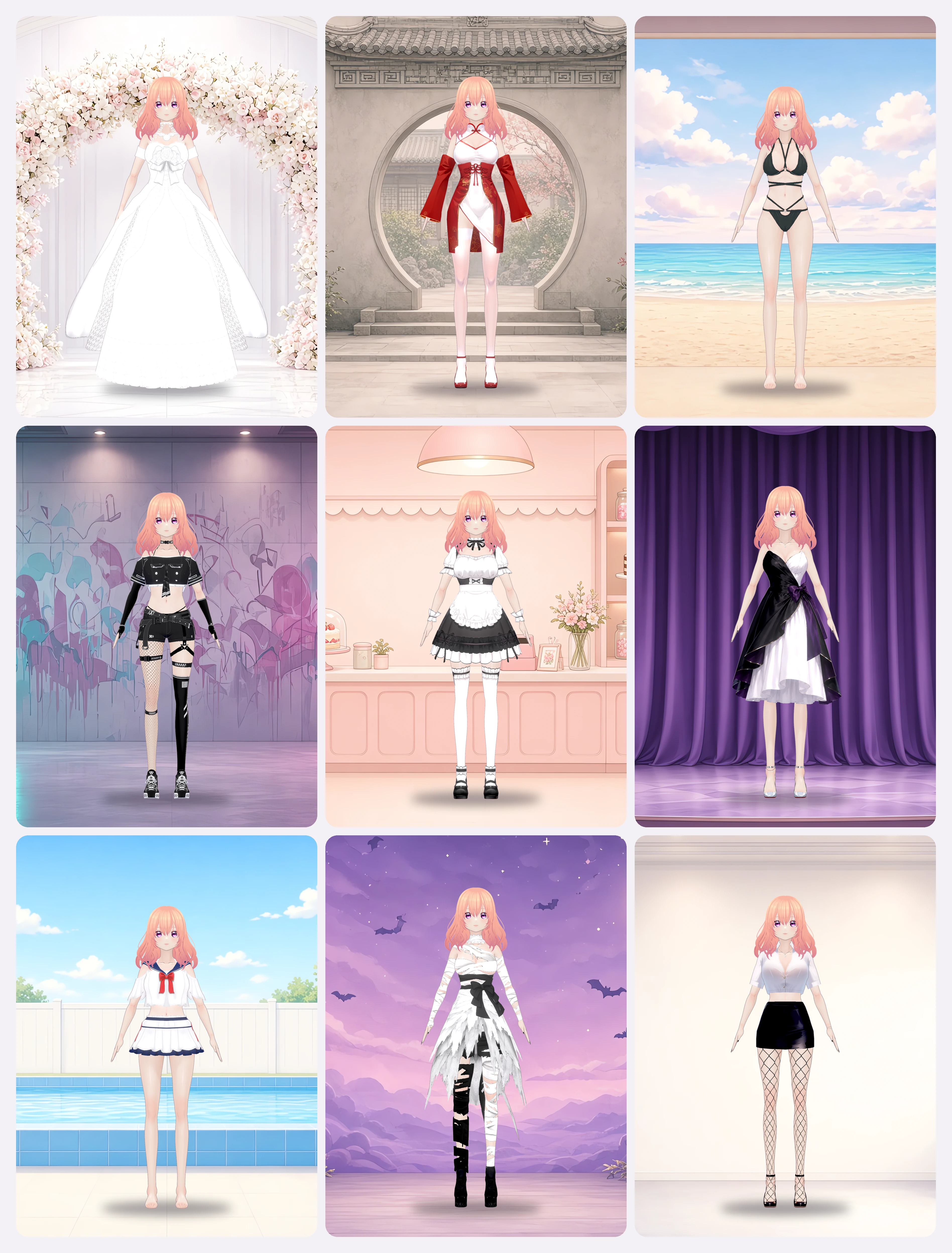
Built-in outfits, all swappable at runtime
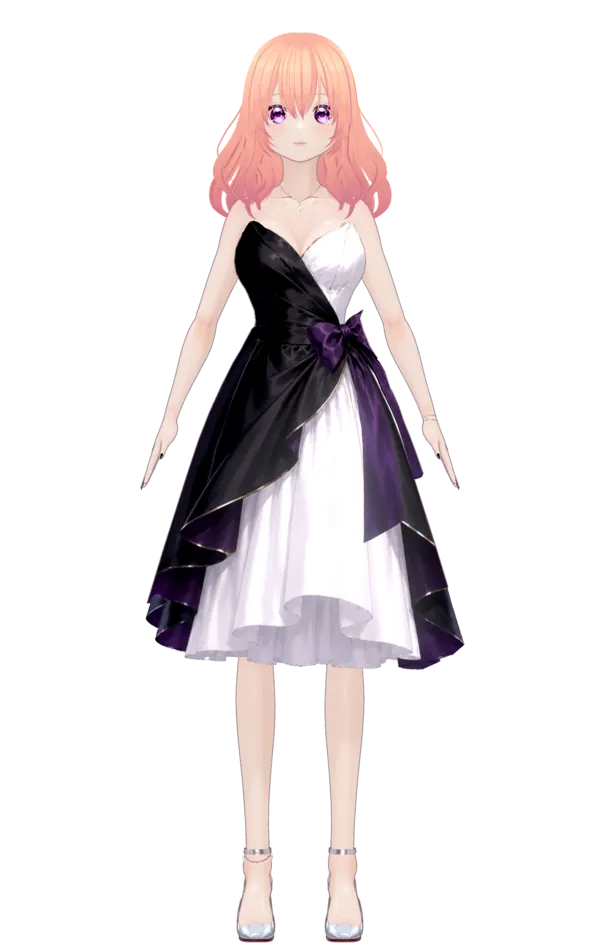 Dinner Dress | 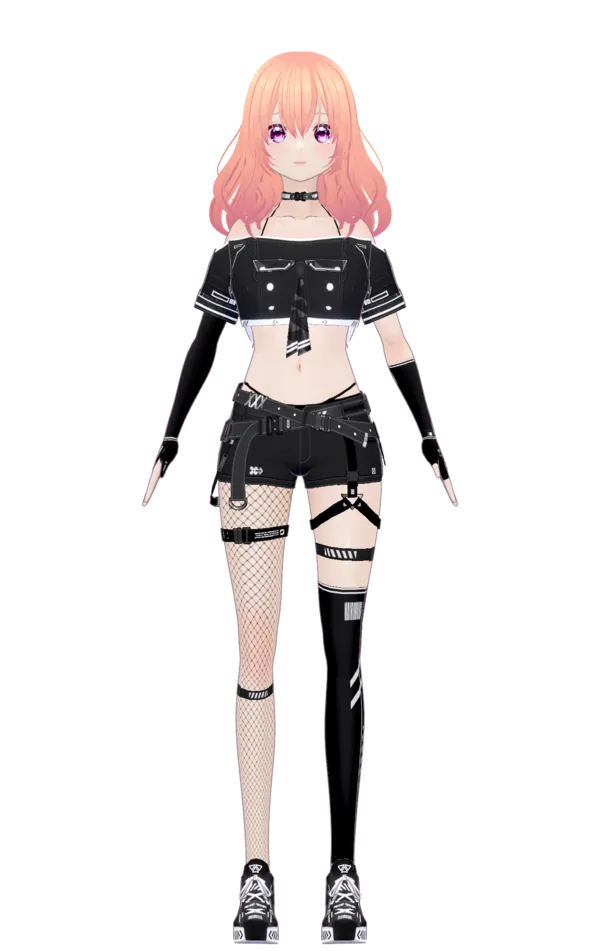 Techwear | 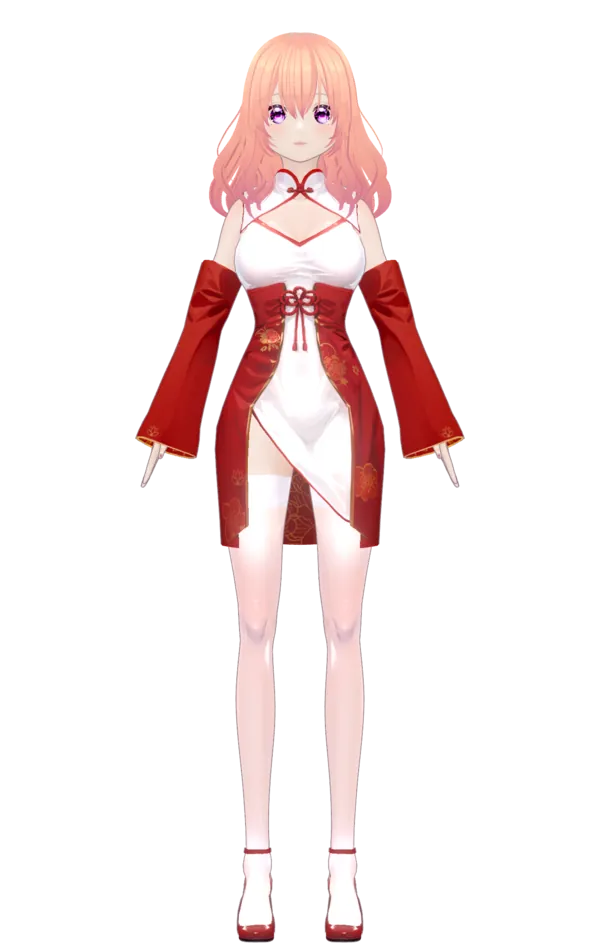 Cheongsam | 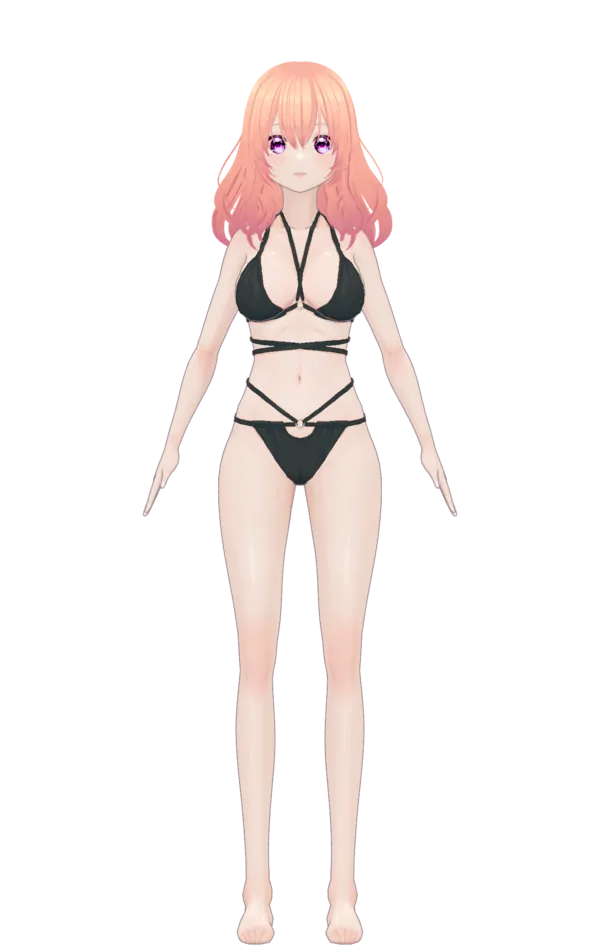 Bikini | 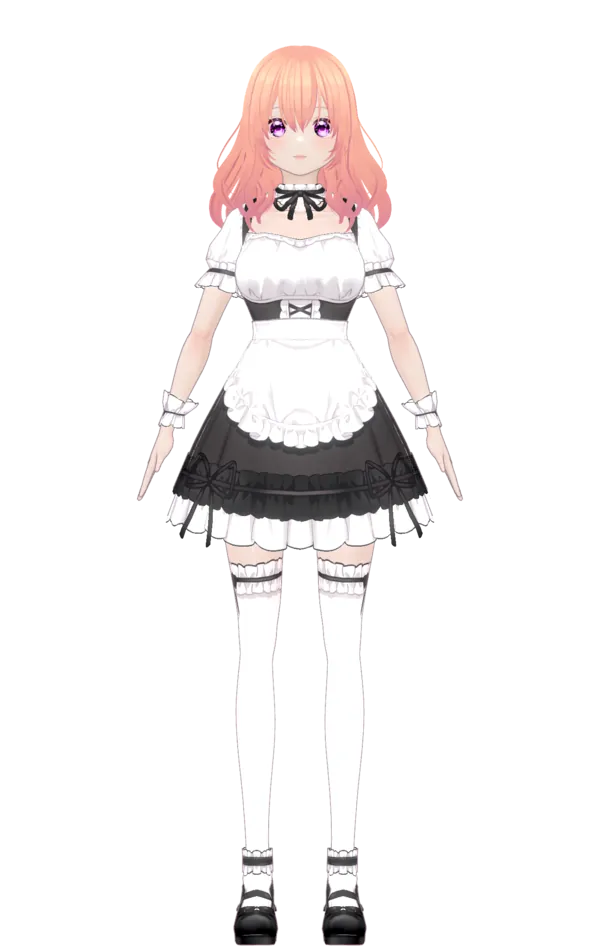 Maid |
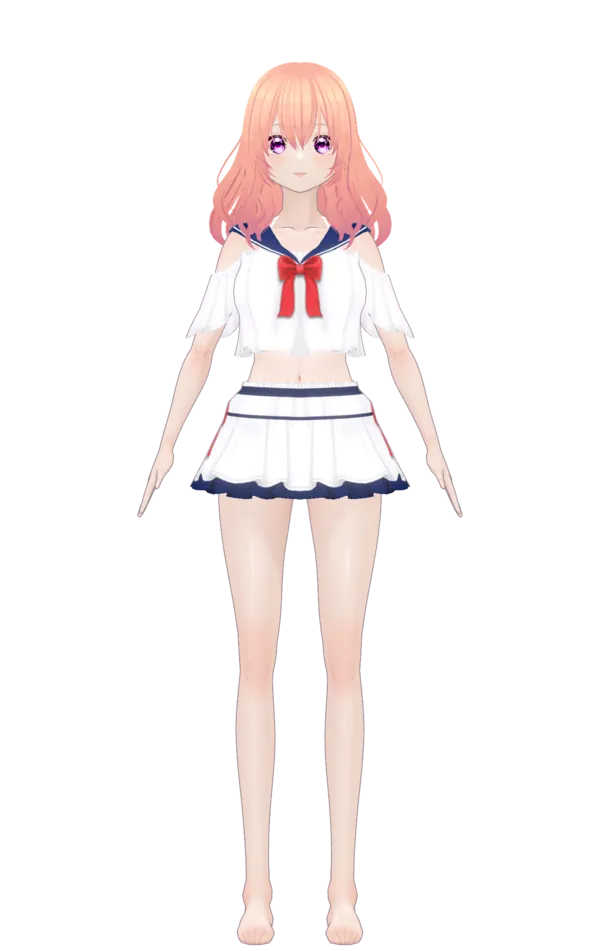 Swimsuit | 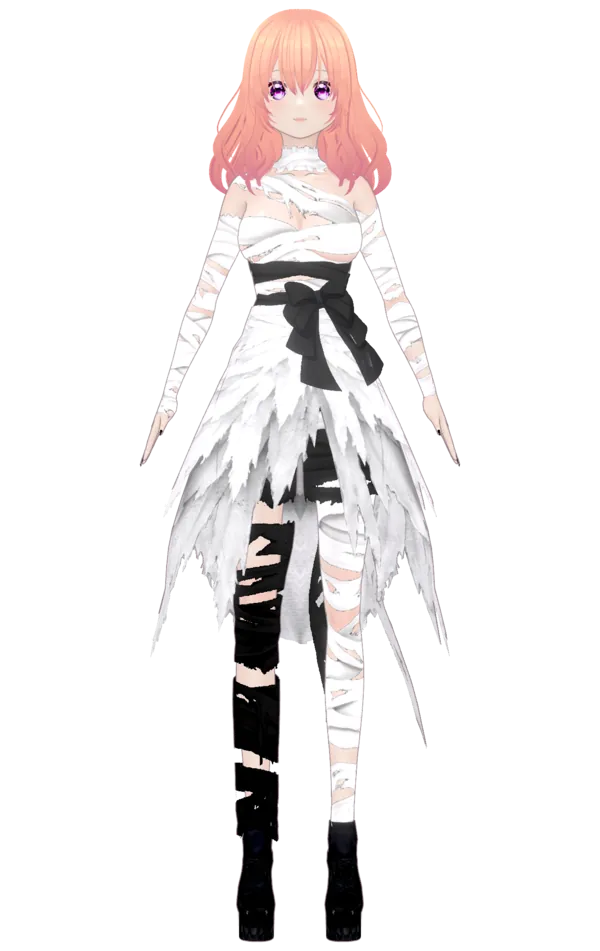 Bandage Wrap | 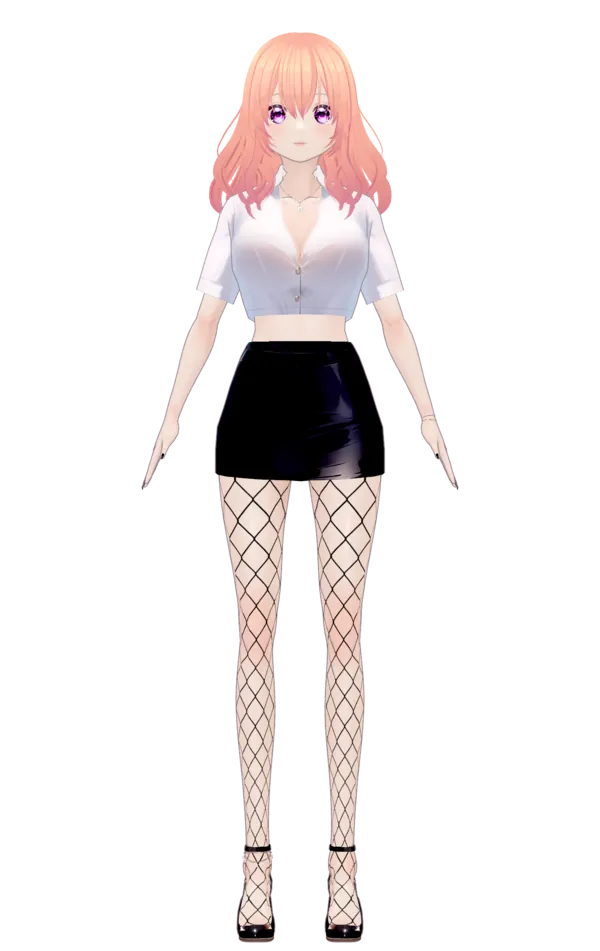 Office Lady | 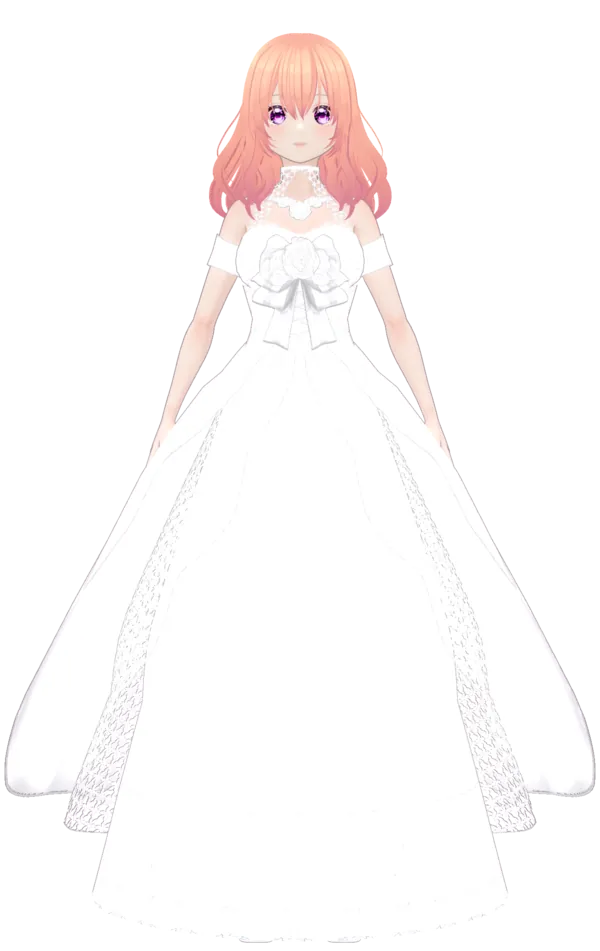 Wedding Dress |
In addition to running directly in the browser, Project XiaoChun provides a cross-platform native desktop client (built with Tauri 2.0). It supports both Full-Stage 3D Mode and Frameless Transparent Desktop Pet Mode with minimal memory overhead and instant startup.
We offer three installation methods (ranked from easiest to most advanced):
Open your terminal (macOS Terminal / Linux Shell / Windows Git-Bash) and run:
curl -fsSL https://raw.githubusercontent.com/FireTable/project-xiaochun/main/scripts/install.sh | bash
🤖 Autonomous AI Agent Friendly: Coding agents (such as Claude Code, OpenClaw, Cursor) can run this command unattended to install XiaoChun. See Agent Skill Specification.
If you are on macOS with Homebrew installed, manage installation and future updates via Homebrew Tap:
brew tap FireTable/project-xiaochun https://github.com/FireTable/project-xiaochun
brew install --cask project-xiaochun
To upgrade in the future:
brew upgrade --cask project-xiaochun
The desktop app can also check GitHub Releases in-app (top-bar ⋯ → Check for updates). Homebrew and in-app updates are both valid.
You can download installer packages directly from the official Releases page:
👉 Go to GitHub Releases for All Downloads
| Platform / Architecture | Package | Description | Quick Download |
|---|---|---|---|
| 🍏 macOS (Apple Silicon) | .dmg | For Apple Silicon (M1 / M2 / M3 / M4) Macs | Download DMG (ARM64) |
| 🍏 macOS (Intel) | .dmg | For Intel-based Macs | Download DMG (x64) |
| 🪟 Windows (x64) | .msi / .exe | For Windows 10 / 11 (64-bit) | Download Windows Installer |
| 🐧 Linux (x64) | .deb / .AppImage | For Ubuntu / Debian and mainstream distros | Download Linux Package |
Project XiaoChun to Applications;xattr -cr "/Applications/Project XiaoChun.app"
.AppImage, run chmod +x <filename>.AppImage, then execute normally.tauri-plugin-window-state automatically restores window position and size. Four corner handles enable fluid resizing without canvas flickering, alongside an Option/Alt + Drag shortcut anywhere on the character.xiaochun://): Custom OS URL Scheme enabling external scripts, AI agents, browsers, and CLI tools to wake up XiaoChun and trigger speakText with full body motion and lip-syncing.latest.json from GitHub Releases, prompts after the splash, and replaces the whole app (not a model-file patch). Details: docs/HYBRID_DESKTOP_APP.md.TurnGuide3D (horizontal yaw ring with responsive light beacon), PitchGuide3D (elevation arc), and CameraYGuide3D (floating 3D height rail).windForce.ts), causing hair ribbons, clothing fabrics, and accessories to flutter dynamically.@pixiv/three-vrm with MToon NPR shading. The core engine (VRMEngine) is decoupled into specialized subsystems, natively accommodating both modern VRM 1.0 and classic VRM 0.x avatars:
PoseBuffer automatically handles bone axis inversions and coordinate mapping under the hood, ensuring VRM 0.0 avatars work out-of-the-box with zero joint inversions.LineworkWorld): Pure procedural code generating a minimalist wireframe outdoor world (sun with 12 radial rays, 19 stylized skyline buildings, ground grid, and 5 tree archetypes); natively supports linework-light and linework-dark dual themes linked to the global color mode — 100% white-on-white / black-on-white, zero external textures.StudioLighting): Streamlined directional sunlight (dir 1.10 with 2048 PCFSoft shadow camera), hemisphere sky/ground light (hemi 0.80), and back-rim fill light (fill 0.65), delivering clean and crisp anime contours without redundant lighting overhead.VRMMaterialManager): Automatic mesh semantic categorization (skin / hair / eyes / clothing); dynamic fragment shader injection with uniform uMatSaturation for live color calibration; tuned hair saturation (default 1.50) for rich anime highlights.GazeController): Companion eye & head tracking, physiological yaw/pitch safety clamping, micro-saccades, and thinking head sways.BubbleTracker): 3D world-to-screen 2D projection with a 1.5px dead-zone filter, writing directly to DOM transforms to bypass 60~120 FPS React re-renders..vrmbase + .vrmaddon): Eliminates bloated multi-megabyte model downloads by stripping shared body geometry into a compact base model xiaochun_base.vrmbase (.vrmaddon patches (1xiaochun-vrm-cache) for instant subsequent swaps. Detailed in docs/OUTFIT_SWAP.md and docs/VRM_BUILD_WORKFLOW.md.docs/POSTFX.md.belly): Deforms 687 front abdominal wall vertices with smooth cosine falloff ($0.70\times \sim 1.80\times$), completely decoupled from Spine bones — zero impact on lumbar thickness or spinal curvature!docs/BONE_MORPH.md.playMotion): Ingest VRMA URLs, raw ArrayBuffers, or THREE.AnimationClips through a single call; automatically performs humanoid retargeting, hips normalization, and supports whole-body (all) or upper-body (upperBody) masking.docs/MOTION_PIPELINE.md.footIkIdlePlant), yields completely to BodyTurn strides, then recaptures after the step. Shoe-off sink 4.6cm/3.9cm. Detailed in docs/FOOT_IK.md.docs/BODY_TURN_AND_GAZE.md.NaturalIdleSystem procedural breathing, 8-figure pelvic postural sway, and relaxed biomechanical finger curling;VRMA thinking loops, EMAGE streaming gestures, and universal clips crossfading smoothly;BodyTurnSystem procedural stepping on LEGS_MASK only (no hip rotation, no spine yaw);composeLayeredSmooth after FootIK + Gaze so ground plant and look-at are follow targets, then commitToVRM.docs/ARCHITECTURE_AND_RULES.md.docs/LOADING_OVERLAY.md.docs/README.md./embed differences: side-by-side table (window / background / click-through, gestures, UI, camera, persistence, loading, security, build & test) with code locations and maintenance rules in docs/PLATFORM_DIFFERENCES.md.@mlc-ai/web-llm MiniCPM5 2B (q4f16_1) on WebGPU (fallback Qwen2.5 0.5B). Lightweight and responsive on mobile and low-VRAM devices; chat-bar menu supports live model switching and thinking mode toggles; response language adaptively mirrors the user's prompt.chatWorkflow.runChat) — Same-shape runChat(opts) → string contract for both WebLLM and custom providers; the dispatcher picks one per request via a ChatProvider registry. Adding a new provider = drop in a descriptor.APP_CONFIG.chat.showHeadBubble, default on). When off, HeadBubble does not render; ChatDirector / bubbleTracker events still fire. Overrides persist in IndexedDB (xiaochun-user-settings); turn bounds live in APP_CONFIG.memory.userTurnsMin/Max.useInt8); does not use WebGPU (model tensors include int64). Temporal Gaussian smoothing and natural idle blends. Streaming windows T=64 with per-window motion_chunk for TTFA; A/V hold until audible TTS; hop/seam tunables under APP_CONFIG.emage.motion (advanceFrames 60..64). See docs/EMAGE_MODEL.md. The shipped model set is a slimmed, INT8-quantized and graph-optimized build (download 191.35 → 71.59 MB, no retraining), produced by packages/emage-onnx; see docs/PERFORMANCE.md.src/lib/edge-tts-core.ts (no third-party TTS SDK); emoji stripped before speech.cdn.firetable.tech/xiaochun/stt/…-2024-07-17. See docs/STT.md..!?\n or natural comma pauses). xc.say has no character cap; this slicer is the limit.say / speakText / speakAudio fades the line still playing (about 0.4s, skipped when the gain is already 0) and then starts the new one. The previous pipeline exits on its utterance id, so the two do not play together. stop() still cuts immediately.continueFromPrevious) across chunks, making multi-chunk generation mathematically identical to a single long-run autoregressive inference.motion_chunk): Worker steps T=64 audio/motion windows and posts transferable motion_chunk after each successful runStep so gestures start before the full utterance finishes (TTFA). First chunk is buffered until TTS AudioContext.start (releaseMotionForAudio) so motion never leads audible audio.same-origin + COEP credentialless (src/server.ts, Vite preview/dev, public/_headers) so crossOriginIsolated enables SharedArrayBuffer and ORT wasm multi-thread when the browser isolates; scratch buffers are reused across windows.APP_CONFIG.emage.motion — advanceFrames (60..64), chunkSeamMaxFrames, seamJumpThreshold / seamJumpFramesScale, pose micro-fade knobs.SpeakIdleSystem): Characters adaptively respond to the current gesture during inter-segment pauses — high gestures hover with breathing buoyancy and gentle micro-settling (>1.5s); fingers flex along the anatomical Z-axis; awareness gaze drifts and micro-nods eliminate frozen mannequins.console.table monitors chunk TTS, EMAGE inference, playback progression, and transition modes.🟢 1 / 5) in the bubble status bar cleanly displays segment progress without intruding on dialogue text.xs:v1:iv.ct.key) is generated and put in a copyable text block. The key travels inside the ciphertext — paste once on the other device, no separate key channel needed.listProvidersDecrypted() on the sender side and saveProvider() re-encryption on the receiver side, using each device's local salt.userSettings through saveUserSettings so the in-memory cache and HeadBubble subscribers update immediately.xiaochun-memory database). Dialogue turns, personal preferences, and recalled facts stay entirely on the client device — zero telemetry or chat logs sent to any server.APP_CONFIG.memory.shortTermTurns), maintaining dialogue coherence.gramScore).rememberTurn() in the background upon turn completion, never stuttering UI animations or audio playback.recallForChat() swiftly retrieves entities and relevant notes, injecting localized memory headers (appendMemoryToSystem) directly into the LLM system prompt so XiaoChun naturally remembers your identity and prior topics while prioritizing current chatter.transform on the DOM with a deadzone, so React does not re-render at 60 FPS.isDev(): Vite DEV or browser loopback, not Tauri production) — 8 sections in fixed order (🎭 预设表情 → 🎥 镜头设置 → 🎨 画面色彩 → ✨ 骨骼体型 → 🧩 模型部位 → 💡 灯光通道 → 🔮 画面后期 → ⚡ EMAGE Perf). Each section owns its own React state, has its own reset, and shows a "modified" dot only when the user has changed something since mount. Schema-driven render: add a section = one entry in SECTIONS + one in the component REGISTRY. PostFxSection manages bloom intensity/radius/threshold, tone mapping modes, and color grading matrix; EmagePerfSection surfaces wasm_env / isolation / numThreads / stage timings for P0b acceptance screenshots. See docs/ARCHITECTURE_AND_RULES.md §3 for the full primitive breakdown.splitIntoSpeechChunks, for end-to-end TTS+EMAGE streaming checks without typing.localStorage) so a 28-slider BoneMorphSection doesn't re-render its siblings on every pointer event. Display numbers next to each slider follow the thumb in real time via imperative textContent writes from SliderWithAnchors' liveValueRef mechanism — React reconciliation is bypassed entirely.ⓘ tooltip listing 20°/30°/45°/60° reference values), 📷 min / 🔭 max camera distance sliders (mouse wheel + pinch zoom range), and the body-turn toggle. Default push-in distance is computed from FOV via defaultShotExtent so the framing stays consistent at 15°/20°/60° (no more "long-lens crops the face").穿 (toggle on) / 未穿 (toggle off, line-through) / 未装配 (dashed disabled div, no checkbox). "Equipped" comes from vrmEngine.materialManager.partMaterials[id]?.length, not the user's visibility toggle. Note: For full wardrobe changes, use the top navigation bar's outfit selector.src/server.ts) — handles full-stack TanStack Start SSR alongside native WebSocket streaming for Edge-TTS; also applies COOP/COEP credentialless on HTML/SSR document responses (Workers+Assets ignores public/_headers for documents) so EMAGE ORT wasm can use SAB threads when isolated.vite/localApiPlugin.ts) — local development powered by Miniflare runtime for 100% dev/prod parity. Forwards GET /api/tts to your TTS_PROXY_URL (e.g., the deployed Worker) when set, else opens a local native WebSocket to Edge-TTS (src/lib/edge-tts-core.ts).src/config.ts consolidates lighting / camera / expressions / saturation / LLM / R2 model config / 28 bone morph params.cdn.firetable.tech/xiaochun/emage/ into the emage-models-v2 cache, old caches are purged.@mlc-ai/web-llm is lazy-loaded: the shared vrmEngine chunk shrinks 6.95 → 1.01 MB and /embed no longer requests web-llm unless chat / eager preload is used.crossOriginIsolated (default off; the host needs COOP same-origin + COEP credentialless/require-corp).Numbers, methods, what was tried and rejected, and what is not measured: docs/PERFORMANCE.md (Chinese).
Put XiaoChun on your own site with a few lines: a lazy, origin-checked <iframe>, a framework-free SDK, a <xiaochun-avatar> Web Component, React bindings, and speakAudio() for feeding your own audio. Pass audible: false when the host page plays the sound and XiaoChun should only move and lip-sync. For that audio, utterance start fires when the clock starts, after the thinking pose and the first motion window. playbackRate (0.25–3) and volume (0–1) scale host audio and its motion clock; setPlaybackRate() / setVolume() change them while it plays. TTS is unchanged.
npm i @firetable/project-xiaochun
Also built in (all opt-in or sensible defaults, details in the package docs):
draggable (left-drag the avatar) and resizable (drag a corner; default min 120×180, max = viewport), driven by the same gesture state machine as the desktop app (src/core/gesture); long-press / Cmd / Ctrl still do the 3D turn. Runtime setDraggable / setResizable / setSize / getBox.borderRadius option, setBorderRadius(), border-radius attribute, --xc-radius).xiaochun_wearing_outfit / xiaochun_scene_theme in its own localStorage); priority is URL / SDK options > saved > default; persist optionally mirrors them in the host page.👉 Package docs: packages/project-xiaochun/README.md · Design & protocol: docs/EMBED.md
| Layer | Technology | Description |
|---|---|---|
| 3D Core Engine | three.js 0.185 + @pixiv/three-vrm 3.5 | Decoupled modular core (Dual-Theme LineworkWorld, Studio 3-Channel Lighting, VRMMaterialManager, GazeController, BubbleTracker) |
| Post-Processing | Custom PostFx Pipeline (postFxPipeline.ts) | UnrealBloomPass (background luminance bypass) + ToneMapping (ACESFilmic, etc.) + BC/HS Color Grading |
| Wardrobe & Delta Addons | Delta Addons + WASM bspatch + Pose Pre-restore | .vrmbase + 5 .vrmaddon files, Web Worker patch assembly, 2-tier IDB cache, zero-frame T-pose swapping |
| Motion Pipeline | Custom Layered Universal Pipeline (MotionPipeline) | Quintic smootherstep inbetweening, bone masking, biomechanical limits, inverse quaternion decoupling & T-Pose protection |
| App Framework | React 19 + TanStack Start | Full-stack SSR with cookie-based i18n hydration |
| Router | TanStack Router | Type-safe file-based routing |
| LLM | WebLLM + custom OpenAI-compatible providers (Ollama / LM Studio / vLLM / cloud) | MiniCPM5 2B q4f16_1 on WebGPU (fallback Qwen2.5 0.5B), streaming; unified runChat(opts) factory pattern |
| Memory | IndexedDB + Custom 3-Tier Pipeline | 100% client-side multi-tier persistence, entity extraction & n-gram note retrieval |
| Motion | EMAGE + ONNX Runtime Web | Dedicated Worker, wasm EP + INT8 (no WebGPU; int64); streaming motion_chunk T=64 |
| TTS | Native WebSocket client (src/lib/edge-tts-core.ts) | XiaoyiNeural zh-CN +10 Hz, emoji-stripped text; no third-party TTS SDK |
| Edge Runtime | Cloudflare Workers + @cloudflare/vite-plugin | SSR streaming + WebSocket Edge-TTS + Static Assets |
| Object Storage | Cloudflare R2 | EMAGE ONNX models served from https://cdn.firetable.tech/xiaochun/emage/ (the 71.59 MB Step 3 INT8 set; older FP32 504 MB / INT8 ~195 MB files stay at the parent path for older builds); browser downloads via the useInt8 toggle and APP_CONFIG.emage.base in src/config.ts |
| Styling | Tailwind CSS 4 + tailwindcss-animate | liquid-glass aesthetic, mobile-first |
| i18n | i18next + react-i18next | 3 languages, SSR-hydrated |
| UI Primitives | Radix UI (Dropdown Menu, Slot) | shadcn-style components |
| Language | TypeScript 6 | Strict typing end-to-end |
| Build | Vite 8 + @cloudflare/vite-plugin | Automated artifact slimming for lean edge bundles |
Requirements: Node.js 18+, package manager: pnpm (enforced via preinstall hook).
# 1. Install dependencies
pnpm install

# 2. (Optional) Configure environment — copy .env.example to .env.local and edit
cp .env.example .env.local
# - VITE_EMAGE_BASE / VITE_EMAGE_BASE_PROD: ONNX model base URLs
# - TTS_PROXY_URL: Forward Edge-TTS to your Cloudflare Worker (auto-appends /api/tts)

# 3. Start dev server (SSR + Miniflare local edge runtime)
pnpm dev          # → http://localhost:5185

# 4. Production build & preview
pnpm build        # outputs dist/client & dist/server (Worker)
pnpm preview      # preview production Worker behavior locally
Open the in-app Custom Model Service dialog (chat-bar menu → provider icon, or top-bar gear). Pick a template (Ollama / LM Studio / vLLM / LocalAI / Generic OpenAI), fill the base URL and (optionally) an API key, hit Test connection, then Save & enable. Active providers appear with a folded-corner checkmark in the list. Switching to a custom provider automatically unloads WebLLM to free 1-2 GB VRAM.
This project uses Cloudflare's modern Workers + Static Assets architecture (replacing legacy Pages) for lightning-fast SSR hydration and duplex WebSocket TTS streaming.
# Builds production bundle and deploys directly to Cloudflare edge
pnpm deploy
# Equivalent to: pnpm build && wrangler deploy
If not logged in, Wrangler will automatically open your browser for OAuth authentication. Once deployed, attach your custom domain (e.g. xiaochun.firetable.tech) under Worker -> Domains & Routes.
To deploy automatically on every git push:
/) — entering / points the runner to the Linux root filesystem and causes builds to hang;pnpm buildnpx wrangler deploymain will now trigger automatic build and deployment.Project-XiaoChun/
├── .github/ # Continuous Integration & Delivery
│ └── workflows/
│ └── release-tauri.yml # Multi-platform (macOS/Win/Linux) matrix build & GitHub release workflow
├── public/ # Static assets (hosted via Cloudflare Workers Assets)
│ ├── vrm/ # Modular VRM base and delta clothing addons
│ │ ├── xiaochun_base.vrmbase # Stripped base model (~5.9 MB, oxipng compressed textures)
│ │ ├── xiaochun_default.vrmaddon # Default Techwear outfit
│ │ ├── xiaochun_cheongsam.vrmaddon # Traditional Cheongsam
│ │ ├── xiaochun_bikini.vrmaddon # Beach Bikini
│ │ ├── xiaochun_maid.vrmaddon # Classic Maid dress
│ │ ├── xiaochun_swimsuit.vrmaddon # Summer Swimsuit
│ │ ├── xiaochun_dinner_dress.vrmaddon # Dinner Dress
│ │ ├── xiaochun_office_lady.vrmaddon # Office Lady
│ │ ├── xiaochun_techwear.vrmaddon # Techwear
│ │ ├── xiaochun_wedding.vrmaddon # Wedding Dress (13 MB)
│ │ └── xiaochun_shroud.vrmaddon # Bandage Wrap (with per-outfit bodyMorph baseline)
│ ├── thinking.vrma # Idle thinking animation loop
│ ├── materials/ # Loading screen key visual (xiaochun_keyvisual*.webp)
│ ├── onnx/ # EMAGE body motion model weights (vq_*, emage_step, postprocess)
│ ├── _headers # Cache-Control and security headers
│ ├── robots.txt / sitemap.* # Search engine crawler contracts
│ ├── llms.txt / llms-full.* # AI agent & LLM GEO documentation specs
│ ├── og.jpg # OpenGraph share card
│ └── logo.png / favicon.* # Brand and icon assets
├── src-tauri/ # Tauri 2.x native desktop hybrid application layer
│ ├── src/lib.rs # 60Hz alpha bitmask click-through, single-instance IPC, deep-link routing
│ ├── capabilities/ # Desktop permission capability declarations
│ └── tauri.conf.json # Desktop window, transparent compositing & URL scheme configs
├── docs/ # Architecture and module deep-dive docs
│ ├── README.md # Documentation index and agent routing guide
│ ├── INTERACTION_AND_CONTROLS.md # User interaction, shortcuts, mouse gestures & platform differences
│ ├── HYBRID_DESKTOP_APP.md # Desktop companion mode, click-through, and Tauri 2.x setup
│ ├── PROTOCOL.md # Inter-process protocol (xiaochun://) specification & actions
│ ├── AGENT_SKILL.md # Autonomous AI Agent skill specification for companion control
│ ├── INTERACTION_AND_3D_GUIDES.md # 3D holographic guides, wind dynamics & quaternion fixes
│ ├── ARCHITECTURE_AND_RULES.md # System architecture, 10-step lifecycle & developer rules
│ ├── OUTFIT_SWAP.md # 0-frame T-pose state snapshot, delta addons & IDB caching
│ ├── POSTFX.md # UnrealBloomPass halos, background bypass & tone grading
│ ├── VRM_BUILD_WORKFLOW.md # VRM build toolchain, bspatch delta splitting & byte idempotency
│ ├── VRM_ENGINE_AND_WORKER.md # VRMEngine facade coordinator & vrmWorker binary synthesis
│ ├── MOTION_PIPELINE.md # Universal motion blending & quintic smootherstep inbetweening
│ ├── BODY_TURN_AND_GAZE.md # Stepping locomotion state machine & saccadic gaze
│ ├── BONE_MORPH.md # 28-parameter orthogonal biomechanical morphing whitepaper
│ ├── FOOT_IK.md # Ground anchoring & foot inverse kinematics solver
│ ├── CHAT_DIRECTOR.md # LLM + TTS + EMAGE streaming orchestration
│ ├── STT.md # SenseVoice ChatBar dictation (VAD + ORT Worker)
│ ├── ONBOARDING.md # Galgame-style immersive onboarding system specification & schema
│ ├── EMAGE_MODEL.md # EMAGE status & known limits (wasm/INT8, streaming, isolation)
│ └── PERFORMANCE.md # Performance & size notes: measured numbers, rejected options, unmeasured items (Chinese)
├── packages/ # pnpm workspace packages
│ ├── project-xiaochun/ # Embed SDK (@firetable/project-xiaochun, published to npm)
│ ├── three-vrm-materials-mtoon/ # MToon fork with NPR shading controls
│ └── emage-onnx/ # Private offline toolchain: slim, quantize and optimize the EMAGE ONNX set, download 191 → 72 MB (not published)
├── scripts/ # Build, offline asset processing, and protocol runners
│ ├── build-vrm/ # VRM delta packaging and texture optimization (workflow.mjs)
│ └── protocol-call.mjs # Fast CLI runner for protocol speech testing
├── wrangler.jsonc # Cloudflare Workers declarative configuration
├── src/
│ ├── routes/ # TanStack Start file-based routes
│ │ ├── __root.tsx # Root layout (i18n SSR hydration, GEO JSON-LD & meta tags)
│ │ └── index.tsx # Main index route
│ ├── components/ # React UI components
│ │ ├── onboarding/ # Immersive Galgame-style onboarding tour
│ │ │ ├── OnboardingTour.tsx # Tour orchestrator, camera checklist gating (4 tasks web / 5 on Tauri) & reply cards
│ │ │ └── onboardingSchema.ts # Finite-state machine schema, speech lines & branching options
│ │ ├── TauriWindowFrame.tsx # Native desktop frameless resize handles & corner glow
│ │ ├── TauriTopHeader.tsx # Desktop ⋯ menu (updates / reload / quit)
│ │ ├── TopHeader.tsx # Responsive top navigation (scene / wardrobe / lang / settings)
│ │ ├── ChatBar.tsx # Streaming chat interface & model switcher
│ │ ├── HeadBubble.tsx # 3D projected speech dialogue bubbles
│ │ ├── dev-drawer/ # Schema-driven 8-section debug drawer (localhost only)
│ │ ├── SliderWithAnchors.tsx # Optimized slider with onTick / onCommit split
│ │ └── ui/ # Radix UI primitives
│ ├── hooks/ # Reusable UI & platform hooks
│ │ ├── usePetUiVisibility.ts # Click-to-toggle desk-pet UI; hover/dialog holds auto-hide
│ │ └── useDeferredUnmount.ts # Optional delayed unmount (pet chrome uses opacity instead)
│ ├── core/ # 3D rendering & scene core (Decoupled Facade architecture)
│ │ ├── vrmEngine.ts # Central engine coordinator (slim Facade, render loop, VRM loading)
│ │ ├── protocol/ # Inter-process protocol layer (types.ts, handler.ts, index.ts)
│ │ ├── interaction/ # 3D holographic controls (interactionController, turnGuide, pitchGuide, cameraYGuide)
│ │ ├── wind/ # Aerodynamic localized cursor wind forces (windForce.ts)
│ │ ├── scene/ # Scene manager, lineworkWorld, beach3d, voidWorld, and passthroughManager
│ │ ├── lighting/ # 3-channel studio lighting (studioLighting.ts: dir / hemi / fill)
│ │ ├── postfx/ # Post-processing pipeline (postFxPipeline.ts: Bloom/ToneMapping/ColorGrading)
│ │ ├── material/ # MToon material management (vrmMaterialManager.ts: saturation injection)
│ │ ├── morph/ # 28-parameter bone-by-bone scale bindings (vrmBodyMorph.ts)
│ │ ├── outfitSwap.ts # Atomic outfit swapping (pose snapshot capture & in-memory pre-restore)
│ │ ├── vrmWorker.ts # Background worker (WASM bspatch assembly & 2-tier IDB cache)
│ │ └── ui/ # Spatial UI tracker (bubbleTracker.ts: raw crown → 2D bubble)
│ ├── motion/ # Motion system (plugin pipeline + bio-inspired posture)
│ │ ├── pipeline/ # tick / selectLiveMotionSource / PoseBuffer / transition
│ │ ├── sources/ # idle, vrma, emage (+ worker), clip, speakIdle
│ │ ├── constraints/ # footIK, bodyTurn, gaze (on draft, then compose)
│ │ └── vrmaRetarget.ts # VRMA bone retargeting & normalization
│ ├── memory/ # Client-side multi-tier memory (IndexedDB / entity extraction / n-gram retrieval)
│ ├── llm/ # LLM layer — WebLLM + custom OpenAI-compatible provider factory
│ ├── director/
│ │ └── chatDirector.ts # LLM → TTS → EMAGE streaming coordinator pipeline
│ ├── i18n/ # zh-CN / en / ja translation dictionaries + server cookie helper
│ ├── lib/ # Cross-cutting utilities
│ │ ├── platform.ts # Desktop/Tauri/Browser environment detection & window actions
│ │ ├── utils.ts # Shared class merge and speech chunk slicer
│ │ ├── constants.ts
│ │ └── edge-tts-core.ts # Native Edge-TTS WebSocket client (no third-party TTS SDK)
│ ├── styles/
│ │ └── main.css # Tailwind v4 @theme tokens + liquid-glass styles
│ ├── App.tsx # Main application component & event bindings
│ ├── client.tsx # Client hydration entry
│ ├── server.ts # Cloudflare Worker entry (SSR + /api/tts WS + COOP/COEP isolation headers)
│ ├── router.tsx # TanStack Router factory
│ ├── routeTree.gen.ts # Auto-generated type-safe route tree
│ └── config.ts # SSOT (R2 / camera / lights / postfx / LLM / bodyMorph / emage.models + emage.motion)
├── vite.config.ts # Vite 8 + TanStack Start + @cloudflare/vite-plugin
├── vite/ # Custom vite plugins (extracted from vite.config.ts)
│ ├── localApiPlugin.ts # /api/tts dev middleware (TTS proxy with EU fallback)
│ └── dropDockerfatAssets.ts # Strip 25 MiB+ WASM blobs for Cloudflare Pages limit
├── AGENTS.md # Coding agent engineering standards (motion pipeline + T-Pose / LookAt / state-machine pitfalls)
├── CLAUDE.md # Claude-specific runtime context
├── README.md / README-CN.md # This file (English / 中文)
├── .env.example # Documented template for all env vars (copy to .env.local)
└── tsconfig.json
Language is stored in a lang cookie and resolved during SSR via @tanstack/react-start/server's getCookie() — wrapped in createServerOnlyFn to keep it out of the client bundle. On the client, the same lang cookie is read via document.cookie, ensuring the SSR-rendered HTML matches the first client paint with zero hydration mismatch.
Switching language:
lang cookie.i18n.changeLanguage().t(...) consumers without reloading.This project is licensed under the MIT License.
Third-party assets used by the default scene:
public/vrm/xiaochun_base.vrmbaseand.vrmaddonbundles — VRM character model and wardrobe addons, generated with VRoid Studio (Pixiv Inc.). Subject to the VRoid Studio License — free for personal use, modification, and non-commercial redistribution with attribution. For commercial use, please review the VRoid Studio License terms or contact Pixiv Inc. for a separate agreement.public/thinking.vrma— VRM animation. License unknown — verify before redistribution.
/api/tts in src/server.ts (and the Vite middleware in vite/localApiPlugin.ts) uses a hand-rolled native WebSocket client (src/lib/edge-tts-core.ts) to talk to Microsoft's Edge-TTS service directly — no third-party TTS SDK. The TRUSTED_CLIENT_TOKEN constant is a publicly known shared token (the same value used by every open-source Edge-TTS implementation) and is not a personal secret.
src/worlds/linework/) — linework outdoor scene visual inspirationpackages/emage-onnx/NOTICE..onnx weights we run in-browser?simple path and sherpa-onnx wiring100% browser-native anime VTuber — local LLM (WebLLM Qwen3) + EMAGE full-body motion + Edge-TTS. Real-time chat with VRM characters, no backend.
See the code
A 100% browser-native anime companion — local LLM + on-device STT + EMAGE motion + Edge-TTS, zero backend
English • 简体中文
[!IMPORTANT] Notice: This repository is a browser-native AI companion research prototype. It explores 100% client-side AI stacks (WebLLM / WebGPU / ONNX Runtime Web) and Cloudflare Workers edge TTS. It is not recommended for direct commercial production deployment.
Project XiaoChun (小蠢) is a fully browser-native anime companion. The character renders through @pixiv/three-vrm with MToon NPR shading inside an immersive linework outdoor scene; all AI inference runs in your browser tab — no Python backend, no server GPUs.
Entry is a 2D MAD preload into 3D — the camera pushes in from a distant 3.3× view while the overlay dissolves. You talk to her (ChatBar mic dictation via on-device SenseVoice, or type). She thinks (WebLLM MiniCPM5 2B q4f16_1 on WebGPU, falls back to Qwen2.5 0.5B; thinking optional), speaks (Edge-TTS over a Cloudflare Workers WebSocket), and moves with her (EMAGE ONNX in a Dedicated Web Worker). If the model is not ready yet, typed messages queue instead of getting dropped. The chat-bar menu can switch models from WebLLM's prebuilt list, or connect any custom OpenAI-compatible provider (Ollama / LM Studio / vLLM / LocalAI / cloud) via the in-app config dialog — credentials stay AES-GCM encrypted in IndexedDB.
The UI is fully SSR-hydrated multi-language (zh-CN / en / ja) via TanStack Start + i18next, and is mobile-first responsive (iOS HIG 44 pt / Material 48 dp touch targets).
Entry: idol-debut style loading screen, then a dimension-break into the 3D stage
3D stage: MToon NPR character, sunny beach scene, head bubble, and chat bar
Built-in outfits, all swappable at runtime
Dinner Dress | Techwear | Cheongsam | Bikini | Maid |
Swimsuit | Bandage Wrap | Office Lady | Wedding Dress |
In addition to running directly in the browser, Project XiaoChun provides a cross-platform native desktop client (built with Tauri 2.0). It supports both Full-Stage 3D Mode and Frameless Transparent Desktop Pet Mode with minimal memory overhead and instant startup.
We offer three installation methods (ranked from easiest to most advanced):
Open your terminal (macOS Terminal / Linux Shell / Windows Git-Bash) and run:
curl -fsSL https://raw.githubusercontent.com/FireTable/project-xiaochun/main/scripts/install.sh | bash
🤖 Autonomous AI Agent Friendly: Coding agents (such as Claude Code, OpenClaw, Cursor) can run this command unattended to install XiaoChun. See Agent Skill Specification.
If you are on macOS with Homebrew installed, manage installation and future updates via Homebrew Tap:
brew tap FireTable/project-xiaochun https://github.com/FireTable/project-xiaochun
brew install --cask project-xiaochun
To upgrade in the future:
brew upgrade --cask project-xiaochun
The desktop app can also check GitHub Releases in-app (top-bar ⋯ → Check for updates). Homebrew and in-app updates are both valid.
You can download installer packages directly from the official Releases page:
👉 Go to GitHub Releases for All Downloads
| Platform / Architecture | Package | Description | Quick Download |
|---|---|---|---|
| 🍏 macOS (Apple Silicon) | .dmg | For Apple Silicon (M1 / M2 / M3 / M4) Macs | Download DMG (ARM64) |
| 🍏 macOS (Intel) | .dmg | For Intel-based Macs | Download DMG (x64) |
| 🪟 Windows (x64) | .msi / .exe | For Windows 10 / 11 (64-bit) | Download Windows Installer |
| 🐧 Linux (x64) | .deb / .AppImage | For Ubuntu / Debian and mainstream distros | Download Linux Package |
Project XiaoChun to Applications;xattr -cr "/Applications/Project XiaoChun.app"
.AppImage, run chmod +x <filename>.AppImage, then execute normally.tauri-plugin-window-state automatically restores window position and size. Four corner handles enable fluid resizing without canvas flickering, alongside an Option/Alt + Drag shortcut anywhere on the character.xiaochun://): Custom OS URL Scheme enabling external scripts, AI agents, browsers, and CLI tools to wake up XiaoChun and trigger speakText with full body motion and lip-syncing.latest.json from GitHub Releases, prompts after the splash, and replaces the whole app (not a model-file patch). Details: docs/HYBRID_DESKTOP_APP.md.TurnGuide3D (horizontal yaw ring with responsive light beacon), PitchGuide3D (elevation arc), and CameraYGuide3D (floating 3D height rail).windForce.ts), causing hair ribbons, clothing fabrics, and accessories to flutter dynamically.@pixiv/three-vrm with MToon NPR shading. The core engine (VRMEngine) is decoupled into specialized subsystems, natively accommodating both modern VRM 1.0 and classic VRM 0.x avatars:
PoseBuffer automatically handles bone axis inversions and coordinate mapping under the hood, ensuring VRM 0.0 avatars work out-of-the-box with zero joint inversions.LineworkWorld): Pure procedural code generating a minimalist wireframe outdoor world (sun with 12 radial rays, 19 stylized skyline buildings, ground grid, and 5 tree archetypes); natively supports linework-light and linework-dark dual themes linked to the global color mode — 100% white-on-white / black-on-white, zero external textures.StudioLighting): Streamlined directional sunlight (dir 1.10 with 2048 PCFSoft shadow camera), hemisphere sky/ground light (hemi 0.80), and back-rim fill light (fill 0.65), delivering clean and crisp anime contours without redundant lighting overhead.VRMMaterialManager): Automatic mesh semantic categorization (skin / hair / eyes / clothing); dynamic fragment shader injection with uniform uMatSaturation for live color calibration; tuned hair saturation (default 1.50) for rich anime highlights.GazeController): Companion eye & head tracking, physiological yaw/pitch safety clamping, micro-saccades, and thinking head sways.BubbleTracker): 3D world-to-screen 2D projection with a 1.5px dead-zone filter, writing directly to DOM transforms to bypass 60~120 FPS React re-renders..vrmbase + .vrmaddon): Eliminates bloated multi-megabyte model downloads by stripping shared body geometry into a compact base model xiaochun_base.vrmbase (.vrmaddon patches (1xiaochun-vrm-cache) for instant subsequent swaps. Detailed in docs/OUTFIT_SWAP.md and docs/VRM_BUILD_WORKFLOW.md.docs/POSTFX.md.belly): Deforms 687 front abdominal wall vertices with smooth cosine falloff ($0.70\times \sim 1.80\times$), completely decoupled from Spine bones — zero impact on lumbar thickness or spinal curvature!docs/BONE_MORPH.md.playMotion): Ingest VRMA URLs, raw ArrayBuffers, or THREE.AnimationClips through a single call; automatically performs humanoid retargeting, hips normalization, and supports whole-body (all) or upper-body (upperBody) masking.docs/MOTION_PIPELINE.md.footIkIdlePlant), yields completely to BodyTurn strides, then recaptures after the step. Shoe-off sink 4.6cm/3.9cm. Detailed in docs/FOOT_IK.md.docs/BODY_TURN_AND_GAZE.md.NaturalIdleSystem procedural breathing, 8-figure pelvic postural sway, and relaxed biomechanical finger curling;VRMA thinking loops, EMAGE streaming gestures, and universal clips crossfading smoothly;BodyTurnSystem procedural stepping on LEGS_MASK only (no hip rotation, no spine yaw);composeLayeredSmooth after FootIK + Gaze so ground plant and look-at are follow targets, then commitToVRM.docs/ARCHITECTURE_AND_RULES.md.docs/LOADING_OVERLAY.md.docs/README.md./embed differences: side-by-side table (window / background / click-through, gestures, UI, camera, persistence, loading, security, build & test) with code locations and maintenance rules in docs/PLATFORM_DIFFERENCES.md.@mlc-ai/web-llm MiniCPM5 2B (q4f16_1) on WebGPU (fallback Qwen2.5 0.5B). Lightweight and responsive on mobile and low-VRAM devices; chat-bar menu supports live model switching and thinking mode toggles; response language adaptively mirrors the user's prompt.chatWorkflow.runChat) — Same-shape runChat(opts) → string contract for both WebLLM and custom providers; the dispatcher picks one per request via a ChatProvider registry. Adding a new provider = drop in a descriptor.APP_CONFIG.chat.showHeadBubble, default on). When off, HeadBubble does not render; ChatDirector / bubbleTracker events still fire. Overrides persist in IndexedDB (xiaochun-user-settings); turn bounds live in APP_CONFIG.memory.userTurnsMin/Max.useInt8); does not use WebGPU (model tensors include int64). Temporal Gaussian smoothing and natural idle blends. Streaming windows T=64 with per-window motion_chunk for TTFA; A/V hold until audible TTS; hop/seam tunables under APP_CONFIG.emage.motion (advanceFrames 60..64). See docs/EMAGE_MODEL.md. The shipped model set is a slimmed, INT8-quantized and graph-optimized build (download 191.35 → 71.59 MB, no retraining), produced by packages/emage-onnx; see docs/PERFORMANCE.md.src/lib/edge-tts-core.ts (no third-party TTS SDK); emoji stripped before speech.cdn.firetable.tech/xiaochun/stt/…-2024-07-17. See docs/STT.md..!?\n or natural comma pauses). xc.say has no character cap; this slicer is the limit.say / speakText / speakAudio fades the line still playing (about 0.4s, skipped when the gain is already 0) and then starts the new one. The previous pipeline exits on its utterance id, so the two do not play together. stop() still cuts immediately.continueFromPrevious) across chunks, making multi-chunk generation mathematically identical to a single long-run autoregressive inference.motion_chunk): Worker steps T=64 audio/motion windows and posts transferable motion_chunk after each successful runStep so gestures start before the full utterance finishes (TTFA). First chunk is buffered until TTS AudioContext.start (releaseMotionForAudio) so motion never leads audible audio.same-origin + COEP credentialless (src/server.ts, Vite preview/dev, public/_headers) so crossOriginIsolated enables SharedArrayBuffer and ORT wasm multi-thread when the browser isolates; scratch buffers are reused across windows.APP_CONFIG.emage.motion — advanceFrames (60..64), chunkSeamMaxFrames, seamJumpThreshold / seamJumpFramesScale, pose micro-fade knobs.SpeakIdleSystem): Characters adaptively respond to the current gesture during inter-segment pauses — high gestures hover with breathing buoyancy and gentle micro-settling (>1.5s); fingers flex along the anatomical Z-axis; awareness gaze drifts and micro-nods eliminate frozen mannequins.console.table monitors chunk TTS, EMAGE inference, playback progression, and transition modes.🟢 1 / 5) in the bubble status bar cleanly displays segment progress without intruding on dialogue text.xs:v1:iv.ct.key) is generated and put in a copyable text block. The key travels inside the ciphertext — paste once on the other device, no separate key channel needed.listProvidersDecrypted() on the sender side and saveProvider() re-encryption on the receiver side, using each device's local salt.userSettings through saveUserSettings so the in-memory cache and HeadBubble subscribers update immediately.xiaochun-memory database). Dialogue turns, personal preferences, and recalled facts stay entirely on the client device — zero telemetry or chat logs sent to any server.APP_CONFIG.memory.shortTermTurns), maintaining dialogue coherence.gramScore).rememberTurn() in the background upon turn completion, never stuttering UI animations or audio playback.recallForChat() swiftly retrieves entities and relevant notes, injecting localized memory headers (appendMemoryToSystem) directly into the LLM system prompt so XiaoChun naturally remembers your identity and prior topics while prioritizing current chatter.transform on the DOM with a deadzone, so React does not re-render at 60 FPS.isDev(): Vite DEV or browser loopback, not Tauri production) — 8 sections in fixed order (🎭 预设表情 → 🎥 镜头设置 → 🎨 画面色彩 → ✨ 骨骼体型 → 🧩 模型部位 → 💡 灯光通道 → 🔮 画面后期 → ⚡ EMAGE Perf). Each section owns its own React state, has its own reset, and shows a "modified" dot only when the user has changed something since mount. Schema-driven render: add a section = one entry in SECTIONS + one in the component REGISTRY. PostFxSection manages bloom intensity/radius/threshold, tone mapping modes, and color grading matrix; EmagePerfSection surfaces wasm_env / isolation / numThreads / stage timings for P0b acceptance screenshots. See docs/ARCHITECTURE_AND_RULES.md §3 for the full primitive breakdown.splitIntoSpeechChunks, for end-to-end TTS+EMAGE streaming checks without typing.localStorage) so a 28-slider BoneMorphSection doesn't re-render its siblings on every pointer event. Display numbers next to each slider follow the thumb in real time via imperative textContent writes from SliderWithAnchors' liveValueRef mechanism — React reconciliation is bypassed entirely.ⓘ tooltip listing 20°/30°/45°/60° reference values), 📷 min / 🔭 max camera distance sliders (mouse wheel + pinch zoom range), and the body-turn toggle. Default push-in distance is computed from FOV via defaultShotExtent so the framing stays consistent at 15°/20°/60° (no more "long-lens crops the face").穿 (toggle on) / 未穿 (toggle off, line-through) / 未装配 (dashed disabled div, no checkbox). "Equipped" comes from vrmEngine.materialManager.partMaterials[id]?.length, not the user's visibility toggle. Note: For full wardrobe changes, use the top navigation bar's outfit selector.src/server.ts) — handles full-stack TanStack Start SSR alongside native WebSocket streaming for Edge-TTS; also applies COOP/COEP credentialless on HTML/SSR document responses (Workers+Assets ignores public/_headers for documents) so EMAGE ORT wasm can use SAB threads when isolated.vite/localApiPlugin.ts) — local development powered by Miniflare runtime for 100% dev/prod parity. Forwards GET /api/tts to your TTS_PROXY_URL (e.g., the deployed Worker) when set, else opens a local native WebSocket to Edge-TTS (src/lib/edge-tts-core.ts).src/config.ts consolidates lighting / camera / expressions / saturation / LLM / R2 model config / 28 bone morph params.cdn.firetable.tech/xiaochun/emage/ into the emage-models-v2 cache, old caches are purged.@mlc-ai/web-llm is lazy-loaded: the shared vrmEngine chunk shrinks 6.95 → 1.01 MB and /embed no longer requests web-llm unless chat / eager preload is used.crossOriginIsolated (default off; the host needs COOP same-origin + COEP credentialless/require-corp).Numbers, methods, what was tried and rejected, and what is not measured: docs/PERFORMANCE.md (Chinese).
Put XiaoChun on your own site with a few lines: a lazy, origin-checked <iframe>, a framework-free SDK, a <xiaochun-avatar> Web Component, React bindings, and speakAudio() for feeding your own audio. Pass audible: false when the host page plays the sound and XiaoChun should only move and lip-sync. For that audio, utterance start fires when the clock starts, after the thinking pose and the first motion window. playbackRate (0.25–3) and volume (0–1) scale host audio and its motion clock; setPlaybackRate() / setVolume() change them while it plays. TTS is unchanged.
npm i @firetable/project-xiaochun
Also built in (all opt-in or sensible defaults, details in the package docs):
draggable (left-drag the avatar) and resizable (drag a corner; default min 120×180, max = viewport), driven by the same gesture state machine as the desktop app (src/core/gesture); long-press / Cmd / Ctrl still do the 3D turn. Runtime setDraggable / setResizable / setSize / getBox.borderRadius option, setBorderRadius(), border-radius attribute, --xc-radius).xiaochun_wearing_outfit / xiaochun_scene_theme in its own localStorage); priority is URL / SDK options > saved > default; persist optionally mirrors them in the host page.👉 Package docs: packages/project-xiaochun/README.md · Design & protocol: docs/EMBED.md
| Layer | Technology | Description |
|---|---|---|
| 3D Core Engine | three.js 0.185 + @pixiv/three-vrm 3.5 | Decoupled modular core (Dual-Theme LineworkWorld, Studio 3-Channel Lighting, VRMMaterialManager, GazeController, BubbleTracker) |
| Post-Processing | Custom PostFx Pipeline (postFxPipeline.ts) | UnrealBloomPass (background luminance bypass) + ToneMapping (ACESFilmic, etc.) + BC/HS Color Grading |
| Wardrobe & Delta Addons | Delta Addons + WASM bspatch + Pose Pre-restore | .vrmbase + 5 .vrmaddon files, Web Worker patch assembly, 2-tier IDB cache, zero-frame T-pose swapping |
| Motion Pipeline | Custom Layered Universal Pipeline (MotionPipeline) | Quintic smootherstep inbetweening, bone masking, biomechanical limits, inverse quaternion decoupling & T-Pose protection |
| App Framework | React 19 + TanStack Start | Full-stack SSR with cookie-based i18n hydration |
| Router | TanStack Router | Type-safe file-based routing |
| LLM | WebLLM + custom OpenAI-compatible providers (Ollama / LM Studio / vLLM / cloud) | MiniCPM5 2B q4f16_1 on WebGPU (fallback Qwen2.5 0.5B), streaming; unified runChat(opts) factory pattern |
| Memory | IndexedDB + Custom 3-Tier Pipeline | 100% client-side multi-tier persistence, entity extraction & n-gram note retrieval |
| Motion | EMAGE + ONNX Runtime Web | Dedicated Worker, wasm EP + INT8 (no WebGPU; int64); streaming motion_chunk T=64 |
| TTS | Native WebSocket client (src/lib/edge-tts-core.ts) | XiaoyiNeural zh-CN +10 Hz, emoji-stripped text; no third-party TTS SDK |
| Edge Runtime | Cloudflare Workers + @cloudflare/vite-plugin | SSR streaming + WebSocket Edge-TTS + Static Assets |
| Object Storage | Cloudflare R2 | EMAGE ONNX models served from https://cdn.firetable.tech/xiaochun/emage/ (the 71.59 MB Step 3 INT8 set; older FP32 504 MB / INT8 ~195 MB files stay at the parent path for older builds); browser downloads via the useInt8 toggle and APP_CONFIG.emage.base in src/config.ts |
| Styling | Tailwind CSS 4 + tailwindcss-animate | liquid-glass aesthetic, mobile-first |
| i18n | i18next + react-i18next | 3 languages, SSR-hydrated |
| UI Primitives | Radix UI (Dropdown Menu, Slot) | shadcn-style components |
| Language | TypeScript 6 | Strict typing end-to-end |
| Build | Vite 8 + @cloudflare/vite-plugin | Automated artifact slimming for lean edge bundles |
Requirements: Node.js 18+, package manager: pnpm (enforced via preinstall hook).
# 1. Install dependencies
pnpm install

# 2. (Optional) Configure environment — copy .env.example to .env.local and edit
cp .env.example .env.local
# - VITE_EMAGE_BASE / VITE_EMAGE_BASE_PROD: ONNX model base URLs
# - TTS_PROXY_URL: Forward Edge-TTS to your Cloudflare Worker (auto-appends /api/tts)

# 3. Start dev server (SSR + Miniflare local edge runtime)
pnpm dev          # → http://localhost:5185

# 4. Production build & preview
pnpm build        # outputs dist/client & dist/server (Worker)
pnpm preview      # preview production Worker behavior locally
Open the in-app Custom Model Service dialog (chat-bar menu → provider icon, or top-bar gear). Pick a template (Ollama / LM Studio / vLLM / LocalAI / Generic OpenAI), fill the base URL and (optionally) an API key, hit Test connection, then Save & enable. Active providers appear with a folded-corner checkmark in the list. Switching to a custom provider automatically unloads WebLLM to free 1-2 GB VRAM.
This project uses Cloudflare's modern Workers + Static Assets architecture (replacing legacy Pages) for lightning-fast SSR hydration and duplex WebSocket TTS streaming.
# Builds production bundle and deploys directly to Cloudflare edge
pnpm deploy
# Equivalent to: pnpm build && wrangler deploy
If not logged in, Wrangler will automatically open your browser for OAuth authentication. Once deployed, attach your custom domain (e.g. xiaochun.firetable.tech) under Worker -> Domains & Routes.
To deploy automatically on every git push:
/) — entering / points the runner to the Linux root filesystem and causes builds to hang;pnpm buildnpx wrangler deploymain will now trigger automatic build and deployment.Project-XiaoChun/
├── .github/ # Continuous Integration & Delivery
│ └── workflows/
│ └── release-tauri.yml # Multi-platform (macOS/Win/Linux) matrix build & GitHub release workflow
├── public/ # Static assets (hosted via Cloudflare Workers Assets)
│ ├── vrm/ # Modular VRM base and delta clothing addons
│ │ ├── xiaochun_base.vrmbase # Stripped base model (~5.9 MB, oxipng compressed textures)
│ │ ├── xiaochun_default.vrmaddon # Default Techwear outfit
│ │ ├── xiaochun_cheongsam.vrmaddon # Traditional Cheongsam
│ │ ├── xiaochun_bikini.vrmaddon # Beach Bikini
│ │ ├── xiaochun_maid.vrmaddon # Classic Maid dress
│ │ ├── xiaochun_swimsuit.vrmaddon # Summer Swimsuit
│ │ ├── xiaochun_dinner_dress.vrmaddon # Dinner Dress
│ │ ├── xiaochun_office_lady.vrmaddon # Office Lady
│ │ ├── xiaochun_techwear.vrmaddon # Techwear
│ │ ├── xiaochun_wedding.vrmaddon # Wedding Dress (13 MB)
│ │ └── xiaochun_shroud.vrmaddon # Bandage Wrap (with per-outfit bodyMorph baseline)
│ ├── thinking.vrma # Idle thinking animation loop
│ ├── materials/ # Loading screen key visual (xiaochun_keyvisual*.webp)
│ ├── onnx/ # EMAGE body motion model weights (vq_*, emage_step, postprocess)
│ ├── _headers # Cache-Control and security headers
│ ├── robots.txt / sitemap.* # Search engine crawler contracts
│ ├── llms.txt / llms-full.* # AI agent & LLM GEO documentation specs
│ ├── og.jpg # OpenGraph share card
│ └── logo.png / favicon.* # Brand and icon assets
├── src-tauri/ # Tauri 2.x native desktop hybrid application layer
│ ├── src/lib.rs # 60Hz alpha bitmask click-through, single-instance IPC, deep-link routing
│ ├── capabilities/ # Desktop permission capability declarations
│ └── tauri.conf.json # Desktop window, transparent compositing & URL scheme configs
├── docs/ # Architecture and module deep-dive docs
│ ├── README.md # Documentation index and agent routing guide
│ ├── INTERACTION_AND_CONTROLS.md # User interaction, shortcuts, mouse gestures & platform differences
│ ├── HYBRID_DESKTOP_APP.md # Desktop companion mode, click-through, and Tauri 2.x setup
│ ├── PROTOCOL.md # Inter-process protocol (xiaochun://) specification & actions
│ ├── AGENT_SKILL.md # Autonomous AI Agent skill specification for companion control
│ ├── INTERACTION_AND_3D_GUIDES.md # 3D holographic guides, wind dynamics & quaternion fixes
│ ├── ARCHITECTURE_AND_RULES.md # System architecture, 10-step lifecycle & developer rules
│ ├── OUTFIT_SWAP.md # 0-frame T-pose state snapshot, delta addons & IDB caching
│ ├── POSTFX.md # UnrealBloomPass halos, background bypass & tone grading
│ ├── VRM_BUILD_WORKFLOW.md # VRM build toolchain, bspatch delta splitting & byte idempotency
│ ├── VRM_ENGINE_AND_WORKER.md # VRMEngine facade coordinator & vrmWorker binary synthesis
│ ├── MOTION_PIPELINE.md # Universal motion blending & quintic smootherstep inbetweening
│ ├── BODY_TURN_AND_GAZE.md # Stepping locomotion state machine & saccadic gaze
│ ├── BONE_MORPH.md # 28-parameter orthogonal biomechanical morphing whitepaper
│ ├── FOOT_IK.md # Ground anchoring & foot inverse kinematics solver
│ ├── CHAT_DIRECTOR.md # LLM + TTS + EMAGE streaming orchestration
│ ├── STT.md # SenseVoice ChatBar dictation (VAD + ORT Worker)
│ ├── ONBOARDING.md # Galgame-style immersive onboarding system specification & schema
│ ├── EMAGE_MODEL.md # EMAGE status & known limits (wasm/INT8, streaming, isolation)
│ └── PERFORMANCE.md # Performance & size notes: measured numbers, rejected options, unmeasured items (Chinese)
├── packages/ # pnpm workspace packages
│ ├── project-xiaochun/ # Embed SDK (@firetable/project-xiaochun, published to npm)
│ ├── three-vrm-materials-mtoon/ # MToon fork with NPR shading controls
│ └── emage-onnx/ # Private offline toolchain: slim, quantize and optimize the EMAGE ONNX set, download 191 → 72 MB (not published)
├── scripts/ # Build, offline asset processing, and protocol runners
│ ├── build-vrm/ # VRM delta packaging and texture optimization (workflow.mjs)
│ └── protocol-call.mjs # Fast CLI runner for protocol speech testing
├── wrangler.jsonc # Cloudflare Workers declarative configuration
├── src/
│ ├── routes/ # TanStack Start file-based routes
│ │ ├── __root.tsx # Root layout (i18n SSR hydration, GEO JSON-LD & meta tags)
│ │ └── index.tsx # Main index route
│ ├── components/ # React UI components
│ │ ├── onboarding/ # Immersive Galgame-style onboarding tour
│ │ │ ├── OnboardingTour.tsx # Tour orchestrator, camera checklist gating (4 tasks web / 5 on Tauri) & reply cards
│ │ │ └── onboardingSchema.ts # Finite-state machine schema, speech lines & branching options
│ │ ├── TauriWindowFrame.tsx # Native desktop frameless resize handles & corner glow
│ │ ├── TauriTopHeader.tsx # Desktop ⋯ menu (updates / reload / quit)
│ │ ├── TopHeader.tsx # Responsive top navigation (scene / wardrobe / lang / settings)
│ │ ├── ChatBar.tsx # Streaming chat interface & model switcher
│ │ ├── HeadBubble.tsx # 3D projected speech dialogue bubbles
│ │ ├── dev-drawer/ # Schema-driven 8-section debug drawer (localhost only)
│ │ ├── SliderWithAnchors.tsx # Optimized slider with onTick / onCommit split
│ │ └── ui/ # Radix UI primitives
│ ├── hooks/ # Reusable UI & platform hooks
│ │ ├── usePetUiVisibility.ts # Click-to-toggle desk-pet UI; hover/dialog holds auto-hide
│ │ └── useDeferredUnmount.ts # Optional delayed unmount (pet chrome uses opacity instead)
│ ├── core/ # 3D rendering & scene core (Decoupled Facade architecture)
│ │ ├── vrmEngine.ts # Central engine coordinator (slim Facade, render loop, VRM loading)
│ │ ├── protocol/ # Inter-process protocol layer (types.ts, handler.ts, index.ts)
│ │ ├── interaction/ # 3D holographic controls (interactionController, turnGuide, pitchGuide, cameraYGuide)
│ │ ├── wind/ # Aerodynamic localized cursor wind forces (windForce.ts)
│ │ ├── scene/ # Scene manager, lineworkWorld, beach3d, voidWorld, and passthroughManager
│ │ ├── lighting/ # 3-channel studio lighting (studioLighting.ts: dir / hemi / fill)
│ │ ├── postfx/ # Post-processing pipeline (postFxPipeline.ts: Bloom/ToneMapping/ColorGrading)
│ │ ├── material/ # MToon material management (vrmMaterialManager.ts: saturation injection)
│ │ ├── morph/ # 28-parameter bone-by-bone scale bindings (vrmBodyMorph.ts)
│ │ ├── outfitSwap.ts # Atomic outfit swapping (pose snapshot capture & in-memory pre-restore)
│ │ ├── vrmWorker.ts # Background worker (WASM bspatch assembly & 2-tier IDB cache)
│ │ └── ui/ # Spatial UI tracker (bubbleTracker.ts: raw crown → 2D bubble)
│ ├── motion/ # Motion system (plugin pipeline + bio-inspired posture)
│ │ ├── pipeline/ # tick / selectLiveMotionSource / PoseBuffer / transition
│ │ ├── sources/ # idle, vrma, emage (+ worker), clip, speakIdle
│ │ ├── constraints/ # footIK, bodyTurn, gaze (on draft, then compose)
│ │ └── vrmaRetarget.ts # VRMA bone retargeting & normalization
│ ├── memory/ # Client-side multi-tier memory (IndexedDB / entity extraction / n-gram retrieval)
│ ├── llm/ # LLM layer — WebLLM + custom OpenAI-compatible provider factory
│ ├── director/
│ │ └── chatDirector.ts # LLM → TTS → EMAGE streaming coordinator pipeline
│ ├── i18n/ # zh-CN / en / ja translation dictionaries + server cookie helper
│ ├── lib/ # Cross-cutting utilities
│ │ ├── platform.ts # Desktop/Tauri/Browser environment detection & window actions
│ │ ├── utils.ts # Shared class merge and speech chunk slicer
│ │ ├── constants.ts
│ │ └── edge-tts-core.ts # Native Edge-TTS WebSocket client (no third-party TTS SDK)
│ ├── styles/
│ │ └── main.css # Tailwind v4 @theme tokens + liquid-glass styles
│ ├── App.tsx # Main application component & event bindings
│ ├── client.tsx # Client hydration entry
│ ├── server.ts # Cloudflare Worker entry (SSR + /api/tts WS + COOP/COEP isolation headers)
│ ├── router.tsx # TanStack Router factory
│ ├── routeTree.gen.ts # Auto-generated type-safe route tree
│ └── config.ts # SSOT (R2 / camera / lights / postfx / LLM / bodyMorph / emage.models + emage.motion)
├── vite.config.ts # Vite 8 + TanStack Start + @cloudflare/vite-plugin
├── vite/ # Custom vite plugins (extracted from vite.config.ts)
│ ├── localApiPlugin.ts # /api/tts dev middleware (TTS proxy with EU fallback)
│ └── dropDockerfatAssets.ts # Strip 25 MiB+ WASM blobs for Cloudflare Pages limit
├── AGENTS.md # Coding agent engineering standards (motion pipeline + T-Pose / LookAt / state-machine pitfalls)
├── CLAUDE.md # Claude-specific runtime context
├── README.md / README-CN.md # This file (English / 中文)
├── .env.example # Documented template for all env vars (copy to .env.local)
└── tsconfig.json
Language is stored in a lang cookie and resolved during SSR via @tanstack/react-start/server's getCookie() — wrapped in createServerOnlyFn to keep it out of the client bundle. On the client, the same lang cookie is read via document.cookie, ensuring the SSR-rendered HTML matches the first client paint with zero hydration mismatch.
Switching language:
lang cookie.i18n.changeLanguage().t(...) consumers without reloading.This project is licensed under the MIT License.
Third-party assets used by the default scene:
public/vrm/xiaochun_base.vrmbaseand.vrmaddonbundles — VRM character model and wardrobe addons, generated with VRoid Studio (Pixiv Inc.). Subject to the VRoid Studio License — free for personal use, modification, and non-commercial redistribution with attribution. For commercial use, please review the VRoid Studio License terms or contact Pixiv Inc. for a separate agreement.public/thinking.vrma— VRM animation. License unknown — verify before redistribution.
/api/tts in src/server.ts (and the Vite middleware in vite/localApiPlugin.ts) uses a hand-rolled native WebSocket client (src/lib/edge-tts-core.ts) to talk to Microsoft's Edge-TTS service directly — no third-party TTS SDK. The TRUSTED_CLIENT_TOKEN constant is a publicly known shared token (the same value used by every open-source Edge-TTS implementation) and is not a personal secret.
src/worlds/linework/) — linework outdoor scene visual inspirationpackages/emage-onnx/NOTICE..onnx weights we run in-browser?simple path and sherpa-onnx wiring


