
See what people are saying
README
StepFlow
Animated architecture, flow and sequence diagrams from a short JSON description, drawn as one SVG that plays right here in a README.

You describe what is in the diagram. StepFlow works out the layout, matches the AWS, Azure, Google Cloud and Kubernetes icons, and animates the path. The SVG carries its diagram inside it, so anyone can drop it on the StepFlow canvas to move things by hand.
This repository holds the Claude Code skill, the spec reference and the examples. It is also where to report a bug or ask for something.
Let your agent draw it
Add the skill to Claude Code:
/plugin marketplace add Figure8-Labs/stepflow
/plugin install stepflow@stepflow
Then ask for a diagram: "diagram what this pull request changes", "draw our AWS architecture for the README", "a sequence diagram of the checkout request". The agent writes a spec, runs the CLI, and hands you the SVG.
Or run the CLI yourself
npx getstepflow draw spec.json -o diagram.svg
Node 18 or later. A spec is a few lines of JSON and has no coordinates in it:
{
  "name": "Order fulfilment",
  "direction": "LR",
  "nodes": [
    { "id": "client", "label": "Client", "sub": "browser" },
    { "id": "orders-api", "label": "Orders API", "icon": "API Gateway" },
    { "id": "order-queue", "label": "Order queue", "icon": "SQS" },
    { "id": "fulfilment", "label": "Fulfilment", "icon": "Lambda" }
  ],
  "edges": [
    { "from": "client", "to": "orders-api", "label": "POST /orders" },
    { "from": "orders-api", "to": "order-queue", "label": "enqueue" },
    { "from": "order-queue", "to": "fulfilment", "label": "consume" }
  ]
}
The full format, sequences, frames, notes, loops and icons included, is in the spec reference.
After someone has moved things by hand on the canvas, redraw onto their copy and their changes stay:
npx getstepflow draw spec.json --onto diagram.svg -o diagram.svg
Examples
Each one is drawn by the CLI from the .json beside it in examples/.
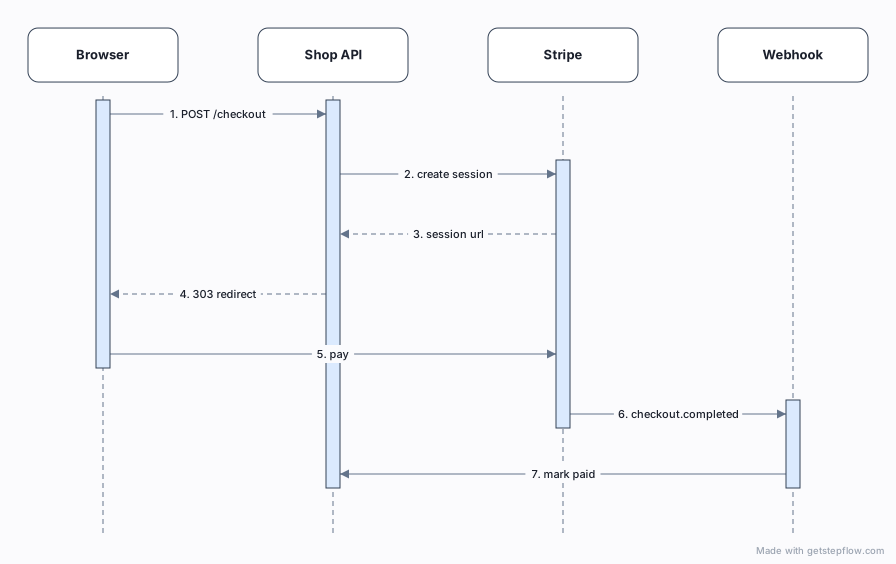
Checkout with Stripe, a sequence
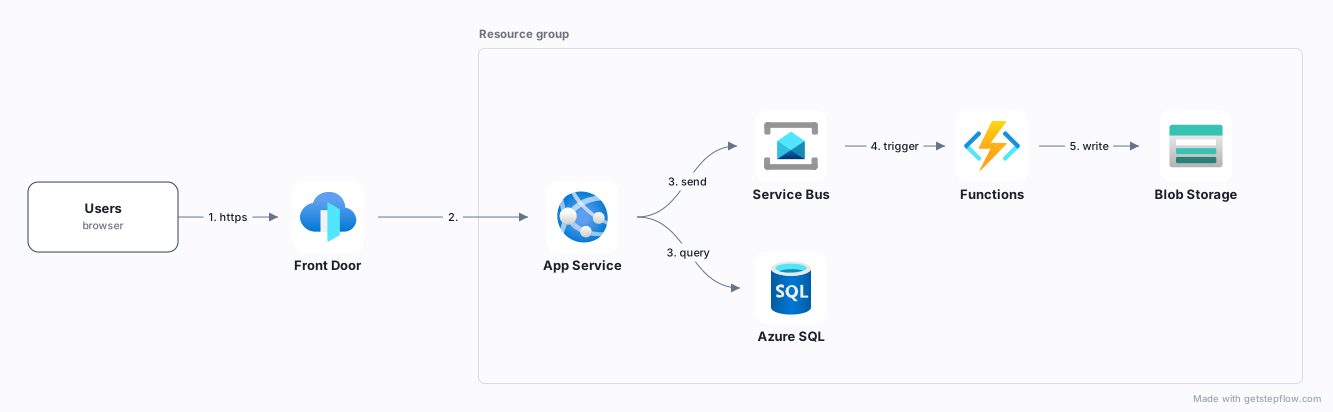
Web app on Azure
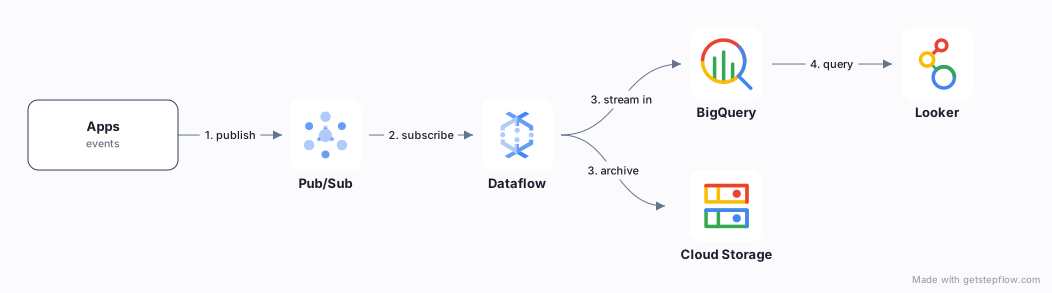
Analytics pipeline on Google Cloud
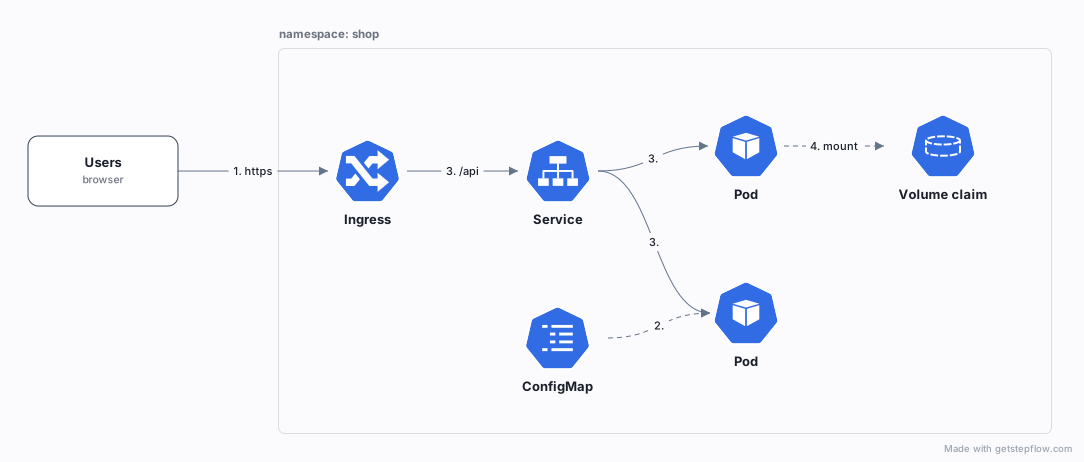
A service on Kubernetes
Answering from your docs

Customer onboarding, a business process

More at getstepflow.com/examples.
Licence
The contents of this repository (the skill, the spec reference and the examples) are MIT.
The CLI, getstepflow on npm, is free to
use, including commercially and in CI, but it is not open source and its source is not in
this repository. The diagrams you
make with it are yours. See the licence that ships with the package.
Similar repos


See what people are saying
README
StepFlow
Animated architecture, flow and sequence diagrams from a short JSON description, drawn as one SVG that plays right here in a README.
You describe what is in the diagram. StepFlow works out the layout, matches the AWS, Azure, Google Cloud and Kubernetes icons, and animates the path. The SVG carries its diagram inside it, so anyone can drop it on the StepFlow canvas to move things by hand.
This repository holds the Claude Code skill, the spec reference and the examples. It is also where to report a bug or ask for something.
Let your agent draw it
Add the skill to Claude Code:
/plugin marketplace add Figure8-Labs/stepflow
/plugin install stepflow@stepflow
Then ask for a diagram: "diagram what this pull request changes", "draw our AWS architecture for the README", "a sequence diagram of the checkout request". The agent writes a spec, runs the CLI, and hands you the SVG.
Or run the CLI yourself
npx getstepflow draw spec.json -o diagram.svg
Node 18 or later. A spec is a few lines of JSON and has no coordinates in it:
{
  "name": "Order fulfilment",
  "direction": "LR",
  "nodes": [
    { "id": "client", "label": "Client", "sub": "browser" },
    { "id": "orders-api", "label": "Orders API", "icon": "API Gateway" },
    { "id": "order-queue", "label": "Order queue", "icon": "SQS" },
    { "id": "fulfilment", "label": "Fulfilment", "icon": "Lambda" }
  ],
  "edges": [
    { "from": "client", "to": "orders-api", "label": "POST /orders" },
    { "from": "orders-api", "to": "order-queue", "label": "enqueue" },
    { "from": "order-queue", "to": "fulfilment", "label": "consume" }
  ]
}
The full format, sequences, frames, notes, loops and icons included, is in the spec reference.
After someone has moved things by hand on the canvas, redraw onto their copy and their changes stay:
npx getstepflow draw spec.json --onto diagram.svg -o diagram.svg
Examples
Each one is drawn by the CLI from the .json beside it in examples/.
Checkout with Stripe, a sequence
Web app on Azure
Analytics pipeline on Google Cloud
A service on Kubernetes
Answering from your docs
Customer onboarding, a business process
More at getstepflow.com/examples.
Licence
The contents of this repository (the skill, the spec reference and the examples) are MIT.
The CLI, getstepflow on npm, is free to
use, including commercially and in CI, but it is not open source and its source is not in
this repository. The diagrams you
make with it are yours. See the licence that ships with the package.