
README



nethack-el
What happens when you combine the most advanced, self-documenting, customizable, extensible real-time display editor, Emacs, with nethack, the most elaborate role-playing environment ever invented?
You get the most advanced, elaborate, self-documenting, customizable, extensible, role-playing environment in the world!
All of the Elisp is GPLv3-or-later, and the patches are under the modified 3-clause BSD.
Features
- Customizable keys
- Customizable colors
- Macros
- Event hooks
- Record and playback sessions (ttyrec)
- All the beauty that comes with Emacs
Gallery
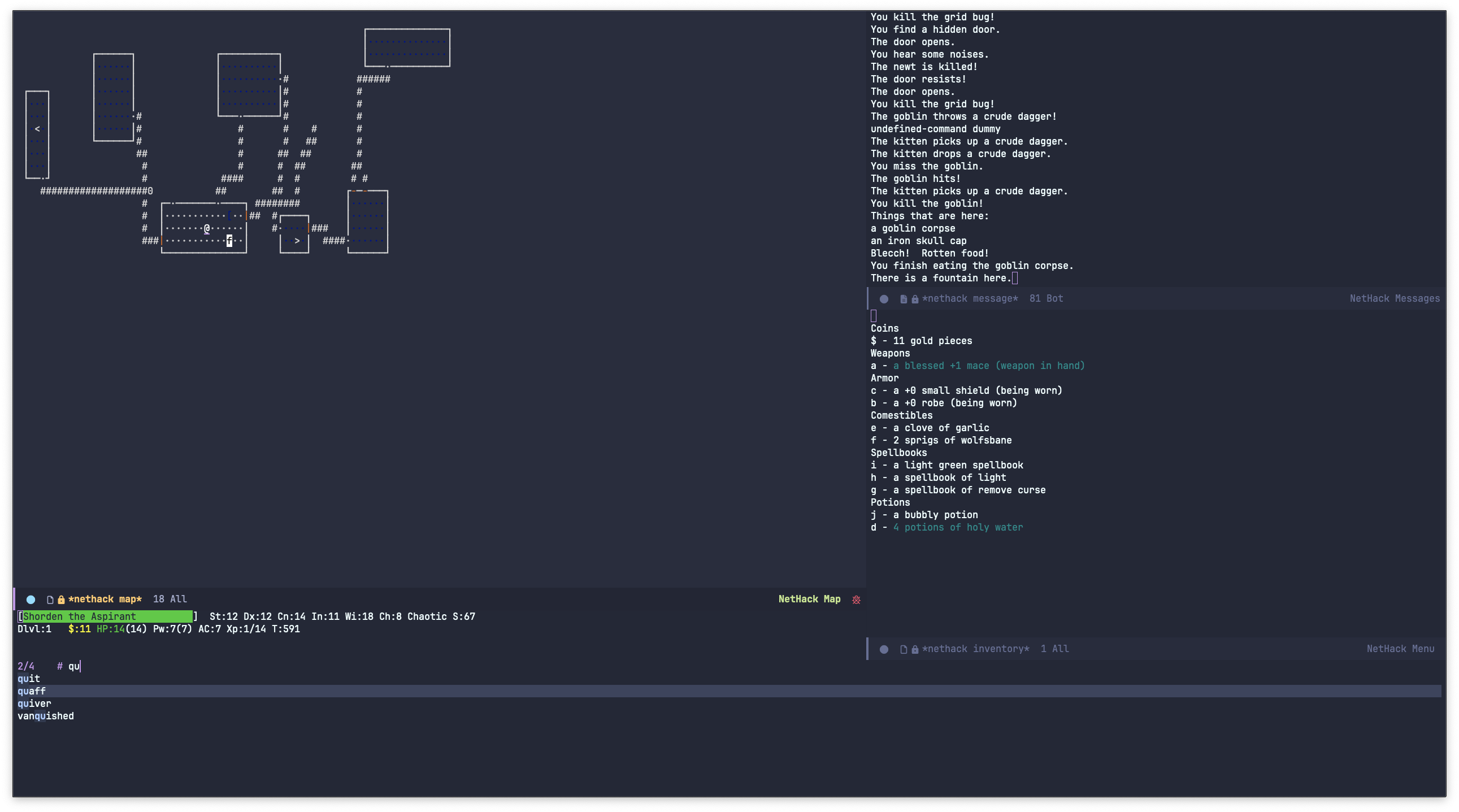 Nethack 3.6.7 in graphical Emacs with DECGraphics
 Nethack 5 (formerly 3.7) in
 emacs -nw with IBMGraphics (lisprec playback)
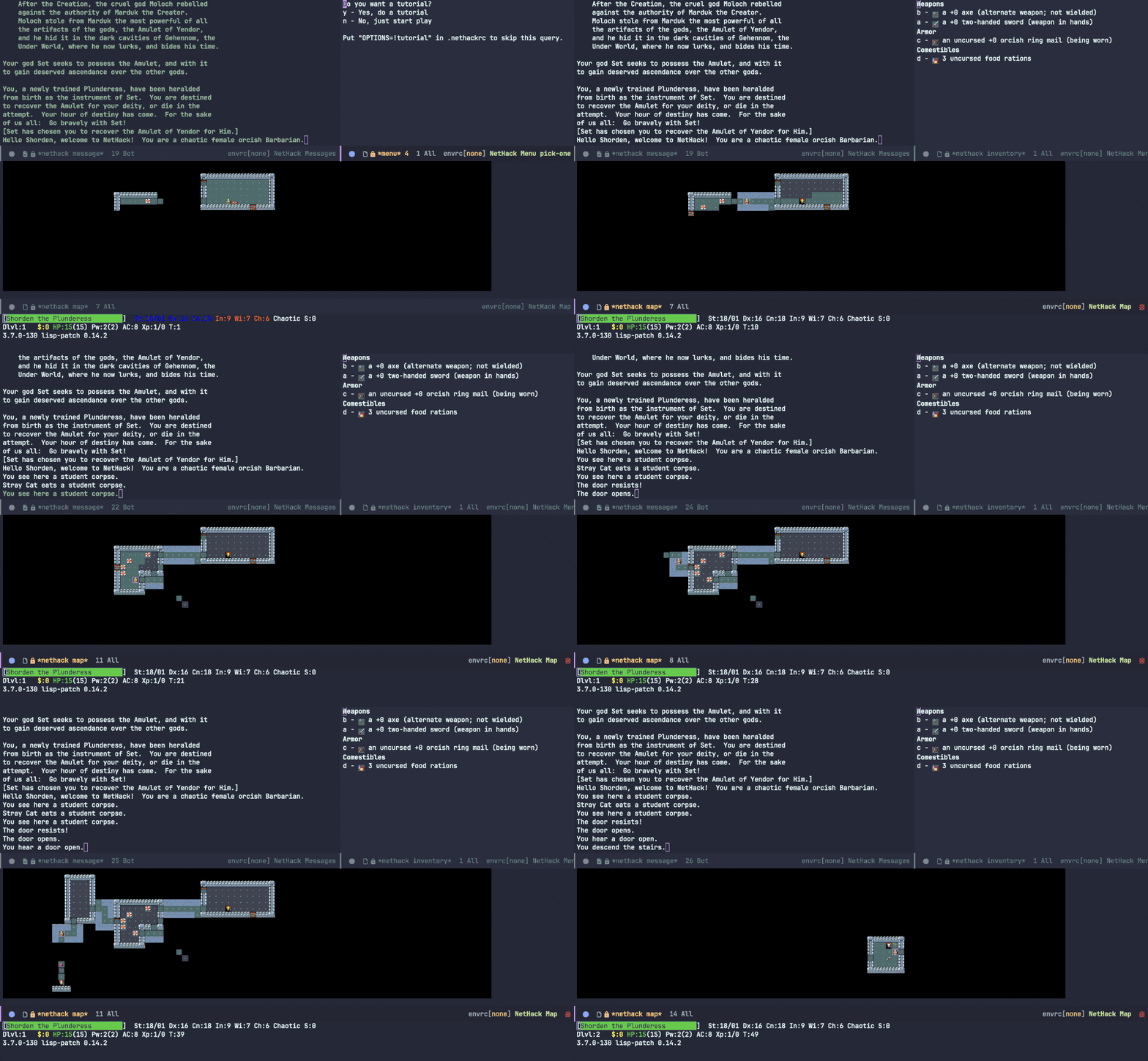 Nethack 5 (formerly 3.7) in graphical Emacs with
 (setq nethack-use-tiles "nethack500")
Project Status
Save for a few cosmetic improvements and bonus features, I consider nethack-el to be mostly feature complete to the point where I have ascended using nethack-el and I prefer nethack-el to the builtin curses interface.
That having been said, I'm receptive to feature requests so please open a discussion if you have ideas!
I mostly work on things that affect how I play NetHack (i.e. my nethackrc), so please open an issue/PR if something doesn't work—it's likely I just don't use that feature and never ran into that particular issue.
[!IMPORTANT] nethack-el currently only officially supports versions 3.6.7 and 5.0.0 of vanilla NetHack. You are welcome to open issues when using nethack-el with modern versions of NetHack (including variants) but please do not open issues with versions of NetHack older than 3.6.7.
Previous repo: https://github.com/be11ng/nethack-el
Old website: http://savannah.nongnu.org/projects/nethack-el
Usage
The nethack command is all you need for local play; if a patched nethack executable can't be found, you will be prompted to build it (see Building).
Features
Remote NetHack
Nethack-el can connect to a server running NetHack with nethack-remote.
Note: At the time of writing, no major public servers use the lisp patch, so the below commands only work if you self host.
Running nethack-remote interactively provides a helpful completing read interface for the below scenarios and is the preferred way to launch a remote nethack game.
To connect to NAO:
(nethack-remote "ssh -o SetEnv=DGLAUTH=username:password nethack@%s" "nethack.alt.org")
(The above example also works for Hardfought.)
Or over telnet:
(nethack-remote "telnet -l username:password %s" "nethack.alt.org")
Lisprec
Nethack-el sessions can be recorded by enabling nethack-lisprec-record; when finished with a session a .lisprec.gz file will be saved to disk.
lisprec(.gz) files can be played back in Emacs with the command nethack-lisprec-playback.
Supported features are
- Pause/resume (
C-c C-,) - Variable rate fast forwarding (
C-c C->) and seeking1 (C-c C-/) - Advance frame-by-frame (
M-x nethack-lisprec-next-frame)
If you would like to convert a lisprec into a more conventional ttyrec (or an asciinema cast), try this script:
#!/usr/bin/env bash

ttyrec -e "emacs -nw -L <NETHACK-EL_DIR> -l nethack --eval \"(progn (add-hook 'nethack-lisprec-playback-finished-hook #'kill-emacs) (nethack-lisprec-playback \\\"$1\\\"))\"" "$(basename ${1%%.lisprec*}).ttyrec"
Tiles
If you're coming from the X11/Qt window port you may prefer playing with (setq nethack-use-tiles "nethack"), which draws the map with XPM images instead of text.
[!NOTE] Tilesets from 3.6.7 are not compatible with those from 5.0.0.
nethack-installwill automatically generate the tileset corresponding to the version of NetHack you are building. nethack-el will try to select the correct tileset by querying nethack version at runtime, but this is not foolproof (especially for variants); try advisingnethack-map-modeornethack-nhapi-init-nhwindows.
You can use tiles with variants other than vanilla NetHack, too: for example, for Slash'EM, first you would run
# can also be run interactively
emacs --batch -l nethack-el/nethack-gen-tiles.el --eval "(nethack-gen-tiles \"<slashem-src-dir>\")"
Next, ensure the resulting slashem-tiles.el is in your load-path, and then (setq nethack-use-tiles "slashem").
Building
These instructions are known to work on *NIX systems and have been lightly tested on Windows.
Easy installation
-
Install the Elisp sources (either download from GitHub or use
package.elwith MELPA).-
Add the
nethack-elfolder to your Emacs load-path. -
Make sure you have all of your dependencies installed. You'll need
make,gcc,ncurses-devlibrary, and (3.6.7 only)bison/yaccandflex/lex.- On Windows you'll need MSYS2 with
mingw-w64-ucrt-x86_64-gccandmakeinstalled. Make sureC:\msys64\usr\binandC:\msys64\ucrt64\binare inPATHfor Emacs (exec-pathdoes not work because compilation is launched as a shell command).
- On Windows you'll need MSYS2 with
-
[!NOTE] nethack-el only supports NetHack 5 on Windows.
- Play with
M-x nethack RET. This should automatically detect if NetHack w/ lisp patch is installed, and if not will attempt to build it from source.
Manual Build
-
Either download a tarball from https://nethack.org/download/ or
git clonefrom https://github.com/NetHack/NetHack -
Untar the package and apply the respective patch
For example, if you were installing 3.6.7, you would do something like:
$ tar xzf nethack-367-src.tgz $ cp enh-367.patch NetHack-NetHack-3.6.7_Released $ cd NetHack-NetHack-3.6.7_Released $ patch -p 1 < enh-367.patch -
Follow the instructions in
sys/*/Install.*orNewInstall.*-
This may be as simple as running
sys/unix/setup.shto copy the Makefiles. -
The 3.6.7/5.0.0 patch includes modifications to the default Linux hints file for enabling the lisp window port (this should also work on macOS); you can inspect and modify this file to e.g. add additional compile flags.
$ cd sys/unix
$ vi hints/linux # or hints/linux.500
$ sh setup.sh hints/linux
-
-
Compile (from the toplevel)
-
Following the instructions as outlined so far, that would be:
$ cd ../..
$ make all WANT_WIN_LISP=1
$ make install
-
[!IMPORTANT] If you are using 5.0.0 on Linux or macOS, you must pass
WANT_WIN_LISP=1to Make in order to build the lisp port. The 3.6.7 build system defaults to building the lisp port automatically, and for Windows the patched 5.0.0 GNUmakefile can only build the lisp port. Seenethack-build-compilefor more details.
-
Install the Elisp sources
-
Edit the Makefile in the
nethack-eldirectory to set the location of your Emacs. -
Byte compile (not strictly necessary).
$ cd .. # Or wherever nethack-el is located $ make all -
Place the
*.elcor*.elfiles in your load-path. -
Add the following lines somewhere inside your
init.el:(autoload 'nethack "nethack" "Play Nethack." t) (setq nethack-program "/PATH/TO/PATCHED/nethack") -
Play with
M-x nethack RET.
-
Testing
Either use (ert-run-tests-interactively) in a live Emacs session or invoke Emacs in batch mode like so:
emacs --batch -L nethack-el -l nethack-el/test/nethack-tests.el --eval '(ert-run-tests-batch-and-exit)'
Footnotes
-
lisprecs cannot be rewound, so
nethack-lisprec-seek-towill restart from the beginning if moving backwards (this should still be very quick). ↩
Contributors


Similar repos


Languages
Emacs Lisp
99.0%
Shell
1.0%
README
nethack-el
What happens when you combine the most advanced, self-documenting, customizable, extensible real-time display editor, Emacs, with nethack, the most elaborate role-playing environment ever invented?
You get the most advanced, elaborate, self-documenting, customizable, extensible, role-playing environment in the world!
All of the Elisp is GPLv3-or-later, and the patches are under the modified 3-clause BSD.
Features
- Customizable keys
- Customizable colors
- Macros
- Event hooks
- Record and playback sessions (ttyrec)
- All the beauty that comes with Emacs
Gallery
Nethack 3.6.7 in graphical Emacs with DECGraphics
Nethack 5 (formerly 3.7) in emacs -nw with IBMGraphics (lisprec playback)
Nethack 5 (formerly 3.7) in graphical Emacs with (setq nethack-use-tiles "nethack500")
Project Status
Save for a few cosmetic improvements and bonus features, I consider nethack-el to be mostly feature complete to the point where I have ascended using nethack-el and I prefer nethack-el to the builtin curses interface.
That having been said, I'm receptive to feature requests so please open a discussion if you have ideas!
I mostly work on things that affect how I play NetHack (i.e. my nethackrc), so please open an issue/PR if something doesn't work—it's likely I just don't use that feature and never ran into that particular issue.
[!IMPORTANT] nethack-el currently only officially supports versions 3.6.7 and 5.0.0 of vanilla NetHack. You are welcome to open issues when using nethack-el with modern versions of NetHack (including variants) but please do not open issues with versions of NetHack older than 3.6.7.
Previous repo: https://github.com/be11ng/nethack-el
Old website: http://savannah.nongnu.org/projects/nethack-el
Usage
The nethack command is all you need for local play; if a patched nethack executable can't be found, you will be prompted to build it (see Building).
Features
Remote NetHack
Nethack-el can connect to a server running NetHack with nethack-remote.
Note: At the time of writing, no major public servers use the lisp patch, so the below commands only work if you self host.
Running nethack-remote interactively provides a helpful completing read interface for the below scenarios and is the preferred way to launch a remote nethack game.
To connect to NAO:
(nethack-remote "ssh -o SetEnv=DGLAUTH=username:password nethack@%s" "nethack.alt.org")
(The above example also works for Hardfought.)
Or over telnet:
(nethack-remote "telnet -l username:password %s" "nethack.alt.org")
Lisprec
Nethack-el sessions can be recorded by enabling nethack-lisprec-record; when finished with a session a .lisprec.gz file will be saved to disk.
lisprec(.gz) files can be played back in Emacs with the command nethack-lisprec-playback.
Supported features are
- Pause/resume (
C-c C-,) - Variable rate fast forwarding (
C-c C->) and seeking1 (C-c C-/) - Advance frame-by-frame (
M-x nethack-lisprec-next-frame)
If you would like to convert a lisprec into a more conventional ttyrec (or an asciinema cast), try this script:
#!/usr/bin/env bash

ttyrec -e "emacs -nw -L <NETHACK-EL_DIR> -l nethack --eval \"(progn (add-hook 'nethack-lisprec-playback-finished-hook #'kill-emacs) (nethack-lisprec-playback \\\"$1\\\"))\"" "$(basename ${1%%.lisprec*}).ttyrec"
Tiles
If you're coming from the X11/Qt window port you may prefer playing with (setq nethack-use-tiles "nethack"), which draws the map with XPM images instead of text.
[!NOTE] Tilesets from 3.6.7 are not compatible with those from 5.0.0.
nethack-installwill automatically generate the tileset corresponding to the version of NetHack you are building. nethack-el will try to select the correct tileset by querying nethack version at runtime, but this is not foolproof (especially for variants); try advisingnethack-map-modeornethack-nhapi-init-nhwindows.
You can use tiles with variants other than vanilla NetHack, too: for example, for Slash'EM, first you would run
# can also be run interactively
emacs --batch -l nethack-el/nethack-gen-tiles.el --eval "(nethack-gen-tiles \"<slashem-src-dir>\")"
Next, ensure the resulting slashem-tiles.el is in your load-path, and then (setq nethack-use-tiles "slashem").
Building
These instructions are known to work on *NIX systems and have been lightly tested on Windows.
Easy installation
-
Install the Elisp sources (either download from GitHub or use
package.elwith MELPA).-
Add the
nethack-elfolder to your Emacs load-path. -
Make sure you have all of your dependencies installed. You'll need
make,gcc,ncurses-devlibrary, and (3.6.7 only)bison/yaccandflex/lex.- On Windows you'll need MSYS2 with
mingw-w64-ucrt-x86_64-gccandmakeinstalled. Make sureC:\msys64\usr\binandC:\msys64\ucrt64\binare inPATHfor Emacs (exec-pathdoes not work because compilation is launched as a shell command).
- On Windows you'll need MSYS2 with
-
[!NOTE] nethack-el only supports NetHack 5 on Windows.
- Play with
M-x nethack RET. This should automatically detect if NetHack w/ lisp patch is installed, and if not will attempt to build it from source.
Manual Build
-
Either download a tarball from https://nethack.org/download/ or
git clonefrom https://github.com/NetHack/NetHack -
Untar the package and apply the respective patch
For example, if you were installing 3.6.7, you would do something like:
$ tar xzf nethack-367-src.tgz $ cp enh-367.patch NetHack-NetHack-3.6.7_Released $ cd NetHack-NetHack-3.6.7_Released $ patch -p 1 < enh-367.patch -
Follow the instructions in
sys/*/Install.*orNewInstall.*-
This may be as simple as running
sys/unix/setup.shto copy the Makefiles. -
The 3.6.7/5.0.0 patch includes modifications to the default Linux hints file for enabling the lisp window port (this should also work on macOS); you can inspect and modify this file to e.g. add additional compile flags.
$ cd sys/unix
$ vi hints/linux # or hints/linux.500
$ sh setup.sh hints/linux
-
-
Compile (from the toplevel)
-
Following the instructions as outlined so far, that would be:
$ cd ../..
$ make all WANT_WIN_LISP=1
$ make install
-
[!IMPORTANT] If you are using 5.0.0 on Linux or macOS, you must pass
WANT_WIN_LISP=1to Make in order to build the lisp port. The 3.6.7 build system defaults to building the lisp port automatically, and for Windows the patched 5.0.0 GNUmakefile can only build the lisp port. Seenethack-build-compilefor more details.
-
Install the Elisp sources
-
Edit the Makefile in the
nethack-eldirectory to set the location of your Emacs. -
Byte compile (not strictly necessary).
$ cd .. # Or wherever nethack-el is located $ make all -
Place the
*.elcor*.elfiles in your load-path. -
Add the following lines somewhere inside your
init.el:(autoload 'nethack "nethack" "Play Nethack." t) (setq nethack-program "/PATH/TO/PATCHED/nethack") -
Play with
M-x nethack RET.
-
Testing
Either use (ert-run-tests-interactively) in a live Emacs session or invoke Emacs in batch mode like so:
emacs --batch -L nethack-el -l nethack-el/test/nethack-tests.el --eval '(ert-run-tests-batch-and-exit)'
Footnotes
-
lisprecs cannot be rewound, so
nethack-lisprec-seek-towill restart from the beginning if moving backwards (this should still be very quick). ↩
Similar repos
Contributors
Languages
Emacs Lisp
99.0%
Shell
1.0%