Code of the paper "LLM-to-Flow-Distillation: Teaching Natural Language Goals to Scientific Generators"
See the code



![Riccardo De Santi [1,2,*], Federico Di Gennaro [1,*], Angelo Gnazzo [3,4,*]; Sophia Tang [5], Pranam Chatterjee [5], Fanny Yang [1], İsmail İlkan Ceylan [3,4,6], Michael M. Bronstein [4,6], Andreas Krause [1,2]](https://raw.githubusercontent.com/FedericoDiGennaro/LLM-to-Flow-Distillation/bb3a1584460b07fd4205e72a7737ac360a69febe/assets/authors-outlined-dark.svg)
* Equal contributions, alphabetical order
1 ETH Zurich 2 ETH AI Center 3 Technische Universität Wien
4 AITHYRA 5 University of Pennsylvania 6 University of Oxford
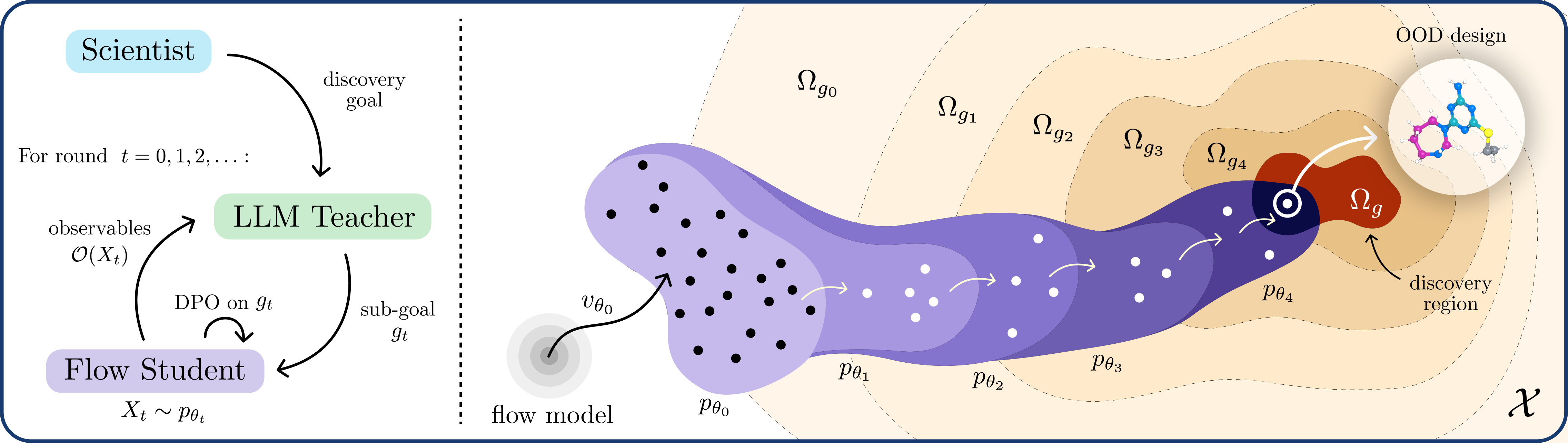
LLM-to-Flow Distillation (LFD) iteratively aligns a pretrained scientific generator (the student) towards a natural-language goal $g$ with Direct Preference Optimization (DPO) on preferences induced by an LLM (the teacher).
Explore the results, subgoals, and LLM traces on the project page.
Use Python 3.10 or 3.11 on Linux, with Git installed. Check that python --version
reports one of these versions, then copy these commands into your terminal:
git clone https://github.com/FedericoDiGennaro/LLM-to-Flow-Distillation.git
cd LLM-to-Flow-Distillation
python -m venv .venv
source .venv/bin/activate
python -m pip install -e .
These commands download the repository, create an isolated Python environment,
and install the llm-to-flow command. The . means the current folder; -e
keeps the installation connected to this checkout so you can edit the code and
adapt the experiments.
You need GitHub access to clone the repository. Run the commands below from
this folder. In each new terminal or job shell, activate .venv again with
source .venv/bin/activate.
The bundled curricula default to Gemini through Vertex Express. Set the key in the shell or job environment used to launch the experiment:
unset GOOGLE_API_KEY
export ADM_LLM_PROVIDER=gemini
export GEMINI_API_KEY="your-vertex-express-api-key"
export HF_TOKEN="your-hugging-face-token"  # Only for downloading gated PepDFM assets.
Accept the upstream PepDFM access terms before downloading its assets. API keys
are read from exported environment variables; keep them out of source and
configuration files. The launcher expects GEMINI_API_KEY as its only Google
API-key variable, so the block above clears a conflicting GOOGLE_API_KEY.
Alternatively, all five llm-to-flow run tasks support a LiteLLM gateway's
Responses endpoint:
export ADM_LLM_PROVIDER=litellm
export LITELLM_API_BASE="https://your-litellm-gateway.example"
export API_KEY_FILE="/absolute/path/to/your/key-file"
unset LITELLM_API_KEY
The file can contain one bare key or a LITELLM_API_KEY="..." environment
assignment (optionally prefixed with export). A LITELLM_API_BASE assignment
may accompany the key, but must match the explicitly selected gateway URL.
Other variable names are not used as credentials. The file is read, never
executed, and shell expansion is not performed. Alternatively,
unset API_KEY_FILE and export LITELLM_API_KEY directly. Google keys are not
used by this route. If your gateway uses different model aliases, map the names
in your task configuration explicitly, for example:
export LITELLM_MODEL_MAP='{"gemini-3.7-flash":"gemini/gemini-3.7-flash","gemini-3.1-pro-preview":"gemini/gemini-3.1-pro-preview"}'
Check those aliases with your gateway administrator. The destination and alias map are frozen with each run; changing either requires a separate output directory. Existing call/token limits still apply. Budget calculations use the configured price estimates, so check these against your gateway's tariffs. The gateway's returned model name is recorded, but it does not necessarily pin an immutable upstream revision. Server-side routing/retry policies remain the gateway administrator's responsibility.
To check transport and structured replies without a GPU or scientific data:
python -m adm.preferences.provider_smoke \
  --model gemini-3.7-flash --output-dir runs/provider-smoke \
  --calls 3 --maximum-usd 1 \
  --input-usd-per-million 10 --output-usd-per-million 60
This prints a plan without reading credentials or making calls. After checking
the route, prices and budget, add --execute to allow the listed synthetic
requests. The example rates are conservative estimates to replace with your
gateway's rates, not a pricing quotation. Reusing the same smoke directory
replays saved replies; uncertain attempts are not silently resent. This checks
provider access and parsing, not the GPU runtime or an entire discovery run.
From the source checkout, install the peptide dependencies and download PepDFM:
python -m pip install -e '.[peptides]'
python -m domains.peptides.fetch_assets --asset-dir /path/to/assets/mog-dfm
The peptide extra includes PyTorch 2.6, the sampler, and the predictor dependencies. Use a CUDA-compatible PyTorch installation on the GPU machine.
FlowMol3 requires a Linux x86-64 GPU machine and uses a separate CUDA 12.1 environment. Install Pixi, then create the environment and download the model:
python -m domains.molecules.gsk3b.setup --ltfd-home /path/to/flowmol-runtime
The setup command uses the environment in domains/molecules/pixi.toml and writes a receipt that the experiment launcher reads automatically. The same runtime and FlowMol3 assets can be reused by all three molecular tasks.
Run from a clean source checkout inside an allocated Slurm GPU job. Obtain the allocation through your cluster before launching; this command does not allocate GPU resources. Choose a fresh output directory. The launcher prepares the task inputs, checks the runtime, and starts the adaptive curriculum with one command.
# Peptides: selective anticancer activity
llm-to-flow run anticancer \
  --assets /path/to/assets/mog-dfm --output-dir runs/anticancer

# Peptides: mammalian cell penetration
llm-to-flow run cell-penetration \
  --assets /path/to/assets/mog-dfm --output-dir runs/cell-penetration

# Molecules: dopamine D2 receptor binding
llm-to-flow run drd2 \
  --runtime-home /path/to/flowmol-runtime --output-dir runs/drd2

# Molecules: GSK3β binding and aqueous solubility
llm-to-flow run gsk3b \
  --runtime-home /path/to/flowmol-runtime --output-dir runs/gsk3b

# Molecules: specified ring motifs for a kinase-focused discovery campaign
llm-to-flow run kinase \
  --runtime-home /path/to/flowmol-runtime --output-dir runs/kinase
Each run starts from the pretrained generator. The LLM proposes a reachable intermediate goal, judges generated candidates, and supplies preferences for a DPO update. The updated generator is sampled again; its results determine whether to continue the current goal or advance the curriculum. This repeats until a stopping condition or configured budget is reached. Candidates, goals, and updated checkpoints are saved in the output directory.
| Domain | Task guide | Generator |
|---|---|---|
| Peptides | Selective anticancer activity | PepDFM |
| Peptides | Mammalian cell penetration | PepDFM |
| Molecules | Dopamine D2 receptor binding with moderate lipophilicity | FlowMol3 |
| Molecules | GSK3β binding and aqueous solubility | FlowMol3 |
| Molecules | Kinase-focused design with specified ring motifs | FlowMol3 |
Use llm-to-flow run --help for optional runtime settings. --prepare-only
writes task input files without GPU work or API calls; it does not validate the
GPU runtime, downloaded assets, or model access. Use a separate output directory
for this check: a normal run requires a new or empty directory. Each molecular
task also has a smaller --smoke profile; that profile uses the GPU and API.
The pipeline creates missing output folders automatically. You do not need to
create trace directories manually. LLM trace folders appear when the first
request is recorded, so --prepare-only does not produce LLM traces.
Paths below are relative to the chosen --output-dir:
| Task | Raw API attempts | Logical requests and responses |
|---|---|---|
| Anticancer | campaign/api_attempts/<role>/<request_hash>/ | campaign/api_artifacts/<role>/<request_hash>/ |
| Cell penetration | campaign/api_attempts/<role>/<request_hash>/ | campaign/api_artifacts/<role>/<request_hash>/ |
| DRD2, GSK3β, and kinase design | api/<role>/api_attempts/<request_hash>/ | api/<role>/artifacts/<request_hash>/ |
Peptide API preflight records are also stored under campaign/preflight/.
Each raw attempt records attempt_started.json and, when a response arrives,
provider_response.json. Structured parsing produces parsed_response.json
or parse_failure.json. Logical artifacts use request.json and
response.json. If a network call fails before a response arrives, its start
record remains. Trace files include prompts, returned output, and usage
metadata; API keys are not included in the transport records. Console output
is separate from these JSON traces.
The task configurations and prompts are starting points for your experiments:
configs/dpo.json.The LLM builds the curriculum during execution; you do not need to recreate the paper's sequence of goals or checkpoints. Domain guides link the prompt files, configuration, and optional baselines. External task evaluation is separate from the adaptive training loop.
Code of the paper "LLM-to-Flow-Distillation: Teaching Natural Language Goals to Scientific Generators"
See the code
* Equal contributions, alphabetical order
1 ETH Zurich 2 ETH AI Center 3 Technische Universität Wien
4 AITHYRA 5 University of Pennsylvania 6 University of Oxford
LLM-to-Flow Distillation (LFD) iteratively aligns a pretrained scientific generator (the student) towards a natural-language goal $g$ with Direct Preference Optimization (DPO) on preferences induced by an LLM (the teacher).
Explore the results, subgoals, and LLM traces on the project page.
Use Python 3.10 or 3.11 on Linux, with Git installed. Check that python --version
reports one of these versions, then copy these commands into your terminal:
git clone https://github.com/FedericoDiGennaro/LLM-to-Flow-Distillation.git
cd LLM-to-Flow-Distillation
python -m venv .venv
source .venv/bin/activate
python -m pip install -e .
These commands download the repository, create an isolated Python environment,
and install the llm-to-flow command. The . means the current folder; -e
keeps the installation connected to this checkout so you can edit the code and
adapt the experiments.
You need GitHub access to clone the repository. Run the commands below from
this folder. In each new terminal or job shell, activate .venv again with
source .venv/bin/activate.
The bundled curricula default to Gemini through Vertex Express. Set the key in the shell or job environment used to launch the experiment:
unset GOOGLE_API_KEY
export ADM_LLM_PROVIDER=gemini
export GEMINI_API_KEY="your-vertex-express-api-key"
export HF_TOKEN="your-hugging-face-token"  # Only for downloading gated PepDFM assets.
Accept the upstream PepDFM access terms before downloading its assets. API keys
are read from exported environment variables; keep them out of source and
configuration files. The launcher expects GEMINI_API_KEY as its only Google
API-key variable, so the block above clears a conflicting GOOGLE_API_KEY.
Alternatively, all five llm-to-flow run tasks support a LiteLLM gateway's
Responses endpoint:
export ADM_LLM_PROVIDER=litellm
export LITELLM_API_BASE="https://your-litellm-gateway.example"
export API_KEY_FILE="/absolute/path/to/your/key-file"
unset LITELLM_API_KEY
The file can contain one bare key or a LITELLM_API_KEY="..." environment
assignment (optionally prefixed with export). A LITELLM_API_BASE assignment
may accompany the key, but must match the explicitly selected gateway URL.
Other variable names are not used as credentials. The file is read, never
executed, and shell expansion is not performed. Alternatively,
unset API_KEY_FILE and export LITELLM_API_KEY directly. Google keys are not
used by this route. If your gateway uses different model aliases, map the names
in your task configuration explicitly, for example:
export LITELLM_MODEL_MAP='{"gemini-3.7-flash":"gemini/gemini-3.7-flash","gemini-3.1-pro-preview":"gemini/gemini-3.1-pro-preview"}'
Check those aliases with your gateway administrator. The destination and alias map are frozen with each run; changing either requires a separate output directory. Existing call/token limits still apply. Budget calculations use the configured price estimates, so check these against your gateway's tariffs. The gateway's returned model name is recorded, but it does not necessarily pin an immutable upstream revision. Server-side routing/retry policies remain the gateway administrator's responsibility.
To check transport and structured replies without a GPU or scientific data:
python -m adm.preferences.provider_smoke \
  --model gemini-3.7-flash --output-dir runs/provider-smoke \
  --calls 3 --maximum-usd 1 \
  --input-usd-per-million 10 --output-usd-per-million 60
This prints a plan without reading credentials or making calls. After checking
the route, prices and budget, add --execute to allow the listed synthetic
requests. The example rates are conservative estimates to replace with your
gateway's rates, not a pricing quotation. Reusing the same smoke directory
replays saved replies; uncertain attempts are not silently resent. This checks
provider access and parsing, not the GPU runtime or an entire discovery run.
From the source checkout, install the peptide dependencies and download PepDFM:
python -m pip install -e '.[peptides]'
python -m domains.peptides.fetch_assets --asset-dir /path/to/assets/mog-dfm
The peptide extra includes PyTorch 2.6, the sampler, and the predictor dependencies. Use a CUDA-compatible PyTorch installation on the GPU machine.
FlowMol3 requires a Linux x86-64 GPU machine and uses a separate CUDA 12.1 environment. Install Pixi, then create the environment and download the model:
python -m domains.molecules.gsk3b.setup --ltfd-home /path/to/flowmol-runtime
The setup command uses the environment in domains/molecules/pixi.toml and writes a receipt that the experiment launcher reads automatically. The same runtime and FlowMol3 assets can be reused by all three molecular tasks.
Run from a clean source checkout inside an allocated Slurm GPU job. Obtain the allocation through your cluster before launching; this command does not allocate GPU resources. Choose a fresh output directory. The launcher prepares the task inputs, checks the runtime, and starts the adaptive curriculum with one command.
# Peptides: selective anticancer activity
llm-to-flow run anticancer \
  --assets /path/to/assets/mog-dfm --output-dir runs/anticancer

# Peptides: mammalian cell penetration
llm-to-flow run cell-penetration \
  --assets /path/to/assets/mog-dfm --output-dir runs/cell-penetration

# Molecules: dopamine D2 receptor binding
llm-to-flow run drd2 \
  --runtime-home /path/to/flowmol-runtime --output-dir runs/drd2

# Molecules: GSK3β binding and aqueous solubility
llm-to-flow run gsk3b \
  --runtime-home /path/to/flowmol-runtime --output-dir runs/gsk3b

# Molecules: specified ring motifs for a kinase-focused discovery campaign
llm-to-flow run kinase \
  --runtime-home /path/to/flowmol-runtime --output-dir runs/kinase
Each run starts from the pretrained generator. The LLM proposes a reachable intermediate goal, judges generated candidates, and supplies preferences for a DPO update. The updated generator is sampled again; its results determine whether to continue the current goal or advance the curriculum. This repeats until a stopping condition or configured budget is reached. Candidates, goals, and updated checkpoints are saved in the output directory.
| Domain | Task guide | Generator |
|---|---|---|
| Peptides | Selective anticancer activity | PepDFM |
| Peptides | Mammalian cell penetration | PepDFM |
| Molecules | Dopamine D2 receptor binding with moderate lipophilicity | FlowMol3 |
| Molecules | GSK3β binding and aqueous solubility | FlowMol3 |
| Molecules | Kinase-focused design with specified ring motifs | FlowMol3 |
Use llm-to-flow run --help for optional runtime settings. --prepare-only
writes task input files without GPU work or API calls; it does not validate the
GPU runtime, downloaded assets, or model access. Use a separate output directory
for this check: a normal run requires a new or empty directory. Each molecular
task also has a smaller --smoke profile; that profile uses the GPU and API.
The pipeline creates missing output folders automatically. You do not need to
create trace directories manually. LLM trace folders appear when the first
request is recorded, so --prepare-only does not produce LLM traces.
Paths below are relative to the chosen --output-dir:
| Task | Raw API attempts | Logical requests and responses |
|---|---|---|
| Anticancer | campaign/api_attempts/<role>/<request_hash>/ | campaign/api_artifacts/<role>/<request_hash>/ |
| Cell penetration | campaign/api_attempts/<role>/<request_hash>/ | campaign/api_artifacts/<role>/<request_hash>/ |
| DRD2, GSK3β, and kinase design | api/<role>/api_attempts/<request_hash>/ | api/<role>/artifacts/<request_hash>/ |
Peptide API preflight records are also stored under campaign/preflight/.
Each raw attempt records attempt_started.json and, when a response arrives,
provider_response.json. Structured parsing produces parsed_response.json
or parse_failure.json. Logical artifacts use request.json and
response.json. If a network call fails before a response arrives, its start
record remains. Trace files include prompts, returned output, and usage
metadata; API keys are not included in the transport records. Console output
is separate from these JSON traces.
The task configurations and prompts are starting points for your experiments:
configs/dpo.json.The LLM builds the curriculum during execution; you do not need to recreate the paper's sequence of goals or checkpoints. Domain guides link the prompt files, configuration, and optional baselines. External task evaluation is separate from the adaptive training loop.



