A GTK theme based on the Gruvbox colour palette.
See the code






A GTK theme based on the colours of Sainnhe's great theme: Gruvbox Material for Neovim
the VinceLiuice's Awesome GTK Themes and the creativity of Gusbemacbe's: Suru Plus Icon Theme.
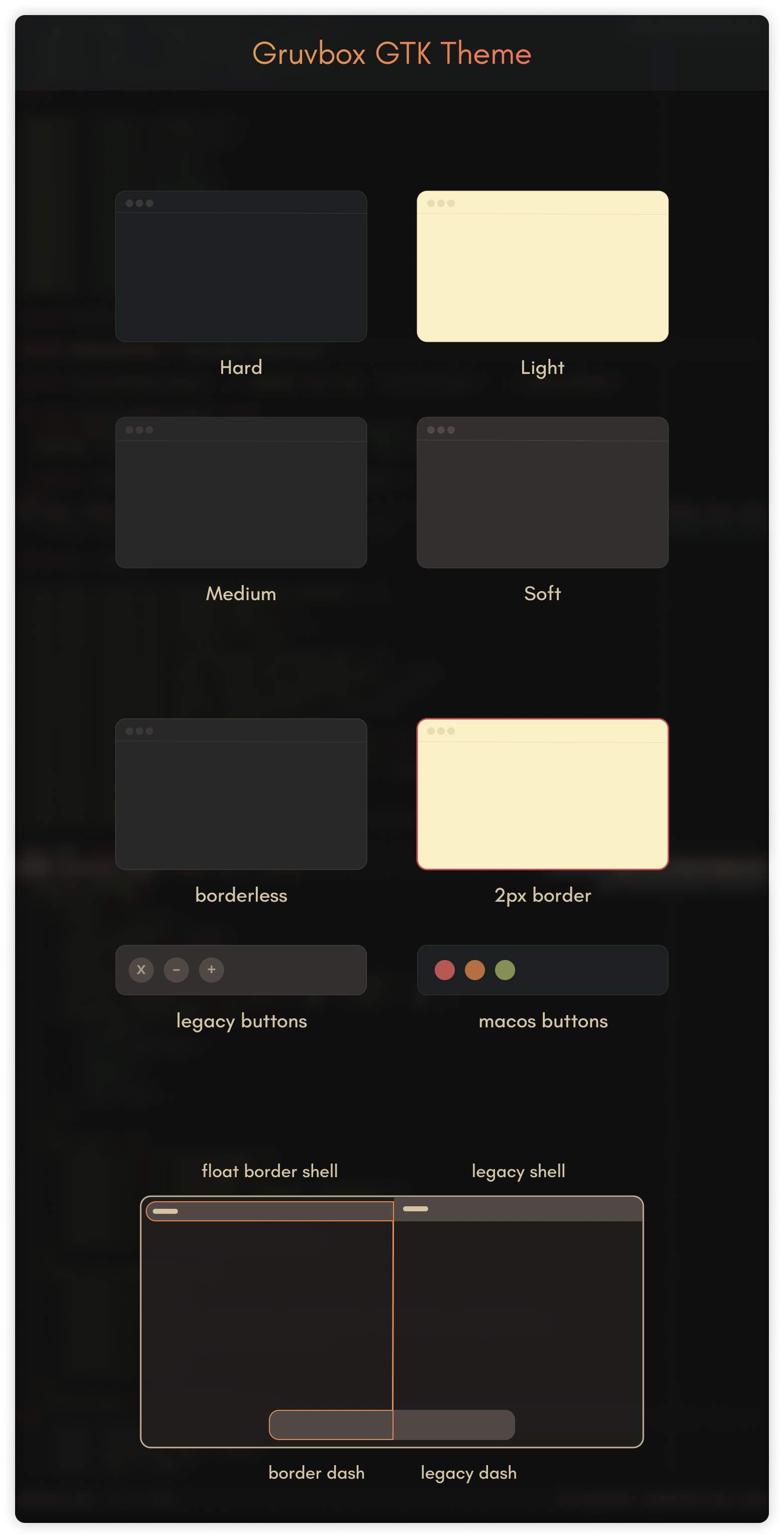
[!NOTE] The theme is more focused on the Gnome Desktop, but supports Cinnamon, XFCE, Mate, etc. with generic styles. It's great to combine in your TWMs like: XmonadWM, AwesomeWM, BSPWM, etc...
Before installing the themes, make sure to install the following necessary packages:
sassc murrine-engine and gnome-themes-extra packages for the correct rendering of themes.
Here are some commands to install on some distributions.
sudo dnf install gtk-murrine-engine
sudo zypper install gtk2-engine-murrine
sudo pacman -S gtk-engine-murrine
sudo apt install gtk2-engines-murrine
~/.themes In this path you must move the entire theme folder.~/.config/gtk-4.0 The files to move to this path can be found inside the theme directory in the gtk-4.0 folder,
copy only the assets, gtk.css and gtk-dark.css files or create a symlinks.assets, gtk.css and gtk-dark.css files to the ~/.config/gtk-4.0 path,
and if you notice that the theme has not been applied, just close and reopen the application.~/.themes:sudo flatpak override --filesystem=$HOME/.themes
~/.icons:sudo flatpak override --filesystem=$HOME/.icons
~/.config/gtk-4.0 locally:flatpak override --user --filesystem=xdg-config/gtk-4.0
~/.config/gtk-4.0 globally:sudo flatpak override --filesystem=xdg-config/gtk-4.0
[!TIP] 💡 Use stylepak for easier Flatpak theming.
Run the following command in the terminal for a general installation
./install.sh
The
./install.shallows some specific options like:
./install.sh --tweaks medium macos outline float -t green -l
To customise the name of the theme, you can use the
-nparameter, e.g.
./install.sh -n "Gruvbox-Float-Border" --tweaks outline float
[!TIP] 🧾 For more information, run:
./install.sh --help
-d, --dest DIR          Specify destination directory (Default: ~/.themes)

-n, --name NAME         Specify theme name (Default: Gruvbox)

-t, --theme VARIANT...  Specify theme accent color variant(s) [default|green|grey|orange|pink|purple|red|teal|yellow|all] (Default: blue)

-c, --color VARIANT...  Specify color variant(s) [light|dark] (Default: All variants)

-s, --size VARIANT...   Specify size variant [standard|compact] (Default: standard variant)

-l, --libadwaita        Link installed gtk-4.0 theme to config folder for all libadwaita app use this theme

-r, --remove,

-u, --uninstall         Uninstall/Remove installed themes or links

--tweaks                Specify versions for tweaks
                        1. [medium|soft]  Medium|Soft ColorSchemes version
                        2. black          Blackness color version
                        3. float          Floating gnome-shell panel style
                        4. outline        Windows with 2px outline style

-h, --help              Show help
This is just to clarify doubts about the abbreviations of the Themes
| Abbreviation example | Explanation of abbreviations |
|---|---|
| Theme-Name-B-MB | Bordered Theme and window macOS Buttons |
| Theme-Name-B-LB | Bordered Theme and window Legacy Buttons |
| Theme-Name-B-GS | Floating and Bordered Theme for Gnome Shell |
| Theme-Name-BL-MB | Borderless Theme and window macOS Buttons |
| Theme-Name-BL-LB | Borderless Theme and window Legacy Buttons |
| Theme-Name-BL-GS | Borderless Theme decoration for Gnome Shell |
| Neovim Colorschemes for GTK | GitHub | Pling |
|---|---|---|
| Catppuccin GTK Theme | Source | Package |
| Everforest GTK Theme | Source | Package |
| Gruvbox GTK Theme | Source | Package |
| Kanagawa GTK Theme | Source | Package |
| Material GTK Theme | Source | Package |
| Nightfox GTK Theme | Source | Package |
| Osaka GTK Theme | Source | Package |
| Rose Pine GTK Theme | Source | Package |
| Tokyonight GTK Theme | Source | Package |
Thanks to @telometto for the alternative to the application of themes in Flatpak.
Thanks to @f1yn for the solution to the active and inactive borders in the new version of Cinnamon.
Thanks to @eeeXun for the hint to solve the bug in Mate Desktop window control buttons.
Thanks to @Icy-Thought,@D3vil0p3r and to those who have packaged these themes for NIX and AUR.
190 followers · starred Dec 2023
515 followers · starred Nov 2023
1,526 followers · starred May 2023
5 followers · starred Dec 2022
A GTK theme based on the Gruvbox colour palette.
See the code
A GTK theme based on the colours of Sainnhe's great theme: Gruvbox Material for Neovim
the VinceLiuice's Awesome GTK Themes and the creativity of Gusbemacbe's: Suru Plus Icon Theme.
[!NOTE] The theme is more focused on the Gnome Desktop, but supports Cinnamon, XFCE, Mate, etc. with generic styles. It's great to combine in your TWMs like: XmonadWM, AwesomeWM, BSPWM, etc...
Before installing the themes, make sure to install the following necessary packages:
sassc murrine-engine and gnome-themes-extra packages for the correct rendering of themes.
Here are some commands to install on some distributions.
sudo dnf install gtk-murrine-engine
sudo zypper install gtk2-engine-murrine
sudo pacman -S gtk-engine-murrine
sudo apt install gtk2-engines-murrine
~/.themes In this path you must move the entire theme folder.~/.config/gtk-4.0 The files to move to this path can be found inside the theme directory in the gtk-4.0 folder,
copy only the assets, gtk.css and gtk-dark.css files or create a symlinks.assets, gtk.css and gtk-dark.css files to the ~/.config/gtk-4.0 path,
and if you notice that the theme has not been applied, just close and reopen the application.~/.themes:sudo flatpak override --filesystem=$HOME/.themes
~/.icons:sudo flatpak override --filesystem=$HOME/.icons
~/.config/gtk-4.0 locally:flatpak override --user --filesystem=xdg-config/gtk-4.0
~/.config/gtk-4.0 globally:sudo flatpak override --filesystem=xdg-config/gtk-4.0
[!TIP] 💡 Use stylepak for easier Flatpak theming.
Run the following command in the terminal for a general installation
./install.sh
The
./install.shallows some specific options like:
./install.sh --tweaks medium macos outline float -t green -l
To customise the name of the theme, you can use the
-nparameter, e.g.
./install.sh -n "Gruvbox-Float-Border" --tweaks outline float
[!TIP] 🧾 For more information, run:
./install.sh --help
-d, --dest DIR          Specify destination directory (Default: ~/.themes)

-n, --name NAME         Specify theme name (Default: Gruvbox)

-t, --theme VARIANT...  Specify theme accent color variant(s) [default|green|grey|orange|pink|purple|red|teal|yellow|all] (Default: blue)

-c, --color VARIANT...  Specify color variant(s) [light|dark] (Default: All variants)

-s, --size VARIANT...   Specify size variant [standard|compact] (Default: standard variant)

-l, --libadwaita        Link installed gtk-4.0 theme to config folder for all libadwaita app use this theme

-r, --remove,

-u, --uninstall         Uninstall/Remove installed themes or links

--tweaks                Specify versions for tweaks
                        1. [medium|soft]  Medium|Soft ColorSchemes version
                        2. black          Blackness color version
                        3. float          Floating gnome-shell panel style
                        4. outline        Windows with 2px outline style

-h, --help              Show help
This is just to clarify doubts about the abbreviations of the Themes
| Abbreviation example | Explanation of abbreviations |
|---|---|
| Theme-Name-B-MB | Bordered Theme and window macOS Buttons |
| Theme-Name-B-LB | Bordered Theme and window Legacy Buttons |
| Theme-Name-B-GS | Floating and Bordered Theme for Gnome Shell |
| Theme-Name-BL-MB | Borderless Theme and window macOS Buttons |
| Theme-Name-BL-LB | Borderless Theme and window Legacy Buttons |
| Theme-Name-BL-GS | Borderless Theme decoration for Gnome Shell |
| Neovim Colorschemes for GTK | GitHub | Pling |
|---|---|---|
| Catppuccin GTK Theme | Source | Package |
| Everforest GTK Theme | Source | Package |
| Gruvbox GTK Theme | Source | Package |
| Kanagawa GTK Theme | Source | Package |
| Material GTK Theme | Source | Package |
| Nightfox GTK Theme | Source | Package |
| Osaka GTK Theme | Source | Package |
| Rose Pine GTK Theme | Source | Package |
| Tokyonight GTK Theme | Source | Package |
Thanks to @telometto for the alternative to the application of themes in Flatpak.
Thanks to @f1yn for the solution to the active and inactive borders in the new version of Cinnamon.
Thanks to @eeeXun for the hint to solve the bug in Mate Desktop window control buttons.
Thanks to @Icy-Thought,@D3vil0p3r and to those who have packaged these themes for NIX and AUR.
190 followers · starred Dec 2023
515 followers · starred Nov 2023
1,526 followers · starred May 2023
5 followers · starred Dec 2022





