
Agentic chat runtime where markdown is the protocol
TypeScript
96
3 commits
updated Mar 17, 2026
README
fenced
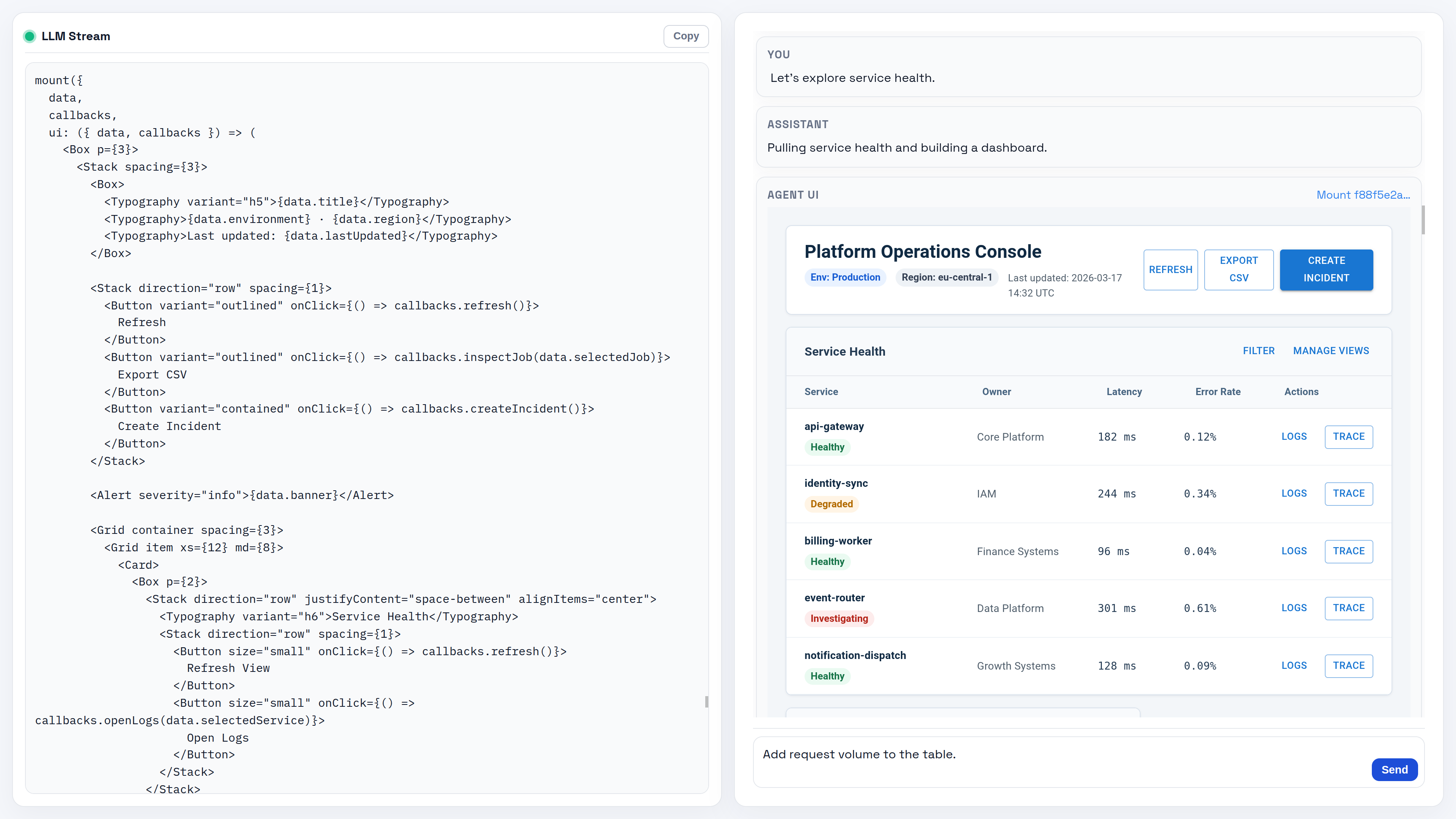
A prototype of an agentic chat runtime where markdown is the protocol. The LLM streams markdown text, executes TypeScript code blocks server-side, and renders reactive UI components on the client—all within a single response.
Thesis: Markdown is the ideal protocol for agentic AI assistants. It's what LLMs already understand, mixing prose, executable code, and structured data in a format that requires no new training.
📖 Read the accompanying article: The Future of Agentic AI Assistants Is... Markdown
Quick Start with Docker
# Build the image
docker build -t fenced .

# Run with required environment variables
docker run -p 4000:4000 \
  -e OPENAI_API_KEY=your-openai-api-key \
  -e FENCED_DISABLE_GOOGLE_SKILLS=true \
  fenced
Open http://localhost:4000 in your browser.
Environment Variables
| Variable | Required | Description |
|---|---|---|
OPENAI_API_KEY | Yes | OpenAI API key for LLM generation |
FENCED_DISABLE_GOOGLE_SKILLS | No | Set to 1 to disable Google skills (mail, contacts, calendar). Recommended when running without Google OAuth credentials. |
Local Development
Prerequisites
- Bun >= 1.0
Setup
# Install dependencies
bun install

# Create .env file
cp .env.example .env
# Edit .env with your OPENAI_API_KEY

# Run dev servers (two terminals)
bun run dev:server   # Bun API on port 4000
bun run dev:client   # Vite dev server with HMR

# Or use tmux to run both
bun run dev
Google Skills (Mail, Calendar, Contacts)
The mail, calendar, and contacts skills need Google OAuth credentials. Without them, set FENCED_DISABLE_GOOGLE_SKILLS=true in your .env to skip loading these skills.
Setting up Google OAuth credentials
1. Create OAuth credentials:
- Go to Google Cloud Console
- Create a project (or select an existing one)
- Enable the Gmail API, Google Calendar API, and People API
- Configure the OAuth consent screen (External, add your email as test user)
- Under Credentials → Data Access, add these scopes:
https://www.googleapis.com/auth/gmail.modifyhttps://www.googleapis.com/auth/calendarhttps://www.googleapis.com/auth/contacts
- Go to Credentials → Create Credentials → OAuth client ID
- Choose Desktop app as the application type
- Download the JSON and save it as:
packages/skills/src/google-auth/client_secret.json
2. Generate access token:
bun run google:renew-token
This starts a local server on port 3000, opens your browser for OAuth consent, and saves the token to token.json.
3. Verify it works:
bun run google:test-auth
4. Done. The agent can now use gmail, calendar, and contacts globals in agent.run blocks.
Warning: The agent can read/send emails and read/modify your calendar. Contacts are read-only.
The Protocol
Three block types flow through the system:
| Block | Syntax | Purpose |
|---|---|---|
| Text | Standard markdown | Streams to user token-by-token |
| Code | ```tsx agent.run | Server-executed TypeScript with persistent context |
| Data | ```json agent.data => "id" | JSON streamed into named client targets |
The feedback loop: user message → LLM generates markdown → code executes → console.log output feeds back to LLM → repeat until logs are empty.
Generative UI
The mount() primitive lets agents write React components on the fly:
const data = new Data({ progress: 0 });
const comp = mount({
  data,
  outputSchema: z.object({ name: z.string() }),
  ui: ({ data, output }) => (
    <Card>
      <LinearProgress value={data.progress} />
      <TextField {...output.name} label="Name" />
      <Button type="submit" {...output}>Submit</Button>
    </Card>
  )
});

data.progress = 50;  // Live update to client
const result = await comp.result;  // Wait for form submit
Four data-movement patterns:
- Client → Server: Form submission with Zod validation
- Server → Client: Live updates via Valtio proxy mutations
- LLM → Client:
json agent.datablocks stream JSON incrementally - Client → Server: Callbacks for interactive elements
Project Structure
apps/
  client/     # React + Vite frontend
  server/     # Bun HTTP/WebSocket API
packages/
  shared/     # Protocol types, constants
  channel/    # WebSocket transport layer
  session/    # Session model
  runtime/    # Interaction loop orchestration
  llm/        # LLM streaming (Vercel AI SDK)
  parser/     # Streaming markdown parser
  executor/   # VM execution, mount manager
  skills/     # Skill discovery and injection
  component-render/  # Client-side UI rendering
Scripts
bun run dev:client      # Vite dev server
bun run dev:server      # Bun API with hot reload
bun run build           # Build client for production
bun run lint            # ESLint (client) + tsc (server)
bun test                # Run all tests
bun test packages/parser  # Run tests in specific package
Adding Skills
Skills extend agent capabilities. Each skill lives in packages/skills/src/skills/<name>/:
| File | Purpose |
|---|---|
SKILL.md | Description injected into LLM prompt |
index.d.ts | TypeScript declarations shown to model |
index.ts | Runtime implementation (globals in agent.run) |
Security
This is a developer prototype with no sandboxing. The LLM generates code that executes with full Bun/browser capabilities. Treat it as "RCE as a Service" until proper isolation is implemented.
Documentation
- SPEC.md — Full specification
Notes
- Single-session, single-user prototype
- All code runs in one
node:vmcontext per session (variables persist) - API on port 4000, Vite proxies
/chatWebSocket - Max 60s per
agent.runexecution
Contributors

3 commits
Similar repos


Languages
TypeScript
95.9%
CSS
3.6%
Agentic chat runtime where markdown is the protocol
TypeScript
96
3 commits
updated Mar 17, 2026
README
fenced
A prototype of an agentic chat runtime where markdown is the protocol. The LLM streams markdown text, executes TypeScript code blocks server-side, and renders reactive UI components on the client—all within a single response.
Thesis: Markdown is the ideal protocol for agentic AI assistants. It's what LLMs already understand, mixing prose, executable code, and structured data in a format that requires no new training.
📖 Read the accompanying article: The Future of Agentic AI Assistants Is... Markdown
Quick Start with Docker
# Build the image
docker build -t fenced .

# Run with required environment variables
docker run -p 4000:4000 \
  -e OPENAI_API_KEY=your-openai-api-key \
  -e FENCED_DISABLE_GOOGLE_SKILLS=true \
  fenced
Open http://localhost:4000 in your browser.
Environment Variables
| Variable | Required | Description |
|---|---|---|
OPENAI_API_KEY | Yes | OpenAI API key for LLM generation |
FENCED_DISABLE_GOOGLE_SKILLS | No | Set to 1 to disable Google skills (mail, contacts, calendar). Recommended when running without Google OAuth credentials. |
Local Development
Prerequisites
- Bun >= 1.0
Setup
# Install dependencies
bun install

# Create .env file
cp .env.example .env
# Edit .env with your OPENAI_API_KEY

# Run dev servers (two terminals)
bun run dev:server   # Bun API on port 4000
bun run dev:client   # Vite dev server with HMR

# Or use tmux to run both
bun run dev
Google Skills (Mail, Calendar, Contacts)
The mail, calendar, and contacts skills need Google OAuth credentials. Without them, set FENCED_DISABLE_GOOGLE_SKILLS=true in your .env to skip loading these skills.
Setting up Google OAuth credentials
1. Create OAuth credentials:
- Go to Google Cloud Console
- Create a project (or select an existing one)
- Enable the Gmail API, Google Calendar API, and People API
- Configure the OAuth consent screen (External, add your email as test user)
- Under Credentials → Data Access, add these scopes:
https://www.googleapis.com/auth/gmail.modifyhttps://www.googleapis.com/auth/calendarhttps://www.googleapis.com/auth/contacts
- Go to Credentials → Create Credentials → OAuth client ID
- Choose Desktop app as the application type
- Download the JSON and save it as:
packages/skills/src/google-auth/client_secret.json
2. Generate access token:
bun run google:renew-token
This starts a local server on port 3000, opens your browser for OAuth consent, and saves the token to token.json.
3. Verify it works:
bun run google:test-auth
4. Done. The agent can now use gmail, calendar, and contacts globals in agent.run blocks.
Warning: The agent can read/send emails and read/modify your calendar. Contacts are read-only.
The Protocol
Three block types flow through the system:
| Block | Syntax | Purpose |
|---|---|---|
| Text | Standard markdown | Streams to user token-by-token |
| Code | ```tsx agent.run | Server-executed TypeScript with persistent context |
| Data | ```json agent.data => "id" | JSON streamed into named client targets |
The feedback loop: user message → LLM generates markdown → code executes → console.log output feeds back to LLM → repeat until logs are empty.
Generative UI
The mount() primitive lets agents write React components on the fly:
const data = new Data({ progress: 0 });
const comp = mount({
  data,
  outputSchema: z.object({ name: z.string() }),
  ui: ({ data, output }) => (
    <Card>
      <LinearProgress value={data.progress} />
      <TextField {...output.name} label="Name" />
      <Button type="submit" {...output}>Submit</Button>
    </Card>
  )
});

data.progress = 50;  // Live update to client
const result = await comp.result;  // Wait for form submit
Four data-movement patterns:
- Client → Server: Form submission with Zod validation
- Server → Client: Live updates via Valtio proxy mutations
- LLM → Client:
json agent.datablocks stream JSON incrementally - Client → Server: Callbacks for interactive elements
Project Structure
apps/
  client/     # React + Vite frontend
  server/     # Bun HTTP/WebSocket API
packages/
  shared/     # Protocol types, constants
  channel/    # WebSocket transport layer
  session/    # Session model
  runtime/    # Interaction loop orchestration
  llm/        # LLM streaming (Vercel AI SDK)
  parser/     # Streaming markdown parser
  executor/   # VM execution, mount manager
  skills/     # Skill discovery and injection
  component-render/  # Client-side UI rendering
Scripts
bun run dev:client      # Vite dev server
bun run dev:server      # Bun API with hot reload
bun run build           # Build client for production
bun run lint            # ESLint (client) + tsc (server)
bun test                # Run all tests
bun test packages/parser  # Run tests in specific package
Adding Skills
Skills extend agent capabilities. Each skill lives in packages/skills/src/skills/<name>/:
| File | Purpose |
|---|---|
SKILL.md | Description injected into LLM prompt |
index.d.ts | TypeScript declarations shown to model |
index.ts | Runtime implementation (globals in agent.run) |
Security
This is a developer prototype with no sandboxing. The LLM generates code that executes with full Bun/browser capabilities. Treat it as "RCE as a Service" until proper isolation is implemented.
Documentation
- SPEC.md — Full specification
Notes
- Single-session, single-user prototype
- All code runs in one
node:vmcontext per session (variables persist) - API on port 4000, Vite proxies
/chatWebSocket - Max 60s per
agent.runexecution
Similar repos
Contributors
3 commits
Languages
TypeScript
95.9%
CSS
3.6%