
Fast, reliable Remote SSH support for VSCodium and Code OSS
TypeScript
0
214 commits
updated Sep 21, 2026
See what people are saying
README
Fast Remote - SSH
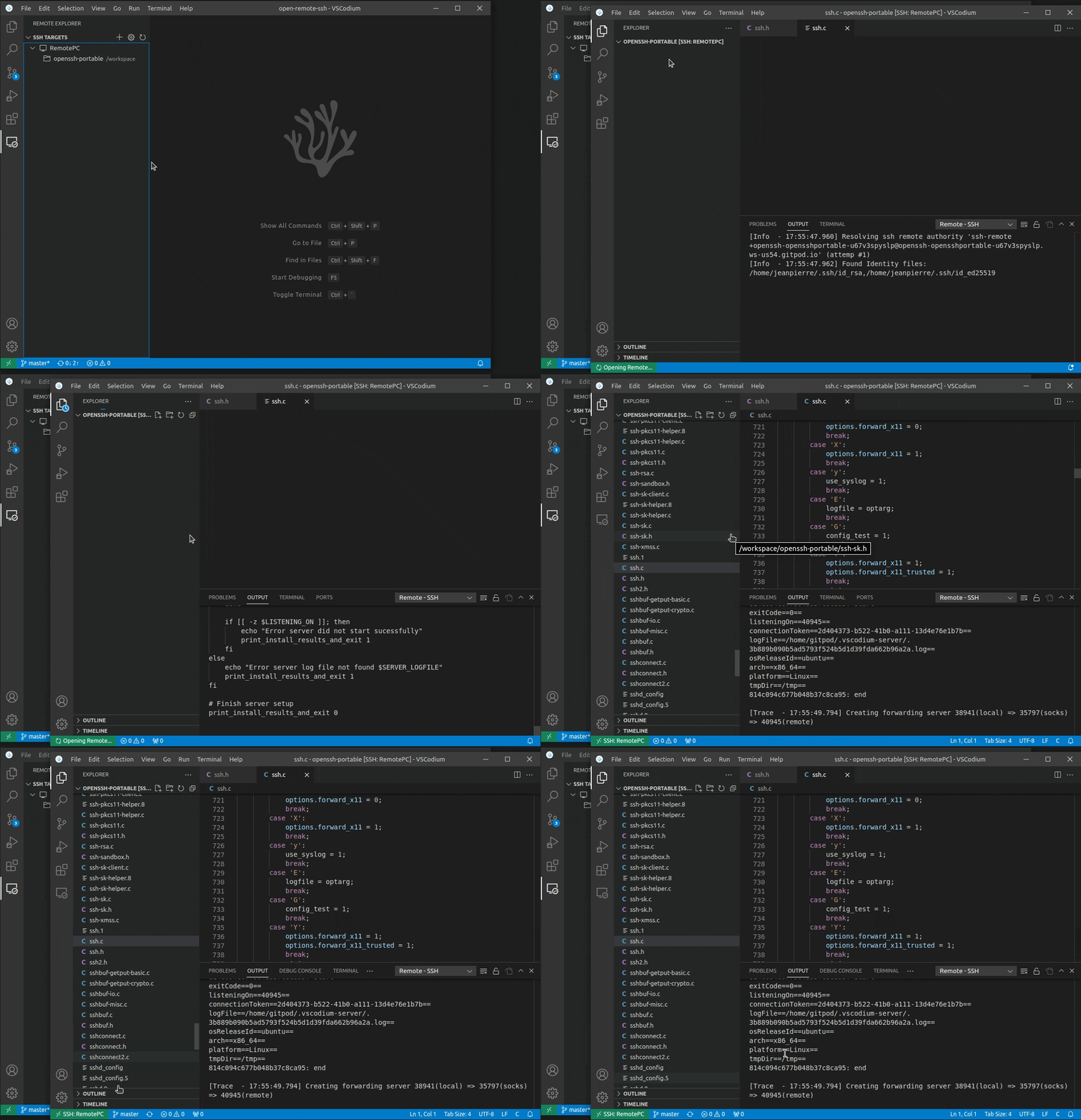
Fast Remote - SSH lets you use a remote machine as a complete development environment from VSCodium or Code OSS. Connect to any configured SSH host, open remote folders, edit files, use terminals, run tasks and debuggers, and install extensions on the remote host while the editor interface stays on your local machine.
This project is our independently maintained distribution of
Open Remote - SSH. It remains compatible with
the familiar remote.SSH.* settings, OpenSSH configuration files, and the ssh-remote
authority, with additional work on connection reuse, recovery, forwarding, and diagnostics.
[!IMPORTANT] Disable or uninstall
jeanp413.open-remote-sshbefore enabling this extension. Both extensions provide the samessh-remoteauthority, commands, views, and settings, so they are not designed to run at the same time.
What it provides
- Connect to hosts from your OpenSSH configuration, including non-default users and ports.
- Open folders and workspaces directly on Linux, macOS, Windows, and supported BSD hosts.
- Run terminals, tasks, debuggers, language tools, and remote extensions beside your code.
- Support public-key, password, keyboard-interactive, SSH agent,
ProxyJump, andProxyCommandconnection flows. - Install and start a matching VSCodium Remote Agent when the host does not already have one.
- Forward the editor's management and extension-host channels through the encrypted SSH connection.
Improvements in this distribution
Faster connection reuse
- Cache the Remote Agent endpoint and connection token across VSCodium windows.
- Probe a cached endpoint with a bounded SSH channel check before trusting it.
- Recover a running Remote Agent without executing the full installation script again.
- Bypass a suspect cache on resolver retries while preserving newer cache data written by another window.
- Try public-key authentication directly, while retaining password, keyboard-interactive, and no-auth compatibility fallbacks.
A thinner forwarding path
- Carry the Management and Remote Extension Host connections over direct SSH forwarding.
- Ask the operating system to allocate local forwarding ports atomically, avoiding the scan-then-listen race between concurrent windows.
- Enable TCP
NODELAYon the SSH transport and local tunnel sockets for latency-sensitive protocol messages.
More predictable recovery
- Send configurable encrypted SSH keepalives so idle NAT or firewall state is detected before an editor operation needs the connection.
- Serialize remote installation and startup across concurrent windows on Linux, macOS, and Windows.
- Clean up old SSH clients, tunnels, jump-host connections, and agent-forwarding channels before a reconnect replaces them.
- Rotate an Agent that accepts SSH forwarding but never establishes a management connection, while allowing older generations to keep serving other VSCodium windows.
- Fall back to a usable temporary directory when a stale
XDG_RUNTIME_DIRpoints to a missing or inaccessible path, and pass the corrected environment to the Remote Agent.
The extension also records timings for SSH configuration loading, authentication, Remote Agent recovery, tunnel creation, and total authority resolution. Use Remote-SSH: Show Log when a connection does not behave as expected.
SSH Host Requirements
You can connect to a running SSH server on the following platforms.
Supported:
- x86_64 Debian 8+, Ubuntu 16.04+, CentOS / RHEL 7+ Linux
- ARMv7l (AArch32) Raspbian Stretch/9+ (32-bit)
- ARMv8l (AArch64) Ubuntu 18.04+ (64-bit)
- IBM Z (s390x) Debian 13, RHEL 8+, Ubuntu 22.04+, SLES 15+
- macOS 10.14+ (Mojave)
- Windows 10+
- FreeBSD 13+ (Requires custom serverDownloadUrlTemplate setting)
- DragonFlyBSD (Requires manual remote-extension-host installation)
Requirements
Configuration
Your SSH server's configuration needs to have the following setting:
AllowTcpForwarding yes
Activation
This extension relies on two API proposals: resolvers (required for SSH connections) and
contribViewsRemote (required to show the SSH Targets view inside the built-in Remote view).
Proposals are only granted to extensions that the client allowlists in its product.json
(extensionEnabledApiProposals), so out of the box this depends on the goodwill of your editor
distribution:
- Code OSS (running from source): proposals are always granted, everything works.
- VSCodium: only extensions listed in its built-in
product.jsonget proposals automatically. If this extension is not on that list, the Remote view integration is unavailable and the extension shows its SSH Targets view in its own activity bar entry instead; SSH connections keep working on current VSCodium builds, but that behavior is not guaranteed. For full functionality enable this extension explicitly inargv.json. Restart VSCodium after changing the file.
{
    ...
    "enable-proposed-api": [
        ...,
        "F1yingWhite.fast-remote-ssh",
    ]
    ...
}
Open the file with the Preferences: Configure Runtime Arguments command. It is usually
located at ~/.vscode-oss/argv.json.
The Remote-SSH: Enable Built-in Remote View Integration command (also in the fallback
view's ... menu) copies the required snippet to the clipboard and opens argv.json for you.
Alpine linux
When running on alpine linux, the packages libstdc++ and bash are necessary and can be installed via
running
sudo apk add bash libstdc++
SSH configuration file
OpenSSH supports using a configuration file to store all your different SSH connections.
To use an SSH config file, run the Remote-SSH: Open SSH Configuration File... command.
Note for VSCode-OSS users
If you are using VSCode-OSS instead of VSCodium, you need some extra steps to make it work.
Modify the following entries in the plugin settings:
"remote.SSH.serverBinaryName": "codium-server",
"remote.SSH.serverDownloadUrlTemplate": "https://github.com/VSCodium/vscodium/releases/download/${version}${release}/vscodium-reh-${os}-${arch}-${version}${release}.tar.gz",
"remote.SSH.serverVersion": "latest",
"remote.SSH.serverValidation": "force",
VSCodium versions have an extra release part that do not have equivalent for VSCode-OSS.
So leaving serverVersion to the default "match" will fail.
The plugin will install the latest release of VSCodium if serverVersion is set to "latest".
If you need to match the VSCode-OSS version, set serverVersion to "closest", to
automatically fetch the last release of VSCodium for this version.
You can look for the release numbers associated with your VSCode version in the release page. For instance, for VSCode version "1.96.0", the (last) VSCodium release number is "24352".
You can also set serverVersion to a specic version (e.g. "1.116.0") or a specific
version-release (e.g. "1.116.02821").
If the local and remote VSCodium versions don't match, which will be the case on VSCode-OSS,
remote server validation needs to be bypassed. Setting serverValidation to "force" will
modify the commit of the remote server to make it match the local VSCode commit.
If serverValidation is set to "skip", the remote server will skip checking that the commits
match. This option is working only if the remote VSCodium version is >=1.120.
Starting with VSCodium version 1.99.0, the release number is not separated from the version by a dot . anymore.
Therefore serverDownloadUrlTemplate needs to be filled with the new scheme (as shown above).
Before 1.99.0, the old scheme needs to be used:
"remote.SSH.serverDownloadUrlTemplate": "https://github.com/VSCodium/vscodium/releases/download/${version}.${release}/vscodium-reh-${os}-${arch}-${version}.${release}.tar.gz",
Contributors


Similar repos




Languages
TypeScript
79.7%
Shell
13.8%
PowerShell
4.5%
JavaScript
1.5%
Fast, reliable Remote SSH support for VSCodium and Code OSS
TypeScript
0
214 commits
updated Sep 21, 2026
See what people are saying
README
Fast Remote - SSH
Fast Remote - SSH lets you use a remote machine as a complete development environment from VSCodium or Code OSS. Connect to any configured SSH host, open remote folders, edit files, use terminals, run tasks and debuggers, and install extensions on the remote host while the editor interface stays on your local machine.
This project is our independently maintained distribution of
Open Remote - SSH. It remains compatible with
the familiar remote.SSH.* settings, OpenSSH configuration files, and the ssh-remote
authority, with additional work on connection reuse, recovery, forwarding, and diagnostics.
[!IMPORTANT] Disable or uninstall
jeanp413.open-remote-sshbefore enabling this extension. Both extensions provide the samessh-remoteauthority, commands, views, and settings, so they are not designed to run at the same time.
What it provides
- Connect to hosts from your OpenSSH configuration, including non-default users and ports.
- Open folders and workspaces directly on Linux, macOS, Windows, and supported BSD hosts.
- Run terminals, tasks, debuggers, language tools, and remote extensions beside your code.
- Support public-key, password, keyboard-interactive, SSH agent,
ProxyJump, andProxyCommandconnection flows. - Install and start a matching VSCodium Remote Agent when the host does not already have one.
- Forward the editor's management and extension-host channels through the encrypted SSH connection.
Improvements in this distribution
Faster connection reuse
- Cache the Remote Agent endpoint and connection token across VSCodium windows.
- Probe a cached endpoint with a bounded SSH channel check before trusting it.
- Recover a running Remote Agent without executing the full installation script again.
- Bypass a suspect cache on resolver retries while preserving newer cache data written by another window.
- Try public-key authentication directly, while retaining password, keyboard-interactive, and no-auth compatibility fallbacks.
A thinner forwarding path
- Carry the Management and Remote Extension Host connections over direct SSH forwarding.
- Ask the operating system to allocate local forwarding ports atomically, avoiding the scan-then-listen race between concurrent windows.
- Enable TCP
NODELAYon the SSH transport and local tunnel sockets for latency-sensitive protocol messages.
More predictable recovery
- Send configurable encrypted SSH keepalives so idle NAT or firewall state is detected before an editor operation needs the connection.
- Serialize remote installation and startup across concurrent windows on Linux, macOS, and Windows.
- Clean up old SSH clients, tunnels, jump-host connections, and agent-forwarding channels before a reconnect replaces them.
- Rotate an Agent that accepts SSH forwarding but never establishes a management connection, while allowing older generations to keep serving other VSCodium windows.
- Fall back to a usable temporary directory when a stale
XDG_RUNTIME_DIRpoints to a missing or inaccessible path, and pass the corrected environment to the Remote Agent.
The extension also records timings for SSH configuration loading, authentication, Remote Agent recovery, tunnel creation, and total authority resolution. Use Remote-SSH: Show Log when a connection does not behave as expected.
SSH Host Requirements
You can connect to a running SSH server on the following platforms.
Supported:
- x86_64 Debian 8+, Ubuntu 16.04+, CentOS / RHEL 7+ Linux
- ARMv7l (AArch32) Raspbian Stretch/9+ (32-bit)
- ARMv8l (AArch64) Ubuntu 18.04+ (64-bit)
- IBM Z (s390x) Debian 13, RHEL 8+, Ubuntu 22.04+, SLES 15+
- macOS 10.14+ (Mojave)
- Windows 10+
- FreeBSD 13+ (Requires custom serverDownloadUrlTemplate setting)
- DragonFlyBSD (Requires manual remote-extension-host installation)
Requirements
Configuration
Your SSH server's configuration needs to have the following setting:
AllowTcpForwarding yes
Activation
This extension relies on two API proposals: resolvers (required for SSH connections) and
contribViewsRemote (required to show the SSH Targets view inside the built-in Remote view).
Proposals are only granted to extensions that the client allowlists in its product.json
(extensionEnabledApiProposals), so out of the box this depends on the goodwill of your editor
distribution:
- Code OSS (running from source): proposals are always granted, everything works.
- VSCodium: only extensions listed in its built-in
product.jsonget proposals automatically. If this extension is not on that list, the Remote view integration is unavailable and the extension shows its SSH Targets view in its own activity bar entry instead; SSH connections keep working on current VSCodium builds, but that behavior is not guaranteed. For full functionality enable this extension explicitly inargv.json. Restart VSCodium after changing the file.
{
    ...
    "enable-proposed-api": [
        ...,
        "F1yingWhite.fast-remote-ssh",
    ]
    ...
}
Open the file with the Preferences: Configure Runtime Arguments command. It is usually
located at ~/.vscode-oss/argv.json.
The Remote-SSH: Enable Built-in Remote View Integration command (also in the fallback
view's ... menu) copies the required snippet to the clipboard and opens argv.json for you.
Alpine linux
When running on alpine linux, the packages libstdc++ and bash are necessary and can be installed via
running
sudo apk add bash libstdc++
SSH configuration file
OpenSSH supports using a configuration file to store all your different SSH connections.
To use an SSH config file, run the Remote-SSH: Open SSH Configuration File... command.
Note for VSCode-OSS users
If you are using VSCode-OSS instead of VSCodium, you need some extra steps to make it work.
Modify the following entries in the plugin settings:
"remote.SSH.serverBinaryName": "codium-server",
"remote.SSH.serverDownloadUrlTemplate": "https://github.com/VSCodium/vscodium/releases/download/${version}${release}/vscodium-reh-${os}-${arch}-${version}${release}.tar.gz",
"remote.SSH.serverVersion": "latest",
"remote.SSH.serverValidation": "force",
VSCodium versions have an extra release part that do not have equivalent for VSCode-OSS.
So leaving serverVersion to the default "match" will fail.
The plugin will install the latest release of VSCodium if serverVersion is set to "latest".
If you need to match the VSCode-OSS version, set serverVersion to "closest", to
automatically fetch the last release of VSCodium for this version.
You can look for the release numbers associated with your VSCode version in the release page. For instance, for VSCode version "1.96.0", the (last) VSCodium release number is "24352".
You can also set serverVersion to a specic version (e.g. "1.116.0") or a specific
version-release (e.g. "1.116.02821").
If the local and remote VSCodium versions don't match, which will be the case on VSCode-OSS,
remote server validation needs to be bypassed. Setting serverValidation to "force" will
modify the commit of the remote server to make it match the local VSCode commit.
If serverValidation is set to "skip", the remote server will skip checking that the commits
match. This option is working only if the remote VSCodium version is >=1.120.
Starting with VSCodium version 1.99.0, the release number is not separated from the version by a dot . anymore.
Therefore serverDownloadUrlTemplate needs to be filled with the new scheme (as shown above).
Before 1.99.0, the old scheme needs to be used:
"remote.SSH.serverDownloadUrlTemplate": "https://github.com/VSCodium/vscodium/releases/download/${version}.${release}/vscodium-reh-${os}-${arch}-${version}.${release}.tar.gz",
Similar repos
Contributors
Languages
TypeScript
79.7%
Shell
13.8%
PowerShell
4.5%
JavaScript
1.5%