Free, open-source desktop editor for narrated documentary videos, image and video Ai generation, and more
Python
10
59 commits
updated Oct 8, 2026
A free, open-source desktop editor for narrated documentary videos. Turn a script, photos, clips and a voice into a finished film one scene at a time. You get film looks, captions that follow the narration, a multitrack audio timeline, stickers, titles and optional AI tools. Arabic and English are first-class.
Install · Highlights · Feature tour · AI providers and prices · Run from source · Tests · Version history · Licenses · Contributing
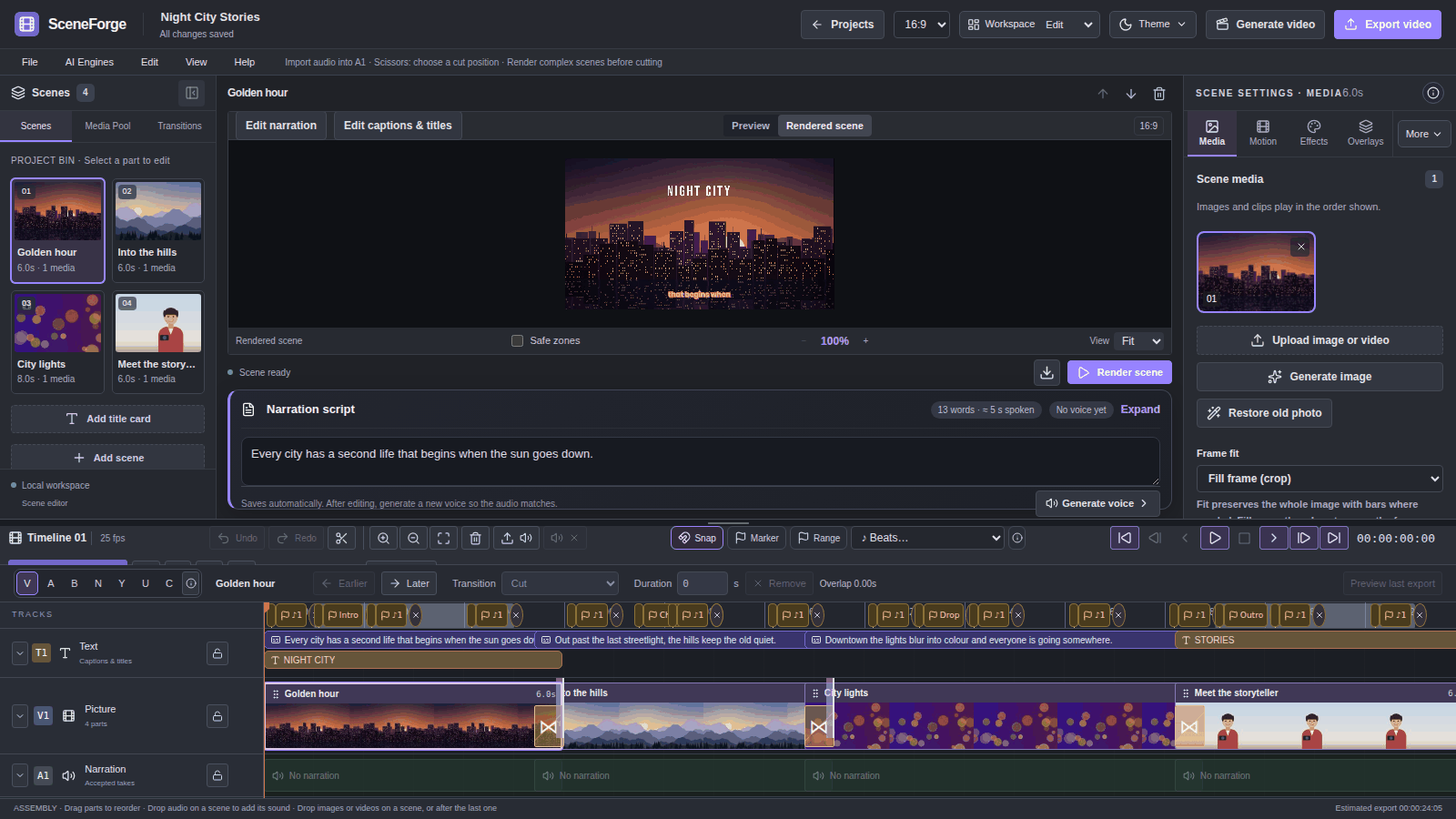
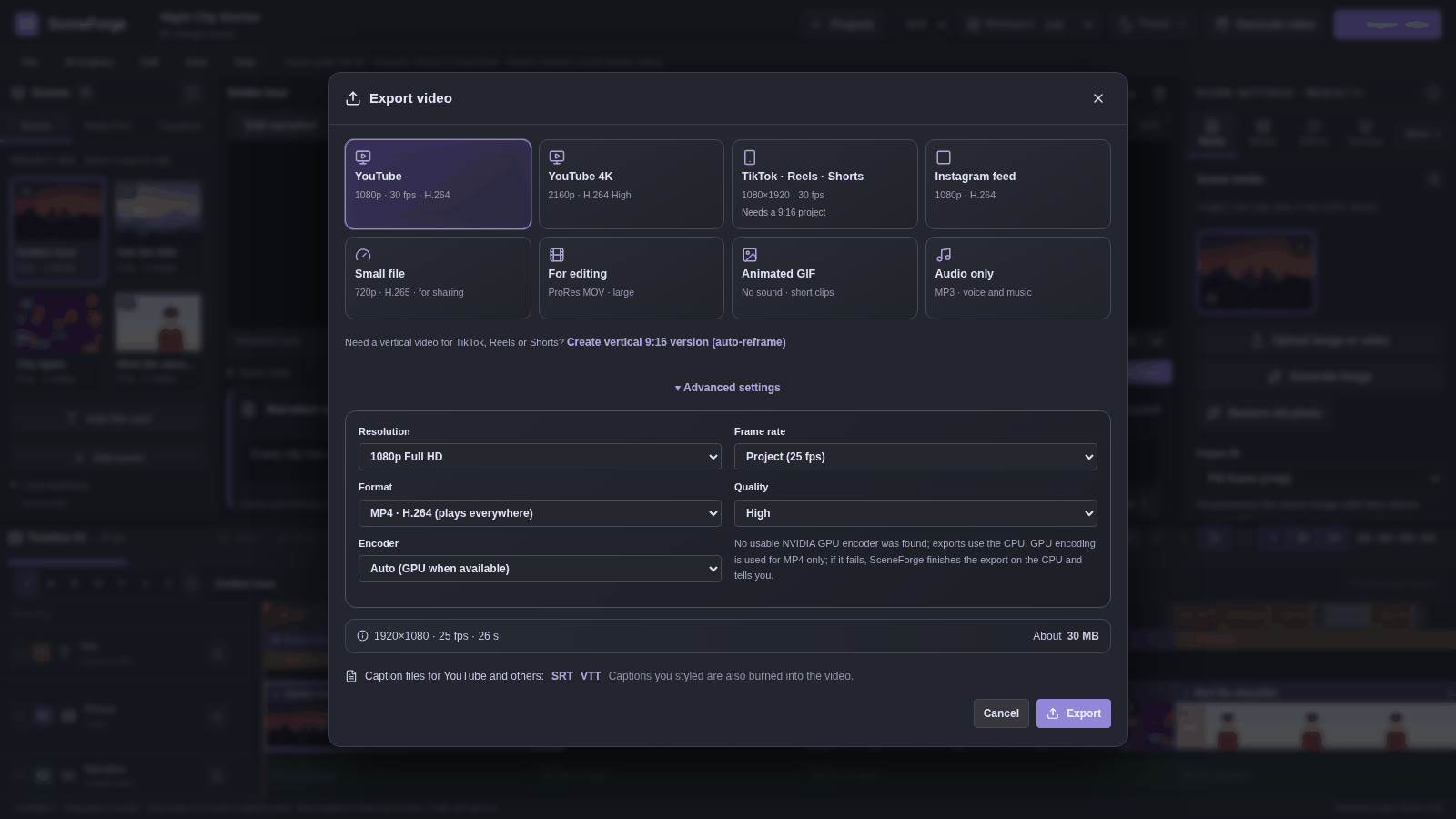
Release status. 0.8.0 is the latest release: the creator pack (silence and filler removal, auto-reframe to 9:16, GPU export, live playback, keyframes), on top of 0.7.1 (security and usability) and 0.7.0. 0.7.0 was a large update over 0.5.3: a multitrack audio timeline with pro edit tools, 71 caption styles, 400 stickers and emoji, per-effect settings, AI subject cutout and voice isolation, and optional text-to-video. Items marked (0.7.0) are new in this version. The full record is in
desktop/RELEASE_NOTES.mdandPROJECT_HISTORY_AND_HANDOFF.md.
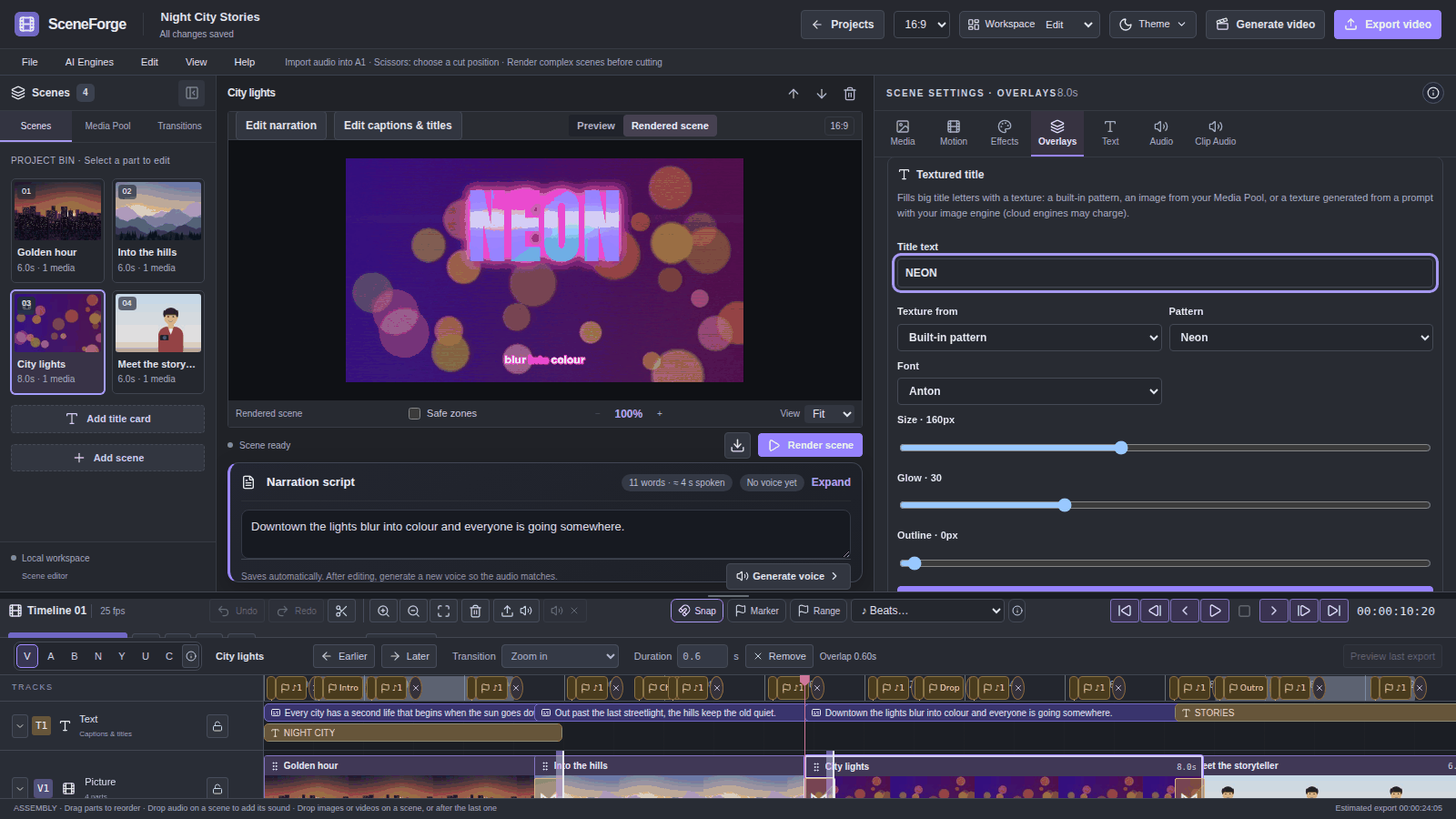
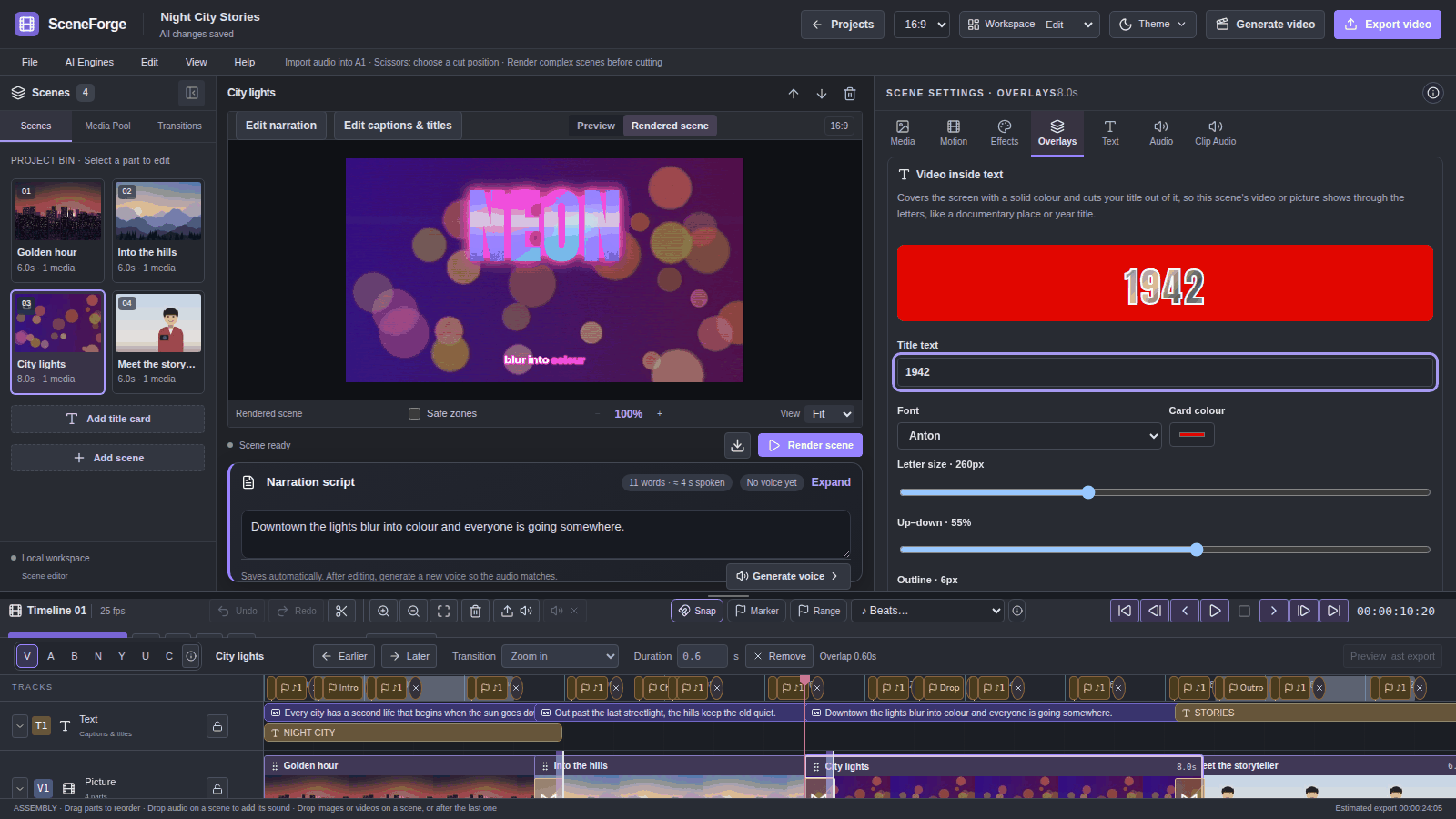
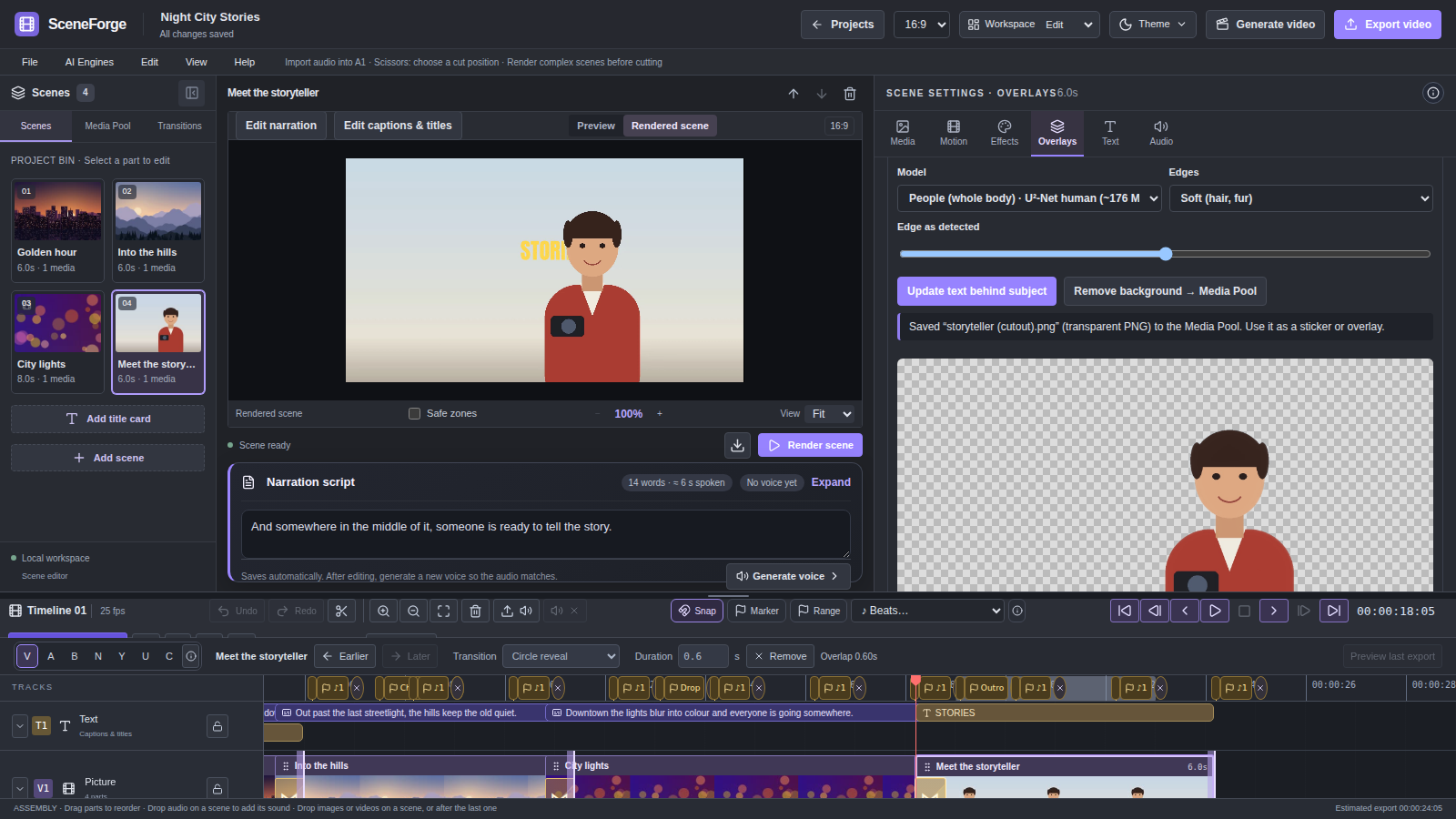
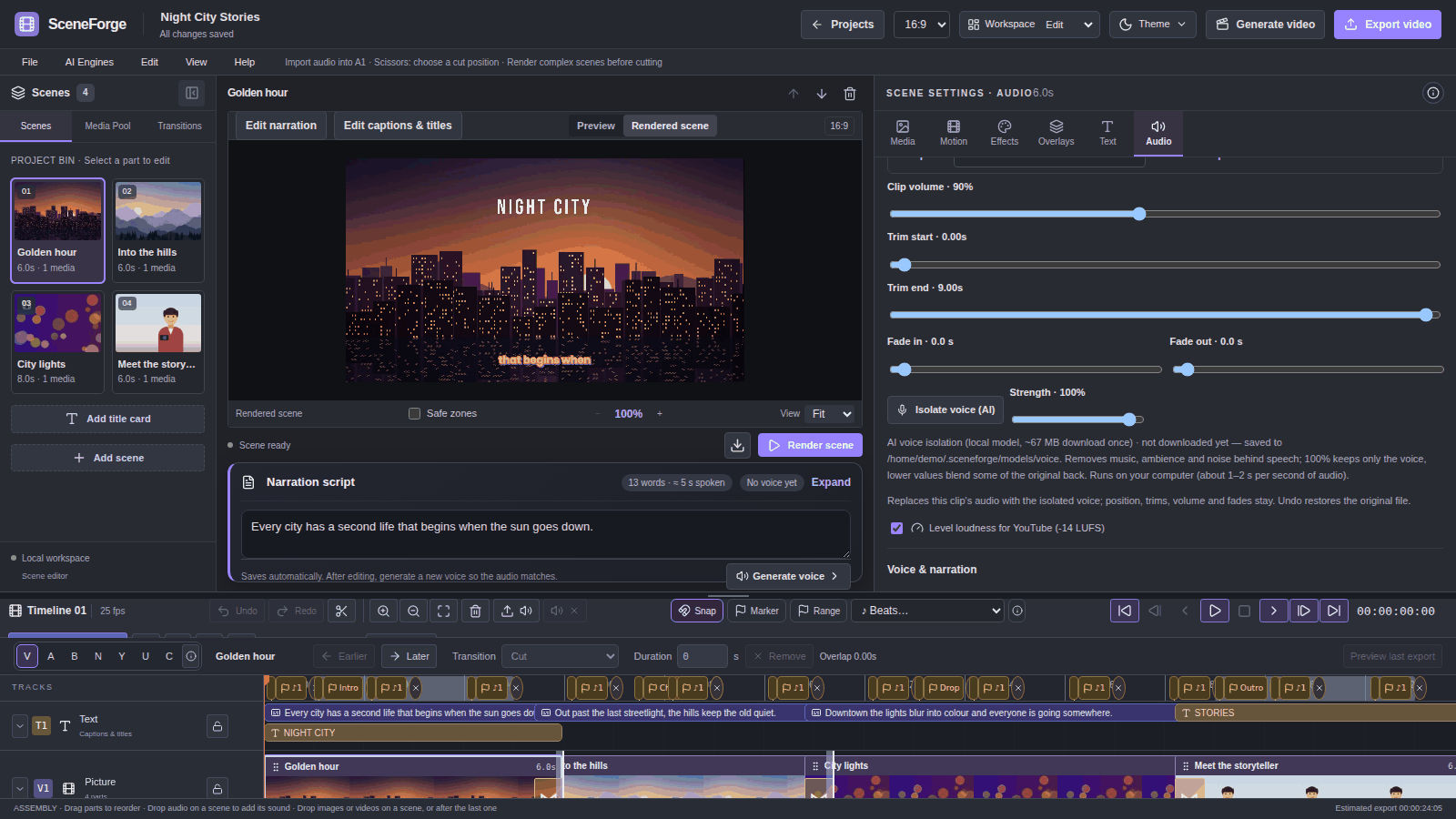
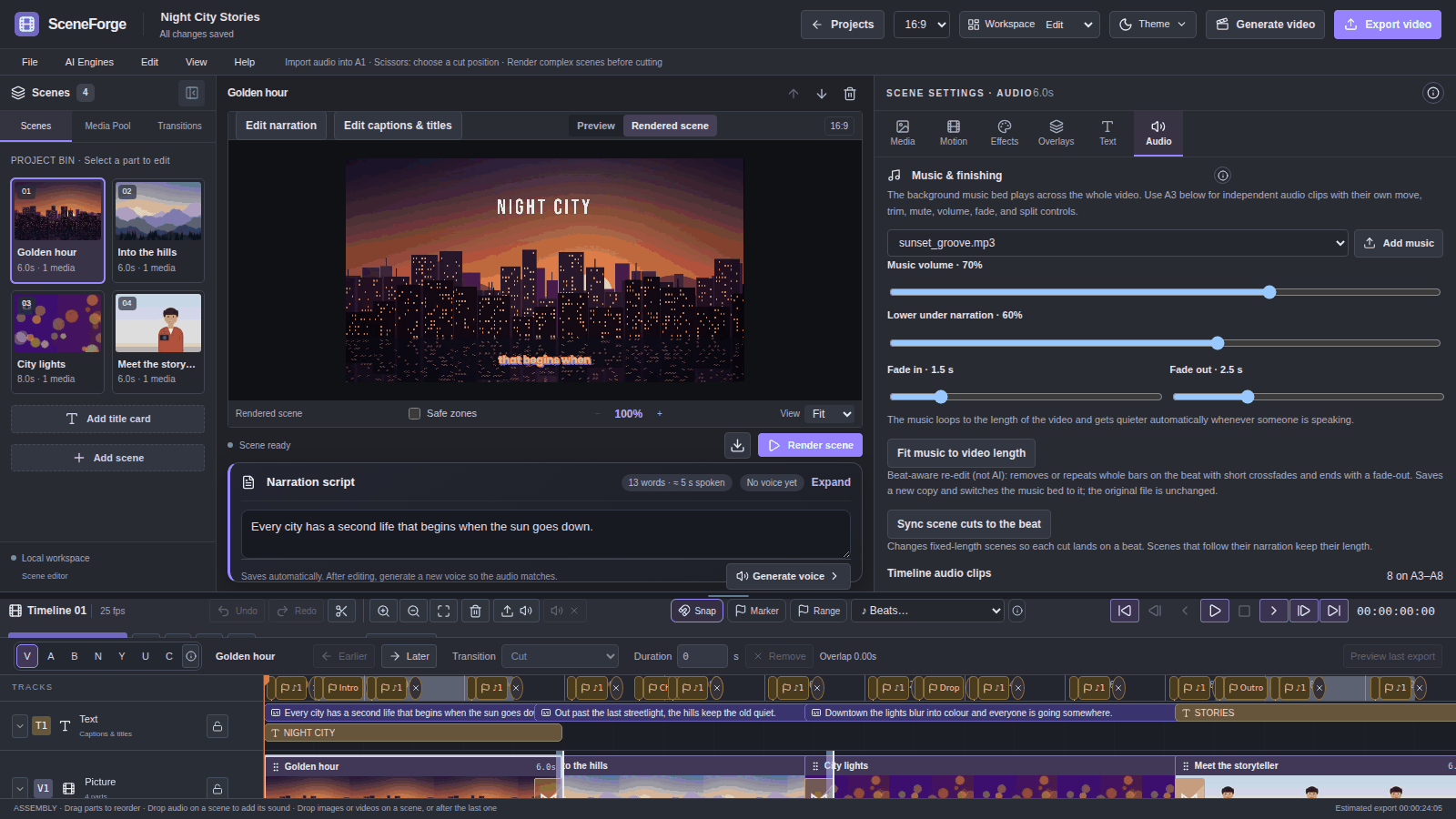
The screenshots on this page come from the 0.7.0 build. They show a demo project made only from procedurally generated pictures, video and audio. scripts/capture_readme_screenshots.py rebuilds the project and the screenshots.
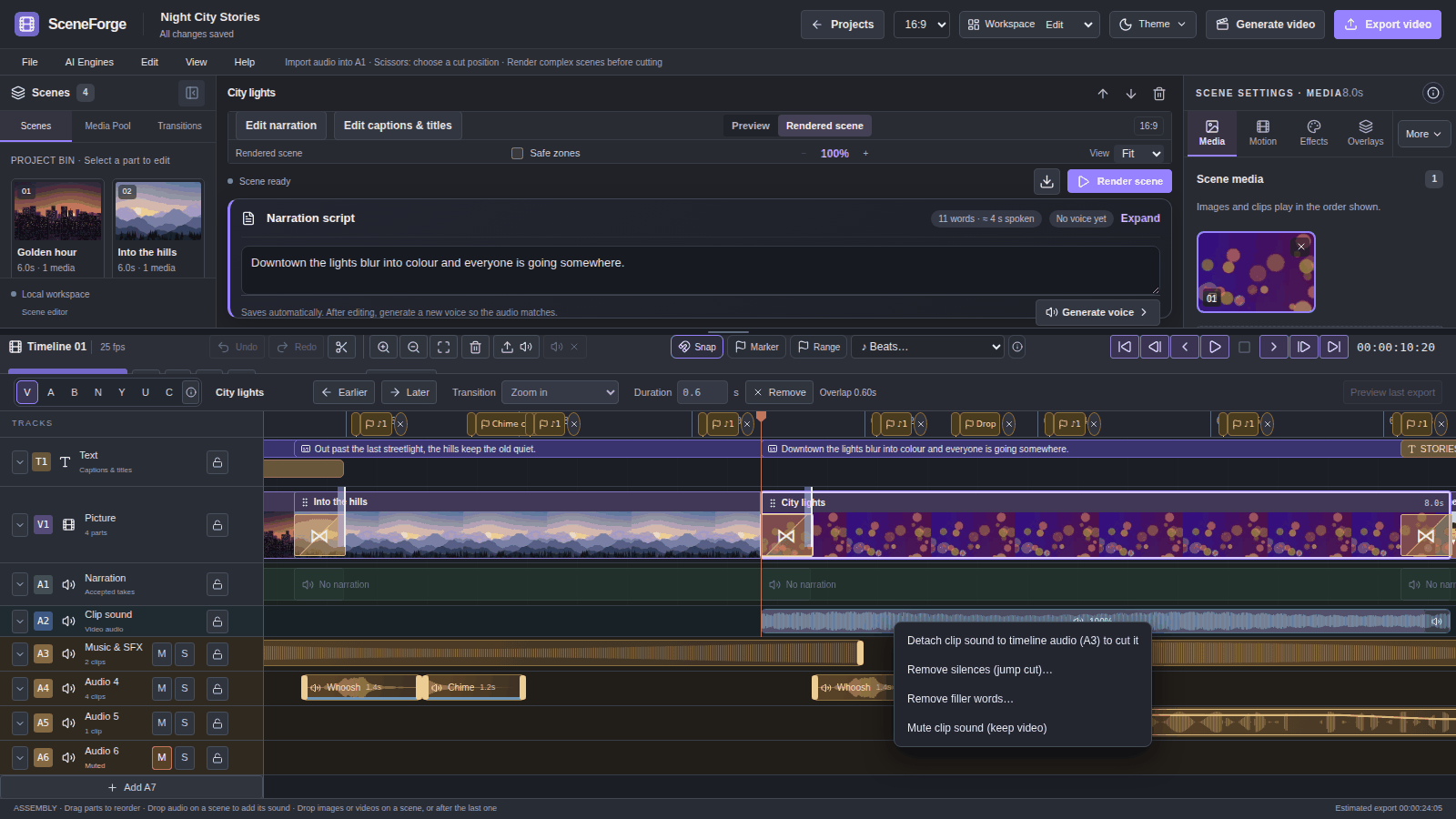
Tracks. T1 holds captions and titles. V1 holds the scene pictures, with transitions overlapping. A1 holds the accepted narration, A2 the embedded sound of each video clip, and A3–A8 independent audio clips. A whole-project music bed sits underneath. Each audio track has mute, solo and lock, and is dimmed when it will not be heard. (A4–A8: 0.7.0)
Edit tools for timeline audio (0.7.0):
| Key | Tool |
|---|---|
| V | Select |
| A | Track select forward |
| B | Ripple trim |
| N | Roll |
| Y | Slip |
| U | Slide |
| C | Blade |
| Shift+C | Razor All |
Delete removes only the selected piece. Shift+Delete ripple-deletes it. Ctrl+C, Ctrl+X, Ctrl+V and Ctrl+D also work, and every edit can be undone.
Markers are saved with the project. A marker can be a point or a range, in five colours, and can be attached to a clip so it moves with the clip. ♪ Beats… finds the beat of the music bed or of a selected clip and marks every beat, every 2nd beat or every bar. Cuts and clips snap to the beat markers. (0.7.0)
Volume envelopes take up to 32 keyframes on an A3–A8 clip, with presets such as dip under a voice. The line is drawn on the clip and heard in scene renders and in the export. Clip groups select and move together: Ctrl+G groups, and Ctrl+Shift+G ungroups. (0.7.0)
Right-click menus for audio clips, scenes, narration and clip sound. From these menus you can split, duplicate, move a clip to another track, add a marker to the clip, or detach narration or clip sound to A3 so you can cut it. (0.7.0)
Everything that existed before: drag-and-drop of files and whole folders, 28 curated transitions with live previews, split and ripple delete, multi-select with batch apply, snapping, linked trimming of source video and audio, Ctrl+wheel zoom around the pointer, and undo/redo.
The design notes are in docs/TIMELINE_ARCHITECTURE.md. V1 is still scene-based. Free multitrack video and nested clips are not implemented yet.
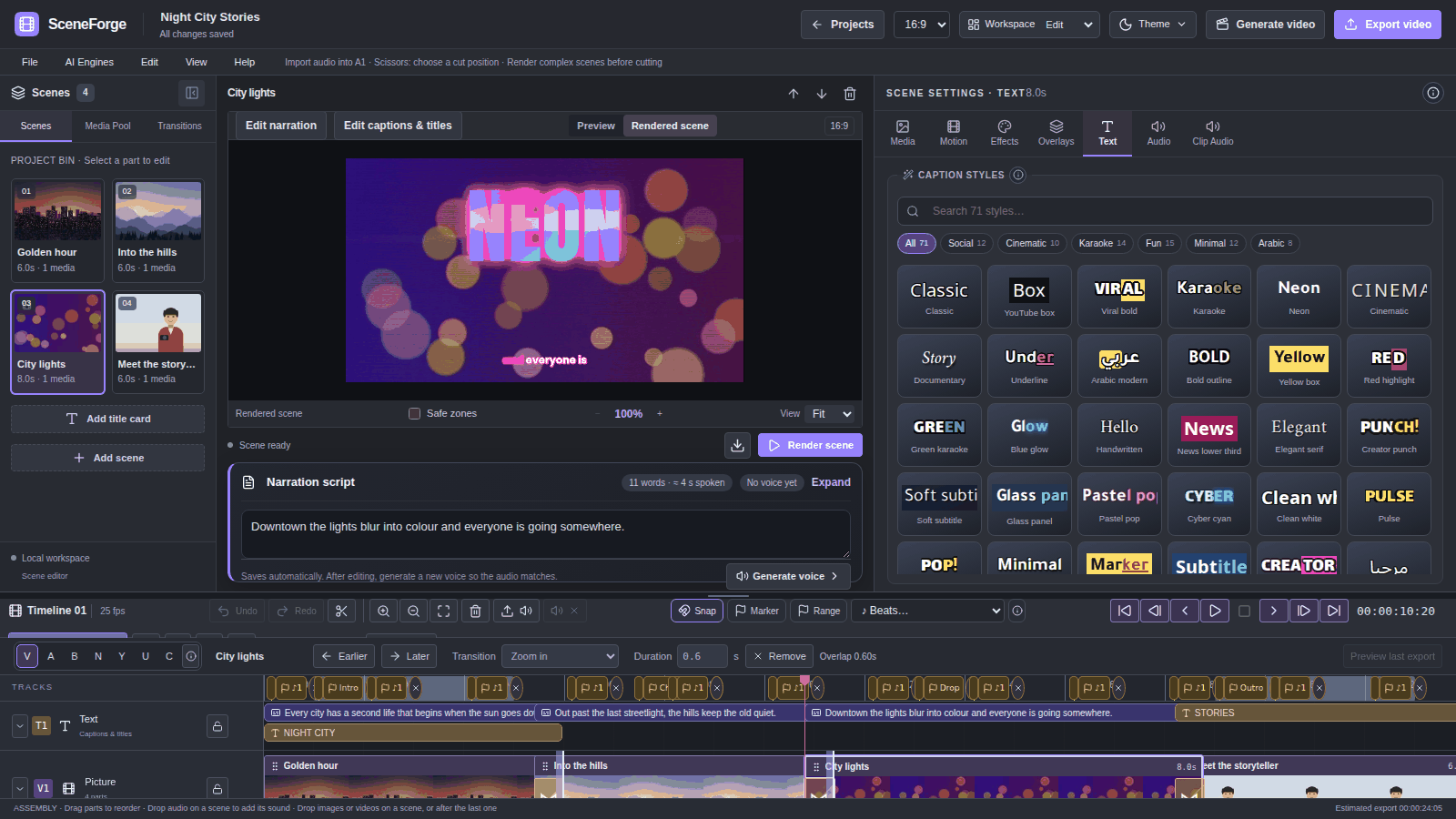
base model, about 145 MB) downloads once on first use. After that it runs offline on the CPU, with no key.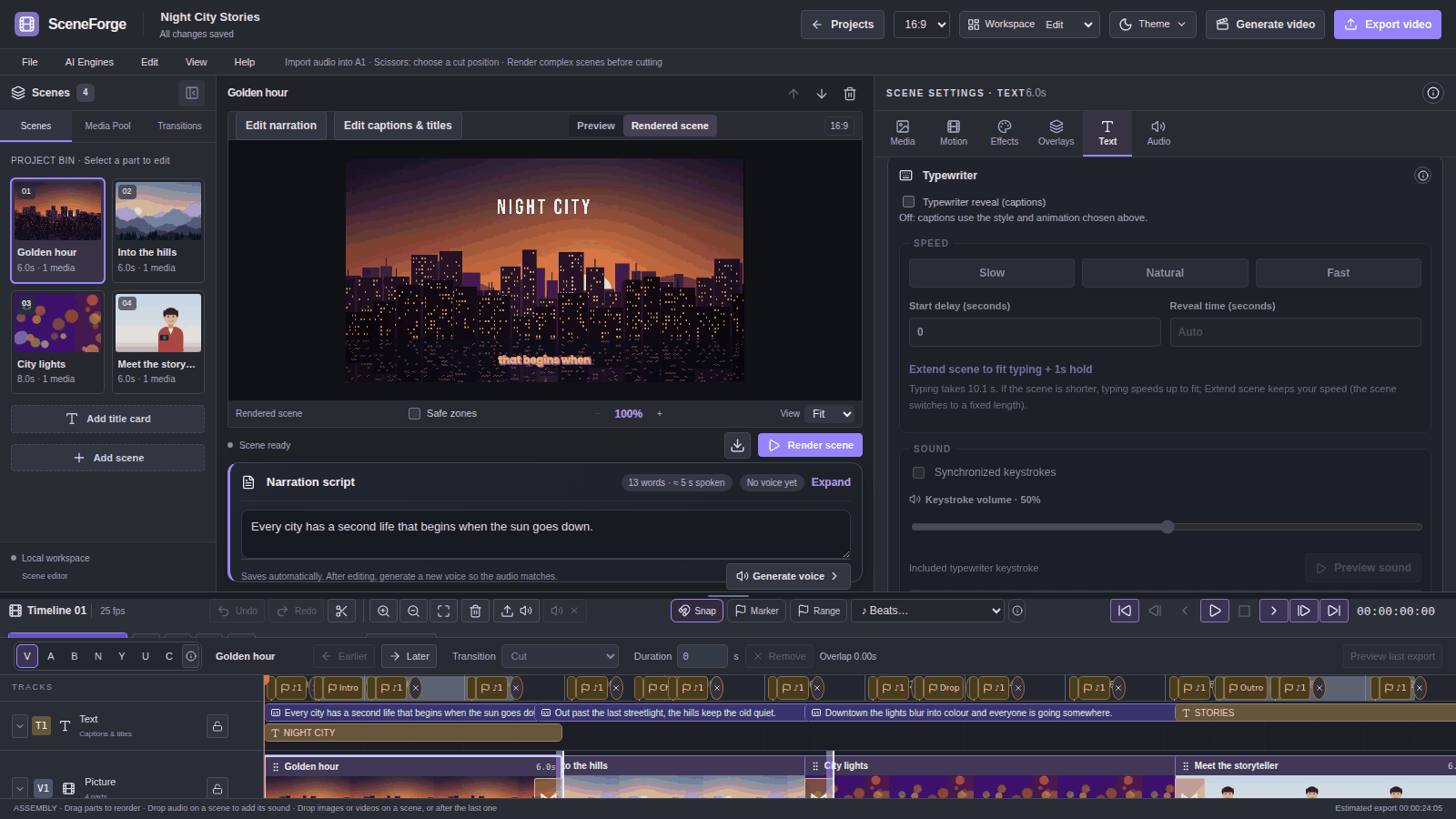
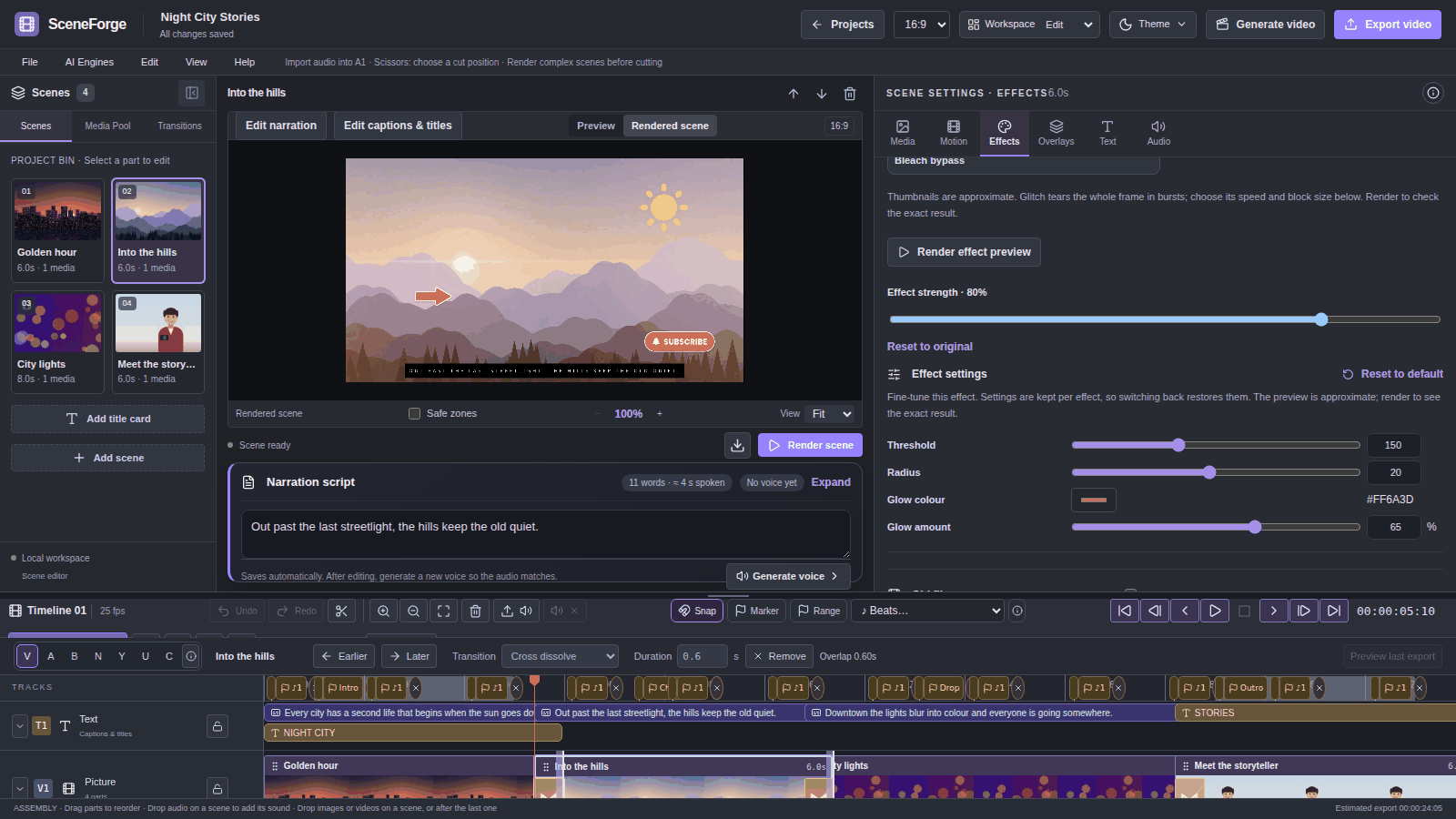
Per-effect settings (0.7.0). 36 presets have 132 settings between them. Examples are warmth, tint and fade for colour looks; bleed, noise, scanlines and tracking for VHS; and threshold, radius and colour for halation. Settings are remembered per effect, and default settings render exactly as before.
Looks: 35 scene looks and film treatments, 8 colour filters (Golden hour, Arctic, Portra film and others), and Chromatic split and Motion trail. Effects pack (0.7.0):
All of these are rendered by FFmpeg. None of them are AI.
Colour tools: sliders, colour wheels, split toning, .cube LUT import (3D, 1D and Resolve shaper LUTs), old film, spotlight, light leaks, and blur or pixelate to hide faces.
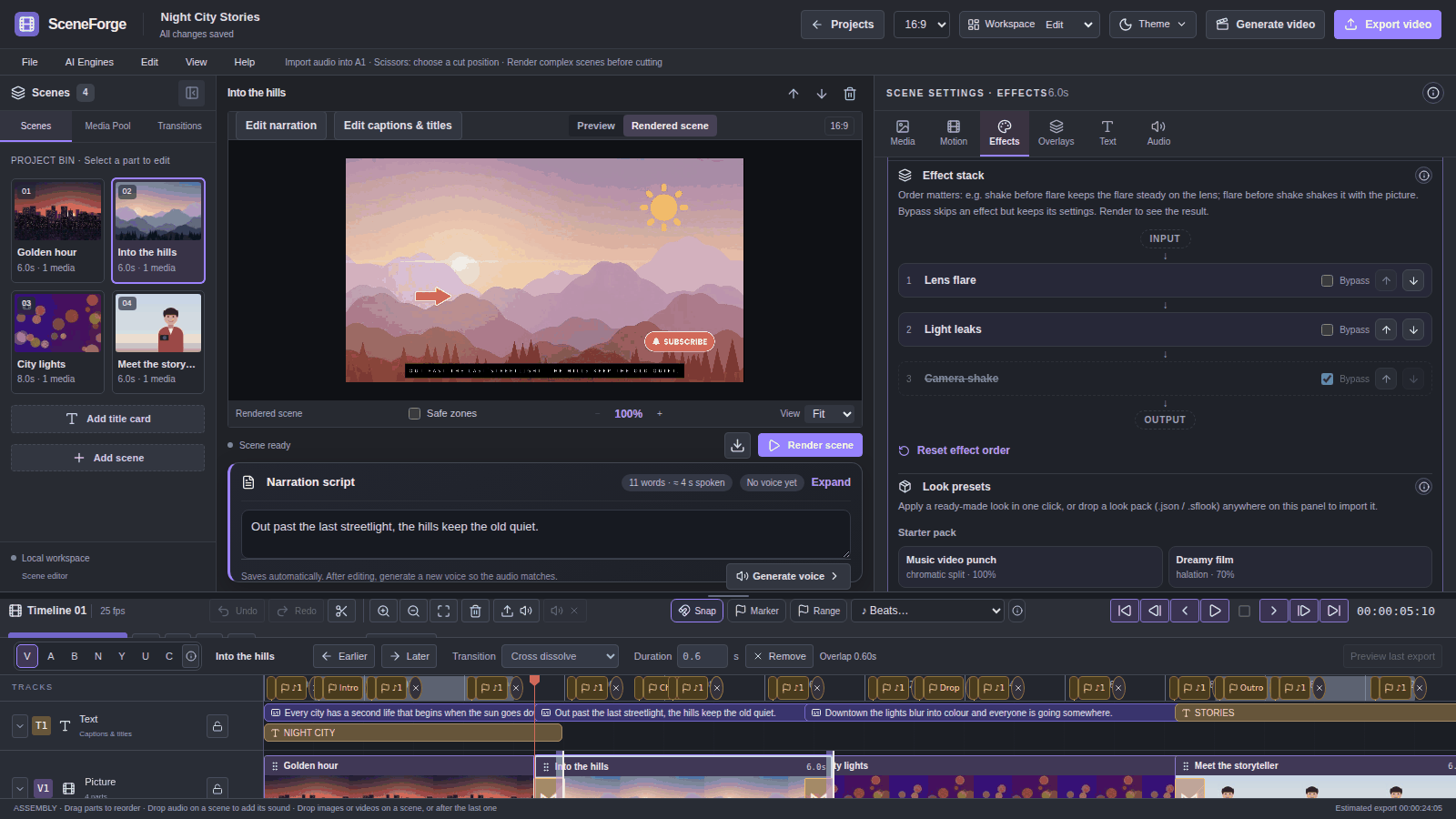
Effect stack (0.7.0). Spotlight, light leak, lens flare, wiggle and camera shake can be reordered or bypassed. The order changes the look: shake before flare keeps the flare steady on the lens.
Look preset packs (0.7.0):
.json or .sflook pack onto the Effects tab to import it.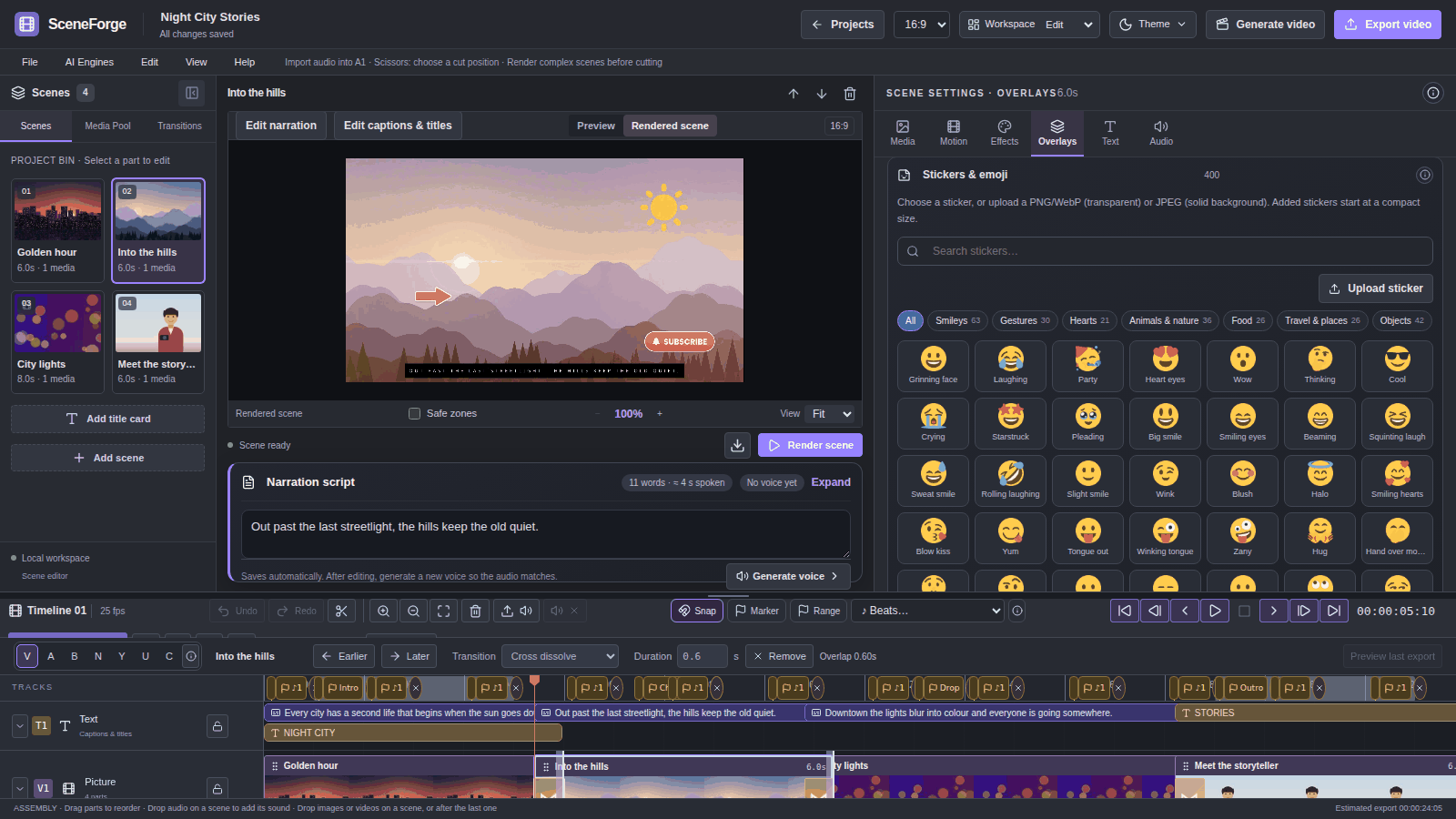
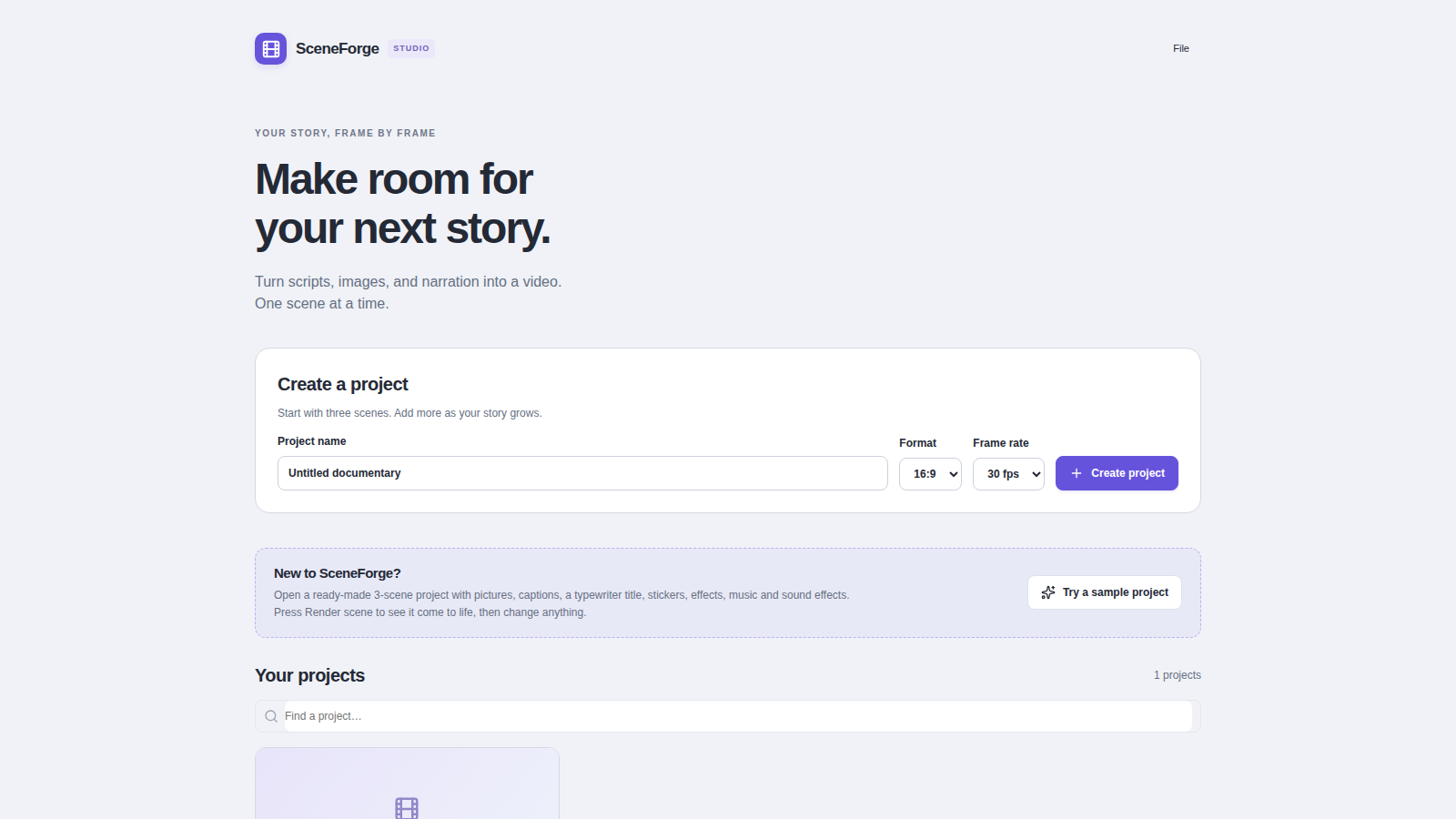
Installers are on the Releases page. The current version is 0.8.0.
| System | File | First launch |
|---|---|---|
| Windows 10/11 (64-bit) | SceneForge-Studio-<version>-Windows-x64-Setup.exe | Windows may show "Windows protected your PC". Click More info → Run anyway. The warning appears because SceneForge has no paid code-signing certificate. |
| Linux (64-bit) | .AppImage (any distribution) or .deb (Ubuntu/Debian) | AppImage: make it executable (chmod +x) and run it. Deb: sudo apt install ./SceneForge-Studio-*.deb |
| macOS (Apple Silicon) | .dmg | Drag SceneForge to Applications. The first time, right-click the app and choose Open, then Open again. macOS builds are experimental. |
Testing builds. Every push to claude/0.7.0-* (or a manual Run workflow) runs the Release workflow. That run produces test installers as temporary GitHub Actions artifacts. Public releases are created only from v* tags.
Updates. On Windows and Linux (AppImage), SceneForge downloads new versions in the background and asks to restart. On macOS it tells you about a new version and opens the download page. Help → Receive beta updates opts you in to test versions.
| Component | Size | How you get it |
|---|---|---|
| App, private Python backend, FFmpeg | — | Bundled in the installer |
| Fonts (Noto, Poppins, Bebas Neue, Anton, Pacifico, Amiri, Tajawal, Lalezar) and 400 stickers | — | Bundled |
Cutout model U²-Net small (u2netp) | ~4.6 MB | Bundled (0.7.0) |
Local Whisper captions (Faster-Whisper base) | ~145 MB | Downloads on first use |
| Cutout model IS-Net general use | ~170 MB | Downloads on first use, checked by checksum (0.7.0) |
| Cutout model People (U²-Net human) | ~176 MB | Downloads on first use, checked by checksum (0.7.0) |
| Voice isolation model (MDX-Net Kim_Vocal_2) | ~67 MB | Downloads on first use, checked by checksum (0.7.0) |
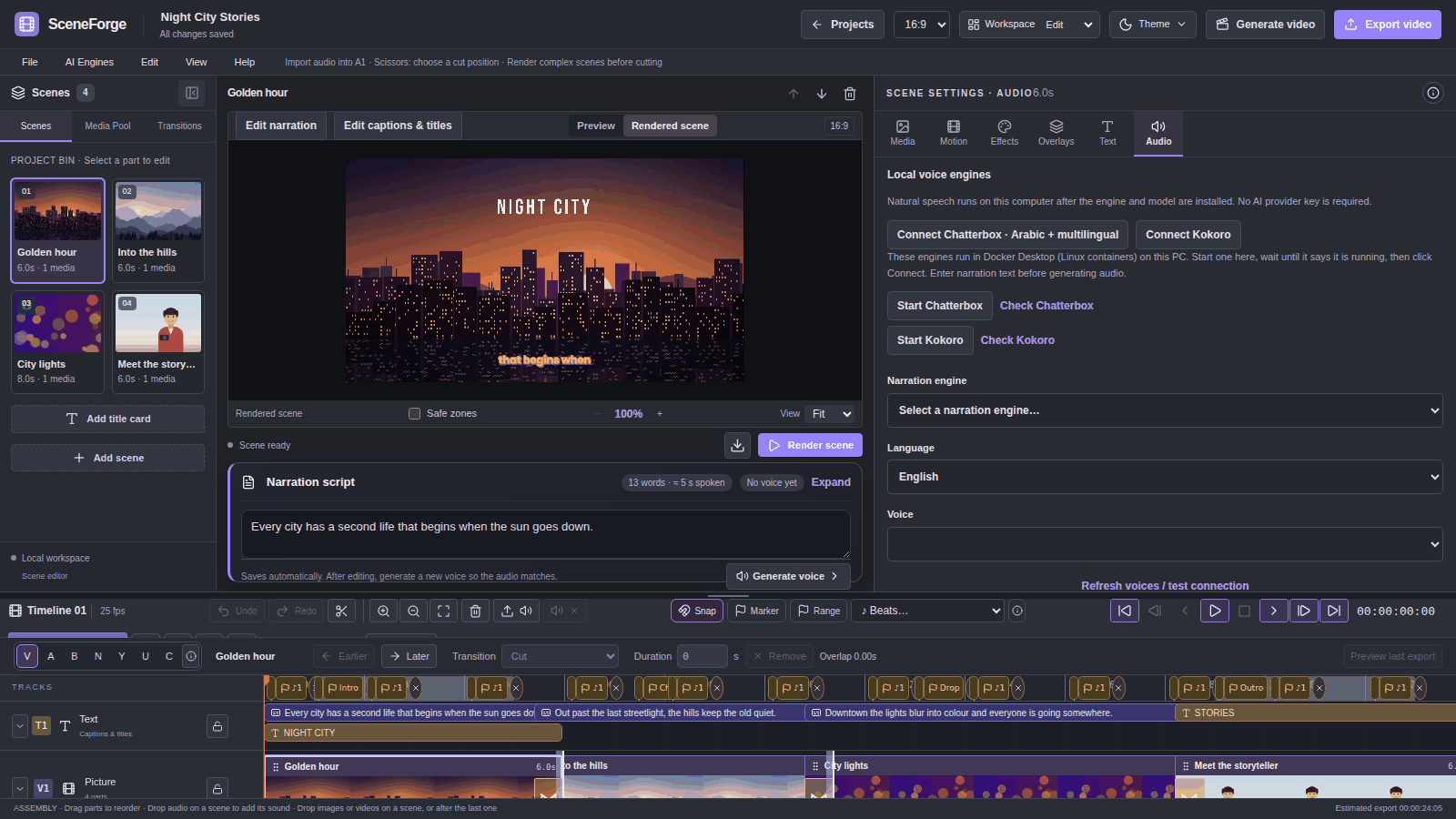
| Chatterbox and Kokoro voices | several GB (Chatterbox) | Docker Desktop (Linux containers) pulls them on first start |
| Stable Diffusion (AUTOMATIC1111), ComfyUI and video models | varies | Installed separately by you |
Downloaded models are kept in %USERPROFILE%\.sceneforge\models\{whisper,cutout,voice} (or ~/.sceneforge/models/…). Provider keys are stored in the operating system's credential store (Windows Credential Manager, macOS Keychain, Linux Secret Service), never in project files.
AI is optional. You can build a complete video from your own photos, clips and recordings without any account.
| Purpose | Cloud (your own account and key) | Local (free, on your computer) |
|---|---|---|
| Images | OpenAI, Google Gemini, Cloudflare Workers AI, Hugging Face | Stable Diffusion through AUTOMATIC1111 (point SceneForge at its folder in AI Engines) |
| Voice | ElevenLabs (with exact word timing), Together AI | Chatterbox and Kokoro (Docker); espeak as an optional robotic diagnostic voice |
| Captions | OpenAI Whisper, ElevenLabs Scribe | Faster-Whisper (model downloads once) |
| Voice isolation, subject cutout | — | Local ONNX models (see above) |
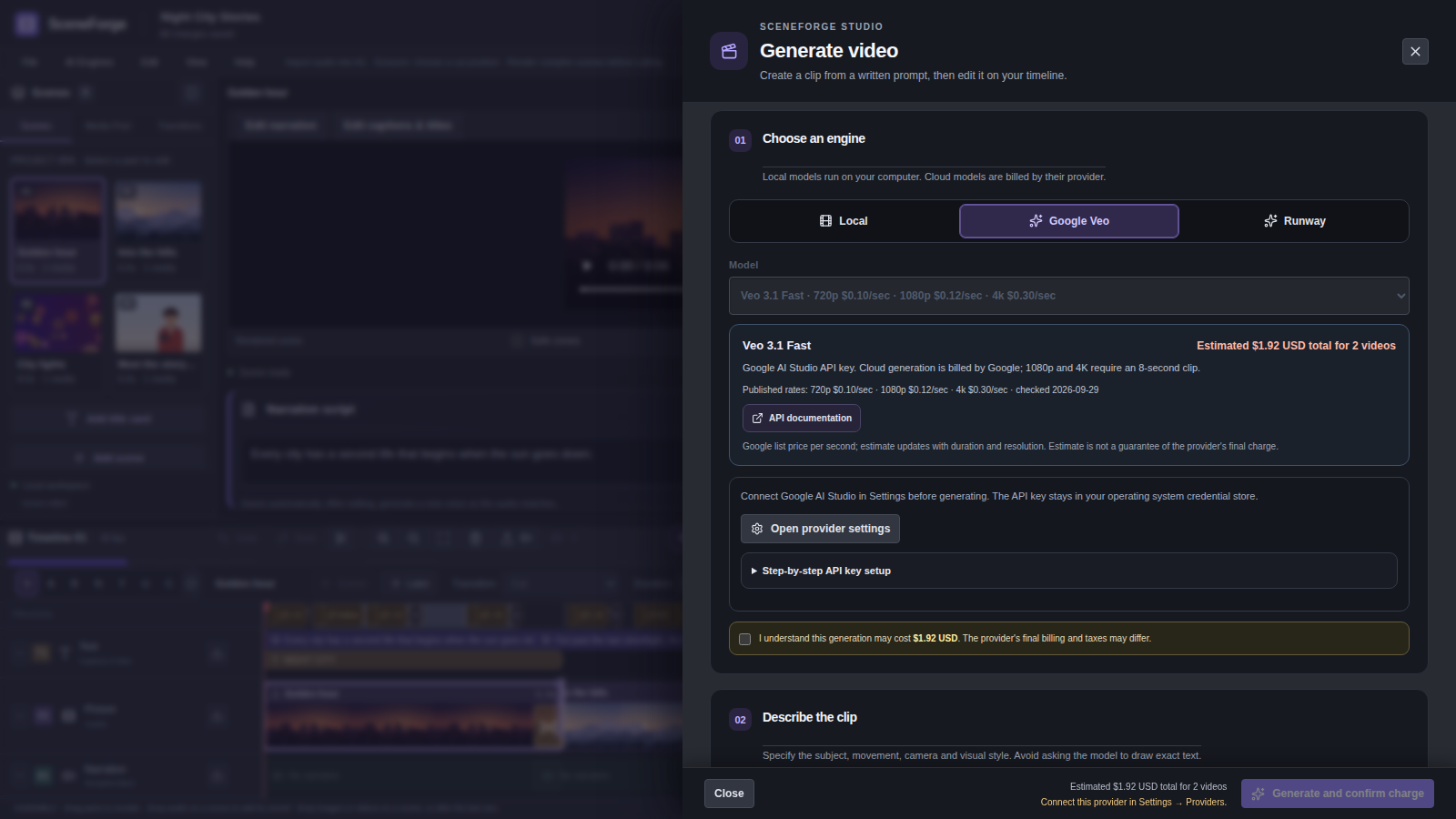
| Text-to-video | Google Veo 3.1, Runway Gen-4.5 and WAN 3.0 | ComfyUI workflows for LTX-2.5, Wan 2.1, Wan 2.2 and custom workflows |
This table shows the provider's published USD rate per generated second, as listed in the app's catalog. The prices were checked on 2026-09-29 and can change. Provider billing, taxes, credits, retries and regional terms can change the final charge. Local generation has no API fee, but it uses your hardware and electricity. Check each model's license before you publish or use its output commercially.
| Provider and model | Published price | Output options in SceneForge |
|---|---|---|
| Google Veo 3.1 Lite | $0.05/sec at 720p; $0.08/sec at 1080p | 4, 6 or 8 s; 16:9 or 9:16; 1080p only at 8 s |
| Google Veo 3.1 Fast | $0.10/sec at 720p; $0.12/sec at 1080p; $0.30/sec at 4K | 4, 6 or 8 s; 16:9 or 9:16; 1080p and 4K only at 8 s |
| Google Veo 3.1 Standard | $0.40/sec at 720p or 1080p; $0.60/sec at 4K | 4, 6 or 8 s; 16:9 or 9:16; 1080p and 4K only at 8 s |
| Runway Gen-4.5 | $0.12/sec (12 credits/sec at $0.01 per credit) | 2–10 s at 720p; 16:9 or 9:16 |
| Runway WAN 3.0 | $0.05/sec at 480p; $0.10/sec at 720p; $0.20/sec at 1080p | 2–30 s; 16:9 or 9:16; native audio |
Price references: Google Veo pricing, Veo API options, Runway API pricing, Runway API changelog. Key setup: Google AI Studio API keys (instructions), Runway API setup (Dev console).
Local setup notes
Requirements:
numpy==2.5.3, which needs 3.12.The desktop installer bundles its own Python runtime and FFmpeg. You only need these tools to run from source.
Windows
git clone https://github.com/EzioDEVio/SceneForge.git
cd SceneForge
scripts\setup.bat
scripts\start.bat          :: serves the built app at http://127.0.0.1:8000
scripts\dev.bat            :: or: backend with --reload on :8000 + Vite dev server on :5173
macOS / Linux
git clone https://github.com/EzioDEVio/SceneForge.git && cd SceneForge
python3.12 -m venv .venv && .venv/bin/pip install -r backend/requirements.txt
npm --prefix frontend ci && npm --prefix frontend run build
cd backend && ../.venv/bin/python -m uvicorn app.main:app --host 127.0.0.1 --port 8000
# open http://127.0.0.1:8000 (FastAPI serves frontend/dist on the same origin)
For frontend work, run npm --prefix frontend run dev. Vite then serves on port 5173 and proxies /api to the backend on port 8000.
Useful environment variables:
| Variable | Use |
|---|---|
SCENEFORGE_DATA_DIR | A separate data folder, for tests |
SCENEFORGE_MODEL_DIR | An existing Whisper model folder, for offline runs |
SCENEFORGE_CUTOUT_MODEL_DIR | An existing cutout model folder, for offline runs |
SCENEFORGE_VOICE_MODEL_DIR | An existing voice-isolation model folder, for offline runs |
Build the desktop installers yourself
pip install -r desktop/requirements-build.txt
npm --prefix frontend ci && npm --prefix frontend run build
npm --prefix desktop ci
python desktop/scripts/fetch_ffmpeg.py        # downloads and verifies FFmpeg for your OS
python desktop/scripts/fetch_models.py        # the bundled cutout model (u2netp)
python desktop/scripts/build_backend.py       # bundles the Python backend (PyInstaller)
npm --prefix desktop run dist:win             # or dist:mac / dist:linux
| Folder | What it is |
|---|---|
frontend/ | React 18 + TypeScript + Vite editor |
backend/app/ | FastAPI server, SQLite database, FFmpeg rendering (render/) and providers |
desktop/ | Electron shell, updater, packaging and build scripts |
assets/ | Bundled fonts, sounds, stickers and look packs |
tests/ | Integration tests that render real video and measure the result |
npm --prefix frontend run build && npm --prefix frontend test   # editor, units, timeline, video-generation and share-dialog checks
ELECTRON_SKIP_BINARY_DOWNLOAD=1 npm --prefix desktop ci && npm --prefix desktop test
python tests/integration/test_combined.py                       # each integration test is a standalone script
Build and render checks (.github/workflows/checks.yml) run on every push. They run the frontend build and tests, then 32 Python integration scripts that render real media with FFmpeg.
On Linux, the credential tests need a Secret Service keyring. Run them under dbus-run-session with gnome-keyring-daemon unlocked, as CI does.
Tests never call paid providers. Those calls are mocked.
Last full local run (RC9):
| Suite | Checks |
|---|---|
| Frontend component checks | 264 |
| Unit checks | 19 |
| Timeline checks | 40 |
| Video-generation flows | 2 |
| Share-dialog checks | 6 |
| Desktop checks | 18 |
| Integration scripts | 32 |
All passed. This does not replace testing on Windows.
The table summarizes the documented history. Versions marked WIP or RC were development snapshots, not public releases. Details are in desktop/RELEASE_NOTES.md and handoff.md.
| Version | Milestone |
|---|---|
| 0.2.0 RC3–RC5 | Built out the scene editor: overlays/PiP, music and clip-audio editing, LUT import, film looks, transitions, photo restoration, split screen, map routes, 3D photos, motion controls and Arabic-aware caption rendering. These were prerelease milestones. |
| 0.3.0 | First public open-source release, with Windows/Linux/macOS installers, updater and project backups. |
| 0.3.1–0.3.4 | Guided AI Engines and Help, diagnostics, safer local-model startup, real transition/look previews, map-route improvements, paste-media support, branded installer and Windows stability fixes. |
| 0.4.0–0.4.1 | Animated titles and captions, text styles, animated annotations and Arabic map-label rendering fixes. |
| 0.5.0 | Captions Pro: expanded caption styles, fonts, Arabic styles, phrase/word timing, formatting, positioning and animation. |
| 0.5.1–0.5.2 | Direct annotation editing, accurate arrow previews, scene copy/duplicate/paste and preview zoom/pan. |
| 0.5.3 | Preserved video sound and source duration, per-clip sound controls, scene countdown intros, 9:16 fit/blur behavior, caption safe positioning and platform safe-zone overlay. Latest published release. |
| 0.6.0 WIP | Additive editor expansion: local Whisper captions, transition/caption packs, multi-select, progress cards, export formats/presets, T1 timed editable caption clips, feature-help popovers, sharing, emoji/stickers, filters, and timeline/history/audio restoration. Unreleased. |
| 0.7.0 RC4 | Text-to-video and image candidates, local ComfyUI setup and hardware guidance, paid-provider cost estimates with confirmation, preferences and themes, a safer close flow, and more filters. Unreleased. |
| 0.7.0 RC5 | Timeline v1: A3–A8 tracks with mute/solo/lock, V/A/B/N/Y/U/C edit tools with Razor All, colour and range markers saved with the project, a versioned timeline format and viewport virtualization. Also fixes the active-render deletion CI failure. Unreleased. |
| 0.7.0 RC6 | Fixes from the Windows test: Delete removes only the cut audio, right-click menus, detach narration or clip sound to A3, timeline audio in scene renders, Whisper diagnostics, and in-app Chatterbox/Kokoro start. Adds the FFmpeg effects pack. Unreleased. |
| 0.7.0 RC7 | Local Whisper fixed (FFmpeg decodes the audio, without PyAV), black first render fixed, AI subject cutout and textured titles. Unreleased. |
| 0.7.0 RC8 | Better cutout (edge refinement, People model, preview, bundled small model), AI voice isolation, beat markers, volume envelopes, effect stack and look preset packs. Unreleased. |
| 0.7.1 | Security updates (urllib3 2.8.0, Vite 7), inspector tab bar fix, workspaces, collapsible/compact tracks, keyboard shortcut sheet and tour, AI model manager, diagnostics export. |
| 0.9.2 | Video inside text shrinks to fit the screen; optional subject in front of the title. |
| 0.9.1 | Video inside text titles; subject cutout no longer gets stuck on Windows; smaller logs; diagnostics include render errors; new screenshots. |
| 0.9.0 | Friendlier editing: • Typewriter box with sound preview • Effects grouped • Waveforms on A2–A8 • Auto-ducking for A3–A8 • Restore points • Sample project • Caption translation • Title templates |
| 0.8.0 | Creator pack: • Remove silences and filler words • Auto-reframe to 9:16 • NVENC GPU export • Live timeline playback • Keyframes |
| 0.7.1 | Security updates (urllib3, Vite 7) and usability: • Inspector tabs • Workspaces • Collapsible tracks • Shortcut sheet and tour • AI model manager • Diagnostics export |
| 0.7.0 RC9 | 400 stickers and emoji, 71 caption styles, settings for 36 effects, clock and iris reveals, moving-video subject cutout, clip groups and clip-attached markers. Current candidate, unreleased. |
desktop/package.json, for example 0.7.0, or 0.7.0-beta.1 for a beta.git tag v0.7.0 && git push origin v0.7.0.SceneForge Studio is free software. You can redistribute it and modify it under the terms of the GNU General Public License v3.0 or later; see LICENSE. It is provided WITHOUT ANY WARRANTY.
desktop/THIRD_PARTY.md.assets/stickers/LICENSE-TWEMOJI-GRAPHICS.txt). The 78 graphic stickers were drawn for SceneForge (GPL-3.0-or-later).backend/app/render/cutout.py, IS-Net general use and U²-Net small are Apache-2.0. The People model (u2net_human_seg) comes from the same rembg release; its licence is not stated in the code.Copyright © 2026 EzioDEVio and SceneForge contributors.
PROJECT_HISTORY_AND_HANDOFF.md and HANDOFF_TO_CHATGPT_RC9.md contain the implementation inventory, decisions and open items.Free, open-source desktop editor for narrated documentary videos, image and video Ai generation, and more
Python
10
59 commits
updated Oct 8, 2026
A free, open-source desktop editor for narrated documentary videos. Turn a script, photos, clips and a voice into a finished film one scene at a time. You get film looks, captions that follow the narration, a multitrack audio timeline, stickers, titles and optional AI tools. Arabic and English are first-class.
Install · Highlights · Feature tour · AI providers and prices · Run from source · Tests · Version history · Licenses · Contributing
Release status. 0.8.0 is the latest release: the creator pack (silence and filler removal, auto-reframe to 9:16, GPU export, live playback, keyframes), on top of 0.7.1 (security and usability) and 0.7.0. 0.7.0 was a large update over 0.5.3: a multitrack audio timeline with pro edit tools, 71 caption styles, 400 stickers and emoji, per-effect settings, AI subject cutout and voice isolation, and optional text-to-video. Items marked (0.7.0) are new in this version. The full record is in
desktop/RELEASE_NOTES.mdandPROJECT_HISTORY_AND_HANDOFF.md.
The screenshots on this page come from the 0.7.0 build. They show a demo project made only from procedurally generated pictures, video and audio. scripts/capture_readme_screenshots.py rebuilds the project and the screenshots.
Tracks. T1 holds captions and titles. V1 holds the scene pictures, with transitions overlapping. A1 holds the accepted narration, A2 the embedded sound of each video clip, and A3–A8 independent audio clips. A whole-project music bed sits underneath. Each audio track has mute, solo and lock, and is dimmed when it will not be heard. (A4–A8: 0.7.0)
Edit tools for timeline audio (0.7.0):
| Key | Tool |
|---|---|
| V | Select |
| A | Track select forward |
| B | Ripple trim |
| N | Roll |
| Y | Slip |
| U | Slide |
| C | Blade |
| Shift+C | Razor All |
Delete removes only the selected piece. Shift+Delete ripple-deletes it. Ctrl+C, Ctrl+X, Ctrl+V and Ctrl+D also work, and every edit can be undone.
Markers are saved with the project. A marker can be a point or a range, in five colours, and can be attached to a clip so it moves with the clip. ♪ Beats… finds the beat of the music bed or of a selected clip and marks every beat, every 2nd beat or every bar. Cuts and clips snap to the beat markers. (0.7.0)
Volume envelopes take up to 32 keyframes on an A3–A8 clip, with presets such as dip under a voice. The line is drawn on the clip and heard in scene renders and in the export. Clip groups select and move together: Ctrl+G groups, and Ctrl+Shift+G ungroups. (0.7.0)
Right-click menus for audio clips, scenes, narration and clip sound. From these menus you can split, duplicate, move a clip to another track, add a marker to the clip, or detach narration or clip sound to A3 so you can cut it. (0.7.0)
Everything that existed before: drag-and-drop of files and whole folders, 28 curated transitions with live previews, split and ripple delete, multi-select with batch apply, snapping, linked trimming of source video and audio, Ctrl+wheel zoom around the pointer, and undo/redo.
The design notes are in docs/TIMELINE_ARCHITECTURE.md. V1 is still scene-based. Free multitrack video and nested clips are not implemented yet.
base model, about 145 MB) downloads once on first use. After that it runs offline on the CPU, with no key.
Per-effect settings (0.7.0). 36 presets have 132 settings between them. Examples are warmth, tint and fade for colour looks; bleed, noise, scanlines and tracking for VHS; and threshold, radius and colour for halation. Settings are remembered per effect, and default settings render exactly as before.
Looks: 35 scene looks and film treatments, 8 colour filters (Golden hour, Arctic, Portra film and others), and Chromatic split and Motion trail. Effects pack (0.7.0):
All of these are rendered by FFmpeg. None of them are AI.
Colour tools: sliders, colour wheels, split toning, .cube LUT import (3D, 1D and Resolve shaper LUTs), old film, spotlight, light leaks, and blur or pixelate to hide faces.
Effect stack (0.7.0). Spotlight, light leak, lens flare, wiggle and camera shake can be reordered or bypassed. The order changes the look: shake before flare keeps the flare steady on the lens.
Look preset packs (0.7.0):
.json or .sflook pack onto the Effects tab to import it.
Installers are on the Releases page. The current version is 0.8.0.
| System | File | First launch |
|---|---|---|
| Windows 10/11 (64-bit) | SceneForge-Studio-<version>-Windows-x64-Setup.exe | Windows may show "Windows protected your PC". Click More info → Run anyway. The warning appears because SceneForge has no paid code-signing certificate. |
| Linux (64-bit) | .AppImage (any distribution) or .deb (Ubuntu/Debian) | AppImage: make it executable (chmod +x) and run it. Deb: sudo apt install ./SceneForge-Studio-*.deb |
| macOS (Apple Silicon) | .dmg | Drag SceneForge to Applications. The first time, right-click the app and choose Open, then Open again. macOS builds are experimental. |
Testing builds. Every push to claude/0.7.0-* (or a manual Run workflow) runs the Release workflow. That run produces test installers as temporary GitHub Actions artifacts. Public releases are created only from v* tags.
Updates. On Windows and Linux (AppImage), SceneForge downloads new versions in the background and asks to restart. On macOS it tells you about a new version and opens the download page. Help → Receive beta updates opts you in to test versions.
| Component | Size | How you get it |
|---|---|---|
| App, private Python backend, FFmpeg | — | Bundled in the installer |
| Fonts (Noto, Poppins, Bebas Neue, Anton, Pacifico, Amiri, Tajawal, Lalezar) and 400 stickers | — | Bundled |
Cutout model U²-Net small (u2netp) | ~4.6 MB | Bundled (0.7.0) |
Local Whisper captions (Faster-Whisper base) | ~145 MB | Downloads on first use |
| Cutout model IS-Net general use | ~170 MB | Downloads on first use, checked by checksum (0.7.0) |
| Cutout model People (U²-Net human) | ~176 MB | Downloads on first use, checked by checksum (0.7.0) |
| Voice isolation model (MDX-Net Kim_Vocal_2) | ~67 MB | Downloads on first use, checked by checksum (0.7.0) |
| Chatterbox and Kokoro voices | several GB (Chatterbox) | Docker Desktop (Linux containers) pulls them on first start |
| Stable Diffusion (AUTOMATIC1111), ComfyUI and video models | varies | Installed separately by you |
Downloaded models are kept in %USERPROFILE%\.sceneforge\models\{whisper,cutout,voice} (or ~/.sceneforge/models/…). Provider keys are stored in the operating system's credential store (Windows Credential Manager, macOS Keychain, Linux Secret Service), never in project files.
AI is optional. You can build a complete video from your own photos, clips and recordings without any account.
| Purpose | Cloud (your own account and key) | Local (free, on your computer) |
|---|---|---|
| Images | OpenAI, Google Gemini, Cloudflare Workers AI, Hugging Face | Stable Diffusion through AUTOMATIC1111 (point SceneForge at its folder in AI Engines) |
| Voice | ElevenLabs (with exact word timing), Together AI | Chatterbox and Kokoro (Docker); espeak as an optional robotic diagnostic voice |
| Captions | OpenAI Whisper, ElevenLabs Scribe | Faster-Whisper (model downloads once) |
| Voice isolation, subject cutout | — | Local ONNX models (see above) |
| Text-to-video | Google Veo 3.1, Runway Gen-4.5 and WAN 3.0 | ComfyUI workflows for LTX-2.5, Wan 2.1, Wan 2.2 and custom workflows |
This table shows the provider's published USD rate per generated second, as listed in the app's catalog. The prices were checked on 2026-09-29 and can change. Provider billing, taxes, credits, retries and regional terms can change the final charge. Local generation has no API fee, but it uses your hardware and electricity. Check each model's license before you publish or use its output commercially.
| Provider and model | Published price | Output options in SceneForge |
|---|---|---|
| Google Veo 3.1 Lite | $0.05/sec at 720p; $0.08/sec at 1080p | 4, 6 or 8 s; 16:9 or 9:16; 1080p only at 8 s |
| Google Veo 3.1 Fast | $0.10/sec at 720p; $0.12/sec at 1080p; $0.30/sec at 4K | 4, 6 or 8 s; 16:9 or 9:16; 1080p and 4K only at 8 s |
| Google Veo 3.1 Standard | $0.40/sec at 720p or 1080p; $0.60/sec at 4K | 4, 6 or 8 s; 16:9 or 9:16; 1080p and 4K only at 8 s |
| Runway Gen-4.5 | $0.12/sec (12 credits/sec at $0.01 per credit) | 2–10 s at 720p; 16:9 or 9:16 |
| Runway WAN 3.0 | $0.05/sec at 480p; $0.10/sec at 720p; $0.20/sec at 1080p | 2–30 s; 16:9 or 9:16; native audio |
Price references: Google Veo pricing, Veo API options, Runway API pricing, Runway API changelog. Key setup: Google AI Studio API keys (instructions), Runway API setup (Dev console).
Local setup notes
Requirements:
numpy==2.5.3, which needs 3.12.The desktop installer bundles its own Python runtime and FFmpeg. You only need these tools to run from source.
Windows
git clone https://github.com/EzioDEVio/SceneForge.git
cd SceneForge
scripts\setup.bat
scripts\start.bat          :: serves the built app at http://127.0.0.1:8000
scripts\dev.bat            :: or: backend with --reload on :8000 + Vite dev server on :5173
macOS / Linux
git clone https://github.com/EzioDEVio/SceneForge.git && cd SceneForge
python3.12 -m venv .venv && .venv/bin/pip install -r backend/requirements.txt
npm --prefix frontend ci && npm --prefix frontend run build
cd backend && ../.venv/bin/python -m uvicorn app.main:app --host 127.0.0.1 --port 8000
# open http://127.0.0.1:8000 (FastAPI serves frontend/dist on the same origin)
For frontend work, run npm --prefix frontend run dev. Vite then serves on port 5173 and proxies /api to the backend on port 8000.
Useful environment variables:
| Variable | Use |
|---|---|
SCENEFORGE_DATA_DIR | A separate data folder, for tests |
SCENEFORGE_MODEL_DIR | An existing Whisper model folder, for offline runs |
SCENEFORGE_CUTOUT_MODEL_DIR | An existing cutout model folder, for offline runs |
SCENEFORGE_VOICE_MODEL_DIR | An existing voice-isolation model folder, for offline runs |
Build the desktop installers yourself
pip install -r desktop/requirements-build.txt
npm --prefix frontend ci && npm --prefix frontend run build
npm --prefix desktop ci
python desktop/scripts/fetch_ffmpeg.py        # downloads and verifies FFmpeg for your OS
python desktop/scripts/fetch_models.py        # the bundled cutout model (u2netp)
python desktop/scripts/build_backend.py       # bundles the Python backend (PyInstaller)
npm --prefix desktop run dist:win             # or dist:mac / dist:linux
| Folder | What it is |
|---|---|
frontend/ | React 18 + TypeScript + Vite editor |
backend/app/ | FastAPI server, SQLite database, FFmpeg rendering (render/) and providers |
desktop/ | Electron shell, updater, packaging and build scripts |
assets/ | Bundled fonts, sounds, stickers and look packs |
tests/ | Integration tests that render real video and measure the result |
npm --prefix frontend run build && npm --prefix frontend test   # editor, units, timeline, video-generation and share-dialog checks
ELECTRON_SKIP_BINARY_DOWNLOAD=1 npm --prefix desktop ci && npm --prefix desktop test
python tests/integration/test_combined.py                       # each integration test is a standalone script
Build and render checks (.github/workflows/checks.yml) run on every push. They run the frontend build and tests, then 32 Python integration scripts that render real media with FFmpeg.
On Linux, the credential tests need a Secret Service keyring. Run them under dbus-run-session with gnome-keyring-daemon unlocked, as CI does.
Tests never call paid providers. Those calls are mocked.
Last full local run (RC9):
| Suite | Checks |
|---|---|
| Frontend component checks | 264 |
| Unit checks | 19 |
| Timeline checks | 40 |
| Video-generation flows | 2 |
| Share-dialog checks | 6 |
| Desktop checks | 18 |
| Integration scripts | 32 |
All passed. This does not replace testing on Windows.
The table summarizes the documented history. Versions marked WIP or RC were development snapshots, not public releases. Details are in desktop/RELEASE_NOTES.md and handoff.md.
| Version | Milestone |
|---|---|
| 0.2.0 RC3–RC5 | Built out the scene editor: overlays/PiP, music and clip-audio editing, LUT import, film looks, transitions, photo restoration, split screen, map routes, 3D photos, motion controls and Arabic-aware caption rendering. These were prerelease milestones. |
| 0.3.0 | First public open-source release, with Windows/Linux/macOS installers, updater and project backups. |
| 0.3.1–0.3.4 | Guided AI Engines and Help, diagnostics, safer local-model startup, real transition/look previews, map-route improvements, paste-media support, branded installer and Windows stability fixes. |
| 0.4.0–0.4.1 | Animated titles and captions, text styles, animated annotations and Arabic map-label rendering fixes. |
| 0.5.0 | Captions Pro: expanded caption styles, fonts, Arabic styles, phrase/word timing, formatting, positioning and animation. |
| 0.5.1–0.5.2 | Direct annotation editing, accurate arrow previews, scene copy/duplicate/paste and preview zoom/pan. |
| 0.5.3 | Preserved video sound and source duration, per-clip sound controls, scene countdown intros, 9:16 fit/blur behavior, caption safe positioning and platform safe-zone overlay. Latest published release. |
| 0.6.0 WIP | Additive editor expansion: local Whisper captions, transition/caption packs, multi-select, progress cards, export formats/presets, T1 timed editable caption clips, feature-help popovers, sharing, emoji/stickers, filters, and timeline/history/audio restoration. Unreleased. |
| 0.7.0 RC4 | Text-to-video and image candidates, local ComfyUI setup and hardware guidance, paid-provider cost estimates with confirmation, preferences and themes, a safer close flow, and more filters. Unreleased. |
| 0.7.0 RC5 | Timeline v1: A3–A8 tracks with mute/solo/lock, V/A/B/N/Y/U/C edit tools with Razor All, colour and range markers saved with the project, a versioned timeline format and viewport virtualization. Also fixes the active-render deletion CI failure. Unreleased. |
| 0.7.0 RC6 | Fixes from the Windows test: Delete removes only the cut audio, right-click menus, detach narration or clip sound to A3, timeline audio in scene renders, Whisper diagnostics, and in-app Chatterbox/Kokoro start. Adds the FFmpeg effects pack. Unreleased. |
| 0.7.0 RC7 | Local Whisper fixed (FFmpeg decodes the audio, without PyAV), black first render fixed, AI subject cutout and textured titles. Unreleased. |
| 0.7.0 RC8 | Better cutout (edge refinement, People model, preview, bundled small model), AI voice isolation, beat markers, volume envelopes, effect stack and look preset packs. Unreleased. |
| 0.7.1 | Security updates (urllib3 2.8.0, Vite 7), inspector tab bar fix, workspaces, collapsible/compact tracks, keyboard shortcut sheet and tour, AI model manager, diagnostics export. |
| 0.9.2 | Video inside text shrinks to fit the screen; optional subject in front of the title. |
| 0.9.1 | Video inside text titles; subject cutout no longer gets stuck on Windows; smaller logs; diagnostics include render errors; new screenshots. |
| 0.9.0 | Friendlier editing: • Typewriter box with sound preview • Effects grouped • Waveforms on A2–A8 • Auto-ducking for A3–A8 • Restore points • Sample project • Caption translation • Title templates |
| 0.8.0 | Creator pack: • Remove silences and filler words • Auto-reframe to 9:16 • NVENC GPU export • Live timeline playback • Keyframes |
| 0.7.1 | Security updates (urllib3, Vite 7) and usability: • Inspector tabs • Workspaces • Collapsible tracks • Shortcut sheet and tour • AI model manager • Diagnostics export |
| 0.7.0 RC9 | 400 stickers and emoji, 71 caption styles, settings for 36 effects, clock and iris reveals, moving-video subject cutout, clip groups and clip-attached markers. Current candidate, unreleased. |
desktop/package.json, for example 0.7.0, or 0.7.0-beta.1 for a beta.git tag v0.7.0 && git push origin v0.7.0.SceneForge Studio is free software. You can redistribute it and modify it under the terms of the GNU General Public License v3.0 or later; see LICENSE. It is provided WITHOUT ANY WARRANTY.
desktop/THIRD_PARTY.md.assets/stickers/LICENSE-TWEMOJI-GRAPHICS.txt). The 78 graphic stickers were drawn for SceneForge (GPL-3.0-or-later).backend/app/render/cutout.py, IS-Net general use and U²-Net small are Apache-2.0. The People model (u2net_human_seg) comes from the same rembg release; its licence is not stated in the code.Copyright © 2026 EzioDEVio and SceneForge contributors.
PROJECT_HISTORY_AND_HANDOFF.md and HANDOFF_TO_CHATGPT_RC9.md contain the implementation inventory, decisions and open items.


