MCP gateway: one endpoint for many MCP servers, with per-user identity, per-tool authorization, lethal-trifecta blocking, audit log and rate limits.
TypeScript
0
137 commits
updated Oct 13, 2026
One MCP endpoint for all your MCP servers, with identity, per-tool authorization, lethal-trifecta blocking and an audit trail in front of every tool call.
Patchbay Gateway is a self-hosted Model Context Protocol
gateway. It connects to any number of MCP servers (stdio, SSE or streamable HTTP),
publishes all of their tools behind a single /mcp endpoint, and decides per caller
and per session which of those tools may run. It is a fork of
ptbsare/mcp-proxy-server; see
Credits and the CHANGELOG for what the fork adds.
An MCP client (Claude Desktop, Claude Code, an agent framework) normally starts or connects to each MCP server on its own: one config entry per server, one set of credentials per client machine, no shared view of who called what.
A proxy fixes the plumbing. It forwards traffic from a client to a server, perhaps translating stdio into HTTP so the server can live somewhere else. It does not decide anything. Every caller gets every tool, and the proxy has no idea who is calling.
A gateway sits in the same place but owns the policy. Patchbay:
| Plain proxy | Patchbay Gateway | |
|---|---|---|
| Backends | One server per endpoint | Many servers aggregated behind one endpoint; tools are namespaced server__tool |
| Transports | Usually one | Backends over stdio, SSE or streamable HTTP; clients over streamable HTTP (/mcp) or SSE (/sse) |
| Who is calling | Unknown | Each caller presents a personal token; every request resolves to a named identity |
| What they may call | Everything | Per-tool authorization from tool_policy.json: allow/deny globs per user, role or default, enforced on tools/list and tools/call |
| Prompt-injection blast radius | Unlimited | Lethal-trifecta blocking: a session that has touched private data and untrusted content cannot also use an outbound channel |
| Record of what happened | None | Append-only JSON Lines audit log of every tools/call, including denials and blocks |
| Runaway agents | Reach every backend | Per-identity rate limits on tool calls and HTTP requests |
| Changing config | Restart | Users and policy apply on the next request; backend edits apply with an in-process reload that only reconnects the servers you changed |
| Operating it | Edit JSON | Admin web UI for servers, tools, users, policy, mailboxes, client installers and a terminal |
flowchart LR
  subgraph Clients
    A["Claude Desktop<br/>(alice)"]
    B["Claude Code<br/>(bob)"]
    C["Agent / script<br/>(static token)"]
  end

  subgraph G["Patchbay Gateway"]
    direction TB
    AUTH["1 · Authenticate token<br/>→ caller identity"]
    RL["2 · Rate limit<br/>(per identity)"]
    AZ["3 · Per-tool authorization<br/>tool_policy.json"]
    TF["4 · Lethal-trifecta check<br/>(per session)"]
    AU["5 · Audit log<br/>tools-call-YYYY-MM-DD.jsonl"]
    AUTH --> RL --> AZ --> TF --> AU
  end

  A & B & C -- "/mcp or /sse" --> AUTH
  AU -- stdio --> S1["web01<br/>(ssh-mcp)"]
  AU -- stdio --> S2["files<br/>(filesystem)"]
  AU -- "streamable HTTP" --> S3["docs<br/>(remote MCP)"]
  AU -- SSE --> S4["db01<br/>(SSE MCP)"]
A tools/call goes through those steps in that order. A call that is throttled,
denied or blocked never reaches a backend, and denials and blocks are written to the
audit log like any other call. A throttled call gets a coalesced rate-limit line
instead of one line per rejection.
Per-user identity. Admins create users in the Users tab (or config/users.json).
Each user gets a random 48-character token. Clients present it as
Authorization: Bearer <token>, X-Api-Key: <token> or ?key=<token>. The gateway
resolves every request to an identity (alice, bob, static for the shared
ALLOWED_TOKENS/ALLOWED_KEYS credential, or anonymous when authentication is off).
Creating or revoking a user takes effect immediately, with no restart.
Per-tool authorization. config/tool_policy.json holds allow and deny lists of
"<backend>/<tool>" globs for each user, for named roles, for the static credential and
for everyone else. Deny beats allow. A tool a caller may not use is removed from their
tools/list and refused on tools/call with JSON-RPC error -32003. No file means
everyone keeps every enabled tool; an invalid file fails closed and denies
everything until it is fixed.
Lethal-trifecta blocking. Every tool is classified on three axes: reads
privateData, ingests untrustedContent, or has an externalComm channel. The
gateway tracks which axes each MCP session has touched and refuses (error -32010) the
call that would give one session all three, before it is forwarded. That is the
combination a single prompt-injected email or web page needs to read something
sensitive and send it out. Built-in defaults recognise ssh-mcp, an IMAP mail
connector and Context7; anything unrecognised is treated as untrusted + external.
Everything is overridable, and there are monitor and off modes. See
TRIFECTA.md.
Audit log. One JSON object per tools/call, appended to a file per UTC day:
who, which session, which tool and backend, allow/deny and the rule that decided,
duration, error code and any trifecta detail. Tool arguments are not recorded unless
you opt in. Tokens never are. Files rotate at a size cap and are pruned after a
retention period.
Rate limits. Two token buckets per identity: one for tools/call (default burst 60,
120/min) and a looser one for every authenticated HTTP request (burst 120, 300/min).
Callers without an identity are bucketed per IP or per session. A throttled tool call
gets JSON-RPC error -32011 with the retry delay. A throttled HTTP request gets
429 and a Retry-After header.
Live reload. Users and the tool policy are re-read on change and apply to the next request, including on sessions that are already open. Server and tool edits apply with the admin UI's reload button. It reconnects only the backends whose config changed and leaves the others running.
Admin web UI (optional, ENABLE_ADMIN_UI=true). Manage backend servers (add, edit,
enable/disable, install, reorder, group), browse a connector catalog, enable/rename
individual tools, create and revoke users, download a per-user Windows client
installer, edit the tool policy, manage IMAP mailboxes for a mail connector, push the
gateway's SSH key to a new host, review end-user connector requests, and open a web
terminal on the gateway host.
Text-block merging (optional, off by default). Some clients only read the
first content block of a tool result; the OpenAI Responses API's remote MCP tool is
one. MCP_MERGE_TEXT_CONTENT=true (or a per-user mergeTextContent) joins adjacent
text blocks so those clients see the whole answer.
Screenshots are from a demo instance with made-up servers and users.
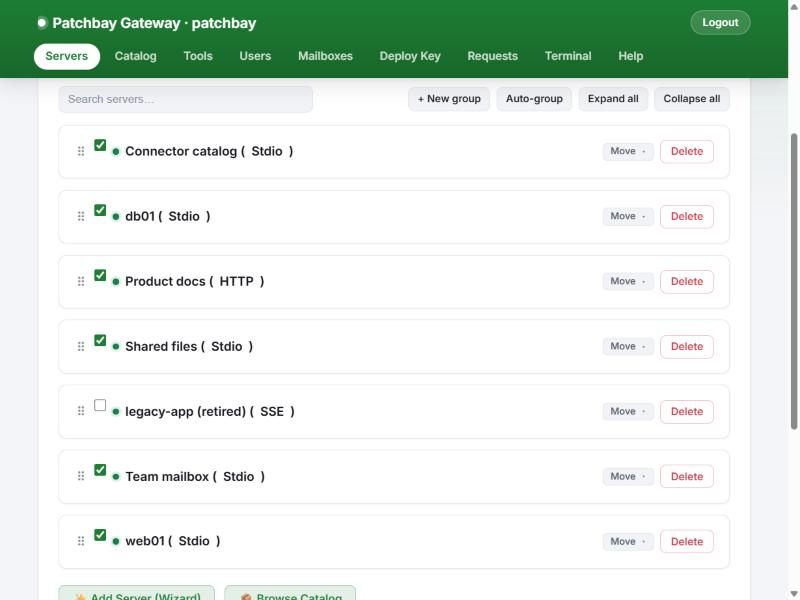
Every backend MCP server in one list: its transport, whether it is active, and
controls to edit, install or remove it. Servers can be searched, grouped into
collapsible sections and drag-ordered. The order also drives the order of tools/list,
which keeps the client's prompt cache stable. Reload applies edits without
restarting the gateway.
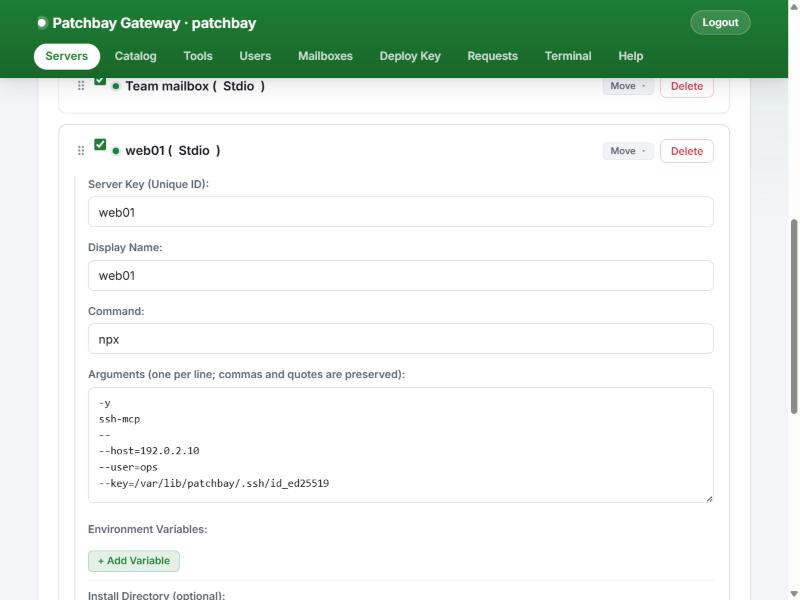
Each server opens in an editor with fields for its transport: command, one argument per line and environment for stdio; URL and API key or bearer token for SSE and HTTP. A guided Add Server wizard and a Catalog of well-known MCP servers make adding one a few clicks.
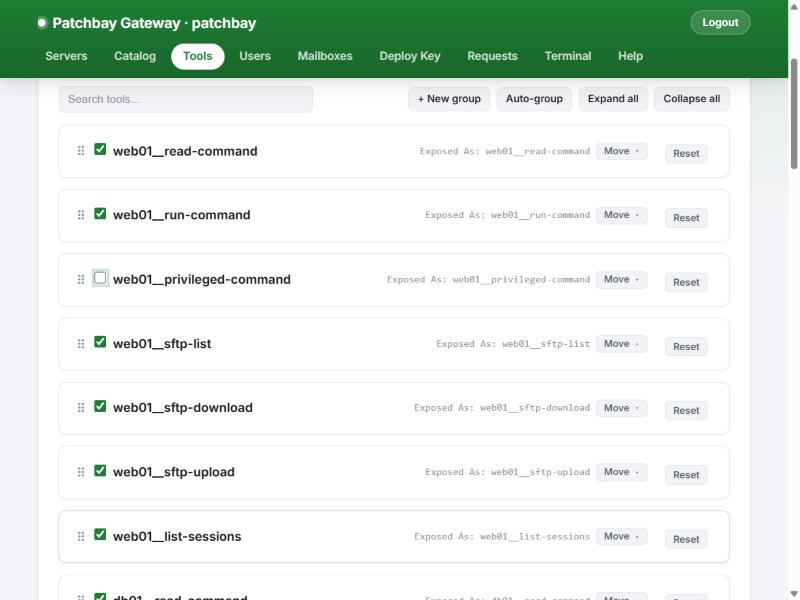
Every tool discovered from every active backend. Disable a tool gateway-wide, or override the name and description the client sees. Overrides are cosmetic: authorization and trifecta rules always match the original backend and tool names.
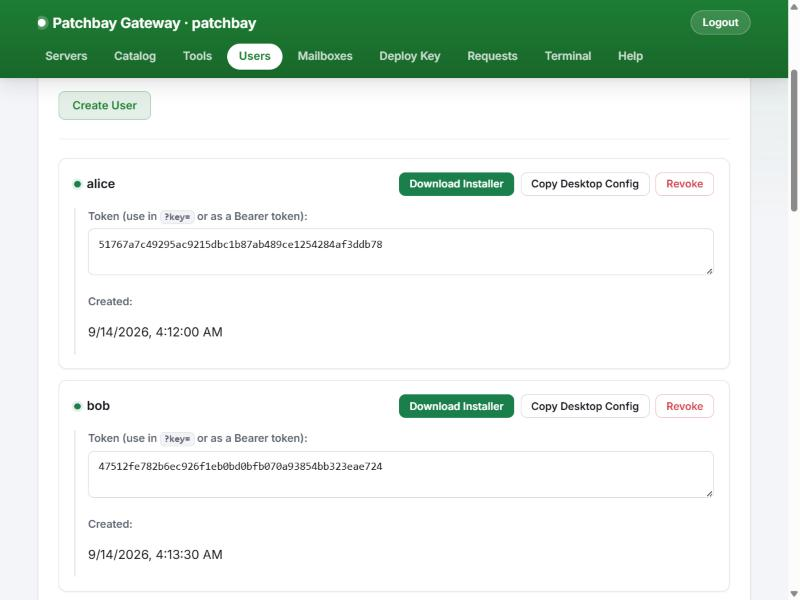
Create a user and their token is live immediately; revoke it the same way. For each
user the tab generates a ready-to-paste Claude Desktop config or a Windows installer
bundle: a zip with a portable Node.js, a pre-installed mcp-remote and the user's
token, which merges one entry into claude_desktop_config.json. See
docs/client-setup.md.
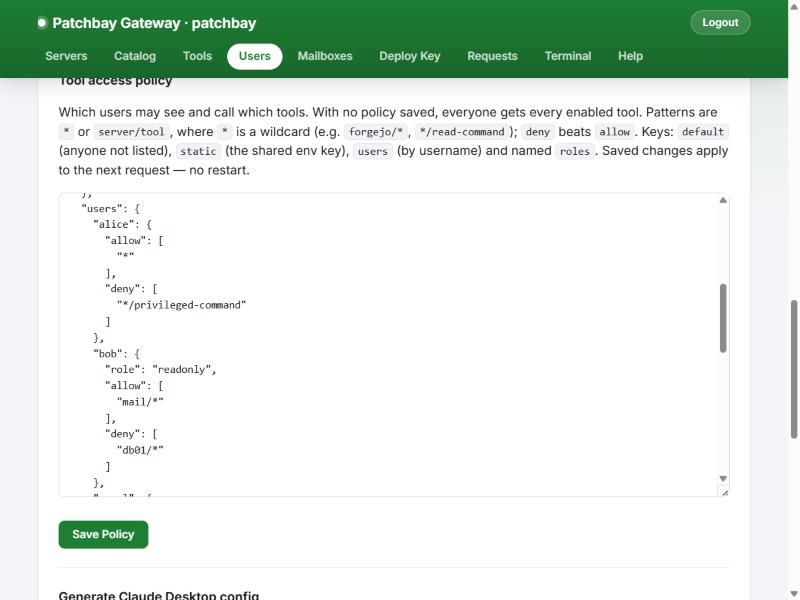
The same tab edits config/tool_policy.json, including the trifecta section. The
gateway validates the policy before saving it, so a typo is rejected instead of locking
everyone out. The next request uses the new policy.
In the demo, alice reads a host (web01__read-command: private data), then reads an
email (mail__read_email: untrusted content), then asks to send mail
(mail__send_email: an outbound channel). The gateway refuses the third call before
it reaches the mail backend:
MCP error -32010: Blocked by the gateway's lethal-trifecta policy: "mail__send_email"
would communicate externally, and this session has already used tools that read
private data (via web01__read-command) and read untrusted outside content (via
mail__read_email). [...] Nothing was sent to the backend. Other calls in this session
still work; to make this call, do it in a new session [...]
Every step is in the audit log. These are lines from the demo, with some fields trimmed:
{"ts":"2026-10-05T18:03:33.696Z","event":"tools/call","user":"alice","identityKind":"user","tool":"web01__read-command","backend":"web01","ok":true,"decision":"allow","authzRule":"users.alice","durationMs":5}
{"ts":"2026-10-05T18:03:33.707Z","event":"tools/call","user":"alice","identityKind":"user","tool":"mail__read_email","backend":"mail","ok":true,"decision":"allow","authzRule":"users.alice","durationMs":4}
{"ts":"2026-10-05T18:03:33.715Z","event":"tools/call","user":"alice","identityKind":"user","tool":"mail__send_email","backend":"mail","ok":false,"decision":"allow","authzRule":"users.alice","durationMs":1,"errorCode":-32010,"trifecta":{"mode":"enforce","sessionAxes":["privateData","untrustedContent"],"toolAxes":["externalComm"],"completing":["externalComm"],"sources":{"privateData":"web01__read-command","untrustedContent":"mail__read_email"},"blocked":true}}
{"ts":"2026-10-05T18:03:33.723Z","event":"tools/call","user":"alice","identityKind":"user","tool":"web01__privileged-command","backend":"web01","ok":false,"decision":"deny","authzRule":"users.alice","authzReason":"matched deny","durationMs":0,"errorCode":-32003}
The last line is the tool policy at work: alice may use everything except
*/privileged-command.
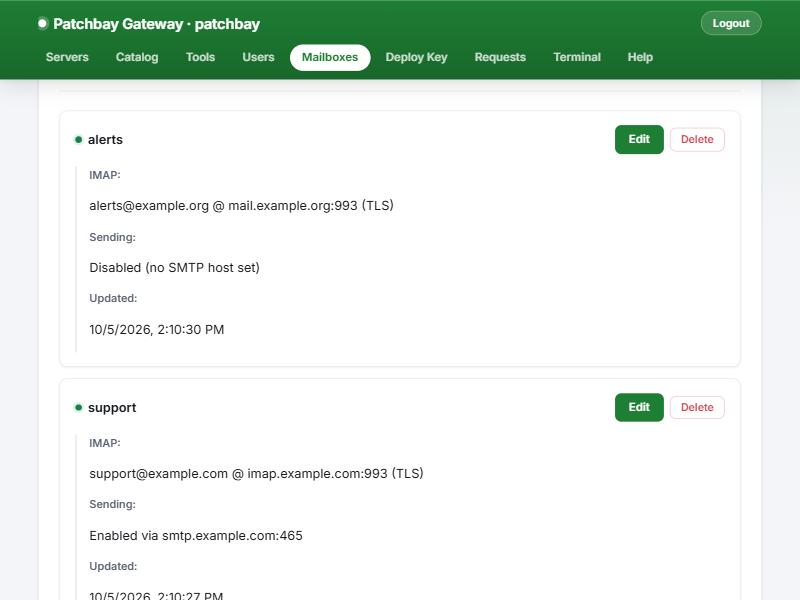
If you run an IMAP/SMTP MCP connector behind the gateway, the Mailboxes tab manages its accounts. Passwords are encrypted at rest (AES-256-GCM) and never sent back to the browser. Saving regenerates the connector's own accounts file and reconnects only that backend.
catalog-server,
and admins approve or reject requests in the Requests tab.authorized_keys. The password is used once and not
stored.ADMIN_*,
ALLOWED_*, *_SECRET, *_PASSWORD, *_TOKEN, *_KEY) are stripped from its
environment.GATEWAY_CLIENT_NAME and GATEWAY_UI_COLOR label the
tab, header and favicon, so you can tell several gateways apart.On a Linux host with Node.js 20+ (no containers needed):
git clone https://github.com/<you>/patchbay-gateway.git /opt/patchbay-gateway
cd /opt/patchbay-gateway
npm install && npm run build
cp config/mcp_server.json.example config/mcp_server.json   # then edit it
ENABLE_ADMIN_UI=true ADMIN_PASSWORD='change-me' MCP_AUDIT_DIR=./audit node build/sse.js
Open http://<host>:3663/admin, create a user in the Users tab, and point a client
at http://<host>:3663/mcp?key=<token>.
For a real deployment (systemd unit, env file, firewall, upgrades) follow docs/install.md.
| Document | Contents |
|---|---|
| docs/install.md | Native install on Linux with systemd, env file, firewall, upgrades |
| docs/configuration.md | Every environment variable, mcp_server.json, users.json, tool_policy.json, rate limits, audit log |
| docs/client-setup.md | Claude Desktop, Claude Code and other clients via mcp-remote; the Windows installer bundle |
| TRIFECTA.md | The lethal-trifecta model, default classification and the trifecta policy section in depth |
| CHANGELOG.md | What this fork adds over upstream |
| FORK_NOTES.md | Implementation notes on each change, for contributors |
| deploy/ | Minimal example systemd unit and env file |
| docs/guard.md | The leak guard that runs in npm test and the pre-commit hook |
npm test builds the project, runs the offline tests under test/ and runs the leak
guard, which needs gitleaks and refuses secrets
and private IP addresses. npm run hooks:install runs the guard on every commit. Use
RFC 5737 addresses (192.0.2.x) and generic host names (web01) in examples and
tests.
Read this before you expose a gateway to anyone.
ADMIN_PASSWORD, keep the UI on a private
network, and leave ENABLE_ADMIN_UI unset where you don't need it. Logins are
throttled per IP, the session cookie is SameSite=Strict and HttpOnly, and session
IDs are regenerated on login.PORT. Restrict it with a host firewall to
a private network or VPN, or put a TLS-terminating reverse proxy in front.
docs/install.md has the details.config/users.json holds them in plain text, mode
0600 recommended. Anyone holding a token is that user until you revoke it.tool_policy.json.Patchbay Gateway is MIT-licensed, like the projects it is forked from. See LICENSE and NOTICE.
d12590dc) whose findings
this fork fixes, the idea for merging adjacent text blocks (190093a1) and the
config-diff approach for reloads (75d535b).40d702cd).src/trifecta.ts is an independent implementation; no Open Edison
(GPL-3.0) code is used.MCP gateway: one endpoint for many MCP servers, with per-user identity, per-tool authorization, lethal-trifecta blocking, audit log and rate limits.
TypeScript
0
137 commits
updated Oct 13, 2026
One MCP endpoint for all your MCP servers, with identity, per-tool authorization, lethal-trifecta blocking and an audit trail in front of every tool call.
Patchbay Gateway is a self-hosted Model Context Protocol
gateway. It connects to any number of MCP servers (stdio, SSE or streamable HTTP),
publishes all of their tools behind a single /mcp endpoint, and decides per caller
and per session which of those tools may run. It is a fork of
ptbsare/mcp-proxy-server; see
Credits and the CHANGELOG for what the fork adds.
An MCP client (Claude Desktop, Claude Code, an agent framework) normally starts or connects to each MCP server on its own: one config entry per server, one set of credentials per client machine, no shared view of who called what.
A proxy fixes the plumbing. It forwards traffic from a client to a server, perhaps translating stdio into HTTP so the server can live somewhere else. It does not decide anything. Every caller gets every tool, and the proxy has no idea who is calling.
A gateway sits in the same place but owns the policy. Patchbay:
| Plain proxy | Patchbay Gateway | |
|---|---|---|
| Backends | One server per endpoint | Many servers aggregated behind one endpoint; tools are namespaced server__tool |
| Transports | Usually one | Backends over stdio, SSE or streamable HTTP; clients over streamable HTTP (/mcp) or SSE (/sse) |
| Who is calling | Unknown | Each caller presents a personal token; every request resolves to a named identity |
| What they may call | Everything | Per-tool authorization from tool_policy.json: allow/deny globs per user, role or default, enforced on tools/list and tools/call |
| Prompt-injection blast radius | Unlimited | Lethal-trifecta blocking: a session that has touched private data and untrusted content cannot also use an outbound channel |
| Record of what happened | None | Append-only JSON Lines audit log of every tools/call, including denials and blocks |
| Runaway agents | Reach every backend | Per-identity rate limits on tool calls and HTTP requests |
| Changing config | Restart | Users and policy apply on the next request; backend edits apply with an in-process reload that only reconnects the servers you changed |
| Operating it | Edit JSON | Admin web UI for servers, tools, users, policy, mailboxes, client installers and a terminal |
flowchart LR
  subgraph Clients
    A["Claude Desktop<br/>(alice)"]
    B["Claude Code<br/>(bob)"]
    C["Agent / script<br/>(static token)"]
  end

  subgraph G["Patchbay Gateway"]
    direction TB
    AUTH["1 · Authenticate token<br/>→ caller identity"]
    RL["2 · Rate limit<br/>(per identity)"]
    AZ["3 · Per-tool authorization<br/>tool_policy.json"]
    TF["4 · Lethal-trifecta check<br/>(per session)"]
    AU["5 · Audit log<br/>tools-call-YYYY-MM-DD.jsonl"]
    AUTH --> RL --> AZ --> TF --> AU
  end

  A & B & C -- "/mcp or /sse" --> AUTH
  AU -- stdio --> S1["web01<br/>(ssh-mcp)"]
  AU -- stdio --> S2["files<br/>(filesystem)"]
  AU -- "streamable HTTP" --> S3["docs<br/>(remote MCP)"]
  AU -- SSE --> S4["db01<br/>(SSE MCP)"]
A tools/call goes through those steps in that order. A call that is throttled,
denied or blocked never reaches a backend, and denials and blocks are written to the
audit log like any other call. A throttled call gets a coalesced rate-limit line
instead of one line per rejection.
Per-user identity. Admins create users in the Users tab (or config/users.json).
Each user gets a random 48-character token. Clients present it as
Authorization: Bearer <token>, X-Api-Key: <token> or ?key=<token>. The gateway
resolves every request to an identity (alice, bob, static for the shared
ALLOWED_TOKENS/ALLOWED_KEYS credential, or anonymous when authentication is off).
Creating or revoking a user takes effect immediately, with no restart.
Per-tool authorization. config/tool_policy.json holds allow and deny lists of
"<backend>/<tool>" globs for each user, for named roles, for the static credential and
for everyone else. Deny beats allow. A tool a caller may not use is removed from their
tools/list and refused on tools/call with JSON-RPC error -32003. No file means
everyone keeps every enabled tool; an invalid file fails closed and denies
everything until it is fixed.
Lethal-trifecta blocking. Every tool is classified on three axes: reads
privateData, ingests untrustedContent, or has an externalComm channel. The
gateway tracks which axes each MCP session has touched and refuses (error -32010) the
call that would give one session all three, before it is forwarded. That is the
combination a single prompt-injected email or web page needs to read something
sensitive and send it out. Built-in defaults recognise ssh-mcp, an IMAP mail
connector and Context7; anything unrecognised is treated as untrusted + external.
Everything is overridable, and there are monitor and off modes. See
TRIFECTA.md.
Audit log. One JSON object per tools/call, appended to a file per UTC day:
who, which session, which tool and backend, allow/deny and the rule that decided,
duration, error code and any trifecta detail. Tool arguments are not recorded unless
you opt in. Tokens never are. Files rotate at a size cap and are pruned after a
retention period.
Rate limits. Two token buckets per identity: one for tools/call (default burst 60,
120/min) and a looser one for every authenticated HTTP request (burst 120, 300/min).
Callers without an identity are bucketed per IP or per session. A throttled tool call
gets JSON-RPC error -32011 with the retry delay. A throttled HTTP request gets
429 and a Retry-After header.
Live reload. Users and the tool policy are re-read on change and apply to the next request, including on sessions that are already open. Server and tool edits apply with the admin UI's reload button. It reconnects only the backends whose config changed and leaves the others running.
Admin web UI (optional, ENABLE_ADMIN_UI=true). Manage backend servers (add, edit,
enable/disable, install, reorder, group), browse a connector catalog, enable/rename
individual tools, create and revoke users, download a per-user Windows client
installer, edit the tool policy, manage IMAP mailboxes for a mail connector, push the
gateway's SSH key to a new host, review end-user connector requests, and open a web
terminal on the gateway host.
Text-block merging (optional, off by default). Some clients only read the
first content block of a tool result; the OpenAI Responses API's remote MCP tool is
one. MCP_MERGE_TEXT_CONTENT=true (or a per-user mergeTextContent) joins adjacent
text blocks so those clients see the whole answer.
Screenshots are from a demo instance with made-up servers and users.
Every backend MCP server in one list: its transport, whether it is active, and
controls to edit, install or remove it. Servers can be searched, grouped into
collapsible sections and drag-ordered. The order also drives the order of tools/list,
which keeps the client's prompt cache stable. Reload applies edits without
restarting the gateway.
Each server opens in an editor with fields for its transport: command, one argument per line and environment for stdio; URL and API key or bearer token for SSE and HTTP. A guided Add Server wizard and a Catalog of well-known MCP servers make adding one a few clicks.
Every tool discovered from every active backend. Disable a tool gateway-wide, or override the name and description the client sees. Overrides are cosmetic: authorization and trifecta rules always match the original backend and tool names.
Create a user and their token is live immediately; revoke it the same way. For each
user the tab generates a ready-to-paste Claude Desktop config or a Windows installer
bundle: a zip with a portable Node.js, a pre-installed mcp-remote and the user's
token, which merges one entry into claude_desktop_config.json. See
docs/client-setup.md.
The same tab edits config/tool_policy.json, including the trifecta section. The
gateway validates the policy before saving it, so a typo is rejected instead of locking
everyone out. The next request uses the new policy.
In the demo, alice reads a host (web01__read-command: private data), then reads an
email (mail__read_email: untrusted content), then asks to send mail
(mail__send_email: an outbound channel). The gateway refuses the third call before
it reaches the mail backend:
MCP error -32010: Blocked by the gateway's lethal-trifecta policy: "mail__send_email"
would communicate externally, and this session has already used tools that read
private data (via web01__read-command) and read untrusted outside content (via
mail__read_email). [...] Nothing was sent to the backend. Other calls in this session
still work; to make this call, do it in a new session [...]
Every step is in the audit log. These are lines from the demo, with some fields trimmed:
{"ts":"2026-10-05T18:03:33.696Z","event":"tools/call","user":"alice","identityKind":"user","tool":"web01__read-command","backend":"web01","ok":true,"decision":"allow","authzRule":"users.alice","durationMs":5}
{"ts":"2026-10-05T18:03:33.707Z","event":"tools/call","user":"alice","identityKind":"user","tool":"mail__read_email","backend":"mail","ok":true,"decision":"allow","authzRule":"users.alice","durationMs":4}
{"ts":"2026-10-05T18:03:33.715Z","event":"tools/call","user":"alice","identityKind":"user","tool":"mail__send_email","backend":"mail","ok":false,"decision":"allow","authzRule":"users.alice","durationMs":1,"errorCode":-32010,"trifecta":{"mode":"enforce","sessionAxes":["privateData","untrustedContent"],"toolAxes":["externalComm"],"completing":["externalComm"],"sources":{"privateData":"web01__read-command","untrustedContent":"mail__read_email"},"blocked":true}}
{"ts":"2026-10-05T18:03:33.723Z","event":"tools/call","user":"alice","identityKind":"user","tool":"web01__privileged-command","backend":"web01","ok":false,"decision":"deny","authzRule":"users.alice","authzReason":"matched deny","durationMs":0,"errorCode":-32003}
The last line is the tool policy at work: alice may use everything except
*/privileged-command.
If you run an IMAP/SMTP MCP connector behind the gateway, the Mailboxes tab manages its accounts. Passwords are encrypted at rest (AES-256-GCM) and never sent back to the browser. Saving regenerates the connector's own accounts file and reconnects only that backend.
catalog-server,
and admins approve or reject requests in the Requests tab.authorized_keys. The password is used once and not
stored.ADMIN_*,
ALLOWED_*, *_SECRET, *_PASSWORD, *_TOKEN, *_KEY) are stripped from its
environment.GATEWAY_CLIENT_NAME and GATEWAY_UI_COLOR label the
tab, header and favicon, so you can tell several gateways apart.On a Linux host with Node.js 20+ (no containers needed):
git clone https://github.com/<you>/patchbay-gateway.git /opt/patchbay-gateway
cd /opt/patchbay-gateway
npm install && npm run build
cp config/mcp_server.json.example config/mcp_server.json   # then edit it
ENABLE_ADMIN_UI=true ADMIN_PASSWORD='change-me' MCP_AUDIT_DIR=./audit node build/sse.js
Open http://<host>:3663/admin, create a user in the Users tab, and point a client
at http://<host>:3663/mcp?key=<token>.
For a real deployment (systemd unit, env file, firewall, upgrades) follow docs/install.md.
| Document | Contents |
|---|---|
| docs/install.md | Native install on Linux with systemd, env file, firewall, upgrades |
| docs/configuration.md | Every environment variable, mcp_server.json, users.json, tool_policy.json, rate limits, audit log |
| docs/client-setup.md | Claude Desktop, Claude Code and other clients via mcp-remote; the Windows installer bundle |
| TRIFECTA.md | The lethal-trifecta model, default classification and the trifecta policy section in depth |
| CHANGELOG.md | What this fork adds over upstream |
| FORK_NOTES.md | Implementation notes on each change, for contributors |
| deploy/ | Minimal example systemd unit and env file |
| docs/guard.md | The leak guard that runs in npm test and the pre-commit hook |
npm test builds the project, runs the offline tests under test/ and runs the leak
guard, which needs gitleaks and refuses secrets
and private IP addresses. npm run hooks:install runs the guard on every commit. Use
RFC 5737 addresses (192.0.2.x) and generic host names (web01) in examples and
tests.
Read this before you expose a gateway to anyone.
ADMIN_PASSWORD, keep the UI on a private
network, and leave ENABLE_ADMIN_UI unset where you don't need it. Logins are
throttled per IP, the session cookie is SameSite=Strict and HttpOnly, and session
IDs are regenerated on login.PORT. Restrict it with a host firewall to
a private network or VPN, or put a TLS-terminating reverse proxy in front.
docs/install.md has the details.config/users.json holds them in plain text, mode
0600 recommended. Anyone holding a token is that user until you revoke it.tool_policy.json.Patchbay Gateway is MIT-licensed, like the projects it is forked from. See LICENSE and NOTICE.
d12590dc) whose findings
this fork fixes, the idea for merging adjacent text blocks (190093a1) and the
config-diff approach for reloads (75d535b).40d702cd).src/trifecta.ts is an independent implementation; no Open Edison
(GPL-3.0) code is used.


