


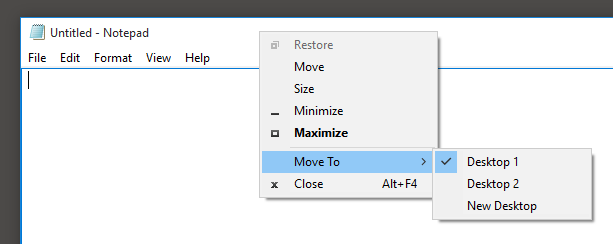
Adds the Move to Desktop feature to the Windows 10 System menu:

Download and Run.
You can also move windows by using WIN+ALT+Left/Right
Hint
It is useful to start MoveToDesktop as Administrator.
If you do so, MoveToDesktop is also enabled for privileged tasks.
For starting MoveToDesktop on logon the prefered way is to create a scheduled task. See how.
You can place the MoveToDesktop.ini into %AppData% and modify the settings in it.
A restart of the application is required.
1.4:
1.3:
1.2:
1.1:
1.0:
323 followers · starred Mar 2016
119 followers · starred Apr 2017
225 followers · starred Jul 2016
94 followers · starred Apr 2017
Adds the Move to Desktop feature to the Windows 10 System menu:
Download and Run.
You can also move windows by using WIN+ALT+Left/Right
Hint
It is useful to start MoveToDesktop as Administrator.
If you do so, MoveToDesktop is also enabled for privileged tasks.
For starting MoveToDesktop on logon the prefered way is to create a scheduled task. See how.
You can place the MoveToDesktop.ini into %AppData% and modify the settings in it.
A restart of the application is required.
1.4:
1.3:
1.2:
1.1:
1.0:
323 followers · starred Mar 2016
119 followers · starred Apr 2017
225 followers · starred Jul 2016
94 followers · starred Apr 2017



