
[INTERSPEECH 2026] This is the official implementation for εar-VAE model including inference and evaluation parts, more details coming soon...
See the codeREADME
εar-VAE: High Fidelity Music Reconstruction Model
[Demo Page] - [Model Weights] - [Paper]
This repository contains the official inference code for εar-VAE, a 44.1 kHz music signal reconstruction model that rethinks and optimizes VAE training for audio. It targets two common weaknesses in existing open-source VAEs—phase accuracy and stereophonic spatial representation—by aligning objectives with auditory perception and introducing phase-aware training. Experiments show substantial improvements across diverse metrics, with particular strength in high-frequency harmonics and spatial characteristics.
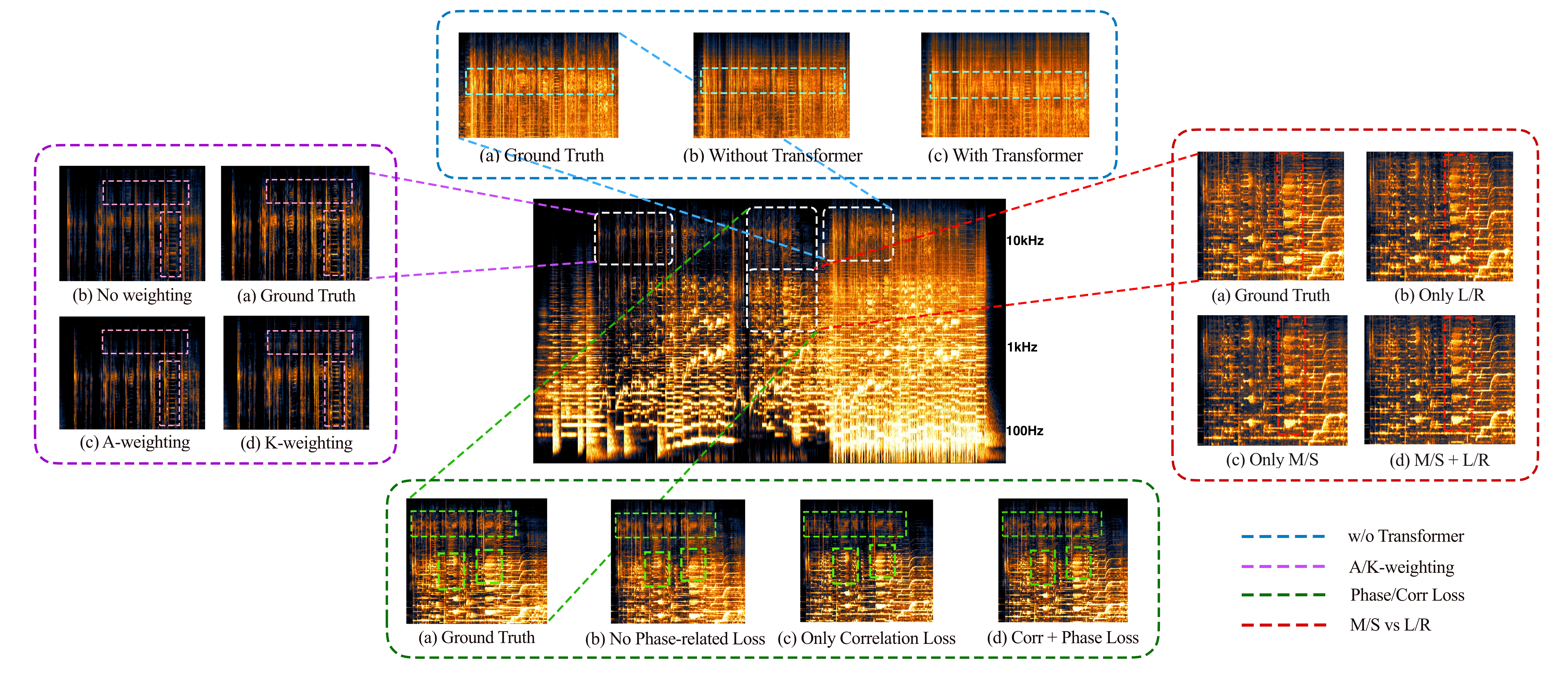
Upper: Ablation study across our training components.
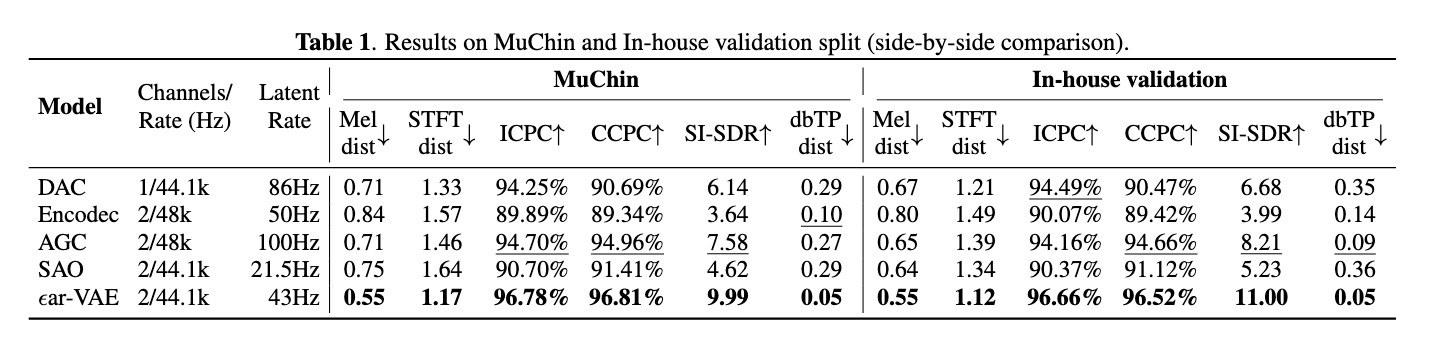
Down: Cross-model metric comparison on the evaluation dataset.
🔥2026-08-21 Update🔥: Now we have the brand new εar-VAE2, feel free to check it [Here!].
⭐2025-12-10 Update⭐: A new model weight works in 48kHz sample rate, same-level vocal performance with better stereophonic energy reconstruction, it was trained with less steps (arround 1m) and smaller dataset. (mel distance
0.55and STFT dist0.95for our In-house validation set.)
Why εar-VAE:
- 🎧 Perceptual alignment: A K-weighting perceptual filter is applied before loss computation to better match human hearing.
- 🔁 Phase-aware objectives: Two novel phase losses
- Stereo Correlation Loss for robust inter-channel coherence.
- Phase-Derivative Loss using Instantaneous Frequency and Group Delay for phase precision.
- 🌈 Spectral supervision paradigm: Magnitude supervised across MSLR (Mid/Side/Left/Right) components, while phase is supervised only by LR (Left/Right), improving stability and fidelity.
- 📈 44.1 & 48 kHz performance: Outperforms leading open-source models across diverse metrics.
1. Installation
Follow these steps to set up the environment and install the necessary dependencies.
Installation Steps
-
Clone the repository:
git clone https://github.com/Eps-Acoustic-Revolution-Lab/EAR_VAE.git cd ear_vae -
Create and activate a conda environment:
conda create -n ear_vae python=3.8 conda activate ear_vae -
Run the installation script:
This script will install the remaining dependencies.
bash install_requirements.shThis will install:
descript-audio-codecalias-free-torchffmpeg < 7(via conda)
-
Download the model weight:
You could download the model checkpoint from Hugging Face
2. Usage
The inference.py script is used to process audio files from an input directory and save the reconstructed audio to an output directory.
Running Inference
You can run the inference with the following command:
python inference.py --indir <input_directory> --outdir <output_directory> --model_path <path_to_model> --device <device>
Command-Line Arguments
--indir: (Optional) Path to the input directory containing audio files. Default:./data.--outdir: (Optional) Path to the output directory where reconstructed audio will be saved. Default:./results.--model_path: (Optional) Path to the pretrained model weights (.pytfile). Default:./pretrained_weight/ear_vae_44k.pyt.--device: (Optional) The device to run the model on (e.g.,cuda:0orcpu). Defaults tocuda:0if available, otherwisecpu.
Example
-
Place your input audio files (e.g.,
.wav,.mp3) into thedata/directory. -
Run the inference script:
python inference.pyThis will use the default paths. The reconstructed audio files will be saved in the
results/directory.
3. Project Structure
.
├── README.md               # This file
├── config/                 # For model configurations
│   └── model_config.json
├── data/                   # Default directory for input audio files
├── eval/                   # Scripts for model evaluation
│   ├── eval_compare_matrix.py
│   ├── install_requirements.sh
│   └── README.md
├── inference.py            # Main script for running audio reconstruction
├── install_requirements.sh # Installation script for dependencies
├── model/                  # Contains the model architecture code
│   ├── sa2vae.py
│   ├── transformer.py
│   └── vaegan.py
├── pretrained_weight/      # Directory for pretrained model weights
│   └── your_weight_here
├── tools/                  # Utility scripts (e.g. K-weighting implementation)
│   └── filter.py
4. Model Details
The model is a Variational Autoencoder with a Generative Adversarial Network (VAE-GAN) structure.
- Encoder: An Oobleck-style encoder that downsamples the input audio into a latent representation.
- Bottleneck: A VAE bottleneck that introduces a probabilistic latent space, sampling from a learned mean and variance.
- Decoder: An Oobleck-style decoder that upsamples the latent representation back into an audio waveform.
- Transformer: A Continuous Transformer can optionally be placed in the bottleneck to further process the latent sequence.
This architecture allows for efficient and high-quality audio reconstruction.
5. Evaluation
The eval/ directory contains scripts to evaluate the model's reconstruction performance using objective metrics.
Evaluation Prerequisites
-
Install Dependencies: The evaluation script has its own set of dependencies. Install them by running the script in the
evaldirectory:bash eval/install_requirements.shThis will install libraries such as
auraloss. -
FFmpeg: The script uses
ffmpegfor loudness analysis. Make sureffmpegis installed and available in your system's PATH. You can install it via conda:conda install -c conda-forge 'ffmpeg<7'
Running Evaluation
The eval_compare_matrix.py script compares the reconstructed audio with the original ground truth files and computes various metrics.
For more details on the evaluation metrics and options, refer to the eval/README.md file.
6. Acknowledgements
This project builds upon the work of several open-source projects. We would like to extend our special thanks to:
- Stability AI's Stable Audio Tools: For providing a foundational framework and tools for audio generation.
- Descript's Audio Codec: For the weight-normed convolusional layers
Their contributions have been invaluable to the development of εar-VAE.
Contributors

9 commits
Similar repos


Languages
Python
99.8%
[INTERSPEECH 2026] This is the official implementation for εar-VAE model including inference and evaluation parts, more details coming soon...
See the codeREADME
εar-VAE: High Fidelity Music Reconstruction Model
[Demo Page] - [Model Weights] - [Paper]
This repository contains the official inference code for εar-VAE, a 44.1 kHz music signal reconstruction model that rethinks and optimizes VAE training for audio. It targets two common weaknesses in existing open-source VAEs—phase accuracy and stereophonic spatial representation—by aligning objectives with auditory perception and introducing phase-aware training. Experiments show substantial improvements across diverse metrics, with particular strength in high-frequency harmonics and spatial characteristics.
Upper: Ablation study across our training components.
Down: Cross-model metric comparison on the evaluation dataset.
🔥2026-08-21 Update🔥: Now we have the brand new εar-VAE2, feel free to check it [Here!].
⭐2025-12-10 Update⭐: A new model weight works in 48kHz sample rate, same-level vocal performance with better stereophonic energy reconstruction, it was trained with less steps (arround 1m) and smaller dataset. (mel distance
0.55and STFT dist0.95for our In-house validation set.)
Why εar-VAE:
- 🎧 Perceptual alignment: A K-weighting perceptual filter is applied before loss computation to better match human hearing.
- 🔁 Phase-aware objectives: Two novel phase losses
- Stereo Correlation Loss for robust inter-channel coherence.
- Phase-Derivative Loss using Instantaneous Frequency and Group Delay for phase precision.
- 🌈 Spectral supervision paradigm: Magnitude supervised across MSLR (Mid/Side/Left/Right) components, while phase is supervised only by LR (Left/Right), improving stability and fidelity.
- 📈 44.1 & 48 kHz performance: Outperforms leading open-source models across diverse metrics.
1. Installation
Follow these steps to set up the environment and install the necessary dependencies.
Installation Steps
-
Clone the repository:
git clone https://github.com/Eps-Acoustic-Revolution-Lab/EAR_VAE.git cd ear_vae -
Create and activate a conda environment:
conda create -n ear_vae python=3.8 conda activate ear_vae -
Run the installation script:
This script will install the remaining dependencies.
bash install_requirements.shThis will install:
descript-audio-codecalias-free-torchffmpeg < 7(via conda)
-
Download the model weight:
You could download the model checkpoint from Hugging Face
2. Usage
The inference.py script is used to process audio files from an input directory and save the reconstructed audio to an output directory.
Running Inference
You can run the inference with the following command:
python inference.py --indir <input_directory> --outdir <output_directory> --model_path <path_to_model> --device <device>
Command-Line Arguments
--indir: (Optional) Path to the input directory containing audio files. Default:./data.--outdir: (Optional) Path to the output directory where reconstructed audio will be saved. Default:./results.--model_path: (Optional) Path to the pretrained model weights (.pytfile). Default:./pretrained_weight/ear_vae_44k.pyt.--device: (Optional) The device to run the model on (e.g.,cuda:0orcpu). Defaults tocuda:0if available, otherwisecpu.
Example
-
Place your input audio files (e.g.,
.wav,.mp3) into thedata/directory. -
Run the inference script:
python inference.pyThis will use the default paths. The reconstructed audio files will be saved in the
results/directory.
3. Project Structure
.
├── README.md               # This file
├── config/                 # For model configurations
│   └── model_config.json
├── data/                   # Default directory for input audio files
├── eval/                   # Scripts for model evaluation
│   ├── eval_compare_matrix.py
│   ├── install_requirements.sh
│   └── README.md
├── inference.py            # Main script for running audio reconstruction
├── install_requirements.sh # Installation script for dependencies
├── model/                  # Contains the model architecture code
│   ├── sa2vae.py
│   ├── transformer.py
│   └── vaegan.py
├── pretrained_weight/      # Directory for pretrained model weights
│   └── your_weight_here
├── tools/                  # Utility scripts (e.g. K-weighting implementation)
│   └── filter.py
4. Model Details
The model is a Variational Autoencoder with a Generative Adversarial Network (VAE-GAN) structure.
- Encoder: An Oobleck-style encoder that downsamples the input audio into a latent representation.
- Bottleneck: A VAE bottleneck that introduces a probabilistic latent space, sampling from a learned mean and variance.
- Decoder: An Oobleck-style decoder that upsamples the latent representation back into an audio waveform.
- Transformer: A Continuous Transformer can optionally be placed in the bottleneck to further process the latent sequence.
This architecture allows for efficient and high-quality audio reconstruction.
5. Evaluation
The eval/ directory contains scripts to evaluate the model's reconstruction performance using objective metrics.
Evaluation Prerequisites
-
Install Dependencies: The evaluation script has its own set of dependencies. Install them by running the script in the
evaldirectory:bash eval/install_requirements.shThis will install libraries such as
auraloss. -
FFmpeg: The script uses
ffmpegfor loudness analysis. Make sureffmpegis installed and available in your system's PATH. You can install it via conda:conda install -c conda-forge 'ffmpeg<7'
Running Evaluation
The eval_compare_matrix.py script compares the reconstructed audio with the original ground truth files and computes various metrics.
For more details on the evaluation metrics and options, refer to the eval/README.md file.
6. Acknowledgements
This project builds upon the work of several open-source projects. We would like to extend our special thanks to:
- Stability AI's Stable Audio Tools: For providing a foundational framework and tools for audio generation.
- Descript's Audio Codec: For the weight-normed convolusional layers
Their contributions have been invaluable to the development of εar-VAE.
Similar repos
Contributors
9 commits
Languages
Python
99.8%