
Jev-assisted retrieval and evidence-preserving inspection for local Markdown, Obsidian vaults, and Logseq Markdown graphs.
See the codeSee what people are saying
README
Jev Graph Search
Jev Graph Search helps an AI agent find useful notes and passages in a local Obsidian vault or a folder of Logseq Markdown notes. It makes a shortlist on your machine, then uses Jev to rank those candidates against your question. The result includes the original passage and source reference, so the agent can point back to the note it used.
Run it from the terminal or install the agent skill. An optional JSON snapshot is supported as well. See Jev for the ranking service.
Get started · Obsidian and Logseq · Agent skill · Documentation
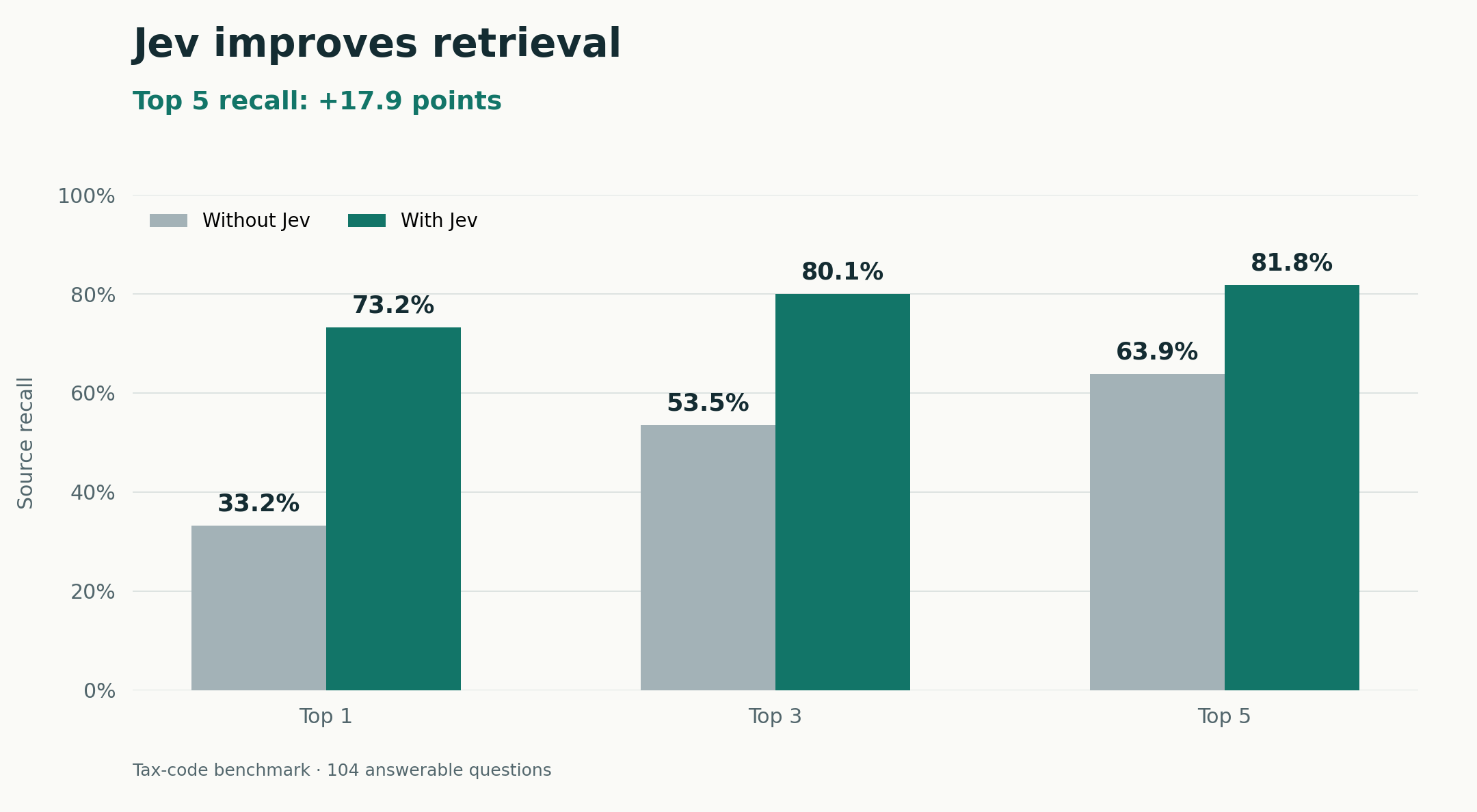
On one 8,851-node tax-code graph, Jev reranking raised top-five source recall from 63.9% to 81.8%.
Get started
You need Node.js 20+ and npm. Git is needed for the example checkout and skill installation. The CLI has no runtime dependencies.
Run the exact npm release:
npx --yes --package=jev-graph-search@0.2.2 jev-graph-search setup
At setup, use ↑/↓ and Enter to choose TypeSafe or OpenRouter, then paste your API key into the hidden prompt. Your key is saved in a private per-user configuration file, outside the graph.
Search a directory of Markdown files or an optional JSON graph snapshot:
npx --yes --package=jev-graph-search@0.2.2 jev-graph-search search "Why did we choose this database?" --input ./ObsidianVault
For a persistent jev-graph-search command:
npm install --global jev-graph-search@0.2.2
jev-graph-search --help
The release workflow publishes exact package versions with npm trusted publishing and provenance. Pin the package version in automation so upgrades are deliberate.
Try the included example without a key
git clone --branch v0.2.2 --depth 1 https://github.com/Emlembow/jev-graph-search.git
cd jev-graph-search
node bin/jev-graph-search.js search "Why PostgreSQL?" --input examples/memory.json --offline
node bin/jev-graph-search.js audit --input examples/memory.json
--offline uses local lexical ranking. Remove it after setup to use Jev.
Agent skill
npx skills add Emlembow/jev-graph-search --skill jev-graph-search
The skill tells an agent how to retrieve evidence from local Markdown graphs or JSON snapshots, inspect links, and suggest where to save a new note. It invokes the CLI above. Installing the skill does not configure API keys or read your files.
Commands
With the CLI installed, try these operations:
# Retrieve source passages from an Obsidian vault
jev-graph-search search "What did we decide?" --input ./ObsidianVault

# Propose where a new memory belongs
jev-graph-search place "We chose PostgreSQL for transactions" --input ./ObsidianVault

# Audit explicit structure; add --semantic for Jev suggestions
jev-graph-search audit --input ./ObsidianVault

# Follow existing links in an optional JSON snapshot without a provider key
jev-graph-search traverse --input snapshot.json --from PAGE_A --to PAGE_B
Search starts with keyword matches and a limited set of linked notes, then sends selected titles, bounded aliases, and content excerpts to Jev for reranking. Results retain the exact source evidence. place and migration commands propose changes without writing to your graph. Use jev-graph-search --help for all commands.
Obsidian and Logseq
Set --input to a local Markdown directory. Obsidian vaults are read recursively, including nested folders. Logseq graphs are supported through their Markdown pages/ and journals/ files; database and Org-mode formats are outside this interface. Hidden paths and symbolic links are skipped. Reading the graph does not create a backup or export.
Common page metadata works in either graph style:
---
aliases: [Database decision, PostgreSQL decision]
tags: [architecture, storage]
---
# Database decision

## Related
- [[Transactions]]
See also [Migration notes](../projects/migration-notes.md)
Top-level YAML aliases and tags lists, plus unindented Logseq alias:: and tags:: page-property lines, are indexed as page-level metadata. Indented block-property lines remain page content. Wikilinks and relative Markdown links become explicit graph evidence.
# Obsidian
jev-graph-search search "database decision" --input ./ObsidianVault --offline

# Logseq Markdown graph
jev-graph-search audit --input ./logseq-graph --offline
Configuration
- Interactive setup:
jev-graph-search setup. - Environment setup: export
TYPESAFE_API_KEYorOPENROUTER_API_KEY, then runjev-graph-search setup --from-envto persist it. - Diagnostics:
jev-graph-search configandjev-graph-search doctorshow redacted configuration. - Cache: semantic scores are cached;
--no-cacherequests fresh scores. - Local search:
--offlineexplicitly selects lexical ranking.
Keys are never accepted as command-line arguments. Saved credentials use a 0600 file inside a 0700 directory. Storage and provider options →
Documentation
Jev ranks only the shortlist it receives. It cannot recover missing candidates or show that the available evidence is sufficient. Model suggestions are not links that already exist in the graph, and a partial snapshot stays partial. The current default may still return results when the question has no answer in the graph.
License
MIT © 2026 Emlembow.
Contributors

7 commits
Similar repos


Languages
JavaScript
100.0%
Jev-assisted retrieval and evidence-preserving inspection for local Markdown, Obsidian vaults, and Logseq Markdown graphs.
See the codeSee what people are saying
README
Jev Graph Search
Jev Graph Search helps an AI agent find useful notes and passages in a local Obsidian vault or a folder of Logseq Markdown notes. It makes a shortlist on your machine, then uses Jev to rank those candidates against your question. The result includes the original passage and source reference, so the agent can point back to the note it used.
Run it from the terminal or install the agent skill. An optional JSON snapshot is supported as well. See Jev for the ranking service.
Get started · Obsidian and Logseq · Agent skill · Documentation
On one 8,851-node tax-code graph, Jev reranking raised top-five source recall from 63.9% to 81.8%.
Get started
You need Node.js 20+ and npm. Git is needed for the example checkout and skill installation. The CLI has no runtime dependencies.
Run the exact npm release:
npx --yes --package=jev-graph-search@0.2.2 jev-graph-search setup
At setup, use ↑/↓ and Enter to choose TypeSafe or OpenRouter, then paste your API key into the hidden prompt. Your key is saved in a private per-user configuration file, outside the graph.
Search a directory of Markdown files or an optional JSON graph snapshot:
npx --yes --package=jev-graph-search@0.2.2 jev-graph-search search "Why did we choose this database?" --input ./ObsidianVault
For a persistent jev-graph-search command:
npm install --global jev-graph-search@0.2.2
jev-graph-search --help
The release workflow publishes exact package versions with npm trusted publishing and provenance. Pin the package version in automation so upgrades are deliberate.
Try the included example without a key
git clone --branch v0.2.2 --depth 1 https://github.com/Emlembow/jev-graph-search.git
cd jev-graph-search
node bin/jev-graph-search.js search "Why PostgreSQL?" --input examples/memory.json --offline
node bin/jev-graph-search.js audit --input examples/memory.json
--offline uses local lexical ranking. Remove it after setup to use Jev.
Agent skill
npx skills add Emlembow/jev-graph-search --skill jev-graph-search
The skill tells an agent how to retrieve evidence from local Markdown graphs or JSON snapshots, inspect links, and suggest where to save a new note. It invokes the CLI above. Installing the skill does not configure API keys or read your files.
Commands
With the CLI installed, try these operations:
# Retrieve source passages from an Obsidian vault
jev-graph-search search "What did we decide?" --input ./ObsidianVault

# Propose where a new memory belongs
jev-graph-search place "We chose PostgreSQL for transactions" --input ./ObsidianVault

# Audit explicit structure; add --semantic for Jev suggestions
jev-graph-search audit --input ./ObsidianVault

# Follow existing links in an optional JSON snapshot without a provider key
jev-graph-search traverse --input snapshot.json --from PAGE_A --to PAGE_B
Search starts with keyword matches and a limited set of linked notes, then sends selected titles, bounded aliases, and content excerpts to Jev for reranking. Results retain the exact source evidence. place and migration commands propose changes without writing to your graph. Use jev-graph-search --help for all commands.
Obsidian and Logseq
Set --input to a local Markdown directory. Obsidian vaults are read recursively, including nested folders. Logseq graphs are supported through their Markdown pages/ and journals/ files; database and Org-mode formats are outside this interface. Hidden paths and symbolic links are skipped. Reading the graph does not create a backup or export.
Common page metadata works in either graph style:
---
aliases: [Database decision, PostgreSQL decision]
tags: [architecture, storage]
---
# Database decision

## Related
- [[Transactions]]
See also [Migration notes](../projects/migration-notes.md)
Top-level YAML aliases and tags lists, plus unindented Logseq alias:: and tags:: page-property lines, are indexed as page-level metadata. Indented block-property lines remain page content. Wikilinks and relative Markdown links become explicit graph evidence.
# Obsidian
jev-graph-search search "database decision" --input ./ObsidianVault --offline

# Logseq Markdown graph
jev-graph-search audit --input ./logseq-graph --offline
Configuration
- Interactive setup:
jev-graph-search setup. - Environment setup: export
TYPESAFE_API_KEYorOPENROUTER_API_KEY, then runjev-graph-search setup --from-envto persist it. - Diagnostics:
jev-graph-search configandjev-graph-search doctorshow redacted configuration. - Cache: semantic scores are cached;
--no-cacherequests fresh scores. - Local search:
--offlineexplicitly selects lexical ranking.
Keys are never accepted as command-line arguments. Saved credentials use a 0600 file inside a 0700 directory. Storage and provider options →
Documentation
Jev ranks only the shortlist it receives. It cannot recover missing candidates or show that the available evidence is sufficient. Model suggestions are not links that already exist in the graph, and a partial snapshot stays partial. The current default may still return results when the question has no answer in the graph.
License
MIT © 2026 Emlembow.
Similar repos
Contributors
7 commits
Languages
JavaScript
100.0%