
README
ERA: Transforming VLMs into Embodied Agents via Embodied Prior Learning and Online Reinforcement Learning
🤗 Dataset | 🏠 Project Website
Hanyang Chen*, Mark Zhao*, Rui Yang*, Qinwei Ma, Ke Yang, Jiarui Yao, Kangrui Wang, Hao Bai, Zhenhailong Wang, Rui Pan, Mengchao Zhang, Jose Barreiros, Aykut Onol, ChengXiang Zhai, Heng Ji, Manling Li, Huan Zhang, Tong Zhang
1University of Illinois Urbana-Champaign, 2Northwestern University, 3Toyota Research Institute
🔥 Overview
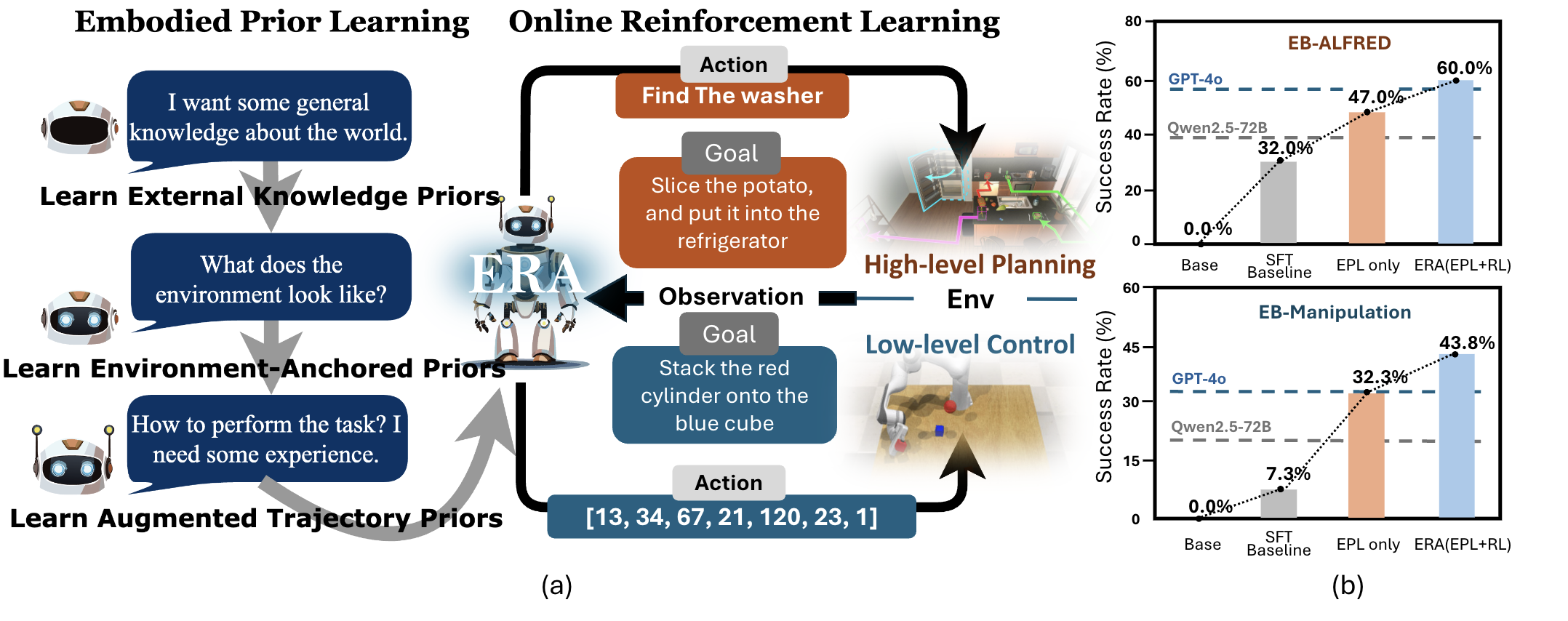
We introduce the Embodied Reasoning Agent (ERA) , a framework that transforms a compact Vision Language Model (VLM) into a performant and efficient embodied agent. In this work, we study: 1. What prior knowledge does embodied agent require before RL and 2 What make RL in long-horizon embodied task stable and effective? We distill them into a unified post-training regime that is capable of delivering both high-level planning agent and low-level control agent, by different curation of training data.
ERA takes a two-stage approach. Stage 1: Infuse foundational capabilities into the model, which is categorized into three kinds of embodied prior knowledge , and Stage 2: refine the agent by online reinforcement learning with rich process reward and turn-level GAE .
📋 Table of Contents
🎓 Stage 1: Embodied Prior Learning (EPL)
EPL Environment Setup
Download repo:
git clone git@github.com:Embodied-Reasoning-Agent/Embodied-Reasoning-Agent.git
cd Embodied-Reasoning-Agent
Environment setup:
cd ERA-sft
conda env create -f environment_epl.yaml
conda activate era-env-epl
EPL Dataset Download
-
Environment-Anchored Prior Dataset
- Download the dataset from EB-Man_environment_anchored_prior_dataset and EB-ALFRED_environment_anchored_prior_dataset
-
External Knowledge Prior Dataset
- Download the dataset from EB-Man_external_knowledge_prior_dataset and EB-ALFRED_external_knowledge_prior_dataset
-
Trajectory-Augmented Prior Dataset
- Download the dataset from EB-Man_trajectory_augmented_prior_dataset and EB-ALFRED_trajectory_augmented_prior_dataset
EPL Training
We adopt stage-wise training on these datasets(that is, training on a dataset at a stage). You can train on them in any sequence you desire, and we recommend two choice of sequence: 1. first training on Environment-Anchored Prior Dataset and then on Trajectory-Augmented Prior Dataset 2. first on External-Knowledge Prior Dataset and then on Trajectory-Augmented Prior Dataset.
Below we will show how to train on any dataset for a single stage.
- Configure your training settings:
cd epl
‼️ There are 2 important argument in two files to set clearly to correctly conduct the training:
-
json_pathInERA-sft/epl/data/stage.yaml: Use variable to specify the path of your json data file.
-
IMAGE_FOLDERInERA-sft/epl/scripts/train.sh: Clearly set this variables, such thatIMAGE_FOLDER+img_path variable in your json data file(concatenation) can correctly points to where your actual img exists.
- Start training:
bash scripts/train.sh
🚀 Stage 2: Online Reinforcement Learning (RL)
Online RL Overview
Note that since we are working with online reinforcement learning, so there are inevitably two parts of workflow: 1. The RL Training Algorithm and 2. The RL Environment. We have seperate code/environment for these two parts. Another important thing is, we adopt Parrallel Rollout in this framework, implemented in a server-client manner, and we will talk about it in RL Training. Now, we will first talk about setup the running environment for these two parts.
Setup
1. Setting up the environment for RL Training Algorithm
Install the RL training framework in a virtual environment:
cd ERA-rl
python -m venv era-rl-env
source era-rl-env/bin/activate  # On Windows: era-rl-env\Scripts\activate
cd verl
pip install -e .
cd ../VAGEN
bash install.sh
deactivate  # you can now de-activate the env to setup other env
2. Setting up the environment for RL Environment
We support two embodied environments from EmbodiedBench: EB-ALFRED and EB-Manipulation. Follow the instructions below to set up each environment.
Note that this line:
cd ERA-rl/VAGEN/vagen/env/Embench_newin the following is very important, since the codebase is rather nested, it keeps you in the right place for installation.
2.1. EB-ALFRED Environment
2.1.1 Environment Installation
cd ERA-rl/VAGEN/vagen/env/Embench_new
conda env create -f conda_envs/environment.yaml
conda activate embench
pip install -e .
2.1.2 Additional Installation
Download dataset from huggingface.
conda activate embench
git clone https://huggingface.co/datasets/EmbodiedBench/EB-ALFRED
mv EB-ALFRED embodiedbench/envs/eb_alfred/data/json_2.1.0
Run the following code to ensure the EB-ALFRED environment is working correctly. Remember to start headless server.
conda activate embench
python -m embodiedbench.envs.eb_alfred.EBAlfEnv
2.2. EB-Manipulation Environment
2.2.1 Environment Installation
cd ERA-rl/VAGEN/vagen/env/Embench_new
conda env create -f conda_envs/environment.yaml
conda activate embench
pip install -e .
2.2.2 Additional Installation
- Install Coppelia Simulator
CoppeliaSim V4.1.0 required for Ubuntu 20.04; you can find other versions here (https://www.coppeliarobotics.com/previousVersions#)
conda activate embench_man
cd embodiedbench/envs/eb_manipulation
wget https://downloads.coppeliarobotics.com/V4_1_0/CoppeliaSim_Pro_V4_1_0_Ubuntu20_04.tar.xz
tar -xf CoppeliaSim_Pro_V4_1_0_Ubuntu20_04.tar.xz
rm CoppeliaSim_Pro_V4_1_0_Ubuntu20_04.tar.xz
mv CoppeliaSim_Pro_V4_1_0_Ubuntu20_04/ /PATH/YOU/WANT/TO/PLACE/COPPELIASIM
- Add the following to your ~/.bashrc file:
export COPPELIASIM_ROOT=/PATH/YOU/WANT/TO/PLACE/COPPELIASIM
export LD_LIBRARY_PATH=$LD_LIBRARY_PATH:$COPPELIASIM_ROOT
export QT_QPA_PLATFORM_PLUGIN_PATH=$COPPELIASIM_ROOT
Remember to source your bashrc (
source ~/.bashrc) or zshrc (source ~/.zshrc) after this.
- Install the PyRep, EB-Manipulation package and dataset:
git clone https://github.com/stepjam/PyRep.git
cd PyRep
pip install -r requirements.txt
pip install -e .
cd ..
pip install -r requirements.txt
pip install -e .
cp ./simAddOnScript_PyRep.lua $COPPELIASIM_ROOT
git clone https://huggingface.co/datasets/EmbodiedBench/EB-Manipulation
mv EB-Manipulation/data/ ./
rm -rf EB-Manipulation/
cd ../../..
Remember that whenever you re-install the PyRep, simAddOnScript_PyRep.lua will be overwritten. Then, you should copy this again.
- Run the following code to ensure the EB-Manipulation is working correctly (start headless server if you have not):
conda activate embench_man
export DISPLAY=:1
python -m embodiedbench.envs.eb_manipulation.EBManEnv
Congratulations, you have finished the environment setup for online RL, and the following would be very easy to go.
RL Dataset Preparation
Since the dataset preparation in online, simulator-based RL basically can be translated to the initial state (or task ID) to start with (mostly heavy-lifting is done by the simulator), we just have to specify the sequence of task IDs here.
The configuration process is the same for both environments (EB-ALFRED and EB-Manipulation):
-
Navigate to the environment's configuration file:
- For EB-ALFRED:
ERA-rl/VAGEN/vagen/env/alfred/alfred_env_config_for_vagen.py - For EB-Manipulation:
ERA-rl/VAGEN/vagen/env/ebman/ebman_env_config_for_vagen.py
- For EB-ALFRED:
-
Modify the
generate_seedfunction to customize the task ID sequence according to your training needs.
RL Training
The RL training workflow consists of two parts: the RL Environment Server and the RL Training Algorithm Client. We adopt a parallel rollout mechanism implemented in a server-client manner for efficient training.
1. Setting up the RL Environment Server
The environment server needs to be started in a separate tmux session. Follow the instructions below based on your chosen environment.
For EB-ALFRED Environment
-
Activate the environment:
conda activate embench -
Configure the environment initialization:
Edit
ERA-rl/VAGEN/vagen/env/Embench_new/__init__.pyto ONLY Inlcude the ALFRED environment:from .alfred_env_for_vagen import AlfredEnv from .alfred_env_service import AlfredService from .alfred_env_config_for_vagen import AlfredEnvConfig -
Set the server port:
Modify the
portfield inERA-rl/VAGEN/vagen/server/server.yamlto your desired port number. -
Start the server:
cd ERA-rl/VAGEN/vagen/server
python server.py
For EB-Manipulation Environment
-
Activate the environment:
conda activate embench_man -
Configure the environment initialization:
Edit
ERA-rl/VAGEN/vagen/env/Embench_new/__init__.pyto ONLY Inlcude the Manipulation environment:from .mani_env import EBManipulationEnv from .mani_env_service import EBManipulationService from .mani_env_config import EBManipulationEnvConfig -
Set the server port:
Modify the
portfield inERA-rl/VAGEN/vagen/server/server.yamlto your desired port number. -
Start the server:
⚠️ Important: For EB-Manipulation, you must start the server from the
Embench_newdirectory due to absolute path dependencies in the environment.cd ERA-rl/VAGEN/vagen/env/Embench_new python ../../server/server.py
2. Running the RL Training Algorithm
Once the environment server is running, you can start the RL training algorithm client in a separate terminal or tmux session.
Starting Training
Navigate to the corresponding environment directory and run the training script:
cd ERA-rl/VAGEN/vagen/examples/<env_name>  # Replace <env_name> with 'alfred' or 'ebman'
bash run.sh
Important Configuration Parameters
Before running the training, you should modify the run.sh file to configure the following key parameters:
-
Parallel Rollout Batch Size (
data.train_batch_size)This parameter specifies how many tasks will be rolled out in parallel during each rollout iteration.
data.train_batch_size=50 # Example: 50 tasks in parallel -
Maximum Steps per Task (
rollout_manager.max_turns)This defines the maximum number of steps/turns for each task during rollout.
rollout_manager.max_turns=30 # Example: 30 steps per task -
Total Training Iterations (
trainer.total_training_steps)This specifies the number of rollout iterations. Each iteration will roughly collect
batch_size × max_turnstransitions (s, a, s', r).trainer.total_training_steps=15 # Example: 15 rollout iterations -
Model Paths and Save Directory
Configure the paths for your actor model, critic model, and checkpoint save directory:
actor_rollout_ref.model.path="your_actor_path" # Path to actor model critic.model.path="your_critic_path" # Path to critic model trainer.default_local_dir="your_local_dir" # Directory to save checkpoints trainer.project_name='your_project_name' # WandB project name trainer.experiment_name='your_experiment_name' # WandB experiment name -
Environment Server URL (
rollout_manager.base_url) [CRITICAL]Set this to match the server address you configured in Part 1. Use the format
http://IP:PORT.rollout_manager.base_url="http://localhost:5000" # Example: adjust IP and port accordinglyMake sure this URL matches:
- The IP address where your environment server is running
- The port number you set in
ERA-rl/VAGEN/vagen/server/server.yaml
Citations
If you find our work helpful for your research, please cite:
@article{chen2025era,
  title={ERA: Transforming VLMs into Embodied Agents via Embodied Prior Learning and Online Reinforcement Learning},
  author={Chen, Hanyang and Zhao, Mark and Yang, Rui and Ma, Qinwei and Yang, Ke and Yao, Jiarui and Wang, Kangrui and Bai, Hao and Wang, Zhenhailong and Pan, Rui and others},
  journal={arXiv preprint arXiv:2510.12693},
  year={2025}
}
@inproceedings{
yang2025embodiedbench,
title={EmbodiedBench: Comprehensive Benchmarking Multi-modal Large Language Models for Vision-Driven Embodied Agents},
author={Rui Yang and Hanyang Chen and Junyu Zhang and Mark Zhao and Cheng Qian and Kangrui Wang and Qineng Wang and Teja Venkat Koripella and Marziyeh Movahedi and Manling Li and Heng Ji and Huan Zhang and Tong Zhang},
booktitle={Forty-second International Conference on Machine Learning},
year={2025},
url={https://openreview.net/forum?id=DgGF2LEBPS}
}
Similar repos


README
ERA: Transforming VLMs into Embodied Agents via Embodied Prior Learning and Online Reinforcement Learning
🤗 Dataset | 🏠 Project Website
Hanyang Chen*, Mark Zhao*, Rui Yang*, Qinwei Ma, Ke Yang, Jiarui Yao, Kangrui Wang, Hao Bai, Zhenhailong Wang, Rui Pan, Mengchao Zhang, Jose Barreiros, Aykut Onol, ChengXiang Zhai, Heng Ji, Manling Li, Huan Zhang, Tong Zhang
1University of Illinois Urbana-Champaign, 2Northwestern University, 3Toyota Research Institute
🔥 Overview
We introduce the Embodied Reasoning Agent (ERA) , a framework that transforms a compact Vision Language Model (VLM) into a performant and efficient embodied agent. In this work, we study: 1. What prior knowledge does embodied agent require before RL and 2 What make RL in long-horizon embodied task stable and effective? We distill them into a unified post-training regime that is capable of delivering both high-level planning agent and low-level control agent, by different curation of training data.
ERA takes a two-stage approach. Stage 1: Infuse foundational capabilities into the model, which is categorized into three kinds of embodied prior knowledge , and Stage 2: refine the agent by online reinforcement learning with rich process reward and turn-level GAE .
📋 Table of Contents
🎓 Stage 1: Embodied Prior Learning (EPL)
EPL Environment Setup
Download repo:
git clone git@github.com:Embodied-Reasoning-Agent/Embodied-Reasoning-Agent.git
cd Embodied-Reasoning-Agent
Environment setup:
cd ERA-sft
conda env create -f environment_epl.yaml
conda activate era-env-epl
EPL Dataset Download
-
Environment-Anchored Prior Dataset
- Download the dataset from EB-Man_environment_anchored_prior_dataset and EB-ALFRED_environment_anchored_prior_dataset
-
External Knowledge Prior Dataset
- Download the dataset from EB-Man_external_knowledge_prior_dataset and EB-ALFRED_external_knowledge_prior_dataset
-
Trajectory-Augmented Prior Dataset
- Download the dataset from EB-Man_trajectory_augmented_prior_dataset and EB-ALFRED_trajectory_augmented_prior_dataset
EPL Training
We adopt stage-wise training on these datasets(that is, training on a dataset at a stage). You can train on them in any sequence you desire, and we recommend two choice of sequence: 1. first training on Environment-Anchored Prior Dataset and then on Trajectory-Augmented Prior Dataset 2. first on External-Knowledge Prior Dataset and then on Trajectory-Augmented Prior Dataset.
Below we will show how to train on any dataset for a single stage.
- Configure your training settings:
cd epl
‼️ There are 2 important argument in two files to set clearly to correctly conduct the training:
-
json_pathInERA-sft/epl/data/stage.yaml: Use variable to specify the path of your json data file.
-
IMAGE_FOLDERInERA-sft/epl/scripts/train.sh: Clearly set this variables, such thatIMAGE_FOLDER+img_path variable in your json data file(concatenation) can correctly points to where your actual img exists.
- Start training:
bash scripts/train.sh
🚀 Stage 2: Online Reinforcement Learning (RL)
Online RL Overview
Note that since we are working with online reinforcement learning, so there are inevitably two parts of workflow: 1. The RL Training Algorithm and 2. The RL Environment. We have seperate code/environment for these two parts. Another important thing is, we adopt Parrallel Rollout in this framework, implemented in a server-client manner, and we will talk about it in RL Training. Now, we will first talk about setup the running environment for these two parts.
Setup
1. Setting up the environment for RL Training Algorithm
Install the RL training framework in a virtual environment:
cd ERA-rl
python -m venv era-rl-env
source era-rl-env/bin/activate  # On Windows: era-rl-env\Scripts\activate
cd verl
pip install -e .
cd ../VAGEN
bash install.sh
deactivate  # you can now de-activate the env to setup other env
2. Setting up the environment for RL Environment
We support two embodied environments from EmbodiedBench: EB-ALFRED and EB-Manipulation. Follow the instructions below to set up each environment.
Note that this line:
cd ERA-rl/VAGEN/vagen/env/Embench_newin the following is very important, since the codebase is rather nested, it keeps you in the right place for installation.
2.1. EB-ALFRED Environment
2.1.1 Environment Installation
cd ERA-rl/VAGEN/vagen/env/Embench_new
conda env create -f conda_envs/environment.yaml
conda activate embench
pip install -e .
2.1.2 Additional Installation
Download dataset from huggingface.
conda activate embench
git clone https://huggingface.co/datasets/EmbodiedBench/EB-ALFRED
mv EB-ALFRED embodiedbench/envs/eb_alfred/data/json_2.1.0
Run the following code to ensure the EB-ALFRED environment is working correctly. Remember to start headless server.
conda activate embench
python -m embodiedbench.envs.eb_alfred.EBAlfEnv
2.2. EB-Manipulation Environment
2.2.1 Environment Installation
cd ERA-rl/VAGEN/vagen/env/Embench_new
conda env create -f conda_envs/environment.yaml
conda activate embench
pip install -e .
2.2.2 Additional Installation
- Install Coppelia Simulator
CoppeliaSim V4.1.0 required for Ubuntu 20.04; you can find other versions here (https://www.coppeliarobotics.com/previousVersions#)
conda activate embench_man
cd embodiedbench/envs/eb_manipulation
wget https://downloads.coppeliarobotics.com/V4_1_0/CoppeliaSim_Pro_V4_1_0_Ubuntu20_04.tar.xz
tar -xf CoppeliaSim_Pro_V4_1_0_Ubuntu20_04.tar.xz
rm CoppeliaSim_Pro_V4_1_0_Ubuntu20_04.tar.xz
mv CoppeliaSim_Pro_V4_1_0_Ubuntu20_04/ /PATH/YOU/WANT/TO/PLACE/COPPELIASIM
- Add the following to your ~/.bashrc file:
export COPPELIASIM_ROOT=/PATH/YOU/WANT/TO/PLACE/COPPELIASIM
export LD_LIBRARY_PATH=$LD_LIBRARY_PATH:$COPPELIASIM_ROOT
export QT_QPA_PLATFORM_PLUGIN_PATH=$COPPELIASIM_ROOT
Remember to source your bashrc (
source ~/.bashrc) or zshrc (source ~/.zshrc) after this.
- Install the PyRep, EB-Manipulation package and dataset:
git clone https://github.com/stepjam/PyRep.git
cd PyRep
pip install -r requirements.txt
pip install -e .
cd ..
pip install -r requirements.txt
pip install -e .
cp ./simAddOnScript_PyRep.lua $COPPELIASIM_ROOT
git clone https://huggingface.co/datasets/EmbodiedBench/EB-Manipulation
mv EB-Manipulation/data/ ./
rm -rf EB-Manipulation/
cd ../../..
Remember that whenever you re-install the PyRep, simAddOnScript_PyRep.lua will be overwritten. Then, you should copy this again.
- Run the following code to ensure the EB-Manipulation is working correctly (start headless server if you have not):
conda activate embench_man
export DISPLAY=:1
python -m embodiedbench.envs.eb_manipulation.EBManEnv
Congratulations, you have finished the environment setup for online RL, and the following would be very easy to go.
RL Dataset Preparation
Since the dataset preparation in online, simulator-based RL basically can be translated to the initial state (or task ID) to start with (mostly heavy-lifting is done by the simulator), we just have to specify the sequence of task IDs here.
The configuration process is the same for both environments (EB-ALFRED and EB-Manipulation):
-
Navigate to the environment's configuration file:
- For EB-ALFRED:
ERA-rl/VAGEN/vagen/env/alfred/alfred_env_config_for_vagen.py - For EB-Manipulation:
ERA-rl/VAGEN/vagen/env/ebman/ebman_env_config_for_vagen.py
- For EB-ALFRED:
-
Modify the
generate_seedfunction to customize the task ID sequence according to your training needs.
RL Training
The RL training workflow consists of two parts: the RL Environment Server and the RL Training Algorithm Client. We adopt a parallel rollout mechanism implemented in a server-client manner for efficient training.
1. Setting up the RL Environment Server
The environment server needs to be started in a separate tmux session. Follow the instructions below based on your chosen environment.
For EB-ALFRED Environment
-
Activate the environment:
conda activate embench -
Configure the environment initialization:
Edit
ERA-rl/VAGEN/vagen/env/Embench_new/__init__.pyto ONLY Inlcude the ALFRED environment:from .alfred_env_for_vagen import AlfredEnv from .alfred_env_service import AlfredService from .alfred_env_config_for_vagen import AlfredEnvConfig -
Set the server port:
Modify the
portfield inERA-rl/VAGEN/vagen/server/server.yamlto your desired port number. -
Start the server:
cd ERA-rl/VAGEN/vagen/server
python server.py
For EB-Manipulation Environment
-
Activate the environment:
conda activate embench_man -
Configure the environment initialization:
Edit
ERA-rl/VAGEN/vagen/env/Embench_new/__init__.pyto ONLY Inlcude the Manipulation environment:from .mani_env import EBManipulationEnv from .mani_env_service import EBManipulationService from .mani_env_config import EBManipulationEnvConfig -
Set the server port:
Modify the
portfield inERA-rl/VAGEN/vagen/server/server.yamlto your desired port number. -
Start the server:
⚠️ Important: For EB-Manipulation, you must start the server from the
Embench_newdirectory due to absolute path dependencies in the environment.cd ERA-rl/VAGEN/vagen/env/Embench_new python ../../server/server.py
2. Running the RL Training Algorithm
Once the environment server is running, you can start the RL training algorithm client in a separate terminal or tmux session.
Starting Training
Navigate to the corresponding environment directory and run the training script:
cd ERA-rl/VAGEN/vagen/examples/<env_name>  # Replace <env_name> with 'alfred' or 'ebman'
bash run.sh
Important Configuration Parameters
Before running the training, you should modify the run.sh file to configure the following key parameters:
-
Parallel Rollout Batch Size (
data.train_batch_size)This parameter specifies how many tasks will be rolled out in parallel during each rollout iteration.
data.train_batch_size=50 # Example: 50 tasks in parallel -
Maximum Steps per Task (
rollout_manager.max_turns)This defines the maximum number of steps/turns for each task during rollout.
rollout_manager.max_turns=30 # Example: 30 steps per task -
Total Training Iterations (
trainer.total_training_steps)This specifies the number of rollout iterations. Each iteration will roughly collect
batch_size × max_turnstransitions (s, a, s', r).trainer.total_training_steps=15 # Example: 15 rollout iterations -
Model Paths and Save Directory
Configure the paths for your actor model, critic model, and checkpoint save directory:
actor_rollout_ref.model.path="your_actor_path" # Path to actor model critic.model.path="your_critic_path" # Path to critic model trainer.default_local_dir="your_local_dir" # Directory to save checkpoints trainer.project_name='your_project_name' # WandB project name trainer.experiment_name='your_experiment_name' # WandB experiment name -
Environment Server URL (
rollout_manager.base_url) [CRITICAL]Set this to match the server address you configured in Part 1. Use the format
http://IP:PORT.rollout_manager.base_url="http://localhost:5000" # Example: adjust IP and port accordinglyMake sure this URL matches:
- The IP address where your environment server is running
- The port number you set in
ERA-rl/VAGEN/vagen/server/server.yaml
Citations
If you find our work helpful for your research, please cite:
@article{chen2025era,
  title={ERA: Transforming VLMs into Embodied Agents via Embodied Prior Learning and Online Reinforcement Learning},
  author={Chen, Hanyang and Zhao, Mark and Yang, Rui and Ma, Qinwei and Yang, Ke and Yao, Jiarui and Wang, Kangrui and Bai, Hao and Wang, Zhenhailong and Pan, Rui and others},
  journal={arXiv preprint arXiv:2510.12693},
  year={2025}
}
@inproceedings{
yang2025embodiedbench,
title={EmbodiedBench: Comprehensive Benchmarking Multi-modal Large Language Models for Vision-Driven Embodied Agents},
author={Rui Yang and Hanyang Chen and Junyu Zhang and Mark Zhao and Cheng Qian and Kangrui Wang and Qineng Wang and Teja Venkat Koripella and Marziyeh Movahedi and Manling Li and Heng Ji and Huan Zhang and Tong Zhang},
booktitle={Forty-second International Conference on Machine Learning},
year={2025},
url={https://openreview.net/forum?id=DgGF2LEBPS}
}