Manage WhatsApp .crypt12, .crypt14 and .crypt15 files.
Python
1,174
400 commits
updated Oct 13, 2026


Decrypt and encrypt WhatsApp and WA Business' .crypt12, .crypt14 and .crypt15 files with ease!
For decryption, you NEED the key file or the 64-characters long key
(or a screenshot of it).
The key file is named "key" if the backup is crypt14 or
"encrypted_backup.key" if the backup is crypt15 (encrypted E2E backups).
Those who are looking for a more complete suite for
WhatsApp forensics, check out whapa.
If you do not want to install programs in your computer, you can run this program in Google Colab .
If you are familiar with Jupyter (read here if you're not), you can use the notebook version of the program.
You can install this script as a package through pip. Just run:
python -m pip install wa-crypt-tools
for the stable version and
python -m pip install git+https://github.com/ElDavoo/wa-crypt-tools
for the development version.
You might have to create a virtual environment to avoid conflicts with other packages.
If you would rather not use a terminal at all, wagui is a small window that decrypts a
backup: pick your key, pick the backup, press Decrypt.
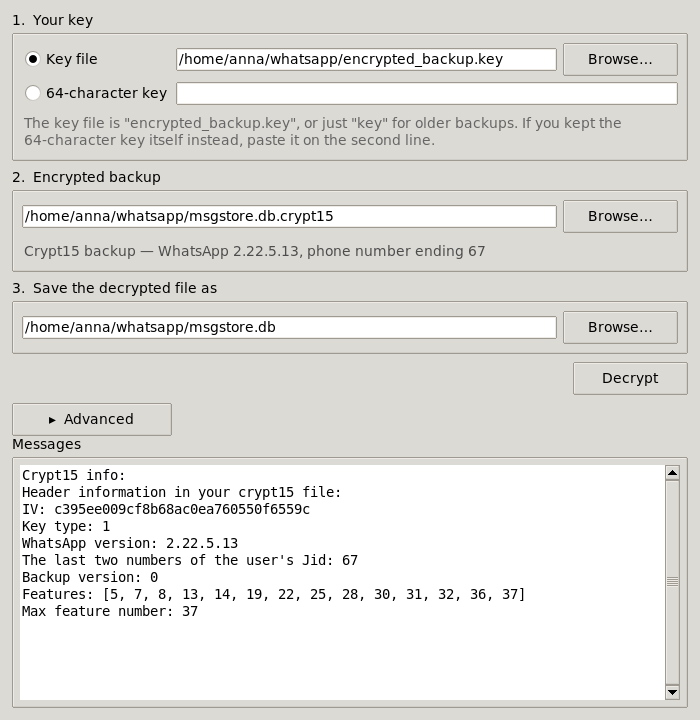
Download it and double-click it. Every release carries a self-contained build that needs no Python and no installation:
| File | For |
|---|---|
wagui-windows-x64.exe | Windows |
wagui-macos-arm64.zip | macOS (Apple Silicon) |
wagui-linux-x64 | Linux (chmod +x it first) |
The macOS build is not code-signed, so the first time you open it macOS will refuse: right-click the app and choose Open, then confirm.
If you already installed the package with pip, the same window is one command away:
wagui
On Linux, a pip install also needs your distribution's tkinter package (python3-tk on
Debian/Ubuntu, python3-tkinter on Fedora) -- it is part of Python but packaged separately.
The downloadable build has it built in and needs nothing.
The window covers decrypting, which is what most people are here for. It also tells you what a
file is as soon as you pick it, the way wainfo does. Encrypting, creating key files and
guessing offsets stay in the command-line tools below.
usage: wadecrypt [-h] [-nm] [-bs BUFFER_SIZE] [-nd] [-v] [-f] [-y] [keyfile] [encrypted] [decrypted]
So, for decrypting a crypt12/14/15, we give the program the key file, the encrypted file and the name of the output file.
It will not write over a file that already exists; pass -y/--yes if that is what you want.
$ wadecrypt encrypted_backup.key msgstore.db.crypt15 msgstore.db
key15.py:51     : [I] Crypt15 / Raw key loaded
wadecrypt.py:271        : [I] Done
usage: waencrypt [-h] [-f] [-y] [-v] [--enable-features [ENABLE_FEATURES ...]] [--max-feature MAX_FEATURE]
                 [--multi-file] [--type {12,14,15}] [--iv IV] [--reference REFERENCE] [--noparse]
                 [--wa-version WA_VERSION] [--jid JID] [--backup-version BACKUP_VERSION] [--no-compress]
                 [-c [0-9]] [keyfile] [decrypted] [encrypted]
waencrypt will not write over a file that already exists; pass -y/--yes if that is what
you want.
With --reference, waencrypt reproduces the referenced backup byte for byte: the IV, the
header (including fields this library does not model) and the compression level all come off
it, so re-encrypting an unmodified database gives you back the md5 you started with.
-c/--compression-level is the zlib level, 9 by default, which is what WhatsApp uses now.
It compressed at 1 historically. With --reference the level is taken from the reference, so
reproducing an older backup needs nothing extra; pass -c to override it.
Encryption is more complex and untested: it is advised to use another encrypted file from the same account, which we will call "reference".
waencrypt --reference msgstore.db.crypt15 encrypted_backup.key msgstore.db msgstore-new.db.crypt15
waencrypt.py:57         : [W] This script is in beta stage
waencrypt.py:89         : [I] Done!
You need to supply the following parameters:
wa.db, stickers.db, the rest of
WhatsApp/Backups/ -- carries no feature information at all, which is what wainfo means
by "No feature table found (not a msgstore DB or very old)". To write a header of that
shape, pass --enable-features with nothing after it: an empty list writes neither the
migration flags nor the backup version, and --max-feature then does nothing.Defaults will be used if parameters are omitted, and they are taken from a real 2.26.34.7
backup: given the right --iv and --jid, waencrypt writes the same header bytes as the
phone does, with no reference at all. Passing --reference is still the better way, since it
takes the IV, the compression level and the whole header off a backup you already have.
To sum it up:
$ waencrypt --enable-features 5 6 7 8 9 10 11 12 13 14 15 16
 17 18 19 20 21 22 23 24 25 26 27 28 29 30 31 32 33 34 35 36 37 39 --type 15 --wa-version 2.26.34.7 --jid 00 --backup
-version 1 encrypted_backup.key msgstore.db msgstore-new.db.crypt15
waencrypt.py:57         : [W] This script is in beta stage
waencrypt.py:89         : [I] Done!
You can get info about a backup file with the wainfo tool.
WhatsApp shows the 64-digit key once and never again, so most people screenshot it. You can give that screenshot to any of the tools wherever the key file goes -- there is no extra flag, the tools work out what they were handed:
$ wadecrypt Screenshot_20260901-184609_WhatsApp.png msgstore.db.crypt15 msgstore.db
ocr.py:503      : [I] Reading the key from the screenshot, this takes a few seconds...
key15.py:55     : [I] Crypt15 / Raw key loaded
wadecrypt.py:301        : [I] Done
wainfo -k <screenshot> prints just the key, if you only want to read it. wagui takes one
too: pick it where you would pick the key file.
This is optional and needs two things installed:
python -m pip install 'wa-crypt-tools[ocr]'
plus the Tesseract program itself -- sudo apt install tesseract-ocr on Debian/Ubuntu,
brew install tesseract on macOS, winget install UB-Mannheim.TesseractOCR on Windows.
Without them nothing else changes; you are only told to install them if you pass an image.
wadecrypt checks the key against the backup before using it, and if it does not fit, it
quietly looks for a near miss and carries on with the one that works. Any single wrong
digit is always found. You are not told about any of this, because there is nothing for you
to do -- run with -v if you want to see it. A candidate is only ever accepted once it has
actually decrypted the start of the backup, so nothing here is a guess that gets used.
This applies to the 64 digits typed in directly, not just to screenshots -- which is the same mistake, since the digits usually get typed off a screenshot in the first place. There it also tries the slips particular to copying by hand: two digits swapped round, two groups swapped, and the 4x4 grid read down the columns instead of across the rows. All of that takes about a second; a key that is simply the wrong key costs you two before the usual error.
A key file is never second-guessed. Its digits were never transcribed by anyone, so it is either the right file or the wrong one.
If even that fails, it says so, and says what to do about it:
[C] Could not read the key from the screenshot: what it says does not decrypt this backup,
    and neither does any near miss of it.
    Transcribe the 64 digits from the screenshot by hand and pass those instead of the image.
A few other things worth knowing:
wainfo -k has no backup to check against, so it cannot repair anything -- it prints what
it read, and you compare it against the picture yourself.For usage, run the tool with -h option.
0) wagui - The window (see above); the only one that is not a command-line tool
wacreatekey - Create key fileswadecrypt - Decrypt backupswaencrypt - Encrypt backupswaguess - Hacky way to try decrypt backupswainfo - Get info about a backupEverything the tools do is available through import wa_crypt_tools.
from wa_crypt_tools import DatabaseFactory, KeyFactory, IntegrityError
import zlib

key = KeyFactory.new("encrypted_backup.key")  # a key file, or the 64-character key itself

with open("msgstore.db.crypt15", "rb") as f:
    # Reads the header and leaves the stream at the start of the ciphertext.
    db = DatabaseFactory.from_file(f)
    plaintext = db.decrypt(key, f.read())

# The payload is usually zlib-compressed; a multi-file backup is a ZIP instead.
open("msgstore.db", "wb").write(zlib.decompress(plaintext))
The version -- crypt12, crypt14 or crypt15 -- is worked out by the factories from the key and the file header. You do not pick a class.
Every error the library raises derives from WaCryptError, itself a ValueError:
| Exception | Means |
|---|---|
InvalidKeyError | the key file or hex key cannot be used |
ScreenshotKeyError | a subclass of it: OCR could not read the key off a screenshot |
HeaderError | the header is missing, truncated or unparsable |
DecryptionError | the cipher failed |
IntegrityError | a check failed, but a result was produced anyway |
IntegrityError is the one worth handling on purpose. A backup whose authentication tag
does not match still yields plaintext, and the library refuses to hand it back as if it were
fine -- but it attaches it to the exception, so you can use it knowingly:
try:
    plaintext = db.decrypt(key, f.read())
except IntegrityError as e:
    # The tag did not match: the backup is corrupt, or the key is not the right one.
    # e.data holds the plaintext anyway. This is what the tools' --force writes out.
    plaintext = e.data
Nothing returns None to signal failure, so there is no return value to check.
NO! What would be the point of encrypting a file otherwise?
See above.
Your backups are corrupted. wadecrypt stops on the first failed check; pass -f and it
will write the output anyway, but expect unreadable output. What -f writes has failed its
authentication check, so nothing vouches for it being your data.
The key is wrong. As above, -f writes the output regardless, with the same caveat.
wacreatekey to create a encrypted_backup.key filewadecrypt to decrypt your backups.In this way, you will manage your own root key - otherwise WhatsApp might change your key when appropriate.
No! The password is only used to talk with the WhatsApp servers and retrieve
the 64-letters key.
In other words, the password is used to protect the key, it's not used
to encrypt the backups.
Yes, but the code is not documented, so please at this time read the code.
Send me the needed files on Telegram and I will take a look.
If you (understandably) have privacy concerns, open an issue and attach:
But it will be more difficult to help you.
On a rooted Android device, you can just copy
/data/data/com.whatsapp/files/key
(or /data/data/com.whatsapp/files/encrypted_backup.key if backups are crypt15).
If you enabled E2E backups, and you did not use a password
(you have a copy of the 64-digit key, for example a screenshot),
you can use the 64 digits in lieu of the key file parameter -- or hand the tools the
screenshot itself, see Reading the key from a screenshot.
There are other ways, but it is not in the scope of this project
to tell you.
Issues asking for this will be closed as invalid.
There was no paper or thesis written about this software, but you can cite this online repository. Please don't say "et al." as there is (for now) only one author.
See the CITATION.cff file for citation information.
@misc{wa-crypt-tools,
  author = {ElDavoo},
  title = {WhatsApp Crypt Tools},
  year = {2022},
  month = {06},
  howpublished = {\url{https://github.com/ElDavoo/wa-crypt-tools}
}
@online{wa-crypt-tools,
  author = {ElDavoo},
  title = {WhatsApp Crypt Tools},
  year = {2022},
  month = {06},
  url = {https://github.com/ElDavoo/wa-crypt-tools}
}
Stable: 2.26.34.7
Tested against real backups off a 2.26.34.7 device: a msgstore, an incremental backup, and the
WhatsApp/Backups/ set (wa.db, status_backup.db, stickers_db.bak, chatsettingsbackup.db,
commerce_backup.db, offloaded-media.db, backup_settings.json, avatar-password.bkup,
chatlock_backup.bkup, individual stickers). All thirteen decrypt, and re-encrypt back to the
byte-for-byte original.
Stable: 2.24.23.78 (not retested)
protoc generates absolute imports (import foo_pb2 as foo__pb2), which do not
resolve from inside a package. proto/fix_imports.py rewrites them into relative
imports (from . import foo_pb2 as foo__pb2). It needs no dependencies beyond the
standard library.
First, after cloning the repository, do an editable installation of the package (possibly in a virtual environment) with:
pip install -e .
Next, download the protobuf compiler from its repository here.
You can move the protoc program to the wa-crypt-tools/proto folder where the .proto files are.
Replace the protobuf classes as needed and run protoc to generate the python classes.
From the wa-crypt-tools/proto directory of the project, run:
./protoc --python_out=../src/wa_crypt_tools/proto --proto_path=. *.proto
The schema uses protobuf edition 2026, so this needs protoc 36.2 or later.
The .pyi type stubs beside the generated classes come from --mypy_out, which does not
accept edition 2026 yet, so run it on a copy of the schema with the first line of each file
changed to edition = "2024"; -- nothing else in the files differs between the two:
t=$(mktemp -d) && cp *.proto "$t" && sed -i '1s/"2026"/"2024"/' "$t"/*.proto
./protoc --mypy_out=../src/wa_crypt_tools/proto --proto_path="$t" "$t"/*.proto
--mypy_out needs
mypy-protobuf (pip install mypy-protobuf,
which puts protoc-gen-mypy on your PATH). It is only needed to regenerate: nothing at
runtime or in the test suite imports it. Leave it out and the classes still work, but a type
checker sees a module with no attributes at all, because _pb2.py builds them at import time
out of a serialized descriptor.
After generating the protobuf python classes through protoc, from that same directory run:
python fix_imports.py ../src/wa_crypt_tools/proto
Now all the generated python classes, and their stubs, should have their imports fixed.
Note that protoc and the protobuf runtime must be version-matched: code generated
by protoc vX.Y asserts a runtime of at least the corresponding protobuf X.Y at
import time. protoc 29.5 pairs with protobuf 5.29.5, protoc 36.2 with 7.36.2.
This step previously used protoletariat
(protol). That project is archived and pins protobuf<6, which silently downgraded
the runtime. fix_imports.py only rewrites the import lines, so unlike protol it
leaves the rest of the generated files exactly as protoc wrote them.
Thank you so much to each one of you!
Anyone else that helped!
9,489 followers · starred Oct 2023
281 followers · starred Jul 2026
739 followers · starred Oct 2023
51 followers · starred Oct 2025
Manage WhatsApp .crypt12, .crypt14 and .crypt15 files.
Python
1,174
400 commits
updated Oct 13, 2026
Decrypt and encrypt WhatsApp and WA Business' .crypt12, .crypt14 and .crypt15 files with ease!
For decryption, you NEED the key file or the 64-characters long key
(or a screenshot of it).
The key file is named "key" if the backup is crypt14 or
"encrypted_backup.key" if the backup is crypt15 (encrypted E2E backups).
Those who are looking for a more complete suite for
WhatsApp forensics, check out whapa.
If you do not want to install programs in your computer, you can run this program in Google Colab .
If you are familiar with Jupyter (read here if you're not), you can use the notebook version of the program.
You can install this script as a package through pip. Just run:
python -m pip install wa-crypt-tools
for the stable version and
python -m pip install git+https://github.com/ElDavoo/wa-crypt-tools
for the development version.
You might have to create a virtual environment to avoid conflicts with other packages.
If you would rather not use a terminal at all, wagui is a small window that decrypts a
backup: pick your key, pick the backup, press Decrypt.
Download it and double-click it. Every release carries a self-contained build that needs no Python and no installation:
| File | For |
|---|---|
wagui-windows-x64.exe | Windows |
wagui-macos-arm64.zip | macOS (Apple Silicon) |
wagui-linux-x64 | Linux (chmod +x it first) |
The macOS build is not code-signed, so the first time you open it macOS will refuse: right-click the app and choose Open, then confirm.
If you already installed the package with pip, the same window is one command away:
wagui
On Linux, a pip install also needs your distribution's tkinter package (python3-tk on
Debian/Ubuntu, python3-tkinter on Fedora) -- it is part of Python but packaged separately.
The downloadable build has it built in and needs nothing.
The window covers decrypting, which is what most people are here for. It also tells you what a
file is as soon as you pick it, the way wainfo does. Encrypting, creating key files and
guessing offsets stay in the command-line tools below.
usage: wadecrypt [-h] [-nm] [-bs BUFFER_SIZE] [-nd] [-v] [-f] [-y] [keyfile] [encrypted] [decrypted]
So, for decrypting a crypt12/14/15, we give the program the key file, the encrypted file and the name of the output file.
It will not write over a file that already exists; pass -y/--yes if that is what you want.
$ wadecrypt encrypted_backup.key msgstore.db.crypt15 msgstore.db
key15.py:51     : [I] Crypt15 / Raw key loaded
wadecrypt.py:271        : [I] Done
usage: waencrypt [-h] [-f] [-y] [-v] [--enable-features [ENABLE_FEATURES ...]] [--max-feature MAX_FEATURE]
                 [--multi-file] [--type {12,14,15}] [--iv IV] [--reference REFERENCE] [--noparse]
                 [--wa-version WA_VERSION] [--jid JID] [--backup-version BACKUP_VERSION] [--no-compress]
                 [-c [0-9]] [keyfile] [decrypted] [encrypted]
waencrypt will not write over a file that already exists; pass -y/--yes if that is what
you want.
With --reference, waencrypt reproduces the referenced backup byte for byte: the IV, the
header (including fields this library does not model) and the compression level all come off
it, so re-encrypting an unmodified database gives you back the md5 you started with.
-c/--compression-level is the zlib level, 9 by default, which is what WhatsApp uses now.
It compressed at 1 historically. With --reference the level is taken from the reference, so
reproducing an older backup needs nothing extra; pass -c to override it.
Encryption is more complex and untested: it is advised to use another encrypted file from the same account, which we will call "reference".
waencrypt --reference msgstore.db.crypt15 encrypted_backup.key msgstore.db msgstore-new.db.crypt15
waencrypt.py:57         : [W] This script is in beta stage
waencrypt.py:89         : [I] Done!
You need to supply the following parameters:
wa.db, stickers.db, the rest of
WhatsApp/Backups/ -- carries no feature information at all, which is what wainfo means
by "No feature table found (not a msgstore DB or very old)". To write a header of that
shape, pass --enable-features with nothing after it: an empty list writes neither the
migration flags nor the backup version, and --max-feature then does nothing.Defaults will be used if parameters are omitted, and they are taken from a real 2.26.34.7
backup: given the right --iv and --jid, waencrypt writes the same header bytes as the
phone does, with no reference at all. Passing --reference is still the better way, since it
takes the IV, the compression level and the whole header off a backup you already have.
To sum it up:
$ waencrypt --enable-features 5 6 7 8 9 10 11 12 13 14 15 16
 17 18 19 20 21 22 23 24 25 26 27 28 29 30 31 32 33 34 35 36 37 39 --type 15 --wa-version 2.26.34.7 --jid 00 --backup
-version 1 encrypted_backup.key msgstore.db msgstore-new.db.crypt15
waencrypt.py:57         : [W] This script is in beta stage
waencrypt.py:89         : [I] Done!
You can get info about a backup file with the wainfo tool.
WhatsApp shows the 64-digit key once and never again, so most people screenshot it. You can give that screenshot to any of the tools wherever the key file goes -- there is no extra flag, the tools work out what they were handed:
$ wadecrypt Screenshot_20260901-184609_WhatsApp.png msgstore.db.crypt15 msgstore.db
ocr.py:503      : [I] Reading the key from the screenshot, this takes a few seconds...
key15.py:55     : [I] Crypt15 / Raw key loaded
wadecrypt.py:301        : [I] Done
wainfo -k <screenshot> prints just the key, if you only want to read it. wagui takes one
too: pick it where you would pick the key file.
This is optional and needs two things installed:
python -m pip install 'wa-crypt-tools[ocr]'
plus the Tesseract program itself -- sudo apt install tesseract-ocr on Debian/Ubuntu,
brew install tesseract on macOS, winget install UB-Mannheim.TesseractOCR on Windows.
Without them nothing else changes; you are only told to install them if you pass an image.
wadecrypt checks the key against the backup before using it, and if it does not fit, it
quietly looks for a near miss and carries on with the one that works. Any single wrong
digit is always found. You are not told about any of this, because there is nothing for you
to do -- run with -v if you want to see it. A candidate is only ever accepted once it has
actually decrypted the start of the backup, so nothing here is a guess that gets used.
This applies to the 64 digits typed in directly, not just to screenshots -- which is the same mistake, since the digits usually get typed off a screenshot in the first place. There it also tries the slips particular to copying by hand: two digits swapped round, two groups swapped, and the 4x4 grid read down the columns instead of across the rows. All of that takes about a second; a key that is simply the wrong key costs you two before the usual error.
A key file is never second-guessed. Its digits were never transcribed by anyone, so it is either the right file or the wrong one.
If even that fails, it says so, and says what to do about it:
[C] Could not read the key from the screenshot: what it says does not decrypt this backup,
    and neither does any near miss of it.
    Transcribe the 64 digits from the screenshot by hand and pass those instead of the image.
A few other things worth knowing:
wainfo -k has no backup to check against, so it cannot repair anything -- it prints what
it read, and you compare it against the picture yourself.For usage, run the tool with -h option.
0) wagui - The window (see above); the only one that is not a command-line tool
wacreatekey - Create key fileswadecrypt - Decrypt backupswaencrypt - Encrypt backupswaguess - Hacky way to try decrypt backupswainfo - Get info about a backupEverything the tools do is available through import wa_crypt_tools.
from wa_crypt_tools import DatabaseFactory, KeyFactory, IntegrityError
import zlib

key = KeyFactory.new("encrypted_backup.key")  # a key file, or the 64-character key itself

with open("msgstore.db.crypt15", "rb") as f:
    # Reads the header and leaves the stream at the start of the ciphertext.
    db = DatabaseFactory.from_file(f)
    plaintext = db.decrypt(key, f.read())

# The payload is usually zlib-compressed; a multi-file backup is a ZIP instead.
open("msgstore.db", "wb").write(zlib.decompress(plaintext))
The version -- crypt12, crypt14 or crypt15 -- is worked out by the factories from the key and the file header. You do not pick a class.
Every error the library raises derives from WaCryptError, itself a ValueError:
| Exception | Means |
|---|---|
InvalidKeyError | the key file or hex key cannot be used |
ScreenshotKeyError | a subclass of it: OCR could not read the key off a screenshot |
HeaderError | the header is missing, truncated or unparsable |
DecryptionError | the cipher failed |
IntegrityError | a check failed, but a result was produced anyway |
IntegrityError is the one worth handling on purpose. A backup whose authentication tag
does not match still yields plaintext, and the library refuses to hand it back as if it were
fine -- but it attaches it to the exception, so you can use it knowingly:
try:
    plaintext = db.decrypt(key, f.read())
except IntegrityError as e:
    # The tag did not match: the backup is corrupt, or the key is not the right one.
    # e.data holds the plaintext anyway. This is what the tools' --force writes out.
    plaintext = e.data
Nothing returns None to signal failure, so there is no return value to check.
NO! What would be the point of encrypting a file otherwise?
See above.
Your backups are corrupted. wadecrypt stops on the first failed check; pass -f and it
will write the output anyway, but expect unreadable output. What -f writes has failed its
authentication check, so nothing vouches for it being your data.
The key is wrong. As above, -f writes the output regardless, with the same caveat.
wacreatekey to create a encrypted_backup.key filewadecrypt to decrypt your backups.In this way, you will manage your own root key - otherwise WhatsApp might change your key when appropriate.
No! The password is only used to talk with the WhatsApp servers and retrieve
the 64-letters key.
In other words, the password is used to protect the key, it's not used
to encrypt the backups.
Yes, but the code is not documented, so please at this time read the code.
Send me the needed files on Telegram and I will take a look.
If you (understandably) have privacy concerns, open an issue and attach:
But it will be more difficult to help you.
On a rooted Android device, you can just copy
/data/data/com.whatsapp/files/key
(or /data/data/com.whatsapp/files/encrypted_backup.key if backups are crypt15).
If you enabled E2E backups, and you did not use a password
(you have a copy of the 64-digit key, for example a screenshot),
you can use the 64 digits in lieu of the key file parameter -- or hand the tools the
screenshot itself, see Reading the key from a screenshot.
There are other ways, but it is not in the scope of this project
to tell you.
Issues asking for this will be closed as invalid.
There was no paper or thesis written about this software, but you can cite this online repository. Please don't say "et al." as there is (for now) only one author.
See the CITATION.cff file for citation information.
@misc{wa-crypt-tools,
  author = {ElDavoo},
  title = {WhatsApp Crypt Tools},
  year = {2022},
  month = {06},
  howpublished = {\url{https://github.com/ElDavoo/wa-crypt-tools}
}
@online{wa-crypt-tools,
  author = {ElDavoo},
  title = {WhatsApp Crypt Tools},
  year = {2022},
  month = {06},
  url = {https://github.com/ElDavoo/wa-crypt-tools}
}
Stable: 2.26.34.7
Tested against real backups off a 2.26.34.7 device: a msgstore, an incremental backup, and the
WhatsApp/Backups/ set (wa.db, status_backup.db, stickers_db.bak, chatsettingsbackup.db,
commerce_backup.db, offloaded-media.db, backup_settings.json, avatar-password.bkup,
chatlock_backup.bkup, individual stickers). All thirteen decrypt, and re-encrypt back to the
byte-for-byte original.
Stable: 2.24.23.78 (not retested)
protoc generates absolute imports (import foo_pb2 as foo__pb2), which do not
resolve from inside a package. proto/fix_imports.py rewrites them into relative
imports (from . import foo_pb2 as foo__pb2). It needs no dependencies beyond the
standard library.
First, after cloning the repository, do an editable installation of the package (possibly in a virtual environment) with:
pip install -e .
Next, download the protobuf compiler from its repository here.
You can move the protoc program to the wa-crypt-tools/proto folder where the .proto files are.
Replace the protobuf classes as needed and run protoc to generate the python classes.
From the wa-crypt-tools/proto directory of the project, run:
./protoc --python_out=../src/wa_crypt_tools/proto --proto_path=. *.proto
The schema uses protobuf edition 2026, so this needs protoc 36.2 or later.
The .pyi type stubs beside the generated classes come from --mypy_out, which does not
accept edition 2026 yet, so run it on a copy of the schema with the first line of each file
changed to edition = "2024"; -- nothing else in the files differs between the two:
t=$(mktemp -d) && cp *.proto "$t" && sed -i '1s/"2026"/"2024"/' "$t"/*.proto
./protoc --mypy_out=../src/wa_crypt_tools/proto --proto_path="$t" "$t"/*.proto
--mypy_out needs
mypy-protobuf (pip install mypy-protobuf,
which puts protoc-gen-mypy on your PATH). It is only needed to regenerate: nothing at
runtime or in the test suite imports it. Leave it out and the classes still work, but a type
checker sees a module with no attributes at all, because _pb2.py builds them at import time
out of a serialized descriptor.
After generating the protobuf python classes through protoc, from that same directory run:
python fix_imports.py ../src/wa_crypt_tools/proto
Now all the generated python classes, and their stubs, should have their imports fixed.
Note that protoc and the protobuf runtime must be version-matched: code generated
by protoc vX.Y asserts a runtime of at least the corresponding protobuf X.Y at
import time. protoc 29.5 pairs with protobuf 5.29.5, protoc 36.2 with 7.36.2.
This step previously used protoletariat
(protol). That project is archived and pins protobuf<6, which silently downgraded
the runtime. fix_imports.py only rewrites the import lines, so unlike protol it
leaves the rest of the generated files exactly as protoc wrote them.
Thank you so much to each one of you!
Anyone else that helped!
9,489 followers · starred Oct 2023
281 followers · starred Jul 2026
739 followers · starred Oct 2023
51 followers · starred Oct 2025