
[ICLR 2026] "DragFlow: Unleashing DiT Priors with Region Based Supervision for Drag Editing" (Official Implementation)
Python
198
5 commits
updated Mar 4, 2026
README
[ICLR 2026] DragFlow: Unleashing DiT Priors with Region-Based Supervision for Drag Editing
Zihan Zhou1,*, Shilin Lu1,*, Shuli Leng1, Shaocong Zhang1, Zhuming Lian1, Xinlei Yu2, Adams Wai-Kin Kong1
1Nanyang Technological University, 2National University of Singapore
*Equal Contribution




TL;DR
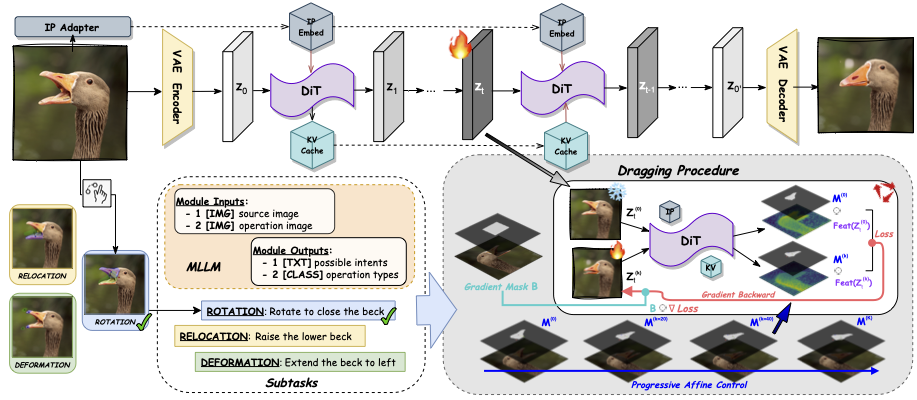
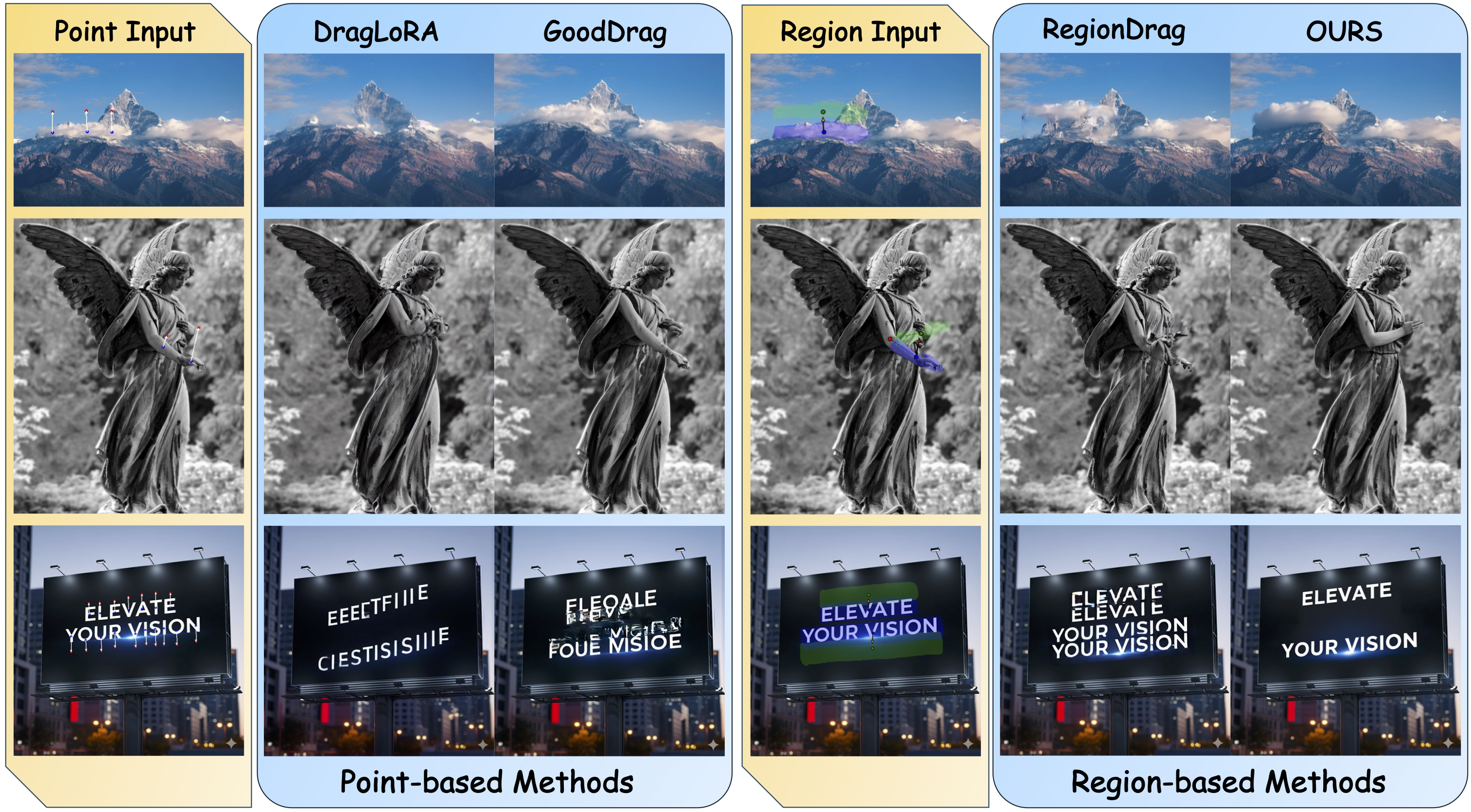
This repo presents DragFlow, the first image drag editor implemented on DiT architecture, which harnesses the strong priors of FLUX for high-quality drag-based editing via a novel region-based paradigm and sets a new SOTA on image drag-editing benchmarks. This repo also provides usage guidance for our proposed dataset, ReD Bench.
Contents
- Update Timeline
- Preparation Process
- Quick Start
- a. Demo
- b. Benchmarking
- c. Interface Usage (Coming Soon)
- Evaluation Metrics
- Dataset Release
- Acknowledgement
- Citation
📆 Update Timeline
- Oct. 2025 -> Preprint Uploaded
- Jan. 2026 -> Paper Accepted by
ICLR 2026✨ - Feb. 2026 ->
ReD_BenchDataset Uploaded to HuggingFace - Feb. 2026 ->
DragFlowFramework Full Code Released - Mar. 2026 -> Interactive Interface & Data Maker Release
- Mar. 2026 -> Full Instruction Accomplish
🛠 Preparation Process
1. Repo Clone
Run the following command to clone the code to your local machine:
git clone --recursive https://github.com/Edennnnnnnnnn/DragFlow.git
2. Environment Setup
Then initialize the environment using Conda:
conda env create -f ./dependencies/dragflow.yaml --yes
conda activate dragflow
The submodule dependencies will be cloned automatically with DragFlow. Run the following command to install:
cd ./dependencies/FireFlow
pip install -e ".[all]"
cd ../..
- Notes: If no submodule folder found, please re-trigger the submodule clone at the repo directory, using
git submodule update --init --recursive
3. Model Initialization
Then cache the adapter checkpoint using the following command:
huggingface-cli download --resume-download Tencent/InstantCharacter --local-dir ./dependencies/checkpoints --local-dir-use-symlinks False
Other reliant models will be loaded from your local HuggingFace_Hub caches or downloaded automatically during the first run. If needed, you can edit the model registered pathways explicitly in ./framework/config.yaml.
4. Dataset Preparation
- Don't want to cache the entire dataset? Try the Quick Demo instead!
Please download the dataset to the expected location, following the instructions present in Dataset Release.
5. Structure Check
Once the preparation steps above are finished, your folder structure should be similar to the following:
DragFlow
├── assets
│   │── flowchart.png
│   └── intro.png
├── datasets
│   │── demo
│   └── ReD_Bench
├── dependencies
│   │── dragflow.yaml
│   │── FireFlow
│   └── checkpoints
│       └── instantcharacter_ip-adapter.bin
├── framework
│   │── (9 python scripts)
│   │── config.yaml
│   └── adapter
│       └── (4 python scripts)
└── evaluation
    └── (3 python scripts)
🎯 Quick Start
After finishing the preparation steps and activating the environment, we are ready to move on!
a. Demo
For a quick demo, you can run any of the following commands, with a demo tag (e.g., --demo cat):
python ./framework/bench_dragflow.py --demo cat

- Notes: Sample details can be found in
./datasets/demos. You may want to try different cases, using:python ./framework/bench_dragflow.py --demo human python ./framework/bench_dragflow.py --demo train python ./framework/bench_dragflow.py --demo view python ./framework/bench_dragflow.py --demo cartoon
b. Benchmarking
Activate the environment prepared and bench on ReD_Bench. Please make sure that the dataset is located at the expected position, such as ./datasets/ReD_Bench.
conda activate dragflow
python ./framework/bench_dragflow.py
- Notes: The first run may take longer. If the required models are not available locally, they will be cached automatically from
Huggingface. You could also state your own dataset pathway by applying--dataset_dir, and use specific GPUs, such as:python ./framework/bench_dragflow.py --dataset_dir <path_to_dataset_directory> --device_0 <device_id> --device_1 <device_id>
To broaden accessibility and support diverse deployment scenarios, this release is optimized for consumer-grade GPUs. By leveraging quantization techniques and activation checkpointing, the project now supports compatible execution on configurations using dual 24GB NVIDIA GPUs.
c. Interface Usage
(Coming Soon)
📊 Evaluation Metrics
For evaluation purpose, you can run the following command, where --input_dir indicate the directory path of the dragged images. Please make sure that the dataset is located at the expected position, such as ./datasets/ReD_Bench:
python ./evaluation/evaluation.py --input_dir ./outputs
The outcomes will be auto-generated in a parallel directory concerning the path of your input_dir.
- For example, if your
input_dirfolder is named./outputs, the outcome folder will be named./outputs__eval, a CSV file namedeval_scores.csvwill be generated inside, which contains all sample outcomes and the mean scores.
You can also apply your own dataset path by setting --dataset_dir, and use specific GPUs, such as:
python ./evaluation/evaluation.py --input_dir <path> --dataset_dir <path> --device_0 <device_id> --device_1 <device_id>
Please note that variations of ±0.002 for IF-related Metrics are considered normal in reproduction, whereas MD-related Metrics may exhibit a variation of ±1 due to randomness caused by the nature of the evaluation methods.
🤗 Dataset Release
Regional-based Dragging (ReD) Bench, consisting of 120 samples annotated with precise drag instructions at both point and region levels. Each manipulation in the dataset is associated with an intention label, selected from relocation, deformation, or rotation.
For quick usage, you can run the following code to acquire the ReD_Bench dataset:
git lfs install
cd ./datasets
git clone https://huggingface.co/datasets/Edennnnn/ReD_Bench
cd ..
Please refer to the HuggingFace page for more details about ReD_Bench usage.
🫡 Acknowledgement
We would like to express our gratitude to the following contributors whose work our code and benchmark are built upon: FLUX, Diffusers, InstantCharacter, and FireFlow.
🔖 Citation
If you find our work useful in your research, please consider citing our work:
@article{zhou2025dragflow,
  title={Dragflow: Unleashing dit priors with region based supervision for drag editing},
  author={Zhou, Zihan and Lu, Shilin and Leng, Shuli and Zhang, Shaocong and Lian, Zhuming and Yu, Xinlei and Kong, Adams Wai-Kin},
  journal={arXiv preprint arXiv:2510.02253},
  year={2025}
}
Contributors

4 commits

1 commits
Similar repos


Languages
Python
100.0%
[ICLR 2026] "DragFlow: Unleashing DiT Priors with Region Based Supervision for Drag Editing" (Official Implementation)
Python
198
5 commits
updated Mar 4, 2026
README
[ICLR 2026] DragFlow: Unleashing DiT Priors with Region-Based Supervision for Drag Editing
Zihan Zhou1,*, Shilin Lu1,*, Shuli Leng1, Shaocong Zhang1, Zhuming Lian1, Xinlei Yu2, Adams Wai-Kin Kong1
1Nanyang Technological University, 2National University of Singapore
*Equal Contribution
TL;DR
This repo presents DragFlow, the first image drag editor implemented on DiT architecture, which harnesses the strong priors of FLUX for high-quality drag-based editing via a novel region-based paradigm and sets a new SOTA on image drag-editing benchmarks. This repo also provides usage guidance for our proposed dataset, ReD Bench.
Contents
- Update Timeline
- Preparation Process
- Quick Start
- a. Demo
- b. Benchmarking
- c. Interface Usage (Coming Soon)
- Evaluation Metrics
- Dataset Release
- Acknowledgement
- Citation
📆 Update Timeline
- Oct. 2025 -> Preprint Uploaded
- Jan. 2026 -> Paper Accepted by
ICLR 2026✨ - Feb. 2026 ->
ReD_BenchDataset Uploaded to HuggingFace - Feb. 2026 ->
DragFlowFramework Full Code Released - Mar. 2026 -> Interactive Interface & Data Maker Release
- Mar. 2026 -> Full Instruction Accomplish
🛠 Preparation Process
1. Repo Clone
Run the following command to clone the code to your local machine:
git clone --recursive https://github.com/Edennnnnnnnnn/DragFlow.git
2. Environment Setup
Then initialize the environment using Conda:
conda env create -f ./dependencies/dragflow.yaml --yes
conda activate dragflow
The submodule dependencies will be cloned automatically with DragFlow. Run the following command to install:
cd ./dependencies/FireFlow
pip install -e ".[all]"
cd ../..
- Notes: If no submodule folder found, please re-trigger the submodule clone at the repo directory, using
git submodule update --init --recursive
3. Model Initialization
Then cache the adapter checkpoint using the following command:
huggingface-cli download --resume-download Tencent/InstantCharacter --local-dir ./dependencies/checkpoints --local-dir-use-symlinks False
Other reliant models will be loaded from your local HuggingFace_Hub caches or downloaded automatically during the first run. If needed, you can edit the model registered pathways explicitly in ./framework/config.yaml.
4. Dataset Preparation
- Don't want to cache the entire dataset? Try the Quick Demo instead!
Please download the dataset to the expected location, following the instructions present in Dataset Release.
5. Structure Check
Once the preparation steps above are finished, your folder structure should be similar to the following:
DragFlow
├── assets
│   │── flowchart.png
│   └── intro.png
├── datasets
│   │── demo
│   └── ReD_Bench
├── dependencies
│   │── dragflow.yaml
│   │── FireFlow
│   └── checkpoints
│       └── instantcharacter_ip-adapter.bin
├── framework
│   │── (9 python scripts)
│   │── config.yaml
│   └── adapter
│       └── (4 python scripts)
└── evaluation
    └── (3 python scripts)
🎯 Quick Start
After finishing the preparation steps and activating the environment, we are ready to move on!
a. Demo
For a quick demo, you can run any of the following commands, with a demo tag (e.g., --demo cat):
python ./framework/bench_dragflow.py --demo cat
- Notes: Sample details can be found in
./datasets/demos. You may want to try different cases, using:python ./framework/bench_dragflow.py --demo human python ./framework/bench_dragflow.py --demo train python ./framework/bench_dragflow.py --demo view python ./framework/bench_dragflow.py --demo cartoon
b. Benchmarking
Activate the environment prepared and bench on ReD_Bench. Please make sure that the dataset is located at the expected position, such as ./datasets/ReD_Bench.
conda activate dragflow
python ./framework/bench_dragflow.py
- Notes: The first run may take longer. If the required models are not available locally, they will be cached automatically from
Huggingface. You could also state your own dataset pathway by applying--dataset_dir, and use specific GPUs, such as:python ./framework/bench_dragflow.py --dataset_dir <path_to_dataset_directory> --device_0 <device_id> --device_1 <device_id>
To broaden accessibility and support diverse deployment scenarios, this release is optimized for consumer-grade GPUs. By leveraging quantization techniques and activation checkpointing, the project now supports compatible execution on configurations using dual 24GB NVIDIA GPUs.
c. Interface Usage
(Coming Soon)
📊 Evaluation Metrics
For evaluation purpose, you can run the following command, where --input_dir indicate the directory path of the dragged images. Please make sure that the dataset is located at the expected position, such as ./datasets/ReD_Bench:
python ./evaluation/evaluation.py --input_dir ./outputs
The outcomes will be auto-generated in a parallel directory concerning the path of your input_dir.
- For example, if your
input_dirfolder is named./outputs, the outcome folder will be named./outputs__eval, a CSV file namedeval_scores.csvwill be generated inside, which contains all sample outcomes and the mean scores.
You can also apply your own dataset path by setting --dataset_dir, and use specific GPUs, such as:
python ./evaluation/evaluation.py --input_dir <path> --dataset_dir <path> --device_0 <device_id> --device_1 <device_id>
Please note that variations of ±0.002 for IF-related Metrics are considered normal in reproduction, whereas MD-related Metrics may exhibit a variation of ±1 due to randomness caused by the nature of the evaluation methods.
🤗 Dataset Release
Regional-based Dragging (ReD) Bench, consisting of 120 samples annotated with precise drag instructions at both point and region levels. Each manipulation in the dataset is associated with an intention label, selected from relocation, deformation, or rotation.
For quick usage, you can run the following code to acquire the ReD_Bench dataset:
git lfs install
cd ./datasets
git clone https://huggingface.co/datasets/Edennnnn/ReD_Bench
cd ..
Please refer to the HuggingFace page for more details about ReD_Bench usage.
🫡 Acknowledgement
We would like to express our gratitude to the following contributors whose work our code and benchmark are built upon: FLUX, Diffusers, InstantCharacter, and FireFlow.
🔖 Citation
If you find our work useful in your research, please consider citing our work:
@article{zhou2025dragflow,
  title={Dragflow: Unleashing dit priors with region based supervision for drag editing},
  author={Zhou, Zihan and Lu, Shilin and Leng, Shuli and Zhang, Shaocong and Lian, Zhuming and Yu, Xinlei and Kong, Adams Wai-Kin},
  journal={arXiv preprint arXiv:2510.02253},
  year={2025}
}
Similar repos
Contributors
4 commits
1 commits
Languages
Python
100.0%