
Automated setup scripts for a self-hosted homelab server — Nginx reverse proxy, Cloudflare DNS, UFW, Fail2ban, and per-service installers for Nextcloud, Jellyfin, Vaultwarden, and more.
Python
14
224 commits
updated Sep 22, 2026
See what people are saying
README






Server-AIO
All-in-one, self-hosted server setup with security hardening and reverse proxy configuration
Explore the docs
Report Bug
·
Request Feature
Table of Contents
About The Project
Server-AIO is an all-in-one setup toolkit that turns a fresh Ubuntu Server into a repeatable self-hosted platform — in the same spirit as nextcloud-aio, but for the whole server rather than a single app. One installer bootstraps the shared infrastructure (Cloudflare DNS updates, a Docker-based Nginx reverse proxy, UFW, Fail2ban, and a shared Docker network), then separate setup commands bring up individual services such as Nextcloud, Vaultwarden, and Jellyfin on top of it.
Unlike a black-box AIO container, every piece here stays a plain, inspectable script and config file — nothing is hidden behind a control panel. Review and adapt the scripts for your network before exposing services to the internet.
Built With


Getting Started
Prerequisites
Before running the installation script, ensure you have:
- Ubuntu Server LTS
- Root or sudo access
- Active internet connection
- A domain and Cloudflare API token for the included DNS automation
- Docker for the service setup scripts
Installation
Run this command in your Ubuntu terminal to start the installation:
curl -fsSL https://raw.githubusercontent.com/ENIACore/server-configs/main/install.py -o /tmp/server-install.py && sudo python3 /tmp/server-install.py
The installer copies the available commands to /usr/local/sbin, collects the
initial server configuration, and prepares Nginx templates for the configured
domain. Run the infrastructure and service setup commands you want afterward.
What Gets Installed
Server-AIO provides setup commands for the following services and infrastructure:
Services:
- Nextcloud - Self-hosted file sync and share platform
- Vaultwarden - Lightweight Bitwarden server implementation
- Jellyfin - Media server for your personal media collection
- qBittorrent - Torrent client with built-in WireGuard VPN (via the hotio image)
- Jackett - Indexer proxy for torrent trackers
- jfa-go - Jellyfin account management
- Minecraft - Fabric server with Lithium
- PostgreSQL and a personal-site container
Security & Infrastructure:
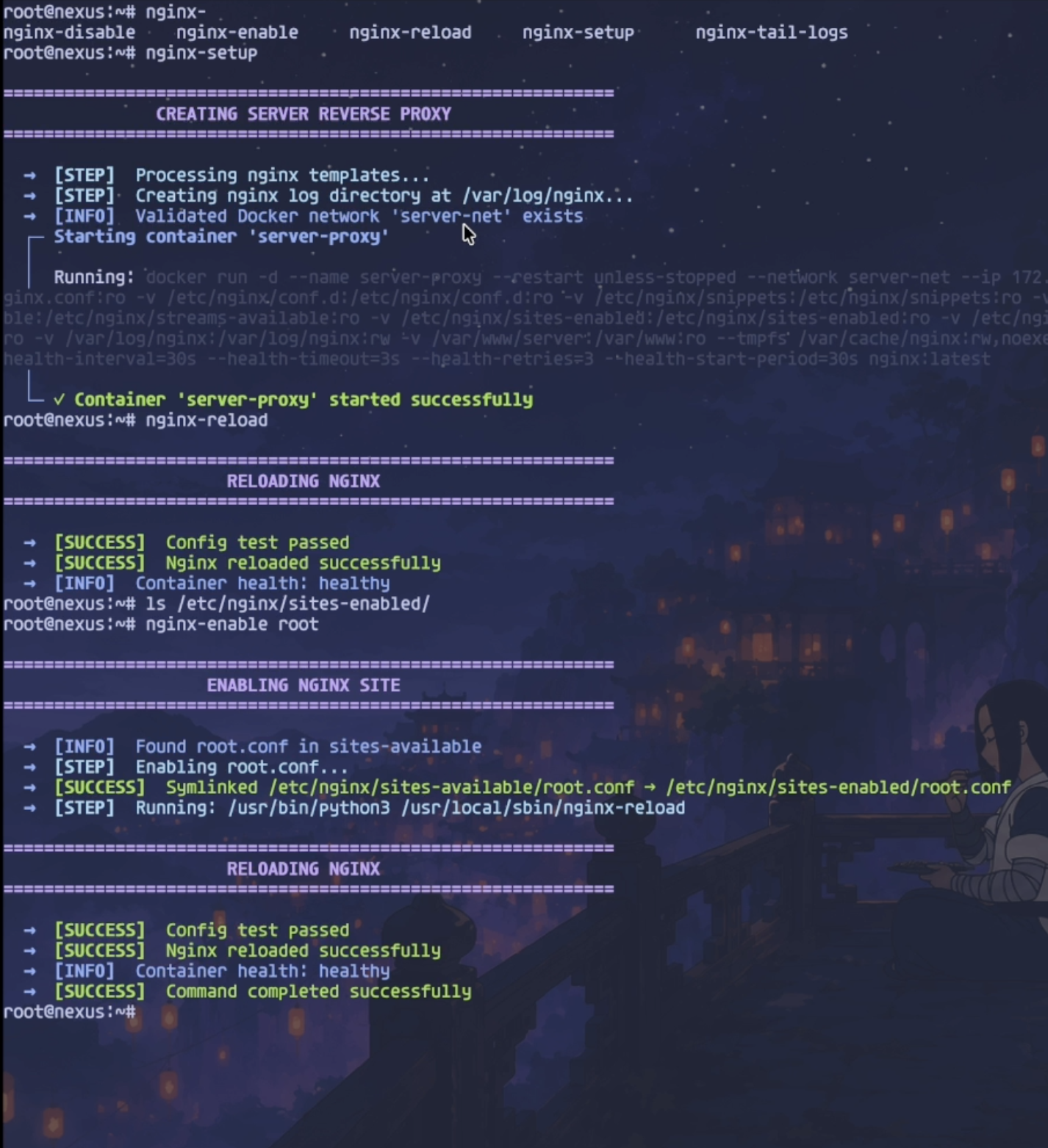
- Nginx - Reverse proxy with SSL termination
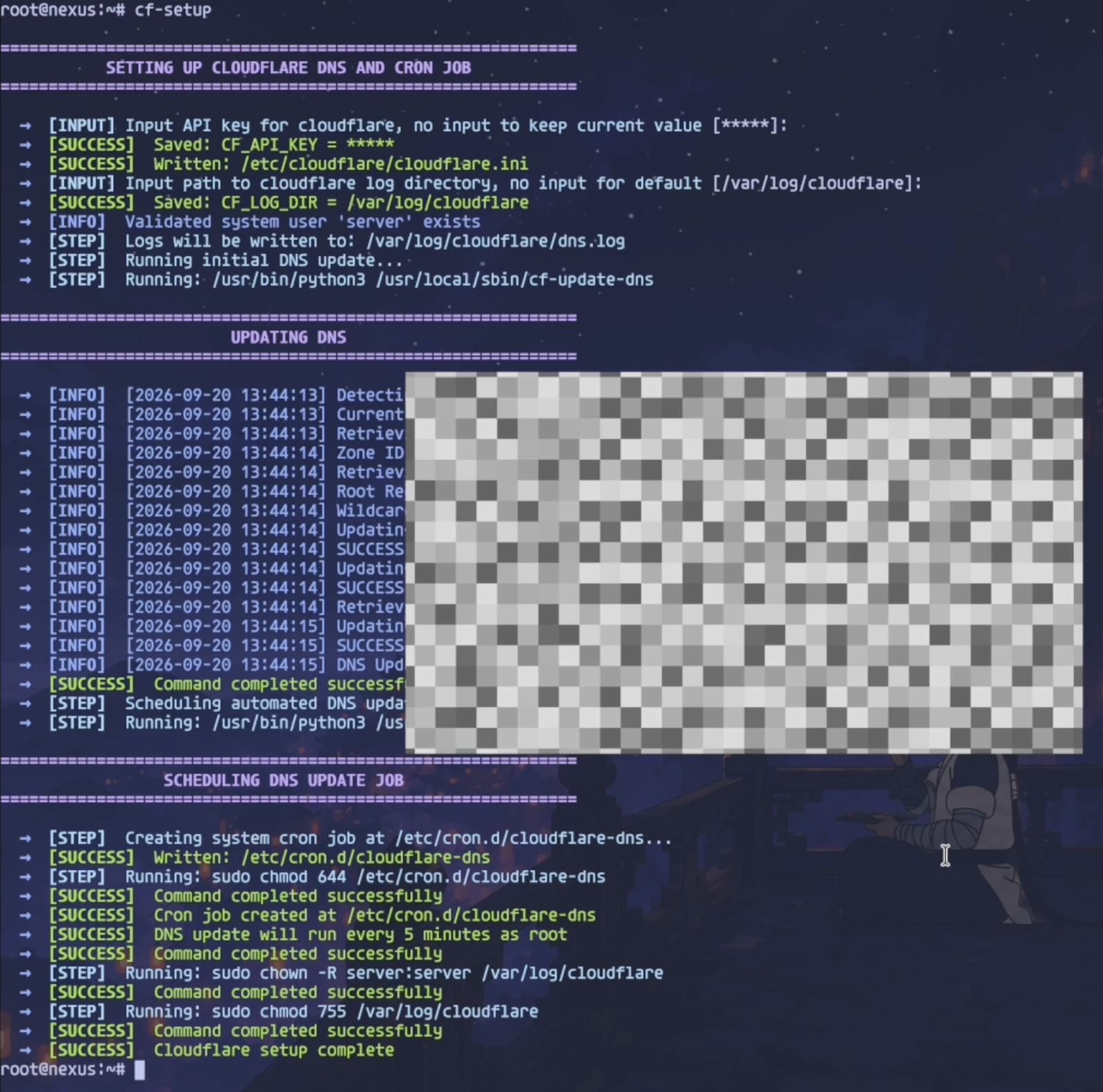
- Cloudflare DNS - Dynamic DNS updates for root and wildcard records
- Fail2ban - Intrusion prevention system
- UFW Firewall - Uncomplicated firewall configuration
- Docker networking - Shared internal network for service-to-service communication
Useful operational commands include nginx-enable, nginx-disable,
scan-ports, docker-network-inspect, docker-system-prune,
add-healthcheck-cron, mask-sleep, and unmask-sleep.
Demo

Screenshots
Initial installation

Cloudflare DNS setup
Reverse proxy setup
Releases
Tagged releases (vMAJOR.MINOR.PATCH) are cut from main and listed on the
Releases page. See CHANGELOG.md for a
per-version summary of what changed. Between releases, main tracks the
maintainer's live server configuration directly.
Roadmap
- Add support for additional Linux distributions
- Implement automated backup solutions
- Add monitoring and alerting system
- Create web-based configuration interface
- Add support for additional self-hosted services
See the open issues for a full list of proposed features and known issues.
Contributing
Contributions are what make the open source community such an amazing place to learn, inspire, and create. Any contributions you make are greatly appreciated.
If you have a suggestion that would make this better, please fork the repo and create a pull request. You can also simply open an issue with the tag "enhancement".
- Fork the Project
- Create your Feature Branch (
git checkout -b feature/AmazingFeature) - Commit your Changes (
git commit -m 'Add some AmazingFeature') - Push to the Branch (
git push origin feature/AmazingFeature) - Open a Pull Request
Top contributors:
License
Distributed under the MIT License. See LICENSE.md for more information.
Contact
Project Link: https://github.com/ENIACore/server-configs
Contributors

224 commits
Similar repos


Languages
Python
97.9%
Shell
2.1%
Automated setup scripts for a self-hosted homelab server — Nginx reverse proxy, Cloudflare DNS, UFW, Fail2ban, and per-service installers for Nextcloud, Jellyfin, Vaultwarden, and more.
Python
14
224 commits
updated Sep 22, 2026
See what people are saying
README
Server-AIO
All-in-one, self-hosted server setup with security hardening and reverse proxy configuration
Explore the docs
Report Bug
·
Request Feature
Table of Contents
About The Project
Server-AIO is an all-in-one setup toolkit that turns a fresh Ubuntu Server into a repeatable self-hosted platform — in the same spirit as nextcloud-aio, but for the whole server rather than a single app. One installer bootstraps the shared infrastructure (Cloudflare DNS updates, a Docker-based Nginx reverse proxy, UFW, Fail2ban, and a shared Docker network), then separate setup commands bring up individual services such as Nextcloud, Vaultwarden, and Jellyfin on top of it.
Unlike a black-box AIO container, every piece here stays a plain, inspectable script and config file — nothing is hidden behind a control panel. Review and adapt the scripts for your network before exposing services to the internet.
Built With
Getting Started
Prerequisites
Before running the installation script, ensure you have:
- Ubuntu Server LTS
- Root or sudo access
- Active internet connection
- A domain and Cloudflare API token for the included DNS automation
- Docker for the service setup scripts
Installation
Run this command in your Ubuntu terminal to start the installation:
curl -fsSL https://raw.githubusercontent.com/ENIACore/server-configs/main/install.py -o /tmp/server-install.py && sudo python3 /tmp/server-install.py
The installer copies the available commands to /usr/local/sbin, collects the
initial server configuration, and prepares Nginx templates for the configured
domain. Run the infrastructure and service setup commands you want afterward.
What Gets Installed
Server-AIO provides setup commands for the following services and infrastructure:
Services:
- Nextcloud - Self-hosted file sync and share platform
- Vaultwarden - Lightweight Bitwarden server implementation
- Jellyfin - Media server for your personal media collection
- qBittorrent - Torrent client with built-in WireGuard VPN (via the hotio image)
- Jackett - Indexer proxy for torrent trackers
- jfa-go - Jellyfin account management
- Minecraft - Fabric server with Lithium
- PostgreSQL and a personal-site container
Security & Infrastructure:
- Nginx - Reverse proxy with SSL termination
- Cloudflare DNS - Dynamic DNS updates for root and wildcard records
- Fail2ban - Intrusion prevention system
- UFW Firewall - Uncomplicated firewall configuration
- Docker networking - Shared internal network for service-to-service communication
Useful operational commands include nginx-enable, nginx-disable,
scan-ports, docker-network-inspect, docker-system-prune,
add-healthcheck-cron, mask-sleep, and unmask-sleep.
Demo
Screenshots
Initial installation
Cloudflare DNS setup
Reverse proxy setup
Releases
Tagged releases (vMAJOR.MINOR.PATCH) are cut from main and listed on the
Releases page. See CHANGELOG.md for a
per-version summary of what changed. Between releases, main tracks the
maintainer's live server configuration directly.
Roadmap
- Add support for additional Linux distributions
- Implement automated backup solutions
- Add monitoring and alerting system
- Create web-based configuration interface
- Add support for additional self-hosted services
See the open issues for a full list of proposed features and known issues.
Contributing
Contributions are what make the open source community such an amazing place to learn, inspire, and create. Any contributions you make are greatly appreciated.
If you have a suggestion that would make this better, please fork the repo and create a pull request. You can also simply open an issue with the tag "enhancement".
- Fork the Project
- Create your Feature Branch (
git checkout -b feature/AmazingFeature) - Commit your Changes (
git commit -m 'Add some AmazingFeature') - Push to the Branch (
git push origin feature/AmazingFeature) - Open a Pull Request
Top contributors:
License
Distributed under the MIT License. See LICENSE.md for more information.
Contact
Project Link: https://github.com/ENIACore/server-configs
Similar repos
Contributors
224 commits
Languages
Python
97.9%
Shell
2.1%