
sbt plugin to show a summary of compilation messages.
Scala
201
120 commits
updated Apr 9, 2021
README
sbt-errors-summary
A simple plugin that makes the error reporter a bit more concise.
I find it useful when doing refactoring: I get a lot of compilation errors, and I waste a lot of time switching between files and looking for line numbers in the error message, when I can immediately see what's wrong when looking at the faulty line.
Overview
This plugin helps by summarizing all the errors per file.
Side by side comparison (this plugin on the left, origin on the right):
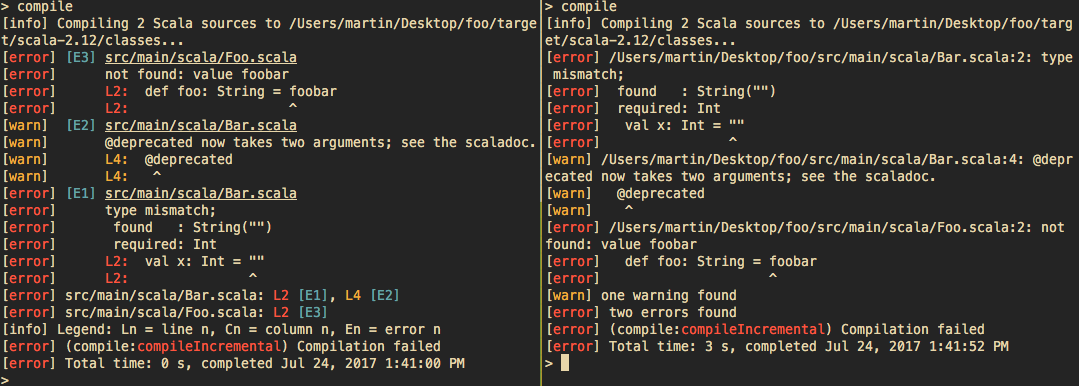
[info] Compiling 2 Scala sources to /Users/martin/Desktop/foo/target/scala-2.12/classes...
[error] [E1] src/main/scala/Bar.scala
[error]      type mismatch;
[error]       found   : String("")
[error]       required: Int
[error]      L2:  val x: Int = ""
[error]      L2:               ^
[warn]  [E2] src/main/scala/Bar.scala
[warn]       @deprecated now takes two arguments; see the scaladoc.
[warn]       L4:  @deprecated
[warn]       L4:   ^
[error] [E3] src/main/scala/Foo.scala
[error]      not found: value foobar
[error]      L2:  def foo: String = foobar
[error]      L2:                    ^
[error] src/main/scala/Bar.scala: L2 [E1], L4 [E2]
[error] src/main/scala/Foo.scala: L2 [E3]
[info] Legend: Ln = line n, Cn = column n, En = error n
[error] (compile:compileIncremental) Compilation failed
[error] Total time: 0 s, completed Jul 3, 2017 3:00:27 PM
Installation
sbt 1.0 or later
To enable this plugin globally, simply put the following in
~/.sbt/1.0/plugins/plugins.sbt:
addSbtPlugin("com.github.duhemm" % "sbt-errors-summary" % "0.6.5")
The organization has changed between 0.6.3 and 0.6.4. Please update!
You can also enable it for a specific project by putting the same line in
project/plugins.sbt in your sbt project.
sbt 0.13
The last version of this plugin to support sbt 0.13 is 0.6.0.
To enable this plugin globally, simply put the following in
~/.sbt/1.0/plugins/plugins.sbt:
addSbtPlugin("org.duhemm" % "sbt-errors-summary" % "0.6.0")
You can also enable it for a specific project by putting the same line in
project/plugins.sbt in your sbt project.
Configuration
This reporter supports several configuration options that let you change how errors
are reported. The configuration can be accessed via the reporterConfig setting key.
A configuration is represented by an instance of a ReporterConfig, which is
generated from a Contraband schema.
The examples can be copy pasted directly inside you global settings in sbt (~/.sbt/1.0/global.sbt)
or inside your build definition. If you enabled this plugin globally and want to configure it globally,
you'll also need to add the following import:
import sbt.errorssummary.Plugin.autoImport._
or start sbt with sbt.global.autoimport set to true.
The supported configuration options include:
-
colors: Boolean = true: Determines whether the reporter will produce a colored and formatted (as in bold, underlined, etc.) output. Defaults totrue. Example:reporterConfig := reporterConfig.value.withColors(false)All the colors are configurable. See ReporterConfig.contra to see all the existing configuration keys.
-
shortenPaths: Boolean = true: Determines whether the reporter will strip the current working directory from paths it displays. Defaults totrue. Example:reporterConfig := reporterConfig.value.withShortenPaths(false)Note (0.6.4+): For compatibility with IntelliJ and ENSIME's sbt-mode, the paths will never be shortened when:
- the system property
idea.runis set, or - the environment variable
INSIDE_EMACSis set, or - the system property
sbt.errorssummary.full.pathsis set.
- the system property
-
columnNumbers: Boolean = false: Determines whether the reporter will show the column number at which an error has been recorded, Defaults tofalse. Example:reporterConfig := reporterConfig.value.withColumnNumbers(false) -
reverseOrder: Boolean = false: Determines whether the reproter will show the error messages in reverse order (first error displayed at the bottom of the screen.) Defaults tofalse. Example:reporterConfig := reporterConfig.value.withReverseOrder(false) -
showLegend: Boolean = true: Determines whether to show a legend at the bottom for the various types of numbers (line, column, error). Note that despite this setting, a legend will still only be shown if there actually are errors, and not otherwise. Example:reporterConfig := reporterConfig.value.withShowLegend(false)
Contributing
Information is available in the contributing guide
Maintainers
The current maintainers (people who can merge pull requests) are:
- Martin Duhem - @Duhemm
Changelog
0.6.5
- Fixed incompatibility with sbt 1.4.8+ in #49 by @note
- sbt-errors-summary is now published under the organization
com.github.duhemm. Please update your plugins accordingly.
0.6.3
- Drop support for sbt 0.13
0.6.0
- Cross publish for sbt 1.0
0.5.0
- Add
reporterConfigkey to configure the reporter. See examples in previous section. - Add configurable colors in #21
- Hide unknown positions in some errors in #24
- Option to reverse order of error messages (first error shown last) in #28
- Improve readability and show faulty line number on the left in #27 by @yawaramin
- Add option to show legend in #27 by @yawaramin
0.4.1
- Re-fix display of relative path in #20
0.4.0
- Fix display of relative path in #10
- Add
ReporterConfigto configure how the reporter displays error messages in #15 - Add config option to show column number in #16
- Support source position mappers in #17
- Support
printWarningstask in #18
0.3.0
- Show offending line again
- Better alignment of messages
- Write tests for the reporter, again multiple Scala versions in #4 and #5
- Address feedback from discussion on Scala contributors
in #6
- Start numbering problems at 1
- Add a newline after file path
- Highlight file name and line number
- Disable colors and formatting in CI and Ensime
- Relativize file paths from working directory in #7
0.2.0
0.1.0
- Initial version




Similar repos


Languages
Scala
99.8%
sbt plugin to show a summary of compilation messages.
Scala
201
120 commits
updated Apr 9, 2021
README
sbt-errors-summary
A simple plugin that makes the error reporter a bit more concise.
I find it useful when doing refactoring: I get a lot of compilation errors, and I waste a lot of time switching between files and looking for line numbers in the error message, when I can immediately see what's wrong when looking at the faulty line.
Overview
This plugin helps by summarizing all the errors per file.
Side by side comparison (this plugin on the left, origin on the right):
[info] Compiling 2 Scala sources to /Users/martin/Desktop/foo/target/scala-2.12/classes...
[error] [E1] src/main/scala/Bar.scala
[error]      type mismatch;
[error]       found   : String("")
[error]       required: Int
[error]      L2:  val x: Int = ""
[error]      L2:               ^
[warn]  [E2] src/main/scala/Bar.scala
[warn]       @deprecated now takes two arguments; see the scaladoc.
[warn]       L4:  @deprecated
[warn]       L4:   ^
[error] [E3] src/main/scala/Foo.scala
[error]      not found: value foobar
[error]      L2:  def foo: String = foobar
[error]      L2:                    ^
[error] src/main/scala/Bar.scala: L2 [E1], L4 [E2]
[error] src/main/scala/Foo.scala: L2 [E3]
[info] Legend: Ln = line n, Cn = column n, En = error n
[error] (compile:compileIncremental) Compilation failed
[error] Total time: 0 s, completed Jul 3, 2017 3:00:27 PM
Installation
sbt 1.0 or later
To enable this plugin globally, simply put the following in
~/.sbt/1.0/plugins/plugins.sbt:
addSbtPlugin("com.github.duhemm" % "sbt-errors-summary" % "0.6.5")
The organization has changed between 0.6.3 and 0.6.4. Please update!
You can also enable it for a specific project by putting the same line in
project/plugins.sbt in your sbt project.
sbt 0.13
The last version of this plugin to support sbt 0.13 is 0.6.0.
To enable this plugin globally, simply put the following in
~/.sbt/1.0/plugins/plugins.sbt:
addSbtPlugin("org.duhemm" % "sbt-errors-summary" % "0.6.0")
You can also enable it for a specific project by putting the same line in
project/plugins.sbt in your sbt project.
Configuration
This reporter supports several configuration options that let you change how errors
are reported. The configuration can be accessed via the reporterConfig setting key.
A configuration is represented by an instance of a ReporterConfig, which is
generated from a Contraband schema.
The examples can be copy pasted directly inside you global settings in sbt (~/.sbt/1.0/global.sbt)
or inside your build definition. If you enabled this plugin globally and want to configure it globally,
you'll also need to add the following import:
import sbt.errorssummary.Plugin.autoImport._
or start sbt with sbt.global.autoimport set to true.
The supported configuration options include:
-
colors: Boolean = true: Determines whether the reporter will produce a colored and formatted (as in bold, underlined, etc.) output. Defaults totrue. Example:reporterConfig := reporterConfig.value.withColors(false)All the colors are configurable. See ReporterConfig.contra to see all the existing configuration keys.
-
shortenPaths: Boolean = true: Determines whether the reporter will strip the current working directory from paths it displays. Defaults totrue. Example:reporterConfig := reporterConfig.value.withShortenPaths(false)Note (0.6.4+): For compatibility with IntelliJ and ENSIME's sbt-mode, the paths will never be shortened when:
- the system property
idea.runis set, or - the environment variable
INSIDE_EMACSis set, or - the system property
sbt.errorssummary.full.pathsis set.
- the system property
-
columnNumbers: Boolean = false: Determines whether the reporter will show the column number at which an error has been recorded, Defaults tofalse. Example:reporterConfig := reporterConfig.value.withColumnNumbers(false) -
reverseOrder: Boolean = false: Determines whether the reproter will show the error messages in reverse order (first error displayed at the bottom of the screen.) Defaults tofalse. Example:reporterConfig := reporterConfig.value.withReverseOrder(false) -
showLegend: Boolean = true: Determines whether to show a legend at the bottom for the various types of numbers (line, column, error). Note that despite this setting, a legend will still only be shown if there actually are errors, and not otherwise. Example:reporterConfig := reporterConfig.value.withShowLegend(false)
Contributing
Information is available in the contributing guide
Maintainers
The current maintainers (people who can merge pull requests) are:
- Martin Duhem - @Duhemm
Changelog
0.6.5
- Fixed incompatibility with sbt 1.4.8+ in #49 by @note
- sbt-errors-summary is now published under the organization
com.github.duhemm. Please update your plugins accordingly.
0.6.3
- Drop support for sbt 0.13
0.6.0
- Cross publish for sbt 1.0
0.5.0
- Add
reporterConfigkey to configure the reporter. See examples in previous section. - Add configurable colors in #21
- Hide unknown positions in some errors in #24
- Option to reverse order of error messages (first error shown last) in #28
- Improve readability and show faulty line number on the left in #27 by @yawaramin
- Add option to show legend in #27 by @yawaramin
0.4.1
- Re-fix display of relative path in #20
0.4.0
- Fix display of relative path in #10
- Add
ReporterConfigto configure how the reporter displays error messages in #15 - Add config option to show column number in #16
- Support source position mappers in #17
- Support
printWarningstask in #18
0.3.0
- Show offending line again
- Better alignment of messages
- Write tests for the reporter, again multiple Scala versions in #4 and #5
- Address feedback from discussion on Scala contributors
in #6
- Start numbering problems at 1
- Add a newline after file path
- Highlight file name and line number
- Disable colors and formatting in CI and Ensime
- Relativize file paths from working directory in #7
0.2.0
0.1.0
- Initial version
Similar repos
Languages
Scala
99.8%