
Attempt at making a universal script for fine-tuning a wide variety of tts models with a single command
Python
10
63 commits
updated Sep 27, 2026
See what people are saying
README
Universal TTS Finetune
Prepare voice recordings, fine-tune a TTS model, and try it in a browser. This tool runs separately from ebook2audiobook and offers 20 training engines, including optional StyleTTS2, OmniVoice and F5-TTS fine-tuning.
Quick start with Docker
Clone and run UFT on its own:
git clone https://github.com/DrewThomasson/Universal_TTS_Finetune.git
cd Universal_TTS_Finetune
docker compose up --build
Open http://localhost:7862. Put local recordings in audio_data/ and use /app/audio_data in the GUI. Datasets and trained models persist in finetune_models/; downloaded base models persist in models/. The default Compose file requests an NVIDIA GPU and needs the NVIDIA Container Toolkit. For CPU only, run docker compose -f docker-compose.cpu.yml up --build and select CPU in the GUI. UFT can also be cloned into E2A's components/ folder, but does not require E2A.
Install
Install uv and use a separate Python 3.12 environment:
cd Universal_TTS_Finetune
uv venv --python 3.12 .venv
source .venv/bin/activate
uv pip install -r requirements.txt
python web_gui.py
On Windows, activate with .venv\Scripts\activate instead. Open http://localhost:7862. You can set --out_path /path/to/output and --port 7862 when launching the GUI. A CUDA GPU speeds up training; CPU training can be slow. Model downloads stay in this repo's models/ folder by default, even when cloned inside E2A. Set UFT_MODELS_DIR=/path/to/ebook2audiobook/models before launch if you want to share E2A's cache.
Fine-tune in three steps
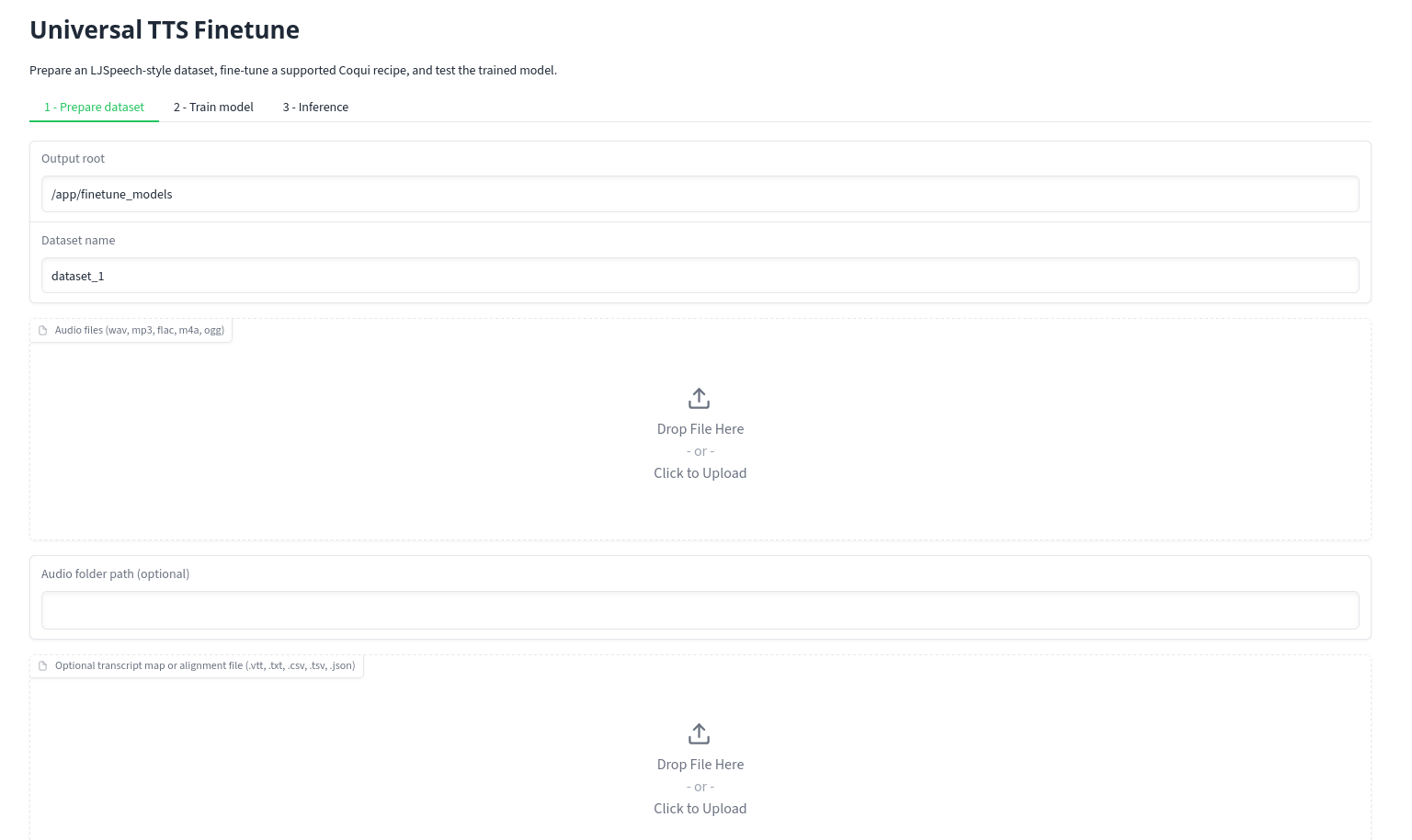
- Prepare dataset: Add audio clips and, if you have them, matching transcripts. You can also supply an E2A audiobook with its matching
.vttfile. Select the dataset language and create the dataset. Without transcripts,autouses Whisper for short language codes (such asen) and MMS ASR for published MMS codes (such aseng). You can choose either backend explicitly. Exact transcript maps and alignment files bypass ASR. MMS ASR needs a published adapter for the selected language; its model is licensed CC BY-NC 4.0. Need text for synthetic clips? See the multilingual prompt files. - Train model: Select the dataset, engine, and fine-tuning language. Choose a published starting checkpoint when one is available, then start training. XTTS v1/v2 list only their supported languages (14/17); selecting another engine may require training from scratch if no checkpoint is mapped. Piper choices show language, locale, voice, and quality. A ready-to-speak Piper ONNX voice is different from a training checkpoint; UFT does not silently substitute an English checkpoint. MMS/Fairseq VITS uses Meta's published three-letter language codes and requires its matching checkpoint. Those checkpoints carry a CC BY-NC 4.0 license.
The training language list follows each engine: Coqui phoneme models show languages supported by the installed phonemizer, Align TTS currently uses English only, and Piper stops with an error if its selected eSpeak voice is unavailable. For Coqui scratch runs, UFT includes the dataset's phoneme symbols in the model vocabulary; a mapped checkpoint cannot expand its fixed vocabulary and UFT reports an error if the dataset needs extra symbols. A language without a starting checkpoint needs substantially more data and training time.
Training device
Choose Auto, CPU, or CUDA in the GUI, or pass --device auto|cpu|cuda to CLI train, workflow, synthesize, or batch-test. Auto uses CUDA when available; CPU forces the training child process off CUDA even on a GPU computer. The GUI shows a RAM/VRAM planning estimate for the selected engine and device, plus available RAM and GPU memory; CLI training prints the same information. These are short-clip, small-batch estimates, not measured minimums. Longer clips, larger batches, and different checkpoints can need more. A CPU run may take many hours and need substantial system memory, especially XTTS, F5-TTS, or StyleTTS2. Start with short clips and batch size 1 (StyleTTS2 requires 2). The choice does not change the dataset or model language.
Piper, the Coqui recipe engines, XTTS and MMS use their CPU-capable training backends. F5-TTS uses full-precision CPU training with its optional runtime, and StyleTTS2 stages a CPU-compatible copy of the official training script under the run output. OmniVoice uses its upstream CPU token-extraction fallback and full-precision SDPA LoRA trainer; this path requires Linux and at least 16 GiB available RAM. It may take many hours. CPU inference is available separately in the inference device picker. Piper ONNX inference always uses CPU. Results for CPU training are recorded in ENGINE_VERIFICATION.md; a selectable device does not imply every engine has completed a CPU training smoke test.
- Inference: Select the finished run and generate a short sample. XTTS and StyleTTS2 need a speaker reference WAV. StyleTTS2 inference uses the official LibriTTS notebook model flow in a separate local Python process.
See the model and starting-checkpoint controls
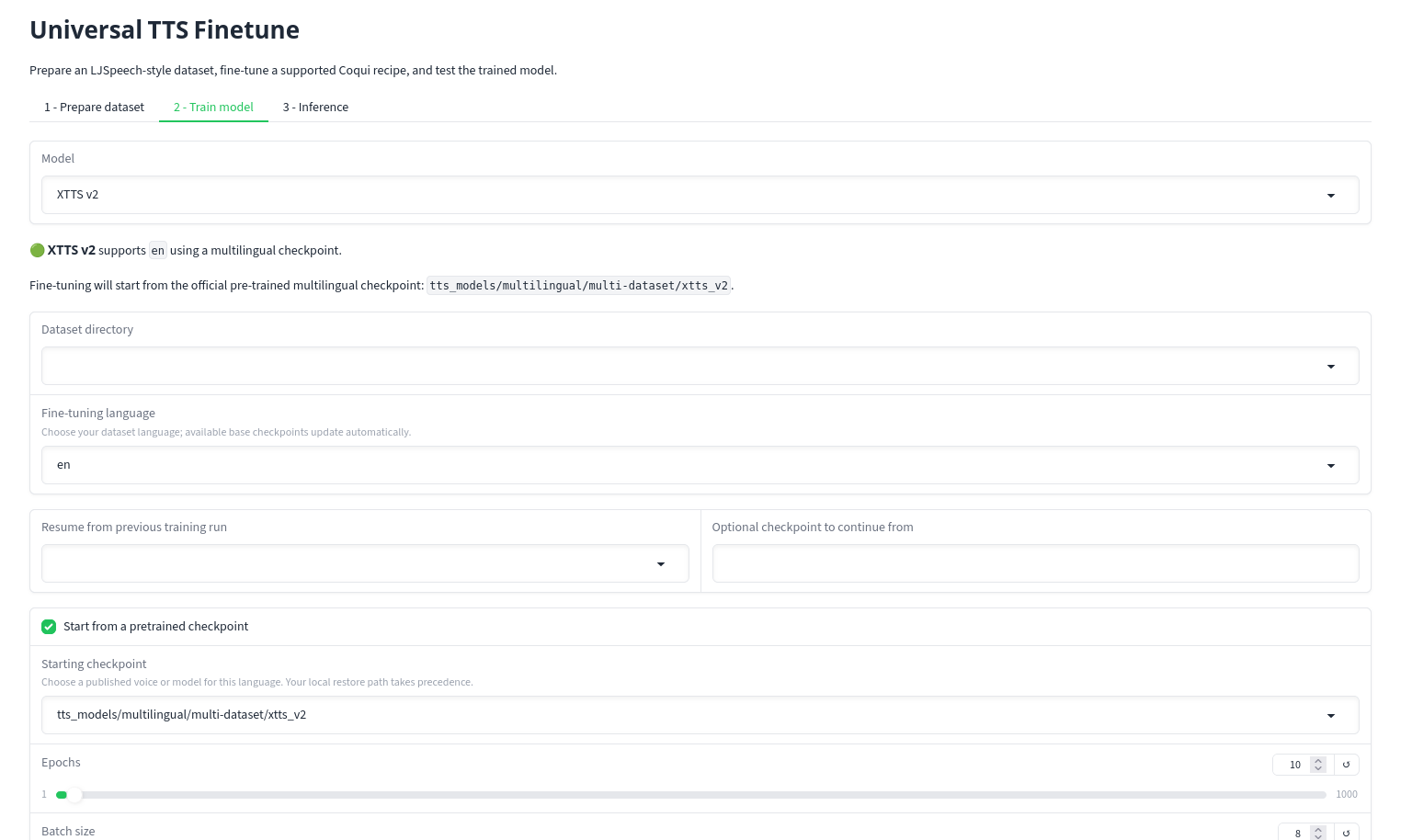
The app stores prepared data under <output_root>/dataset/ and finished models under <output_root>/training_runs/<model>/<run>/ready/. Keep artifacts.json with the model files so UFT can load the run later.
Optional StyleTTS2 engine
This adapter reuses the prepared UFT dataset and runs the official training code. Its dependencies and model weights are optional; the base Docker image does not include them. Choose batch size 2, gradient accumulation 1, and English in the GUI or CLI. Upstream's predictor fails at batch size 1.
- StyleTTS2: English only; CUDA was verified, while its new CPU training path has not completed a smoke test. Clone the official source, install its requirements in a separate compatible Python environment, and obtain its LibriTTS base checkpoint and required ASR/JDC/PL-BERT assets. Set
UFT_STYLETTS2_REPOto that checkout,UFT_STYLETTS2_CHECKPOINTto the local LibriTTS.pth, andUFT_STYLETTS2_PYTHONto the interpreter with the official dependencies if different from UFT's. The adapter keeps generated data in the UFT output folder and never downloads these assets for you.
The adapter records its checkpoint in ready/artifacts.json. For inference, select the run in UFT, upload a speaker reference WAV, and use the local official-requirements Python environment when needed by setting UFT_STYLETTS2_PYTHON. The checkout path can be set with UFT_STYLETTS2_REPO. Inference defaults to CPU; opt into CUDA with UFT_STYLETTS2_INFER_DEVICE=cuda. It uses local assets only and does not download weights or dependencies. E2A upload ZIP is unavailable for this format.
OmniVoice (optional)
OmniVoice LoRA fine-tuning and inference use a separate environment because its Transformers dependencies can conflict with UFT's Coqui stack. Set UFT_OMNIVOICE_PYTHON to that environment's Python executable and install the official k2-fsa/OmniVoice requirements plus peft>=0.20. Keep its official base model, audio tokenizer, and Qwen3-0.6B assets cached locally before starting; UFT runs offline and does not fetch models or dependencies. The trainer uses batch size 1 and gradient accumulation 1. It writes the selected published language_id into every training manifest.
Completed runs store their LoRA checkpoint, base model, and isolated interpreter in ready/artifacts.json. UFT inference loads the adapter through OmniVoice's official LoRA API in that same environment. The language picker contains the IDs from OmniVoice's published catalog; catalog presence represents published coverage, not language-by-language UFT validation. Scratch training, resume from a local checkpoint, and E2A export are unsupported for this adapter.
For CUDA training, use Linux with at least 16 GiB total and 12 GiB free GPU memory. CPU training requires Linux and at least 16 GiB available system RAM; it has not completed a UFT smoke test. The base Docker image does not include OmniVoice's optional environment. Create a separate uv environment, install PyTorch for your device into it, then install OmniVoice:
uv venv --python 3.12 ../omnivoice-env
uv pip install --python ../omnivoice-env/bin/python 'git+https://github.com/k2-fsa/OmniVoice.git@08be0b4ccbac3e13e374e86fbfead4b4cac343e2' 'peft>=0.20'
export UFT_OMNIVOICE_PYTHON="$PWD/../omnivoice-env/bin/python"
Cache k2-fsa/OmniVoice, eustlb/higgs-audio-v2-tokenizer, and Qwen/Qwen3-0.6B in the same Hugging Face cache used by UFT (UFT_MODELS_DIR) before training. Keep that cache available for inference; the packaged LoRA adapter needs its base model.
Use the pinned official source revision above: the PyPI 0.2.1 wheel lacks the required LoRA APIs.
For an E2A custom voice, load the finished run in Inference and click Create E2A upload ZIP. This supports XTTS v1/v2, VITS, MMS/Fairseq VITS, and Piper, and packages the exact filenames E2A requires. Other UFT engines are not accepted by E2A's custom model upload. You can also run python headless_cli.py export-e2a --artifacts /path/to/ready/artifacts.json --output-file /path/to/voice.zip.
See engine verification for the current test record and the checklist for adding engines.
Command line
The same local environment also provides headless_cli.py. For example, with short Spanish WAV clips and a CSV whose columns are audio,text:
python headless_cli.py list-models
python headless_cli.py list-checkpoints --model vits_tts --language es
python headless_cli.py prepare-dataset \
  --audio-dir /path/to/wavs \
  --transcript-file /path/to/transcripts.csv \
  --language es \
  --output-root ./finetune_models
python headless_cli.py train \
  --model vits_tts \
  --language es \
  --dataset-dir ./finetune_models/dataset/LJSpeech-1.1 \
  --output-root ./finetune_models
The checkpoint list includes only mapped starting models for that engine and language. Use --pretrained-model-id to select one explicitly, or omit it for the default. Coqui and Piper can use --no-pretrained to start from random weights; the CLI warns that this needs much more audio and training. XTTS and MMS/Fairseq require a starting checkpoint. python headless_cli.py --help lists the other commands; each command also has --help.
For the E2A FAIRSEQ engine, choose MMS / Fairseq VITS in the GUI and select the matching language from Meta's MMS catalog. The CLI uses the published code, for example --model mms_vits --language eng. The finished run's ready/fairseq/ folder contains G_100000.pth, config.json, and vocab.txt in the published MMS checkpoint layout.
F5-TTS (optional)
Fine-tune the official F5-TTS v1 base in English (en) or Chinese (zh-cn). Install PyTorch and f5-tts==1.1.22 in a separate Python environment, then set:
export UFT_F5TTS_PYTHON=/path/to/f5-env/bin/python
Select F5-TTS v1, your prepared dataset and its language. Start with batch size 1 and short clips. CUDA runs require at least 9 GiB free GPU memory; CPU runs use full precision and can require substantial RAM. Both require at least 12 GiB free disk before training. UFT downloads the official base on first training and Vocos on first inference. CUDA training uses mixed precision and 8-bit Adam; CPU training uses full precision and standard AdamW; generated data stays in your output folder.
The finished artifact includes online model weights, vocabulary and a reference clip with its exact text. CLI and GUI inference use that reference without transcription. Other languages, custom reference audio, scratch training, resume, periodic audio samples and E2A export are not exposed. The base Docker image excludes this optional runtime. For Docker, install F5-TTS in a custom image and set UFT_F5TTS_PYTHON to its interpreter; keep the model cache in a mounted volume.
Official project: MIT code; the official pretrained weights are CC-BY-NC-4.0.
Contributors

58 commits

5 commits
Similar repos


Languages
Python
96.9%
Jupyter Notebook
2.3%
Attempt at making a universal script for fine-tuning a wide variety of tts models with a single command
Python
10
63 commits
updated Sep 27, 2026
See what people are saying
README
Universal TTS Finetune
Prepare voice recordings, fine-tune a TTS model, and try it in a browser. This tool runs separately from ebook2audiobook and offers 20 training engines, including optional StyleTTS2, OmniVoice and F5-TTS fine-tuning.
Quick start with Docker
Clone and run UFT on its own:
git clone https://github.com/DrewThomasson/Universal_TTS_Finetune.git
cd Universal_TTS_Finetune
docker compose up --build
Open http://localhost:7862. Put local recordings in audio_data/ and use /app/audio_data in the GUI. Datasets and trained models persist in finetune_models/; downloaded base models persist in models/. The default Compose file requests an NVIDIA GPU and needs the NVIDIA Container Toolkit. For CPU only, run docker compose -f docker-compose.cpu.yml up --build and select CPU in the GUI. UFT can also be cloned into E2A's components/ folder, but does not require E2A.
Install
Install uv and use a separate Python 3.12 environment:
cd Universal_TTS_Finetune
uv venv --python 3.12 .venv
source .venv/bin/activate
uv pip install -r requirements.txt
python web_gui.py
On Windows, activate with .venv\Scripts\activate instead. Open http://localhost:7862. You can set --out_path /path/to/output and --port 7862 when launching the GUI. A CUDA GPU speeds up training; CPU training can be slow. Model downloads stay in this repo's models/ folder by default, even when cloned inside E2A. Set UFT_MODELS_DIR=/path/to/ebook2audiobook/models before launch if you want to share E2A's cache.
Fine-tune in three steps
- Prepare dataset: Add audio clips and, if you have them, matching transcripts. You can also supply an E2A audiobook with its matching
.vttfile. Select the dataset language and create the dataset. Without transcripts,autouses Whisper for short language codes (such asen) and MMS ASR for published MMS codes (such aseng). You can choose either backend explicitly. Exact transcript maps and alignment files bypass ASR. MMS ASR needs a published adapter for the selected language; its model is licensed CC BY-NC 4.0. Need text for synthetic clips? See the multilingual prompt files. - Train model: Select the dataset, engine, and fine-tuning language. Choose a published starting checkpoint when one is available, then start training. XTTS v1/v2 list only their supported languages (14/17); selecting another engine may require training from scratch if no checkpoint is mapped. Piper choices show language, locale, voice, and quality. A ready-to-speak Piper ONNX voice is different from a training checkpoint; UFT does not silently substitute an English checkpoint. MMS/Fairseq VITS uses Meta's published three-letter language codes and requires its matching checkpoint. Those checkpoints carry a CC BY-NC 4.0 license.
The training language list follows each engine: Coqui phoneme models show languages supported by the installed phonemizer, Align TTS currently uses English only, and Piper stops with an error if its selected eSpeak voice is unavailable. For Coqui scratch runs, UFT includes the dataset's phoneme symbols in the model vocabulary; a mapped checkpoint cannot expand its fixed vocabulary and UFT reports an error if the dataset needs extra symbols. A language without a starting checkpoint needs substantially more data and training time.
Training device
Choose Auto, CPU, or CUDA in the GUI, or pass --device auto|cpu|cuda to CLI train, workflow, synthesize, or batch-test. Auto uses CUDA when available; CPU forces the training child process off CUDA even on a GPU computer. The GUI shows a RAM/VRAM planning estimate for the selected engine and device, plus available RAM and GPU memory; CLI training prints the same information. These are short-clip, small-batch estimates, not measured minimums. Longer clips, larger batches, and different checkpoints can need more. A CPU run may take many hours and need substantial system memory, especially XTTS, F5-TTS, or StyleTTS2. Start with short clips and batch size 1 (StyleTTS2 requires 2). The choice does not change the dataset or model language.
Piper, the Coqui recipe engines, XTTS and MMS use their CPU-capable training backends. F5-TTS uses full-precision CPU training with its optional runtime, and StyleTTS2 stages a CPU-compatible copy of the official training script under the run output. OmniVoice uses its upstream CPU token-extraction fallback and full-precision SDPA LoRA trainer; this path requires Linux and at least 16 GiB available RAM. It may take many hours. CPU inference is available separately in the inference device picker. Piper ONNX inference always uses CPU. Results for CPU training are recorded in ENGINE_VERIFICATION.md; a selectable device does not imply every engine has completed a CPU training smoke test.
- Inference: Select the finished run and generate a short sample. XTTS and StyleTTS2 need a speaker reference WAV. StyleTTS2 inference uses the official LibriTTS notebook model flow in a separate local Python process.
See the model and starting-checkpoint controls
The app stores prepared data under <output_root>/dataset/ and finished models under <output_root>/training_runs/<model>/<run>/ready/. Keep artifacts.json with the model files so UFT can load the run later.
Optional StyleTTS2 engine
This adapter reuses the prepared UFT dataset and runs the official training code. Its dependencies and model weights are optional; the base Docker image does not include them. Choose batch size 2, gradient accumulation 1, and English in the GUI or CLI. Upstream's predictor fails at batch size 1.
- StyleTTS2: English only; CUDA was verified, while its new CPU training path has not completed a smoke test. Clone the official source, install its requirements in a separate compatible Python environment, and obtain its LibriTTS base checkpoint and required ASR/JDC/PL-BERT assets. Set
UFT_STYLETTS2_REPOto that checkout,UFT_STYLETTS2_CHECKPOINTto the local LibriTTS.pth, andUFT_STYLETTS2_PYTHONto the interpreter with the official dependencies if different from UFT's. The adapter keeps generated data in the UFT output folder and never downloads these assets for you.
The adapter records its checkpoint in ready/artifacts.json. For inference, select the run in UFT, upload a speaker reference WAV, and use the local official-requirements Python environment when needed by setting UFT_STYLETTS2_PYTHON. The checkout path can be set with UFT_STYLETTS2_REPO. Inference defaults to CPU; opt into CUDA with UFT_STYLETTS2_INFER_DEVICE=cuda. It uses local assets only and does not download weights or dependencies. E2A upload ZIP is unavailable for this format.
OmniVoice (optional)
OmniVoice LoRA fine-tuning and inference use a separate environment because its Transformers dependencies can conflict with UFT's Coqui stack. Set UFT_OMNIVOICE_PYTHON to that environment's Python executable and install the official k2-fsa/OmniVoice requirements plus peft>=0.20. Keep its official base model, audio tokenizer, and Qwen3-0.6B assets cached locally before starting; UFT runs offline and does not fetch models or dependencies. The trainer uses batch size 1 and gradient accumulation 1. It writes the selected published language_id into every training manifest.
Completed runs store their LoRA checkpoint, base model, and isolated interpreter in ready/artifacts.json. UFT inference loads the adapter through OmniVoice's official LoRA API in that same environment. The language picker contains the IDs from OmniVoice's published catalog; catalog presence represents published coverage, not language-by-language UFT validation. Scratch training, resume from a local checkpoint, and E2A export are unsupported for this adapter.
For CUDA training, use Linux with at least 16 GiB total and 12 GiB free GPU memory. CPU training requires Linux and at least 16 GiB available system RAM; it has not completed a UFT smoke test. The base Docker image does not include OmniVoice's optional environment. Create a separate uv environment, install PyTorch for your device into it, then install OmniVoice:
uv venv --python 3.12 ../omnivoice-env
uv pip install --python ../omnivoice-env/bin/python 'git+https://github.com/k2-fsa/OmniVoice.git@08be0b4ccbac3e13e374e86fbfead4b4cac343e2' 'peft>=0.20'
export UFT_OMNIVOICE_PYTHON="$PWD/../omnivoice-env/bin/python"
Cache k2-fsa/OmniVoice, eustlb/higgs-audio-v2-tokenizer, and Qwen/Qwen3-0.6B in the same Hugging Face cache used by UFT (UFT_MODELS_DIR) before training. Keep that cache available for inference; the packaged LoRA adapter needs its base model.
Use the pinned official source revision above: the PyPI 0.2.1 wheel lacks the required LoRA APIs.
For an E2A custom voice, load the finished run in Inference and click Create E2A upload ZIP. This supports XTTS v1/v2, VITS, MMS/Fairseq VITS, and Piper, and packages the exact filenames E2A requires. Other UFT engines are not accepted by E2A's custom model upload. You can also run python headless_cli.py export-e2a --artifacts /path/to/ready/artifacts.json --output-file /path/to/voice.zip.
See engine verification for the current test record and the checklist for adding engines.
Command line
The same local environment also provides headless_cli.py. For example, with short Spanish WAV clips and a CSV whose columns are audio,text:
python headless_cli.py list-models
python headless_cli.py list-checkpoints --model vits_tts --language es
python headless_cli.py prepare-dataset \
  --audio-dir /path/to/wavs \
  --transcript-file /path/to/transcripts.csv \
  --language es \
  --output-root ./finetune_models
python headless_cli.py train \
  --model vits_tts \
  --language es \
  --dataset-dir ./finetune_models/dataset/LJSpeech-1.1 \
  --output-root ./finetune_models
The checkpoint list includes only mapped starting models for that engine and language. Use --pretrained-model-id to select one explicitly, or omit it for the default. Coqui and Piper can use --no-pretrained to start from random weights; the CLI warns that this needs much more audio and training. XTTS and MMS/Fairseq require a starting checkpoint. python headless_cli.py --help lists the other commands; each command also has --help.
For the E2A FAIRSEQ engine, choose MMS / Fairseq VITS in the GUI and select the matching language from Meta's MMS catalog. The CLI uses the published code, for example --model mms_vits --language eng. The finished run's ready/fairseq/ folder contains G_100000.pth, config.json, and vocab.txt in the published MMS checkpoint layout.
F5-TTS (optional)
Fine-tune the official F5-TTS v1 base in English (en) or Chinese (zh-cn). Install PyTorch and f5-tts==1.1.22 in a separate Python environment, then set:
export UFT_F5TTS_PYTHON=/path/to/f5-env/bin/python
Select F5-TTS v1, your prepared dataset and its language. Start with batch size 1 and short clips. CUDA runs require at least 9 GiB free GPU memory; CPU runs use full precision and can require substantial RAM. Both require at least 12 GiB free disk before training. UFT downloads the official base on first training and Vocos on first inference. CUDA training uses mixed precision and 8-bit Adam; CPU training uses full precision and standard AdamW; generated data stays in your output folder.
The finished artifact includes online model weights, vocabulary and a reference clip with its exact text. CLI and GUI inference use that reference without transcription. Other languages, custom reference audio, scratch training, resume, periodic audio samples and E2A export are not exposed. The base Docker image excludes this optional runtime. For Docker, install F5-TTS in a custom image and set UFT_F5TTS_PYTHON to its interpreter; keep the model cache in a mounted volume.
Official project: MIT code; the official pretrained weights are CC-BY-NC-4.0.
Similar repos
Contributors
58 commits
5 commits
Languages
Python
96.9%
Jupyter Notebook
2.3%