
See what people are saying
README
depuzzled
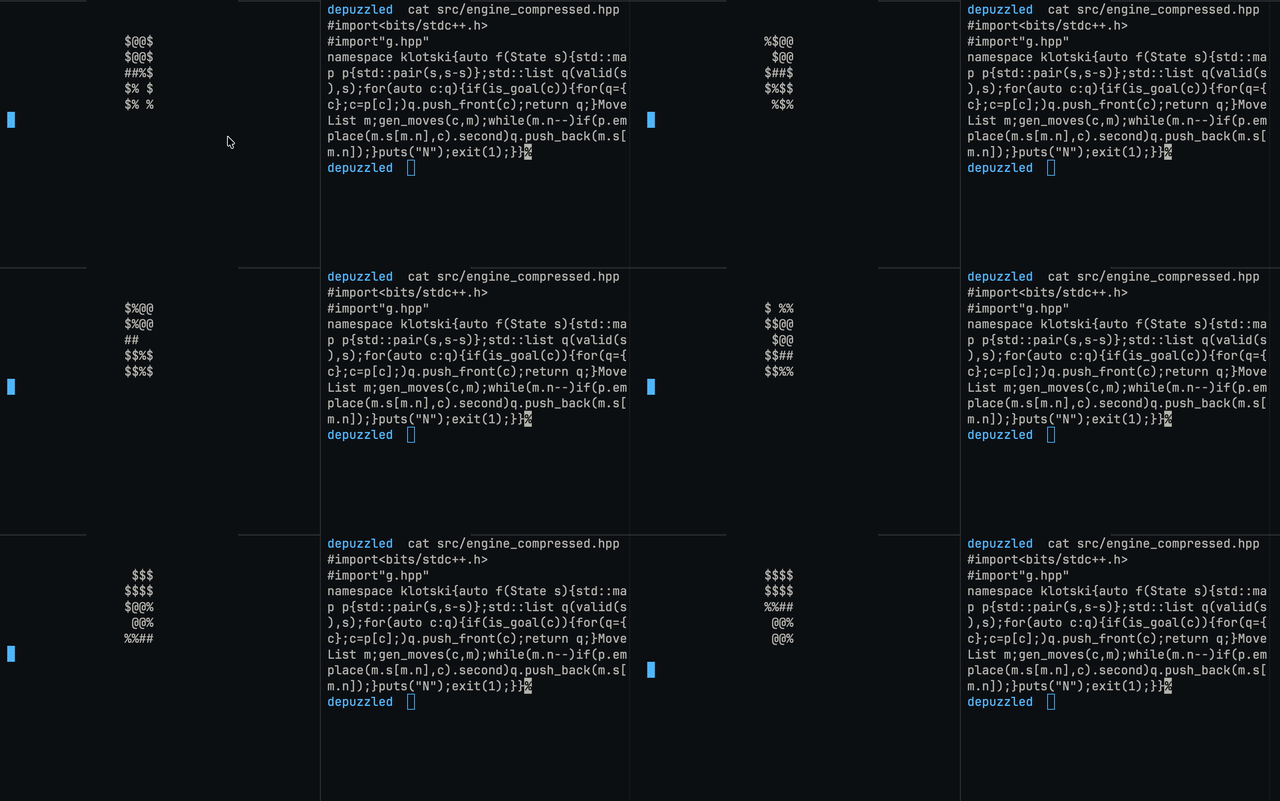
A 311 byte Klotski solver in C++ Give it a board, it finds the shortest way to slide the pieces until the big square reaches the goal.
Table of contents
- What is Klotski
- Quick start
- How to run it
- Writing your own board
- Reading the output
- More examples
- Exit codes
- Files in this project
- How it works
- The compressed engine
- Using the engine in your own code
- Speed
What is Klotski
Klotski is a sliding block puzzle. You have a box that is 4 cells wide and 5 cells tall. Inside the box there are blocks of different shapes, and only two empty cells. You can slide a block into an empty cell next to it. You cannot lift blocks or turn them.
The classic puzzle has these pieces:
| Piece | Size | Count |
|---|---|---|
| Big square | 2x2 | 1 |
| Vertical block | 1 wide, 2 tall | 4 |
| Horizontal block | 2 wide, 1 tall | 1 |
| Small square | 1x1 | 4 |
| Empty cells | 1x1 | 2 |
The goal is to move the big square to the bottom middle of the box. In this program the goal is exactly this: the top left cell of the big square must sit at row 3, column 1 (counting from 0). That means the big square fills rows 3 and 4, columns 1 and 2.
The classic start looks like this (this is the picture the program prints):
$@@$
$@@$
$##$
$%%$
%  %
The big square @@ is at the top middle. It has to travel to the bottom middle, where the two empty cells are right now.
Quick start
You need a C++17 compiler. GCC or Clang both work.
g++ -std=c++17 -O2 main.cpp -o klotski
./klotski
You should see something like this:
start board: 0x0201a4d8d4bfd9f4
$@@$
$@@$
$##$
$%%$
%  %

reachable states: 25955 (2.29 ms)
shortest solution: 116 moves (one piece, one cell per move)
The time will be different on your computer.
What these mean:
start boardshows the board as one big number (in hex) and as a picture.reachable statesis how many different boards can be made from the start by legal moves. For the classic board that is 25955.shortest solutionis the smallest number of moves needed. One move means one piece slides by one cell. If a piece slides two cells in a row, that counts as two moves.
How to run it
./klotski                          solve the classic board
./klotski -v                       also print every board on the way
./klotski 0x<hex>                  solve a board given as a hex number
./klotski "<20 characters>"        solve a board given as text
./klotski -v "<20 characters>"     same as above, with every step printed
The -v flag can be placed anywhere in the command. If you give more than one board, the last one is used.
If you run the program with wrong arguments, it prints a short help message and exits with code 2.
Writing your own board
A text board is exactly 20 characters. You write it row by row, from the top row to the bottom row, left to right. Each row has 4 characters, and there are 5 rows.
These are the characters you can use:
| You type | It means |
|---|---|
. | empty cell |
o | a small 1x1 square |
< > | a horizontal block. < is the left half, > is the right half |
^ v | a vertical block. ^ is the top half, v is the bottom half |
# | a cell of the big 2x2 square (you write all four cells as #) |
A space also counts as an empty cell, but a dot is easier to read.
For the big square, just write a 2x2 block of #. The program treats the first # it finds (reading left to right, top to bottom) as the top left corner, and it claims the other three cells for the same square.
The classic board is written like this:
^##^
v##v
^<>^
voov
o..o
Put all the rows in one string and you get ^##^v##v^<>^voovo..o.
Giving a hex number instead
The program stores a board as one 64 bit number. You can pass that number directly, starting with 0x:
./klotski 0x0201a4d8d4bfd9f4
This is the same classic board. More about the number format is in How it works.
More examples
A board that needs only one move
The big square is one row above the goal, and everything else is empty:
....
....
.##.
.##.
....
./klotski -v ".........##..##....."
The program finds a solution with 1 move. With -v it prints the start board and then the final board, where the big square has slid down into rows 3 and 4.
A board that is already solved
./klotski "............o##oo##o"
The big square is already at the goal, so the answer is 0 moves.
A board with no solution
This board has no empty cell at all, so nothing can move:
./klotski "##oo##oooooooooooooo"
@@%%
@@%%
%%%%
%%%%
%%%%

reachable states: 1 (0.11 ms)
no solution
The exit code is 1.
A board that is not valid
A < with no > next to it is a cut off piece:
./klotski "<..................."
The program still prints the board first (so you can see what you typed), and then it prints this message and stops with exit code 2:
invalid board: a piece is cut off, overlaps, or extends past the edge
Exit codes
| Code | Meaning |
|---|---|
| 0 | a solution was found (this includes a board that is already solved) |
| 1 | the board is valid, but no solution exists |
| 2 | bad input: wrong arguments, or the board is not valid |
This makes the program easy to use in scripts.
Files in this project
| File | Purpose |
|---|---|
game.hpp / g.hpp | The rules of the game. Board format, text parsing, board checking, goal test and move generation. It was renamed to g.hpp for the compressed engine |
engine.hpp | The solver (readable version), a bfs with a custom hash table |
engine_compressed.hpp | The same idea as engine.hpp, compressed into 311 bytes |
render.hpp | Renders ASCII boards |
The size difference is big: engine.hpp is about 3.1 KB and engine_compressed.hpp is 311 bytes.
How the files include each other:
main.cpp
  |-- g.hpp
  |-- engine.hpp -> g.hpp
  |-- render.hpp -> g.hpp
How it works
1. The board is an integer
The board has 20 cells. Every cell can hold one of 5 things, and 5 values fit exactly in 3 bits. So the whole board fits in 20 x 3 = 60 bits of a single 64 bit number (uint64_t, called State in the code).
Cells are numbered row by row, starting at the top left:
 0  1  2  3
 4  5  6  7
 8  9 10 11
12 13 14 15
16 17 18 19
Cell number 0 lives in the lowest 3 bits of the number. Cell number 1 lives in the next 3 bits, and so on. The cell number is row * 4 + column.
These are the 8 codes:
| Code | Name | Meaning |
|---|---|---|
| 0 | EMPTY | empty cell |
| 1 | ONE | a 1x1 square |
| 2 | HL | left half of a horizontal block |
| 3 | HR | right half of a horizontal block |
| 4 | VT | top half of a vertical block |
| 5 | VB | bottom half of a vertical block |
| 6 | BIG_TL | top left cell of the big square |
| 7 | BIG_BODY | the other three cells of the big square |
Here is a small example. The classic board ends with the hex digits ...d9f4. Look at the last two digits, f4. In binary that is 11 110 100. The lowest 3 bits are 100, which is 4, so cell 0 is VT (top of a vertical block). The next 3 bits are 110, which is 6, so cell 1 is BIG_TL (top left of the big square). That matches the first row of the classic board, which starts with ^#.
Because the board is stored only as a picture, two pieces of the same shape look the same. Swapping two small squares does not make a new board. This keeps the number of states small.
There are two small helper functions for this: get(s, i) reads the 3 bits of cell i, and set(s, i, v) writes them.
2. Checking a board
valid(s) is the safety check. It makes sure that:
- no stray bits are set outside the 60 board bits,
- every piece is complete (a
<has a>next to it, a^has avbelow it, a big square has all four cells), - no piece goes outside the box,
- no pieces overlap,
- no loose half pieces exist (a
>orvor body cell that belongs to no piece).
main.cpp runs this check before solving. The engine itself does not check anything, so it expects a valid board.
3. Finding every possible move
gen_moves(s, out) fills a list with every board you can reach from s in one move. The code looks at each empty cell and at the four cells next to it.
One empty cell is enough for:
- A small square next to the empty cell slides in.
- A block slides in along its own long direction. For example, a vertical block whose bottom half is right above the empty cell moves down by one.
Two empty cells next to each other are needed for:
- A block sliding sideways (across its short side). For example, a horizontal block above two empty cells moves down.
- The big square moving by one cell. It needs two empty cells along the side it moves toward.
Each empty pair is handled only once, from its first cell (the left one for a side by side pair, the top one for a stacked pair). That way every neighbour board is produced exactly one time and there are no duplicates.
To find the empty cells fast, the code uses a small bit trick:
blanks = ~(s | s >> 1 | s >> 2) & LOW;
A cell is empty when all 3 of its bits are zero. The s | s >> 1 | s >> 2 part copies any set bit of a cell down into the lowest bit of that cell. The ~ flips it, and & LOW keeps only the lowest bit of each cell. So bit 3 * i is set exactly when cell i is empty, and the code walks through these bits with __builtin_ctzll.
A MoveList has room for 128 boards. The comment in g.hpp explains why this is a safe upper bound for the moves of any one board.
4. Breadth first search
The solver in engine.hpp is a breadth first search (BFS). The idea is simple:
- Put the start board in a list.
- Take the first board that has not been processed yet.
- Make all its neighbour boards. Add each new one to the end of the list (skip the ones already seen).
- Repeat until there is nothing left to process.
Boards are discovered in order of distance from the start: first all boards 0 moves away, then all boards 1 move away, then 2 moves away, and so on. Because of this, the first time the search meets a goal board, it has found a shortest solution.
The solver does not stop at the first goal. It keeps going until it has seen every reachable board. This is why the program can report the exact number of reachable states, and it only costs a few milliseconds.
5. Remembering boards: flat arrays and a hash table
The solver needs to answer "have I seen this board before?" very fast. It uses three plain vectors instead of a fancy container:
| Name | What it stores |
|---|---|
st_ | every discovered board, in the order it was found (this list is also the BFS queue) |
par_ | for each board, the index of the board that discovered it (its parent) |
tab_ | the hash table: each slot holds an index into st_ plus one, and 0 means the slot is empty |
A board is identified by its position in st_. This means parents and hash slots are just small 32 bit numbers.
How the hash table works:
- The hash is the board number multiplied by the constant
0x9E3779B97F4A7C15, keeping only the top bits. This spreads boards evenly over the table. - It uses open addressing with linear probing. If a slot is taken by a different board, the code tries the next slot, and the next, until it finds the board or an empty slot.
- The table starts with 65536 slots. When it becomes more than half full, it doubles in size and every board is placed again. So there is no fixed limit on the number of states. For the classic puzzle (25955 states) the table never needs to grow.
One detail in run(): the current board is copied into a local variable before its neighbours are added. This is because adding new boards may make the vector reallocate, which would leave a reference pointing to freed memory.
6. Building the answer
When the goal board is found, the solver remembers its index. To build the path, it walks backward using par_: from the goal to its parent, then to the parent of that parent, and so on until it reaches index 0 (the start board). Then it reverses the list. The result is the list of boards from the start to the goal, including both ends. The number of moves is the list size minus one.
The compressed engine
engine_compressed.hpp does the same BFS in one short line. Here it is:
#import<bits/stdc++.h>
#import"g.hpp"
namespace klotski{auto f(State s){std::map p{std::pair(s,s-s)};std::list q(valid(s),s);for(auto c:q){if(is_goal(c)){for(q={c};c=p[c];)q.push_front(c);return q;}MoveList m;gen_moves(c,m);while(m.n--)if(p.emplace(m.s[m.n],c).second)q.push_back(m.s[m.n]);}puts("N");exit(1);}}
main.cpp does not use it. To try it, write a tiny program like this:
#include "engine_compressed.hpp"

int main() {
  auto path = klotski::f(klotski::START);
  std::printf("%zu moves\n", path.size() - 1);
}
g++ -std=c++17 -O2 try.cpp -o try && ./try
It prints 116 moves for the classic board.
Two things to know about this file:
#importis an old GCC extension so it prints a warning about it, but it works.<bits/stdc++.h>is a GCC header. The default compiler on macOS (Apple Clang) does not have it, so this file may fail to compile there unless you use a real GCC (for example one installed with Homebrew) or replace that line with the normal headers (<map>,<list>,<cstdio>,<cstdlib>).
Everything lives in the klotski namespace.
What you can call
| Name | Whats it? |
|---|---|
State | the board as a uint64_t |
START | the classic starting board |
from_rows(const char *t) | turns a 20 character text into a State |
valid(State s) | true if the board is a legal layout |
is_goal(State s) | true if the big square's top left cell is at row 3, column 1 |
get(s, i) / set(s, i, v) | read or write one cell |
gen_moves(s, list) | fill a MoveList with every board one move away |
solve(State start) | run the solver and return a Solution |
print_board(State s) | print the ASCII picture |
What solve returns
A Solution has three fields:
| Field | Meaning |
|---|---|
status | Status::Solved or Status::Unsolvable |
path | the boards from the start to the goal, both included. Empty unless the status is Solved. The number of moves is path.size() - 1. |
states | how many reachable states were explored |
The precondition is that start passes valid(). The solver itself does no checking.
Speed
On the classic board the whole search (25955 states) takes a couple of milliseconds with -O2. A few things make it fast:
- a board is one 64 bit number, so copying and comparing boards is very cheap,
- the visited set is one flat array plus a simple hash table, so there are no small allocations per board,
- the move generator works with bit tricks and produces each neighbour only once.
Always build with -O2 (or higher). Without optimization it is much slower.
[!NOTE] To generate an ascii game play video, first run the ./klotski -v to generate the game, then save it in a text file, eg. out/log.txt. Then you can just run this command on the same directory & record screen.
awk -v RS='\n\n' 'BEGIN {print "\033c"; system("sleep 2")} /\$/ {gsub(/\n/, "\n\t\t"); print "\033c\n\n\t\t" $0; system("sleep 0.15")} END {system("sleep 7")}' log.txt
README was generated with claude
Similar repos


Languages
C++
100.0%
See what people are saying
README
depuzzled
A 311 byte Klotski solver in C++ Give it a board, it finds the shortest way to slide the pieces until the big square reaches the goal.
Table of contents
- What is Klotski
- Quick start
- How to run it
- Writing your own board
- Reading the output
- More examples
- Exit codes
- Files in this project
- How it works
- The compressed engine
- Using the engine in your own code
- Speed
What is Klotski
Klotski is a sliding block puzzle. You have a box that is 4 cells wide and 5 cells tall. Inside the box there are blocks of different shapes, and only two empty cells. You can slide a block into an empty cell next to it. You cannot lift blocks or turn them.
The classic puzzle has these pieces:
| Piece | Size | Count |
|---|---|---|
| Big square | 2x2 | 1 |
| Vertical block | 1 wide, 2 tall | 4 |
| Horizontal block | 2 wide, 1 tall | 1 |
| Small square | 1x1 | 4 |
| Empty cells | 1x1 | 2 |
The goal is to move the big square to the bottom middle of the box. In this program the goal is exactly this: the top left cell of the big square must sit at row 3, column 1 (counting from 0). That means the big square fills rows 3 and 4, columns 1 and 2.
The classic start looks like this (this is the picture the program prints):
$@@$
$@@$
$##$
$%%$
%  %
The big square @@ is at the top middle. It has to travel to the bottom middle, where the two empty cells are right now.
Quick start
You need a C++17 compiler. GCC or Clang both work.
g++ -std=c++17 -O2 main.cpp -o klotski
./klotski
You should see something like this:
start board: 0x0201a4d8d4bfd9f4
$@@$
$@@$
$##$
$%%$
%  %

reachable states: 25955 (2.29 ms)
shortest solution: 116 moves (one piece, one cell per move)
The time will be different on your computer.
What these mean:
start boardshows the board as one big number (in hex) and as a picture.reachable statesis how many different boards can be made from the start by legal moves. For the classic board that is 25955.shortest solutionis the smallest number of moves needed. One move means one piece slides by one cell. If a piece slides two cells in a row, that counts as two moves.
How to run it
./klotski                          solve the classic board
./klotski -v                       also print every board on the way
./klotski 0x<hex>                  solve a board given as a hex number
./klotski "<20 characters>"        solve a board given as text
./klotski -v "<20 characters>"     same as above, with every step printed
The -v flag can be placed anywhere in the command. If you give more than one board, the last one is used.
If you run the program with wrong arguments, it prints a short help message and exits with code 2.
Writing your own board
A text board is exactly 20 characters. You write it row by row, from the top row to the bottom row, left to right. Each row has 4 characters, and there are 5 rows.
These are the characters you can use:
| You type | It means |
|---|---|
. | empty cell |
o | a small 1x1 square |
< > | a horizontal block. < is the left half, > is the right half |
^ v | a vertical block. ^ is the top half, v is the bottom half |
# | a cell of the big 2x2 square (you write all four cells as #) |
A space also counts as an empty cell, but a dot is easier to read.
For the big square, just write a 2x2 block of #. The program treats the first # it finds (reading left to right, top to bottom) as the top left corner, and it claims the other three cells for the same square.
The classic board is written like this:
^##^
v##v
^<>^
voov
o..o
Put all the rows in one string and you get ^##^v##v^<>^voovo..o.
Giving a hex number instead
The program stores a board as one 64 bit number. You can pass that number directly, starting with 0x:
./klotski 0x0201a4d8d4bfd9f4
This is the same classic board. More about the number format is in How it works.
More examples
A board that needs only one move
The big square is one row above the goal, and everything else is empty:
....
....
.##.
.##.
....
./klotski -v ".........##..##....."
The program finds a solution with 1 move. With -v it prints the start board and then the final board, where the big square has slid down into rows 3 and 4.
A board that is already solved
./klotski "............o##oo##o"
The big square is already at the goal, so the answer is 0 moves.
A board with no solution
This board has no empty cell at all, so nothing can move:
./klotski "##oo##oooooooooooooo"
@@%%
@@%%
%%%%
%%%%
%%%%

reachable states: 1 (0.11 ms)
no solution
The exit code is 1.
A board that is not valid
A < with no > next to it is a cut off piece:
./klotski "<..................."
The program still prints the board first (so you can see what you typed), and then it prints this message and stops with exit code 2:
invalid board: a piece is cut off, overlaps, or extends past the edge
Exit codes
| Code | Meaning |
|---|---|
| 0 | a solution was found (this includes a board that is already solved) |
| 1 | the board is valid, but no solution exists |
| 2 | bad input: wrong arguments, or the board is not valid |
This makes the program easy to use in scripts.
Files in this project
| File | Purpose |
|---|---|
game.hpp / g.hpp | The rules of the game. Board format, text parsing, board checking, goal test and move generation. It was renamed to g.hpp for the compressed engine |
engine.hpp | The solver (readable version), a bfs with a custom hash table |
engine_compressed.hpp | The same idea as engine.hpp, compressed into 311 bytes |
render.hpp | Renders ASCII boards |
The size difference is big: engine.hpp is about 3.1 KB and engine_compressed.hpp is 311 bytes.
How the files include each other:
main.cpp
  |-- g.hpp
  |-- engine.hpp -> g.hpp
  |-- render.hpp -> g.hpp
How it works
1. The board is an integer
The board has 20 cells. Every cell can hold one of 5 things, and 5 values fit exactly in 3 bits. So the whole board fits in 20 x 3 = 60 bits of a single 64 bit number (uint64_t, called State in the code).
Cells are numbered row by row, starting at the top left:
 0  1  2  3
 4  5  6  7
 8  9 10 11
12 13 14 15
16 17 18 19
Cell number 0 lives in the lowest 3 bits of the number. Cell number 1 lives in the next 3 bits, and so on. The cell number is row * 4 + column.
These are the 8 codes:
| Code | Name | Meaning |
|---|---|---|
| 0 | EMPTY | empty cell |
| 1 | ONE | a 1x1 square |
| 2 | HL | left half of a horizontal block |
| 3 | HR | right half of a horizontal block |
| 4 | VT | top half of a vertical block |
| 5 | VB | bottom half of a vertical block |
| 6 | BIG_TL | top left cell of the big square |
| 7 | BIG_BODY | the other three cells of the big square |
Here is a small example. The classic board ends with the hex digits ...d9f4. Look at the last two digits, f4. In binary that is 11 110 100. The lowest 3 bits are 100, which is 4, so cell 0 is VT (top of a vertical block). The next 3 bits are 110, which is 6, so cell 1 is BIG_TL (top left of the big square). That matches the first row of the classic board, which starts with ^#.
Because the board is stored only as a picture, two pieces of the same shape look the same. Swapping two small squares does not make a new board. This keeps the number of states small.
There are two small helper functions for this: get(s, i) reads the 3 bits of cell i, and set(s, i, v) writes them.
2. Checking a board
valid(s) is the safety check. It makes sure that:
- no stray bits are set outside the 60 board bits,
- every piece is complete (a
<has a>next to it, a^has avbelow it, a big square has all four cells), - no piece goes outside the box,
- no pieces overlap,
- no loose half pieces exist (a
>orvor body cell that belongs to no piece).
main.cpp runs this check before solving. The engine itself does not check anything, so it expects a valid board.
3. Finding every possible move
gen_moves(s, out) fills a list with every board you can reach from s in one move. The code looks at each empty cell and at the four cells next to it.
One empty cell is enough for:
- A small square next to the empty cell slides in.
- A block slides in along its own long direction. For example, a vertical block whose bottom half is right above the empty cell moves down by one.
Two empty cells next to each other are needed for:
- A block sliding sideways (across its short side). For example, a horizontal block above two empty cells moves down.
- The big square moving by one cell. It needs two empty cells along the side it moves toward.
Each empty pair is handled only once, from its first cell (the left one for a side by side pair, the top one for a stacked pair). That way every neighbour board is produced exactly one time and there are no duplicates.
To find the empty cells fast, the code uses a small bit trick:
blanks = ~(s | s >> 1 | s >> 2) & LOW;
A cell is empty when all 3 of its bits are zero. The s | s >> 1 | s >> 2 part copies any set bit of a cell down into the lowest bit of that cell. The ~ flips it, and & LOW keeps only the lowest bit of each cell. So bit 3 * i is set exactly when cell i is empty, and the code walks through these bits with __builtin_ctzll.
A MoveList has room for 128 boards. The comment in g.hpp explains why this is a safe upper bound for the moves of any one board.
4. Breadth first search
The solver in engine.hpp is a breadth first search (BFS). The idea is simple:
- Put the start board in a list.
- Take the first board that has not been processed yet.
- Make all its neighbour boards. Add each new one to the end of the list (skip the ones already seen).
- Repeat until there is nothing left to process.
Boards are discovered in order of distance from the start: first all boards 0 moves away, then all boards 1 move away, then 2 moves away, and so on. Because of this, the first time the search meets a goal board, it has found a shortest solution.
The solver does not stop at the first goal. It keeps going until it has seen every reachable board. This is why the program can report the exact number of reachable states, and it only costs a few milliseconds.
5. Remembering boards: flat arrays and a hash table
The solver needs to answer "have I seen this board before?" very fast. It uses three plain vectors instead of a fancy container:
| Name | What it stores |
|---|---|
st_ | every discovered board, in the order it was found (this list is also the BFS queue) |
par_ | for each board, the index of the board that discovered it (its parent) |
tab_ | the hash table: each slot holds an index into st_ plus one, and 0 means the slot is empty |
A board is identified by its position in st_. This means parents and hash slots are just small 32 bit numbers.
How the hash table works:
- The hash is the board number multiplied by the constant
0x9E3779B97F4A7C15, keeping only the top bits. This spreads boards evenly over the table. - It uses open addressing with linear probing. If a slot is taken by a different board, the code tries the next slot, and the next, until it finds the board or an empty slot.
- The table starts with 65536 slots. When it becomes more than half full, it doubles in size and every board is placed again. So there is no fixed limit on the number of states. For the classic puzzle (25955 states) the table never needs to grow.
One detail in run(): the current board is copied into a local variable before its neighbours are added. This is because adding new boards may make the vector reallocate, which would leave a reference pointing to freed memory.
6. Building the answer
When the goal board is found, the solver remembers its index. To build the path, it walks backward using par_: from the goal to its parent, then to the parent of that parent, and so on until it reaches index 0 (the start board). Then it reverses the list. The result is the list of boards from the start to the goal, including both ends. The number of moves is the list size minus one.
The compressed engine
engine_compressed.hpp does the same BFS in one short line. Here it is:
#import<bits/stdc++.h>
#import"g.hpp"
namespace klotski{auto f(State s){std::map p{std::pair(s,s-s)};std::list q(valid(s),s);for(auto c:q){if(is_goal(c)){for(q={c};c=p[c];)q.push_front(c);return q;}MoveList m;gen_moves(c,m);while(m.n--)if(p.emplace(m.s[m.n],c).second)q.push_back(m.s[m.n]);}puts("N");exit(1);}}
main.cpp does not use it. To try it, write a tiny program like this:
#include "engine_compressed.hpp"

int main() {
  auto path = klotski::f(klotski::START);
  std::printf("%zu moves\n", path.size() - 1);
}
g++ -std=c++17 -O2 try.cpp -o try && ./try
It prints 116 moves for the classic board.
Two things to know about this file:
#importis an old GCC extension so it prints a warning about it, but it works.<bits/stdc++.h>is a GCC header. The default compiler on macOS (Apple Clang) does not have it, so this file may fail to compile there unless you use a real GCC (for example one installed with Homebrew) or replace that line with the normal headers (<map>,<list>,<cstdio>,<cstdlib>).
Everything lives in the klotski namespace.
What you can call
| Name | Whats it? |
|---|---|
State | the board as a uint64_t |
START | the classic starting board |
from_rows(const char *t) | turns a 20 character text into a State |
valid(State s) | true if the board is a legal layout |
is_goal(State s) | true if the big square's top left cell is at row 3, column 1 |
get(s, i) / set(s, i, v) | read or write one cell |
gen_moves(s, list) | fill a MoveList with every board one move away |
solve(State start) | run the solver and return a Solution |
print_board(State s) | print the ASCII picture |
What solve returns
A Solution has three fields:
| Field | Meaning |
|---|---|
status | Status::Solved or Status::Unsolvable |
path | the boards from the start to the goal, both included. Empty unless the status is Solved. The number of moves is path.size() - 1. |
states | how many reachable states were explored |
The precondition is that start passes valid(). The solver itself does no checking.
Speed
On the classic board the whole search (25955 states) takes a couple of milliseconds with -O2. A few things make it fast:
- a board is one 64 bit number, so copying and comparing boards is very cheap,
- the visited set is one flat array plus a simple hash table, so there are no small allocations per board,
- the move generator works with bit tricks and produces each neighbour only once.
Always build with -O2 (or higher). Without optimization it is much slower.
[!NOTE] To generate an ascii game play video, first run the ./klotski -v to generate the game, then save it in a text file, eg. out/log.txt. Then you can just run this command on the same directory & record screen.
awk -v RS='\n\n' 'BEGIN {print "\033c"; system("sleep 2")} /\$/ {gsub(/\n/, "\n\t\t"); print "\033c\n\n\t\t" $0; system("sleep 0.15")} END {system("sleep 7")}' log.txt
README was generated with claude
Similar repos
Languages
C++
100.0%