Macro-header for compile-time C polymorphic obfuscation (tcc, win x86/x64)
See the code
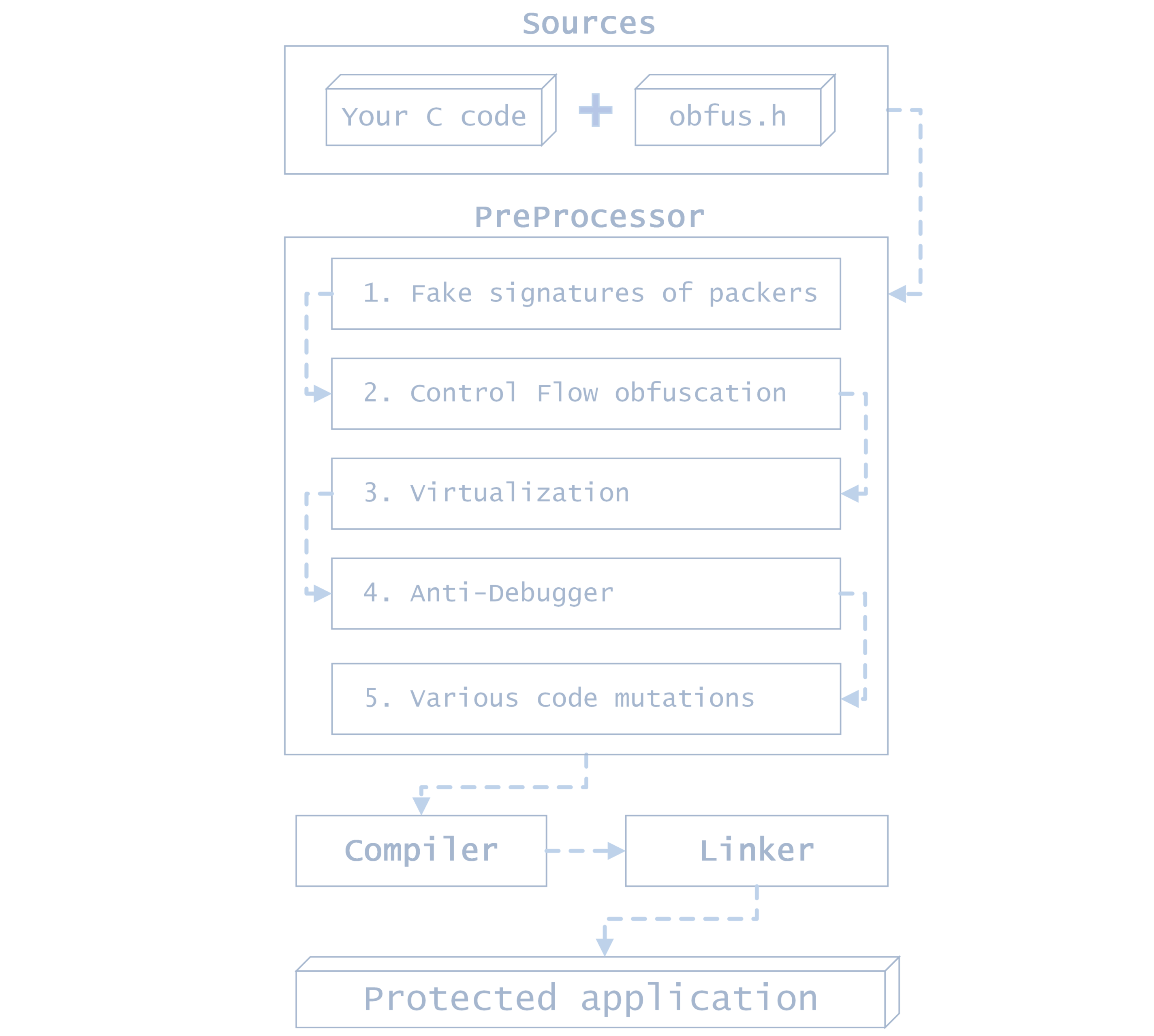
obfus.h is a macro-only library for compile-time polymorphic obfuscation of C applications, designed specifically for TinyCC 0.9.28rc on Windows x86 and x64. Download the complete compiler package from TinyCC-builder releases. One file. Protection baked into your binary.
Just seeing obfus.h in your binary will make a reverse engineer question the existence of God.
Four levels: Easy, Medium, Hardcore and Extreme. Unique crackmes, automatically generated and built every day. Each challenge has its own generated verification logic, not just a different password. Sharpen your reverse-engineering skills or see how obfus.h works in real binaries — no compiler or test setup needed. Download. Disassemble. Find the password.
obfus.h is a full-featured obfuscation tool, not a proof of concept. It is a powerful tool when you understand where and how to apply it: use it to protect selected native components containing sensitive logic.
Since obfus.h requires TCC, the recommended approach for larger projects is to isolate that logic in C DLLs compiled with TCC and obfuscated with obfus.h. The main application can remain in C#, C++, another language, or C compiled with GCC, LLVM/Clang or Visual C and call those DLLs through their exported interfaces.
The resulting binaries can also be processed by commercial protectors and packers to add another layer of protection. Check compatibility with your chosen protector and settings before distributing the protected components.
[!IMPORTANT] obfus.h significantly raises the barrier to reverse engineering, but it is not a panacea. Protecting trade secrets also requires your own internal protection mechanisms; obfuscation should be one layer of your protection strategy.
Integrating obfus.h into your project is a simple process. Just include the following line in your code:
#include "obfus.h"
One file. Powerful protection. Include it and build your application: the protection code is baked directly into the output binary, making your native code much harder to analyze.
Protection is polymorphic throughout the application: even small changes to the source code can substantially reshape the protection baked into the output binary, changing its instructions, constants and control-flow paths.
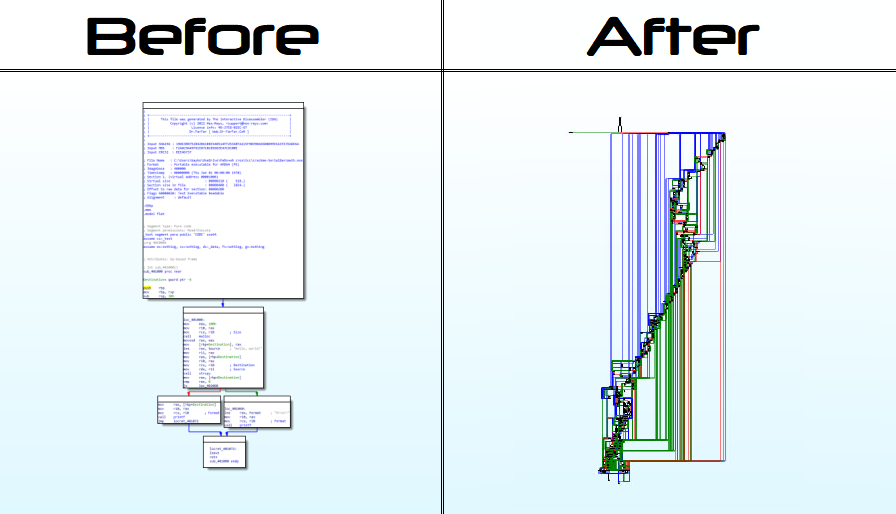
Control-flow protection uses Control Flow Explosion: straightforward conditions and loops expand into a tangled graph of branches, indirect transitions and fake functions. Polymorphic instruction sequences carry state and select continuations, so removing them without preserving their dependencies can break execution. The graph's structure and instruction forms vary with the source code, making the original logic harder to follow in disassemblers and decompilers. CFLOW_V2 adds another layer of control-flow mutation.
Automatic control-flow protection transforms if, else, break, switch, while, for, return, continue, default and do into polymorphic code that makes the original logic harder to follow. For explicit insertion, use BREAK_STACK_CFLOW; or STACK_PROXY_FUNCTIONS;. NO_CFLOW disables automatic control-flow protection; NO_OBF disables obfuscation.
IntelliSense remains available. No extra tools or code generation are required.
Define options before including
obfus.h:// Advanced code protection (see the "Virtualization" part of the documentation!) #define VIRT 1 // Allows you to use the functions of a math VM // Additional options #define CFLOW_V2 1 // Stronger control-flow protection (slower execution) #define ANTIDEBUG_V2 1 // Add hardware-breakpoint checks to anti-debugging protection #define FAKE_SIGNS 1 // Fake protector/packer signatures (crackme/CTF only) // Disabling default features #define NO_OBF 1 // Don't obfuscate (for debugging) #define NO_CFLOW 1 // Don't use Control-Flow obfuscation #define NO_ANTIDEBUG 1 // Don't build in debugging protection #define NO_PDATA_DECOYS 1 // Disable additional x64 fake functions
[!WARNING] Reserve
FAKE_SIGNSfor crackme/CTF challenges; avoid it in production software. Fake protector and packer signatures can trigger antivirus detections and cause tools such as Detect It Easy to flag the binary as suspicious or potentially malicious.
or use it with compiler args:
tcc "app.c" -w -D NO_CFLOW -D ANTIDEBUG_V2 -D FAKE_SIGNS -D VIRT
[!TIP] Use
-wto suppress warnings generated by the protection during compilation.
🔐 Debugging protection is triggered by calls to many basic MSVCRT functions.
In critical places in the code you can use the ANTI_DEBUG; construct. For example:
ANTI_DEBUG;
if (!licenseExpired()) {
	// ...
}
Use HIDE_STRING(str) to build a string at runtime instead of storing it as a plain string in the binary. Use it inside functions; it cannot initialize static variables.
The returned pointer remains valid until the enclosing block ends. Copy the string if it needs to outlive that block. Some decompilers can still reconstruct its contents.
Example:
char *hidden_message = HIDE_STRING("Hello, world!");
// ...
printf(hidden_message);
Enable VIRT and use the VM macro-operators to run selected calculations through an embedded virtual machine. No extra initialization is required. With VIRT disabled, these macro-operators use ordinary calculations.
[!WARNING] Virtualization in critical locations can impact optimization. Use with caution only in areas where it is really needed
| Function | Type | Op | Description | Example |
|---|---|---|---|---|
VM_ADD | long | + | Adds two numbers | VM_ADD(5, 3) = 8 |
VM_SUB | long | - | Subtracts two numbers | VM_SUB(5, 3) = 2 |
VM_MUL | long | * | Multiplies two numbers | VM_MUL(5, 3) = 15 |
VM_DIV | long | / | Divides two numbers | VM_DIV(6, 3) = 2 |
VM_MOD | long | % | Calculates the modulus of two numbers | VM_MOD(5, 3) = 2 |
VM_AND | unsigned int | & | Calculates the bitwise AND of two numbers | VM_AND(6, 3) = 2 |
VM_OR | unsigned int | | | Calculates the bitwise OR of two numbers | VM_OR(6, 3) = 7 |
VM_XOR | unsigned int | ^ | Calculates the bitwise XOR of two numbers | VM_XOR(6, 3) = 5 |
VM_NOT | unsigned int | ~ | Inverts all bits of a number | VM_NOT(0) = 0xFFFFFFFFu |
VM_SHL | unsigned int | << | Shifts a number left by the specified number of bits | VM_SHL(1, 3) = 8 |
VM_SHR | unsigned int | >> | Shifts a number right by the specified number of bits, filling with zeros | VM_SHR(8, 3) = 1 |
VM_EQU | BOOL | == | Checks if two numbers are equal | VM_EQU(5, 5) = true |
VM_NEQ | BOOL | != | Checks if two numbers are not equal | VM_NEQ(5, 3) = true |
VM_LSS | BOOL | < | Checks if the first number is less than the second number | VM_LSS(3, 5) = true |
VM_GTR | BOOL | > | Checks if the first number is greater than the second number | VM_GTR(5, 3) = true |
VM_LEQ | BOOL | <= | Checks if the first number is less than or equal to the second number | VM_LEQ(3, 5) = true |
VM_GEQ | BOOL | >= | Checks if the first number is greater than or equal to the second number | VM_GEQ(5, 3) = true |
VM_ADD_DBL | long double | + | Adds two double numbers | VM_ADD_DBL(5.5, 3.2) = ≈8.7 |
VM_SUB_DBL | long double | - | Subtracts two double numbers | VM_SUB_DBL(5.5, 3.2) = ≈2.3 |
VM_MUL_DBL | long double | * | Multiplies two double numbers | VM_MUL_DBL(5.5, 3.2) = ≈17.6 |
VM_DIV_DBL | long double | / | Divides two double numbers | VM_DIV_DBL(6.0, 3.0) = ≈2.0 |
VM_LSS_DBL | BOOL | < | Checks if the first double number is less than the second double number | VM_LSS_DBL(3.5, 5.2) = true |
VM_GTR_DBL | BOOL | > | Checks if the first double number is greater than the second double number | VM_GTR_DBL(5.5, 3.2) = true |
The virtual machine does not support some basic
doublecomparison operations.
You can use logical operators that use virtual machine calls to further complicate the understanding of your code:
| Operator | Description |
|---|---|
VM_IF | Use instead of if |
VM_ELSE_IF | Use instead of else if |
VM_ELSE | Use instead of else |
This is not a complete replacement for if/else, but is just a complication of standard operators.
A simple example of using virtualization:
// ...
#define VIRT 1
// ...

// if ((2 + 2) == 4) { ... }
VM_IF (VM_EQU(VM_ADD(2, 2), 4)) {
	printf("2 + 2 == 4!");
}

// if (condition1) { ... }
// else if (condition2) { ... }
// else { ... }
VM_IF (condition1) {
	// if
} VM_ELSE_IF (condition2) {
	// else if
} VM_ELSE {
	// else
}
You can find examples of using all the functions of a virtual machine in the file tests/vm.c
If you need advanced protection against skilled reversers, use CFLOW_V2 and ANTIDEBUG_V2 options.
// Let's obfuscate your code!

#include <stdio.h>

#define VIRT         1 // [+] Use math virtual machine

#define CFLOW_V2     1 // [+] ControlFlow v2
#define FAKE_SIGNS   1 // [+] Fake signatures
#define ANTIDEBUG_V2 1 // [+] AntiDebug v2

#define NO_OBF       0 // [-] Don't obfuscate (disable all)
#define NO_CFLOW     0 // [-] Disable ControlFlow
#define NO_ANTIDEBUG 0 // [-] Disable AntiDebug

#include "obfus.h"

void _start(void) {
	ANTI_DEBUG;

	char *out = malloc(256);

	STACK_PROXY_FUNCTIONS;

	if (out) {
		strcpy(out, HIDE_STRING("Hello, world!\n"));
		printf("%s", out);
	} else {
		printf("Error!\n");
	}

	free(out);

	int result = VM_ADD(5, 7); // 5 + 7

	BREAK_STACK_CFLOW;
	VM_IF (VM_EQU(result, 12)) { // (5 + 7) == 12
		printf("5 + 7 == 12");
	}

	exit(0);
}
Use TinyCC 0.9.28rc from TinyCC-builder, which includes the Windows headers, libraries and obfh-update.cmd. TinyCC 0.9.27, Visual C, GCC and Clang are not supported.
[!NOTE] To build the latest compiler yourself, download TinyCC-builder and double-click
build.cmd; sources and dependencies are downloaded automatically.
obfh-update.cmd is already included in the standard TinyCC-builder package, next to tcc.exe. No separate download is needed.
Run it manually from your project directory or add it to your build pipeline. It downloads the latest obfus.h into the current directory:
call "C:\TinyCC\obfh-update.cmd"
if errorlevel 1 exit /b 1
"C:\TinyCC\tcc.exe" app.c -w
Without the compiler package, you can also download the script separately.
Extremely aggressive polymorphic obfuscation is the core of obfus.h. Its protection deliberately uses aggressive transformations to disrupt the semantic structure recovered by analysis tools while preserving the program's behavior. Instructions and control-flow paths vary throughout the binary, making the original logic harder to reconstruct and modify. Use it alongside your application's own checks and protections.
What the diagrammatic code will look like after obfuscation:
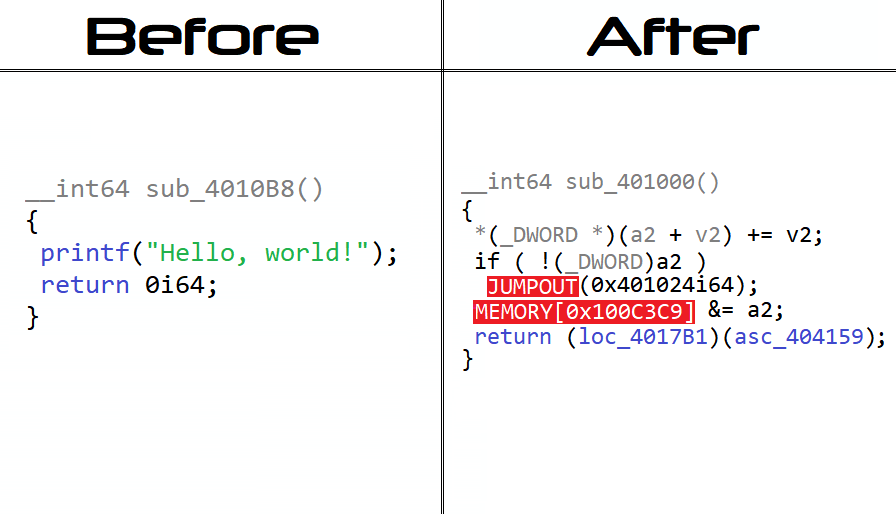
The reverser will see something like this if he tries to use a decompiler:
This is what all hidden strings via
HIDE_STRINGfeature look like in the disassembler (x86-64 arch):; ; ; ; ; ; ; ; ; ; ; ; ; ; ; ; ; ; ; ; ; ; ; ; ; ; ; ; ; ; ; ; ; ; PROTECTED STRING: ; ORIGINAL STRING: ; mov eax, 48h lea rax, aHelloWorld ; mov [rbp-0Fh], al mov r11, rax ; mov eax, 65h ; . . . ; mov [rbp-0Eh], al ; mov eax, 6Ch ; mov [rbp-0Dh], al ; mov eax, 6Ch ; mov [rbp-0Ch], al ; mov eax, 6Fh ; mov [rbp-0Bh], al ; mov eax, 2Ch ; ; etc . . . ; ; ; ; ; ; ; ; ; ; ; ; ; ; ; ; ; ; ; ; ; ; ; ; ; ; ; ; ; ; ; ; ; ;
Thanks to everyone who helped in the development of this project. I appreciate it! ❤️
And thanks to you 🤝 for paying attention to this project!
169 followers · starred Nov 2024
352 followers · starred Nov 2024
383 followers · starred Apr 2024
75 followers · starred May 2026
Macro-header for compile-time C polymorphic obfuscation (tcc, win x86/x64)
See the code
obfus.h is a macro-only library for compile-time polymorphic obfuscation of C applications, designed specifically for TinyCC 0.9.28rc on Windows x86 and x64. Download the complete compiler package from TinyCC-builder releases. One file. Protection baked into your binary.
Just seeing obfus.h in your binary will make a reverse engineer question the existence of God.
Four levels: Easy, Medium, Hardcore and Extreme. Unique crackmes, automatically generated and built every day. Each challenge has its own generated verification logic, not just a different password. Sharpen your reverse-engineering skills or see how obfus.h works in real binaries — no compiler or test setup needed. Download. Disassemble. Find the password.
obfus.h is a full-featured obfuscation tool, not a proof of concept. It is a powerful tool when you understand where and how to apply it: use it to protect selected native components containing sensitive logic.
Since obfus.h requires TCC, the recommended approach for larger projects is to isolate that logic in C DLLs compiled with TCC and obfuscated with obfus.h. The main application can remain in C#, C++, another language, or C compiled with GCC, LLVM/Clang or Visual C and call those DLLs through their exported interfaces.
The resulting binaries can also be processed by commercial protectors and packers to add another layer of protection. Check compatibility with your chosen protector and settings before distributing the protected components.
[!IMPORTANT] obfus.h significantly raises the barrier to reverse engineering, but it is not a panacea. Protecting trade secrets also requires your own internal protection mechanisms; obfuscation should be one layer of your protection strategy.
Integrating obfus.h into your project is a simple process. Just include the following line in your code:
#include "obfus.h"
One file. Powerful protection. Include it and build your application: the protection code is baked directly into the output binary, making your native code much harder to analyze.
Protection is polymorphic throughout the application: even small changes to the source code can substantially reshape the protection baked into the output binary, changing its instructions, constants and control-flow paths.
Control-flow protection uses Control Flow Explosion: straightforward conditions and loops expand into a tangled graph of branches, indirect transitions and fake functions. Polymorphic instruction sequences carry state and select continuations, so removing them without preserving their dependencies can break execution. The graph's structure and instruction forms vary with the source code, making the original logic harder to follow in disassemblers and decompilers. CFLOW_V2 adds another layer of control-flow mutation.
Automatic control-flow protection transforms if, else, break, switch, while, for, return, continue, default and do into polymorphic code that makes the original logic harder to follow. For explicit insertion, use BREAK_STACK_CFLOW; or STACK_PROXY_FUNCTIONS;. NO_CFLOW disables automatic control-flow protection; NO_OBF disables obfuscation.
IntelliSense remains available. No extra tools or code generation are required.
Define options before including
obfus.h:// Advanced code protection (see the "Virtualization" part of the documentation!) #define VIRT 1 // Allows you to use the functions of a math VM // Additional options #define CFLOW_V2 1 // Stronger control-flow protection (slower execution) #define ANTIDEBUG_V2 1 // Add hardware-breakpoint checks to anti-debugging protection #define FAKE_SIGNS 1 // Fake protector/packer signatures (crackme/CTF only) // Disabling default features #define NO_OBF 1 // Don't obfuscate (for debugging) #define NO_CFLOW 1 // Don't use Control-Flow obfuscation #define NO_ANTIDEBUG 1 // Don't build in debugging protection #define NO_PDATA_DECOYS 1 // Disable additional x64 fake functions
[!WARNING] Reserve
FAKE_SIGNSfor crackme/CTF challenges; avoid it in production software. Fake protector and packer signatures can trigger antivirus detections and cause tools such as Detect It Easy to flag the binary as suspicious or potentially malicious.
or use it with compiler args:
tcc "app.c" -w -D NO_CFLOW -D ANTIDEBUG_V2 -D FAKE_SIGNS -D VIRT
[!TIP] Use
-wto suppress warnings generated by the protection during compilation.
🔐 Debugging protection is triggered by calls to many basic MSVCRT functions.
In critical places in the code you can use the ANTI_DEBUG; construct. For example:
ANTI_DEBUG;
if (!licenseExpired()) {
	// ...
}
Use HIDE_STRING(str) to build a string at runtime instead of storing it as a plain string in the binary. Use it inside functions; it cannot initialize static variables.
The returned pointer remains valid until the enclosing block ends. Copy the string if it needs to outlive that block. Some decompilers can still reconstruct its contents.
Example:
char *hidden_message = HIDE_STRING("Hello, world!");
// ...
printf(hidden_message);
Enable VIRT and use the VM macro-operators to run selected calculations through an embedded virtual machine. No extra initialization is required. With VIRT disabled, these macro-operators use ordinary calculations.
[!WARNING] Virtualization in critical locations can impact optimization. Use with caution only in areas where it is really needed
| Function | Type | Op | Description | Example |
|---|---|---|---|---|
VM_ADD | long | + | Adds two numbers | VM_ADD(5, 3) = 8 |
VM_SUB | long | - | Subtracts two numbers | VM_SUB(5, 3) = 2 |
VM_MUL | long | * | Multiplies two numbers | VM_MUL(5, 3) = 15 |
VM_DIV | long | / | Divides two numbers | VM_DIV(6, 3) = 2 |
VM_MOD | long | % | Calculates the modulus of two numbers | VM_MOD(5, 3) = 2 |
VM_AND | unsigned int | & | Calculates the bitwise AND of two numbers | VM_AND(6, 3) = 2 |
VM_OR | unsigned int | | | Calculates the bitwise OR of two numbers | VM_OR(6, 3) = 7 |
VM_XOR | unsigned int | ^ | Calculates the bitwise XOR of two numbers | VM_XOR(6, 3) = 5 |
VM_NOT | unsigned int | ~ | Inverts all bits of a number | VM_NOT(0) = 0xFFFFFFFFu |
VM_SHL | unsigned int | << | Shifts a number left by the specified number of bits | VM_SHL(1, 3) = 8 |
VM_SHR | unsigned int | >> | Shifts a number right by the specified number of bits, filling with zeros | VM_SHR(8, 3) = 1 |
VM_EQU | BOOL | == | Checks if two numbers are equal | VM_EQU(5, 5) = true |
VM_NEQ | BOOL | != | Checks if two numbers are not equal | VM_NEQ(5, 3) = true |
VM_LSS | BOOL | < | Checks if the first number is less than the second number | VM_LSS(3, 5) = true |
VM_GTR | BOOL | > | Checks if the first number is greater than the second number | VM_GTR(5, 3) = true |
VM_LEQ | BOOL | <= | Checks if the first number is less than or equal to the second number | VM_LEQ(3, 5) = true |
VM_GEQ | BOOL | >= | Checks if the first number is greater than or equal to the second number | VM_GEQ(5, 3) = true |
VM_ADD_DBL | long double | + | Adds two double numbers | VM_ADD_DBL(5.5, 3.2) = ≈8.7 |
VM_SUB_DBL | long double | - | Subtracts two double numbers | VM_SUB_DBL(5.5, 3.2) = ≈2.3 |
VM_MUL_DBL | long double | * | Multiplies two double numbers | VM_MUL_DBL(5.5, 3.2) = ≈17.6 |
VM_DIV_DBL | long double | / | Divides two double numbers | VM_DIV_DBL(6.0, 3.0) = ≈2.0 |
VM_LSS_DBL | BOOL | < | Checks if the first double number is less than the second double number | VM_LSS_DBL(3.5, 5.2) = true |
VM_GTR_DBL | BOOL | > | Checks if the first double number is greater than the second double number | VM_GTR_DBL(5.5, 3.2) = true |
The virtual machine does not support some basic
doublecomparison operations.
You can use logical operators that use virtual machine calls to further complicate the understanding of your code:
| Operator | Description |
|---|---|
VM_IF | Use instead of if |
VM_ELSE_IF | Use instead of else if |
VM_ELSE | Use instead of else |
This is not a complete replacement for if/else, but is just a complication of standard operators.
A simple example of using virtualization:
// ...
#define VIRT 1
// ...

// if ((2 + 2) == 4) { ... }
VM_IF (VM_EQU(VM_ADD(2, 2), 4)) {
	printf("2 + 2 == 4!");
}

// if (condition1) { ... }
// else if (condition2) { ... }
// else { ... }
VM_IF (condition1) {
	// if
} VM_ELSE_IF (condition2) {
	// else if
} VM_ELSE {
	// else
}
You can find examples of using all the functions of a virtual machine in the file tests/vm.c
If you need advanced protection against skilled reversers, use CFLOW_V2 and ANTIDEBUG_V2 options.
// Let's obfuscate your code!

#include <stdio.h>

#define VIRT         1 // [+] Use math virtual machine

#define CFLOW_V2     1 // [+] ControlFlow v2
#define FAKE_SIGNS   1 // [+] Fake signatures
#define ANTIDEBUG_V2 1 // [+] AntiDebug v2

#define NO_OBF       0 // [-] Don't obfuscate (disable all)
#define NO_CFLOW     0 // [-] Disable ControlFlow
#define NO_ANTIDEBUG 0 // [-] Disable AntiDebug

#include "obfus.h"

void _start(void) {
	ANTI_DEBUG;

	char *out = malloc(256);

	STACK_PROXY_FUNCTIONS;

	if (out) {
		strcpy(out, HIDE_STRING("Hello, world!\n"));
		printf("%s", out);
	} else {
		printf("Error!\n");
	}

	free(out);

	int result = VM_ADD(5, 7); // 5 + 7

	BREAK_STACK_CFLOW;
	VM_IF (VM_EQU(result, 12)) { // (5 + 7) == 12
		printf("5 + 7 == 12");
	}

	exit(0);
}
Use TinyCC 0.9.28rc from TinyCC-builder, which includes the Windows headers, libraries and obfh-update.cmd. TinyCC 0.9.27, Visual C, GCC and Clang are not supported.
[!NOTE] To build the latest compiler yourself, download TinyCC-builder and double-click
build.cmd; sources and dependencies are downloaded automatically.
obfh-update.cmd is already included in the standard TinyCC-builder package, next to tcc.exe. No separate download is needed.
Run it manually from your project directory or add it to your build pipeline. It downloads the latest obfus.h into the current directory:
call "C:\TinyCC\obfh-update.cmd"
if errorlevel 1 exit /b 1
"C:\TinyCC\tcc.exe" app.c -w
Without the compiler package, you can also download the script separately.
Extremely aggressive polymorphic obfuscation is the core of obfus.h. Its protection deliberately uses aggressive transformations to disrupt the semantic structure recovered by analysis tools while preserving the program's behavior. Instructions and control-flow paths vary throughout the binary, making the original logic harder to reconstruct and modify. Use it alongside your application's own checks and protections.
What the diagrammatic code will look like after obfuscation:
The reverser will see something like this if he tries to use a decompiler:
This is what all hidden strings via
HIDE_STRINGfeature look like in the disassembler (x86-64 arch):; ; ; ; ; ; ; ; ; ; ; ; ; ; ; ; ; ; ; ; ; ; ; ; ; ; ; ; ; ; ; ; ; ; PROTECTED STRING: ; ORIGINAL STRING: ; mov eax, 48h lea rax, aHelloWorld ; mov [rbp-0Fh], al mov r11, rax ; mov eax, 65h ; . . . ; mov [rbp-0Eh], al ; mov eax, 6Ch ; mov [rbp-0Dh], al ; mov eax, 6Ch ; mov [rbp-0Ch], al ; mov eax, 6Fh ; mov [rbp-0Bh], al ; mov eax, 2Ch ; ; etc . . . ; ; ; ; ; ; ; ; ; ; ; ; ; ; ; ; ; ; ; ; ; ; ; ; ; ; ; ; ; ; ; ; ; ;
Thanks to everyone who helped in the development of this project. I appreciate it! ❤️
And thanks to you 🤝 for paying attention to this project!
169 followers · starred Nov 2024
352 followers · starred Nov 2024
383 followers · starred Apr 2024
75 followers · starred May 2026