
README
Vireo
Design as Code (DaaC). Write declarative design files (
.dac) and compile them into HTML, JSON IR, and native Figma Auto Layout components.







📖 Official Documentation & Live Guide: https://dormiwww.github.io/Vireo/ 🤖 Official AI Agent Skill: https://github.com/DorMiwww/vireo-skill
Vireo bridges the gap between codebases and design systems. Instead of manually drawing components in Figma and re-implementing them in code, you define your design system in a clean, declarative .dac syntax that compiles into:
- HTML — Standalone HTML5 previews with native CSS Flexbox styling.
- JSON IR — Structured intermediate representation for AST inspection and tooling integrations.
- Figma — Real frames, shapes, typography, and Auto Layout structures imported directly into your Figma canvas via the bundled Vireo Importer development plugin.
Example Syntax (.dac)
import buttons from "./components/buttons.dac"
import badges from "./components/badges.dac"

block Profile {
    component Card {
        width: 380
        color: #FFFFFF
        radius: 16
        shadow: true
        padding: 24
        layout: vertical
        gap: 16

        component Header {
            layout: horizontal
            gap: 16
            alignItems: center

            component Avatar {
                width: 56
                height: 56
                radius: 99
                color: #2563EB

                component Initials {
                    text: "JD"
                    fontSize: 20
                    fontWeight: bold
                    color: #FFFFFF
                }
            }

            component UserInfo {
                layout: vertical
                gap: 4

                component Name {
                    text: "Jane Doe"
                    fontSize: 18
                    fontWeight: bold
                    color: #111827
                }

                component Handle {
                    text: "@janedoe • Design Systems"
                    fontSize: 13
                    color: #6B7280
                }
            }
        }

        component Bio {
            text: "Design systems architect and UI engineer."
            fontSize: 14
            color: #4B5563
        }

        component ActionBtn {
            ref: buttons.Primary.Default
            label: "Connect"
        }
    }
}
Architecture & Modules
Vireo is built as a pure Kotlin (JVM) multi-module project with strict dependency isolation:
Vireo
├── vireo-core              # AST model, SourceLocation, Visitor pattern, VireoResult
├── vireo-lexer             # Stateless lexical scanner with token classification
├── vireo-parser            # Recursive descent parser producing unresolved AST
├── vireo-analysis          # Semantic analyzer, symbol table, cross-file imports, expression evaluator
├── vireo-renderer-json     # Structured JSON IR emitter
├── vireo-renderer-html     # Standalone HTML5 + CSS Flexbox generator
├── vireo-renderer-figma    # AST-to-Figma schema transformer
├── vireo-cli               # CLI interface (vireo init, vireo check, vireo render)
└── figma-plugin            # Native Figma development plugin (JS/HTML) for canvas import
Data compilation pipeline:
.dac source ──▶ [ Lexer ] ──▶ [ Parser ] ──▶ [ Analyzer ] ──▶ [ Renderer ] ──▶ HTML / JSON / Figma
Getting Started
Prerequisites
- JDK 17+ (JDK 21 recommended)
- Gradle (handled automatically via
./gradlew) - Node.js (optional, for the Figma plugin)
Build & Test
./gradlew test
Installing & Running the CLI
One-Line Installer (macOS & Linux)
curl -fsSL https://raw.githubusercontent.com/DorMiwww/Vireo/main/install.sh | bash
From Source / Repository
./gradlew installCli
# Or run the local repository wrapper directly:
./vireo --help
AI Agent Skill (Claude Code & Antigravity)
Vireo provides an official AI agent skill for Claude Code and Google Antigravity: DorMiwww/vireo-skill. It equips coding assistants to professionally author, refactor, and architect .dac design systems using live, dynamically fetched documentation.
Install globally with a single command:
curl -fsSL https://raw.githubusercontent.com/DorMiwww/vireo-skill/main/install.sh | bash
👉 Repository & documentation: https://github.com/DorMiwww/vireo-skill
CLI Usage
The Vireo CLI features a kubectl-style ergonomic interface with built-in help for each subcommand:
1. Initialize a New Project (vireo init)
Scaffold a complete ready-to-render design system in seconds:
# Initialize a new project in directory 'my-design'
vireo init my-design

# Or initialize in the current directory
vireo init .
This creates:
vireo.config.json— project configurationdesigns/tokens.dac— colors, spacing, and typography tokensdesigns/components/button.dac— reusable component definitionsdesigns/card.dac— full composition showcasing token and component importsREADME.md— project instructions
2. Syntax & Import Validation (vireo check)
Verify syntax, resolve cross-file imports, and catch semantic errors:
vireo check designs/card.dac
3. Compiling & Rendering (vireo render)
Render .dac designs into HTML previews, JSON AST representations, or Figma-ready schema files. By default, output files are created automatically based on input file names:
# Render to standalone HTML5 preview (automatically creates card.html)
vireo render designs/card.dac --html

# Render to Figma JSON for the Figma Canvas Plugin (automatically creates card.figma.json)
vireo render designs/card.dac --figma

# Stream output directly to terminal stdout (or pipe to other tools)
vireo render designs/card.dac --html --stdout
vireo render designs/card.dac -o -

# Render HTML snippet to custom file (without full HTML wrapper)
vireo render designs/card.dac --html --snippet --out card-snippet.html

# Render to structured JSON IR (AST representation)
vireo render designs/card.dac -o json
For a full list of options, run:
vireo render --help
Figma Integration
Vireo includes a private development plugin located in figma-plugin/:
- Open Figma Desktop.
- Navigate to Plugins → Development → Import plugin from manifest...
- Select
figma-plugin/manifest.json. - Run Vireo Importer on your canvas.
- Choose an optional device canvas preset (Desktop Browser, Laptop, iPhone 16, iPad, or None).
- Drag & drop or paste your generated
*.figma.jsonfile. - Click Import to Canvas — native Auto Layout frames, text layers, colors, and paddings are rendered directly onto your Figma canvas.
Showcase Designs & HTML Previews
Vireo compiles declarative .dac files directly into pixel-perfect standalone HTML5/CSS Flexbox previews. Below are previews of ready-to-test components available in the showcase/ directory:
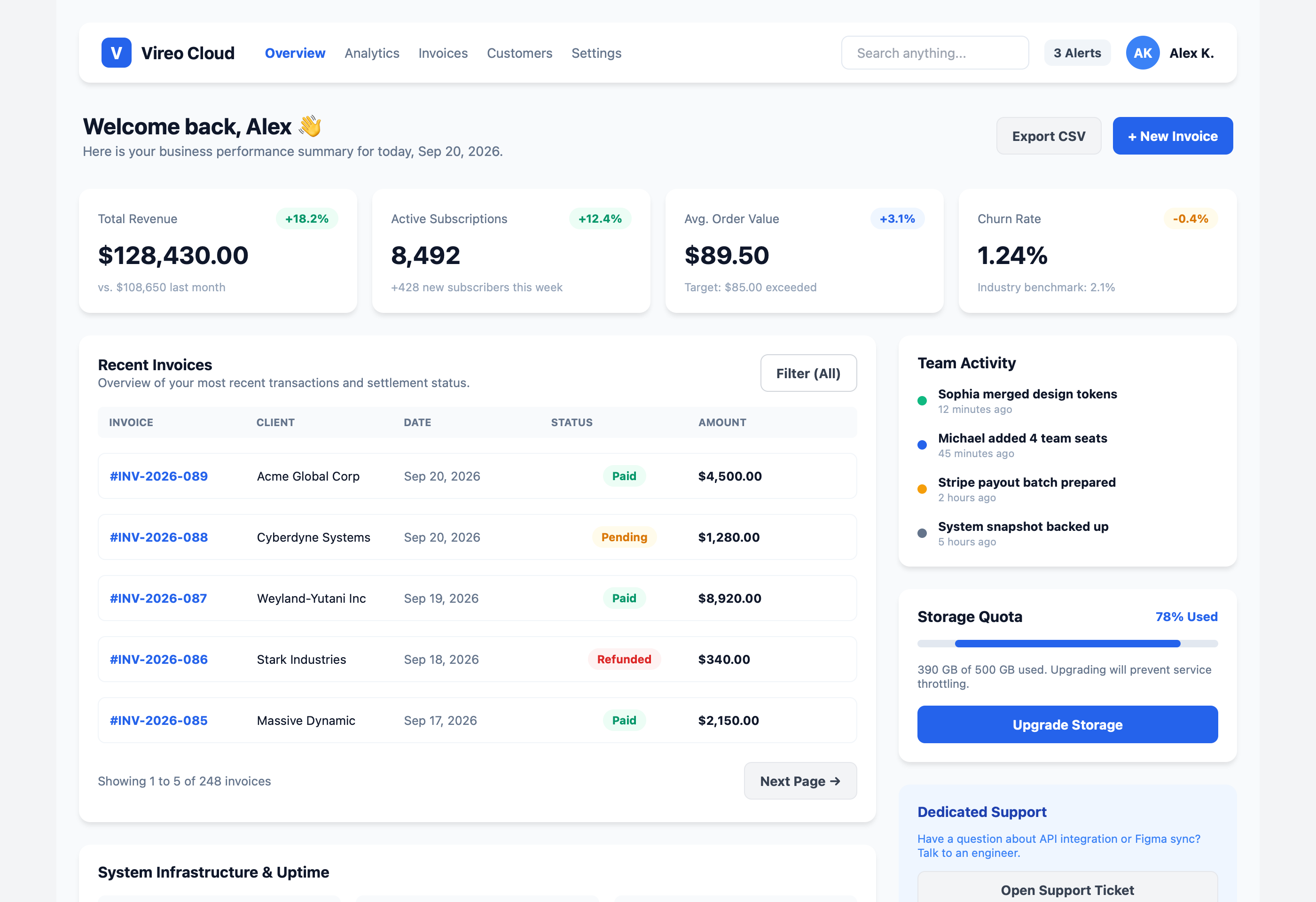
1. Large SaaS Analytics Dashboard (showcase/dashboard.dac)
Complete responsive analytics dashboard featuring navigation, hero greetings, key performance metrics, data tables with pagination, and interactive sidebars.
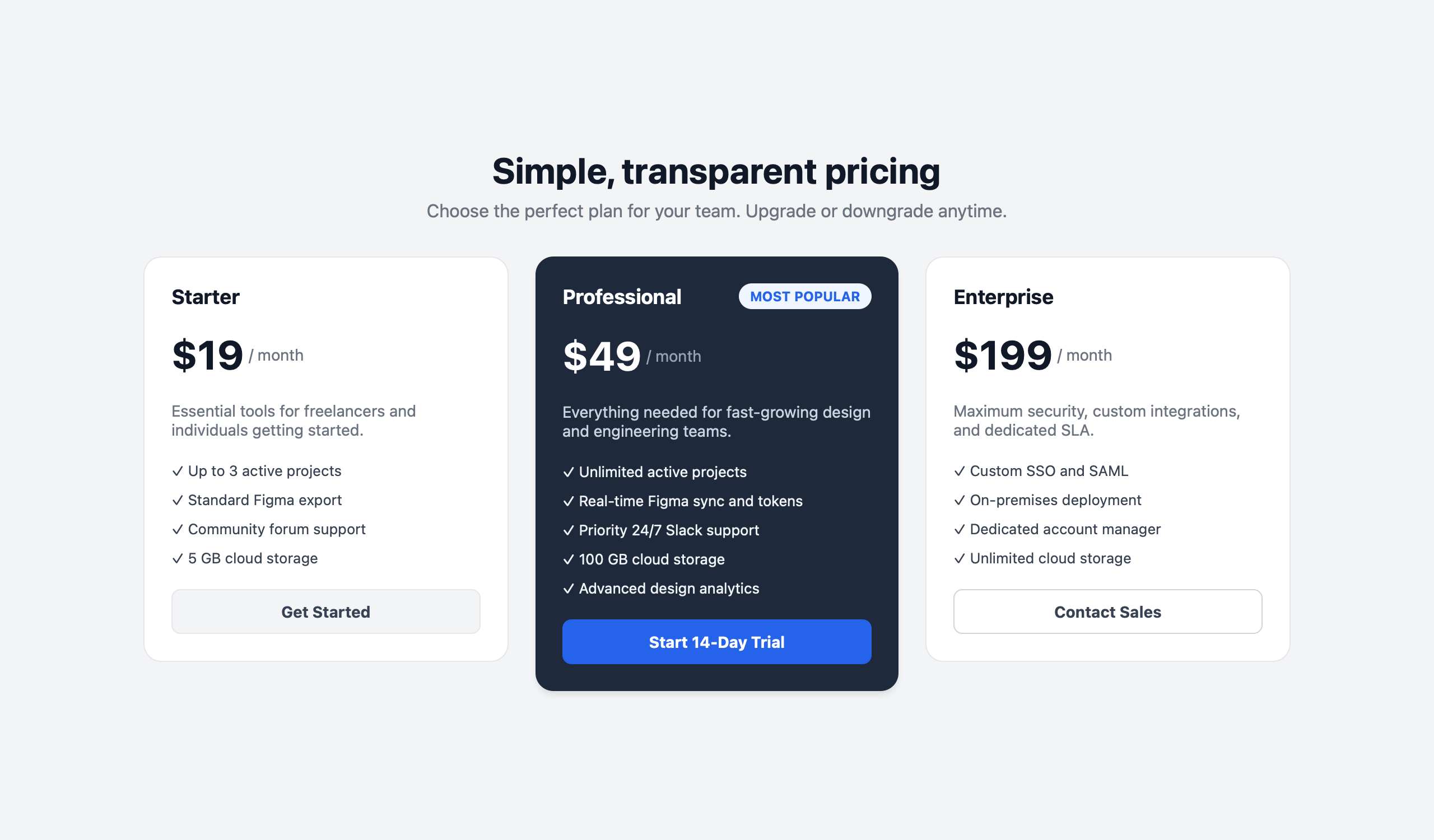
2. SaaS Pricing Table (showcase/pricing.dac)
Multi-tier comparative pricing table with highlight badges, feature lists, and action buttons.
3. Profile Card (showcase/card.dac)
User profile component demonstrating nested Auto Layout, avatar typography, followers metrics grid, and tag chips.

You can preview the pre-rendered HTML files directly in your browser:
open showcase/dashboard.html
# or
open showcase/pricing.html
# or
open showcase/card.html
Documentation
Full developer documentation, component catalogue, language syntax, and layout specifications are available online:
👉 https://dormiwww.github.io/Vireo/
Source markdown documentation files are maintained in the DOCS/ directory:
- Getting Started
- Core Concepts & Addressing
- Component Model & Properties
- Auto Layout & Constraints
- Renderers (HTML, JSON AST, Figma)
- CLI Reference Manual
- Figma Plugin Guide
Roadmap
- Phase 1: Core AST, Stateless Lexer & Recursive Descent Parser
- Phase 2: Cross-file Imports (
import ... from), Layout Constraints & HTML5/CSS Flexbox Renderer - Phase 3: Variables, Function Definitions, Arithmetic Expressions, and Conditionals (
if ... then ... else) - Phase 4: Figma Schema Renderer (
vireo-renderer-figma) - Phase 4.5: Native Figma Canvas Plugin (
figma-plugin/) with Auto Layout & Device Canvas Presets - Phase 5: Interactive Project Scaffolding & CLI Ergonomics (
vireo init,kubectl-style flags) - Homebrew Distribution:
brew install dormiwww/tap/vireo - Backlog: Figma Design Bundle & Canvas Orchestrator (
vireo bundle)
Contributing & Agent Rules
Project guidelines, syntax references, architecture decision records, and agent skills are organized under .agents/:
- Rules & Architecture:
.agents/rules/AGENTS.md - Roadmap & Context:
.agents/rules/ROADMAP.md,.agents/rules/CONTEXT.md - Agent Skills:
.agents/skills/ - Official AI Skill Repository:
DorMiwww/vireo-skill
License
Similar repos


Languages
JavaScript
43.3%
Kotlin
37.4%
Python
9.2%
HTML
9.0%
README
Vireo
Design as Code (DaaC). Write declarative design files (
.dac) and compile them into HTML, JSON IR, and native Figma Auto Layout components.
📖 Official Documentation & Live Guide: https://dormiwww.github.io/Vireo/ 🤖 Official AI Agent Skill: https://github.com/DorMiwww/vireo-skill
Vireo bridges the gap between codebases and design systems. Instead of manually drawing components in Figma and re-implementing them in code, you define your design system in a clean, declarative .dac syntax that compiles into:
- HTML — Standalone HTML5 previews with native CSS Flexbox styling.
- JSON IR — Structured intermediate representation for AST inspection and tooling integrations.
- Figma — Real frames, shapes, typography, and Auto Layout structures imported directly into your Figma canvas via the bundled Vireo Importer development plugin.
Example Syntax (.dac)
import buttons from "./components/buttons.dac"
import badges from "./components/badges.dac"

block Profile {
    component Card {
        width: 380
        color: #FFFFFF
        radius: 16
        shadow: true
        padding: 24
        layout: vertical
        gap: 16

        component Header {
            layout: horizontal
            gap: 16
            alignItems: center

            component Avatar {
                width: 56
                height: 56
                radius: 99
                color: #2563EB

                component Initials {
                    text: "JD"
                    fontSize: 20
                    fontWeight: bold
                    color: #FFFFFF
                }
            }

            component UserInfo {
                layout: vertical
                gap: 4

                component Name {
                    text: "Jane Doe"
                    fontSize: 18
                    fontWeight: bold
                    color: #111827
                }

                component Handle {
                    text: "@janedoe • Design Systems"
                    fontSize: 13
                    color: #6B7280
                }
            }
        }

        component Bio {
            text: "Design systems architect and UI engineer."
            fontSize: 14
            color: #4B5563
        }

        component ActionBtn {
            ref: buttons.Primary.Default
            label: "Connect"
        }
    }
}
Architecture & Modules
Vireo is built as a pure Kotlin (JVM) multi-module project with strict dependency isolation:
Vireo
├── vireo-core              # AST model, SourceLocation, Visitor pattern, VireoResult
├── vireo-lexer             # Stateless lexical scanner with token classification
├── vireo-parser            # Recursive descent parser producing unresolved AST
├── vireo-analysis          # Semantic analyzer, symbol table, cross-file imports, expression evaluator
├── vireo-renderer-json     # Structured JSON IR emitter
├── vireo-renderer-html     # Standalone HTML5 + CSS Flexbox generator
├── vireo-renderer-figma    # AST-to-Figma schema transformer
├── vireo-cli               # CLI interface (vireo init, vireo check, vireo render)
└── figma-plugin            # Native Figma development plugin (JS/HTML) for canvas import
Data compilation pipeline:
.dac source ──▶ [ Lexer ] ──▶ [ Parser ] ──▶ [ Analyzer ] ──▶ [ Renderer ] ──▶ HTML / JSON / Figma
Getting Started
Prerequisites
- JDK 17+ (JDK 21 recommended)
- Gradle (handled automatically via
./gradlew) - Node.js (optional, for the Figma plugin)
Build & Test
./gradlew test
Installing & Running the CLI
One-Line Installer (macOS & Linux)
curl -fsSL https://raw.githubusercontent.com/DorMiwww/Vireo/main/install.sh | bash
From Source / Repository
./gradlew installCli
# Or run the local repository wrapper directly:
./vireo --help
AI Agent Skill (Claude Code & Antigravity)
Vireo provides an official AI agent skill for Claude Code and Google Antigravity: DorMiwww/vireo-skill. It equips coding assistants to professionally author, refactor, and architect .dac design systems using live, dynamically fetched documentation.
Install globally with a single command:
curl -fsSL https://raw.githubusercontent.com/DorMiwww/vireo-skill/main/install.sh | bash
👉 Repository & documentation: https://github.com/DorMiwww/vireo-skill
CLI Usage
The Vireo CLI features a kubectl-style ergonomic interface with built-in help for each subcommand:
1. Initialize a New Project (vireo init)
Scaffold a complete ready-to-render design system in seconds:
# Initialize a new project in directory 'my-design'
vireo init my-design

# Or initialize in the current directory
vireo init .
This creates:
vireo.config.json— project configurationdesigns/tokens.dac— colors, spacing, and typography tokensdesigns/components/button.dac— reusable component definitionsdesigns/card.dac— full composition showcasing token and component importsREADME.md— project instructions
2. Syntax & Import Validation (vireo check)
Verify syntax, resolve cross-file imports, and catch semantic errors:
vireo check designs/card.dac
3. Compiling & Rendering (vireo render)
Render .dac designs into HTML previews, JSON AST representations, or Figma-ready schema files. By default, output files are created automatically based on input file names:
# Render to standalone HTML5 preview (automatically creates card.html)
vireo render designs/card.dac --html

# Render to Figma JSON for the Figma Canvas Plugin (automatically creates card.figma.json)
vireo render designs/card.dac --figma

# Stream output directly to terminal stdout (or pipe to other tools)
vireo render designs/card.dac --html --stdout
vireo render designs/card.dac -o -

# Render HTML snippet to custom file (without full HTML wrapper)
vireo render designs/card.dac --html --snippet --out card-snippet.html

# Render to structured JSON IR (AST representation)
vireo render designs/card.dac -o json
For a full list of options, run:
vireo render --help
Figma Integration
Vireo includes a private development plugin located in figma-plugin/:
- Open Figma Desktop.
- Navigate to Plugins → Development → Import plugin from manifest...
- Select
figma-plugin/manifest.json. - Run Vireo Importer on your canvas.
- Choose an optional device canvas preset (Desktop Browser, Laptop, iPhone 16, iPad, or None).
- Drag & drop or paste your generated
*.figma.jsonfile. - Click Import to Canvas — native Auto Layout frames, text layers, colors, and paddings are rendered directly onto your Figma canvas.
Showcase Designs & HTML Previews
Vireo compiles declarative .dac files directly into pixel-perfect standalone HTML5/CSS Flexbox previews. Below are previews of ready-to-test components available in the showcase/ directory:
1. Large SaaS Analytics Dashboard (showcase/dashboard.dac)
Complete responsive analytics dashboard featuring navigation, hero greetings, key performance metrics, data tables with pagination, and interactive sidebars.
2. SaaS Pricing Table (showcase/pricing.dac)
Multi-tier comparative pricing table with highlight badges, feature lists, and action buttons.
3. Profile Card (showcase/card.dac)
User profile component demonstrating nested Auto Layout, avatar typography, followers metrics grid, and tag chips.
You can preview the pre-rendered HTML files directly in your browser:
open showcase/dashboard.html
# or
open showcase/pricing.html
# or
open showcase/card.html
Documentation
Full developer documentation, component catalogue, language syntax, and layout specifications are available online:
👉 https://dormiwww.github.io/Vireo/
Source markdown documentation files are maintained in the DOCS/ directory:
- Getting Started
- Core Concepts & Addressing
- Component Model & Properties
- Auto Layout & Constraints
- Renderers (HTML, JSON AST, Figma)
- CLI Reference Manual
- Figma Plugin Guide
Roadmap
- Phase 1: Core AST, Stateless Lexer & Recursive Descent Parser
- Phase 2: Cross-file Imports (
import ... from), Layout Constraints & HTML5/CSS Flexbox Renderer - Phase 3: Variables, Function Definitions, Arithmetic Expressions, and Conditionals (
if ... then ... else) - Phase 4: Figma Schema Renderer (
vireo-renderer-figma) - Phase 4.5: Native Figma Canvas Plugin (
figma-plugin/) with Auto Layout & Device Canvas Presets - Phase 5: Interactive Project Scaffolding & CLI Ergonomics (
vireo init,kubectl-style flags) - Homebrew Distribution:
brew install dormiwww/tap/vireo - Backlog: Figma Design Bundle & Canvas Orchestrator (
vireo bundle)
Contributing & Agent Rules
Project guidelines, syntax references, architecture decision records, and agent skills are organized under .agents/:
- Rules & Architecture:
.agents/rules/AGENTS.md - Roadmap & Context:
.agents/rules/ROADMAP.md,.agents/rules/CONTEXT.md - Agent Skills:
.agents/skills/ - Official AI Skill Repository:
DorMiwww/vireo-skill
License
Similar repos
Languages
JavaScript
43.3%
Kotlin
37.4%
Python
9.2%
HTML
9.0%