
See what people are saying
README
DemoForge
Product demo videos from a script. Write the flow once as Playwright steps with a line of narration on each; DemoForge drives the app, records it, zooms in on every click, draws a smooth cursor, speaks the narration and exports an MP4. When the UI changes, run the same command again.
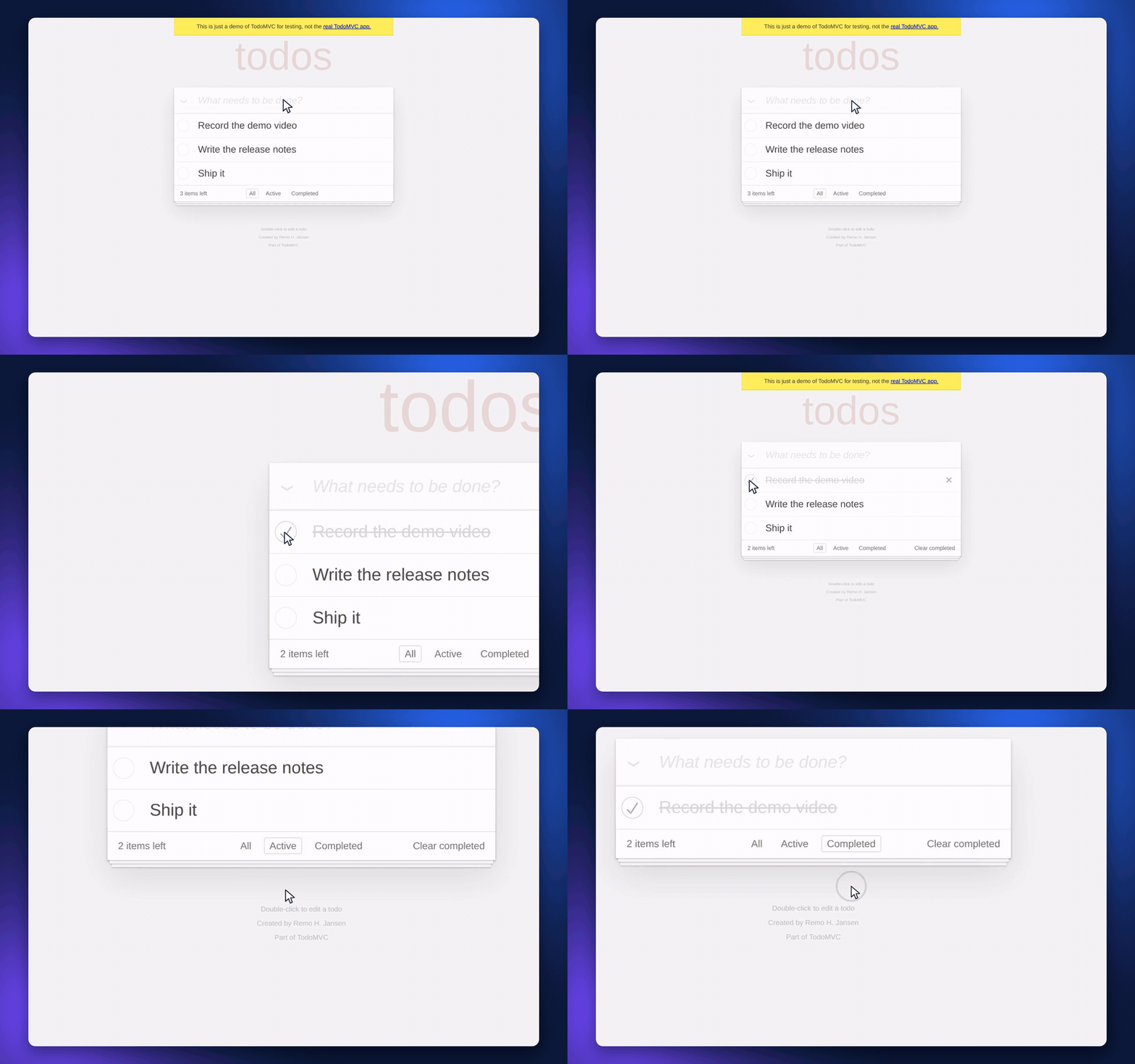
- Auto-zoom from the click log, not computer vision — the browser already knows where you clicked.
- Synthetic cursor with natural motion, since Playwright never moves a real one.
- Narration: local espeak-ng, or Gemini / ElevenLabs / Mistral with a key. The recorder holds each step until its line has been said.
- Editor in the browser: drag zooms, cut, captions, background, then export.
- A Chrome extension for recording by hand, feeding the same editor.
Quick start
Needs Node, pnpm and ffmpeg. espeak-ng (dnf install espeak-ng /
apt install espeak-ng) gives you a free local voice; no API key needed.
pnpm install
pnpm -C packages/core build
pnpm exec playwright-core install chromium

node scripts/demoforge.mjs record demos/todomvc/flow.json   # drive the app, record
node scripts/demoforge.mjs open   demos/todomvc             # review in the editor
node scripts/demoforge.mjs export demos/todomvc             # -> demos/todomvc/demo.mp4
demos/todomvc/flow.json records Playwright's public TodoMVC demo — copy it
and point url at your own app.
Layout
packages/core       @demoforge/core — types, zoom planner, evaluator, cursor path
apps/editor         Vite + React + Tailwind — player, timeline, compositor, export
apps/extension      MV3 Chrome extension — capture by hand + click log
scripts/            demoforge.mjs — the record / open / export CLI
pnpm -r test runs the tests. demoforge-docs/ has the product vision and
architecture notes.
Voices
Narration needs a voice provider; nothing else does, and the editor tells you which ones are available.
-
espeak-ng (local) — free, offline, robotic.
-
Gemini AI — copy
.env.exampleto.envand put a key inGEMINI_API_KEY. The same key writes the script. Sounds like a person..envat the repo root or inapps/editor/both work; the key is read by the dev server only and never reaches the browser.A free-tier key allows only a few requests a minute, so generating a long script pauses when the quota says to and picks up again — the button tells you how long it is waiting.
-
ElevenLabs —
ELEVENLABS_API_KEY, same two locations. The best voices. Metered per character: the free tier is 10,000 characters a month, personal use only, and asks you to credit ElevenLabs. The panel shows what is left and what the next generate will cost, and warns before a run that would run out partway. -
Mistral Voxtral —
MISTRAL_API_KEY, same two locations.
Recording by hand (extension)
- Record.
pnpm -C apps/extension build, loadapps/extension/distunpacked in Chrome, open anyhttp(s)page, click the DemoForge action → Start. It captures the tab withchrome.tabCaptureand logs every click, input, scroll and navigation against the recorder's own clock. - Stop. Two files land in
~/Downloads/demoforge/<timestamp>/:recording.webmanddemo.json(aDemoRecording). - Edit.
pnpm -C apps/editor devand drop both into the editor. Zooms are planned from the click log; drag the pills to move or resize them, add and delete, restyle the frame. - Export. Render to MP4. With the dev server running this uses native
ffmpeg (
apps/editor/vite-export.ts): the recording is decoded straight through, each frame drawn by the editor's owncompose()on a Skia canvas, and piped into x264 — an 86 s demo in about 2 minutes. Without a server it falls back to ffmpeg.wasm in the browser, several times slower.
Agent-recorded demos
Tell Claude Code "record a demo of /login" and it does the rest. The
demoforge skill (.claude/skills/demoforge/, symlink it into
~/.claude/skills/ to use it from any repo) has the agent read the page,
write demos/<name>/flow.json — Playwright actions with a say line of
narration on each — and run:
node scripts/demoforge.mjs record demos/<name>/flow.json   # video + demo.json + project with script
node scripts/demoforge.mjs steps  demos/<name>             # frames the agent checks
node scripts/demoforge.mjs open   demos/<name>             # editor at ?demo=<name>
The recorder paces itself to the narration: each line starts a beat before
its action and the step holds until the line has been said. setup steps
(signing in) run off camera. Capture is 2× device pixels, encoded as VP9 from the
screencast's own frames — Playwright's built-in recorder is capped at 1 Mbps. ${NAME} in a flow is read from the environment
or .env, so credentials stay out of the file. The flow is the only file in a
take that is committed — re-recording after a UI change is the same command.
Editor
An icon rail on the right opens six panels:
| Panel | What it does |
|---|---|
| Script & voice | Narration lines on the timeline, drafted from the click log or written by hand, spoken by a local TTS |
| Background | Image / Colour / Gradient tabs — 18 generated wallpapers, custom upload, gradient presets with editable stops and angle |
| Zoom | Auto-zoom toggle, per-zoom or global scale, re-plan from the click log |
| Captions | Add at the playhead, draft a set from the click log, edit text, position / size / colour |
| Effects | Padding, corner radius, shadow blur / offset / strength |
| Layout | Output aspect — Original, 16:9, 9:16, 1:1, 4:3, 4:5 |
| Cursor | Show, click pulse, size, smoothing |
Aiming a zoom. Select a pill and the preview drops back to the unzoomed frame with a rectangle showing exactly what that zoom will crop. Click or drag anywhere on the frame to move it, and a floating inspector gives you the zoom level, focus mode, reset and delete.
A zoom's focus is auto by default: it points at the nearest click, and re-aims itself if you drag the pill somewhere else on the timeline. Placing a point by hand switches it to manual, and nothing moves it again until you reset it.
Captions are drawn over the frame but outside the zoom transform — a caption belongs to the viewer, not to the picture, so it does not slide or grow when the camera moves. From clicks drafts one cue per click out of the element text the extension already recorded; that is string formatting, not AI.
Cutting. Press T to drop a cut at the playhead, then drag its edges;
I and O cut everything before or after the playhead. Cut spans are shaded
across every lane, playback jumps over them, and they are gone from the export
— video and audio both.
Cuts are the one place timeline time and source time come apart. The edit list
in packages/core/src/edits.ts owns that conversion, and the rule that keeps
it cheap is that everything else stays in source time: zoom keyframes,
captions, the cursor path and the event log are never remapped. The exporter
walks edited time, maps each frame back through editedToSource(), and
composites at a source timestamp exactly as the preview does.
The timeline has a scrubbable ruler with amber marks at every logged click, a cut lane, a zoom lane, a caption lane, and a clip lane. Ctrl+Scroll zooms the view about the pointer, Shift+Scroll pans, and the window follows the playhead.
| Key | |
|---|---|
Space | play / pause |
Z | add a zoom at the playhead |
C | add a caption at the playhead |
N | add a narration line at the playhead |
S | save the project |
T | cut a section out at the playhead |
I O | cut everything before / after the playhead |
Delete | remove the selection |
Esc | deselect |
← → | step one frame (hold Shift for a second) |
Home End | jump to start / end |
Wallpapers are generated, not shipped — a base colour plus soft radial blobs, painted by one function used for both the picker swatch and the full frame, so the swatch cannot lie and there are no binary assets in the repo.
Narration
A script is a list of lines, each anchored to a source timestamp on the same clock as everything else. There are two ways to get one.
Write the script with AI is the good one. The editor breaks the demo into steps — an opening, then one per click — grabs a frame of the screen at each, rings the spot that was clicked, and sends the lot to a model along with how many seconds it has to talk at each step. It writes to that budget, naming what is actually on screen. Give it a sentence about what the demo is for and it gets markedly better; that brief is saved with the project.
Two things the model is deliberately not trusted with:
- Timestamps. It says which step a line belongs to; the editor decides when that lands. Asked for milliseconds, a model returns plausible ones, and plausible is not synchronised.
- Length. Each step carries a word budget from its own window. An over-long line is trimmed back to a sentence boundary, never mid-sentence — a line that runs a little long still reads, a truncated one does not.
Frames of your recording go to Google when you press it. Nothing else in the editor sends anything anywhere.
From clicks is the offline fallback: one line per step from the element text already in the log, string templates, no network. Rough, but instant.
Generate voiceover then speaks every line that has changed, measures how long it actually took, and lays the results onto one track.
The mixdown plays in the preview (the captured tab audio stays muted there) and is muxed into the export with the recording ducked underneath the voice.
A few things follow from how it is wired:
- Audio is saved beside the project, not inside it. Save project
writes
<name>.dfp.jsonand, when there is a voiceover,<name>.narration.wav. Drop both back in with the video and the narration plays immediately — nothing is respoken, which matters when the voice is metered. The JSON stays a few readable kilobytes rather than megabytes of base64, and the.wavis an ordinary file you can listen to or edit elsewhere. - A reloaded mixdown is sliced back into lines. Each line knows its anchor
and how long it ran, so the track is cut up and put back in the speech
cache. Change one line of a reloaded project and only that line is spoken
again. Drop the
.wavand everything still works — it just costs a full regenerate. - The mixdown is in source time, so cuts splice it through the exact same filter as the tab audio. Nothing in the narration path knows what a cut is.
- Level is applied once, at the end. The mixdown is at unity; the preview sets it on the audio element and the export sets it with a filter, so the two agree and moving the slider never forces a re-mix.
- A line's length is its speech, not something you drag. Until it has been
spoken the timeline uses a word-count estimate, marked
est.. If lines start talking over each other the panel says so and offers to space them out. - Providers live behind one endpoint.
GET /api/ttssays who can speak and with which voices;POST /api/ttsreturns WAV (apps/editor/vite-tts.ts). The panel renders whatever the server reports, so adding a provider is a server-side change. The mixdown, the timeline and the exporter never learn who spoke. - Different providers take different dials. espeak-ng takes words per minute; Gemini takes a director's note — free text describing tone, pace and accent, handed to the model alongside the line; ElevenLabs takes neither and puts everything in the choice of voice. The panel shows only the dials the chosen provider actually uses, and switching provider or note re-speaks the affected lines.
- Voice lists come from the provider. ElevenLabs' are fetched live against your key, so your own cloned voices appear and no hardcoded id can go stale. Its availability means the key works, not just that one is set.
- Both hosted providers return raw PCM at 24 kHz — Gemini describes it in
a mime type, ElevenLabs is asked for
pcm_24000— so the WAV header is written server-side before the audio ever reaches the browser. (44.1 kHz from ElevenLabs needs a Pro subscription; 24 kHz does not.) - "Available" means a key is configured, not that it works — a bad key surfaces as the provider's own error the first time you generate.
Saving: the project file
Save project (or S) writes <name>.dfp.json — the recording plus every
edit (zooms, captions, cuts, the narration script and the style) as plain
readable JSON — and <name>.narration.wav alongside it when there is a
voiceover. Drop the JSON, the video, and the .wav back in to carry on
exactly where you were. A raw demo.json still opens too; it just gets
freshly planned zooms.
The schema lives in packages/core/src/project.ts, not in the editor, because
the point is that the editor is not the only thing that can write one. A
script, a CI job, or Claude Code can open a project, change the zooms or
captions, write it back, and the editor will render exactly that.
{
  "format": "demoforge-project",
  "version": 1,
  "mediaName": "recording.webm",       // referenced, not embedded
  "narrationName": "recording.narration.wav",   // ditto; "" when there is none
  "brief": "AirSense is an air-quality dashboard for facilities teams.",
  "recording": { /* the DemoRecording from capture */ },
  "zooms": [
    { "tStart": 1500, "tEnd": 3700, "targetXNorm": 0.42, "targetYNorm": 0.31,
      "scale": 1.8, "easing": "easeInOutCubic", "focus": "auto" }
  ],
  "captions": [
    { "tStart": 2000, "tEnd": 4200, "text": "Click \"Add Widget\"" }
  ],
  "script": [                          // narration; text only, audio is regenerated
    { "tStart": 800, "text": "Start by clicking Add Widget.", "audioMs": 2100 }
  ],
  "style": { "background": { "kind": "wallpaper", "id": "cobalt" }, "aspect": null,
             "padding": 0.05, "radius": 0.02, "shadow": { "blur": 0.05, "y": 0.018, "alpha": 0.5 },
             "cursor": { "show": true, "size": 0.045, "smoothing": 0.4, "clicks": true },
             "captions": { "size": 0.045, "position": "bottom", "color": "#ffffff",
                           "background": "rgba(2,6,23,0.72)" },
             "voice": { "provider": "local", "voice": "en-us+f3", "rate": 170,
                        "direction": "", "gain": 1, "duck": 0.25 } }
}
Notes for anything editing one by hand:
zoomsandcaptionsare time-ordered, so "the third zoom" is stable. Neither list may overlap itself.- All coordinates are 0..1, all style lengths are fractions of the output's shorter side. No pixels anywhere.
focus: "auto"means the zoom is aimed at the nearest click and will re-aim if moved;"manual"pins it.parseProject()is a trust boundary: it sorts and de-overlaps the lists, clamps every number into range, drops zero-length spans, and falls back to defaults rather than lettingNaNreach the renderer. It throws only on a missing recording or a format version it does not understand — so a roughly-right file loads rather than failing.cutsare spans of source video the demo skips, in source time. They are sorted, clamped, merged when they overlap, and dropped when shorter than 100 ms. A legacytrim: {startMs, endMs}(a span to keep) is migrated into the equivalent head and tail cuts.scriptlines carryaudioMsonly as a cached measurement. Changetextand drop it — a stale length lays the timeline out for audio that no longer exists. Lines may overlap; that is reported, not prevented.style.voice.duckis what the captured recording drops to while the voice is talking,gainis the voice's own level.briefis what the demo is about, in your words. It is context for whoever writes the narration — the AI writer reads it — and it is worth keeping so the next rewrite starts from the same understanding.narrationNamenames the rendered voiceover sitting next to the project. The editor takes any dropped.wavas the narration, so the name is a hint rather than a requirement — files get renamed.style.voice.provideris"local","gemini"or"elevenlabs";voiceis thatvoiceis that provider's own id (en-us+f3,Iapetus, or an ElevenLabs voice id).rateis used by the local provider,directionby Gemini — both are always stored, so switching provider and back keeps your settings.- Omitting
zooms,captions,cuts,scriptorstyleentirely is fine; they default.
The architecture contract
Everything flows through one type, DemoRecording, defined once in
packages/core. The rules that make Phase 1's editor reusable unchanged in
Phase 2 (AI voiceover) and Phase 3 (Playwright re-record):
- Nothing downstream reads
source. Not the planner, editor, compositor or exporter. That branch is the seam that would break Phase 3. - Stored coordinates are normalised 0..1. Pixels appear at exactly one
place,
render/geometry.ts, against the video's real decoded size. - One clock.
t0is stamped atMediaRecorder.start(); everyDemoEvent.tis ms since it. The editor reconciles against the decoded duration on import and warns on drift over 100 ms. - The editor draws its own cursor from the click log and never depends on a captured OS cursor — which is what makes Phase 3 work for free.
- Audio is a separate track, muxed at export, never an input to zoom logic.
Verifying it
./scripts/make-fixture.sh          # markers at exactly known coordinates
pnpm -C apps/editor dev            # drop fixture/demo.json + recording.webm
Every zoom must land dead centre on its marker; the double-click at 5.0/5.12 s
must produce one zoom, and the giant panel at 13 s none. pnpm -r test asserts
all of that headlessly.
For recording-side timing, see apps/extension/README.md.
Known ceilings
- Velocity continuity at zoom seams. Chained zooms are position-continuous, but the ease curve's velocity still steps at a ramp boundary, which can read as a small jerk. A spring chasing the eased target is the fix if it shows.
- Native export is one process, one frame at a time (~1.5x real time at 2880x1800). Splitting the timeline across worker threads is the next step if that matters. The ffmpeg.wasm fallback still holds every frame in memory.
- Pill handles stay inside the pill, so a very short zoom is fiddly to grab.
- Voice providers are dev-server only, so a statically built editor has
none. Fine while this is a tool you run with
pnpm dev; the fix is the same backend the Phase 2 TODO already calls for. - Ducking is a constant, not a sidechain compressor — right when the tab audio is ambience, wrong if it ever carries something worth hearing.
Similar repos


See what people are saying
README
DemoForge
Product demo videos from a script. Write the flow once as Playwright steps with a line of narration on each; DemoForge drives the app, records it, zooms in on every click, draws a smooth cursor, speaks the narration and exports an MP4. When the UI changes, run the same command again.
- Auto-zoom from the click log, not computer vision — the browser already knows where you clicked.
- Synthetic cursor with natural motion, since Playwright never moves a real one.
- Narration: local espeak-ng, or Gemini / ElevenLabs / Mistral with a key. The recorder holds each step until its line has been said.
- Editor in the browser: drag zooms, cut, captions, background, then export.
- A Chrome extension for recording by hand, feeding the same editor.
Quick start
Needs Node, pnpm and ffmpeg. espeak-ng (dnf install espeak-ng /
apt install espeak-ng) gives you a free local voice; no API key needed.
pnpm install
pnpm -C packages/core build
pnpm exec playwright-core install chromium

node scripts/demoforge.mjs record demos/todomvc/flow.json   # drive the app, record
node scripts/demoforge.mjs open   demos/todomvc             # review in the editor
node scripts/demoforge.mjs export demos/todomvc             # -> demos/todomvc/demo.mp4
demos/todomvc/flow.json records Playwright's public TodoMVC demo — copy it
and point url at your own app.
Layout
packages/core       @demoforge/core — types, zoom planner, evaluator, cursor path
apps/editor         Vite + React + Tailwind — player, timeline, compositor, export
apps/extension      MV3 Chrome extension — capture by hand + click log
scripts/            demoforge.mjs — the record / open / export CLI
pnpm -r test runs the tests. demoforge-docs/ has the product vision and
architecture notes.
Voices
Narration needs a voice provider; nothing else does, and the editor tells you which ones are available.
-
espeak-ng (local) — free, offline, robotic.
-
Gemini AI — copy
.env.exampleto.envand put a key inGEMINI_API_KEY. The same key writes the script. Sounds like a person..envat the repo root or inapps/editor/both work; the key is read by the dev server only and never reaches the browser.A free-tier key allows only a few requests a minute, so generating a long script pauses when the quota says to and picks up again — the button tells you how long it is waiting.
-
ElevenLabs —
ELEVENLABS_API_KEY, same two locations. The best voices. Metered per character: the free tier is 10,000 characters a month, personal use only, and asks you to credit ElevenLabs. The panel shows what is left and what the next generate will cost, and warns before a run that would run out partway. -
Mistral Voxtral —
MISTRAL_API_KEY, same two locations.
Recording by hand (extension)
- Record.
pnpm -C apps/extension build, loadapps/extension/distunpacked in Chrome, open anyhttp(s)page, click the DemoForge action → Start. It captures the tab withchrome.tabCaptureand logs every click, input, scroll and navigation against the recorder's own clock. - Stop. Two files land in
~/Downloads/demoforge/<timestamp>/:recording.webmanddemo.json(aDemoRecording). - Edit.
pnpm -C apps/editor devand drop both into the editor. Zooms are planned from the click log; drag the pills to move or resize them, add and delete, restyle the frame. - Export. Render to MP4. With the dev server running this uses native
ffmpeg (
apps/editor/vite-export.ts): the recording is decoded straight through, each frame drawn by the editor's owncompose()on a Skia canvas, and piped into x264 — an 86 s demo in about 2 minutes. Without a server it falls back to ffmpeg.wasm in the browser, several times slower.
Agent-recorded demos
Tell Claude Code "record a demo of /login" and it does the rest. The
demoforge skill (.claude/skills/demoforge/, symlink it into
~/.claude/skills/ to use it from any repo) has the agent read the page,
write demos/<name>/flow.json — Playwright actions with a say line of
narration on each — and run:
node scripts/demoforge.mjs record demos/<name>/flow.json   # video + demo.json + project with script
node scripts/demoforge.mjs steps  demos/<name>             # frames the agent checks
node scripts/demoforge.mjs open   demos/<name>             # editor at ?demo=<name>
The recorder paces itself to the narration: each line starts a beat before
its action and the step holds until the line has been said. setup steps
(signing in) run off camera. Capture is 2× device pixels, encoded as VP9 from the
screencast's own frames — Playwright's built-in recorder is capped at 1 Mbps. ${NAME} in a flow is read from the environment
or .env, so credentials stay out of the file. The flow is the only file in a
take that is committed — re-recording after a UI change is the same command.
Editor
An icon rail on the right opens six panels:
| Panel | What it does |
|---|---|
| Script & voice | Narration lines on the timeline, drafted from the click log or written by hand, spoken by a local TTS |
| Background | Image / Colour / Gradient tabs — 18 generated wallpapers, custom upload, gradient presets with editable stops and angle |
| Zoom | Auto-zoom toggle, per-zoom or global scale, re-plan from the click log |
| Captions | Add at the playhead, draft a set from the click log, edit text, position / size / colour |
| Effects | Padding, corner radius, shadow blur / offset / strength |
| Layout | Output aspect — Original, 16:9, 9:16, 1:1, 4:3, 4:5 |
| Cursor | Show, click pulse, size, smoothing |
Aiming a zoom. Select a pill and the preview drops back to the unzoomed frame with a rectangle showing exactly what that zoom will crop. Click or drag anywhere on the frame to move it, and a floating inspector gives you the zoom level, focus mode, reset and delete.
A zoom's focus is auto by default: it points at the nearest click, and re-aims itself if you drag the pill somewhere else on the timeline. Placing a point by hand switches it to manual, and nothing moves it again until you reset it.
Captions are drawn over the frame but outside the zoom transform — a caption belongs to the viewer, not to the picture, so it does not slide or grow when the camera moves. From clicks drafts one cue per click out of the element text the extension already recorded; that is string formatting, not AI.
Cutting. Press T to drop a cut at the playhead, then drag its edges;
I and O cut everything before or after the playhead. Cut spans are shaded
across every lane, playback jumps over them, and they are gone from the export
— video and audio both.
Cuts are the one place timeline time and source time come apart. The edit list
in packages/core/src/edits.ts owns that conversion, and the rule that keeps
it cheap is that everything else stays in source time: zoom keyframes,
captions, the cursor path and the event log are never remapped. The exporter
walks edited time, maps each frame back through editedToSource(), and
composites at a source timestamp exactly as the preview does.
The timeline has a scrubbable ruler with amber marks at every logged click, a cut lane, a zoom lane, a caption lane, and a clip lane. Ctrl+Scroll zooms the view about the pointer, Shift+Scroll pans, and the window follows the playhead.
| Key | |
|---|---|
Space | play / pause |
Z | add a zoom at the playhead |
C | add a caption at the playhead |
N | add a narration line at the playhead |
S | save the project |
T | cut a section out at the playhead |
I O | cut everything before / after the playhead |
Delete | remove the selection |
Esc | deselect |
← → | step one frame (hold Shift for a second) |
Home End | jump to start / end |
Wallpapers are generated, not shipped — a base colour plus soft radial blobs, painted by one function used for both the picker swatch and the full frame, so the swatch cannot lie and there are no binary assets in the repo.
Narration
A script is a list of lines, each anchored to a source timestamp on the same clock as everything else. There are two ways to get one.
Write the script with AI is the good one. The editor breaks the demo into steps — an opening, then one per click — grabs a frame of the screen at each, rings the spot that was clicked, and sends the lot to a model along with how many seconds it has to talk at each step. It writes to that budget, naming what is actually on screen. Give it a sentence about what the demo is for and it gets markedly better; that brief is saved with the project.
Two things the model is deliberately not trusted with:
- Timestamps. It says which step a line belongs to; the editor decides when that lands. Asked for milliseconds, a model returns plausible ones, and plausible is not synchronised.
- Length. Each step carries a word budget from its own window. An over-long line is trimmed back to a sentence boundary, never mid-sentence — a line that runs a little long still reads, a truncated one does not.
Frames of your recording go to Google when you press it. Nothing else in the editor sends anything anywhere.
From clicks is the offline fallback: one line per step from the element text already in the log, string templates, no network. Rough, but instant.
Generate voiceover then speaks every line that has changed, measures how long it actually took, and lays the results onto one track.
The mixdown plays in the preview (the captured tab audio stays muted there) and is muxed into the export with the recording ducked underneath the voice.
A few things follow from how it is wired:
- Audio is saved beside the project, not inside it. Save project
writes
<name>.dfp.jsonand, when there is a voiceover,<name>.narration.wav. Drop both back in with the video and the narration plays immediately — nothing is respoken, which matters when the voice is metered. The JSON stays a few readable kilobytes rather than megabytes of base64, and the.wavis an ordinary file you can listen to or edit elsewhere. - A reloaded mixdown is sliced back into lines. Each line knows its anchor
and how long it ran, so the track is cut up and put back in the speech
cache. Change one line of a reloaded project and only that line is spoken
again. Drop the
.wavand everything still works — it just costs a full regenerate. - The mixdown is in source time, so cuts splice it through the exact same filter as the tab audio. Nothing in the narration path knows what a cut is.
- Level is applied once, at the end. The mixdown is at unity; the preview sets it on the audio element and the export sets it with a filter, so the two agree and moving the slider never forces a re-mix.
- A line's length is its speech, not something you drag. Until it has been
spoken the timeline uses a word-count estimate, marked
est.. If lines start talking over each other the panel says so and offers to space them out. - Providers live behind one endpoint.
GET /api/ttssays who can speak and with which voices;POST /api/ttsreturns WAV (apps/editor/vite-tts.ts). The panel renders whatever the server reports, so adding a provider is a server-side change. The mixdown, the timeline and the exporter never learn who spoke. - Different providers take different dials. espeak-ng takes words per minute; Gemini takes a director's note — free text describing tone, pace and accent, handed to the model alongside the line; ElevenLabs takes neither and puts everything in the choice of voice. The panel shows only the dials the chosen provider actually uses, and switching provider or note re-speaks the affected lines.
- Voice lists come from the provider. ElevenLabs' are fetched live against your key, so your own cloned voices appear and no hardcoded id can go stale. Its availability means the key works, not just that one is set.
- Both hosted providers return raw PCM at 24 kHz — Gemini describes it in
a mime type, ElevenLabs is asked for
pcm_24000— so the WAV header is written server-side before the audio ever reaches the browser. (44.1 kHz from ElevenLabs needs a Pro subscription; 24 kHz does not.) - "Available" means a key is configured, not that it works — a bad key surfaces as the provider's own error the first time you generate.
Saving: the project file
Save project (or S) writes <name>.dfp.json — the recording plus every
edit (zooms, captions, cuts, the narration script and the style) as plain
readable JSON — and <name>.narration.wav alongside it when there is a
voiceover. Drop the JSON, the video, and the .wav back in to carry on
exactly where you were. A raw demo.json still opens too; it just gets
freshly planned zooms.
The schema lives in packages/core/src/project.ts, not in the editor, because
the point is that the editor is not the only thing that can write one. A
script, a CI job, or Claude Code can open a project, change the zooms or
captions, write it back, and the editor will render exactly that.
{
  "format": "demoforge-project",
  "version": 1,
  "mediaName": "recording.webm",       // referenced, not embedded
  "narrationName": "recording.narration.wav",   // ditto; "" when there is none
  "brief": "AirSense is an air-quality dashboard for facilities teams.",
  "recording": { /* the DemoRecording from capture */ },
  "zooms": [
    { "tStart": 1500, "tEnd": 3700, "targetXNorm": 0.42, "targetYNorm": 0.31,
      "scale": 1.8, "easing": "easeInOutCubic", "focus": "auto" }
  ],
  "captions": [
    { "tStart": 2000, "tEnd": 4200, "text": "Click \"Add Widget\"" }
  ],
  "script": [                          // narration; text only, audio is regenerated
    { "tStart": 800, "text": "Start by clicking Add Widget.", "audioMs": 2100 }
  ],
  "style": { "background": { "kind": "wallpaper", "id": "cobalt" }, "aspect": null,
             "padding": 0.05, "radius": 0.02, "shadow": { "blur": 0.05, "y": 0.018, "alpha": 0.5 },
             "cursor": { "show": true, "size": 0.045, "smoothing": 0.4, "clicks": true },
             "captions": { "size": 0.045, "position": "bottom", "color": "#ffffff",
                           "background": "rgba(2,6,23,0.72)" },
             "voice": { "provider": "local", "voice": "en-us+f3", "rate": 170,
                        "direction": "", "gain": 1, "duck": 0.25 } }
}
Notes for anything editing one by hand:
zoomsandcaptionsare time-ordered, so "the third zoom" is stable. Neither list may overlap itself.- All coordinates are 0..1, all style lengths are fractions of the output's shorter side. No pixels anywhere.
focus: "auto"means the zoom is aimed at the nearest click and will re-aim if moved;"manual"pins it.parseProject()is a trust boundary: it sorts and de-overlaps the lists, clamps every number into range, drops zero-length spans, and falls back to defaults rather than lettingNaNreach the renderer. It throws only on a missing recording or a format version it does not understand — so a roughly-right file loads rather than failing.cutsare spans of source video the demo skips, in source time. They are sorted, clamped, merged when they overlap, and dropped when shorter than 100 ms. A legacytrim: {startMs, endMs}(a span to keep) is migrated into the equivalent head and tail cuts.scriptlines carryaudioMsonly as a cached measurement. Changetextand drop it — a stale length lays the timeline out for audio that no longer exists. Lines may overlap; that is reported, not prevented.style.voice.duckis what the captured recording drops to while the voice is talking,gainis the voice's own level.briefis what the demo is about, in your words. It is context for whoever writes the narration — the AI writer reads it — and it is worth keeping so the next rewrite starts from the same understanding.narrationNamenames the rendered voiceover sitting next to the project. The editor takes any dropped.wavas the narration, so the name is a hint rather than a requirement — files get renamed.style.voice.provideris"local","gemini"or"elevenlabs";voiceis thatvoiceis that provider's own id (en-us+f3,Iapetus, or an ElevenLabs voice id).rateis used by the local provider,directionby Gemini — both are always stored, so switching provider and back keeps your settings.- Omitting
zooms,captions,cuts,scriptorstyleentirely is fine; they default.
The architecture contract
Everything flows through one type, DemoRecording, defined once in
packages/core. The rules that make Phase 1's editor reusable unchanged in
Phase 2 (AI voiceover) and Phase 3 (Playwright re-record):
- Nothing downstream reads
source. Not the planner, editor, compositor or exporter. That branch is the seam that would break Phase 3. - Stored coordinates are normalised 0..1. Pixels appear at exactly one
place,
render/geometry.ts, against the video's real decoded size. - One clock.
t0is stamped atMediaRecorder.start(); everyDemoEvent.tis ms since it. The editor reconciles against the decoded duration on import and warns on drift over 100 ms. - The editor draws its own cursor from the click log and never depends on a captured OS cursor — which is what makes Phase 3 work for free.
- Audio is a separate track, muxed at export, never an input to zoom logic.
Verifying it
./scripts/make-fixture.sh          # markers at exactly known coordinates
pnpm -C apps/editor dev            # drop fixture/demo.json + recording.webm
Every zoom must land dead centre on its marker; the double-click at 5.0/5.12 s
must produce one zoom, and the giant panel at 13 s none. pnpm -r test asserts
all of that headlessly.
For recording-side timing, see apps/extension/README.md.
Known ceilings
- Velocity continuity at zoom seams. Chained zooms are position-continuous, but the ease curve's velocity still steps at a ramp boundary, which can read as a small jerk. A spring chasing the eased target is the fix if it shows.
- Native export is one process, one frame at a time (~1.5x real time at 2880x1800). Splitting the timeline across worker threads is the next step if that matters. The ffmpeg.wasm fallback still holds every frame in memory.
- Pill handles stay inside the pill, so a very short zoom is fiddly to grab.
- Voice providers are dev-server only, so a statically built editor has
none. Fine while this is a tool you run with
pnpm dev; the fix is the same backend the Phase 2 TODO already calls for. - Ducking is a constant, not a sidechain compressor — right when the tab audio is ambience, wrong if it ever carries something worth hearing.