
A heavily vibecoded GTK4 GUI interface to manage systemd-nspawn containers
Rust
0
5 commits
updated Oct 5, 2026
See what people are saying
README
Nspawn Studio
A small, focused GTK4 / libadwaita desktop application written in Rust for creating, configuring and running systemd-nspawn containers on Linux.
Nspawn Studio is a front end for the tools you already trust: debootstrap
creates the root filesystem, systemd-nspawn boots it, systemd-run and
machinectl keep it running, and journalctl shows you what happened. The
application never re-implements the container runtime; it generates a plain,
readable bash launcher and drives it.
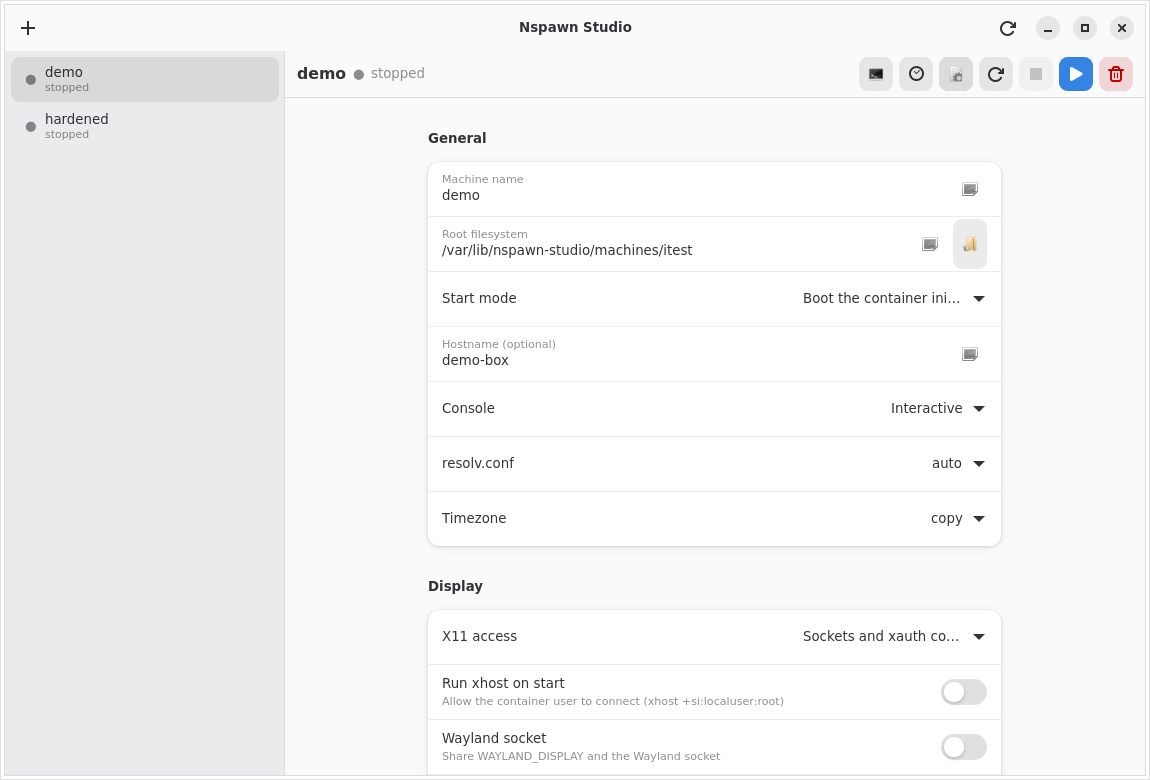
Managing a container: machine name, root filesystem, boot mode, hostname,
console, resolv.conf/timezone handling and the display/audio integration.
Features
- Create containers two ways
debootstrapa fresh Debian root filesystem (suite, mirror, architecture, variant and package list are all editable).- Import an existing chroot directory.
- Generated launcher script for every container at
/var/lib/nspawn-studio/scripts/<name>.sh. It is a normal bash script you can read, run by hand withsudo, or audit. Every option you pick in the GUI ends up as an explicitsystemd-nspawnflag. - Lifecycle management: the play button opens the container in a terminal window (a booted container gives you its normal login prompt); the second button starts it in the background as a transient systemd unit. Stop works for both. The sidebar shows the live running/stopped state, including containers started from a terminal.
- User and password provisioning: set a root password and create any number
of users, each with an optional sudo grant. The accounts are written into the
container's root filesystem with
chpasswd/useradd(run through systemd-nspawn), so the login prompt accepts them immediately. Applying is refused while the container is running. - Display integration
- X11: none, sockets only, or sockets +
XAUTHORITYcookie (recommended; works out of the box). DISPLAYandXAUTHORITYare exported through the container's/etc/profile.d, so programs started afterlogin:see them (a bind mount, so this also works with a read-only root).- Xephyr: a private nested X server. The container gets its own display and the host only shows the Xephyr window. The screen size is configurable per container, and Xephyr is shut down again when the container stops.
- Optional
xhost +si:localuser:rooton start. - Wayland socket sharing.
/dev/driGPU passthrough.
- X11: none, sockets only, or sockets +
- Audio integration: PipeWire, PulseAudio and ALSA (any combination).
- Bind mounts: expose any host folder inside the container, read-only or read-write, with one-click presets for the whole host filesystem (read-only) and your home directory.
- Networking: host networking,
--private-network, or--network-vethwith a bridge, plus--port=forwards. - Security and sandboxing: capabilities and system call groups are picked
from checkbox menus with a short description for each option instead of
comma separated text boxes; user namespaces (
-U) with ownership modes, read-only root, ephemeral mode, seccomp via--system-call-filter=,no-new-privileges, capability dropping/adding,--inaccessible=masking,--tmpfs=and raw extra arguments. A one-click recommended hardening profile (based on thesystemd-nspawn(1)example) is included. - Optional systemd unit generation for each container.
Requirements
- Linux with systemd (nspawn, machinectl, systemd-run are part of systemd).
- Debian/Ubuntu-style host for the runtime tools:
systemd-container(systemd-nspawn, machinectl)debootstrap(only needed to create new root filesystems)
- Build dependencies:
- Rust 1.80 or newer (rustc + cargo)
pkg-config- GTK 4 development headers (
libgtk-4-dev) - libadwaita development headers (
libadwaita-1-dev) - a C toolchain (
build-essential/gcc)
On Debian 13 "trixie" the whole list is:
sudo apt update
sudo apt install build-essential pkg-config libgtk-4-dev libadwaita-1-dev \
    rustc cargo git systemd-container debootstrap wget file patchelf \
    squashfs-tools desktop-file-utils xserver-xephyr
The application manipulates containers, so run it as root (or launch it with
pkexec/sudo). Containers are stored under /var/lib/nspawn-studio.
Building and running
git clone https://github.com/Dhmhtrhs23/Nspawn-Studio.git nspawn-studio
cd nspawn-studio
cargo build --release
sudo ./target/release/nspawn-studio
For development:
cargo run -p nspawn-studio
Run the test suite (unit tests plus end-to-end launcher tests that execute the
generated script against a fake systemd-nspawn):
cargo test
or the convenience script:
./scripts/verify.sh
The binary can also regenerate a launcher without opening the GUI:
sudo ./target/release/nspawn-studio --render <container-name>
# prints the path of the rewritten launcher script
Building an AppImage (x86_64)
The repository ships a script that builds a self-contained AppImage for x86_64:
./scripts/build-appimage.sh
It performs the following steps:
cargo build --release -p nspawn-studio- Assembles an AppDir with the binary, a
.desktopfile, the icon and anAppRunentry point. - Downloads
appimagetool(x86_64) intotarget/appimage-tools/if needed. - Produces
dist/nspawn-studio-<version>-x86_64.AppImage.
Run it with:
chmod +x dist/nspawn-studio-*.AppImage
sudo ./dist/nspawn-studio-*.AppImage
FUSE. The AppImage is a type-2 AppImage and needs FUSE 2 to mount itself. If it is missing, install
libfuse2/libfuse2t64, or run it with./dist/nspawn-studio-*.AppImage --appimage-extract-and-run.
Note on libraries. The AppImage bundles the application itself and relies on the host for GTK 4 and libadwaita (which any current desktop already has). If you need a fully self-contained bundle, add the libraries with
linuxdeploy:
linuxdeploy --appdir target/appimage/nspawn-studio.AppDir \
    --plugin gtk --output appimage
The application also needs systemd-container and (for new root filesystems)
debootstrap installed on the host, because it calls those system tools.
Building an AppImage for arm64 (cross-compile)
On a Debian/Ubuntu x86_64 host you can cross-compile a native aarch64
binary and package it with the aarch64 appimagetool:
sudo ./scripts/build-arm64.sh
The script enables the arm64 architecture, installs
gcc-aarch64-linux-gnu, qemu-user-static + binfmt-support (needed to run
the aarch64 appimagetool), the arm64 libgtk-4-dev / libadwaita-1-dev
libraries, and a Rust toolchain with the aarch64-unknown-linux-gnu target.
It then cross-compiles and writes
dist/nspawn-studio-<version>-aarch64.AppImage.
The generic build-appimage.sh is architecture aware:
ARCH=aarch64 TARGET=aarch64-unknown-linux-gnu ./scripts/build-appimage.sh
ARCH selects the appimagetool build (and the output file name), TARGET
selects the Rust target triple and therefore which binary gets packaged.
Notes for arm64:
- Run the AppImage on the arm64 machine (
chmod +xthensudo). On the x86_64 build host you can smoke test it with qemu (the static-pie AppImage runtime is not always dispatched through binfmt_misc automatically):qemu-aarch64-static ./dist/nspawn-studio-*-aarch64.AppImage --appimage-extract-and-run --version. - On the arm64 machine the same runtime dependencies apply:
systemd-container,debootstrapand the distro's GTK4/libadwaita. - An arm64 host does not need any cross setup:
./scripts/build-appimage.shdetectsaarch64and producesdist/nspawn-studio-<version>-aarch64.AppImage.
What the generated launcher looks like
Every time a container configuration is saved, Nspawn Studio writes
/var/lib/nspawn-studio/scripts/<name>.sh. A shortened example:
#!/usr/bin/env bash
set -euo pipefail
NAME='demo'
ROOTFS='/var/lib/nspawn-studio/machines/demo'
ARGS=()
ARGS+=("--machine=$NAME")
ARGS+=("--directory=$ROOTFS")
ARGS+=(--console=interactive)
ARGS+=(-b)
ARGS+=(-U)
ARGS+=(--no-new-privileges=yes)
ARGS+=(--drop-capability=CAP_SYS_ADMIN)
ARGS+=(--private-network)
ARGS+=(--port=tcp:8080:80)
ARGS+=(--bind-ro='/srv/data:/data')
if [[ -d /tmp/.X11-unix ]]; then
  ARGS+=(--bind=/tmp/.X11-unix)
fi
if [[ -f "$XAUTH" ]]; then
  ARGS+=(--bind-ro="$XAUTH:/root/.Xauthority")
  ARGS+=(--setenv=XAUTHORITY=/root/.Xauthority)
fi
exec systemd-nspawn "${ARGS[@]}" "$@"
The script resolves session-specific values (DISPLAY, XAUTHORITY,
XDG_RUNTIME_DIR, the PipeWire/PulseAudio/Wayland sockets) at run time, so the
same file works from a terminal and from a systemd unit. When it is executed by
systemd it switches to --console=read-only automatically.
Accounts and passwords
The Users and passwords section of a container lets you:
- set the root password;
- add users (name, password, and whether the account gets sudo);
- Apply users and passwords to the container.
Applying runs a small shell script inside the container with
systemd-nspawn -D <rootfs> /bin/sh -c .... It creates the accounts, sets
their passwords, creates the sudo group and a
/etc/sudoers.d/90-nspawn-studio drop-in, and installs the sudo package
if it is missing. The new-container dialog has the same fields, and applies
them automatically once the root filesystem exists (after debootstrap, when
you ask it to build now).
Passwords are stored in plain text in the container configuration
(/var/lib/nspawn-studio/containers/<name>.json) so the container can be
re-provisioned later. That file is root-only (mode 0600). Leave the password
blank to keep an existing password unchanged.
Where things are stored
| Path | Purpose |
|---|---|
/var/lib/nspawn-studio/containers/<name>.json | container configuration |
/var/lib/nspawn-studio/scripts/<name>.sh | generated launcher |
/var/lib/nspawn-studio/containers/<name>.json | also stores root/user passwords, mode 0600 |
/var/lib/nspawn-studio/units/<name>.service | optional systemd unit |
/var/lib/nspawn-studio/machines/<name>/ | default root filesystem |
Set NSPAWN_STUDIO_HOME to relocate everything (useful for testing).
Project layout
nspawn-studio/
|- Cargo.toml                 # cargo workspace
|- core/                      # no GUI dependencies, fully unit tested
|  |- src/model.rs            # container data model (serde)
|  |- src/validate.rs         # name/path/capability validation
|  |- src/generator.rs        # systemd-nspawn launcher + unit generation
|  |- src/store.rs            # on-disk configuration store
|  |- src/command.rs          # systemctl / machinectl / systemd-run helpers
|  '- tests/launcher_integration.rs
|- gui/                       # GTK4 + libadwaita front end
|  '- src/{main,state,detail,create,widgets,task}.rs
|- data/                      # .desktop file and icon
|- scripts/
|  |- build-appimage.sh
|  '- verify.sh
'- README.md
The split exists so the interesting logic (what flags are produced, how configurations are validated and stored) can be tested without a display server.
Testing and verification
cargo test -p nspawn-studio-core runs:
- model serialisation round-trips and backwards-compatible defaults,
- validation of names, paths, ports, capabilities and mounts,
- generator tests for every option (boot/command, X11, audio, Wayland, GPU, mounts, networking, hardening, extra arguments, debootstrap argv, unit file),
- store tests (save/load/delete, file permissions, path containment),
- command helper tests (output capture, state parsing, machinectl parsing),
- integration tests that write a generated launcher, check it with
bash -n, then execute it with a fakesystemd-nspawnonPATHand assert that the exact expected flags and runtime guards are passed through.
./scripts/verify.sh runs the tests, builds the release binary and performs a
short GUI smoke test.
Security notes
- The launcher refuses to run unless it is executed as root, and refuses to run when the root filesystem does not exist.
- Machine names, paths and capabilities are validated before they reach a command line; the generated script quotes every value.
- Deleting a root filesystem is only allowed when it lives inside the store's
machines/directory. - Account passwords live in the root-only container configuration (mode 0600).
- The recommended hardening profile uses a user namespace, a seccomp
system-call filter, dropped capabilities and
no-new-privileges. It has been verified to boot a Debian container cleanly.--inaccessible=masking is available for paths that exist inside the container image; kernel-provided paths such as/proc/kcorecannot be masked this way because they do not exist in the on-disk root filesystem.
Similar repos


A heavily vibecoded GTK4 GUI interface to manage systemd-nspawn containers
Rust
0
5 commits
updated Oct 5, 2026
See what people are saying
README
Nspawn Studio
A small, focused GTK4 / libadwaita desktop application written in Rust for creating, configuring and running systemd-nspawn containers on Linux.
Nspawn Studio is a front end for the tools you already trust: debootstrap
creates the root filesystem, systemd-nspawn boots it, systemd-run and
machinectl keep it running, and journalctl shows you what happened. The
application never re-implements the container runtime; it generates a plain,
readable bash launcher and drives it.
Managing a container: machine name, root filesystem, boot mode, hostname,
console, resolv.conf/timezone handling and the display/audio integration.
Features
- Create containers two ways
debootstrapa fresh Debian root filesystem (suite, mirror, architecture, variant and package list are all editable).- Import an existing chroot directory.
- Generated launcher script for every container at
/var/lib/nspawn-studio/scripts/<name>.sh. It is a normal bash script you can read, run by hand withsudo, or audit. Every option you pick in the GUI ends up as an explicitsystemd-nspawnflag. - Lifecycle management: the play button opens the container in a terminal window (a booted container gives you its normal login prompt); the second button starts it in the background as a transient systemd unit. Stop works for both. The sidebar shows the live running/stopped state, including containers started from a terminal.
- User and password provisioning: set a root password and create any number
of users, each with an optional sudo grant. The accounts are written into the
container's root filesystem with
chpasswd/useradd(run through systemd-nspawn), so the login prompt accepts them immediately. Applying is refused while the container is running. - Display integration
- X11: none, sockets only, or sockets +
XAUTHORITYcookie (recommended; works out of the box). DISPLAYandXAUTHORITYare exported through the container's/etc/profile.d, so programs started afterlogin:see them (a bind mount, so this also works with a read-only root).- Xephyr: a private nested X server. The container gets its own display and the host only shows the Xephyr window. The screen size is configurable per container, and Xephyr is shut down again when the container stops.
- Optional
xhost +si:localuser:rooton start. - Wayland socket sharing.
/dev/driGPU passthrough.
- X11: none, sockets only, or sockets +
- Audio integration: PipeWire, PulseAudio and ALSA (any combination).
- Bind mounts: expose any host folder inside the container, read-only or read-write, with one-click presets for the whole host filesystem (read-only) and your home directory.
- Networking: host networking,
--private-network, or--network-vethwith a bridge, plus--port=forwards. - Security and sandboxing: capabilities and system call groups are picked
from checkbox menus with a short description for each option instead of
comma separated text boxes; user namespaces (
-U) with ownership modes, read-only root, ephemeral mode, seccomp via--system-call-filter=,no-new-privileges, capability dropping/adding,--inaccessible=masking,--tmpfs=and raw extra arguments. A one-click recommended hardening profile (based on thesystemd-nspawn(1)example) is included. - Optional systemd unit generation for each container.
Requirements
- Linux with systemd (nspawn, machinectl, systemd-run are part of systemd).
- Debian/Ubuntu-style host for the runtime tools:
systemd-container(systemd-nspawn, machinectl)debootstrap(only needed to create new root filesystems)
- Build dependencies:
- Rust 1.80 or newer (rustc + cargo)
pkg-config- GTK 4 development headers (
libgtk-4-dev) - libadwaita development headers (
libadwaita-1-dev) - a C toolchain (
build-essential/gcc)
On Debian 13 "trixie" the whole list is:
sudo apt update
sudo apt install build-essential pkg-config libgtk-4-dev libadwaita-1-dev \
    rustc cargo git systemd-container debootstrap wget file patchelf \
    squashfs-tools desktop-file-utils xserver-xephyr
The application manipulates containers, so run it as root (or launch it with
pkexec/sudo). Containers are stored under /var/lib/nspawn-studio.
Building and running
git clone https://github.com/Dhmhtrhs23/Nspawn-Studio.git nspawn-studio
cd nspawn-studio
cargo build --release
sudo ./target/release/nspawn-studio
For development:
cargo run -p nspawn-studio
Run the test suite (unit tests plus end-to-end launcher tests that execute the
generated script against a fake systemd-nspawn):
cargo test
or the convenience script:
./scripts/verify.sh
The binary can also regenerate a launcher without opening the GUI:
sudo ./target/release/nspawn-studio --render <container-name>
# prints the path of the rewritten launcher script
Building an AppImage (x86_64)
The repository ships a script that builds a self-contained AppImage for x86_64:
./scripts/build-appimage.sh
It performs the following steps:
cargo build --release -p nspawn-studio- Assembles an AppDir with the binary, a
.desktopfile, the icon and anAppRunentry point. - Downloads
appimagetool(x86_64) intotarget/appimage-tools/if needed. - Produces
dist/nspawn-studio-<version>-x86_64.AppImage.
Run it with:
chmod +x dist/nspawn-studio-*.AppImage
sudo ./dist/nspawn-studio-*.AppImage
FUSE. The AppImage is a type-2 AppImage and needs FUSE 2 to mount itself. If it is missing, install
libfuse2/libfuse2t64, or run it with./dist/nspawn-studio-*.AppImage --appimage-extract-and-run.
Note on libraries. The AppImage bundles the application itself and relies on the host for GTK 4 and libadwaita (which any current desktop already has). If you need a fully self-contained bundle, add the libraries with
linuxdeploy:
linuxdeploy --appdir target/appimage/nspawn-studio.AppDir \
    --plugin gtk --output appimage
The application also needs systemd-container and (for new root filesystems)
debootstrap installed on the host, because it calls those system tools.
Building an AppImage for arm64 (cross-compile)
On a Debian/Ubuntu x86_64 host you can cross-compile a native aarch64
binary and package it with the aarch64 appimagetool:
sudo ./scripts/build-arm64.sh
The script enables the arm64 architecture, installs
gcc-aarch64-linux-gnu, qemu-user-static + binfmt-support (needed to run
the aarch64 appimagetool), the arm64 libgtk-4-dev / libadwaita-1-dev
libraries, and a Rust toolchain with the aarch64-unknown-linux-gnu target.
It then cross-compiles and writes
dist/nspawn-studio-<version>-aarch64.AppImage.
The generic build-appimage.sh is architecture aware:
ARCH=aarch64 TARGET=aarch64-unknown-linux-gnu ./scripts/build-appimage.sh
ARCH selects the appimagetool build (and the output file name), TARGET
selects the Rust target triple and therefore which binary gets packaged.
Notes for arm64:
- Run the AppImage on the arm64 machine (
chmod +xthensudo). On the x86_64 build host you can smoke test it with qemu (the static-pie AppImage runtime is not always dispatched through binfmt_misc automatically):qemu-aarch64-static ./dist/nspawn-studio-*-aarch64.AppImage --appimage-extract-and-run --version. - On the arm64 machine the same runtime dependencies apply:
systemd-container,debootstrapand the distro's GTK4/libadwaita. - An arm64 host does not need any cross setup:
./scripts/build-appimage.shdetectsaarch64and producesdist/nspawn-studio-<version>-aarch64.AppImage.
What the generated launcher looks like
Every time a container configuration is saved, Nspawn Studio writes
/var/lib/nspawn-studio/scripts/<name>.sh. A shortened example:
#!/usr/bin/env bash
set -euo pipefail
NAME='demo'
ROOTFS='/var/lib/nspawn-studio/machines/demo'
ARGS=()
ARGS+=("--machine=$NAME")
ARGS+=("--directory=$ROOTFS")
ARGS+=(--console=interactive)
ARGS+=(-b)
ARGS+=(-U)
ARGS+=(--no-new-privileges=yes)
ARGS+=(--drop-capability=CAP_SYS_ADMIN)
ARGS+=(--private-network)
ARGS+=(--port=tcp:8080:80)
ARGS+=(--bind-ro='/srv/data:/data')
if [[ -d /tmp/.X11-unix ]]; then
  ARGS+=(--bind=/tmp/.X11-unix)
fi
if [[ -f "$XAUTH" ]]; then
  ARGS+=(--bind-ro="$XAUTH:/root/.Xauthority")
  ARGS+=(--setenv=XAUTHORITY=/root/.Xauthority)
fi
exec systemd-nspawn "${ARGS[@]}" "$@"
The script resolves session-specific values (DISPLAY, XAUTHORITY,
XDG_RUNTIME_DIR, the PipeWire/PulseAudio/Wayland sockets) at run time, so the
same file works from a terminal and from a systemd unit. When it is executed by
systemd it switches to --console=read-only automatically.
Accounts and passwords
The Users and passwords section of a container lets you:
- set the root password;
- add users (name, password, and whether the account gets sudo);
- Apply users and passwords to the container.
Applying runs a small shell script inside the container with
systemd-nspawn -D <rootfs> /bin/sh -c .... It creates the accounts, sets
their passwords, creates the sudo group and a
/etc/sudoers.d/90-nspawn-studio drop-in, and installs the sudo package
if it is missing. The new-container dialog has the same fields, and applies
them automatically once the root filesystem exists (after debootstrap, when
you ask it to build now).
Passwords are stored in plain text in the container configuration
(/var/lib/nspawn-studio/containers/<name>.json) so the container can be
re-provisioned later. That file is root-only (mode 0600). Leave the password
blank to keep an existing password unchanged.
Where things are stored
| Path | Purpose |
|---|---|
/var/lib/nspawn-studio/containers/<name>.json | container configuration |
/var/lib/nspawn-studio/scripts/<name>.sh | generated launcher |
/var/lib/nspawn-studio/containers/<name>.json | also stores root/user passwords, mode 0600 |
/var/lib/nspawn-studio/units/<name>.service | optional systemd unit |
/var/lib/nspawn-studio/machines/<name>/ | default root filesystem |
Set NSPAWN_STUDIO_HOME to relocate everything (useful for testing).
Project layout
nspawn-studio/
|- Cargo.toml                 # cargo workspace
|- core/                      # no GUI dependencies, fully unit tested
|  |- src/model.rs            # container data model (serde)
|  |- src/validate.rs         # name/path/capability validation
|  |- src/generator.rs        # systemd-nspawn launcher + unit generation
|  |- src/store.rs            # on-disk configuration store
|  |- src/command.rs          # systemctl / machinectl / systemd-run helpers
|  '- tests/launcher_integration.rs
|- gui/                       # GTK4 + libadwaita front end
|  '- src/{main,state,detail,create,widgets,task}.rs
|- data/                      # .desktop file and icon
|- scripts/
|  |- build-appimage.sh
|  '- verify.sh
'- README.md
The split exists so the interesting logic (what flags are produced, how configurations are validated and stored) can be tested without a display server.
Testing and verification
cargo test -p nspawn-studio-core runs:
- model serialisation round-trips and backwards-compatible defaults,
- validation of names, paths, ports, capabilities and mounts,
- generator tests for every option (boot/command, X11, audio, Wayland, GPU, mounts, networking, hardening, extra arguments, debootstrap argv, unit file),
- store tests (save/load/delete, file permissions, path containment),
- command helper tests (output capture, state parsing, machinectl parsing),
- integration tests that write a generated launcher, check it with
bash -n, then execute it with a fakesystemd-nspawnonPATHand assert that the exact expected flags and runtime guards are passed through.
./scripts/verify.sh runs the tests, builds the release binary and performs a
short GUI smoke test.
Security notes
- The launcher refuses to run unless it is executed as root, and refuses to run when the root filesystem does not exist.
- Machine names, paths and capabilities are validated before they reach a command line; the generated script quotes every value.
- Deleting a root filesystem is only allowed when it lives inside the store's
machines/directory. - Account passwords live in the root-only container configuration (mode 0600).
- The recommended hardening profile uses a user namespace, a seccomp
system-call filter, dropped capabilities and
no-new-privileges. It has been verified to boot a Debian container cleanly.--inaccessible=masking is available for paths that exist inside the container image; kernel-provided paths such as/proc/kcorecannot be masked this way because they do not exist in the on-disk root filesystem.